
-
Hey Guest. Check out your NeoGAF Wrapped 2025 results here!
You are using an out of date browser. It may not display this or other websites correctly.
You should upgrade or use an alternative browser.
You should upgrade or use an alternative browser.
Tomb Raider PC Performance Thread
- Thread starter JaseC
- Start date

Do Lara's shoulders mess up while walking through the water for anyone else, or is it just my game? Shit's annoying
Happens to me as well.
Do Lara's shoulders mess up while walking through the water for anyone else, or is it just my game? Shit's annoying
Yep, ever since the 3/9 patch... bummed that they haven't fixed it. I end up mashing jump in the water to prompt the faster wading animation instead, no messed up shoulders there.

plumpblumpkin
Member
Is anyone else getting low fps in the shipwreck area?? Im running a gtx 680 and 3570k with latest patch and drivers and even without TressFX maxed Im getting low fps in that area...
Backfoggen
Banned
*edit* After looking up what hard contact shadowing is I am starting to believe that there is no problem and the only problem was due to my ignorance. This thread explained it enough, I had heard of soft-shadowing before but not hard contact shadowing. Although I think that the effect is to strong or overdone with this new setting.*edit*
Was checking out the new patch and notice the the Ultra shadow setting is broken, although I am unsure if the glitch is only happening on my pc. Is this happening to anyone else?
The problem I am experiencing is that the shadow look worse when using Ultra setting in multiplayer and in singleplayer most of the shadow detail disappears.
Mulitplayer Normal Shadow Setting (Link):
Multiplayer Ultra Shadow Setting (Link):
Singleplayer Normal Shadow Setting (Link):
Singleplayer Ultra Shadow Setting (Link):
Some more comparisons:
Singleplayer Normal Shadow Setting 2
Singleplayer Ultra Shadow Setting 2
Singleplayer Normal Shadow Setting 3
Singleplayer Ultra Setting 3
That's how it's supposed to look. The farther the object is from the surface it's casting a shadow on, the softer the shadow gets.
I ran some benchmarks with the 314.21s:
314.14: Ultimate preset (with 8x AF and 2x SSAA)
314.21: As above:
Relative differences:
Min FPS: +18.7fps
Max FPS: +27fps
Avg FPS: +20.5fps
314.14: Ultimate preset (with 8x AF, 2x SSAA and TressFX disabled)
314.21: As above:
Relative differences:
Min FPS: +16fps
Max FPS: + 35.1fps
Avg FPS: + 23.8fps
I also ran a couple of benchmarks with the Ultra shadows, which I'll compare to the above 314.21 benchmarks:
TressFX enabled:
Relative differences:
Min FPS: -13.1fps
Max FPS: -13fps
Avg FPS: -9.7fps
TressFX disabled:
Relative differences:
Min FPS: -22.1fps
Max FPS: -11.7fps
Avg FPS: -18.4fps
Specs: 8GB DDR3-1600, 2600K @ 4.6GHz, 2GB GTX 670 SLI and Win7 x64.
314.14: Ultimate preset (with 8x AF and 2x SSAA)
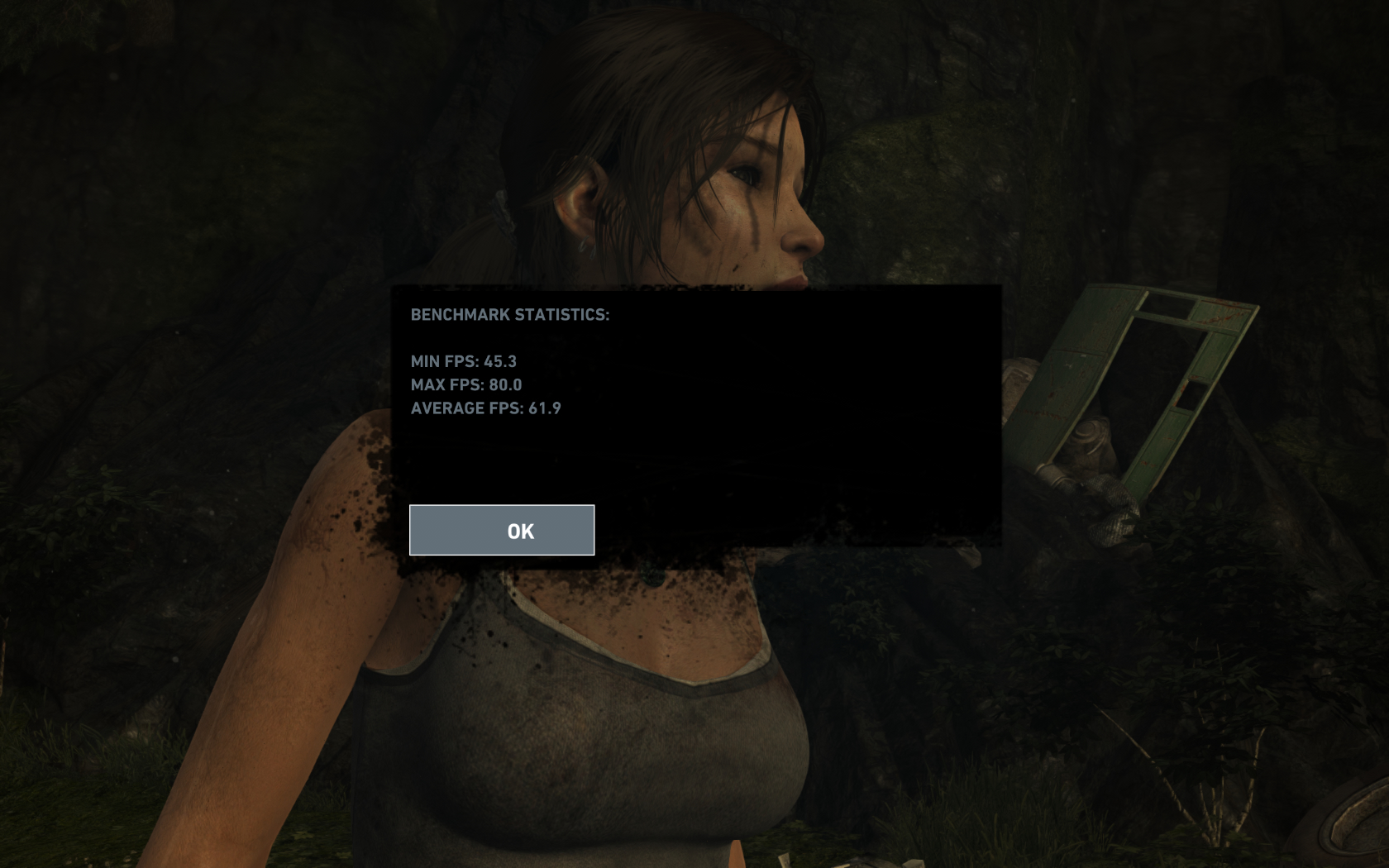
314.21: As above:

Relative differences:
Min FPS: +18.7fps
Max FPS: +27fps
Avg FPS: +20.5fps
314.14: Ultimate preset (with 8x AF, 2x SSAA and TressFX disabled)
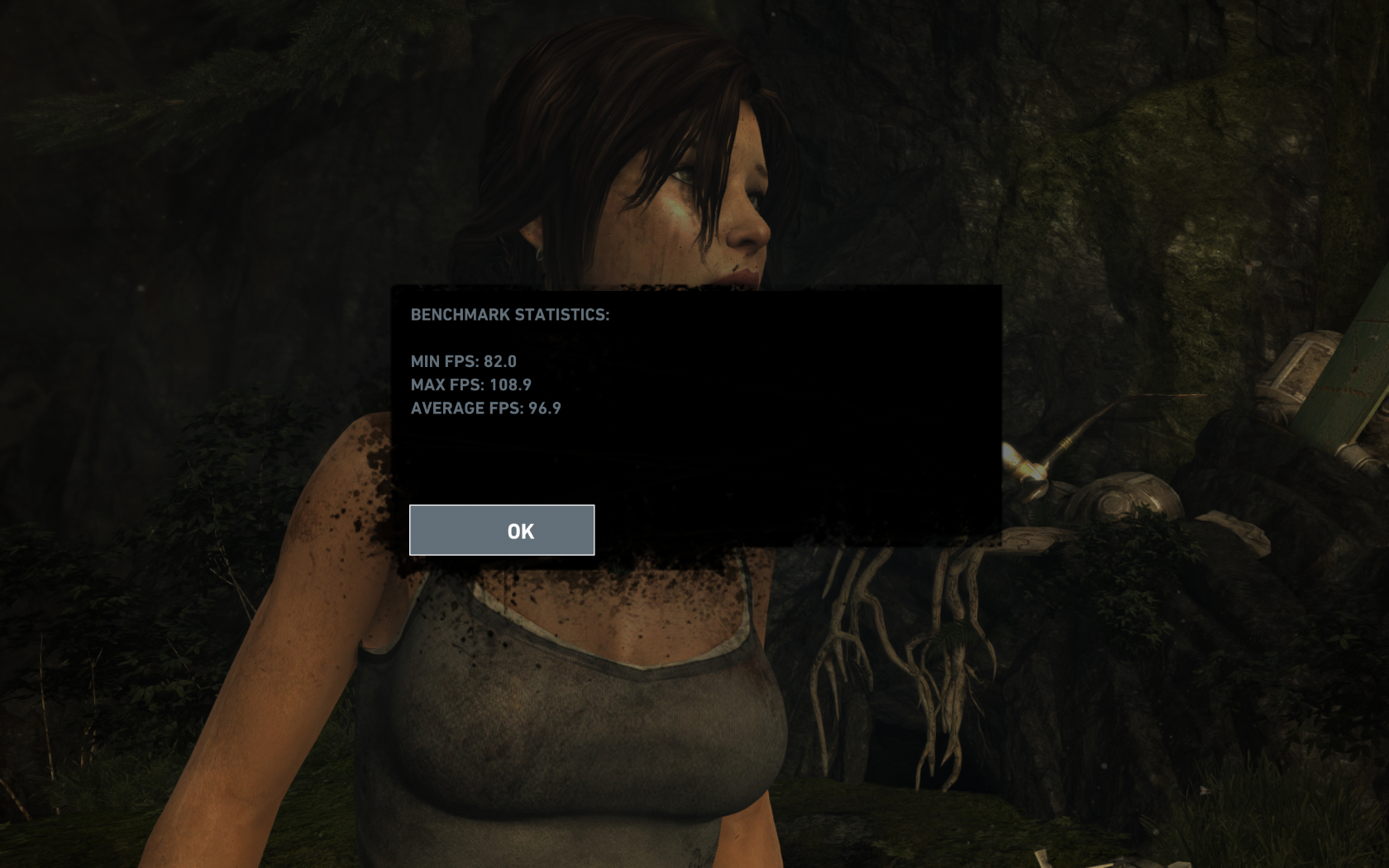
314.21: As above:

Relative differences:
Min FPS: +16fps
Max FPS: + 35.1fps
Avg FPS: + 23.8fps
I also ran a couple of benchmarks with the Ultra shadows, which I'll compare to the above 314.21 benchmarks:
TressFX enabled:

Relative differences:
Min FPS: -13.1fps
Max FPS: -13fps
Avg FPS: -9.7fps
TressFX disabled:

Relative differences:
Min FPS: -22.1fps
Max FPS: -11.7fps
Avg FPS: -18.4fps
Specs: 8GB DDR3-1600, 2600K @ 4.6GHz, 2GB GTX 670 SLI and Win7 x64.
Backfoggen
Banned
Has anyone else run into the giantbomb texture thing. It looks like the picture below. Restarting the game fixes it but I've had it twice and im not sure if it's the card or the game. I keep track of my temps and they've been good so if it is a bug please chime in.

Yes, it happened to me pre-patch.
Also my TressFX performance is bad again for no reason, this sucks.
I got my system running again on an old HDD (new OS drive won't arrive until Monday).
314.21
2x GTX TITAN, reference speeds and temp boost
i7-2600K @ 4.6GHz
1920x1080
Max Settings
Ultra Shadows
4xSSAA
TressFX
Min: 56
Max: 105.1
Avg: 78.4
2560x1440
Max Settings
Ultra Shadows
4xSSAA
TressFX
Min: 37.7
Max: 62.1
Avg: 49.4
314.21
2x GTX TITAN, reference speeds and temp boost
i7-2600K @ 4.6GHz
1920x1080
Max Settings
Ultra Shadows
4xSSAA
TressFX
Min: 56
Max: 105.1
Avg: 78.4
2560x1440
Max Settings
Ultra Shadows
4xSSAA
TressFX
Min: 37.7
Max: 62.1
Avg: 49.4
Metalmurphy
Member
AMD is doing great with their updates lately, the latest beta driver enables me to play the game for hours crash free! Finally :/
:/

Awesome.

JRW
Member
EVGA GTX 480 @ 780 / 1900 - i7 920 @ 3.36ghz
Definitely got a performance boost with the latest TR patch & Nvidia driver although TressFX is a little to taxing for a GTX480, Unless you don't mind capping the framerate @ 30fps but I always aim for 60fps when configuring games.
Ran each benchmark twice for accuracy / Vsync off.
314.14 driver & Tomb Raider v 718.4:
TressFX Off / TressFX On
Min. 66.0 fps / 32.0 fps
Max. 99.2 fps / 58.3 fps
Avg. 83.1 fps / 43.0 fps
314.21 driver & Tomb Raider v 722.3:
TressFX Off / TressFX On
Min. 71.8fps / 31.8 fps
Max.112.8fps / 68.1 fps
Avg. 91.9fps / 47.2 fps


Definitely got a performance boost with the latest TR patch & Nvidia driver although TressFX is a little to taxing for a GTX480, Unless you don't mind capping the framerate @ 30fps but I always aim for 60fps when configuring games.
Ran each benchmark twice for accuracy / Vsync off.
314.14 driver & Tomb Raider v 718.4:
TressFX Off / TressFX On
Min. 66.0 fps / 32.0 fps
Max. 99.2 fps / 58.3 fps
Avg. 83.1 fps / 43.0 fps
314.21 driver & Tomb Raider v 722.3:
TressFX Off / TressFX On
Min. 71.8fps / 31.8 fps
Max.112.8fps / 68.1 fps
Avg. 91.9fps / 47.2 fps
:/
Awesome.
Did you driver sweep first?
Metalmurphy
Member
Did you driver sweep first?
No, usually isn't required.
Lostconfused
Member
:/
Awesome.
Eh driver installation failure happens no matter who you buy your video cards from.
No, usually isn't required.
It's always advised.
Your doing it wrong ...No, usually isn't required.
Always uninstall drivers manually and sweep before new driver install. But you will argue its not required most likely.

Is the tessellation crash bug fixed with 314.21 or do you still have to switch to hitman profile in nvidia inspector?
Should be fixed.
Metalmurphy
Member
Your doing it wrong ...
Always uninstall drivers manually and sweep before new driver install. But you will argue its not required most likely.
Why would I argue? I'm just saying not once have I had to do this, but this is only my 3rd time installing beta ones.

Mithos
Member
Your doing it wrong ...
Always uninstall drivers manually and sweep before new driver install. But you will argue its not required most likely.
I'm not Metalmurphy, but I'd argue those features should be done automatically every time you install drivers (if you choose clean install) so that you don't have to have 3rd party program to do it.
I'm not Metalmurphy, but I'd argue those features should be done automatically every time you install drivers (if you choose clean install) so that you don't have to have 3rd party program to do it.
You can choose to do a clean install with Nvidia's drivers if you wish.
Mithos
Member
You can choose to do a clean install with Nvidia's drivers if you wish.
I know you can (I always pick that option), but is it the same as manually uninstalling, and sweeping as they say you should always do?
If not, it should be.
Our drivers are designed to be installed on top of existing versions. Only do a clean install if you're having a problem, otherwise you'll lose all your settings, custom profiles, etc.
For profiles this is a problem. And with the API in windows 7 you definitely can do it automatically. I know you are the Nvidia guy and you know your stuff ; )
That said ...
I always uninstall manually via device manager.
Safe mode - Clean w/ driver sweeper to kill reg entries
Reboot - install new package
100% no problems every time, as far as SLI profiles go yes that is a problem. I never really care for profiles personally so it does not effect me. But go full auto if you want, even with windows 7 I still do it old school out of habit. Whatever works best I suppose.
For profiles this is a problem. And with the API in windows 7 you definitely can do it automatically. I know you are the Nvidia guy and you know your stuff ; )
That said ...
I always uninstall manually via device manager.
Safe mode - Clean w/ driver sweeper to kill reg entries
Reboot - install new package
100% no problems every time, as far as SLI profiles go yes that is a problem. I never really care for profiles personally so it does not effect me. But go full auto if you want, even with windows 7 I still do it old school out of habit. Whatever works best I suppose.
You lose custom AA, AF and downsampling stuff, too.
You lose custom AA, AF and downsampling stuff, too.
Ya I know, it's not that hard to put back on though. Takes me like 10 sec ...
Never felt comfortable doing it automatically, been doing it for years like this. I fear change.
Cannon Goose
Member
Finally decided to try this out now that it's been patched and some drivers have come out. I don't have any numbers from before to compare but someone else might still find these useful/interesting.
i5-2320 3.00GHz
Factory OC'd GTX560Ti 1GB
8GB RAM
Ran the benchmark at max settings with all the bells and whistles at 1080p.

lol
Then I turned just turned TressFX off, left everything else at max settings.

Massive improvement!
I'll most likely play at those settings (Max with TressFX off) until I run into a performance hurdle like that shanty town everyone has been mentioning.
Edit: This is with the latest patch and drivers (314.21) and in-game FXAA.
i5-2320 3.00GHz
Factory OC'd GTX560Ti 1GB
8GB RAM
Ran the benchmark at max settings with all the bells and whistles at 1080p.
lol
Then I turned just turned TressFX off, left everything else at max settings.
Massive improvement!
I'll most likely play at those settings (Max with TressFX off) until I run into a performance hurdle like that shanty town everyone has been mentioning.
Edit: This is with the latest patch and drivers (314.21) and in-game FXAA.
Mithos
Member
Holy shit at pic above ....
Really wish AMD/Nvidia would quit this PhysX/Tress FX stuff and let all card users have the same optimizations. Hope never got me anywhere though!
Well with PhysX you can place all that on a card of its own, if I could do that with tressFX...
Backfoggen
Banned
Finally decided to try this out now that it's been patched and some drivers have come out. I don't have any numbers from before to compare but someone else might still find these useful/interesting.
i5-2320 3.00GHz
Factory OC'd GTX560Ti 1GB
8GB RAM
Ran the benchmark at max settings with all the bells and whistles at 1080p.

lol
Then I turned just turned TressFX off, left everything else at max settings.
Massive improvement!
I'll most likely play at those settings (Max with TressFX off) until I run into a performance hurdle like that shanty town everyone has been mentioning.
Edit: This is with the latest patch and drivers (314.21) and in-game FXAA.
That's exactly what I'm getting too, just sometimes. It's really annoying. Some setting or something running in the background or whatever turns my fps to complete shit with TressFX on. But sometimes it runs fine.. why..............................................................
....
Metalmurphy
Member
Ran a cleaner, specifically chose to clean ATi driers, now I'm getting a rt64win7.sys BSOD, which seems to be realtek related, which I never had drivers for... -.-
Ran a cleaner, specifically chose to clean ATi driers, now I'm getting a rt64win7.sys BSOD, which seems to be realtek related, which I never had drivers for... -.-
What cleaner? After or before uninstall main driver, or did you do that first? You always want to uninstall the driver first, from device manager. Then clean in safe mode. Also did you clean just the ATI driver files? Or chipset? Not even sure if ATI has a chipset option but AMD might. Gotta be very careful w/ this crap, at worse if you are missing something specific you can reinstall.
BSOD.exe is a great program to figure out bluescreen crash reasons, or you can go to event viewer and look at the dump log to see, rt64win7.sys got something to do with the crash it seems.
For profiles this is a problem. And with the API in windows 7 you definitely can do it automatically. I know you are the Nvidia guy and you know your stuff ; )
That said ...
I always uninstall manually via device manager.
Safe mode - Clean w/ driver sweeper to kill reg entries
Reboot - install new package
100% no problems every time, as far as SLI profiles go yes that is a problem. I never really care for profiles personally so it does not effect me. But go full auto if you want, even with windows 7 I still do it old school out of habit. Whatever works best I suppose.
This is completely unnecessary if you choose Nvidia's "Clean Installation" checkbox during installation.
In your case, fearing change is causing you to waste time for no reason.
This is completely unnecessary if you choose Nvidia's "Clean Installation" checkbox during installation.
In your case, fearing change is causing you to waste time for no reason.
I waste 10 min total doing it my way, I waste entire days for months on end all the time. So 10 min isn't a big deal. Change is bad. You know that part from Waynes World where Garth starts hitting the hand with a hammer? I don't want to hit my hand with a hammer.
I waste 10 min total doing it my way, I waste entire days for months on end all the time. So 10 min isn't a big deal. Change is bad. You know that part from Waynes World where Garth starts hitting the hand with a hammer? I don't want to hit my hand with a hammer.
Sounds more like a personality thing, change is not always bad. Sometimes it is, sometimes it's not... that's a fact =P
Sounds more like a personality thing, change is not always bad. Sometimes it is, sometimes it's not... that's a fact =P
Ya I am joking with the change shtick sorry. I've been doing this since forever old habits die hard I guess. Hope metals computer is ok though I don't want to be the guy who told him to do something and then its all messed up.
Ya I am joking with the change shtick sorry. I've been doing this since forever old habits die hard I guess. Hope metals computer is ok though I don't want to be the guy who told him to do something and then its all messed up.
Yeah don't get me wrong, before Nvidia introduced the "Clean Installation" option in their drivers, I manually uninstalled every time too.
Holy shit at pic above ....
Really wish AMD/Nvidia would quit this PhysX/Tress FX stuff and let all card users have the same optimizations. Hope never got me anywhere though!
I hope PhysX/TressFX becomes the next big thing, so every game will use it. I love how Lara's hair looks. It's unfortunate it's such a drain on a graphics card's resources, but once more games use it and devs know how to optimize realistic moving hair, in the end everyone will profit.
Besides that, it's nice to have a great looking feature that needs a hefty system. I didn't buy two GTX 680s so I can run the latest games with 300 frames per second. Devs should use that power!
Metalmurphy
Member
What cleaner? After or before uninstall main driver, or did you do that first? You always want to uninstall the driver first, from device manager. Then clean in safe mode. Also did you clean just the ATI driver files? Or chipset? Not even sure if ATI has a chipset option but AMD might. Gotta be very careful w/ this crap, at worse if you are missing something specific you can reinstall.
BSOD.exe is a great program to figure out bluescreen crash reasons, or you can go to event viewer and look at the dump log to see, rt64win7.sys got something to do with the crash it seems.
http://downloads.guru3d.com/download.php?det=745
Turns out it was the network card, uninstalled the device and then I got a hdaudio bsod, which I also never installed, and with all the reboots my MB thought the overclocking had failed and restored bios settings to default and now windows isn't even booting, holycrap...
All this for 5 more FPS...
I hope PhysX/TressFX becomes the next big thing, so every game will use it. I love how Lara's hair looks. It's unfortunate it's such a drain on a graphics card's resources, but once more games use it and devs know how to optimize realistic moving hair, in the end everyone will profit.
Besides that, it's nice to have a great looking feature that needs a hefty system. I didn't buy two GTX 680s so I can run the latest games with 300 frames per second. Devs should use that power!
I love the effects, just wish it ran nice on Nvidia cards!
http://downloads.guru3d.com/download.php?det=745
Turns out it was the network card, uninstalled the device and then I got a hdaudio bsod, which I also never installed, and with all the reboots my MB thought the overclocking had failed and restored bios settings to default and now windows isn't even booting, holycrap...
All this for 5 more FPS...
Geeze what did you uninstall exactly? Was anything chipset related? Sounds like you uninstalled chipset drivers man.
Metalmurphy
Member
I just uninstalled the network card in device manager and told it to delete driver files, wasn't anything chipset. In that guru sweeper I simply chose Ati card.
Not even safe mode is booting now, i think my SSD got damaged with all these reboots or something as this doesn't make alot of sense.
Not even safe mode is booting now, i think my SSD got damaged with all these reboots or something as this doesn't make alot of sense.
I just uninstalled the network card in device manager and told it to delete driver files, wasn't anything chipset. In that guru sweeper I simply chose Ati card.
Not even safe mode is booting now, i think my SSD got damaged with all these reboots or something as this doesn't make alot of sense.
Why did you uninstall network card?? Were you trying to do that or just the video card? What message do you get when windows fails to boot by the way?
even after the patch and new driver i still have to set LOD to normal on big open environments or my frame rate will fluctuate on the low 50s, something weird also is that SSAO now is a big frame rate eater for me, before my pc handled that setting on ultra without any problems, now i have to set it on normal
Metalmurphy
Member
Why did you uninstall network card?? Were you trying to do that or just the video card? What message do you get when windows fails to boot by the way?
Cause I was getting the Rt64win.sys BSOD and that file was related to my Realtek NIC. Windows booting I just fixed it, turns out bios reseting switched IDE to AHCI, switching it back to IDE worked. HDAudio was the same thing, turned on onboard audio card.
Now I only need to actually get the ATI drivers installed.
Cause I was getting the Rt64win.sys BSOD and that file was related to my Realtek NIC. Windows booting I just fixed it, turns out bios reseting switched IDE to AHCI, switching it back to IDE worked. HDAudio was the same thing, turned on onboard audio card.
Now I only need to actually get the ATI drivers installed.
Phew glad you are booting now, nice job realizing AHCI was messing you up.
papersleeves
Member
GO GO GTX 480!


Edit: Fixed settings
Edit: Fixed settings