• Hey Guest. Check out your NeoGAF Wrapped 2025 results here!

Let’s be real with gpu increases especially the 5090

I didn't show any of those games in the screenshots I posted though? The 4080S is a good card. I used to have one. Went from 4090 -> 4080 Super -> 5090.

It could be twice as fast? Last I checked, on techpowerup it was 83% faster so things might have changed. Look at how expensive the 5090 is, the idea of dropping settings for such a price premium is a tad ridiculous to me.

That being said, everyone has their preferences.
On average, it's 83%, but there are games in which the 5090 is twice as fast. For example, I saw Borderlands 3 gameplay on an RTX 5090 at 240 fps. On my PC, I get 90–120 fps. I've seen more examples like that, especially if game use heavy RT. There are even games that heavily rely on memory bandwidth where the 5090 is twice as fast, even compared to the 4090 (Red Dead Redemption 2 with MSAAx8 at 4K).

However, I agree with you that dropping settings on such an expensive card shouldn't be necessary. I don't know who's to blame: Nvidia or the developers. That said, DLSS isn't a significant compromise. I can't imagine 5090 owners preferring to lower the resolution or settings instead of using DLSS. With DLSS and MFG, the 5090 can take full advantage of a 4K, 240 Hz monitor, even in demanding UE5 games. The 5090 is only a 1440p card if people aren't willing to use DLSS or adjust some settings in the least optimized games.
 
On average, it's 83%, but there are games in which the 5090 is twice as fast. For example, I saw Borderlands 3 gameplay on an RTX 5090 at 240 fps. On my PC, I get 90–120 fps. I've seen more examples like that, especially if game use heavy RT. There are even games that heavily rely on memory bandwidth where the 5090 is twice as fast, even compared to the 4090 (Red Dead Redemption 2 with MSAAx8 at 4K).
I got a 4k 240 fps monitor and the 5090 is pretty nice to have to drive it. It's definitely made a huge difference. If it were not so expensive, I'd eagerly recommend it.
However, I agree with you that dropping settings on such an expensive card shouldn't be necessary. I don't know who's to blame: Nvidia or the developers. That said, DLSS isn't a significant compromise. I can't imagine 5090 owners preferring to lower the resolution or settings instead of using DLSS. With DLSS and MFG, the 5090 can take full advantage of a 4K, 240 Hz monitor, even in demanding UE5 games. The 5090 is only a 1440p card if people aren't willing to use DLSS or adjust some settings in the least optimized games.
I'm sure lots of people use DLSS on their 5090 and even frame gen. I will sometimes use DLSS in games where it doesn't have too many artifacts however it's still not really clear. I blame Alex from DF for starting this stupid narrative that DLSS is better than native.

DLSS is better than native TAA but TAA sucks in general. For DLSS to work, it needs motion vectors, which creates a dependency on TAA. As a tier 1 TAA hater, DLSS is just a band-aid for TAA however a game without TAA will look much clearer.

If you go back and play older games that don't use TAA, you'll see how clear it is. So with that context, I'm sure you can see why I'm not a huge fan of DLSS.

EDIT: You can see a comparison here for RDR2 comparing NO AA to the new DLSS presets: https://imgsli.com/NDM5MzYx/0/2
 
Last edited:
I got a 4k 240 fps monitor and the 5090 is pretty nice to have to drive it. It's definitely made a huge difference. If it were not so expensive, I'd eagerly recommend it.

I'm sure lots of people use DLSS on their 5090 and even frame gen. I will sometimes use DLSS in games where it doesn't have too many artifacts however it's still not really clear. I blame Alex from DF for starting this stupid narrative that DLSS is better than native.

DLSS is better than native TAA but TAA sucks in general. For DLSS to work, it needs motion vectors, which creates a dependency on TAA. As a tier 1 TAA hater, DLSS is just a band-aid for TAA however a game without TAA will look much clearer.

If you go back and play older games that don't use TAA, you'll see how clear it is. So with that context, I'm sure you can see why I'm not a huge fan of DLSS.

EDIT: You can see a comparison here for RDR2 comparing NO AA to the new DLSS presets: https://imgsli.com/NDM5MzYx/0/2
I played games with MSAA over 20 years ago, and later with SMAA. These methods produced a sharper image during motion, but they perform poorly in modern games (aliasing, shader and SSR noise, and shimmering). Regarding your RDR2 comparison, even the latest version of DLSS requires a slight sharpening mask to produce a sharp image. If the game does not add a sharpening mask to DLSS, the image will appear soft. That's why many games include a DLSS sharpening settings slider that lets people adjust the strength of the sharpening to their liking. The in-game TAA in Red Dead Redemption 2 uses sharpening, but not DLSS, so if you just replace DLL to to the latest, DLSS image in this game will still look softer than TAA. I had to use my own sharpening filters to make DLSS in this game look razor sharp. I dont want to download this game just to make screenshot comparison, so I will use my old Black Myth Wukong comparison. Notice that even the DLAA (native resolution) looks soft without a sharpening filter. Sharpening is must in both TAA and DLSS games.

DLAA 4.0 (native resolution) without reshade sharpening filter


DLAA 4.0 with reshade sharpening and my settings

 
Last edited:
I got a 4k 240 fps monitor and the 5090 is pretty nice to have to drive it. It's definitely made a huge difference. If it were not so expensive, I'd eagerly recommend it.

I'm sure lots of people use DLSS on their 5090 and even frame gen. I will sometimes use DLSS in games where it doesn't have too many artifacts however it's still not really clear. I blame Alex from DF for starting this stupid narrative that DLSS is better than native.

DLSS is better than native TAA but TAA sucks in general. For DLSS to work, it needs motion vectors, which creates a dependency on TAA. As a tier 1 TAA hater, DLSS is just a band-aid for TAA however a game without TAA will look much clearer.

If you go back and play older games that don't use TAA, you'll see how clear it is. So with that context, I'm sure you can see why I'm not a huge fan of DLSS.

EDIT: You can see a comparison here for RDR2 comparing NO AA to the new DLSS presets: https://imgsli.com/NDM5MzYx/0/2
Yeah I have a 5090, almost always use quality dlss. It feels like free AA and I get really fast smooth performance. Native can be a tiny bit cleaner depending on the game, but I feel like ue5 games with taa look like trash still, so Dlss quality still feels like an improvement.
 
Yeah I have a 5090, almost always use quality dlss. It feels like free AA and I get really fast smooth performance. Native can be a tiny bit cleaner depending on the game, but I feel like ue5 games with taa look like trash still, so Dlss quality still feels like an improvement.
Try DLAA + MFG 2X. I think it looks better and performs better.
 
Try DLAA + MFG 2X. I think it looks better and performs better.
It doesn't perform better, thats for sure. DLAA has an increased cost over DLSS quality. MFG reduces your base framerate prior generating frames due to the cost of mfg. From a latency perspective, DLSS quality is superior in every way.
 
The average customer isn't really the important market anymore. It is the above average higher disposable income set - this is the sweet target now and has been for some years.
That happens when the purchasing power increases as well as the number of these people relatively to the entire human population. It's more about who you are more than where you live.
 
It doesn't perform better, thats for sure. DLAA has an increased cost over DLSS quality. MFG reduces your base framerate prior generating frames due to the cost of mfg. From a latency perspective, DLSS quality is superior in every way.

You sure about that?

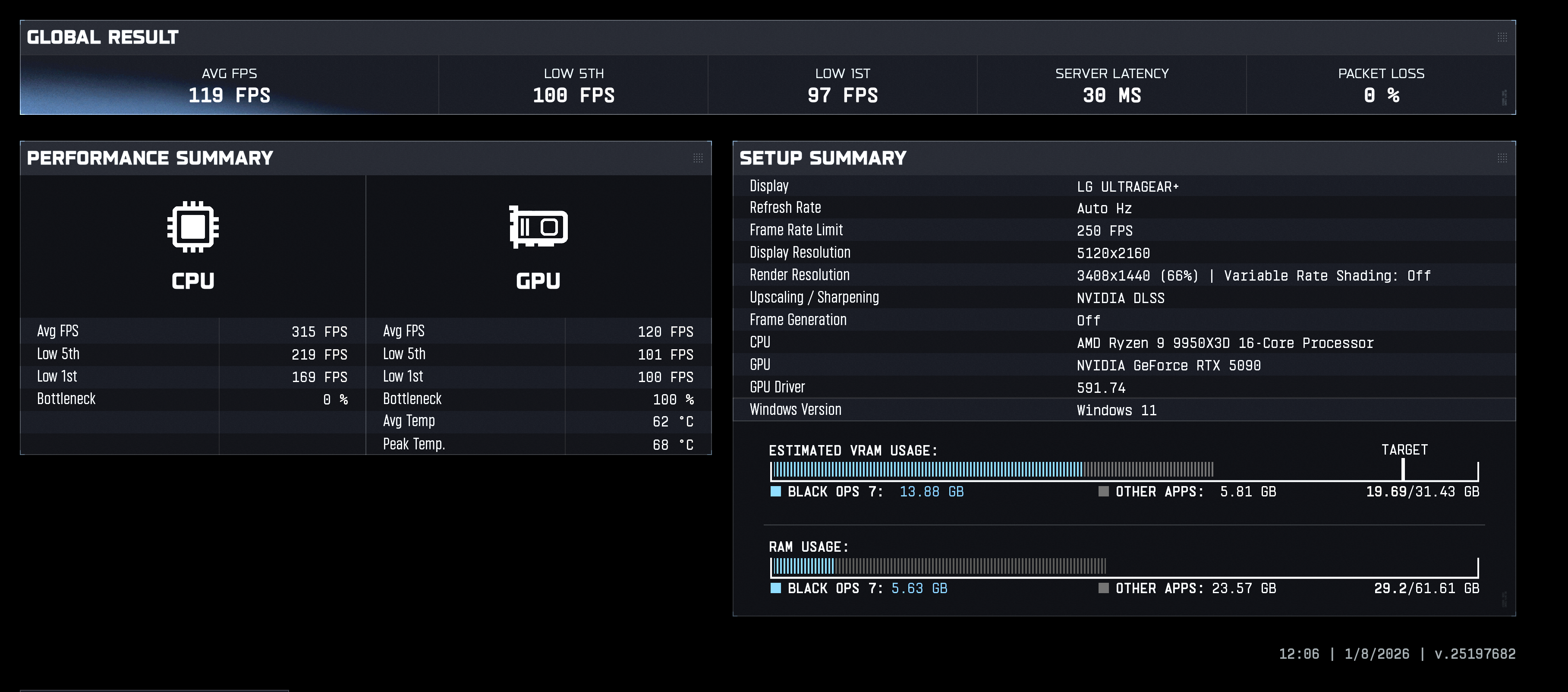
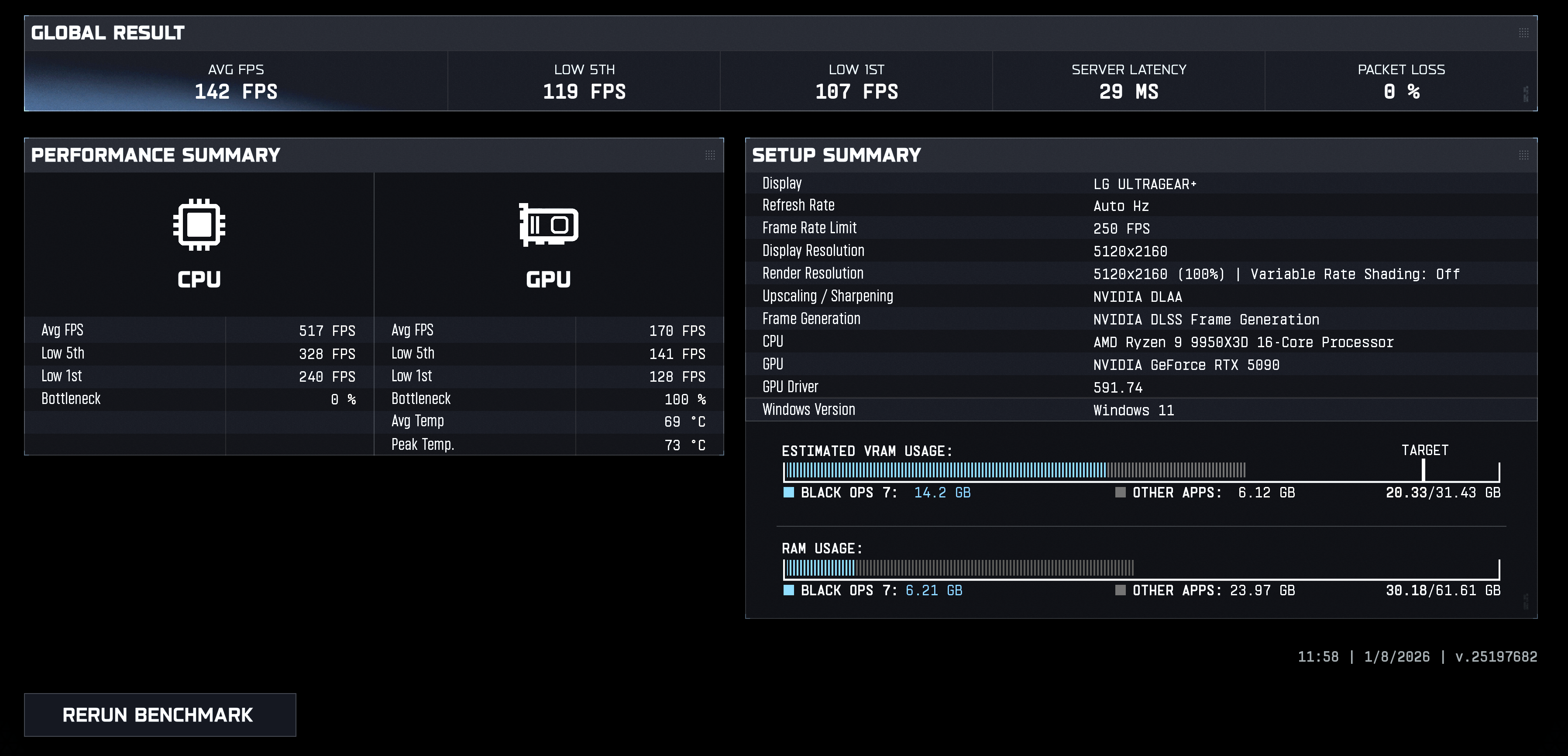
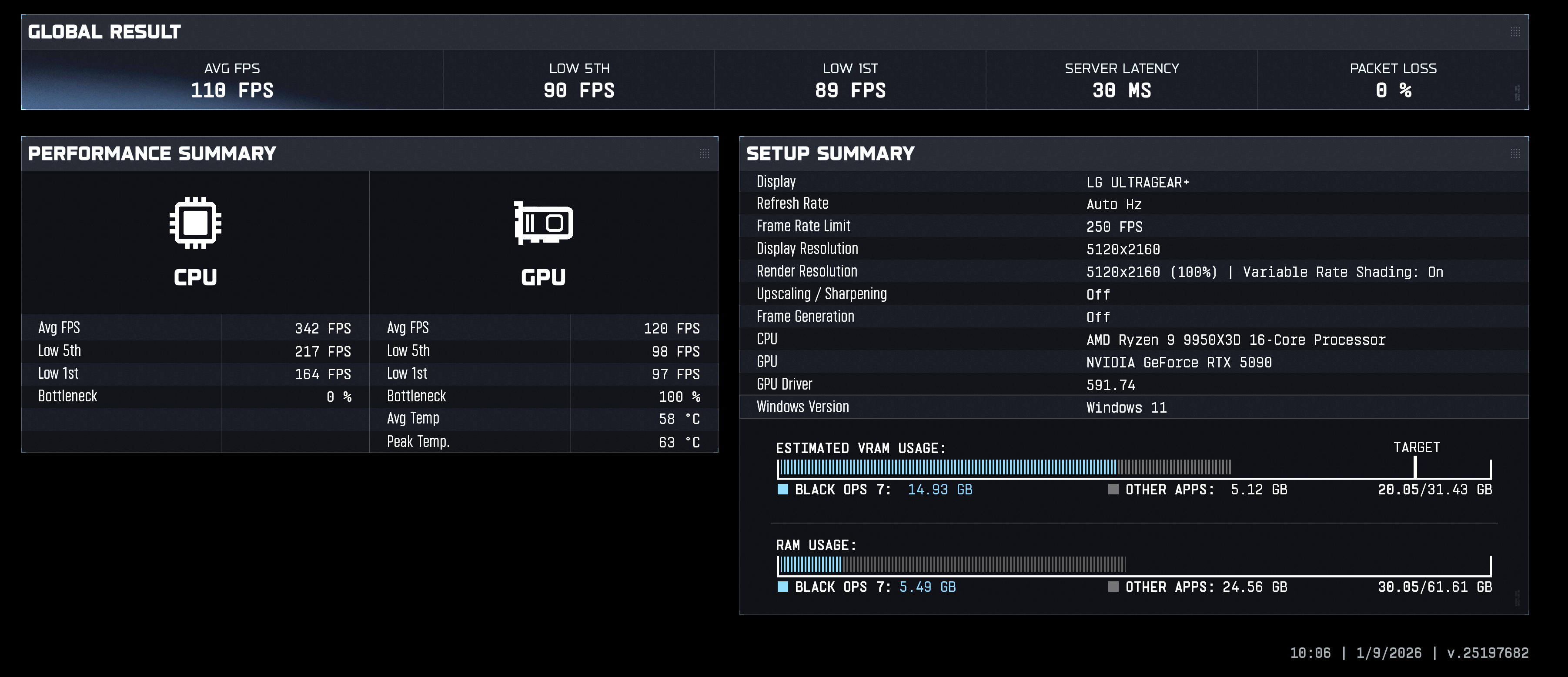
Just ran this benchmark on COD --

DLSS Quality -

T92iNxgnHCRclJKG.png


DLAA + MFG 2X -

GIbTdZLsaWAnvnZ3.png


Looks better and performs better.
 
You sure about that?

Just ran this benchmark on COD --

DLSS Quality -

T92iNxgnHCRclJKG.png


DLAA + MFG 2X -

GIbTdZLsaWAnvnZ3.png


Looks better and performs better.
You're joking right? I'll let you explain what you think this proves... I've been needing a good laugh.

Maybe others will chime in and explain what you're missing. I want to blame Nvidia but that would absolve you of the personal responsibility to educate yourself.
 
What number do you get when you do that math?
Unfortunately, there's too much missing information to say. What I can estimate is about 71 fps in real frames. Ie frames that actually have an impact on your gameplay.

Generated frames have absolutely no impact on gameplay. What I will tell you though is that the framerate of (DLSS 4 DLAA) > (1/2 (DLSS 4 DLAA x 2MFG)).

The reason the native framerate is always greater is because enabling frame gen lowers your base fps. The degree to which it lowers your base fps is dependent on your card.

This is why I mostly don't use it in the first place. Any technology that reduces my real framerate in favor of adding generated frames is not a technology I'm interested in.
 
You're joking right? I'll let you explain what you think this proves... I've been needing a good laugh.

Maybe others will chime in and explain what you're missing. I want to blame Nvidia but that would absolve you of the personal responsibility to educate yourself.

Looks and performs better.

Sorry it hurt your feelings.
 
For people running cards in the 3000 series on the Nvidia side or the 7000 series AMD, if you're thinking about upgrading, I'm genuinely curious as to why? Is increasing RT settings really worth a thousand bucks? Remember a time when buying a GPU got you access to whole ass actual games you could not play with your old GPU. Now it's graphical settings that you can barely even spot in motion. The 3070 Ti experience is not all that different from the 5070. Benchmark graphics don't optimize settings, so don't get it twisted. Many times, those "very high" across the board games can a be very well optimized by turning that AO or whichever effect is killing ya down to medium. I think that steers a lot of people into upgrading faster and higher up the chain then they really have to.
 
Looks and performs better.

Sorry it hurt your feelings.
Based on the numbers you posted, it doesn't perform better? You keep using the word performance but I don't think you know what it means. If you wanted to count FG as "performance", you'd compare DLSS quality + MFG to DLAA + MFG.

You don't do that though and reason is very obvious. As always, I never contended that DLAA looked better, just that it performs better and it doesn't.

To further highlight your lack of knowledge, Exhibit A:

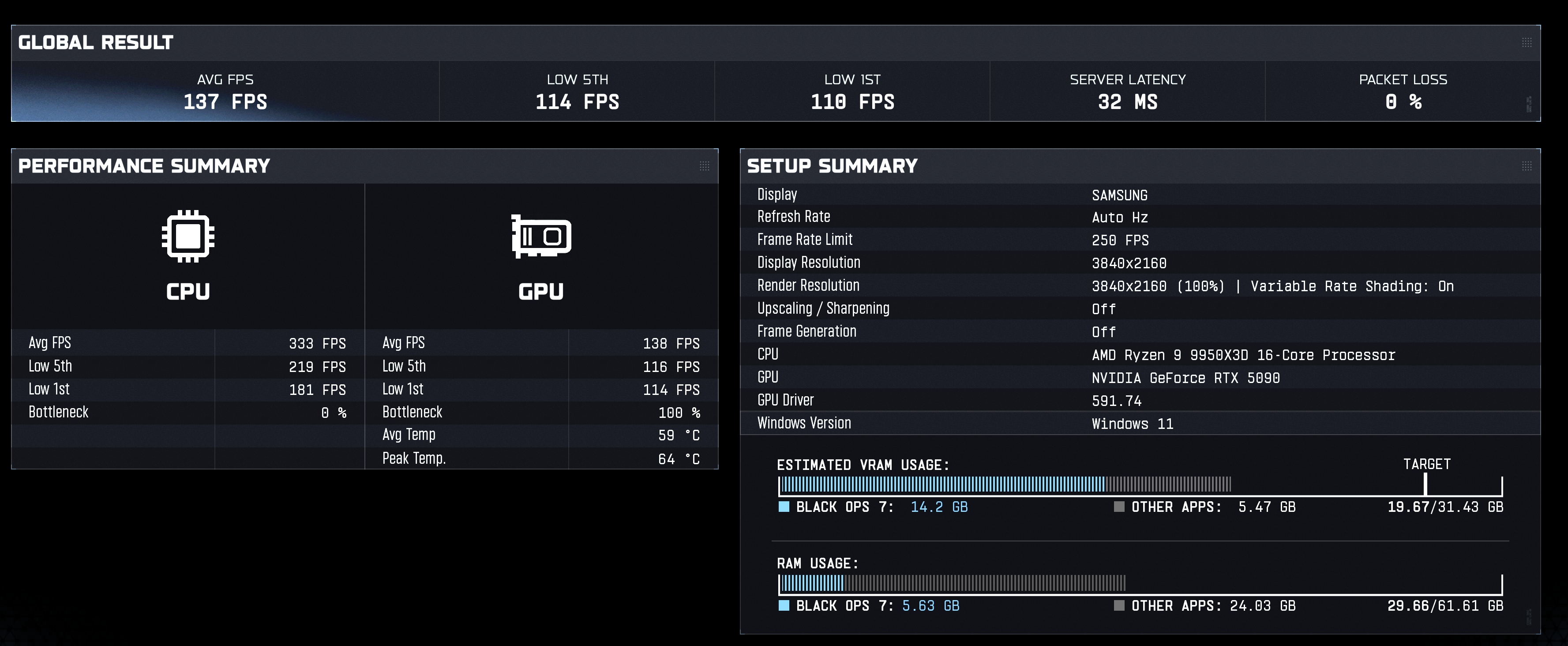
Here you go -- interesting result. If I was playing on my TV primarily I'd just turn everything (DLSS/Frame Gen) off.

ak3XFVD4nLkAyQKe.png
DLSS Quality -

T92iNxgnHCRclJKG.png
DLSS quality having less fps than native? Well it wouldn't make sense unless something was off.. When we look at the VRS setting, Display and render resolution, it becomes clear that something is amiss. I'm sure if we had access to the other settings, we'd also find other irregularities. Bunch of bogus benchmarks.
 
Last edited:
A small percentage of people into pc gaming buy 5090's. Games are never using these types of GPUs as a recommended spec. So what if it becomes out of reach for the average consumer. There is still always mid tier and developers will now have to optimize better for mid-low tier GPUs instead of brute forcing performance.
Define "optimized".
Optimized for default graphics settings or for ultra? 🤔
 
Based on the numbers you posted, it doesn't perform better? You keep using the word performance but I don't think you know what it means. If you wanted to count FG as "performance", you'd compare DLSS quality + MFG to DLAA + MFG.

You don't do that though and reason is very obvious. As always, I never contended that DLAA looked better, just that it performs better and it doesn't.

To further highlight your lack of knowledge, Exhibit A:


DLSS quality having less fps than native? Well it wouldn't make sense unless something was off.. When we look at the VRS setting, Display and render resolution, it becomes clear that something is amiss. I'm sure if we had access to the other settings, we'd also find other irregularities. Bunch of bogus benchmarks.

I think you could do with improving your reading comprehension skills. My original post was benchmarked at 5120x2160 - in this test I ran DLSS Quality vs DLAA + MFA 2x. This backed up my original claim that it looks better (visually sharper) and performs better (higher fps).

Where you made your disingenuous blunder is the native resolution benchmark I posted was at Celcius's request - 3840x2160. I would have expected you to catch that. Since the resolution is different, it is not comparable with my original benchmarks. You see, and I hate to get technical here, increasing the resolution impacts performance. Happy to dive deeper if you need!

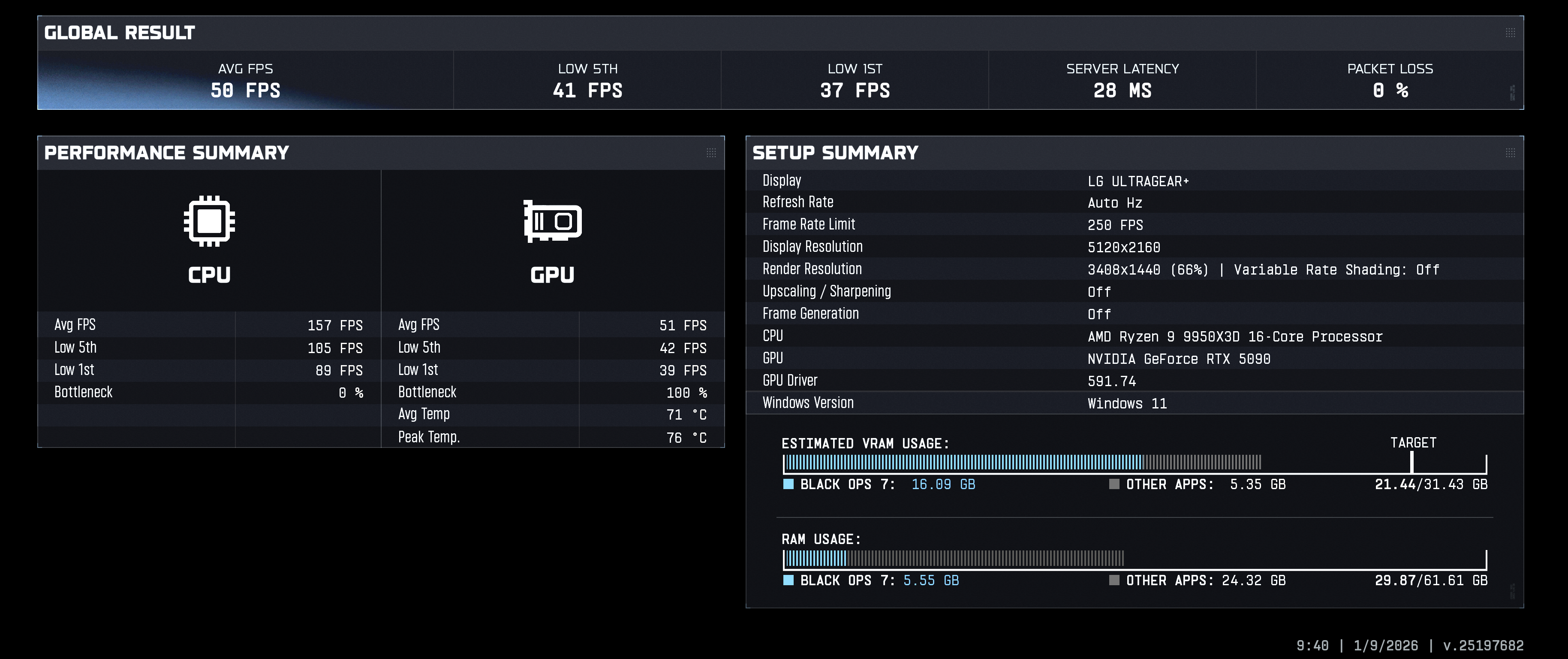
Now just for fun at 5120x2160 here are two more scores:

Ray tracing turned on (no MFG)
ZvXelO8zNYalvDSS.png

No raytracing, no MFG or DLSS

bjqSATawMI8bUi3e.png


Let's review -

At 5120x2160 I get the following result:

Native - 110
With Raytracing On + DLSS (locked setting) - 50
DLSS Quality - 119
DLAA + MFG 2X - 142
DLSS Quality + MFG 2x - 188

For me, the increased fidelity of DLAA + performance gains of MFG 2X is a sweet spot.
 
Last edited:
I think you could do with improving your reading comprehension skills. My original post was benchmarked at 5120x2160 - in this test I ran DLSS Quality vs DLAA + MFA 2x. This backed up my original claim that it looks better (visually sharper) and performs better (higher fps).

Where you made your disingenuous blunder is the native resolution benchmark I posted was at Celcius's request - 3840x2160. I would have expected you to catch that. Since the resolution is different, it is not comparable with my original benchmarks. You see, and I hate to get technical here, increasing the resolution impacts performance. Happy to dive deeper if you need!

Now just for fun at 5120x2160 here are two more scores:

Ray tracing turned on (no MFG)
ZvXelO8zNYalvDSS.png

No raytracing, no MFG or DLSS

bjqSATawMI8bUi3e.png


Let's review -

At 5120x2160 I get the following result:

Native - 110
With Raytracing On + DLSS (locked setting) - 50
DLSS Quality - 119
DLAA + MFG 2X - 142
DLSS Quality + MFG 2x - 188

For me, the increased fidelity of DLAA + performance gains of MFG 2X is a sweet spot.
Have you tried using DLSS at 77% or even 85%? DLAA costs a lot of frames at such an insanely high resolution, but DLSS 77% res scale (and especially 85%) look indistinguishable and perform noticeably better, especially in RT games.
 
I played games with MSAA over 20 years ago, and later with SMAA. These methods produced a sharper image during motion, but they perform poorly in modern games (aliasing, shader and SSR noise, and shimmering). Regarding your RDR2 comparison, even the latest version of DLSS requires a slight sharpening mask to produce a sharp image. If the game does not add a sharpening mask to DLSS, the image will appear soft. That's why many games include a DLSS sharpening settings slider that lets people adjust the strength of the sharpening to their liking. The in-game TAA in Red Dead Redemption 2 uses sharpening, but not DLSS, so if you just replace DLL to to the latest, DLSS image in this game will still look softer than TAA. I had to use my own sharpening filters to make DLSS in this game look razor sharp. I dont want to download this game just to make screenshot comparison, so I will use my old Black Myth Wukong comparison. Notice that even the DLAA (native resolution) looks soft without a sharpening filter. Sharpening is must in both TAA and DLSS games.

DLAA 4.0 (native resolution) without reshade sharpening filter


DLAA 4.0 with reshade sharpening and my settings


Hey, you're someone I could ask. This could be another thread, but wanted to get someone's opinion on it. I was doing some experiments to see how much resolution I can actually appreciate with my old eyes and the distance and size of my tv. It seems like for the most part, I can't tell if it's anything higher than 3200x1800 after scaling/aa. If I can tell, it's because I made a mental note of some little hint on a particular element in the scene.

So going forth with those experiments, I remembered that I could use gamscope to spoof resolutions to games. I set my true output to 1080p, and the internal res of the game to 4k. First of all, I am kinda shocked at how good the final supersampled 1080p image looks. I would worry about my eyes, but I can still spot a native 1080, taa'd image easily. So maybe I associate 1080p with how it was in the ps4 era and just didn't realize how good if could look and how much detail it was capable of preserving. Secondly, I've been rolling with this forced supersample for a week now and am starting to like it.

I would be interested in knowing your (or anyone's) opinion on that! Waste of cycles? Inferior picture? Secret hot setup?
 
For people running cards in the 3000 series on the Nvidia side or the 7000 series AMD, if you're thinking about upgrading, I'm genuinely curious as to why? Is increasing RT settings really worth a thousand bucks? Remember a time when buying a GPU got you access to whole ass actual games you could not play with your old GPU. Now it's graphical settings that you can barely even spot in motion. The 3070 Ti experience is not all that different from the 5070. Benchmark graphics don't optimize settings, so don't get it twisted. Many times, those "very high" across the board games can a be very well optimized by turning that AO or whichever effect is killing ya down to medium. I think that steers a lot of people into upgrading faster and higher up the chain then they really have to.
Yeah I'm always someone that aims for big upgrades so I can actually see and feel a big amount of difference.

Went from

1070 to 5070ti
I7 5820k to 9800XD3
1TB HDD to 2TB SSD
16GB RAM to 32GB RAM

All on the same day and actually see a true improvement with games I couldn't play before or games that I could barely play. And now being able to play them max out extremely well even on games I couldn't play before.

Even if I was rich, I still wouldn't do 1 or 2 gen upgrades with pc parts and phones as I wanna see some big difference each time.
 
For people running cards in the 3000 series on the Nvidia side or the 7000 series AMD, if you're thinking about upgrading, I'm genuinely curious as to why? Is increasing RT settings really worth a thousand bucks? Remember a time when buying a GPU got you access to whole ass actual games you could not play with your old GPU. Now it's graphical settings that you can barely even spot in motion. The 3070 Ti experience is not all that different from the 5070. Benchmark graphics don't optimize settings, so don't get it twisted. Many times, those "very high" across the board games can a be very well optimized by turning that AO or whichever effect is killing ya down to medium. I think that steers a lot of people into upgrading faster and higher up the chain then they really have to.

I'm with you on taking 10 minutes to optimize the settings. I've often found the highest shadow detail setting hits the frame rate pretty hard, while also looking very unnatural. Once we got out of the era of heavily pixilated shadows, Medium often looks more realistic than Ultra, and has a noticeable impact on the frame rate.

That said, I was on a 3080 until Oblivion remaster came out. I had just finished Hogwarts which was a stuttery and frustrating experience. Oblivion was way worse when I got out into the open world - dipping into the 30s with hitching (I'm on 1440). I had some extra cash so I decided to try out the 9070 XT. It basically doubled my 1% lows with no other changes. Oblivion is still a problematic game. But the jump in minimum frame rate took it from a game I wasn't going to play, to one I can enjoy. It was a much bigger jump than I expected.

I was originally thinking of it as a temporary iterum card until the 5080 Super came out. Now that the Super series is canceled, I'm still itching for something bigger, but I can't justify buying a 5090, which is the only logical upgrade. I'm trying to just enjoy what I have, save money, and be ready to buy a card at the next gen launch.
 
I'm with you on taking 10 minutes to optimize the settings. I've often found the highest shadow detail setting hits the frame rate pretty hard, while also looking very unnatural. Once we got out of the era of heavily pixilated shadows, Medium often looks more realistic than Ultra, and has a noticeable impact on the frame rate.

That said, I was on a 3080 until Oblivion remaster came out. I had just finished Hogwarts which was a stuttery and frustrating experience. Oblivion was way worse when I got out into the open world - dipping into the 30s with hitching (I'm on 1440). I had some extra cash so I decided to try out the 9070 XT. It basically doubled my 1% lows with no other changes. Oblivion is still a problematic game. But the jump in minimum frame rate took it from a game I wasn't going to play, to one I can enjoy. It was a much bigger jump than I expected.

I was originally thinking of it as a temporary iterum card until the 5080 Super came out. Now that the Super series is canceled, I'm still itching for something bigger, but I can't justify buying a 5090, which is the only logical upgrade. I'm trying to just enjoy what I have, save money, and be ready to buy a card at the next gen launch.
A second side grade that still won't run Oblivion Remastered perfectly smoothly? That's actually the only game I can't get playable conditions out of on my 6750xt. Value prop just isn't there for me, but I've got a dusty Titan on a shelf in my workbench to remind me how these puppies age. If they start cranking out some truly awesome AAA stuff that compels me to buy in, I'll buy in.
 
Last edited:
For people running cards in the 3000 series on the Nvidia side or the 7000 series AMD, if you're thinking about upgrading, I'm genuinely curious as to why? Is increasing RT settings really worth a thousand bucks? Remember a time when buying a GPU got you access to whole ass actual games you could not play with your old GPU. Now it's graphical settings that you can barely even spot in motion. The 3070 Ti experience is not all that different from the 5070. Benchmark graphics don't optimize settings, so don't get it twisted. Many times, those "very high" across the board games can a be very well optimized by turning that AO or whichever effect is killing ya down to medium. I think that steers a lot of people into upgrading faster and higher up the chain then they really have to.

I just upgraded from a 3070 to a 5070Ti. I play a lot of older games, so I absolutely could have stretched the 3070 for a while. But here are my reasons for the upgrade:

1. I did start to hit problems with the 8 GB limit in a few games (e.g. Last of Us Part I). I put in the work to lower the settings and balance quality, but that was work and it just told me it was nearing time for an upgrade.
2. I'm probably going to get a VR headset for the first time with the Steam Frame. In doing some research, I think 3070 would be too under powered for some of the VR mods that are intriguing. 5070Ti might also not be enough, but it will get me a lot closer I think.
3. I bought my 3070 a year into Covid when I couldn't get a card for MSRP the entirety of 2021 and it was just a miserable experience. I'd rather have my 16 GB card in hand if the GPU market goes sideways again than be on the outside looking in.
 
I just upgraded from a 3070 to a 5070Ti. I play a lot of older games, so I absolutely could have stretched the 3070 for a while. But here are my reasons for the upgrade:

1. I did start to hit problems with the 8 GB limit in a few games (e.g. Last of Us Part I). I put in the work to lower the settings and balance quality, but that was work and it just told me it was nearing time for an upgrade.
2. I'm probably going to get a VR headset for the first time with the Steam Frame. In doing some research, I think 3070 would be too under powered for some of the VR mods that are intriguing. 5070Ti might also not be enough, but it will get me a lot closer I think.
3. I bought my 3070 a year into Covid when I couldn't get a card for MSRP the entirety of 2021 and it was just a miserable experience. I'd rather have my 16 GB card in hand if the GPU market goes sideways again than be on the outside looking in.
Yeah I could see the 8GB. Didn't think of that. If those 3070s had shipped with 12 by default it would have made a big difference. Crazy they're still shipping brand new cards with 8.
 
A second side grade that still won't run Oblivion Remastered perfectly smoothly? That's actually the only game I can't get playable conditions out of on my 6750xt. Value prop just isn't there for me, but I've got a dusty Titan on a shelf in my workbench to remind me how these puppies age. If they start cranking out some truly awesome AAA stuff that compels me to buy in, I'll buy in.

I generally hand my previous card down to my son for his rig. He was on my old 2080, so bumping up to the 3080 was meaningful to him. If I wasn't giving him my old card, I would be looking at ebay prices to see what I could get for a previous generation card and what that would mean for the net price on a current gen card. There have been times in the past where that's been more meaningful than others.

Oblivion runs well enough to enjoy it now. Because I play at QHD and not 4k, the 9070 XT runs every other game I've tried maxed out with power to spare. I don't need more GPU power at this point. Honestly, the next logical upgrade for me would be replacing my monitor with an OLED. I like everything about my current monitor except that it's a VA panel. I want the super inky blacks.
 
Based on the numbers you posted, it doesn't perform better? You keep using the word performance but I don't think you know what it means. If you wanted to count FG as "performance", you'd compare DLSS quality + MFG to DLAA + MFG.

You don't do that though and reason is very obvious. As always, I never contended that DLAA looked better, just that it performs better and it doesn't.

To further highlight your lack of knowledge, Exhibit A:


DLSS quality having less fps than native? Well it wouldn't make sense unless something was off.. When we look at the VRS setting, Display and render resolution, it becomes clear that something is amiss. I'm sure if we had access to the other settings, we'd also find other irregularities. Bunch of bogus benchmarks.
Are you kidding? If it has higher fps and lower latency it performs better. If the latency were higher you'd have a point, but "fake" frames with lower latency is actually BETTER than real frames if the latency is lower, merely from a performance standpoint. This is why i hate frame gen discussion because people who have an axe to grind about it completely misrepresent the reality of what it is, how it works and what it does. Literally the ONLY performance drawback, notice I said performance, is latency, so if you are using FG and still have lower latency, there is zero negative from a performance standpoint and it literally performs better.

The only thing bogus here is your understanding of any of this tech. he's right about all of this and you're absolutely wrong.

I'll give it a shot!
85% is what I used in place of DLAA, prior to 4.0 and it was pretty much indistinguishable from an IQ standpoint from DLAA, with a significant uplift in performance. This is with a 4090, though, I imagine the 5090 would be even better. Honestly, with 4.0 forward, I dropped to quality in games, aside from a few that still seem to hate any level of DLSS at all.
 
Are you kidding? If it has higher fps and lower latency it performs better. If the latency were higher you'd have a point, but "fake" frames with lower latency is actually BETTER than real frames if the latency is lower, merely from a performance standpoint. This is why i hate frame gen discussion because people who have an axe to grind about it completely misrepresent the reality of what it is, how it works and what it does. Literally the ONLY performance drawback, notice I said performance, is latency, so if you are using FG and still have lower latency, there is zero negative from a performance standpoint and it literally performs better.
Server latency is not the latency measurement we're looking for? That is a measure of the network latency between you and Cod's servers. So if you're interpreting server latency to be actual render latency, then I don't know what to say. I mean, you just have to be able to read to understand what type of latency it's talking about smh.
The only thing bogus here is your understanding of any of this tech. he's right about all of this and you're absolutely wrong.
Read above and try to pay attention to details next time. It's really embarrassing when you build an argument only to be foiled by your inability to comprehend the data being presented.

My original post was benchmarked at 5120x2160 - in this test I ran DLSS Quality vs DLAA + MFA 2x. This backed up my original claim that it looks better (visually sharper) and performs better (higher fps).
I think you need to go back and read my original post. My implied assertion is that DLAA + MFG can never outperform DLSS Quality + MFG. That is always true and you've posted absolutely nothing to serve as a rebuttal to my original argument.

I never made an argument for quality, just for performance.
It doesn't perform better, thats for sure. DLAA has an increased cost over DLSS quality. MFG reduces your base framerate prior generating frames due to the cost of mfg. From a latency perspective, DLSS quality is superior in every way.
Native - 110
With Raytracing On + DLSS (locked setting) - 50
DLSS Quality - 119
DLAA + MFG 2X - 142
DLSS Quality + MFG 2x - 188


For me, the increased fidelity of DLAA + performance gains of MFG 2X is a sweet spot.
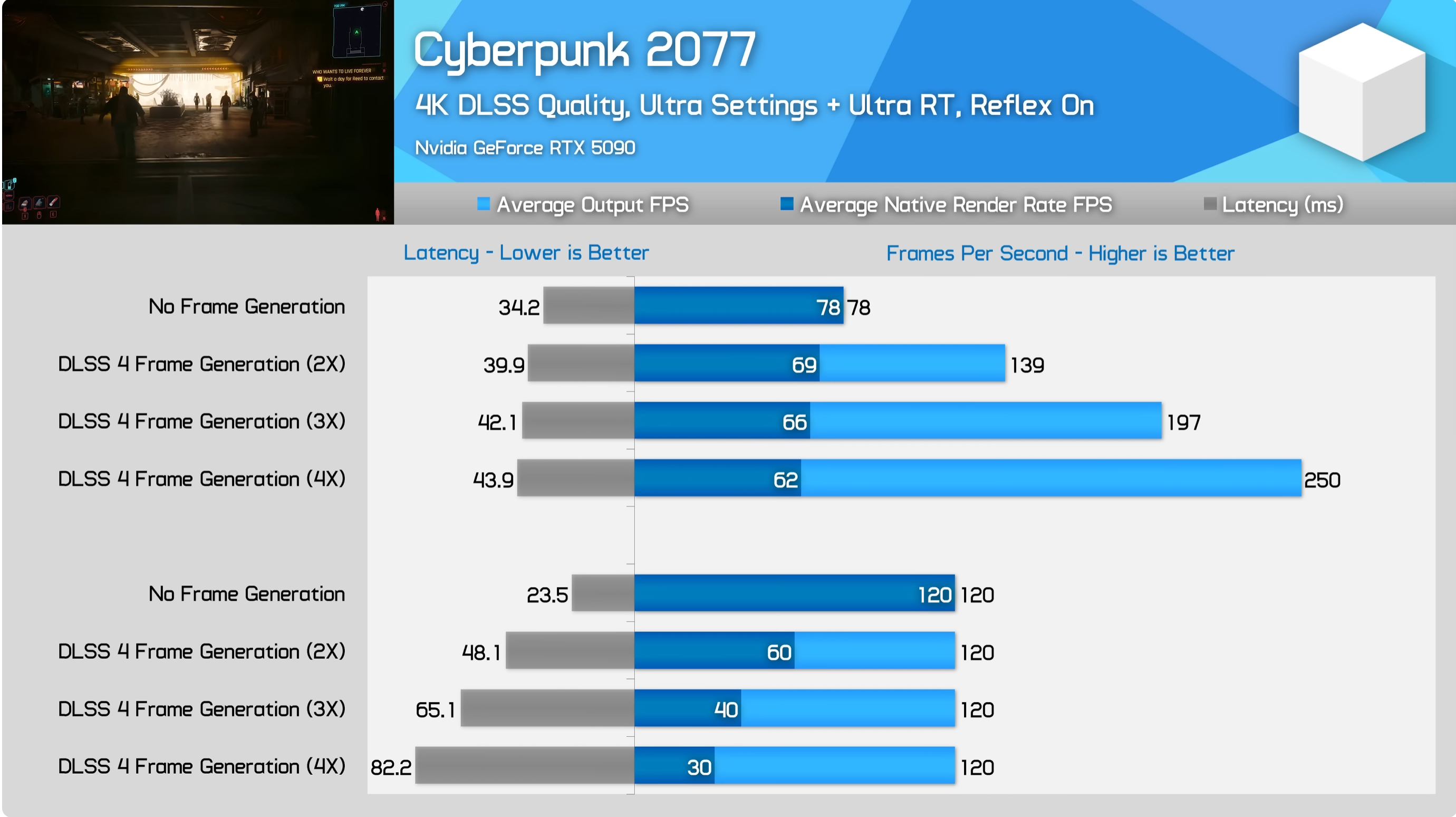
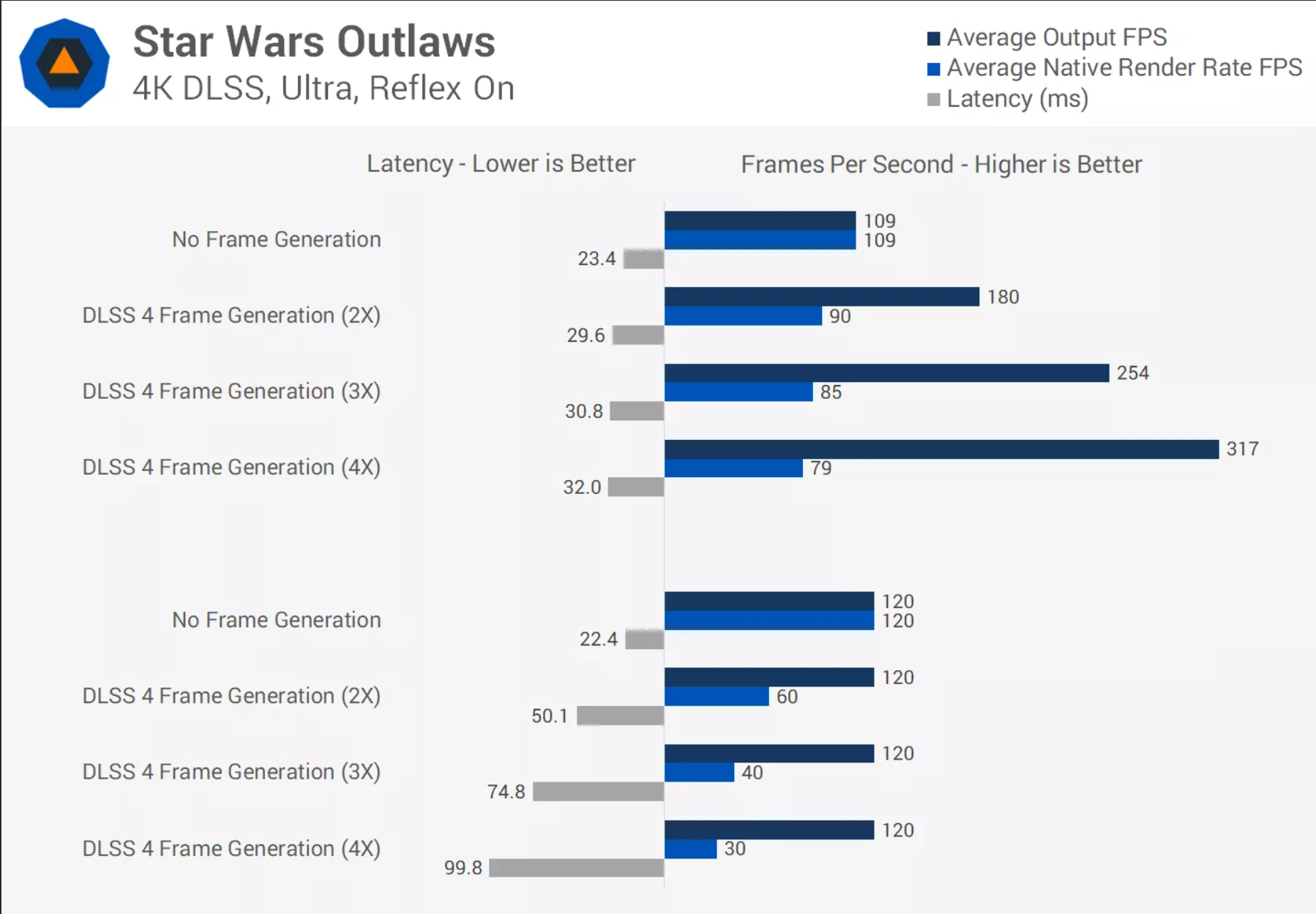
Furthermore, if you actually calculated the real latency of DLAA + Reflex + frame gen vs DLSS quality + Reflex + no frame gen, DLSS quality will always have lower latency. You are making the mistake of using the fps number as a measurement of performance and that is only true if the you're comparing like data. The moment you started comparing frame gen to no frame gen, the only relevant metric for performance became latency. This is because frame gen does not reduce your latency but increases it compared to the same scenario without frame gen.

You never made the argument about latency so I won't penalize you for that but, RafterXL RafterXL who struggles with reading comprehension tried to argue against what we already know to be true. This has been tested multiple times and if I had COD, I'd run this exact test to show the data. However, we can reference other tests that show this behavior.

FI1XGkHtKCY2h10w.png


hzfS36Hh9jBxY06C.png
 
Last edited:
So going forth with those experiments, I remembered that I could use gamscope to spoof resolutions to games. I set my true output to 1080p, and the internal res of the game to 4k. First of all, I am kinda shocked at how good the final supersampled 1080p image looks. I would worry about my eyes, but I can still spot a native 1080, taa'd image easily. So maybe I associate 1080p with how it was in the ps4 era and just didn't realize how good if could look and how much detail it was capable of preserving. Secondly, I've been rolling with this forced supersample for a week now and am starting to like it.

I would be interested in knowing your (or anyone's) opinion on that! Waste of cycles? Inferior picture? Secret hot setup?
Supersampling definitely eliminates TAA blur. I would rather game on a 1440p display with DSR x2.25 — or x4 if possible — than on a 4K display with only TAA. Even on a 4K display, TAA still looks blurry and requires a sharpening mask to counterbalance the loss of edge contrast (result of strong AA).

As for 1800p, I sometimes play games at this resolution on my 32-inch 4K monitor. However, I don't use standard image upscaling because I don't like blur. Even slight bilinear upscaling destroys edge contrast, making the image appear blurry and unfocused. Even from a distance, I can see that the fine details of textures no longer stand out when bilinear filtering is used. I display 1800p at 1:1, so the image is smaller on my monitor, but remains razor sharp. The 1800p picture on my monitor is equivalent to a 27-inch monitor, but it offers the perfect FOV for me when I play from up close.

Although bilinear filtering destroy sharpness when an image is upscaled to a 4K display, technologies like DLSS can now be used to reconstruct the image instead of resizing it. An image reconstructed from 1800p to 4K with DLSS is indistinguishable from a native 4K image, even when taking screenshots and zooming in to spot differences.

It's possible to upscale the image with amazing results even without DLSS, but the method is complicated. I use integer scaling, which is only available in emulators (unfortunately, Nvidia's integer scaling cant be used for this method). The integer scaling enlarges the pixels without affecting edge contrast (sharpness) and if I add to that CRT mask (like guestHD with custimized phosphor mask) I can remove pixelation resulting in an image that is sharp and clean, comparable to a native full HD display.
 
Last edited:
A small percentage of people into pc gaming buy 5090's. Games are never using these types of GPUs as a recommended spec. So what if it becomes out of reach for the average consumer. There is still always mid tier and developers will now have to optimize better for mid-low tier GPUs instead of brute forcing performance.
All GPU have already seen an increase.
I just bought a 5080 at 1200 on Amazon.
One week later it's now at 1470…
 
Last edited:
Are you kidding? If it has higher fps and lower latency it performs better. If the latency were higher you'd have a point, but "fake" frames with lower latency is actually BETTER than real frames if the latency is lower, merely from a performance standpoint. This is why i hate frame gen discussion because people who have an axe to grind about it completely misrepresent the reality of what it is, how it works and what it does. Literally the ONLY performance drawback, notice I said performance, is latency, so if you are using FG and still have lower latency, there is zero negative from a performance standpoint and it literally performs better.

The only thing bogus here is your understanding of any of this tech. he's right about all of this and you're absolutely wrong.

AMD, Intel, and NVIDIA all also developed their own APIs for motion tracking with frame gen which will hopefully become standardized. I could then see something like Microsoft's Talisman where you have the definition of the 3D object and any motion vectors. Then if the angle of view and lighting doesn't change you could create a 2D bitmap that shifts over a pixel even on a raster frame which could drastically speed up how rendering works.

If you only needed to redraw 25% of the screen for an isometric game, that could let to big performance improvements. Once you are down to 8ms much less 4ms for an individual frame being shown, people really over estimate just how well their eyes can track things.
 
Supersampling definitely eliminates TAA blur. I would rather game on a 1440p display with DSR x2.25 — or x4 if possible — than on a 4K display with only TAA. Even on a 4K display, TAA still looks blurry and requires a sharpening mask to counterbalance the loss of edge contrast (result of strong AA).

As for 1800p, I sometimes play games at this resolution on my 32-inch 4K monitor. However, I don't use standard image upscaling because I don't like blur. Even slight bilinear upscaling destroys edge contrast, making the image appear blurry and unfocused. Even from a distance, I can see that the fine details of textures no longer stand out when bilinear filtering is used. I display 1800p at 1:1, so the image is smaller on my monitor, but remains razor sharp. The 1800p picture on my monitor is equivalent to a 27-inch monitor, but it offers the perfect FOV for me when I play from up close.

Although bilinear filtering destroy sharpness when an image is upscaled to a 4K display, technologies like DLSS can now be used to reconstruct the image instead of resizing it. An image reconstructed from 1800p to 4K with DLSS is indistinguishable from a native 4K image, even when taking screenshots and zooming in to spot differences.

It's possible to upscale the image with amazing results even without DLSS, but the method is complicated. I use integer scaling, which is only available in emulators (unfortunately, Nvidia's integer scaling cant be used for this method). The integer scaling enlarges the pixels without affecting edge contrast (sharpness) and if add to that CRT mask (like guestHD with custimized phosphor mask) I can remove pixelation resulting in an image that is sharp and clean, comparable to a native full HD display.

Nice! Thanks for the input. I've been looking for someone with good eyes to ask lol.

Any thoughts on the linear downscaling? It's a subtle difference and I was wondering if anyone else had tried it much.
 
Last edited:
As an owner of one I completely agree with most people in here, its pointless, especially with things like frame gen getting better and upscaling now going beyond native res in quality.

I am someone that usually upgrades to the best thing in most cases and i have now entered into a phase where the fuctionality and value is more important to me.

Like i could get a new AMD cpu but playing at 4k there is no point at all. Its a complete waste of money and time, when my system runs perfectly and most games aren't optimised whether you are on a top end system or a steam deck.

Its far more impressive to have a tightly designed well engineered optimised product to me than simply bigger = better, its never been the case.
 
I saw that someone picked up an Asus TUF 5090 from their local MicroCenter. I asked how much and they said it was $3k. I was shocked so I went online and yep, it's now $3000. I also noticed that my local microcenter was sold out so I checked and ALL of the RTX 5090's are now sold out.

2026 is off to an interesting start :messenger_downcast_sweat:
 
I saw that someone picked up an Asus TUF 5090 from their local MicroCenter. I asked how much and they said it was $3k. I was shocked so I went online and yep, it's now $3000. I also noticed that my local microcenter was sold out so I checked and ALL of the RTX 5090's are now sold out.

2026 is off to an interesting start :messenger_downcast_sweat:
You don't need to buy a 5090 to have a damn good gaming experience.
 
Top Bottom