• Hey Guest. Check out your NeoGAF Wrapped 2025 results here!

Digital Foundry - DLSS Preset L Review - 1440p/4k Ultra Performance Mode etc.

I fucking knew modern reflections denoisers suck ass... I just never had so much evidence of it before 🤣

I just always looked at RT reflections, and thought... "why the fuck is this smearing so much while being blurry af?"... because it's a reflection, it's not a hyper-diffused material that reflects light from a bajilloon different angles on every cm² of its surface.

And Ray Reconstruction already showed us that reflections don't need to look like shit even with low internal resolution.
 
And Ray Reconstruction already showed us that reflections don't need to look like shit even with low internal resolution.

yeah. and I wonder however how much that is about just literally being a less smeary denoiser.
because if you told me a week ago that the screenshots of UE5 with denoising off were using DLSS Ray Reconstruction, I'd not have questioned it. because the results are unironically almost better than Ray Reconstruction.

at least in UE5, turning the denoiser off has the same sharpness as games I've seen with Ray Reconstruction, but has less motion smearing than Ray Reconstruction.
 
Last edited:
yeah. and I wonder however how much that is about just literally being a less smeary denoiser.
because if you told me a week ago that the screenshots of UE5 with denoising off were using DLSS Ray Reconstruction, I'd not have questioned it. because the results are unironically almost better than Ray Reconstruction.

at least in UE5, turning the denoiser off has the same sharpness as games I've seen with Ray Reconstruction, but has less motion smearing than Ray Reconstruction.

Yeah, I couldn't belive is as well when testing SH2.

At least now when we know about this, we can fix this shit in many games.
 
Yeah, I couldn't belive is as well when testing SH2.

At least now when we know about this, we can fix this shit in many games.

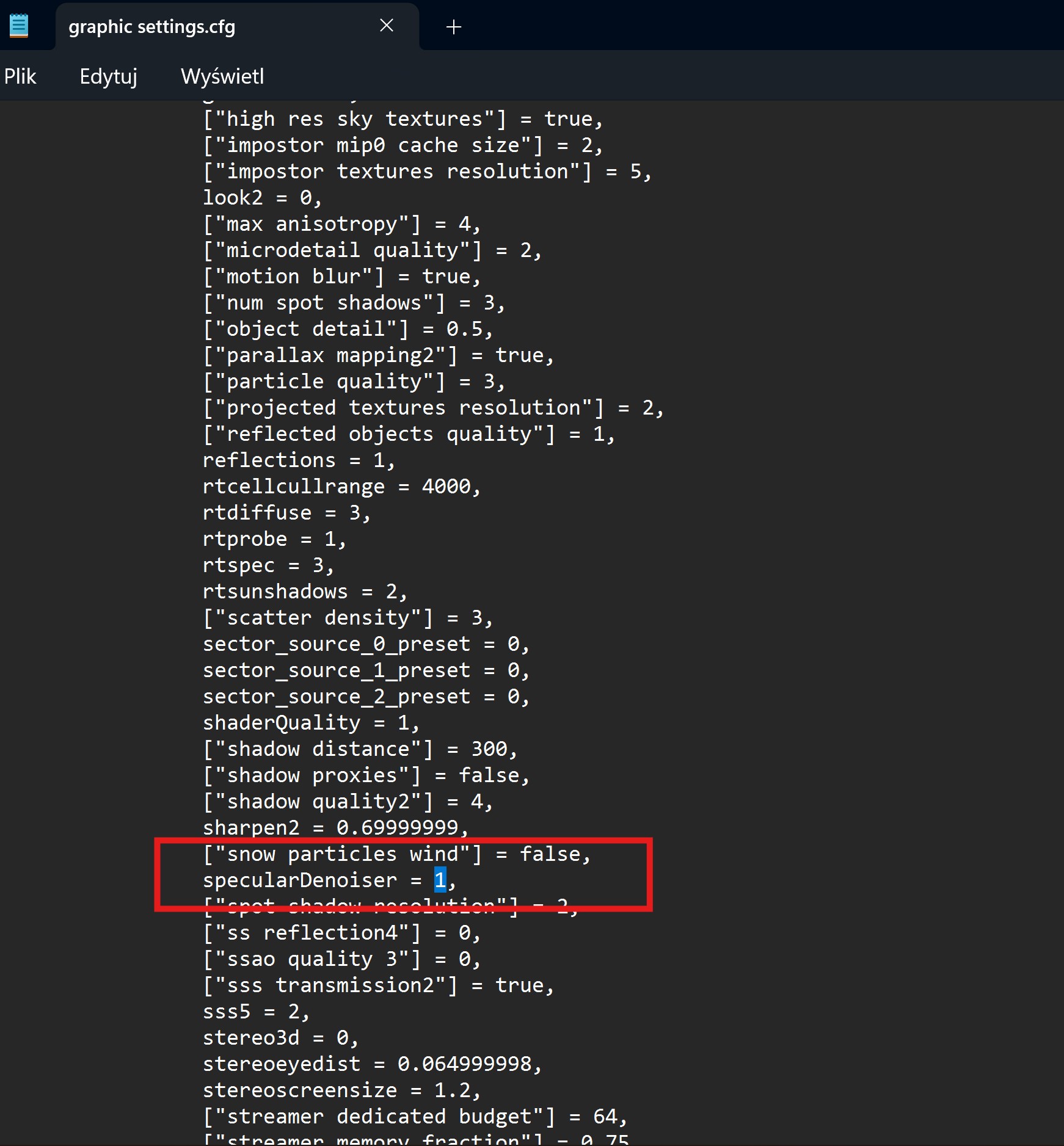
yup especially in UE5 I am already used to just drop my already prepared engine.ini file in there lol.
and now there's one more line in there
 
Last edited:
And Snowdrop, I will play with commands myself (just installed Avatar).

this makes me think...
I should try getting it off in the Pragmata demo. but I don't know how easy it is to modify that stuff in RE Engine tbh lol.

because Pragamta's RT reflections are insanely bad and smeared
 
Last edited:
this makes me think...
I should try getting it off in the Pragmata demo. but I don't know how easy it is to modify that stuff in RE Engine tbh lol.

because Pragamta's RT reflections are insanely bad and smeared

Yeah, they are horrible. That's why I hope PC version will ship with RR, it's gonna have PT...
 
Yeah, they are horrible. That's why I hope PC version will ship with RR, it's gonna have PT...

the path tracing seems to be clean from what was shown by Nvidia, so I assume it will have RR in the final version.

found the config file for the demo, but none of the variables in there are related tot he denosing from what I can tell. and I can't find a list of variables for the engine sadly...
 
the path tracing seems to be clean from what was shown by Nvidia, so I assume it will have RR in the final version.

found the config file for the demo, but none of the variables in there are related tot he denosing from what I can tell. and I can't find a list of variables for the engine sadly...

So I tried Avatar and holy shit, results are... something.

Game has cfg file in documents/my games/AFOP

XpqmWSgdozFfq7Sy.jpg


Default - 4.5:

QOENZsX.jpeg


denoiser off - 4.5

Dz48PaA.jpeg


RR:

wDgpFyo.jpeg


RR has less details, it's smoother but maybe too smooth.

In game preset E and J, both unusable with this amount of noise (denoiser off):

cchafZW.jpeg

jmpl1UP.jpeg


Denoiser off and 4.5 look really good, great in motion even. Grain is almost non existent. Too bad 4.5 fuck ups RT lighting and it becomes unstable just like in UE5 games...
 
So I tried Avatar and holy shit, results are... something.

Game has cfg file in documents/my games/AFOP

XpqmWSgdozFfq7Sy.jpg


Default - 4.5:

QOENZsX.jpeg


denoiser off - 4.5

Dz48PaA.jpeg


RR:

wDgpFyo.jpeg


RR has less details, it's smoother but maybe too smooth.

In game preset E and J, both unusable with this amount of noise (denoiser off):

cchafZW.jpeg

jmpl1UP.jpeg


Denoiser off and 4.5 look really good, great in motion even. Grain is almost non existent. Too bad 4.5 fuck ups RT lighting and it becomes unstable just like in UE5 games...

too bad only 4.5 works well.

have you tried preset K or other TAA methods?
 
too bad only 4.5 works well.

have you tried preset K or other TAA methods?

K

oCj9YCZ.jpeg


Xess Q

gEL0f5Y.jpeg


FSR 3 Q

QYIZr4k.jpeg


Native TAA

Nq5MYWZ.jpeg


So DLSS 4.5 is the only thing that can also denoise the image, it's a very interesting finding for sure.

There is also this in the file, I will try it hahaha

xA78H0548yUPRNqg.png
 
K

oCj9YCZ.jpeg


Xess Q

gEL0f5Y.jpeg


FSR 3 Q

QYIZr4k.jpeg


Native TAA

Nq5MYWZ.jpeg


So DLSS 4.5 is the only thing that can also denoise the image, it's a very interesting finding for sure.

There is also this in the file, I will try it hahaha

xA78H0548yUPRNqg.png

I think this is down to the seemingly insane amount of small ripples in that water material.

the more morror like a reflection is the easier it is to denoise. the water in this game seems to be an edge case in how much small detail it has, that makes the reflectiona more defused than most reflections.
 
I think this is down to the seemingly insane amount of small ripples in that water material.

the more morror like a reflection is the easier it is to denoise. the water in this game seems to be an edge case in how much small detail it has, that makes the reflectiona more defused than most reflections.

So turning off both denoisers (specular and diffuse) fixed all the issues preset M had with this game... Looks like 4.5 is incompatible with in game, low quality denoisers and at the same time it can denoise RT on its own.


I'm not sure how it looks on the video but difference in person is BIG, 4.5 is actually usable now in this game and offers better image quality and performance than RR 4.0. This shit is mindblowing.

Water with denoiser off/on:


I think it's safe to assume that disabling diffuse denoiser in UE5 should also fix issues with 4.5...
 
So turning off both denoisers (specular and diffuse) fixed all the issues preset M had with this game... Looks like 4.5 is incompatible with in game, low quality denoisers and at the same time it can denoise RT on its own.


I'm not sure how it looks on the video but difference in person is BIG, 4.5 is actually usable now in this game and offers better image quality and performance than RR 4.0. This shit is mindblowing.

Water with denoiser off/on:


I think it's safe to assume that disabling diffuse denoiser in UE5 should also fix issues with 4.5...


that water looks so crisp without the denoiser it's insane šŸ˜‚

maybe Nvidia needs to promote 4.5 as an all in one upscaler+denoiser solution lol.

the second video is set to private btw.
 
Last edited:
that water looks so crisp without the denoiser it's insane šŸ˜‚

maybe Nvidia needs to promote 4.5 as an all in one upscaler+denoiser solution lol.

the second video is set to private btw.

Working now?

They need to force nvidia app to disable in game denoisers when switching to 4.5, hahaha.
 
oh shit... I just thought of something...

Ninja Gaiden 2 Black looks like pure garbage by default. I think I gotta test that tomorrow with 4.5 and the denoisers off šŸ¤”

that game looks straight up broken tho at times, so I probably also have to change other stuff to make it look presentable, as it had very unstable GI in some environments.
 
oh shit... I just thought of something...

Ninja Gaiden 2 Black looks like pure garbage by default. I think I gotta test that tomorrow with 4.5 and the denoisers off šŸ¤”

that game looks straight up broken tho at times, so I probably also have to change other stuff to make it look presentable, as it had very unstable GI in some environments.

I wonder what command there is to disable just denoiser for lumen diffuse lighting. In theory 4.5 should handle the denoise but without trying nothing is confirmed...
 
I wonder what command there is to disable just denoiser for lumen diffuse lighting. In theory 4.5 should handle the denoise but without trying nothing is confirmed...

thankfully, UE5 is very well documented due to being an openly available engine.

r.Lumen.ScreenProbeGather.Temporal
r.Lumen.ScreenProbeGather.TemporalFilterProbes

these 2 seem to be lighting related denoisers. but UE5 has tons of different denoisers for everything, because so many elements of the renderer are dithered to hell.

edit: so at least in Outer Worlds 2, this doesn't work. I think the Lumen GI quality is just so insanely low, that not having an aggressive denoiser just doesn't work.
if I set r.Lumen.ScreenProbeGather.Temporal to 0 the entire scene just flickers like crazy, no matter the DLSS preset used.

It probably works fine for other RT GI solutions in other engines, but for Lumen, I think you'd need to massively boost the ray count for it to work.
 
Last edited:
thankfully, UE5 is very well documented due to being an openly available engine.

r.Lumen.ScreenProbeGather.Temporal
r.Lumen.ScreenProbeGather.TemporalFilterProbes

these 2 seem to be lighting related denoisers. but UE5 has tons of different denoisers for everything, because so many elements of the renderer are dithered to hell.

edit: so at least in Outer Worlds 2, this doesn't work. I think the Lumen GI quality is just so insanely low, that not having an aggressive denoiser just doesn't work.
if I set r.Lumen.ScreenProbeGather.Temporal to 0 the entire scene just flickers like crazy, no matter the DLSS preset used.

It probably works fine for other RT GI solutions in other engines, but for Lumen, I think you'd need to massively boost the ray count for it to work.

Yeah, lumen is fucking software garbage compared to HW RT in other games (even HW lumen is low quality). This doesn't surprise me.

What surprises me is that nvidia released 4.5 knowing that it will have conflict with many denoisers, no way they didn't saw that...

Explanation for super noobs on how to do it?

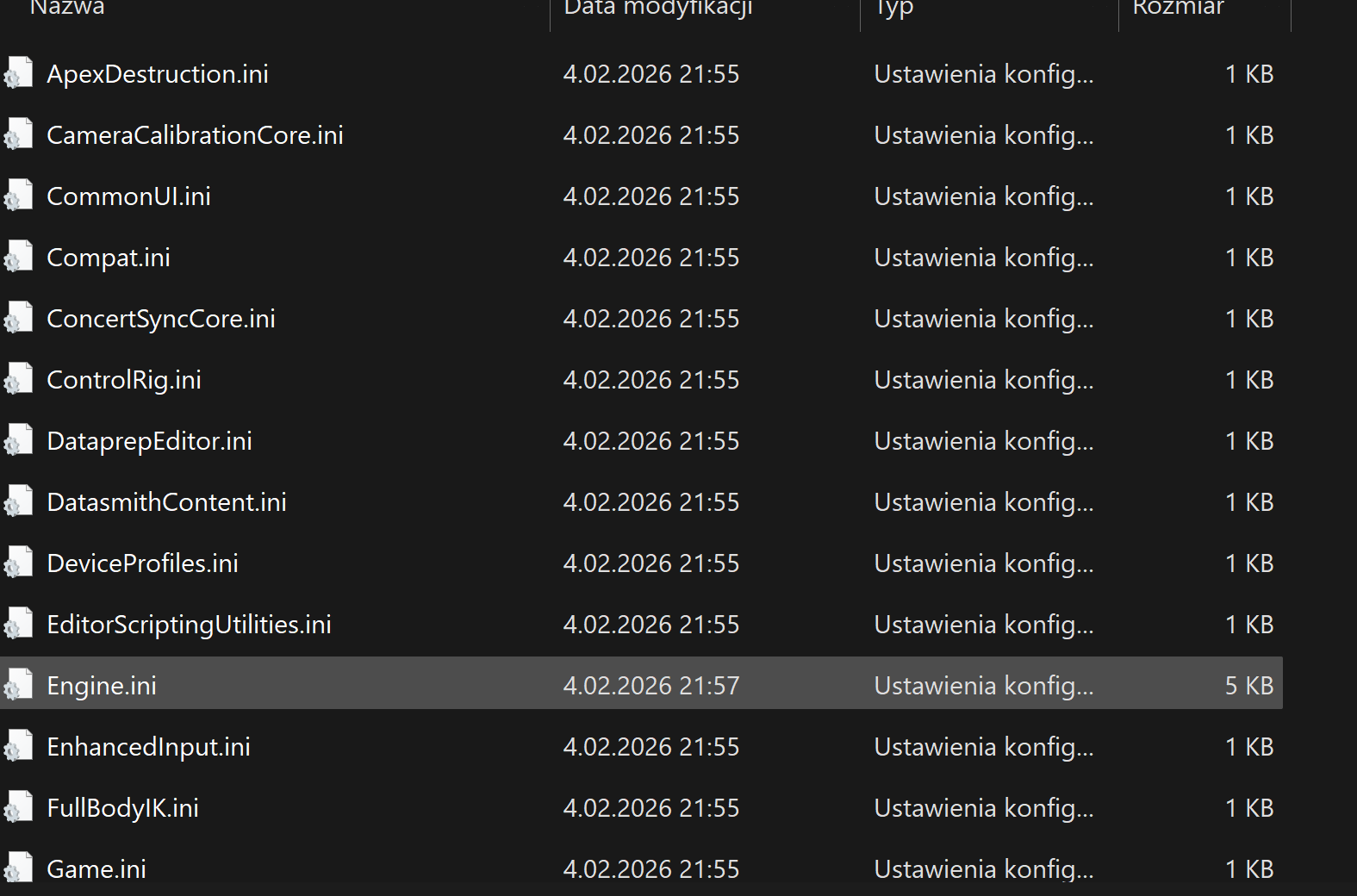
Go to C:\Users\(your user name)\AppData\Local\SilentHill2\Saved\Config\Windows

And add this to engine.ini

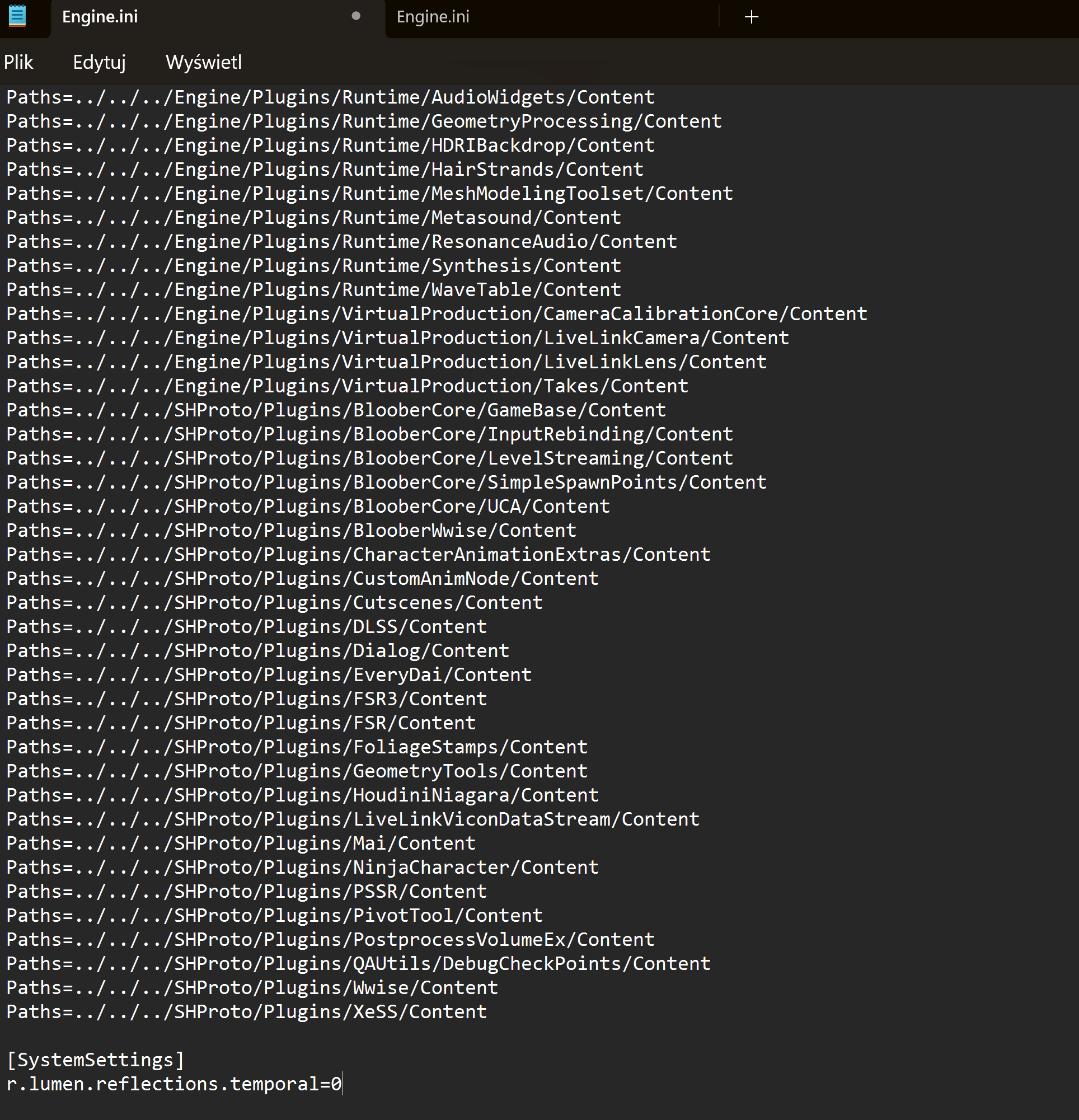
[SystemSettings]
r.lumen.reflections.temporal=0

j04XghBV2KPQ4nGc.png
TEvCBB90ygIN70yY.png


This improves reflections even with older DLSS4.
 
Last edited:
Explanation for super noobs on how to do it?

look up the folder where the UE5 game you wanna play stores its config file. PC Gaming Wiki usually has that listed on their page for the game.
evO2g3LHbcYON1IY.png


for SH2 Remake that would be %LOCALAPPDATA%\SilentHill2\Saved\Config\Windows\
however on some PCs the folder isn't called Windows but instead WinGDK so it's best to just copy the %LOCALAPPDATA%\SilentHill2\Saved\Config\ part into the adress-bar of the explorer window and then click on the corresponding folder, Windows or WinGDK

in that folder is the config file. in SH2's case there are a bunch of them. look for the one called engine.ini. if there is no engine.ini file, then create one by right clicking and creating a text file, which you then rename to engine.ini

in that engine.ini file, the first thing you do is add the line [SystemSettings]
and then on the lines below that add whatever modifier you want. like if you want to remove the reflecion denoiser add r.lumen.reflections.temporal=0 and then save the file.
after saving it, right click the file, go into its properties, and set it to read only, because some games will delete engine.ini files that shouldn't be there. if there already was an engine.ini file, you probably don't have to set it to read only.

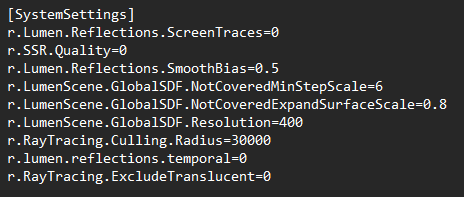
as an example of how a custom engine.ini file can look, here's mine for Outer Worlds 2:
3hz7gruTx71u8RKZ.png
 
Last edited:
Given how well Preset L/M improve motion stability, there is a genuine opportunity for Nvidia to back-port FG features. Jensen said they should look into it at CES.

Ampere being able to handle FG is easy to see now that the model is lighter and doesn't use OFA. DLSS SR improvements have made DLSS FG's job a lot easier.

Ada, Nvidia can easily figure out a way to do 3-4x frame gen with software frame pacing instead of the hardware flip meter. They are much better than Radeon at the software game.

The above two would be a transformational value add.

As for Turing and its ability to handle FG…….

I suspect they might not succeed. The Turing SM is not flexible.

Fingers crossed for what Nvidia will cook!
 
Last edited:
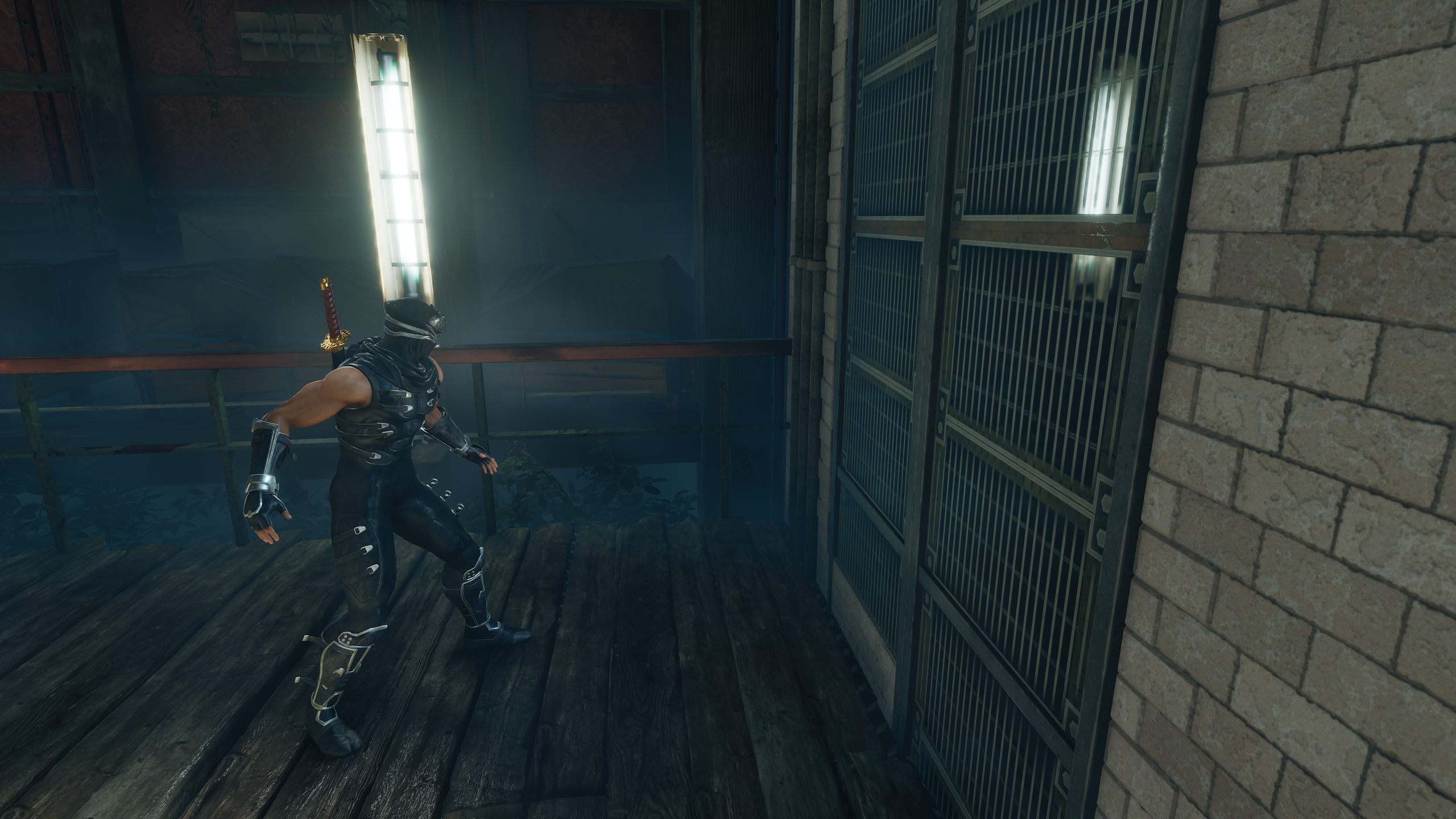
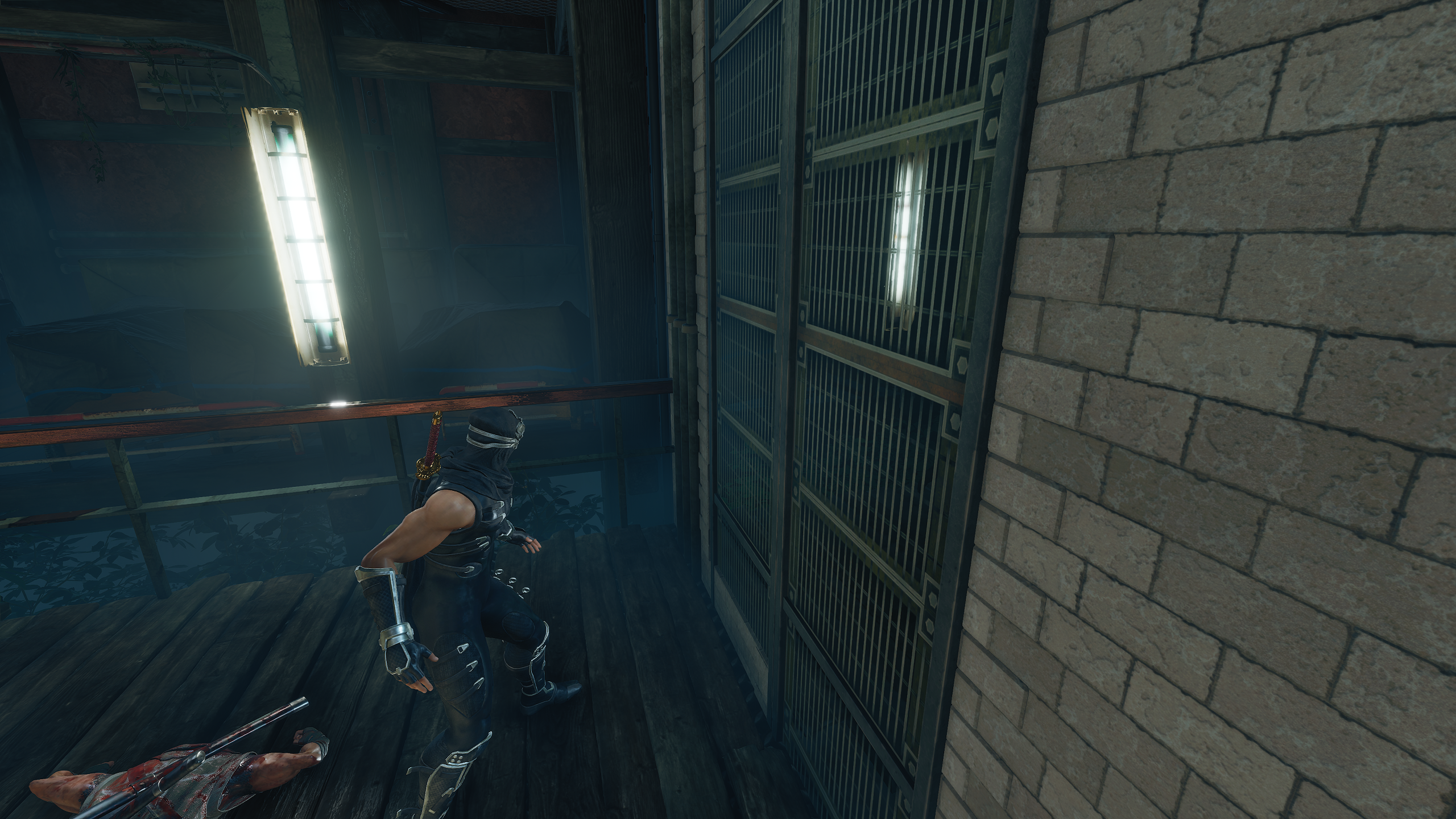
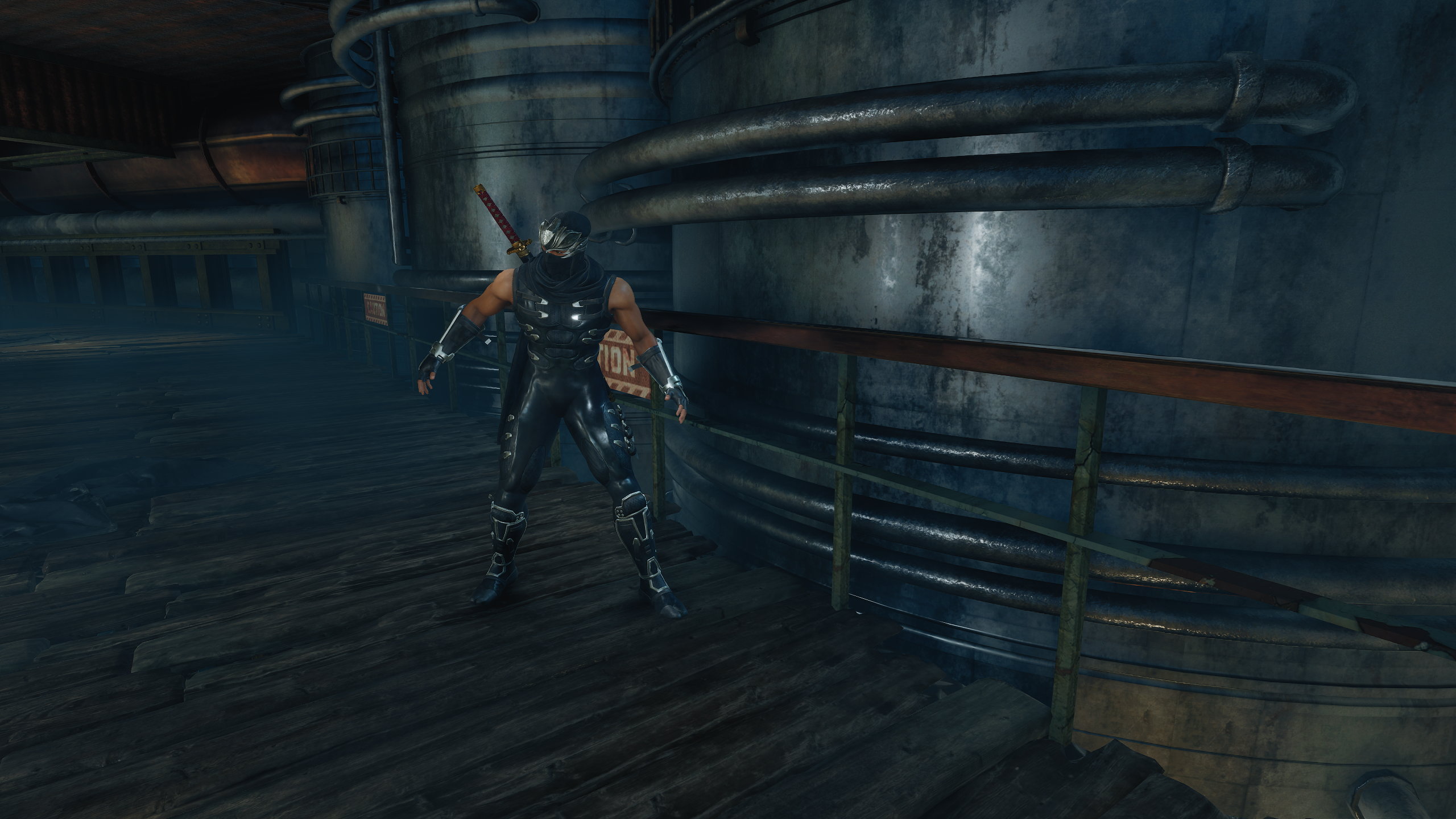
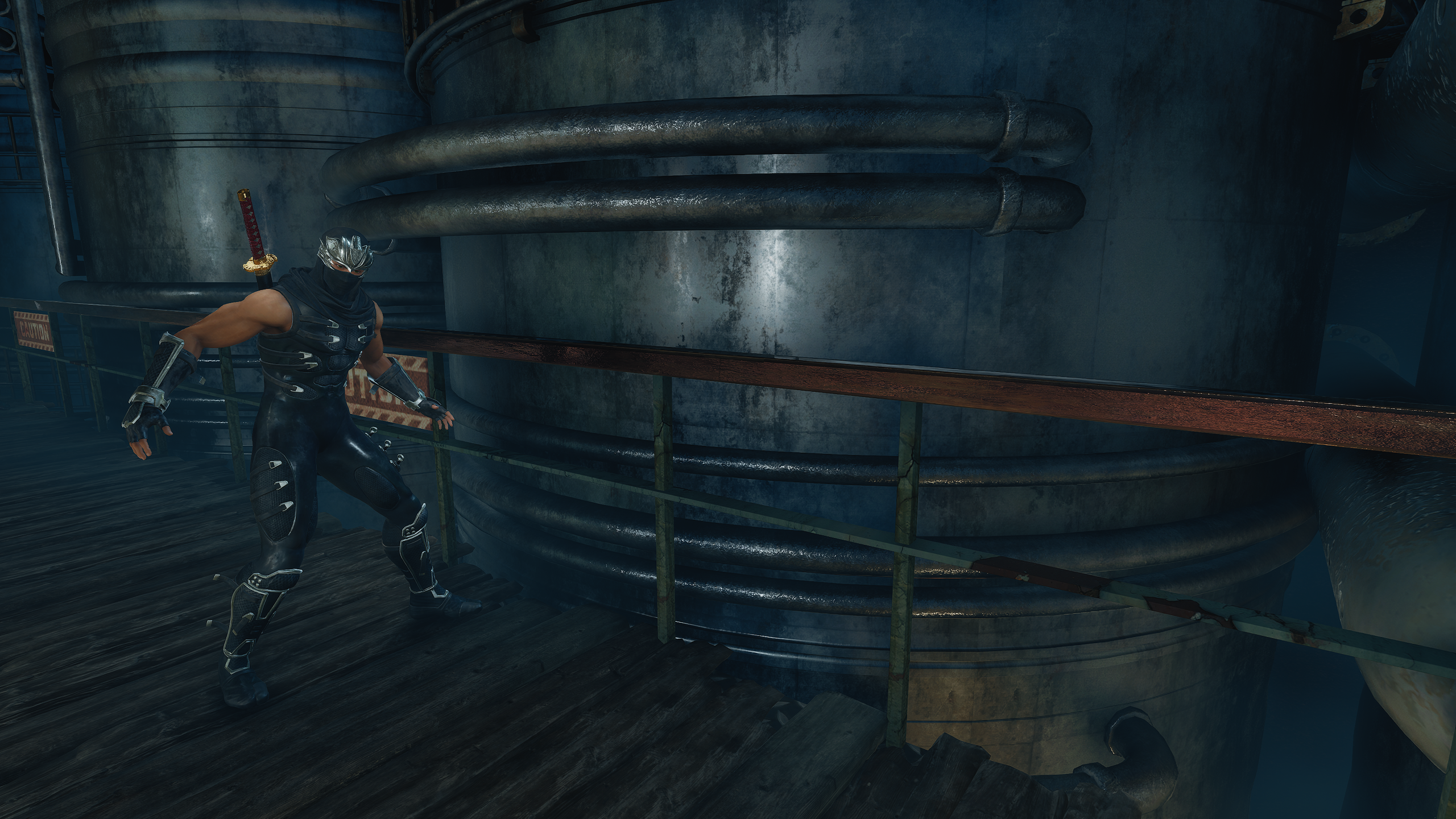
so, tested NG2 Black, and it doesn't fix its broken GI of course, but Preset L + Specular Denoiser Off does improve fidelity noticably.
the game has a lot of "wet" surfaces and shiny metals, so a lot of surfaces are affected by this.

lining up shots is hard here, but I tried.

Default:
z3vvk5dy.png


Denoiser OFF:
xl77uzas.png


Notice how the missing detail on the metal railing in the back is back with the denoiser gone, and of course the mirror image in the glass on the right is sharper


Default:
ugmwvyvs.png


Denoiser OFF:
73rlvopu.png


again, all the details of the metal surface is just gone with the specular denoiser on. but clearly visible with it off.

with the denoiser on, it legit looks like the texture quality is worse, just because the denoiser makes the texture look blotchy and completely destroys all the detail.
 
Last edited:
I play my games with my PC connected to my 65 inch QD-OLED TV. I have a mid range system with a 13th gen 20 core i5, 32GB DDR5 ram and a rtx 4070


I am playing through Robocop Rogue City and have everything cranked up. The game is a looker. I am playing at 4k, all settings are epic, lumen on, DLSS Quality, frame gen on. I am hitting around 90fps on average. With that said if I turn the DLSS to performance I am hitting well over 100-120fps. The difference between Quality and performance DLSS 4 is really low and you have to do side by side to really see. DLSS is an evolving technology and will get better with time. I can see almost every platform relying on it or a competitive versin like FSR for the foreseeable future.
 
So I tried Avatar and holy shit, results are... something.

Game has cfg file in documents/my games/AFOP

XpqmWSgdozFfq7Sy.jpg


Default - 4.5:

QOENZsX.jpeg


denoiser off - 4.5

Dz48PaA.jpeg


RR:

wDgpFyo.jpeg


RR has less details, it's smoother but maybe too smooth.

In game preset E and J, both unusable with this amount of noise (denoiser off):

cchafZW.jpeg

jmpl1UP.jpeg


Denoiser off and 4.5 look really good, great in motion even. Grain is almost non existent. Too bad 4.5 fuck ups RT lighting and it becomes unstable just like in UE5 games...


Huh, interesting. Why is the framerate lower when you turn off the game specific denoiser? You would think it would be the other way around. Or is there are small RR part in DLSS 4.5 that gets turned on when there's no in game denoising? But how would that work.
 
Huh, interesting. Why is the framerate lower when you turn off the game specific denoiser? You would think it would be the other way around. Or is there are small RR part in DLSS 4.5 that gets turned on when there's no in game denoising? But how would that work.

Good question, but those pictures aren't 1:1 (autosaves are far from that place). I think performance is very similar but maybe there is some decrease with denoiser off, maybe it's like what you said: DLSS takes the role of the denoiser and that increases performance cost.
 
Top Bottom