-
Hey Guest. Check out your NeoGAF Wrapped 2025 results here!
You are using an out of date browser. It may not display this or other websites correctly.
You should upgrade or use an alternative browser.
You should upgrade or use an alternative browser.
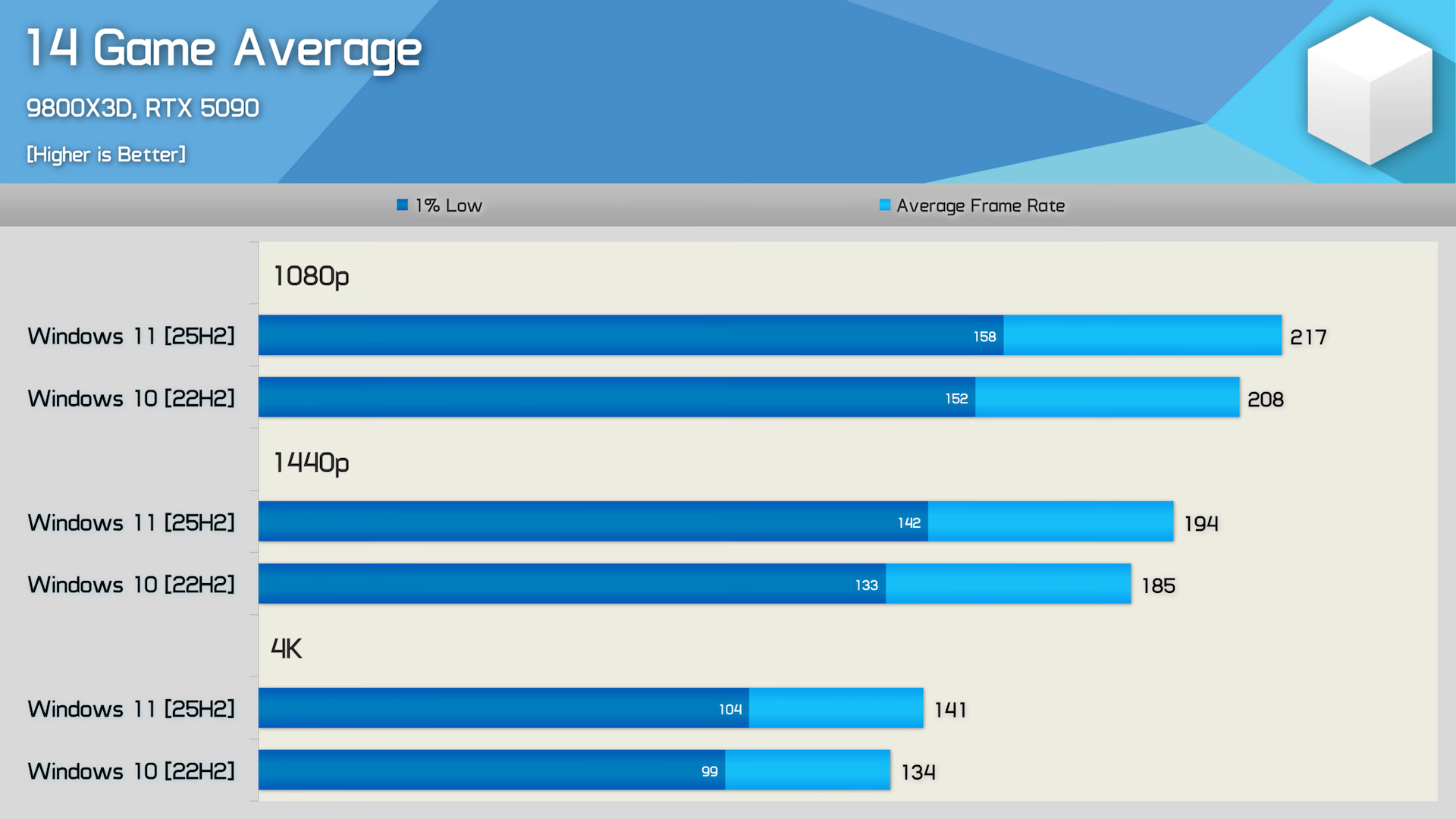
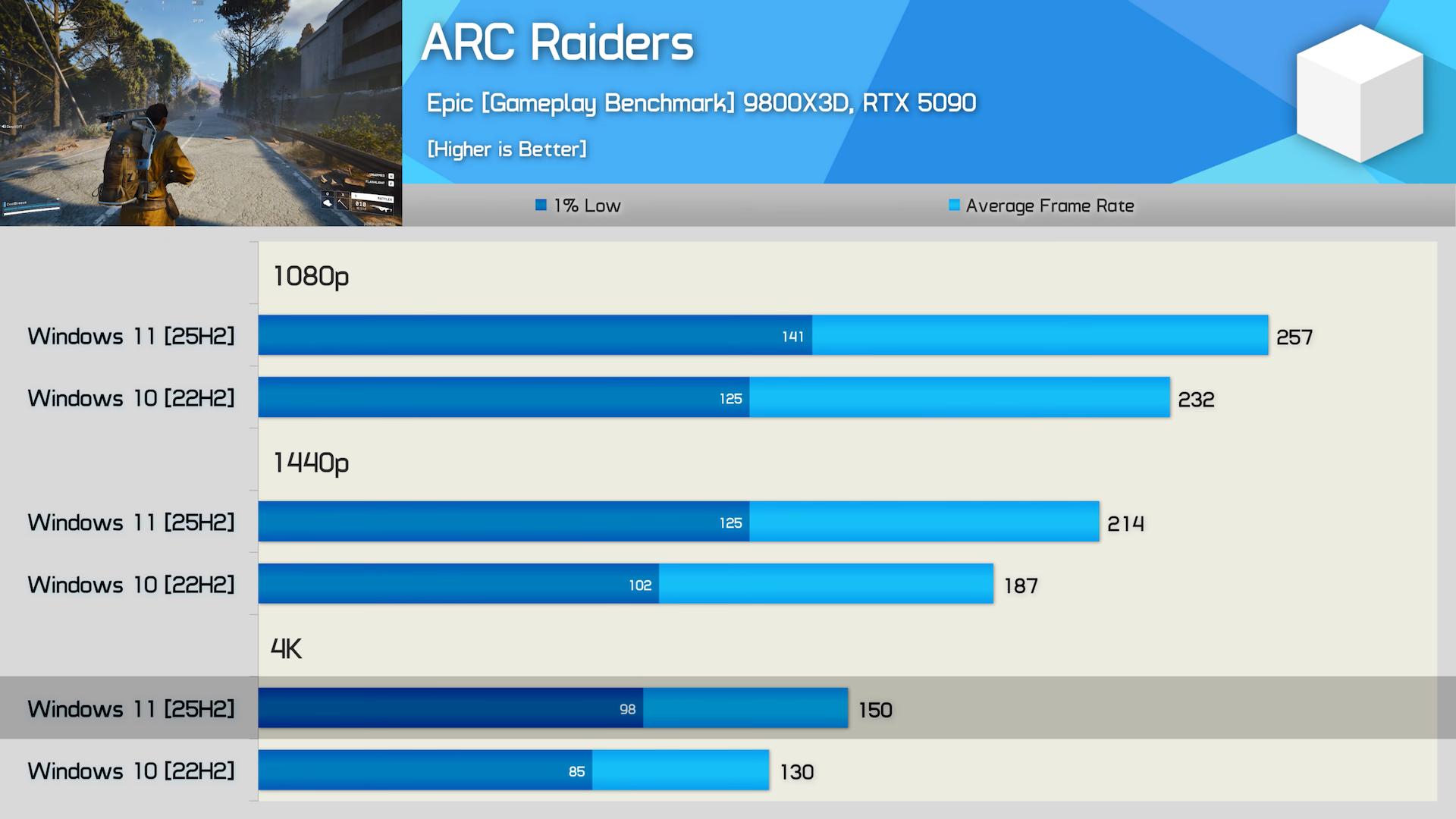
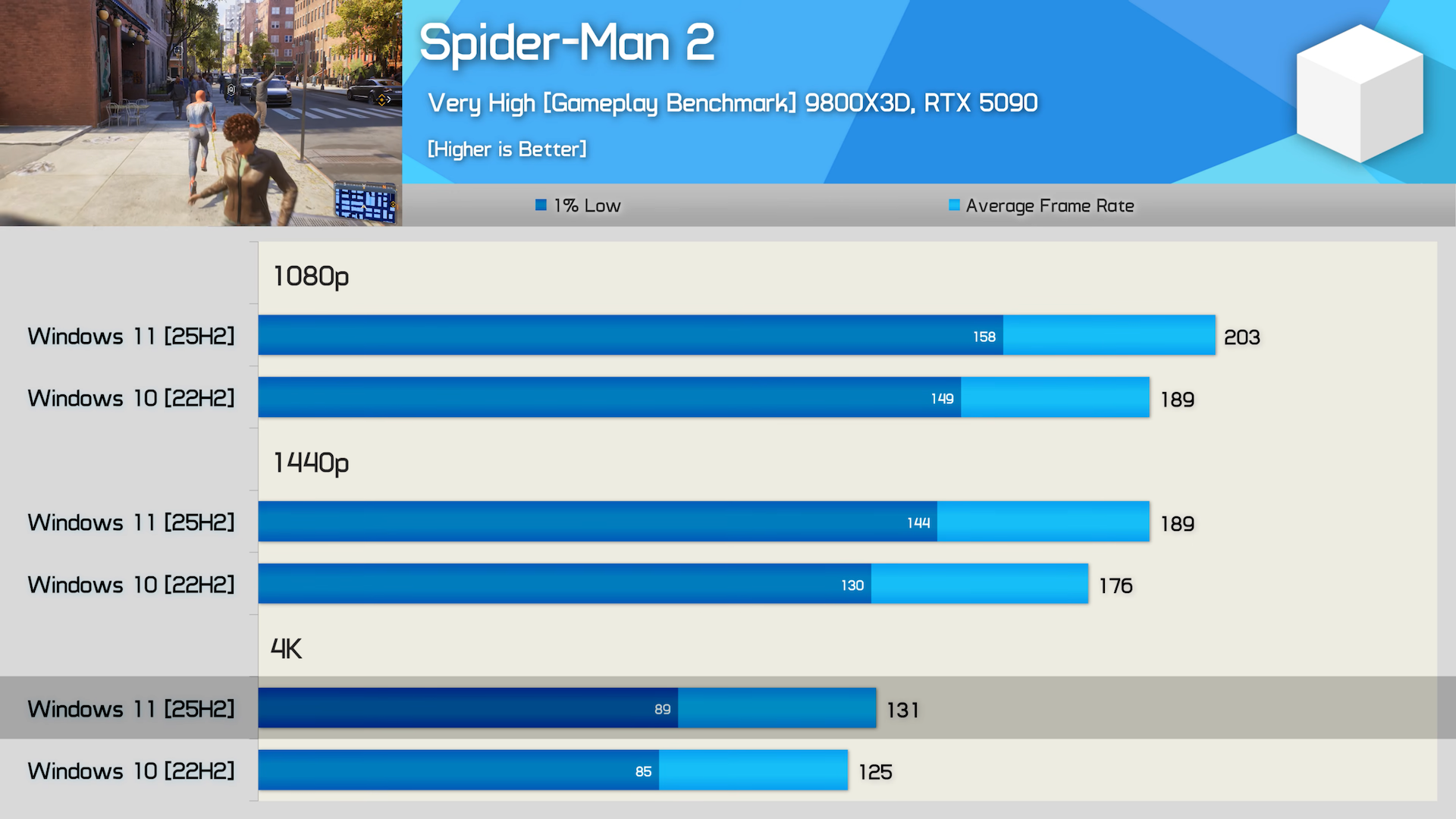
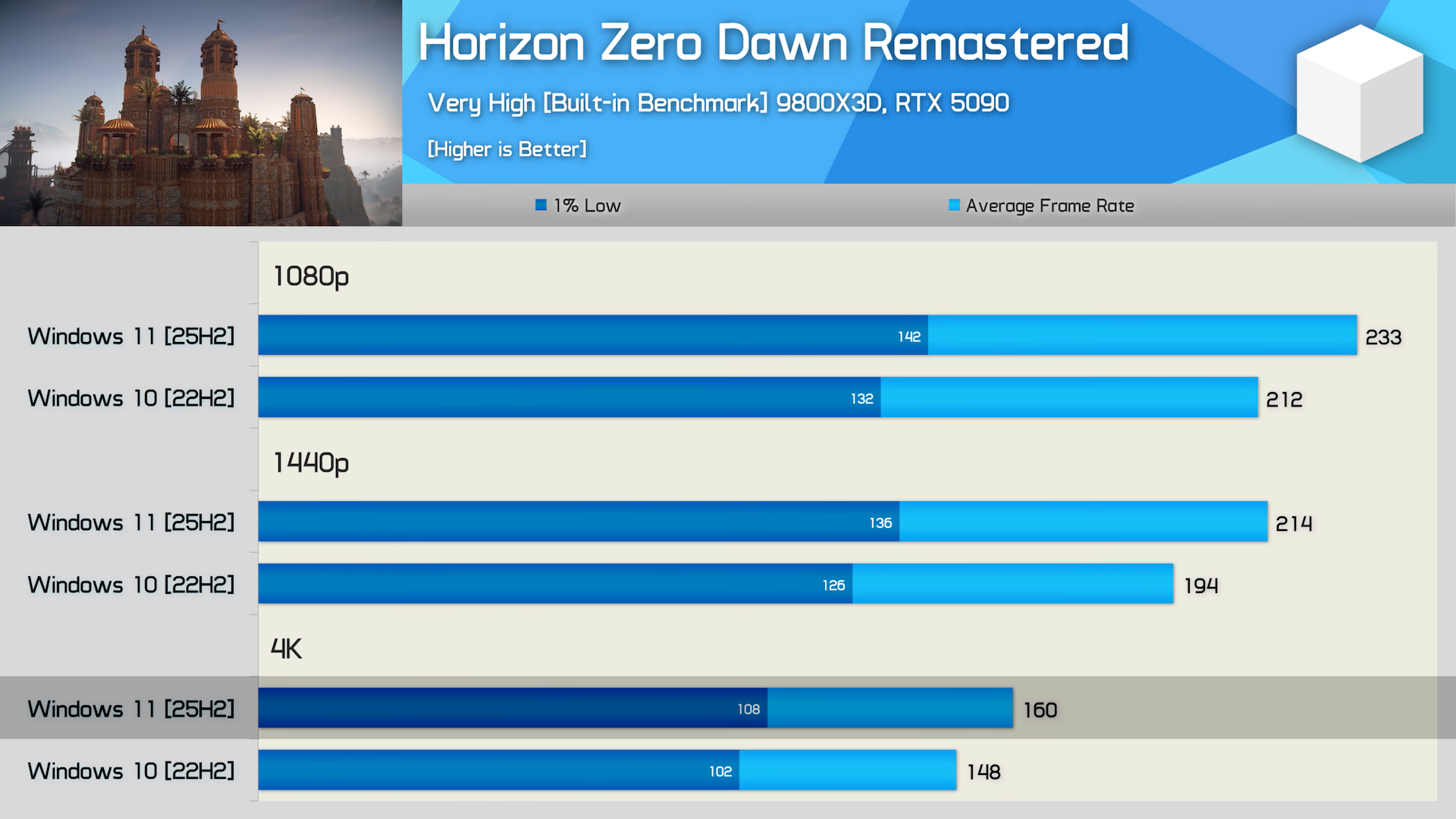
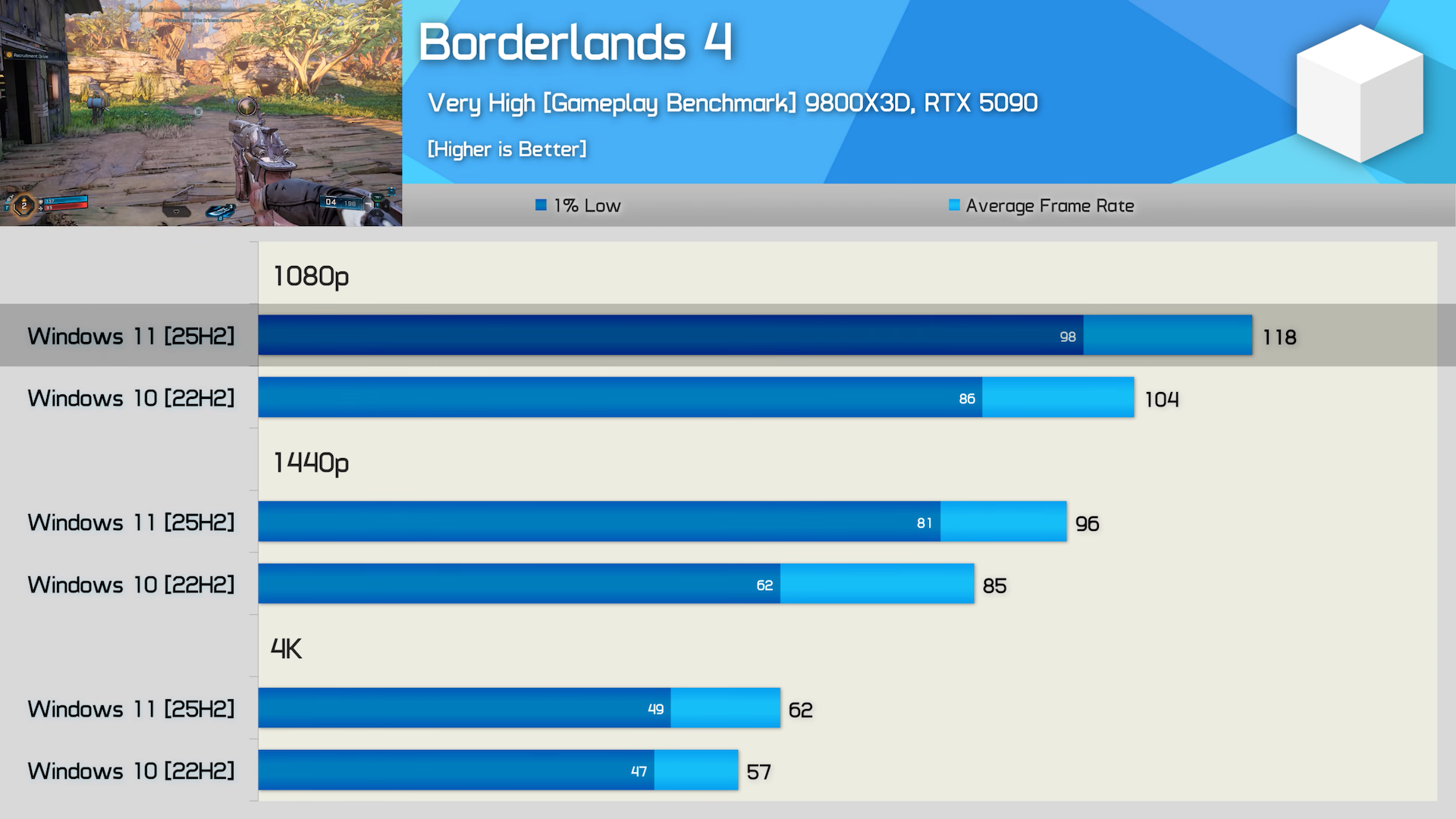
Hardware Unboxed - Windows 11 25H2 VS Windows 10
- Thread starter winjer
- Start date

DenchDeckard
Moderated wildly
I will be looking up this debloat tool today. Never heard of it before.
Last edited:

winjer
Gold Member
I will be looking up this debloat tool today. Never heard of it before.
I highly recommend it.
I have been using it for several years and it works wonders.
Just be careful with what you remove. For example, the Windows Store. Only do it if you really are willing to not use it and install apps from there.
There are tooltips that explain most settings.
I'll give a personal warning before using Chris' tool and other debloat tools.
Read up on all the options and don't just activate whatever you want.
Reason is that there's plenty of things that can bug out in windows 11 as a result of it. And you can't just turn it off. Sometimes the damage is done forever. To give one of the more milder examples I had to reinstall windows because XBOX achievements stopped popping in gamepass/windows store games. Nothing I did would get them back.
Personally I went back to native and just started setting the most basic things manually instead of using tools. In general its probably easier just to use ltsc if you want a debloated system.
Read up on all the options and don't just activate whatever you want.
Reason is that there's plenty of things that can bug out in windows 11 as a result of it. And you can't just turn it off. Sometimes the damage is done forever. To give one of the more milder examples I had to reinstall windows because XBOX achievements stopped popping in gamepass/windows store games. Nothing I did would get them back.
Personally I went back to native and just started setting the most basic things manually instead of using tools. In general its probably easier just to use ltsc if you want a debloated system.
Last edited:

bighugeguns
Member
I switched to Bazzite and it's fast as fuck, out of the box!
Don't be intimidated by Linux, fire up an AI to help you out and you'll be the master of your PC in no time at all.
Don't be intimidated by Linux, fire up an AI to help you out and you'll be the master of your PC in no time at all.
Last edited:
DenchDeckard
Moderated wildly
I highly recommend it.
I have been using it for several years and it works wonders.
Just be careful with what you remove. For example, the Windows Store. Only do it if you really are willing to not use it and install apps from there.
There are tooltips that explain most settings.
Thanks man. I feel like a bit of a noob that I haven't heard of it before.
 I'll check it out today.
Tomorrow
Member
is that linux?I switched to Bazzite and it's fast as fuck, out of the box!
Don't be intimidated by Linux, fire up an AI to help you out and you'll be the master of your PC in no time at all.
edit: yes. so most of my games won't work on it then.
Last edited:

CliffBronger
Member
Just grab Windows 11 LTSC iot
The best version of windows and not much to debloat once installed
The best version of windows and not much to debloat once installed


SolarFry
Member
Same. Be very careful with that debloat stuff. Saw it actually in here, in another thread. I tried it once, didn't touch any extra settings and still made my OS much worse - slowdowns, freezes. I had to do a couple of system restores until it was back to being relatively normal again.I'll give a personal warning before using Chris' tool and other debloat tools.
Read up on all the options and don't just activate whatever you want.
Reason is that there's plenty of things that can bug out in windows 11 as a result of it. And you can't just turn it off. Sometimes the damage is done forever. To give one of the more milder examples I had to reinstall windows because XBOX achievements stopped popping in gamepass/windows store games. Nothing I did would get them back.
Personally I went back to native and just started setting the most basic things manually instead of using tools. In general its probably easier just to use ltsc if you want a debloated system.
That's my experience with this anyway.

Soodanim
Member
But at the same time, going the manual route can be just as dangerous if not more when you're not clued up. Being cautious with your selections in CTT is really the best way for most people. There's even sets of recommended/safe picks for those that don't want to worry about it too much, then all you have to do is review those before clicking yes.I'll give a personal warning before using Chris' tool and other debloat tools.
Read up on all the options and don't just activate whatever you want.
Reason is that there's plenty of things that can bug out in windows 11 as a result of it. And you can't just turn it off. Sometimes the damage is done forever. To give one of the more milder examples I had to reinstall windows because XBOX achievements stopped popping in gamepass/windows store games. Nothing I did would get them back.
Personally I went back to native and just started setting the most basic things manually instead of using tools. In general its probably easier just to use ltsc if you want a debloated system.
Don't forget system restore points.

StereoVsn
Gold Member
Agree. Running latest LTSC or Enterprise with some judicial add-ons is the way to go.Yeah, some surprising results here.
W11 gets fucked up updates every few months but it still has features essential to me: Auto HDR, Game Bar and full support for Series controller (including SS button). I tried going back to W10 but it's impossible for me...
When you do it manually you get clued up though because you actually read up on what you're doing. And a ton of things you can do at zero risk with windows own tools already.But at the same time, going the manual route can be just as dangerous if not more when you're not clued up. Being cautious with your selections in CTT is really the best way for most people. There's even sets of recommended/safe picks for those that don't want to worry about it too much, then all you have to do is review those before clicking yes.
Don't forget system restore points.
Fake Edit: Also recommended already touches some sensitive stuff you should take a moment to read up on.
Fake Edit 2: Everyone is of course free to do it however they are most comfortable with. Again just my two cents.
Last edited:

ClosBSAS
Member
Its amazing. The first thing you should always do after a fresh installI will be looking up this debloat tool today. Never heard of it before.
P:axMagellanic
Member
I'm alreet, I'll stick with 10 for a bit longer.

simpatico
Gold Member
Me too. Only by "longer" I mean "as long as I want to play native directx games"I'm alreet, I'll stick with 10 for a bit longer.

//DEVIL//
Member
Same. Does it work on fresh install only ? Because I ain't doing that lolI will be looking up this debloat tool today. Never heard of it before.

memoryman3
Member
Still would trade 11 for 10 without blinking, single worst piece of shit OS I've ever had.
The day I'm able to jump to linux without worrying about gaming can't come soon enough.
As long as the Linux kernel remains open source and Valve relies on Proton, that day will never come.
simpatico
Gold Member
Eh, if you don't care about playing slop of the month AAA online games, we're pretty much there.As long as the Linux kernel remains open source and Valve relies on Proton, that day will never come.

MidGenRefresh
Banned
I will be looking up this debloat tool today. Never heard of it before.
GitHub - ChrisTitusTech/winutil: Chris Titus Tech's Windows Utility - Install Programs, Tweaks, Fixes, and Updates
Chris Titus Tech's Windows Utility - Install Programs, Tweaks, Fixes, and Updates - ChrisTitusTech/winutil
 github.com

SoloCamo
Member
I switched to Bazzite and it's fast as fuck, out of the box!
Don't be intimidated by Linux, fire up an AI to help you out and you'll be the master of your PC in no time at all.
You know how to figure out if someone is a linux user? They'll always tell you.
Anyways, I'm still on 10 for my main gaming pc, laptop has been on 11 for a long time now. I debloated Windows 10 though already. Didn't watch the video but will today, did they debloat 10 and compare it to 11 or are these results stock 10 vs debloated 11?
Last edited:

The Cockatrice
I'm retarded?
Ill take the 5% hit and stick with win10 for now.
Sorry for the necropost. The most important feature of this debloat tool is disabling VBS (which the author mentioned) which isn't easy to turn off without a bunch of sophisticated scripts (you can search for "turn off VBS Windows 25H2" on VMware forums to feel the pain)... But I accidentally found an easy way to do a clean install of Win11 25H2 without all this VBS stuff. You just need to temporarily disable Secure Boot in the BIOS before installing. This prevents Core Isolation from being enabled, and Windows won't install Hyper-V components, so the system runs without virtualization. You can also temporarily disable virtualization in the BIOS. (Another option is to use an autounattend generator, which allows you to disable many unnecessary things in advance using standard methods).
Just in case. I wish someone had mentioned this before I last reinstalled Windows 11 . Maybe it will help someone
Just in case. I wish someone had mentioned this before I last reinstalled Windows 11
. Maybe it will help someone
drotahorror
Member
wtf is this shit
I just restarted my computer and now my start bar looks like this
I might have to use that debloat tool at this point. Kind of annoying. Also I don't like how when I turn my PC on the location icon pops up in my taskbar bottom right. Like it's searching to see where the fuck I am? I have locations services turned off on everything too.
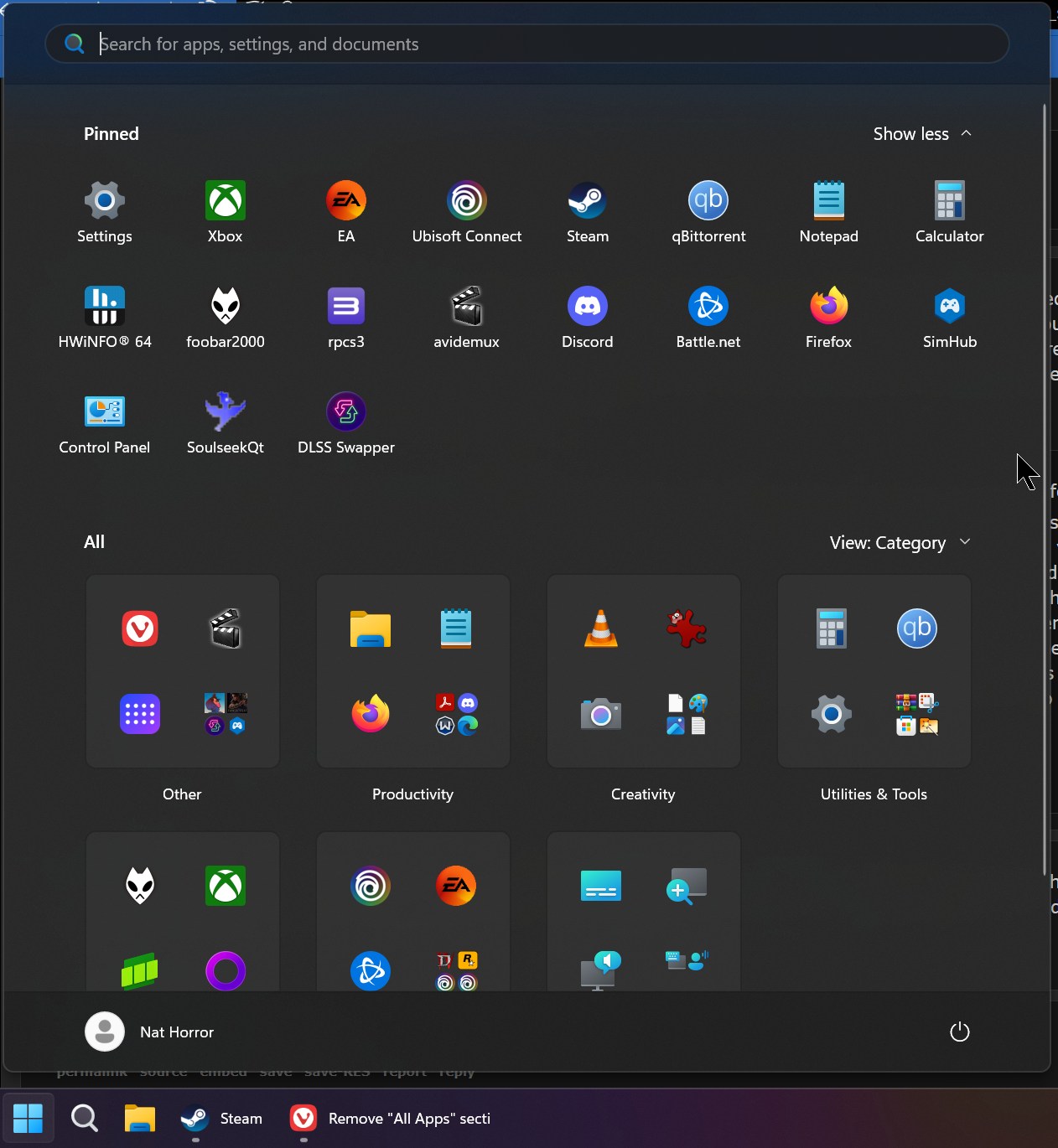
I just restarted my computer and now my start bar looks like this
I might have to use that debloat tool at this point. Kind of annoying. Also I don't like how when I turn my PC on the location icon pops up in my taskbar bottom right. Like it's searching to see where the fuck I am? I have locations services turned off on everything too.

archvile7
Member
Just click on the View: Category button and change it to List. This more or less changes it back to the way it was. I actually prefer it because now you don't need to click the Apps button to view everything installed, you just scroll down as soon as you open the Start Menu.wtf is this shit
I just restarted my computer and now my start bar looks like this
I might have to use that debloat tool at this point. Kind of annoying. Also I don't like how when I turn my PC on the location icon pops up in my taskbar bottom right. Like it's searching to see where the fuck I am? I have locations services turned off on everything too.
Debloating tools won't do anything to change stuff like that, since all of these UI changes are either part of Windows Updates or A/B tests rolled out randomly.
I would check out this one - https://github.com/Raphire/Win11Debloat
I use it on all of my systems and it doesn't break anything (if you use the suggested defaults) and instantly disables all of the telemetry, removes junk preinstalled Windows apps, and turns off miscellaneous other privacy stuff.
If you put your mouse cursor over the location arrow it should show you which app requested your location. You can also go into the Settings - Privacy & security and view the Recent Activity to see what has requested location. Chances are it is something running at startup if you are seeing it as soon as you turn it on.
Also make sure location is turned off under both the "Let desktop apps access your location" and the "Let apps access your location", then the Location Services at the top of that page. Also turn off the "Allow Location Override".
Last edited:
drotahorror
Member
Just click on the View: Category button and change it to List. This more or less changes it back to the way it was. I actually prefer it because now you don't need to click the Apps button to view everything installed, you just scroll down as soon as you open the Start Menu.
Debloating tools won't do anything to change stuff like that, since all of these UI changes are either part of Windows Updates or A/B tests rolled out randomly.
I would check out this one - https://github.com/Raphire/Win11Debloat
I use it on all of my systems and it doesn't break anything (if you use the suggested defaults) and instantly disables all of the telemetry, removes junk preinstalled Windows apps, and turns off miscellaneous other privacy stuff.
If you put your mouse cursor over the location arrow it should show you which app requested your location. You can also go into the Settings - Privacy & security and view the Recent Activity to see what has requested location. Chances are it is something running at startup if you are seeing it as soon as you turn it on.
Also make sure location is turned off under both the "Let desktop apps access your location" and the "Let apps access your location", then the Location Services at the top of that page. Also turn off the "Allow Location Override".
Yea I didn't think I'd be able to debloat the start menu, unfortunately. Just kind of want to debloat out of spite lol.
I did turn it from category to list but the menu still takes literally 50% of my screen which seems absurd.
Thank you for the tips and suggestions though!

nikos
Member
Been running Windows 11 since pre-release and it's always been solid.
Chris Titus' tool makes a good amount of the debloating and optimization really simple. I've always done things manually but decided to give it a shot when I wiped my system the other day and it made things convenient.
Chris Titus' tool makes a good amount of the debloating and optimization really simple. I've always done things manually but decided to give it a shot when I wiped my system the other day and it made things convenient.

alabtrosMyster
Member
I remember the days that debloaters were used to remove manufacturer's bloatware that came bundled with PCs, MS looked like the good guys when they forbade them to do that kind of excessive bundling deals.Upgrading to Windows 11, using the Chris Titus debloat tool and delay non security updates for a few months is the best way to play games on a Windows PC.
A few years later, MS just took their place, with stuff that's ingraned so deep that you can't even just disable or uninstall it without a special tool.
Linux comes debloated.
Last edited:

Bojji
Gold Member
I remember the days that debloaters were used to remove manufacturer's bloatware that came bundled with PCs, MS looked like the good guys when they forbade them to do that kind of excessive bundling deals.
A few years later, MS just took their place, with stuff that's ingraned so deep that you can't even just disable or uninstall it without a special tool.
Linux comes debloated.