• Hey Guest. Check out your NeoGAF Wrapped 2025 results here!

It's the NAS (Network Attached Storage) Thread, yo.

A little off-topic, but I purchased something called a HooToo a month ago and I love it. It's essentially a portable, battery powered NAS. I can hook up USB flash drives and USB hard drives and I can stream the contents to any portable device via a private WIFI connection. I was able to keep my son entertained on flight and while traveling via highways in a foreign country with movies he loves.

I don't think there is any other product like it on the market.
 
Yes, 2 years ago when I started ripping my blu-rays I had over 250 of them, and no where to put them, WD Greens were ~140+ per drive, so I bought 3, and then 4 and finally finishing at 6 for 12tb of raw space. I know full well if I lose a drive I lose the array, which is why everything is backed up in triplicate. I'm not using the NAS for anything other than raw storage of the movies and my photography. The movies are played from the other machine I mentioned and my photos even at a couple hundred megabytes each are not very much load on the box when editing them.

The box has been going for over 2 years now without a single problem or failure.

But there's no real point to you doing it this way. You're using more drives to have the data backed up because you risk a single drive wiping out the the data storage in the event of failure. It's not a question of if it will happen; it's a question of when it will happen. The longer you go, the more likely you're bound to hit a failure and then you'll loose that entire array. You're not taking advantage of the Raid 0 configuration in any way, so it's really really pointless.
 
But there's no real point to you doing it this way. You're using more drives to have the data backed up because you risk a single drive wiping out the the data storage in the event of failure. It's not a question of if it will happen; it's a question of when it will happen. The longer you go, the more likely you're bound to hit a failure and then you'll loose that entire array. You're not taking advantage of the Raid 0 configuration in any way, so it's really really pointless.

Ok well maybe I wasn't clear enough? First, this isn't the backup. Second, 2tb WD Greens were ~140 and 3tb and 4tb drives were 250-500 bucks for one. I can only fit 6 drives in the case I bought, and with the movies I had I was already at 9tb plus 1.1tb of photography, i'm now at almost 11tb of movies. I also wasn't about to start buying 3 or 4 TB drives to put in a RAID 0 to not get taken advantage of.

I do not care if i'm not taking advantage of any speed gains or anything like that because I'm taking advantage of what I wanted, which is space. I couldn't care less if I lost the array, because it would literally take me 30 minutes of going to the store to get another 2tb drive, and then popping it in and redoing the pool and then letting all the data copy back to it.

I have a second FreeNAS box that I recently built with 3tb drives that has the capacity for a lot more drives. But I will soon be converting to Server 2012 R2 and adding a bunch more drives, as I make way more money now than I did when I started this project. At that point I may make a RAID 6(or at least Server 2012's version of it) with ReFS, not sure yet.
 
Ok well maybe I wasn't clear enough? First, this isn't the backup. Second, 2tb WD Greens were ~140 and 3tb and 4tb drives were 250-500 bucks for one. I can only fit 6 drives in the case I bought, and with the movies I had I was already at 9tb plus 1.1tb of photography, i'm now at almost 11tb of movies. I also wasn't about to start buying 3 or 4 TB drives to put in a RAID 0 to not get taken advantage of.

I do not care if i'm not taking advantage of any speed gains or anything like that because I'm taking advantage of what I wanted, which is space. I couldn't care less if I lost the array, because it would literally take me 30 minutes of going to the store to get another 2tb drive, and then popping it in and redoing the pool and then letting all the data copy back to it.

I have a second FreeNAS box that I recently built with 3tb drives that has the capacity for a lot more drives. But I will soon be converting to Server 2012 R2 and adding a bunch more drives, as I make way more money now than I did when I started this project. At that point I may make a RAID 6(or at least Server 2012's version of it) with ReFS, not sure yet.

I guess the problem I, and others are having is that if you need to duplicate the data across another set of hard drives, you're no longer really taking advantage of space because now you need double the capacity in order to secure yourself from a hard drive failure.

Let me put it another way. Let's say you have 6 drives, at 4TB each with a 1 drive redundancy. That's 20 TB of storage that if you have a drive failure, you can pop another one in and be good to go. Now in your situation, you would need 40TB of hard drive space in order to have the one and a back up compared to the 24TB in my example. That's not maximizing your hard drive space, that's needing extra so that if you do have a drive that fails that you can rebuild and repopulate. I'm not even sure how you setup the back up drives with the data, but if you do something similar, that's just bound for a catastrophic failure.

So maybe I don't quite understand how you have your setup, but I can't really imagine a situation where RAID 0 is a good idea for your type of usage. I'm not even sure you understand how long it takes to repopulate that amount of data when copying it back over. Having just migrated recently from to a new NAS, it took a really long time to move things over and you're extremely vulnerable with your back up at that point.
 
So I have them replicating to my XBMC machine which are just single drives in no array or anything. I have 4 3 TB drives there. And then I have copies at friends and families houses.

The FreeNAS box was built to store data, the data, in this case, the movies, were not backed up at one point, yes you are correct. But I didn't care as if something catastrophic happened I could just re-rip the movies as I still own them. Now I have them backed up as mentioned in multiples places.

I also could not stream to my XBMC box from the NAS as the "media room" does not have Ethernet dropped to it and I can't run a cable cause its on an exterior wall with windows. So this necessitated a second copy of the movies anyway.
 
You gotta be fucking kidding me.

nasb6ea0.png


That's from my brand-new Synology DS414. I replaced my DS413 because it had the exact same issue. Now it also happens with the DS414? This can't be right. Statistically, that's way too unlikely. The problem must be caused by something else. One of the disks, maybe? Though according to the SMART test, all four of them are fine.
 
You gotta be fucking kidding me.

nasb6ea0.png


That's from my brand-new Synology DS414. I replaced my DS413 because it had the exact same issue. Now it also happens with the DS414? This can't be right. Statistically, that's way too unlikely. The problem must be caused by something else. One of the disks, maybe? Though according to the SMART test, all four of them are fine.

My guess would be either a bad drive or something is wrong with where you've got it plugged in and there is a power fluctuation that causes it die.
 
You gotta be fucking kidding me.

nasb6ea0.png


That's from my brand-new Synology DS414. I replaced my DS413 because it had the exact same issue. Now it also happens with the DS414? This can't be right. Statistically, that's way too unlikely. The problem must be caused by something else. One of the disks, maybe? Though according to the SMART test, all four of them are fine.

Definitely sounds like an issue with the electrical outlet it is plugged into, would recommend trying a ups, that should stop the problem.
 
Reboot your Synology and see what happens. That should clear all old connections. What are you using to connect to it?

No, because I gave it my own IP so that the connection would be constant. I just want to also be able to access my other folders, other than movies.

[edit]
Oh wow, now it works all of a sudden.
 
After updating to Windows 10 Build 9926, my computer no longer was able to connect to any public NAS drives. For those who are experiencing this problem, there is a fix.


Run REGEDIT, Go all the way into HKEY_LOCAL_MACHINE\SYSTEM\CurrentControlSet\Services\LanmanWorkstation\Parameters. Create a 32bit DWORD value named AllowInsecureGuestAuth and set it to value 1.
 
No, because I gave it my own IP so that the connection would be constant. I just want to also be able to access my other folders, other than movies.

[edit]
Oh wow, now it works all of a sudden.
You're confused. The static IP had nothing to do with the problem. It's saying there's a conflict from too many connections. Rebooting will disconnect all those connections so that nothing has tried to access it.
 
Yeah, I were able to map more drives again. Before, it kept rejecting my password for some reason.

My NAS is about to run out of space. I'm thinking, is it possible to build a NAS myself, but make it wired instead of Internet-based? And what do I need?
 
I know this is for network attached storage, but I would like to have a big box of storage through USB instead of through WiFi, like some have build, but I'm wondering, if that means just buying a lot of HDD's? And what kind of box I need to store them in?
 
I know this is for network attached storage, but I would like to have a big box of storage through USB instead of through WiFi, like some have build, but I'm wondering, if that means just buying a lot of HDD's? And what kind of box I need to store them in?

Ok, I think we're having a bit of a language/terminology barrier. I'm going to guess English isn't your first language and there's no problem with that, it just may take a few back and forth exchanges to get on the same page.

Let's clear a few things up first though. Having a NAS hooked up through WiFi is not Internet based. It's just a wireless local network. The Internet is an outside network. Now if you connect a bunch of drives to your computer directly through USB, you no longer have a NAS unless you share those on the network.

Now with that said, there are a few options. You can get an external enclosure that has a RAID controller in it and plug a bunch of HDDs in to get something that shows up as one large storage device. You can also get an external enclosure that doesn't have a RAID controller and it will show up as a bunch of individual HDDs. These are perfectly fine solutions, but it really depends on what your usage is and why you want to go one route over the other. It also depends on how much you want to spend and how much storage you need.
 
I guess I would go with an enclosure with a RAID controller, and connect a bunch of HDDs. I'm thinking around 10TB. And I'm storing my movies, music, photos, data and all kinds of things. I just want to be sure it can take backups, so that I don't lose my stuff if one of the HDDs dies.
 
Just finished my 3rd NAS/SAN.
Here are the Internals...

w67PAIg.jpg


It's a Supermicro 36 bay chassis with redundant 1280w platinum PSU's and Dual-Channel SAS Expanders connected to two LSI 9207 HBA's.

2X Xeon E5-2609 v2's with 128GB ECC. 10GbE Intel X540 for networking.

Drives will be 4TB ES.3 SAS with WD 6TB Red's, various ZFS vdev/zpool configurations.

Let me know if anyone is interested in any more info.

yoooo, I want more info. I'm looking at building out my own. This looks redonkulous.
 
yoooo, I want more info. I'm looking at building out my own. This looks redonkulous.

What will you be connecting it to?

These are connected to vSphere 5.5/ESXi 5.5 boxes through iSCSI. For utmost data protection use sync writes and get a high quality low latency SLOG to use for the ZIL. These have Intel DC S3700's.
 
What will you be connecting it to?

These are connected to vSphere 5.5/ESXi 5.5 boxes through iSCSI. For utmost data protection use sync writes and get a high quality low latency SLOG to use for the ZIL. These have Intel DC S3700's.

Dang. I'm guessing this is for an actual business? The case alone cost more than I have in my hyper-v lab server.
 
Dang. I'm guessing this is for an actual business? The case alone cost more than I have in my hyper-v lab server.

Yes. You don't have to go that expensive. The most expensive part of the case are the backplanes, they have SAS Expanders. If you just find a cheap JBOD case and hook up drives either through individual SATA connections or SAS SFF-8087 to SATA breakout cables, decent sized cases are fairly cheap.

The Best part of ZFS is you never have to worry about RAID controllers.

Most single users don't need 36 bays lol
 
Ok, I think we're having a bit of a language/terminology barrier. I'm going to guess English isn't your first language and there's no problem with that, it just may take a few back and forth exchanges to get on the same page.

Let's clear a few things up first though. Having a NAS hooked up through WiFi is not Internet based. It's just a wireless local network. The Internet is an outside network. Now if you connect a bunch of drives to your computer directly through USB, you no longer have a NAS unless you share those on the network.

Now with that said, there are a few options. You can get an external enclosure that has a RAID controller in it and plug a bunch of HDDs in to get something that shows up as one large storage device. You can also get an external enclosure that doesn't have a RAID controller and it will show up as a bunch of individual HDDs. These are perfectly fine solutions, but it really depends on what your usage is and why you want to go one route over the other. It also depends on how much you want to spend and how much storage you need.


I will look into it when the time is right. Thank you for your help. :)

By the way. I disconnected my Internet and computer (as I had to re-decorate the living room), and have now connected everything again.
Though, I keep losing the connection to my NAS, which makes it impossible for me to transfer anything. What is wrong with it?

I get this error message:

4uwN9EL.png
 
I will look into it when the time is right. Thank you for your help. :)

By the way. I disconnected my Internet and computer (as I had to re-decorate the living room), and have now connected everything again.
Though, I keep losing the connection to my NAS, which makes it impossible for me to transfer anything. What is wrong with it?

I get this error message:

4uwN9EL.png

Can you give further details on your exact setup? How is your NAS is connected? What OS is it? How many devices/computers access your NAS? How do they access it (WiFi, Wired)?

It sounds like too many things are trying to connect to it or something is connecting and disconnecting over and over and screwing with it. If I know how your setup is in better detail, it could help me give a suggestion.
 
Can you give further details on your exact setup? How is your NAS is connected? What OS is it? How many devices/computers access your NAS? How do they access it (WiFi, Wired)?

It sounds like too many things are trying to connect to it or something is connecting and disconnecting over and over and screwing with it. If I know how your setup is in better detail, it could help me give a suggestion.

My NAS is connected with an ethernet cable to the router. And my computer is running Windows 7 64-bit. It's only my Desktop which have access to my NAS, and that's with an ethernet cable to the router as well.
This only started to happen, when I had disconnected everything and connected everything again.

Maybe I should change the IP I have given it?
The problem is, I don't remember how to do so.
 
Ugh, my NAS keeps disconnecting but it's still powered on. Is all of this happening because I disconnected everything in my apartment?

I'm trying to change the IP again but keeps losing connection.

[edit]
That seem to have worked. I gave it a new IP address.
 
I had previously mentioned that I had two NAS boxes in the house running FreeNAS. Well I took one down and took it out of the Antec Twelve Hundred case I had it in and put it in this case, Roswell RSV L4500 http://www.amazon.com/dp/B0091IZ1ZG/?tag=neogaf0e-20

Holds 15 3.5" hdds. Can't recommend it enough. It has 8 fans and is yet shockingly quiet.

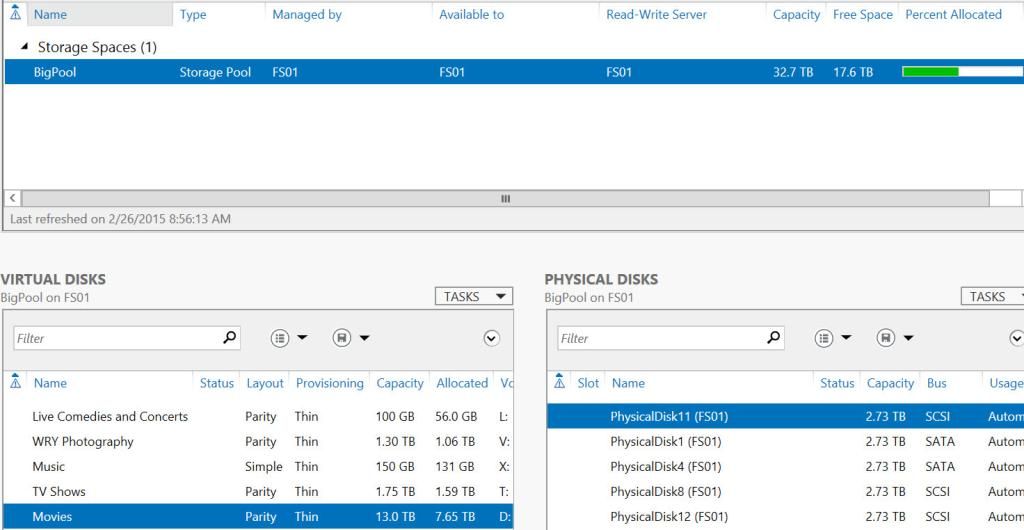
I put server 2012 R2 on it and setup storage pools. I like them a lot so far. I like that I have the option to setup whatever I want. For instance you could do 2 drives striped and have 4 hot spares if you wanted. Not that that would be very efficient but you could. The drives don't have to be the same size either.

And then when you make your virtual disks you can make them stripped (which is named simple in the menu), parity or mirrored and you can do NTFS or ReFS.


Sort of related, I also checked Kodi/XBMC and as of 13.0 you can now buffer to a HDD on the HTPC, whereas you could only buffer to RAM previously. This may not be that important, however in my setup the HTPC is connected to the rest of the network via a homeplug, which is nice but not that great for streaming content. Well I did a test after changing the settings to buffer to the HDD and it works perfectly now over the new NAS, on the hold version of XBMC it stuttered and was unmatchable. Which is why I ended up with a external USB 3.0 box with 4 3tb drives in it with all my content. Now ill copy all that to the NAS and add those drives in for 20+ TB of space with hot spares.
 
I'm getting frustrated. My NAS keeps losing connection, even after I gave it a new IP. How do I reset all of the ip's or clear those I have given to my NAS?

[edit]
Isn't this weird?
I have given my NAS its own IP in the Synology Assistant and added it to Windows Credentials, so it shouldn't lose connection at any point.
Yet, it just dropped the connection.

=;(
 
I hate double posting but I need help with this issue. I took a screen grab of the message it gives me, when I try to connect:

sVS7E8i.png


I have give my NAS its own id and set it up in Windows Credentials.
 
I hate double posting but I need help with this issue. I took a screen grab of the message it gives me, when I try to connect:

sVS7E8i.png


I have give my NAS its own id and set it up in Windows Credentials.

No offense, but I don't know that you are technologically equipped to handle the issues you are having. Several people have tried to help you and you haven't really understood the questions or advice they responded with.

That said, this usually means you have a problem with name resolution on your network. Either windows thinks that the NAS device exists with the same name and IP address and the credentials are changed and it doesn't know the new ones. Or windows has that drive mapped already and you're trying to re-map it. Or less likely, another device or router is holding onto and broadcasting old information about the NAS that needs to be deleted or updated.
 
I would say I understand what people have told me, and I have learned how to give my NAS an IP and how to set it in Windows Credentials. So now I don't have to type in my password to get in, as it remembers it - which is handy, and thanks for that help. :)
I'm not sure if I understand your advice. I'm trying to though. I gave my NAS an IP before but have given it a new one now, and changed it in Windows Credentials so it corresponds with the ip I have given it.
I would like to delete the old information about my NAS but that's what I don't know how to do.
Windows already have the drive mapped to P and I'm not trying to re-map it. I'm just trying to enter it, were that message pops up.

I don't know if the problem could be, because I have mapped it a drive, after I gave it an IP and added it to the Windows Credentials.

Also, I think I have clearly done everything I have been told in this thread. And it have all been successful, until it have started losing connection again, even after I have given it an IP address and added it to Windows credentials.
 
I hate double posting but I need help with this issue. I took a screen grab of the message it gives me, when I try to connect:

sVS7E8i.png


I have give my NAS its own id and set it up in Windows Credentials.

I get this error on my mapped drives on another pc from time to time. All i have found is to login and out of pc or restart then i can access the drives or remap them, not found a permanent solution yet. Do you get the error everytime you try and access the nas?
 
I get this error on my mapped drives on another pc from time to time. All i have found is to login and out of pc or restart then i can access the drives or remap them, not found a permanent solution yet. Do you get the error everytime you try and access the nas?
I get it 90 of the time now. I'm trying to change the IP address all the time and add it to Windows credentials but it drops the connection many times. Frustrating as I can't transfer nor watch my movies or anything else.
 
On my Synology NAS I go to Control Panel > Network > Network Interface and give it a IP address. After that, I go to Manage Windows Credentials were I type in the address along with the username and password I use to log in to the NAS. It says No to use DHCP. So it's an IP reservation. That's what I were told to do earlier in this thread. And I have read through all of the suggestions again just to be sure.

I have a hard time even accessing the web interface of my NAS, so it's hard to even get to the settings.

CSKatJk.png
 
Why are you using a IP address and not a DNS host name? Have you given the NAS a static IP or a DHCP reservation?

A static IP is more reliable than relying on a DNS name unless you put that DNS name in the host file. During a log on process it can sometimes take a second or two for the machine to register the DNS name to the IP.
 
On my Synology NAS I go to Control Panel > Network > Network Interface and give it a IP address. After that, I go to Manage Windows Credentials were I type in the address along with the username and password I use to log in to the NAS. It says No to use DHCP. So it's an IP reservation. That's what I were told to do earlier in this thread. And I have read through all of the suggestions again just to be sure.

I have a hard time even accessing the web interface of my NAS, so it's hard to even get to the settings.

CSKatJk.png

What are the values listed there? It's okay to tell us because those are internal network values that are common across anyone's network. Are you sure they match up with your router correctly?
 
Finished my new server.

2015-02-26_9-57-54_zpspm1myym0.jpg


12 3tb drives. And concerned parties will be glad to know that the virtual disks are provisioned with parity instead of just striped. Only other thing I want is to add two more 3 TB drives as hot spares.

Storage pools are definitely interesting, I think I still look them better than ZFS but there are some things I like about ZFS better.
 
Storage Spaces / ReFS can't really compare to ZFS in terms of file security.

MS kinda went half-assed on ReFS as to not make it have the hardware requirements that ZFS does.

I Hope you are using 2012 R2 at least.
 
Storage Spaces / ReFS can't really compare to ZFS in terms of file security.
Its a home file server, couldn't care less about security.


MS kinda went half-assed on ReFS as to not make it have the hardware requirements that ZFS does.
Going by what i've learned about Windows server vNext and Azure, they may be trying to take hardware requirements out of the picture. They buy a shit ton of servers every month, therefore they need everything to be configurable and the same from the software level.

I Hope you are using 2012 R2 at least.

Well, yea. Only a noob would deploy 2012 at this point.
 
Ok, so it's ample time I became serious and make my NAS dreams a reality. With a dead HD and a shaky PC, I think having a solid backup solution wouldn't be a bad idea.
But damn, those things aren't cheap. I'm not even sure I really need a NAS, I toyed with the idea of a re-purposed desktop PC, there is the cloud too... but at the end of the day the best would be to mix those options I think.
But still, those prices.

So I would use a NAS for essential file backups that are size insignificant like ebooks. Oh, and evidently the family pictures.
Then there are the old Music CD I would like to ripp, again not really big, even in lossless form.
Then I would like to ripp the 300+ DVD I have in my collection.
And the 50+ BR.

Is there other things I should totally do with a NAS ?
As for Raid, I think the secure one would be the one (forgot the name) that copy everything from one HD to the other, no ?

What should I aim for ? 2 bays seems really limiting, but 4 bays NAS are really expensive. What if I choose the 2 bays solution with big HD ?
Beyond backup I really would like to evolve my numeric life, as in have my data in one secure place and streams it wherever I want, be it Desktop, TV, Tablet etc.

Sorry if all this is your typical customer indecision, I really could use some help here.

 
Ok, so it's ample time I became serious and make my NAS dreams a reality. With a dead HD and a shaky PC, I think having a solid backup solution wouldn't be a bad idea.
But damn, those things aren't cheap. I'm not even sure I really need a NAS, I toyed with the idea of a re-purposed desktop PC, there is the cloud too... but at the end of the day the best would be to mix those options I think.
But still, those prices.

So I would use a NAS for essential file backups that are size insignificant like ebooks. Oh, and evidently the family pictures.
Then there are the old Music CD I would like to ripp, again not really big, even in lossless form.
Then I would like to ripp the 300+ DVD I have in my collection.
And the 50+ BR.

Is there other things I should totally do with a NAS ?
As for Raid, I think the secure one would be the one (forgot the name) that copy everything from one HD to the other, no ?

What should I aim for ? 2 bays seems really limiting, but 4 bays NAS are really expensive. What if I choose the 2 bays solution with big HD ?
Beyond backup I really would like to evolve my numeric life, as in have my data in one secure place and streams it wherever I want, be it Desktop, TV, Tablet etc.

Sorry if all this is your typical customer indecision, I really could use some help here.
The main benefit of raid is availability. When one drive fails, everything is still up and running and you can conveniently replace the drive. However, it's not a great backup. If the nas fails or lightning strikes or whatever, the data isn't safe. You'd want to backup to an external drive that's not always connected.
I have a 2-bay nas with only one 4TB disk and another 4TB external drive to to backup the nas.
 
The main benefit of raid is availability. When one drive fails, everything is still up and running and you can conveniently replace the drive. However, it's not a great backup. If the nas fails or lightning strikes or whatever, the data isn't safe. You'd want to backup to an external drive that's not always connected.
I have a 2-bay nas with only one 4TB disk and another 4TB external drive to to backup the nas.

My god at the price of a 4TB external drive :o
You have a good point, I should really think about multiplying the backups instead of only counting on the NAS.

Is the Synology DS214 a good choice for beginners ?
 
My god at the price of a 4TB external drive :o
You have a good point, I should really think about multiplying the backups instead of only counting on the NAS.

Is the Synology DS214 a good choice for beginners ?

This is going to push you into more thinking, saving, planning, etc. but buy for the future and not now.

There is nothing wrong with the DS214 but it's only two bays. That means even with 4TB drives you'll only have 4TB. At a minimum consider a 4-bay set up so you can get as much space as possible in there; though some will recommend going for 6 or more so you can better run RAID 6 or 10.

Synology does offer a version of software raid called SHR/SHR-2 which is their home built software. The benefit here over traditional RAID is you can mix and match drive sizes. There are downsides to mixing drives sizes though so make sure you read up on it: http://forum.synology.com/wiki/index.php/What_is_Synology_Hybrid_RAID?

Also, for the love of god, do not think this makes you immune to data failure. Invest in an off-site solution like Crashplan or Backblaze. Neither officially support network drives, but there are ways to make it work with at least Crashplan.
 
Thanks for you input on this, NAS and digital life in general have always been a dream and a puzzle at the same time. I know that with the proper tools I can really add a lot to my technology experience. But the whole thing is so rich with possibilities that I can't decide on a path.
So to be safe I should have my data on a NAS in Raid1 but mix it with autolated cloud backups ? Is there a need for an external hd in that case ?
And yeah, a question that must be asked often seeing the prices of those beasts, what about building a PC to take on the functions of a NAS ? Must be cheaper, no ?

Oh and a stupid question I need to ask : can I install a NAS with just one hd, copy things on it and then at a later date add another hd and make a raid 1 ? I mean can you set up a raid with one of the hd already in use ?
 
So to be safe I should have my data on a NAS in Raid1 but mix it with autolated cloud backups ? Is there a need for an external hd in that case ?
And yeah, a question that must be asked often seeing the prices of those beasts, what about building a PC to take on the functions of a NAS ? Must be cheaper, no ?

Oh and a stupid question I need to ask : can I install a NAS with just one hd, copy things on it and then at a later date add another hd and make a raid 1 ? I mean can you set up a raid with one of the hd already in use ?

I'm assuming you're saying RAID 1 if you go with the 2 bay model. If you go with 4 or more I wouldn't use RAID 1.

Yes, you can build your own system. unRaid, FreeNas, Nas4Free, FlexRAID and SnapRAID are free (to an extent, ie unRaid costs money for 3 or more drives) tools you can use. These are all software RAID, though I think you can use RAID cards with FreeNAS (and maybe others). They can be cheaper, but they may require more of your time to understand things. At its core it's just building a PC, but there can be hardware compatibility and hardware specific things. Nevermind the software specifics that may come from a particular product like ZFS pooling.

They're expensive, but those devices from Synology, Drobo, Netgear, Seagate, etc that are RAID in a box provide a benefit to the consumer. If you value your time then the up-sell could be worth it.

As for installing it to a drive, that's not really how RAID works. When I say software RAID I don't mean a single piece of software you install like Chrome or Dropbox. It's simply using software to act as the RAID controller over dedicated hardware. Further, traditional RAID does not allow for easy expansion nor can you mix drive capacities.

What I would recommend doing is determine a budget first. This will play a big role in where you go.
 
How do you guys feel about Storage Spaces if all I'm going to be using it as a media server primarily? Originally I was looking into things like unRAID and Free NAS, but in the end, I feel it'd be far simpler for me to set up storage spaces in Windows 8.1 with one drive in parity. I use Plex quite often, and I have PlexConnect set up on my current computer with the AppleTV. It's the main reason I'd like to stick with Windows. Any severe drawbacks here?

Only one I can think of is that I won't be able to set up a NFS share as easily (if at all). When I first started my blu-ray ripping, it was with the intention of streaming my uncompressed rips at my home theater setup, and I found having a NFS share through HaneWIN on Windows 7 was able to do it pretty flawlessly when streaming to a Boxee Box. I've traded out my Boxee Box for Rokus and Apple TVs, though, so I've pretty much been using Plex exclusively. I feel like HaneWIN NFS isn't supported for Windows 8.1, but I'm not sure.
 
Your performance will 100% come down to 1. your CPU, 2. your network, 3. your drives. It's plausible NFS made a difference with your Boxee Box, but that may have had to do with that being an underpowered device trying to play an uncompressed file over your network; not to mention it kind of stunk and had tons of issues. Really the only time I see anything regarding NFS vs CIFS vs NTFS vs etc is in enterprise environmets where you're pushing a lot of data.

Since you're streaming uncompressed to a Roku and AppleTV you're likely going to have transcoding happen. Just make sure you have at least a Core2Duo and you should be fine.
 
Your performance will 100% come down to 1. your CPU, 2. your network, 3. your drives. It's plausible NFS made a difference with your Boxee Box, but that may have had to do with that being an underpowered device trying to play an uncompressed file over your network; not to mention it kind of stunk and had tons of issues. Really the only time I see anything regarding NFS vs CIFS vs NTFS vs etc is in enterprise environmets where you're pushing a lot of data.

Since you're streaming uncompressed to a Roku and AppleTV you're likely going to have transcoding happen. Just make sure you have at least a Core2Duo and you should be fine.

Yeah, I'm good with the hardware I've selected and bought. I just rarely see Storage Spaces suggested in this thread so I wanted to be sure there were no severe draw backs if my main use is movies through Plex and some backing up from other computers for my familys' photos (have a cloud backup of photos also). I didn't want to commit to Windows 8.1 and then regret it later. Thanks!
 
I'm assuming you're saying RAID 1 if you go with the 2 bay model. If you go with 4 or more I wouldn't use RAID 1.

Yes, you can build your own system. unRaid, FreeNas, Nas4Free, FlexRAID and SnapRAID are free (to an extent, ie unRaid costs money for 3 or more drives) tools you can use. These are all software RAID, though I think you can use RAID cards with FreeNAS (and maybe others). They can be cheaper, but they may require more of your time to understand things. At its core it's just building a PC, but there can be hardware compatibility and hardware specific things. Nevermind the software specifics that may come from a particular product like ZFS pooling.

They're expensive, but those devices from Synology, Drobo, Netgear, Seagate, etc that are RAID in a box provide a benefit to the consumer. If you value your time then the up-sell could be worth it.

As for installing it to a drive, that's not really how RAID works. When I say software RAID I don't mean a single piece of software you install like Chrome or Dropbox. It's simply using software to act as the RAID controller over dedicated hardware. Further, traditional RAID does not allow for easy expansion nor can you mix drive capacities.

What I would recommend doing is determine a budget first. This will play a big role in where you go.

Hmm, maybe I'm misunderstanding but it feels like you answer my last question in the case of the PC/NAS idea I was talking about one paragraph earlier, while all I meant is : can I buy a Syno and an HD, use it as is because oh boy the prices add up, and some month later add another hd and then tell the Nas to copy the content of the old hd to the new and set the thing in raid1.
Then again maybe you perfectly answered me and I'm in over my head.
 
Top Bottom