
-
Hey Guest. Check out your NeoGAF Wrapped 2025 results here!
You are using an out of date browser. It may not display this or other websites correctly.
You should upgrade or use an alternative browser.
You should upgrade or use an alternative browser.
Xbox One Screenshot Sharing is Live!
- Thread starter Noobcraft
- Start date


But he said that he didn't have a Twitter account, so you told him he can just grab them from Xbox.com. But...your description of how to do that necessitates a Twitter account.
Sorry about that hehe.
SO

Man, brazilian portuguese translations feel so forced. "Cuzão" :lol


Seems like after taking the shot I have to exit Upload, then start it up again before they can be shared. It's either that or there's a delay before the share options will pop up.
Yup, it's really unintuitive and kind of clunky.
Share option won't show up until they're uploaded. Every screenshot you take gets uploaded automatically like game clips, but sometimes it seems to take a little bit.Seems like after taking the shot I have to exit Upload, then start it up again before they can be shared. It's either that or there's a delay before the share options will pop up.
Seems like after taking the shot I have to exit Upload, then start it up again before they can be shared. It's either that or there's a delay before the share options will pop up.
because its uploading. you can't share until its fully uploaded.
Seems like after taking the shot I have to exit Upload, then start it up again before they can be shared. It's either that or there's a delay before the share options will pop up.
It seems like a temporary solution so that we can share stuff and because of that it's less than optimal. I expect it to get better each update they release leading up to the public release in March.
I think having lossless screenshots will help Xbone in the long run in regards to public perception. We're already seeing it here, people are starting to realize that 900p is not the end of the world and that Xbone is not some super weak ass machine. It's weaker than PS4, yes, but it's still a massive improvement over last-gen and has great looking titles already.
I don't think anyone here thinks of the X1 as a super weak system. It is clearly a very proficient game machine.


Poodlestrike
Banned
I don't think anyone here thinks of the X1 as a super weak system. It is clearly a very proficient game machine.
You'd be surprised. "Weaker" machine often translates to "weak" machine, as the message gets passed down grapevine.
SavageCobra
Member
I'll join in on the forza fun.
saw the buildings in the background of this pic, so I took the 2nd pic from up there.


saw the buildings in the background of this pic, so I took the 2nd pic from up there.

Xaero Gravity
NEXT LEVEL lame™
Holy shit, now I desperately need to buy Horizon 2.
barneystuta83
Member
I've noticed a few people saying that the screenshot here don't look as good as they do on their Xbox... There could be a few reasons for that.
1. I assume most are viewing the screenshots on a different screen than the one they game on. For example, on my Note 4, the screenshots do really pop. They are very high res on a relatively small screen.
2. TV calibration. The Xbox One has a decent colour calibration tool. Use it and follow it as close as you can. At first, especially if you are making a lot of tweaks, it may first appear 'rubbish' (different...) but stick with it. Your eyes will adjust and you will have the best picture your screen can display.
3. TV/Monitor screen. Kind of linked to 1 and 2,the Xbox One can only look as good as the screen that the image is appearing on.
1. I assume most are viewing the screenshots on a different screen than the one they game on. For example, on my Note 4, the screenshots do really pop. They are very high res on a relatively small screen.
2. TV calibration. The Xbox One has a decent colour calibration tool. Use it and follow it as close as you can. At first, especially if you are making a lot of tweaks, it may first appear 'rubbish' (different...) but stick with it. Your eyes will adjust and you will have the best picture your screen can display.
3. TV/Monitor screen. Kind of linked to 1 and 2,the Xbox One can only look as good as the screen that the image is appearing on.
Man, brazilian portuguese translations feel so forced. "Cuzão" :lol
That's a direct translation of the game's original english script. Is that a word that isn't really used in Brazilian Portuguese?


I've noticed a few people saying that the screenshot here don't look as good as they do on their Xbox... There could be a few reasons for that.
1. I assume most are viewing the screenshots on a different screen than the one they game on. For example, on my Note 4, the screenshots do really pop. They are very high res on a relatively small screen.
2. TV calibration. The Xbox One has a decent colour calibration tool. Use it and follow it as close as you can. At first, especially if you are making a lot of tweaks, it may first appear 'rubbish' (different...) but stick with it. Your eyes will adjust and you will have the best picture your screen can display.
3. TV/Monitor screen. Kind of linked to 1 and 2,the Xbox One can only look as good as the screen that the image is appearing on.
It's because the screenshots are rendering out at video blacklevels 16-235, so things that are black are grey and things that are white aren't as bright as they should be when viewed on a PC.
I can see this on the historgram when I've imported it into Adobe Lightroom
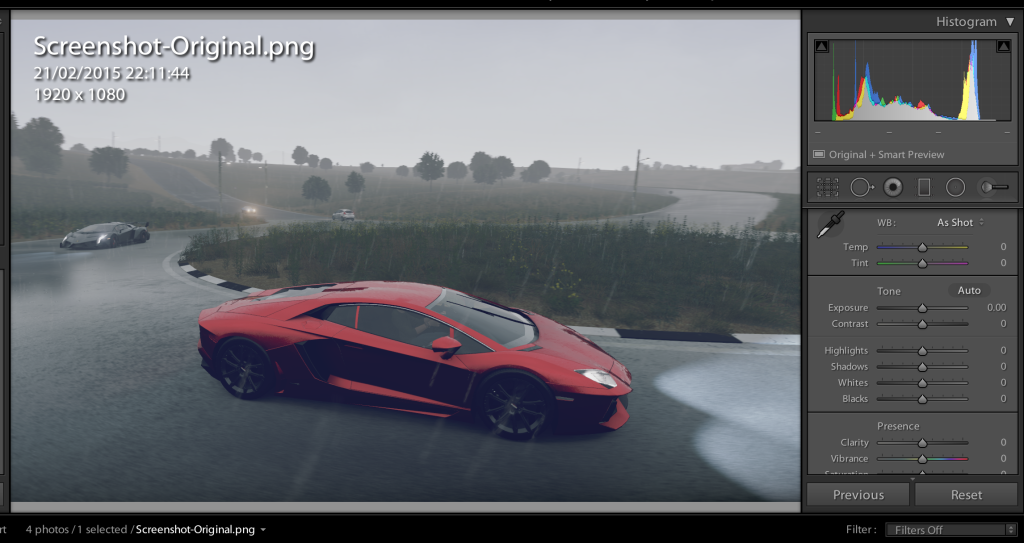
Most Xbox One owners will have the console set to limited RGB (and they should!)It's because the screenshots are rendering out at video blacklevels 16-235, so things that are black are grey and things that are white aren't as bright as they should be when viewed on a PC.
I can see this on the historgram when I've imported it into Adobe Lightroom
I'll take some shots with full range to see if it matters.
Most Xbox One owners will have the console set to limited RGB (and they should!)
I'll take some shots with full range to see if it matters.
I've saved a few other pictures from this thread and they are at 0-255.
I'm not sure if that is the game or the user's console
Here's one I took with full RGB:I've saved a few other pictures from this thread and they are at 0-255.
I'm not sure if that is the game or the user's console

Here's one I took with limited RGB:

Are they different?


HighResTomato
Member


Here's one I took with full RGB:
Here's one I took with limited RGB:
Are they different?
Yeah it shows up as they should in the histograms
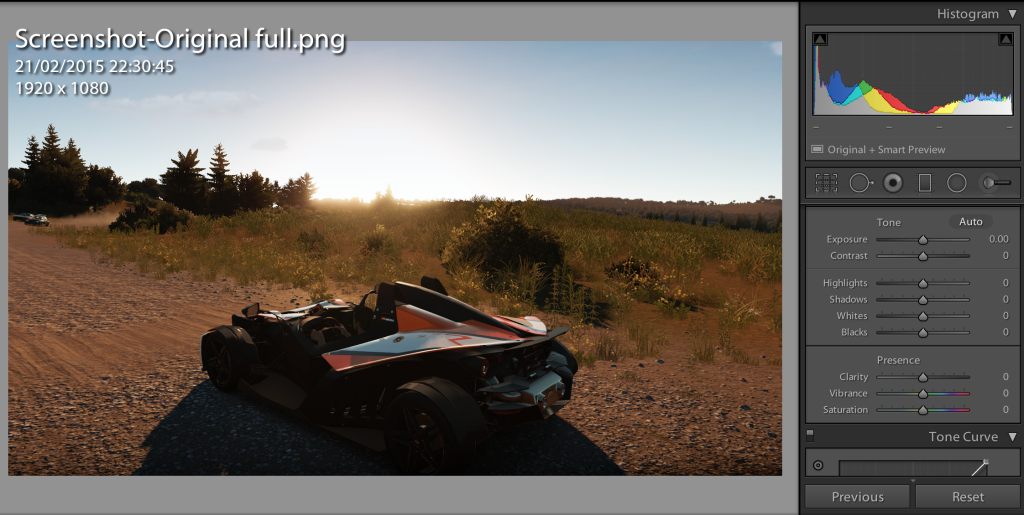
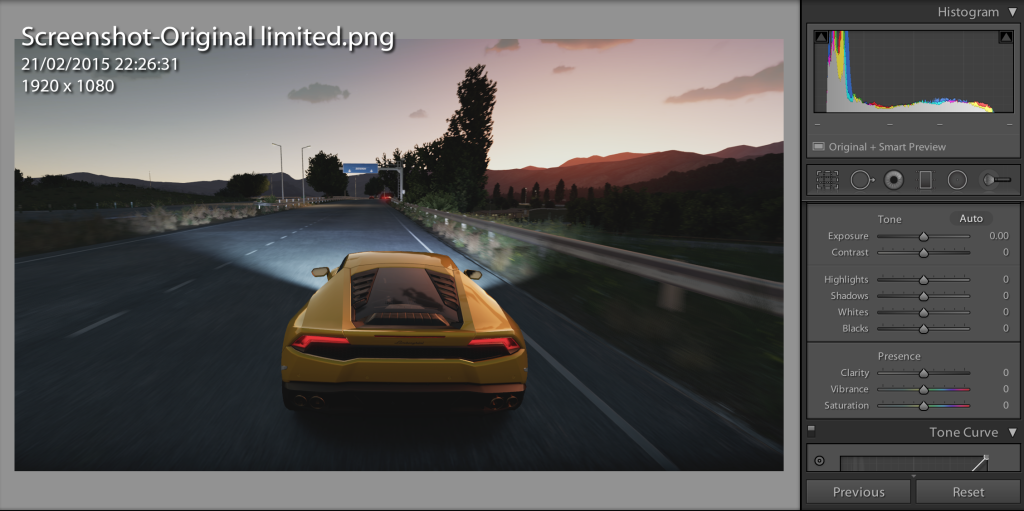
So basically, if you are taking screenshots to share on the internets, you want to set your console to full before you do it.
RebornYeti
Member
Orcas in GTAV

I'm liking this feature.
I'm liking this feature.

The English Conquistador
Member
Ugh the screenshot function isn't working for me. I double tap the Xbox button and just receive the normal "record that" etc functionality.
Anyone else having an issue?
Anyone else having an issue?
VisceralBowl
Member


Are you in the preview program?Ugh the screenshot function isn't working for me. I double tap the Xbox button and just receive the normal "record that" etc functionality.
Anyone else having an issue?
Ugh the screenshot function isn't working for me. I double tap the Xbox button and just receive the normal "record that" etc functionality.
Anyone else having an issue?
Are you in the preview program? Have you done the update?
The English Conquistador
Member
I got the update but I am not in the preview program. 
I got the update but I am not in the preview program.
That's not the update then.
You only get the update that contains beta functionality if you are in the program, you can either get someone to invite you and have beta updates (glitchy) or hang on a few weeks and get the public release.


Doug Heffernan
Member
Wow.
Can I get a preview invite?
Gamertag is same as my username.
Can I get a preview invite?
Gamertag is same as my username.
The English Conquistador
Member
That's not the update then.
You only get the update that contains beta functionality if you are in the program, you can either get someone to invite you and have beta updates (glitchy) or hang on a few weeks and get the public release.
Wow, well that sucks. :/
Would anyone be kind enough to give me an invite to the preview? Since the screenshotting is so hot right now, waiting for the public release would be a bummer.
My Xbox ID is "THat J0keR"
The o is replaced with a zero.
JackAubrey
Member
My Unity-Screenshots from the screenshot-thread.
How are you getting those views without Arno in the way?
How are you getting those views without Arno in the way?
Just dress Arno like a dandy and have him pose with a shank up someone's chin.
I couldn't figure it out either.
JackAubrey
Member
Just dress Arno like a dandy and have him pose with a shank up someone's chin.
I couldn't figure it out either.
Just experimenting now. Seems if you cover against a wall/object then turn the camera around you can sometimes remove Arno from the frame.
3rdamention
Member
Yeah it shows up as they should in the histograms
So basically, if you are taking screenshots to share on the internets, you want to set your console to full before you do it.
However, remember the full setting doesn't look right in many games because the Microsoft encouraged range and Xbox One default is limited....JStevenson talked about this when addressing crushed Blacks in Sunset Overdrive..


VisceralBowl
Member

StudioTan
Hold on, friend! I'd love to share with you some swell news about the Windows 8 Metro UI! Wait, where are you going?
Wow, well that sucks. :/
Would anyone be kind enough to give me an invite to the preview? Since the screenshotting is so hot right now, waiting for the public release would be a bummer.
My Xbox ID is "THat J0keR"
The o is replaced with a zero.
Even if you get an invite getting into the preview isn't instant and you won't be getting this preview before it goes live, sorry


Suburban_Nooblet
Banned
Sweet baby fuck. I love this so much.

theDeeDubs
Member
Playing through Sleeping Dogs and figured why not take some.


Trying out the screenshot with Ryse. Good excuse to replay the game


Ryse is fucking awesome and looks absolutely glorious. I am wanting to play it again.
The English Conquistador
Member
Even if you get an invite getting into the preview isn't instant and you won't be getting this preview before it goes live, sorry
Major bummer! Thanks for the info to you and the others. Guess I'll just have to wait.


Just experimenting now. Seems if you cover against a wall/object then turn the camera around you can sometimes remove Arno from the frame.
Just stand next to a wall and move the camera around until Arno disappears
