• Hey Guest. Check out your NeoGAF Wrapped 2025 results here!

New Owner Steam Deck Hardware General - Bring your tips and experience!

simpatico

Gold Member
I searched for a Steam Deck general and didn't find anything. Maybe this can turn into that. I'm happy to edit the OP as good tips n' tricks roll in.

I got blindsided with a Steam Deck gift yesterday and I'm woefully unprepared. I don't think I've received a gift of significant value since the launch window era Sega Dreamcast. So I'm getting my head around this from an emotional and technical standpoint.

I'll start with some impressions of handheld as a medium. I bought PSP at launch. Enthusiastically. That was the height of my pre-parenting disposable income, interest in Playstation as a brand and overall dedication to console gaming as a hobby. I bought as Gucci of a PSP setup as was available. It just never truly clicked. I'm a man who owned a library of UMD movies, so it was not for lack of effort.

I'm not saying I hated it at all. This is what it all boils down to: I was never able to have a fully immersed experience where I played a "real" game start to finish. By "real" game I mean something like a full-fledged Metal Gear or Resident Evil game. Played a lot of little side piece puzzle games or arcade games and that was cool. But I was really hoping PSP would be the one to offer that sitting down "Metal Gear Solid 3 Snake Eater played for the first time at release" experience.

Bought into 3DS but at that point I was a new father and never would have found the time for something beyond my PS36ii.

Played around a bunch last night and I see big potential. Just as a medium for games it's very interesting. I saw detail in Hollow Knight and Blasphemous that was getting lost even at monitor viewing distance. Certainly possible I just don't have the best eyes, but either way there is a novel aspect here and it's been a looooooooong ass time since I've had anything novel injected into my gaming workflow.

I'm really here to grouse and look for some relief on a few quirks. The main one is the shoulder buttons. I don't know if I have a bad unit or if it's something widespread and known, but I really have to hit the shoulder buttons on this thing just right to make them register. Is there a sensitivity setting I can adjust? What I'd really like to do from an ergonomic perspective is remap L1 and R1 to L4 and R4. Is there a way I can do this system wide? Really curious about this one as I'd love to use the track pad as the right analog stick as well.

What other stuff should I be doing with the Deck? Just as far as housekeeping type items. I'm really loving this thing way more than I ever expected I would. I didn't really have any intentions of buying one, but I'd also never seen one in the flesh. Game recommendations are welcome too! I'm looking for a racing game. Forza Horizon has a massive file size and apparently has CTD problems. But something of that ilk would be perfect.
 
PSP did offer those games, with compromises. Peace Walker and Portable Ops were both really good, there were more.

I sold my SD long ago but I played a lot of older games, and it handled them all really well. So I think with SD it's best to play older games or newer simpler ones like Silksong or whatever. When it came to racing games, I played like DIRT Rally 2.0 and was good on it. Again, older title. Wreckfest as well.
 
Last edited:
3, 4 or 5??
From what I've read, all of them. I only own 5 on Steam. Any experience? I've only got a 512gb card right now.

Absolutely zero problems 10 hours I played. Holds 45FPS at Medium. If you have OLED try always to set resolution a multiple of 30.
I keep thinking it's the perfect Deck game. I'm gonna make room for it on my SD card. I'm really slow with the controller on this for some reason. Playing Trepang2 on Easy and still kinda getting my shit pushed in. Are the shoulder buttons known to be a little cheesy?
 
Last edited:
From what I've read, all of them. I only own 5 on Steam. Any experience? I've only got a 512gb card right now.


I keep thinking it's the perfect Deck game. I'm gonna make room for it on my SD card.
Only 5 but on Windows and gamepass version. No CTD. 🤷‍♂️
 
I searched for a Steam Deck general and didn't find anything

CV2IYkqZZVF5ecqQ.gif
 
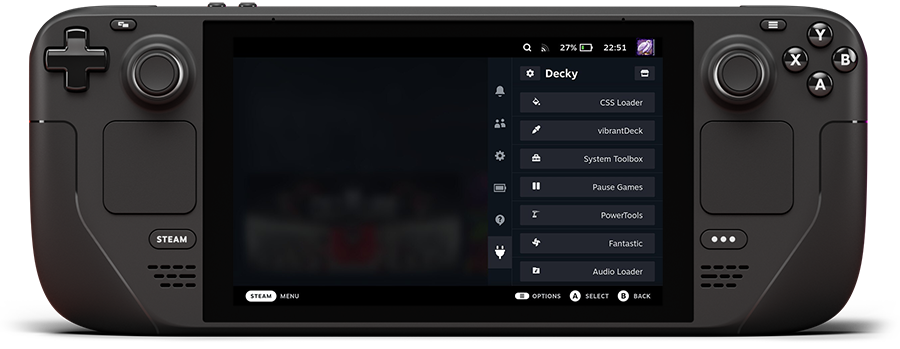
First thing I recommend new Steam Deck owners do is install Decky


My favorite plugins are
  • CSS loader (change the Steam Deck layout)
  • Playtime (tracks playtime of non-Steam games, emulated games, etc.)
  • SteamGridDB (adds a menu to change game's artwork, also works great for non-Steam games)
  • HowLongToBeat (adds information to game pages about how long a particular game takes to finish)
  • PlayCount (adds number of current players to game pages)

There's like a million and one useful plugins and tools

 
Bought my LCD recently when it was £279 - best advice I received:

The SSD can be replaced very easily. I bought the cheapest model and followed a YouTube video to bump mine up to 512GB for cheaper than buying their 512 model.

Also, note that in the settings menu (the ... button on the lower right side), you can turn down the refresh rate of the screen, which also caps the frame rate to match. I've found 40hz (to my eyes/brain) feels 90% as good as 60 for most of the indie and older games that I play on the Deck. Turning this down gives you longer battery life, while also generating less heat and noise. To me this is a huge feature of the Steam Deck.

40hz - doesn't get loud at all, doesn't get hot at all, minimal to no performance impact, much better battery life.
 
Bought my LCD recently when it was £279 - best advice I received:


40hz - doesn't get loud at all, doesn't get hot at all, minimal to no performance impact, much better battery life.
Not a bad idea!


Anyone know if I can bind L1 and R1 to L4 and R4 system wide? ChatGPT is unhelpful this morning. Not only do the shoulder buttons suck, but my hands naturally sit pretty low. The rear buttons would be perfect but I can't get any game to accept them as bindings. I know I have to approach it like I'm binding KB&M. I just need to find a good video. I'm sure it's possible to do.
 
Anyone know if I can bind L1 and R1 to L4 and R4 system wide? ChatGPT is unhelpful this morning. Not only do the shoulder buttons suck, but my hands naturally sit pretty low. The rear buttons would be perfect but I can't get any game to accept them as bindings. I know I have to approach it like I'm binding KB&M. I just need to find a good video. I'm sure it's possible to do.
Can't be done system-wide, only on a per-game basis.

While in-game, press the Steam button then go to Controller Settings. That menu will let you re-bind them.
 
Last edited:
I searched for a Steam Deck general and didn't find anything. Maybe this can turn into that. I'm happy to edit the OP as good tips n' tricks roll in.

I got blindsided with a Steam Deck gift yesterday and I'm woefully unprepared. I don't think I've received a gift of significant value since the launch window era Sega Dreamcast. So I'm getting my head around this from an emotional and technical standpoint.

I'll start with some impressions of handheld as a medium. I bought PSP at launch. Enthusiastically. That was the height of my pre-parenting disposable income, interest in Playstation as a brand and overall dedication to console gaming as a hobby. I bought as Gucci of a PSP setup as was available. It just never truly clicked. I'm a man who owned a library of UMD movies, so it was not for lack of effort.

I'm not saying I hated it at all. This is what it all boils down to: I was never able to have a fully immersed experience where I played a "real" game start to finish. By "real" game I mean something like a full-fledged Metal Gear or Resident Evil game. Played a lot of little side piece puzzle games or arcade games and that was cool. But I was really hoping PSP would be the one to offer that sitting down "Metal Gear Solid 3 Snake Eater played for the first time at release" experience.

Bought into 3DS but at that point I was a new father and never would have found the time for something beyond my PS36ii.

Played around a bunch last night and I see big potential. Just as a medium for games it's very interesting. I saw detail in Hollow Knight and Blasphemous that was getting lost even at monitor viewing distance. Certainly possible I just don't have the best eyes, but either way there is a novel aspect here and it's been a looooooooong ass time since I've had anything novel injected into my gaming workflow.

I'm really here to grouse and look for some relief on a few quirks. The main one is the shoulder buttons. I don't know if I have a bad unit or if it's something widespread and known, but I really have to hit the shoulder buttons on this thing just right to make them register. Is there a sensitivity setting I can adjust? What I'd really like to do from an ergonomic perspective is remap L1 and R1 to L4 and R4. Is there a way I can do this system wide? Really curious about this one as I'd love to use the track pad as the right analog stick as well.

What other stuff should I be doing with the Deck? Just as far as housekeeping type items. I'm really loving this thing way more than I ever expected I would. I didn't really have any intentions of buying one, but I'd also never seen one in the flesh. Game recommendations are welcome too! I'm looking for a racing game. Forza Horizon has a massive file size and apparently has CTD problems. But something of that ilk would be perfect.
On the shoulder button front, the shoulder buttons are the weak link on the lcd decks. When I had an lcd I had to send it back for repairs twice for shoulder button issues. They fixed it with the OLED, I'm pretty sure.

Hopefully it's just a sensitivity thing and not a mechanical issue, but I thought I'd let you know.
 
Bought my LCD recently when it was £279 - best advice I received:


40hz - doesn't get loud at all, doesn't get hot at all, minimal to no performance impact, much better battery life.
Thought it was included in the post I made but also make sure to set the TDP to 10 instead of 15!
 
Make sure you don't let it sit on no battery for long. If you forget about it for a month or two you run the risk the battery never works again.
 
On the shoulder button front, the shoulder buttons are the weak link on the lcd decks. When I had an lcd I had to send it back for repairs twice for shoulder button issues. They fixed it with the OLED, I'm pretty sure.

Hopefully it's just a sensitivity thing and not a mechanical issue, but I thought I'd let you know.
thanks for the heads up. I'll probably get around it through remapping. Like I mentioned, the rear buttons are ergonomically better for me anyways. Good to know it's not just my unit. I'm also learning where to press it to make it register. Seems like it can be trained away that way too. Curious to see if this thing inspires me to pony up for a hot rod version down the line. The OLED is certainly tempting. Esspecially as I'm figuring out this thing is an absolute SHMUP machine. Super Hydorah is perfection in this medium. I'm also really interested it handheld as a medium. Seeing how a full fledged gaming experience is on this thing. I'm still picking up extra graphic detail that I missed at my desk.

Getting better with the controller too. Using Trepang2 as training lol. Still nowhere near regular gamepad status.
 
Last edited:
I bought a Steam Deck OLED about 6 months ago and the best advice I can give is to sell all your other gaming shit because you'll no longer use them.

Kurt Russell Smoking GIF by GritTV
 
Last edited:
1. Install Heroic Launcher to play Epic Games Store games.
Claim free weekly Epic Games Store games on Epic Games Store website.
Watch your library grow without spending any money and launch your games via Heroic Launcher.
2. Install Emudeck, get some ROMS (legally ofc) and enjoy a device that can play games from most console generations effortlessly.
3. Install and setup Chiaki if you have a PS5 and remote play any game you have on PS5. Your PS5 must be wired. Yes, it works better than Playstation Portal.

Now I have infinite library that gets bigger every week on top of my purchases.
 
Last edited:
I shoulda just bought the lcd one when they had them for >$350 a few weeks ago. Still holding out dwindling hope for a $500 Steambox. If they announce some ridiculous price point for the thing, I'll end up getting a used Deck I imagine.

I think the most recent title in my Steam library is Sekiro, the vast majority of the titles are even older and I'm assuming will run fine on the Deck.

I want it mainly for lil indies that don't make it to the console stores.
 
I shoulda just bought the lcd one when they had them for >$350 a few weeks ago. Still holding out dwindling hope for a $500 Steambox. If they announce some ridiculous price point for the thing, I'll end up getting a used Deck I imagine.

I think the most recent title in my Steam library is Sekiro, the vast majority of the titles are even older and I'm assuming will run fine on the Deck.

I want it mainly for lil indies that don't make it to the console stores.
Steam Deck OLED would be great for this purpose. Or Legion Go S Z1E, Ally X (heck, even OG Z1E Ally), and so on.
 
Steam Deck OLED would be great for this purpose. Or Legion Go S Z1E, Ally X (heck, even OG Z1E Ally), and so on.

I've thought about building a mini tower too, but I've only ever built one pc and that was a loooonnnggg time ago.
The Steambox is really exactly what I want, and I'll definitely bite at $500ish. I just dunno if I can justify more than that when the Deck will probably be sufficient for my needs.

Either way, I'll be buying something. I've been without a pc for years now, and I want to immerse myself in the warm fuzzy nostalgia of my Steam library.
 
I've thought about building a mini tower too, but I've only ever built one pc and that was a loooonnnggg time ago.
The Steambox is really exactly what I want, and I'll definitely bite at $500ish. I just dunno if I can justify more than that when the Deck will probably be sufficient for my needs.

Either way, I'll be buying something. I've been without a pc for years now, and I want to immerse myself in the warm fuzzy nostalgia of my Steam library.
You could just get a miniPC with Radeon 780m if you are going to hook it up to a TV.


Just see what is on the cheaper side and has enough RAM/Storage. This would have been better 2-3 weeks ago though.
 
Last edited:
First thing I recommend new Steam Deck owners do is install Decky


My favorite plugins are
  • CSS loader (change the Steam Deck layout)
  • Playtime (tracks playtime of non-Steam games, emulated games, etc.)
  • SteamGridDB (adds a menu to change game's artwork, also works great for non-Steam games)
  • HowLongToBeat (adds information to game pages about how long a particular game takes to finish)
  • PlayCount (adds number of current players to game pages)

There's like a million and one useful plugins and tools


I've been meaning to try decky on bazzite. The css and theme stuff seems interesting. I didnt see any other plugins that were super interesting to me, though.
 
Last edited:
I've been meaning to try decky on bazzite. The css and theme stuff seems interesting. I didnt see any other plugins that were super interesting to me, though.
It used to be a must have for LCD Deck early on as SteamOS didn't have color vibrancy controls at the time and Decky had a plugin for that.
 
PSP was about acquiring mp3s, having the ability to browse the web, the UMD movies, the beauty in PS2 style games on the go. It was the portable utopia. Steam deck considering its technology its only concern is gaming.
 

Generic Tips

  • You can actually run applications in the background like Spotify or Discord, while playing games. Simply go to Desktop Mode, rightclick (left trigger) to add them as a non-steam game. Then launch them like a game, enter a voice chat or play some music, hit the Steam button, hit Home or Library, and then launch whatever game you plan to play. Discord/Spotify will suck up some memory, but for most games not a big deal.
  • For applications like Spotify or Discord, I'd recommend adjusting Steam Input control profile to "Web Browser", and using the trackpad to navigate them (way easier).
  • Changing the System Update Channel to beta, can give you the lastest fixes/improvements, but more often you will get updates to download too.
  • Set the Battery charging limit to 80% in Power settings, if you want to preserve the battery's health for longer.
  • When in-game, hitting the 3-dot button to go to the performance section, you have a toggle to per-game set stuff like frame limits, TDP Limit to save battery for indie/old games, etc.

Emulation

Emudeck

Features
  • Simplifies a huge chunk of the emulator installation, and you can have your entire rom directory on a removable micro-sd if you wanna save your internal storage for PC games.
  • Lets you setup a retroachievements login so emulators and games that support achievements can it.
  • One-click install for Steamdeckgyrodsu, which lets you use the Steam Deck's gyro for motion controls in Cemu (WiiU) and various Switch emulators.
  • Utilize Steam ROM Manager to add game roms to as Steam game categories to launch, or use EmulationStation-DE as a non-steam game for a unique interface.
  • Cloud Saves as a paid option, or you can use Ludusavi to for free sync saves between devices.

Plugins

Deckyloader - Gives you a list of plugins you can quick access directly on the Steam Deck interface using the 3-Dot button on right side of the Steam Deck.
e2HBReEyR0tasZ6B.png

My Favorites (bold ones are imo best ones)
  • AutoFlatpaks - Basically lets you one-click update any non-game apps (Spotify, Discord, Jellyfin, etc.) on your Deck without touching the desktop mode each time.
  • Animation Changer - Lets you change the startup and sleep themes to your deck, and gives a store filled with videos to choose from.
  • Audio Loader - Lets you customize all of the UI sound effects of your device. Ones I use are the Monster Hunter 3 Ultimate, or PS2 System Sounds.
  • CSSLoader - Lets you customize the look of your Steam Deck interface to a pretty ridiculous degree
  • Emudecky - Lets you a toggle shaders for emulators, change aspect ratios for emulators on the fly, & one-click updates for emulators without going to desktop mode.
  • HLTB for Deck - Adds support for Howlongtobeat, so every game when you click to open it will show how long it takes to complete above the install/play button (or in the store).
  • IsThereAnyDeal for Deck - When you're shopping on the Steam store on your deck, gives you options to see prices from other storefronts like GoG to get potentially better options.
  • Music Control - Give you quick access playback controls for playing media from stuff like Spotify if it's running in the background, but you wanna quick pause/skip something.
  • Power Tools - More granular power-user controls to eek the most performance out of your deck for games if you're willing.
  • ProtonDB Badges (#1 you should download this) - Adds badges based on compatibility quality from ProtonDB over games you're shopping for or own on Steam (far better than Steam's own verified program). Also, if you touch the badge on your Steam Deck screen, it will link you to the ProtonDB page where people can offer you tweaks to get better performance or battery life (super handy)...and sometimes get a game to run at all (mainly older games).
  • Quick Launch - Lets you select from various installed flatpak apps without going to Desktop mode, and add them as non-Steam games with cover-art if you put in SteamGridDB key in.
  • SteamGridDB - Plugin that lets you take any Steam or non-Steam game, and add cover art or background art for it. Go to settings per-game, click "change artwork...", and you'll see an interface to pick various options.

Other Storefronts

  • Heroic Games Launcher (GoG, Epic Games Store, Amazon) - IMO, the easiest to use app for getting your games from other PC storefronts on SteamOS. Super easy to use interface, automatically lets you select specific versions of Proton/ProtonGE to automatically use with games, and can auto-add games to Steam as non-steam games after downloading them.
  • Lutris - For every other launcher (Ubisoft, Battle.net, EA Origin, Rockstar, etc). It basically runs every PC launcher like a windows installation, a bit more clunky to use, and I only use for stuff Heroic can't do.
 
Last edited:
I bought one in the middle of last year. I feel like it's the best gaming device I bought in a long time. Emulation is great to have but I come across a lot of switch stuff that just doesn't work. There's plenty of stuff to find that does though.

I love how flawless GFN is on the device. Also it's awesome to get some free games from epic. Heroic launcher is a must have.
 
In 2026 this is still the go to handheld.

I have an XAX , MSI claw 8 AI and switch 2 (going to be selling two) and the SD OLED is the best of the bunch. Sure it's not as powerful but the firm factor and ease of use is unrivalled along with the screen.

Lock to 30 or even 40 and the games on a smaller screen are absolutely fine.
 
In 2026 this is still the go to handheld.

I have an XAX , MSI claw 8 AI and switch 2 (going to be selling two) and the SD OLED is the best of the bunch. Sure it's not as powerful but the firm factor and ease of use is unrivalled along with the screen.

Lock to 30 or even 40 and the games on a smaller screen are absolutely fine.
This, and it's impressive and annoying at the same time this is the only handheld with an OLED screen except Lenovo Go 2, but that costs an arm and a leg and is massive for absolutely no reason other than a gimmick.
 
This, and it's impressive and annoying at the same time this is the only handheld with an OLED screen except Lenovo Go 2, but that costs an arm and a leg and is massive for absolutely no reason other than a gimmick.
Yeah I had all the others so didn't bother with the Lego2. I love the 8" on the MSI and it's definitely second on the list there but anything above that and I feel like it's laptop territory. Similarly the 7" on the ally is just too small especially with the 16:9 aspect ratio.

As usual the steam deck absolutely perfects the balance between screen size and device size.

When they designed this thing they absolutely nailed it. I could sell all of them and be very happy with it. Especially when streaming from my desktop.
 
Top Bottom