• Hey Guest. Check out your NeoGAF Wrapped 2025 results here!

Windows 11 Low Latency Profile mode is now available

winjer

Gold Member

Microsoft is rolling out its Windows 11 CPU-boosting update – here's how to enable it now

Remember the Low Latency Profile (LLP) feature that Microsoft has been working on? The frequency-boosting update is rolling out to eligible Windows 11 24H2 and 25H2 users, promising up to 70% faster flyouts and 40% quicker app launches. If you want to try it now, check out how to enable it below.
Microsoft lists the change in update KB5089573 as a "General Performance" improvement, saying it accelerates app launches and core shell experiences such as the Start menu, Search, and Action Center. This is the same LLP system we covered earlier this month, a feature that briefly pushes CPU clocks higher when Windows detects an interaction that would otherwise feel sluggish.

LLP is designed to cut those delays that make Windows 11 feel slower than it should, such as opening the Start menu, bringing up Search, launching apps, or triggering flyouts and context menus.

Instead of letting the processor ramp up gradually, Windows gives it a short burst of maximum frequency for one to three seconds, finishes the task sooner, then drops back down. Microsoft has defended the approach as normal modern OS behavior rather than a cheat, noting that phones, macOS, and Linux already use similar tricks.
Because this is Windows, the catch is that installing the update does not guarantee the feature will be enabled immediately. Microsoft is using a controlled rollout, so some users may get the code without the switch being flipped.

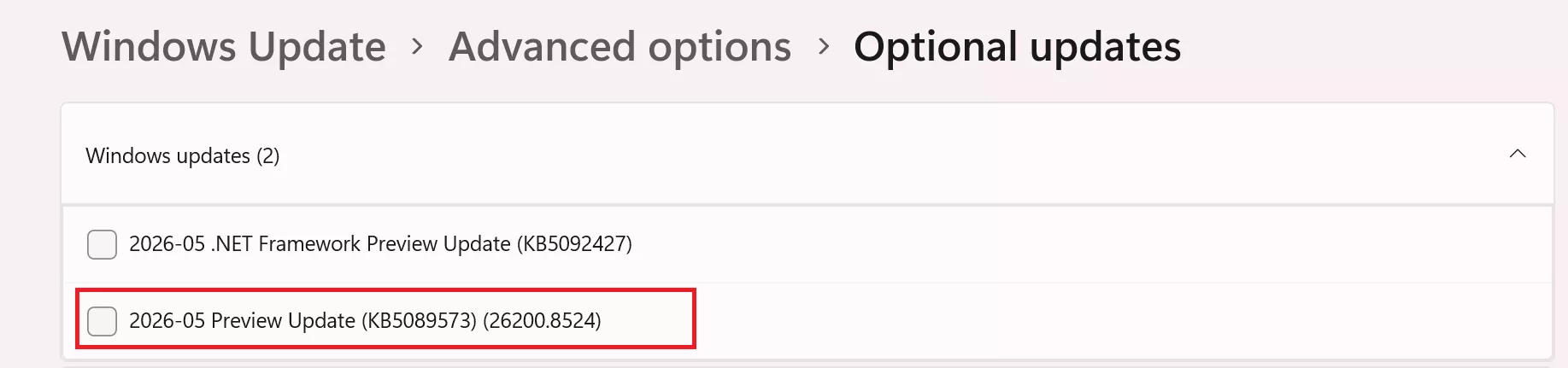
To get the update officially, open Settings > Windows Update > Advanced options > Optional updates, then install KB5089573. The same changes should arrive more broadly with the next Patch Tuesday security update.


Users can force-enable LLP right now using ViveTool, though that remains an unofficial method. After installing KB5089573, download ViveTool (you can do it safely right here), extract it to C:\ViveTool, open Command Prompt as administrator, run cd C:\ViveTool, then enter vivetool /enable /id:58989092 and restart the PC. There is no standard Settings toggle for LLP; once Microsoft enables it by default on your device, it should simply run in the background.


If you want to download the update directly:

Steps to Enable LLP

  1. Open the Windows Settings menu
    • Press Windows + I
  2. Navigate to Windows Update
    • Select Windows Update from the left sidebar
  3. Open Advanced Options
    • Click Advanced options
  4. Locate Optional Updates
    • Scroll down and select Optional updates
  5. Install KB5089573
    • Find the update labeled:
      KB5089573 (Build 26200.8524)
    • Tick the checkbox and press Download & install
  6. Restart the system
    • Reboot your PC after installation completes

What LLP Does

Low Latency Profile temporarily increases CPU clock speeds for approximately one to three seconds when launching Windows-integrated applications or interacting with interface components such as:

  • Start Menu
  • Context menus
  • Microsoft Edge
  • Outlook
The feature focuses on improving perceived responsiveness rather than sustained performance.

Important Notes

  • LLP is currently limited mainly to Microsoft "in-box" applications and Windows UI components.
  • Games and third-party applications generally do not directly benefit from the feature.
  • Rollout is gradual, meaning some users may not immediately notice changes after installing the update.
  • The feature is currently tied to Windows 11 25H2 preview-style updates and may evolve in future releases.

jeremy-clarkson-speed.gif
 
Last edited:
Not sure if it's true but I saw someone on Reddit claiming that cpu utilisation in games was slightly lower after this windows update anyone know if that's true?

Also thanks for the steps on how to enable it winjer winjer will do that once I finish work (y)
 
Last edited:
So they're just "fixing" how unresponsive Microsoft's own bloated apps feel on even top tier PCs by clocking up? Why don't they clock up for the launch of all apps like MacOS does.
 
Doesn't this just spike your CPU to open things quickly?

Any issues or possible damage to worry about over time from this approach?

This only affects Microsoft apps and Windows UI elements. Not third party programs.
Unless you are constantly closing and opening apps, seconds apart, chances are there will be no problem.
The only question is for laptops. I suspect people might notice battery being drained a bit faster.
 
Last edited:
This only affects Microsoft apps and Windows UI elements. Not third party programs.
Unless you are contently closing and opening apps, seconds apart, chances are there will be no problem.
The only question is for laptops. I suspect people might notice battery being drained a bit faster.
Ah ok makes sense thanks.
 
The fact it took MS this f***ing long to implement this just shows how insanely incompetent the last crew incharge of 11 was. I'm glad someone in MS leadership finally removed that incompetence (though sadly just placed them in other departments).
 
Its a feature that sadly matters little to gamers since Bluetooth audio has a very noticeable audio lag. To be fair its been quite a while since I've used it, so maybe its better, but audio really exposed Bluetooths limitations for me and I used 2.4 GHz connections whenever possible.
 
Lmfao if you actually read what it does, this will do nothing for AMD CPUs. All it does is force the CPU to boost to max turbo clocks for 1-3 seconds after opening apps so it can process them faster. Guess what? AMD CPUs have fucked up beyond all repair boost algorithms and the fucking thing boosts to max just by moving the mouse, nevermind subjecting the chip to an actual load like opening an app. It's already doing this. I fucking hate my 9950x3D I really do. If intel offered a top tier chip without the stupid eco cores I would have never gone team Red.
 
So I got to try it this morning.

File explorer finally just opened instead of the one to two second delay normally associated with it.

9800x3d is my CPU.
Haven't got to try it on my rig with the R9 7900x because for some reason the update hasn't shown. It also has not shown up on my zephyrus g16 for some reason
 
So I got to try it this morning.

File explorer finally just opened instead of the one to two second delay normally associated with it.

9800x3d is my CPU.
Haven't got to try it on my rig with the R9 7900x because for some reason the update hasn't shown. It also has not shown up on my zephyrus g16 for some reason

AMD CPUs have always felt more sluggish but I think we are finally there
 
Jesus fucking Christ I install this update to try out the low latency thing and now my start menu looks like dogshit.

For anyone else who wants revert the start menu to non-trash, this worked for me:


Now there is a big empty space, but it is better than it was.
 
Last edited:
Jesus fucking Christ I install this update to try out the low latency thing and now my start menu looks like dogshit.

For anyone else who wants revert the start menu to non-trash, this worked for me:


Now there is a big empty space, but it is better than it was.

This new start menu always works for me after new update but breaks after a few hours and don't show this shit anymore, haha.
 
This new start menu always works for me after new update but breaks after a few hours and don't show this shit anymore, haha.
I already found a huge flaw to this method, I have no link at all to open the entire start menu list of apps lol

Now I need to search for every app that isn't pinned, and using Microsoft search is as appetizing as punching myself in the dick.
 
Jesus fucking Christ I install this update to try out the low latency thing and now my start menu looks like dogshit.

For anyone else who wants revert the start menu to non-trash, this worked for me:


Now there is a big empty space, but it is better than it was.
Why would I remove the "all programs" from there??? I want the ease access to them.
 
What's the catch? Does it unintentionally break butlocker? The store app? Task manager? Windows updates always break something now
 
Why would I remove the "all programs" from there??? I want the ease access to them.
I don't really need a massive list of all programs every time I open the menu, which makes the menu 3x as big as it needs to be. Like my start menu is half my screen when I click it now.

I pinned like 15 apps and that is all I need to look at when I click start. Well, that and an all button.

This is a very minor thing but I don't understand why these things are not configurable.


edit: I will concede that grid mode is decent now that I am playing with it more, but overall this is just so much wasted screen space. Do they not have people that understand how humans physically interact with software build these things anymore? Why do I now have to click the bottom of my screen and then move the mouse to the top of the screen to click a pinned app? Shouldn't pinned apps be the absolute closest to the start button, since they would be my most used apps?
 
Last edited:
I have an Intel and an AMD system and for me it's definitely more noticeable on the 5800x3D.

It took some sort of a "brute force" approach to fix whatever AMD needed to work properly.

My Intel based machine also feels better but it's not as obvious.

Been using it for ~15hrs or so without any issues.
 
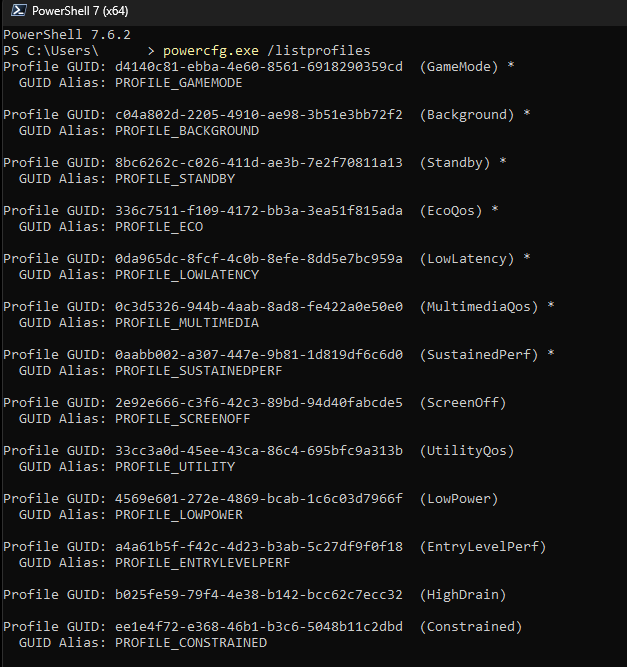
To check if it's active, open CMD, then enter: powercfg.exe /listprofiles
It should appear in the list and an asterisk on the active profiles.

kvlQFVpit9ehODHu.png
 
Installed it. Works. Pretty cool for what it is.

Edit: Appears to be working well with Windhawk and its Windows 11 Start Menu Styler mod as well.
 
Last edited:
Top Bottom