CRT Simulation vs Real CRT for old 240p / 480p era games

Corporal.Hicks

Gold Member
These days gamers still have a choice, and can play old 240p / 480p era games on real CRTs. However, the reality is that all remaining CRTs will eventually die, probably within next 10-20 years. For this reason, I bought an unused (old stock) 15-inch CRT monitor. Although CTX is not a well-known brand, the monitor displays colours accurately and brightly, so I hope it will last me a long time. I also still use my old 21-inch philips 15kHz CRT TV from 2003, and the picture it displays is still very bright.

However, there is hope for those who want to play their favourite old games and achieve an authentic CRT look even without CRT display. I'm talking about CRT simulation. The pixel density of modern displays is so high that you can literally simulate a CRT display. I tried many CRT shaders and most look clearly inferior to my CRTs, but in this comparison, I will show a very special CRT shader called "Sony Megatron". This shader uses HDR mask and unlike standard SDR CRT masks, it doesn't use any tricks to create brightness, thus resolving all the associated issues. For those who are unaware, SDR CRT masks are limited to a 100-nits container. This means that gamma/bloom tricks are needed to compensate for brightness loss due to the phosphor mask, and that always affect the gamma and colours. I tried popular CRT shaders like retro-crisis, koko-aio, royale, cyberlab, guesthd and all of them had problems with strange colour tints, inaccurate and whashed out colours, blow out highlights, black crush in some games and lifted shadows in other games. Also these SDR CRT shaders are usually very complex and and include number of different settings (and hardware intensive as well), so I spent weeks adjusting their settings just to achieve somewhat acceptable results in one game. In other games, the results were inconsistent though, so I was never happy with this situation. The Sony Megatron HDR fixed all these problems and what's more, it's also very lightweight and simple to configure. I only had to configure it once, and the gamma and colours are now consistent in every game I run. The only parameter I change is TVL, I use TVL300 for 240p games, and TVL600 for 480p.

You would think that I have no reason to use CRT simulation when I can play 240p/480p games on real CRTs. Well, my CRT VGA monitor can display 320x240p natively (at 120Hz, as you need a minimum of 31kHz on a VGA monitor), but with sharp square pixels almost like an LCD. The picture also has thick black spaces between the scan lines. PVM enthusiasts love that look, but personally I'm distracted when half of the picture is made from thick black lines and square pixels. These old 240p games never looked like that on arcade monitors and especially not on SDR TV CRTs.

I'm also not entirely satisfied with the results on my SDR CRT TV with an RGB SCART connection. My 21'inch TV offers a big picture with no visible gaps between the scan lines (slot mask), so the pixel art blends at 240p as it should. However, for some strange reason, my CRT TV in RGB mode cannot use the sharpening settings. This results in a blurry and undefined image that doesn't look as impressive as the arcade monitors I grew up playing on. I need to use S-Video or composite singal to get sharpening sliders working, but these signals washed out the colurs and that's too noticeable to me. I had 4 other SD CRT TVs in the past and all of them had this limitation when you connected RGB, so I couldnt use sharpening sliders on any of them.

Interestingly CRT simulation enables me to combine the best of both worlds. I can get thick black spaces between scanlines (PVM like) if I want with 4K TVL600 or TVL800 mask, but I can also get image without noticeable gaps between scanlines with 4K 300 TVL mask. I think the latter offers the perfect combination for 240p games. The pixels blend together perfectly without looking blurry, which reminds me of the arcade monitors I grew up playing on.

And now I want to show comparison between my VGA monitor and CRT simulation. My CRT monitor is set to native 320x240p (thanks to 120Hz 31kHz trick). For CRT simulation I used my 4K 32'inch Gigabyte 240Hz QD-OLED monitor in peak HDR 1000 picture mode with Sony Megatron 2730QM CRT shader and following settings:
- 420 nits for paper white and 1000 for peaks.
- I tweaked the D65 white balance to 7300K as, on my monitor, this actually looks more like 6500K

I'm including high-resolution photos (each around 15–30 MB) to illustrate the differences, but I will also share my own impressions because what I see and what the camera captures not always look the same, especially when it comes to colours. The colours on my photos may look desaturated, or oversaturated, but they look amazing on both my CRT and OLED. I also recommend viewing these photos in 1:1 on a new tab, otherwise you will see a moiré pattern from the mask when resolution is downsampled.


DSCF0174.jpg


It's very difficult to capture what the human eye can see, but this photo from my CRT is just spot on — it accurately shows what I can see. The 240p looks sharp, but the image is too pixelated, and scanlines are too dark (or should I say the space between the scanlines is are very dark).

CRT simulation photo using Sony Megatron shader set to TVL300 settings.


DSCF0158.jpg


In the photo, the phosphor mask is more noticeable compared to CRT. However my OLED monitor is simply much bigger compared to my CRT monitor (15 inch vs 32 inch), so that's the reason why. From a normal viewing distance, the TVL300 mask blends in perfectly and the image appears to my eyes way less pixelated compared to VGA monitor. Also I cant see dark scanlines (spaces between scanlines) and that was distracting on my CRT. The edges of sprites have such a strong contrast that they appear almost 3D in real life (thanks to that difference between 420 nits paper white and peak 1000 nits). Edges appear oversharpened in photographs, but my eyes dont see that sharpening in real life, it's only how camera interpreted that edge contrast. If someone prefers less contrasty edges, it's possible to lower beam sharpness in the shader settings, and that would create less contrasty edges.

Now lets look at CRT Simulation using TVL600

DSCF0196-Enhanced-RD.jpg


With the TVL600, the picture on my monitor resemble that of a CRT VGA monitor. Scanlines are noticeable (the gaps between the scan lines), and the pixelation has increased as well. Using the TVL800 or TVL1000 would make scanlines and the pixelation even more noticeable.


VGA CRT


DSCF0179.jpg


CRT simulation TVL300


DSCF0152.jpg


CRT Simulation TVL600


DSCF0188-Enhanced-RD.jpg


VGA CRT


DSCF0178.jpg


CRT Simulation TVL300


DSCF0146.jpg


CRT Simulation TVL600


DSCF0187-Enhanced-RD.jpg


480p game on my CRT monitor


DSCF0180.jpg


480p CRT simulation using TVL600


DSCF0169.jpg


The 480p mode looks sharp on my CRT, but CRT simulation is even sharper probably thanks to OLED contrast. Colours may look more natural on CRT photo, but in real life colours look more impressive on OLED. From a normal viewing distance, that 480p on my OLED appears sharper and more pleasing than typical UE5 games upscaled to 4K on the PS5. It's crazy that modern games can use high resolutions like 1080p (2 million pixels) yet image look like a blurry mess to my eyes, while even 480p (6.6x less pixels) can look so sharp. Even at an insanely low resolution, the right display produces a sharp image.

I'm also including comparison photos from the creator of this Sony Megatron shader. This shader is pre-installed in the RetroArch emulator, and can be found in the 'HDR' folder.
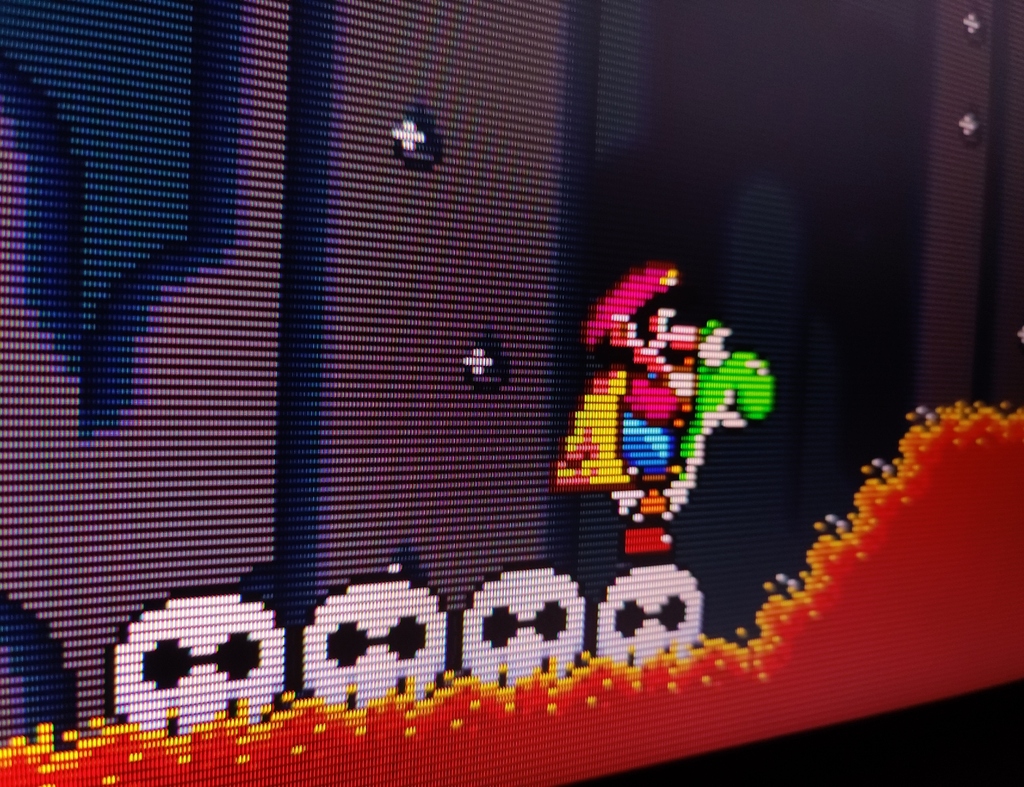

Real Sony PVM 2730QM

907560ce310edbdb235c33445830262415a7f69d.jpeg


CRT simulation using Sony Megatron Shader
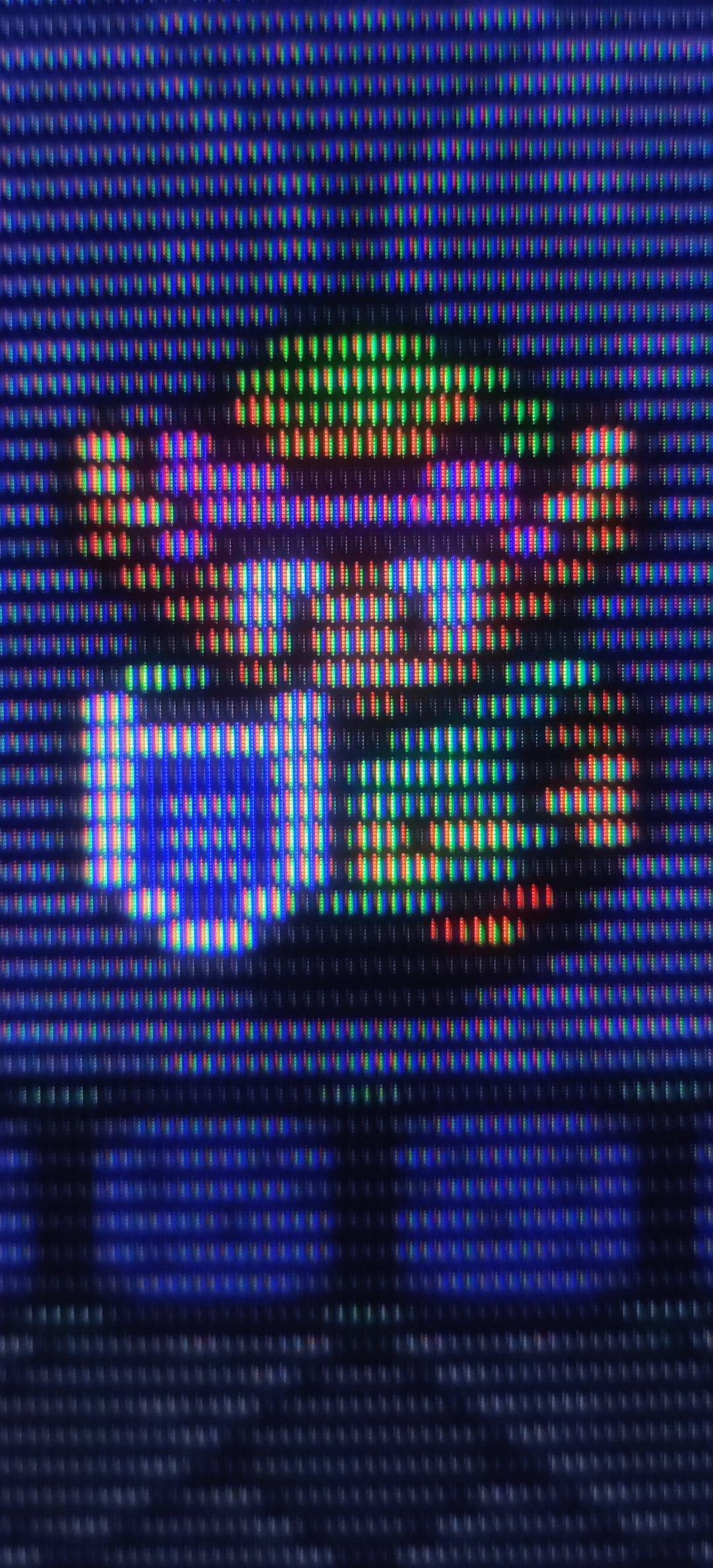

6cb263b273140b5c87d99c446756b80cfd677a6b.jpeg


The Sony Megatron shader is absolutely amazing, making other CRT shaders look like a joke (and not to mention it surpassed my real CRTs IMO). However, there's one big problem with it. Sony Megatron requires very bright display. My previous HDR400 monitor just wasnt bright enough for this shader. My OLED monitor offers usable brightness in 1000-nit peak mode with a 4K mask and especially during the night. However, I can see that the image could look even better (brighter) if the automatic brightness limiter (ABL) on my monitor wasn't kicking in. If I will use 1080p resolution and 1080p mask (sony megatron shader support both 4K and 1080p) image is much smaller (equivalent to 11'inch PVM), but ABL isnt limiting the brightness as much, so I can get even brighteer image than my real CRTs. That smaller 11-inch picture has something beautiful about it. Even up close, 240p games look razor sharp, and you don't see as many imperfections in game assets. I'm starting to understand why some people use small 9'inch PVM monitors, because that combination of small display size and low resolution is just perfect. I have used CRTs for 30 years, but none of them produced more pleasing results when displaying 240p games. The picture quality from 240p on such small 11'inch display is truly outstanding.

DSCF0165.jpg


480p game "Blue Stinger" using 1080p TVL600 mask.

DSCF0173.jpg


You have to zoom in to see the detail, but I think this photo accurately demonstrates the quality of 480p with a 1080p mask. The edges are razor sharp and the whole image looks fairly clean.

The TVL600 mask with a 1080p resolution had a slight blue tint because 1080p is not sufficient for a TVL600 mask. However, I was able to correct this using the shader settings by adjusting the RGB deconvergence settings. The blue tint disappeared completely and white balance looked natural to my eyes (6500K).

And bonus photos from my SDR CRT from PS2 version of metal slug 2 (scart RGB)


The picture is blurry compared to the CRT VGA and the Sony Megatron shader.
 
Last edited:
Th Sony Megatron shader is incredible, but it definitely requires a 4K OLED screen in order to be effective. There are a few other shaders that I think are almost as good and offer a few other CRT types (like slot masks). But the best is definitely the Megatron + Mega Bezels.

I'm a huge fan of the mega bezels project, since it gives decently accurate reflections and refractions through "glass" and on the fake bezels of the TVs. Before I had my own PVM, I swore by this, and it's extremely convincing, even up close. Here, I'll upload an old video from 2022 showing off the setup:

 
Th Sony Megatron shader is incredible, but it definitely requires a 4K OLED screen in order to be effective. There are a few other shaders that I think are almost as good and offer a few other CRT types (like slot masks). But the best is definitely the Megatron + Mega Bezels.

I'm a huge fan of the mega bezels project, since it gives decently accurate reflections and refractions through "glass" and on the fake bezels of the TVs. Before I had my own PVM, I swore by this, and it's extremely convincing, even up close. Here, I'll upload an old video from 2022 showing off the setup:


Definitely! The pixel-level light control makes a big difference. Even in HDR400 mode, my OLED TV produces a brighter image than my previous LCD monitor with HDR400 specification. The thing is, LCDs will minileds can display extremely bright image but only in bigger window sizes. However, this is not possible at the pixel level, which is precisely what the HDR phosphor mask requires. My OLED TV provides adequate brightness in HDR1000 mode, so I'm satisfied overall but I know that the Sony Megatron shader can look even better. A dream combination would be to use QD-OLED TV, because TVs absolutely murders QD-OLED monitors when it comes to HDR brightnees. TVs are very big, but 1080p mask will only use 1/4 of the screen.

I also forgot to mention a very important detail. I can use my CRTs in every game, whereas Megatron can only be used in RetroArch. I tried using sony megatron shader outside retroarch thanks to reshade and shader glass apps, but HDR settings didnt worked. Also games dont support integer scaling and sony megatron needs it. I can only enable integer scaling in the Nvidia driver settings, but their implementation doesn't work as it should because it renders the image buffer at 480p (unlike RetroArch, which renders at full 2160p). This means that I can only use a 640x480 in reshade / shaderglass and that's too low a resolution for shader mask.

I wish Nvidia would implement such an impressive CRT simulation at driver level. Many gamers still like to play old 240p/480p games, and even 720p games from the WinXP or Xbox 360/PS3 era, but such low resolutions just look terrible on modern displays, especially 4K ones. You get either extremely pixelated image (integer scaling / nearest neighbour), or extremely blurry image (bilinear filtering). Old games like classic C&C Tiberium Sun, or Red Alert 2 would look absolutely stunning with CRT simulation on modern displays.
 
Last edited:
Definitely! The pixel-level light control makes a big difference. Even in HDR400 mode, my OLED TV produces a brighter image than my previous LCD monitor with HDR400 specification. The thing is, LCDs will minileds can display extremely bright image but only in bigger window sizes. However, this is not possible at the pixel level, which is precisely what the HDR phosphor mask requires. My OLED TV provides adequate brightness in HDR1000 mode, so I'm satisfied overall. The Sony Megatron shader however must be a dream combination with a QD-OLED TV though, because TVs absolutely murders QD-OLED monitors when it comes to HDR brightnees.

I also forgot to mention a very important detail. I can use my CRTs in every game, whereas Megatron can only be used in RetroArch. I tried using sony megatron shader outside retroarch thanks to reshade and shader glass apps, but HDR settings didnt worked. Also games dont support integer scaling and sony megatron needs it. I can only enable integer scaling in the Nvidia driver settings, but their implementation doesn't work as it should because it renders the image buffer at 480p (unlike RetroArch, which renders at full 2160p). This means that I can only use a 640x480 in reshade / shaderglass and that's too low a resolution for shader mask.

I wish Nvidia would implement such an impressive CRT simulation at driver level. Many gamers still like to play old 240p/480p games, and even 720p games from the WinXP or Xbox 360/PS3 era, but such low resolutions just look terrible on modern displays, especially 4K ones. You get either extremely pixelated image (integer scaling), or extremely blurry image (bilinear filtering). Old games like classic C&C Tiberium Sun, or Red Alert 2 would look absolutely stunning with CRT simulation.
Sometimes I fantasize about getting a job at LG or some TV manufacturer just so I could implement an on-device filter for retro play on these incredible TVs. I don't think it would be as niche as it seems.

For goodness sake, the least they could do is implement a nearest neighbor scaling option.
 
I have not yet succeeded in using any filters in Retroarch. This sounds so good I will have to learn how to set the filters up.
 
Dunno about filters but my CRTs geometry's super fucked up. Wish someone still manufactured those kind of displays.
 
You can get it to work even outside of Retroarch with ShaderGlass! That's cool.
I know that the Shader Glass can run the Sony Megatron shader (reshade can run it as well). However, this shader requires two other components.

-integer scaling component; otherwise, the pixels won't look right, and there will be fringing on the edges. Integer scaling in nvidia driver settings cant be used for that because the game will render it's buffer at original resolution making it impossible to apply CRT mask.

-HDR component in order to adjust the paper white and peaks in the shader settings. The Sony Megatron has an SDR version, but its SDR gamma curve crushes shadow details.

Have you been able to find solution to these problems?
 
I've been dabbling in Duckstation & PCSX2 recently but I'm on a 55" 4K OLED and I think old games look like arse on there when raw. I also don't like excessive upscaling as it just makes game geometry/assets look too hard-edged and rudimentary in a way that was never intended. I found the sweet spot for me on PS1/Duckstation for eg. is 4x Scaling w/ a Box Downsample back to 2x + FXAA + 4x SSAA paired with CRTLottes2 CRT shader. It's upscaled enough but it retains a nice softness and then I have CRTLottes2 set just so that it brings everything together nicely, but in reality the way I have it set is so that the overall CRT-effect is only around 50% the intensity you'd get with a real life CRT.

I have scar tissue on my retinas which results in small blind patches that sit just off to the outer edge of my centre of vision in each of my eyes (paracentral scotomas from optical toxicity of intrathecal chemo as a kid) and day-to-day -- just like the natural blind spots in our eyes -- the brain plus the additional info from the other eyes fills in the gaps without any issue, but when something has a highly ordered pattern like the scan lines or grid of a CRT, they become very apparent and scintillate, so I can't run CRT filters full tilt or watch CRT TVs with overly egregious scanlines anymore. So I try to find a nice filter that's to my liking and then use the settings to dial the intensity down to about half. It's still enough just to bring it all together and give the vibe, but not so much it makes my eyes spaz out.

I tried CRT Royale and a few others but just couldn't get them dialed in with a nice subtle look and ended up settling on Lottes2 for Duckstation (and the same via Reshade for PCSX2) as I much-preferred it.

I know I'm not going to recreate the original experience fully, but I also don't wanna get too carried away trying to 'upgrade' it. Instead trying to achieve a nice middleground in translating it.

Only hope is that one day we get super-bright OLEDs, QDELs or MicroLEDs that can run 4x BFI in tandem with ~4x the up front brightness we have today on OLED and then after the BFI we'd still get equivalent brightness to today paired with motion clarity/quality that comes close to CRT.
 
Last edited:
Personally I would upscale early 3D games, and enable AA and all that.
One good thing about PC gaming is that you have options. If you prefer playing old games in native 4K, it's easy to do so.

Personally I dont like the way 5 / 6 gen (early 3D games from PS1 / PS2 / DC / Xbox / GC) look when I simply increase the internal resolution in emulators to get sharp image on my 4K OLED monitor. These old games have extremely low-poly models and low-res textures, and 4K allows me to see even the smallest graphics imperfection in razor-sharp clarity, making them ten times as noticeable. For example, at 4K, I can see that the AI cars in Gran Turismo are literally one big rectangle just 10 meters away and it's also very noticeable when that rectangle transforms into a more detailed model right in front of my car. At 240p I dont notice these problems and everything blends perfectly. That's why I prefer playing old 3D games in their native resolution, because to my mind and eyes they graphics look more immersive and much more pleasing. I'm only using texture filtering and geometry correction in the emulator settings for PSX games.

Most people only saw 240p / 480p on their monitors upscaled with garbage bilinear filtering, or integer scale, so they had either extremely blurry, or pixelared image on their modern monitor. That's why people want to increase internal resolution, to get sharp image. I'm however using sony megatron HDR phosphor mask to turn my 4K oled into CRT display, so 240p or 480p image look sharp, clean and without pixelation. Assets blend perfectly at that resolution, making games more immersive. Using real SD CRT is also a good way, to replay PSX games, but image dont appear razor sharp to my eyes if I use scart RGB, therefore I prefer using CRT simulation.

But slight resolution increase can still look good. For example PSX and N64 games still look good at 480p and some even at 720p. Only when you go to 1080p and above the graphics start to look too clean. At that point, I start noticing imperfections in low poly assets and low res textures starts to look stretched. At 4K native this effect is 4x times as noticeable.
 
Last edited:
Corporal.Hicks Corporal.Hicks you're going to have to stop posting about this. I don't have the room for a big OLED, alright? So just stop it before I get too jealous and spend a grand on a Sunday morning
 
Last edited:
Corporal.Hicks Corporal.Hicks you're going to have to stop posting about this. I don't have the room for a big OLED, alright? So just stop it before I get too jealous and spend a grand on a Sunday morning
You don't need a big TV :). A 27-inch 1440p OLED monitor would be perfect for you, especially since the latest 1440p OLEDs are brighter than ever (330 nits in 100% window and 1300-1500 nits in 2%). 1440p is enough for sony megatron 1080p mask/resolution, and a 27-inch screen is also the perfect size for a monitor IMO. I think my 32-inch monitor is slightly too big, but that's not a problem because I can easily adjust the viewing distance, or simply use a lower resolution. For example 1800p looks exactly the same size as my previous 27-inch 1440p monitor, and even 1600p is big enough.
 
Last edited:
One good thing about PC gaming is that you have options. If you prefer playing old games in native 4K, it's easy to do so.

Personally I dont like the way 5 / 6 gen (early 3D games from PS1 / PS2 / DC / Xbox / GC) look when I simply increase the internal resolution in emulators to get sharp image on my 4K OLED monitor. These old games have extremely low-poly models and low-res textures, and 4K allows me to see even the smallest graphics imperfection in razor-sharp clarity, making them ten times as noticeable. For example, at 4K, I can see that the AI cars in Gran Turismo are literally one big rectangle just 10 meters away and it's also very noticeable when that rectangle transforms into a more detailed model right in front of my car. At 240p I dont notice these problems and everything blends perfectly. That's why I prefer playing old 3D games in their native resolution, because to my mind and eyes they graphics look more immersive and much more pleasing. I'm only using texture filtering and geometry correction in the emulator settings for PSX games.

Most people only saw 240p / 480p on their monitors upscaled with garbage bilinear filtering, or integer scale, so they had either extremely blurry, or pixelared image on their modern monitor. That's why people want to increase internal resolution, to get sharp image. I'm however using sony megatron HDR phosphor mask to turn my 4K oled into CRT display, so 240p or 480p image look sharp, clean and without pixelation. Assets blend perfectly at that resolution, making games more immersive. Using real SD CRT is also a good way, to replay PSX games, but image dont appear razor sharp to my eyes if I use scart RGB, therefore I prefer using CRT simulation.

But slight resolution increase can still look good. For example PSX and N64 games still look good at 480p and some even at 720p. Only when you go to 1080p and above the graphics start to look too clean. At that point, I start noticing imperfections in low poly assets and low res textures starts to look stretched. At 4K native this effect is 4x times as noticeable.
I can agree with this regarding resolution. I have tested all sorts of shader and resolution combos, and I found that a small boost to PS1 graphics just to stop things from being too low res for 3D objects is a happy medium.
You don't need a big TV :). A 27-inch 1440p OLED monitor would be perfect for you, especially since the latest 1440p OLEDs are brighter than ever (330 nits in 100% window and 1300-1500 nits in 2%). 1440p is enough for sony megatron 1080p mask/resolution, and a 27-inch screen is also the perfect size for a monitor IMO. I think my 32-inch monitor is slightly too big, but that's not a problem because I can easily adjust the viewing distance, or simply use a lower resolution. For example 1800p looks exactly the same size as my previous 27-inch 1440p monitor, and even 1600p is big enough.
If I hadn't not long upgraded to 27" 1440p IPS I'd definitely be looking into it, but for now I can't justify it so I'm just going to have to sit and be jealous.

I do worry about OLED and emulation, because the uneven wear on a 4:3 box seems like it would be glaring obvious a few years down the road.
 
You HAVE to play old games on CRT!
They look SO much better, friend has Onimusha 2 "Remaster" on PS5 HDTV, it looks so bad compared to my game on CRT.
FF Pixel Femaster looks garbage on modeern TV.
Like wtf?

Also, old TV shows like Hercules Legendary Journeys, good luck watching that on modern TV, on CRT it looks crisp as fuk.

some billionaire should produce new CRTs ffs
would pay 1000€
 
Last edited:
I do worry about OLED and emulation, because the uneven wear on a 4:3 box seems like it would be glaring obvious a few years down the road.
In theory, I could use bezels in RetroArch to fill the entire screen, but after a few years of use, I guess my OLED will probably show some wear anyway, so I will be forced to replace it. OLED technology isnt perfect and I accepted that risk. New OLED monitors will probably be much brighter, so even if my current monitor doesn't wear out, I'll probably still want to upgrade it.

By the way. I still use a 2013 Panasonic 42GT60 plasma TV, and I often used 4:3 content on it, or sub 1080p resolutions (displayed without upscaling in 1:1, so with black bars). PS2 games look amazing with 2x integer scaling (960p) and a basic CRT filter. That TV has lasted 30,000 hours and there's still no sign of image burn or uneven wear and plasma TVs had similar problems as OLEDs with pixels burn in.

You HAVE to play old games on CRT!
They look SO much better, friend has Onimusha 2 "Remaster" on PS5 HDTV, it looks so bad compared to my game on CRT.
FF Pixel Femaster looks garbage on modeern TV.
Like wtf?

Also, old TV shows like Hercules Legendary Journeys, good luck watching that on modern TV, on CRT it looks crisp as fuk.

some billionaire should produce new CRTs ffs
would pay 1000€
The factories used to produce CRT tubes have probably gone a long time ago and I can't imagine how much it would cost to build a new one. Also bear in mind that CRTs were not exactly environmentally friendly, so governments would most likely make it difficult to set up a new production line, even if a billionaire wanted to finance such project.

Any PS2 era game will look very different on a modern display (especially 4K) because you will see every imperfection clearly and low poly assets will not blend very well at high resolution. CRT simulation however solve that problem, becasue it will literally turn your modern display into a CRT. If your frend used sony megatron shader to turn on his TV into a big CRT the same game would look not only comparable to your CRT TV, but even better, because xonsumer CRT TVs simply blurred the image too much, making even 480i/480p look too blurry. Even my plasma TV with a simple 2x integer scaling (960p) and a basic guestHD CRT mask offers a much better picture for PS2 games. My 2'nd plasma TV has 1024x768 panel and doesnt even need any integer scale or CRT simulation to display PS2 games with better quality than my SD CRT. These PS2 games literally look HD to me despite running at 480i/480p, whereas on an SDR CRT, I always see that unfocused look, especially with Scart RGB. For example, the minimap in GTA: San Andreas is perfectly readable on my plasma TVs (both of them) or OLED TV with CRT simulation. On my SDR CRT, that minimap is barely readable.

Here's for example crop from my "Blue Stinger" photo. The game runs at 480p and this photo shows only 1080p TVL600 CRT mask. Notice the clarity of the image, because it's much better compared to consumer CRTs, and assets still blends well because the game is running at it's native 480p resolution. You would need a CRT VGA monitor with good transcoder to get comparable results to sony megatron shader, and this shader will still look better on OLED display simply because OLEDs have much higher contrast and even better colours.


DSCF0173-2.jpg
 
Last edited:
This is super interesting, and the explanation is surprisingly deep.

However, the most important thing will always be motion.
You can get pretty much whatever you want with static images that everyone will watch on a different screen when reading a thread like this. In real life, I've dabbled with emulation in several different settings, and nothing I've seen on digital panels ever accurately reproduced the CRT look and, most importantly, the CRT feel. Metal Slug 2 is orgasmic on a CRT. It's never been the same on LED/OLED in my eyes.
Also, correct scaling is paramount for motion on modern displays. Motion artifacts will be several times more noticeable if the original image is scaled incorrectly, even at 60fps. And the best-looking emulated image will turn to shit the moment you press anything on the controller.

Granted, I've always only used consumer CRTs. I've never seen that square grid picture on a CRT, so that looks very unnatural to me at a glance. Forced scanlines look better to me, and even more so in motion. Square grid creates a lot of shimmering if the scaling isn't perfect.
 
I would like to express my gratitude to the person who gave me gold 😀. People on this forum are so generous.

2mx2XvnZu7PljWhA.jpg


the most important thing will always be motion.
You can get pretty much whatever you want with static images that everyone will watch on a different screen when reading a thread like this.
Yes, real CRT still has the upper hand when it comes to motion clarity. OLED is sample and hold display, so it needs 240Hz just to match plasma motion clarity (4 blured pixels during 1000 pixel / motion), and 1000Hz to match CRT (zero blurred pixels even during fast motion).

That being said, people can improve the motion clarity with another trick: CRT beam simulation. I think OLED TVs should be bright enough to use both the CRT mask and beam simulation simultaneously, but you would need at least 240Hz (current TVs are just 120-165Hz) to reduce persistence blur by 75%. My OLED monitor has 240Hz, but it's barely bright enough to run sony megatron mask, yet alone onother mask.

CRT beam simulation can be tested even in the browser.


I can definitely see the effect of persistence blur on my OLED monitor, but I've also noticed that there's a point at which it doesnt matter to me from practical point of view. For example, the UFO motion test pattern on the Blurbusters site shows that persistence blur very well on my OLED. I can see when the pixel-sized UFO eye starts to blur into the next three pixels (240Hz screen has 4ms persistence blur that equalls to 4 pixels of motion blur). That blur isn't strong, so I can still see the object's overall shape clearly, but it's definitely not pixel-perfect sharp. Do I however need to read pixel size text on the objects when I move the camera? Not at all. Even in fast-paced games, the overall shape of moving objects appears well-defined. Therefore, I don't feel that this persistence affects my experience.

The motion clarity bothered me on old VA LCD panels because I could see very noticeable dark outlines / trails behind moving objects, even during slow movement. However, my 240 Hz OLED TV has none of these problems, and I can only see a subtle persistence blur when tracking extremely fast objects.

This difference is less noticeable in old games because the 2D backgrounds usually don't scroll quickly enough to even make the persistence blur noticeable. Very few games can scroll the background as fast as Sonic the Hedgehog (sega saturn), but even in this game, I don't feel like I'm missing out on much on my OLED.
 
Last edited:
Someone really needs to start putting these crt shaders into newer ossc hardware revisions. The basic scan line has good options but it could be better.
 
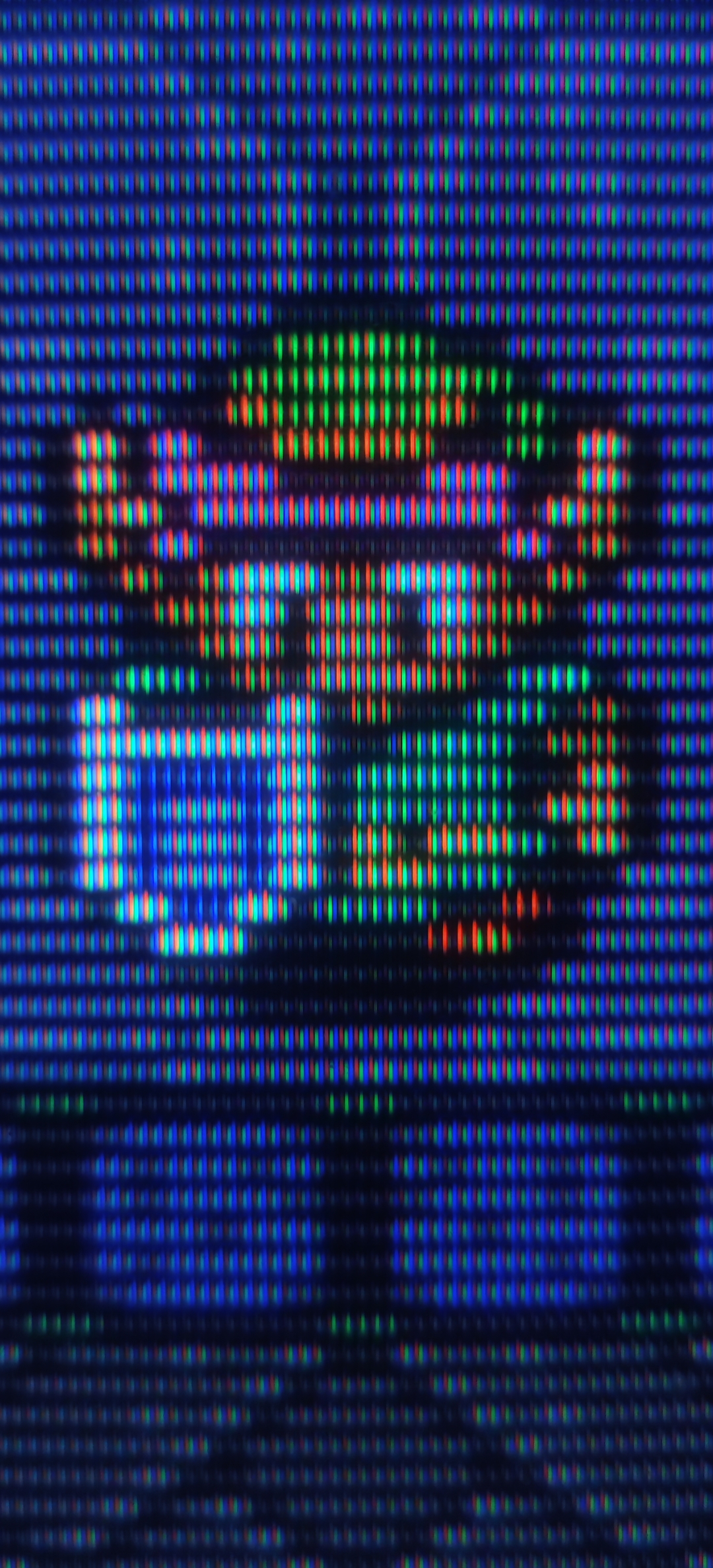
I have included a TVL600 simulation in my comparison. The TVL600 image resembles my VGA CRT, or PVM. I can clearly see the empty/dark space between the scan lines.

a1.jpg
 
Last edited:
Quaint. Looking at the screenshots on my LCD monitor, it looks kinda like a CRT, but simulation will never replace it. The refresh rate is too big a part of the feel. One lap of F-Zero is all one needs to feel the difference. I put a 19" CRT in the corner of my home office and never looked back.
 
Quaint. Looking at the screenshots on my LCD monitor, it looks kinda like a CRT, but simulation will never replace it. The refresh rate is too big a part of the feel. One lap of F-Zero is all one needs to feel the difference. I put a 19" CRT in the corner of my home office and never looked back.
The refresh rate can be the same (60 Hz) for both CRT and PC monitors. Furthermore, PC monitors with VRR can accommodate even the most unusual refresh rates used by some arcade games. I think you are talking just about the pixel response and motion clarity.

I noticed a significant difference in pixel response time and overall feel during aiming/motion when switching from my previous 170Hz LCD monitor to CRT. Playing on a CRT monitor felt smoother and more responsive. However, the OLED screen has an extremely fast pixel response time, and I no longer notice the difference between my CRT. The only advantage CRTs still have is motion clarity, but objects would have to move very quickly for me to notice.
 
Last edited:
Comparing CRT and LCD with still pictures is the first point of failure. Sure, for static screens, filters will eventually make it look like a CRT. But as soon as it scrolls, there is nothing you can do with modern technology to reach the impeccable motion clarity of a CRT. And THIS is the real issue. At least for me. And yes, I play a ton of MegaDrive/Saturn and scrolling is quite fast in games.
 
Last edited:
These days I prefer CRT shaders (CRT Royale is my favorite for most stuff) over any kind of CRT displays, and I really don't need them to accurately mimic them, as long as old low res games look nice on modern monitors.

I remember buying one still unopened PC CRT, and it was fun for a while, experimenting with custom resolutions, and refresh rate, watching various decades old things - but soon I realized that deep down, I already moved on from that abandoned technology.

A few good things about them, like motion clarity are, frankly, overrated, IMO.
 
Comparing CRT and LCD with still pictures is the first point of failure. Sure, for static screens, filters will eventually make it look like a CRT. But as soon as it scrolls, there is nothing you can do with modern technology to reach the impeccable motion clarity of a CRT. And THIS is the real issue. At least for me. And yes, I play a ton of MegaDrive/Saturn and scrolling is quite fast in games.
100%. I bought a retrotink 4k. Hooked up some old consoles via component. Thought it looked ok but deep down I felt there must have been a better way. So I bought a small 14inch crt just to see what the fuss was about. Everything looked unbelievably good. I could not believe it. Until you see it in person, it's almost impossible to describe. I have gotten so used to the motion clarity that when I tried super Mario world on a friends OLED steam deck and I see what looked judder.
 
Comparing CRT and LCD with still pictures is the first point of failure. Sure, for static screens, filters will eventually make it look like a CRT. But as soon as it scrolls, there is nothing you can do with modern technology to reach the impeccable motion clarity of a CRT. And THIS is the real issue. At least for me. And yes, I play a ton of MegaDrive/Saturn and scrolling is quite fast in games.
I used OLED, not LCD, for this comparison. The two technologies have a significant difference in pixel response time and overall feel during motion. LCD, especially VA panels leaves noticeable trails behind moving objects and blurs even slight movement. OLED doesn't do that. Even my last 170Hz gaming LCD with fast nano-IPS panes was a joke compared to my OLED when it comes to overall feel during aiming / motion.

I used CRTs for three decades, and I don't think my current OLED monitor negatively affects my gaming experience at all, especially if the game uses the full capabilities of my monitor (240 Hz). These old 240p games usually run at 60 Hz, so the motion clarity isn't as amazing. However, very few 2D games scroll their backgrounds quickly enough for me to notice the persistence blur.

If people want motion clarity to rival that of a CRT, they can use CRT beam simulation. On 240 Hz OLEDs, this technology reduces persistence blur by 75%. At 500 Hz, OLEDs would literally give you motion clarity on pair with CRT.
 
Last edited:
I tried super Mario world on a friends OLED steam deck and I see what looked judder.
Judder only occurs when the game's framerate is not perfectly matched to the display's refresh rate. OLED monitors have fully functioning VRR, so there is no judder, regardless of the frame rate. Based on what I've read, the Steam Deck OLED doesn't support VRR, which is probably why you saw judder.
 
I'm glad someone gifted gold. This thread definitely deserves it.
 
Dunno about filters but my CRTs geometry's super fucked up. Wish someone still manufactured those kind of displays.
Is that even with the degaussing feature used heavily to help re-align image geometry - among other things? Only reason I ask is that it isn't documented on all TV devices, like the 21" flat panel Philips CRT TV I have laying around in the garage.

When you press the main on/off button on the front it auto degausses each time, making a quieter dung sound on each on/off as the degaussing happens. On my last lounge CRT: Sony KD-32DX200 (1280x720@100Hz panel)that I stupidly gave away fully boxed 18years ago, its degaussing from the on/off switch first time sounded like someone getting hit by an opening fridge door if we came back from a week away. But it also had more extensive geometry adjustment features similar to Sony CRT pro monitors.

On my old Philips I sometimes need to degauss 20 times before the alignment and colour return to normal .
 
Sony Megatron is the only shader that comes close to capturing the look of CRTs but the problem is it doesn't account for 2 very important aspects to CRTs that have yet to be fully replicated: photon beam scan out for buttery smooth motion clarity, and the various phenomenon that show up as artifacts when using a real analog connection. These two things are what are preventing CRT shaders from truly hitting that perfect feel that you get from hooking up a real console on a real CRT. Eventually it will be possible with 1000Hz OLED or MicroLED monitors to achieve accurate scan out for motion clarity, but we will likely never have an authentic simulation of the signal artifacts from something like composite or RF cables. The flickering, the desaturation, the ghost images, etc from interference across the signal.
 
Judder only occurs when the game's framerate is not perfectly matched to the display's refresh rate. OLED monitors have fully functioning VRR, so there is no judder, regardless of the frame rate. Based on what I've read, the Steam Deck OLED doesn't support VRR, which is probably why you saw judder.
I don't know if it was judder per se. But it definitely did not look as smooth as a crt.
 
Still the same principle, you get movement blur. But great if you are happy with OLED.
Yes, OLED like LCD is sample and hold display, so you get motion blur at low framerate, just without black trailing artefacts, smearing.

9AJCxGsXqOLIPGmt.jpg


My OLED screen has a refresh rate of 240 Hz. If the game and the hardware can use this capability, I get very good motion clarity (plasma TV like), even when objects are moving very quickly. Old 240p/480p games however run at 60 Hz. This means that objects moving very quickly (960 pixels per second) will appear blurred, as shown in the 60Hz image above.

I tested what can be done to combat persistence blur on my 240Hz OLED with 60Hz games.

- roling scan / CRT beam simulation: It provides the same clarity as a CRT monitor, but the image is noticeably dimmer. It's possible to use it without the CRT shaders, but my OLED screen is too dim for both to be used at the same time. I also saw frequent artefacts (horizontal lines) when the framerate wasn't perfectly synchronised.
- LSFG x3 generated frames: Motion clarity like with native 240Hz (plasma TV like), but with very noticeable artefacts and input lag.
- Black frame insertion: Motion clarity a little bit better than plasma, small 25% brightness loss with no artefacts. On a slightly brighter OLED, it could be used with CRT simulation.

Black frame insertion with sony megatron CRT shader will be awesome combination on newer and brighter OLEDs. As for CRT beam simulation there's something wrong with this technology at the moment, but maybe retroarch implementation is to blame, because CRT beam simulation demo in the browser works perfectly.
 
Last edited:
Top Bottom