• Hey Guest. Check out your NeoGAF Wrapped 2025 results here!

GAF Wii Homebrew thread: Homebrew, emulators, USB disc installs! Easy tutorial!

Son of Godzilla said:
So I was wondering exactly what's so appealing about Wii Homebrew and didn't want to shit up that other thread.

I was looking over this list of apps and games and such and didn't really notice anything amazing... I mean, I guess there's some utility stuff in there that's good but I don't really get the hype. Is this all mainly about USB loading?
Truthfully. Yes.

USB loading. Emulators (very solid device to emulate on... perfect for unreleased games, translations and such). The occasional neat homebrew app.
 
Guys, my brother got a Wii for Christmas and we're trying to format his USB hard drive to FAT32, but his laptop is using Vista and we can only seem to format to exFAT and NTFS. Is there any way we can use exFAT? I've read it's Vista's "fixed" version of FAT32, but I thought I should ask first. Is there any way we can just format to FAT32 with Vista? We're using Partition Magic 8.
 
So yeah, I managed to get the HBC back on my Wii and installed BootMii just in case. The least I can do is to apologize for panicking and posting a stupid post when I should have taken the time to read the GAF Homebrew Wiki carefully. I was a bit confused by all the sections in the wiki.

Ah, well, that tag and avatar serve me right. I was dumb. Sorry, and thanks again for the great job, Clipper and the others. Keep it up!
 
So I've updated my Wii using the safe update from the clipper tutorial - and am now on 4.2E - but why does NSMB want to update my Wii.

Is there a step I'm missing? <I did search through the tutorial, no mention of NSWB I could find.>

:D
 
scitek said:
Guys, my brother got a Wii for Christmas and we're trying to format his USB hard drive to FAT32, but his laptop is using Vista and we can only seem to format to exFAT and NTFS. Is there any way we can use exFAT? I've read it's Vista's "fixed" version of FAT32, but I thought I should ask first. Is there any way we can just format to FAT32 with Vista? We're using Partition Magic 8.
You should be able to format to FAT32 just fine with Partition Magic. If you can't figure out how or it really isn't possible, just use this tool which is linked in the Wiki.

Vagabundo said:
So I've updated my Wii using the safe update from the clipper tutorial - and am now on 4.2E - but why does NSMB want to update my Wii.

Is there a step I'm missing? <I did search through the tutorial, no mention of NSWB I could find.>

:D
The update it wants you to perform is the boot2 update that the safe update avoids. This is separate to the firmware update. To avoid it, you should be using the Avoid Disc Updates page of the tutorial.
 
Oh shit–my brother got NSMBW and the only Wii in the house was mine, already well-through a homebrew method. The disc made me update to play it...am I screwed?
 
BrandNew said:
Oh shit–my brother got NSMBW and the only Wii in the house was mine, already well-through a homebrew method. The disc made me update to play it...am I screwed?
If your Wii still boots, you are fine. You will likely only need to reinstall BootMii.
 
Just installed bootmii so I can backup my nand. I want to make sure this is normal. When I boot to the sysmenu, the screen starts flashing red for a couple seconds then lands at the warning screen. This is normal, correct?
 
xero273 said:
Just installed bootmii so I can backup my nand. I want to make sure this is normal. When I boot to the sysmenu, the screen starts flashing red for a couple seconds then lands at the warning screen. This is normal, correct?

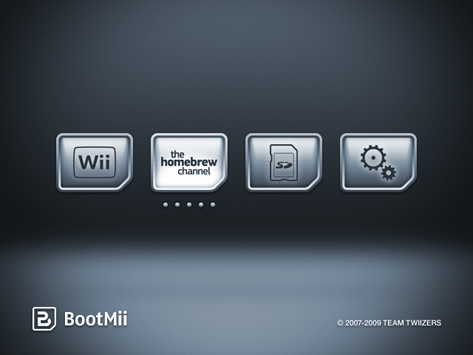
No, it's not normal. Did you add an autoboot option to the bootmii.ini file or something? That could explain what you are seeing. What you should see is:
bootmii.png
 
Got a little problem.

I've started experiencing a problem where sometimes Configurable USB doesn't load and is stuck on a black screen and other times it loads up fine.

A little background info on my setup:

4.2U (followed the GAF wiki guide)
Configurable USBLoader v50
Verbatim 500GB external HD

Anybody every experience this problem?
 
Clipper said:
No, it's not normal. Did you add an autoboot option to the bootmii.ini file or something? That could explain what you are seeing. What you should see is:
bootmii.png

I'm not talking about that screen. I have that screen. When you select the wii icon to boot into the normal nintendo warning screen, the screen will flash black and red for a couple seconds. Then you see the normal nintendo warning msg.
 
Magik said:
Got a little problem.

I've started experiencing a problem where sometimes Configurable USB doesn't load and is stuck on a black screen and other times it loads up fine.

A little background info on my setup:

4.2U (followed the GAF wiki guide)
Configurable USBLoader v50
Verbatim 500GB external HD

Anybody every experience this problem?
This problem usually indicates the drive is spinning down and/or isn't given enough time to start up properly at start up. If you aren't using IOS222 as your default ios, you might find that might help alleviate the issue (add ios=222-mload to config.txt).


xero273 said:
I'm not talking about that screen. I have that screen. When you select the wii icon to boot into the normal nintendo warning screen, the screen will flash black and red for a couple seconds. Then you see the normal nintendo warning msg.
Oh, well that could be normal. The display format changes between the BootMii screen and the menu screen and the red flashes are probably just how your TV handles the transition.
 
Clipper said:
This problem usually indicates the drive is spinning down and/or isn't given enough time to start up properly at start up. If you aren't using IOS222 as your default ios, you might find that might help alleviate the issue (add ios=222-mload to config.txt).

I think you are right in that the drive is spinning down. I think I might have to look at getting another HD that has the option to turn off the spindown which my current HD doesn't have the option of.

Whats the overall recommend HD I should get?
 
Magik said:
I think you are right in that the drive is spinning down. I think I might have to look at getting another HD that has the option to turn off the spindown which my current HD doesn't have the option of.

Whats the overall recommend HD I should get?


Segate FreeAgent Go are amazing and have software available to turn off spindown permanently.
 
Magik said:
I think you are right in that the drive is spinning down. I think I might have to look at getting another HD that has the option to turn off the spindown which my current HD doesn't have the option of.

Whats the overall recommend HD I should get?

what drive do you have? i have a wd passport and it had spindown issues, but not anymore. i use rev 14 and hermes 223. haven't had a problem since.

but even w/ that, i still recommend the free agent to all my buddies.
 
Save me, GAF! I (think) I've installed cIOS249, but I can't tell. Is there any way to confirm/deny? I ask this because I'm now trying to run StartPatch, but I'm getting an es_identify failure. Google tells me that this would occur if my IOS is not properly set up, but there's nothing about it on the Wiki. I followed the instructions on installing cIOS and it seemed to take, but I guess not...?

More Information:
1. Currently at 4.0U.
2. Followed the Truncha Bug Restorer instructions, then installed IOS249.
3. Attempted to run StartPatch, received es_identify failure.

I just want to play Crystal Bearers, but it wants to install wad files from Gecko, and I'm paranoid about losing my homebrew setup.

EDIT: Now I've tried installing the WAD files, but it seems to get stuck while extracting the WAD data.
 
RocketDarkness said:
Save me, GAF! I (think) I've installed cIOS249, but I can't tell. Is there any way to confirm/deny? I ask this because I'm now trying to run StartPatch, but I'm getting an es_identify failure. Google tells me that this would occur if my IOS is not properly set up, but there's nothing about it on the Wiki. I followed the instructions on installing cIOS and it seemed to take, but I guess not...?

More Information:
1. Currently at 4.0U.
2. Followed the Truncha Bug Restorer instructions, then installed IOS249.
3. Attempted to run StartPatch, received es_identify failure.

I just want to play Crystal Bearers, but it wants to install wad files from Gecko, and I'm paranoid about losing my homebrew setup.

EDIT: Now I've tried installing the WAD files, but it seems to get stuck while extracting the WAD data.
There should have been two sets of steps you followed. The first steps would use Trucha Bug Restorer to install a patched IOS36 into the IOS249 slot. The second set of steps uses that patched IOS36 to install the real IOS249 into the IOS249 slot (via an app with loud music). Are you sure you followed both sets of steps? Even if you did, I suggest you do the reinstallation steps (for updating to a new version) for IOS249.

In any case, installing those files via Gecko OS will not do anything to your homebrew. You should allow it to do it.
 
Nabs said:
what drive do you have? i have a wd passport and it had spindown issues, but not anymore. i use rev 14 and hermes 223. haven't had a problem since.

but even w/ that, i still recommend the free agent to all my buddies.

I'm currently using a Verbatim 500GB external HD.

So what exactly does the IOS do in relation to spindown? I always thought spindown was something separate and entirely based on the HD itself.
 
Clipper said:
In any case, installing those files via Gecko OS will not do anything to your homebrew. You should allow it to do it.
Tried allowing Gecko to install them, but it hangs, unfortunately. Unless it's meant to take longer than an hour, but I doubt that...

I tried redoing the TBR steps, but during this set of steps

Use Trucha Bug Restorer with IOS15 to install a patched IOS36 as IOS 249 via the following sub-steps:

1. Choose IOS15 for IOS to reload with D-pad left/right and load with A.
2. Wait for the message to push 1 or Start to appear and do so.
3. Ensure the IOS at the top of the screen now states "IOS15 (Rev 257)"
4. Choose "IOS36 menu" with the D-pad and push A.
5. Change "Install IOS to slot" to be 249.
6. Set all three patch options to yes
7. Choose "Install patched IOS36" with the D-pad and push A.
8. If you are connected to the Internet, choose "Download IOS from NUS" with the D-Pad and Push A to select. If not, choose "Load IOS from sd card" with the D-Pad and push A to select. # When prompted, push A to start installation.
When I try to start installation, it fails, saying there's a higher installation or somesuch. I can't check right now, the Wii is in use by my brother.

If I have cIOS successfully installed, would it say so in the Wii System menu?
 
RocketDarkness said:
Tried allowing Gecko to install them, but it hangs, unfortunately. Unless it's meant to take longer than an hour, but I doubt that...

I tried redoing the TBR steps, but during this set of steps


When I try to start installation, it fails, saying there's a higher installation or somesuch. I can't check right now, the Wii is in use by my brother.

If I have cIOS successfully installed, would it say so in the Wii System menu?

You won't see it in system menu. I think you can use Anytitle Deleter to find out what IOS you have installed
 
Hello all, Having a bit of a problem, and seeing if there might be some help here in fixing this. Followed the guide on taking the configurable USB Loader to FAT format, and overall the transition appears to be smooth, but it seem Zack and Wiki doesn't want to work after this transition.(It loads, but hangs on a black screen, where the Wii remote is on, but nothing else is going on)

I am not sure if there is an issue with the game itself (not being to load or whatever) but every other game I have installed works fine, if not better than before. If the game doesn't work on the loader, than I understand, but I searched on the alternative.dol pages, and didn't see it mentioned there.

Thanks for any help you can offer, and especially thanks to all for these guides!
 
Bebpo said:
I tried moving the HD to a different spot and still the same thing:

It only affects certain textures, which is weird and makes me thing it's some sort of file corruption.

Only the sky backdrop is corrupted with black dots everywhere. The rest of the image is flawless.

On the title screen it's the same deal. In fact in the entire game that's the only thing that has graphical glitches, the sky backdrops.

In other games it's just random textures here and there. It's not like when your gpu dies and you get that stuff everywhere all the time.

And like I said, I don't get any of those black dots on any game when I just play from the disc.

I'm using 4.0J firmware with Cios Rev14 & the latest version of various loaders.


your wii is dying. same thing happened to mine with NSMBwii, black dots appeared. tried a bunch of other games and couldnt really see them except for in zelda they showed up there too. i ended up sending it in to nintendo before it got worse and the refurb they sent back has no problems what so ever. I was kinda dreading sending it in again but they did it for free and gave me a new warranty since im now on my 5th wii...
 
Here's some more details: I tried performing the TRB steps a second time, but during the "Install Patched IOS36" option, trying to install gives me the following:

ES_AddTitleStart returned: -1035
Has your installed IOS36 a higher revision than 3094?

I see this has popped up in the thread before, but hasn't been resolved as far as I am aware. Details:

-Running 4.0U.

-I downloaded IOS15-64-v257, IOS15-64-v266, IOS36-64-v3094, and IOS38-64-v3867, as specified, and placed them in the SD card's root directory.
-I follow the instructions on the IOS page regarding using TBR.
-I install cIOS under 249, as specified, again.
-I receive the es_identify error when attempting to run StartPatch.

I then tried to repeat the TBR instructions, and receive the message as detailed above. Is it possible I accidentally installed a patched IOS37 (I noticed they mention IOS37 doesn't support es_identify). If that's the case, is there some way to wipe out the custom IOS installation stuff to start from scratch?
---------

Also, when I try to follow the "Update IOS249 to a different version" instructions, "IOS222" and "IOS223" are not present to be deleted. I delete 249 and reinstall on 250, but nothing seems to have changed.

---

EDIT: Problem resolved! I rolled up my sleeves and blazed my own trail, and it seems to have worked.

First off, I deleted IOS249 and 250, wiping cIOS.
Then, I ran TBR'd onto IOS36 instead of 249.
I then truncha'd 249 again, and reinstalled cIOS.
I then ran StartPatch successfully, and can now play Crystal Bearers and copy my Brawl save to SD card.

Awesome!

EDIT 2 The Editening: One last thing, I updated Gecko to 2.9 from 2.8b, and used that to install the WAD properly. Before doing that, booting from the main Wii menu simply black-screened the Wii.
 
Nobodyspatzy said:
Hello all, Having a bit of a problem, and seeing if there might be some help here in fixing this. Followed the guide on taking the configurable USB Loader to FAT format, and overall the transition appears to be smooth, but it seem Zack and Wiki doesn't want to work after this transition.(It loads, but hangs on a black screen, where the Wii remote is on, but nothing else is going on)

I am not sure if there is an issue with the game itself (not being to load or whatever) but every other game I have installed works fine, if not better than before. If the game doesn't work on the loader, than I understand, but I searched on the alternative.dol pages, and didn't see it mentioned there.

Thanks for any help you can offer, and especially thanks to all for these guides!
Z-Dub certainly does work with Cfg if my memory serves me correctly. You might have some luck setting the video option to system default rather than game default.

It is also possible the game got corrupted. Delete it with '-' and install the game from disc again with '+' to be sure.
 
my wii runs no more homebrew :(

i miss my media player ce :(


problem is that my lil bro saw the nintendo email that said that if you bought the opera channel it let you get a nes game for free.

we did got super mario bros alright, but the homebrew stopped working. I mean, the hbc boots, but no app can be ran. it just freezes on a black screen.

any help gaf? :(

btw, it was homebrewed while being 4.2u, and it's still 4.2u supposedly
 
sonikokaruto said:
my wii runs no more homebrew :(

i miss my media player ce :(


problem is that my lil bro saw the nintendo email that said that if you bought the opera channel it let you get a nes game for free.

we did got super mario bros alright, but the homebrew stopped working. I mean, the hbc boots, but no app can be ran. it just freezes on a black screen.

any help gaf? :(

btw, it was homebrewed while being 4.2u, and it's still 4.2u supposedly
Mate, did you read the thread title?
 
sonikokaruto said:
yes i did and no, it didn't answered my questions either :(


sorry, but really, i did read it
http://www.gwht.wikidot.com/upgrade-faq tells you all about what upgrading has changed on your Wii (the Wii Shop update you performed to get your game would have been a full Nintendo-type upgrade to 4.2).

Basically, your cIOSes are gone, which is likely why you are having trouble with apps. You need to reinstall them all, and each page of the tutorial has instructions on how to replace them as well. Same goes for the cIOS that MPlayer needs (202), I think.
 
Clipper said:
http://www.gwht.wikidot.com/upgrade-faq tells you all about what upgrading has changed on your Wii (the Wii Shop update you performed to get your game would have been a full Nintendo-type upgrade to 4.2).

Basically, your cIOSes are gone, which is likely why you are having trouble with apps. You need to reinstall them all, and each page of the tutorial has instructions on how to replace them as well. Same goes for the cIOS that MPlayer needs (202), I think.


oooh ok, so what happend was a shop channel upgrade, saw it but didn't guessed it was that

>.>

thanks for your help Clipper :)
 
So I read a lot of things here and have searched the internet extensively but I can't find the info I need. I just bought a Wii with 4.0 out of the box. I then updated to 4.2u and started playing NSMB Wii. After I updated I installed the Homebrew Channel via bannerbomb. The Homebrew Channel launches fine and it sees the apps but the Wii will automatically try to load from the disc and does not see the SD card when directed towards it. I'm stuck as to what to do so if any kind person could at least point me in the right direction that would be great. I also installed the vote, nintendo, and mii contest channel after installing the Homebrew if that helps at all. Thanks again.
 
Haha, pretty strange glitch with the Wii Message board last night, not sre if it had anything to do with running an import via homebrew. Have been playing Rabbids Go Home (same region, just popping the disc in) and Excitebots (imported and running the disc via Gecko) and after I played them both I looked at my message board and it stated I had been playing Rabbids for 5:55! Even both of those games combined it was more like around 3 hours, what the hell? :lol
 
Clipper said:
Z-Dub certainly does work with Cfg if my memory serves me correctly. You might have some luck setting the video option to system default rather than game default.

It is also possible the game got corrupted. Delete it with '-' and install the game from disc again with '+' to be sure.

Yep, that is what happened (I also had to re-install Mario Galaxy for the same issue). However, I just discovered, while trying to re-install Z&W, there is a rather deep scratch on the disc...=/ Oh well, I'll play on the disc as that seems to work ok.
 
Gagaman said:
Haha, pretty strange glitch with the Wii Message board last night, not sre if it had anything to do with running an import via homebrew. Have been playing Rabbids Go Home (same region, just popping the disc in) and Excitebots (imported and running the disc via Gecko) and after I played them both I looked at my message board and it stated I had been playing Rabbids for 5:55! Even both of those games combined it was more like around 3 hours, what the hell? :lol
This happens sometimes with homebrew apps as they don't report shutdown properly. I've had cases where I've apparently been playing the Homebrew Channel for a duration of 23:59 multiple times on the same day :p.

moop2000 said:
So I read a lot of things here and have searched the internet extensively but I can't find the info I need. I just bought a Wii with 4.0 out of the box. I then updated to 4.2u and started playing NSMB Wii. After I updated I installed the Homebrew Channel via bannerbomb. The Homebrew Channel launches fine and it sees the apps but the Wii will automatically try to load from the disc and does not see the SD card when directed towards it. I'm stuck as to what to do so if any kind person could at least point me in the right direction that would be great. I also installed the vote, nintendo, and mii contest channel after installing the Homebrew if that helps at all. Thanks again.
What exactly do you want to do here? The disc channel is for launching discs. The homebrew channel is for launching homebrew. According to your statement, both of these things seem to be working and I can't think of what you are expecting to happen.

Are you perhaps saying that when you choose to run an application in the HBC, it loads whatever disc is in the disc slot? That makes very little sense (unless you are running one of those disc launching applications).
 
Clipper said:
What exactly do you want to do here? The disc channel is for launching discs. The homebrew channel is for launching homebrew. According to your statement, both of these things seem to be working and I can't think of what you are expecting to happen.

Are you perhaps saying that when you choose to run an application in the HBC, it loads whatever disc is in the disc slot? That makes very little sense (unless you are running one of those disc launching applications).

I figured out the issue. It was my SD card that was incompatible and for some reason I could access the emulator but the rom would not work. I got a good sd card and now everything is fine. Thanks anyway.
 
'Kay guys, I wanna play some Mario, but I'm on 4.0U and I don't want to risk anything. SO, I want to use StartPatch to skip the updates on the disc, but to use it, I need IOS249, so I tried to install that. I went through all the Trucha hoops and then ran the installer (with the loud music) and everything seemed to work, but StartPatch still gives me that identify error that allegedly means I don't have 249. Wat.

Does anyone have any suggestions on what to do now? Maybe I should just do the safe 4.2 upgrade?

Oh, yeah, I can and have just loaded it through Gecko, but I want to see the start screen, I want the time to count, and I don't want to see that crappy "system update" thing in my menu. And some of the other patchable things seem pretty nifty too...

Edit: I was impatient and loaded it through Gecko again. This time, Gecko had a lot more options and said it was using IOS249. How befuddling.
 
So, this external HDD just turns itself off when I launch USB loader.

My question is... is that something related to the enclosure or to the HDD itself?
 
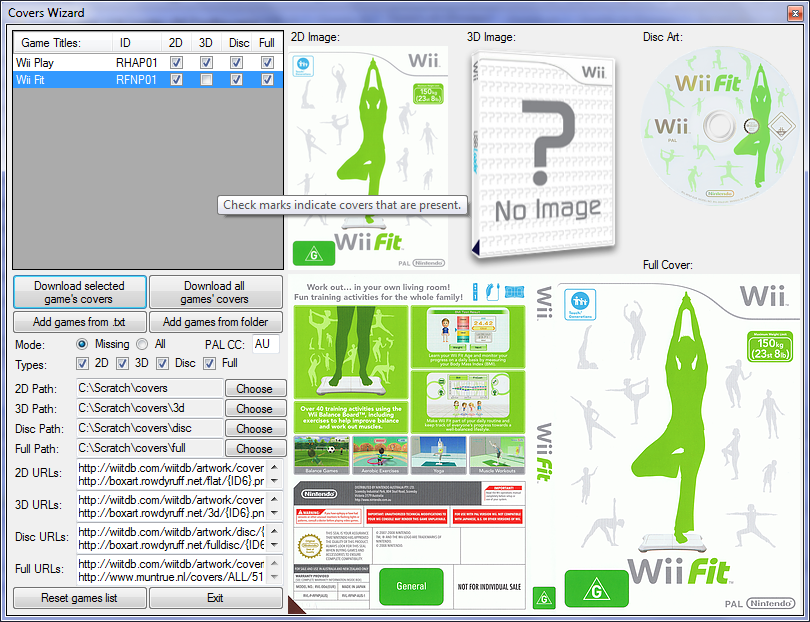
I've just made a big change to my Configurator... cover downloading! Perfect for those without an online Wii.
coverswiz.png


I'd really appreciate any feedback on bugs to be fixed or improvements to be made. Check the release post for the download link and usage notes.

For those that don't know, the Configurator is a tool to aid configuration of Cfg USB Loader. You can set all the options and create themes and so on:


jts said:
So, this external HDD just turns itself off when I launch USB loader.

My question is... is that something related to the enclosure or to the HDD itself?
Probably the enclosure.
 
Hello chaps. I have just borrowed NSMB wii of a friend, and was about to play.. but it wants me to update. Now I'm looking through the pages regarding avoiding the update and so forth, and it's a bit overwhelming. It's been .. like a year since I last turned the console on, so it has hardly any updates. I do have homebrew channel on but I'm not sure if I need to update it numerous times, or is it just the one update.

Basically, since I hardly play the Wii, I was wondering if there's a simple way to just revert back to a non hacked Wii, and just continue as normal? I did read that NSMB has a chance of bricking the Wii though regardless..

I'm just unsure of the choices I have.

Nevermind. I will try to load it up from Gecko which I got to work, and i need to update.. which apparently is fine.. Here goes.

Yes! It works. All is well in the world.
 
I am having an issue with my wii, I do not think it is homebrew related but wanted to post it anyways in case someone might know what is going on. When I turn on my wii my health screen appears fine, after passing that I have 2 system menus. There is the normal one which is centered on the screen and takes up about half of the screen space. Behind that (I can see it on both the left and right sides) is the same menu only displayed in black and white. If I move my wiimote to the side of the screen I can see the pointer on both the color and b&w screen. This stays if I run a game through the disk channel, open HBC or any other menu.

I had it fixed for a little bit yesterday when I switch my wii to a different input on the TV and then all of a sudden this morning I found I am having the same issue. There are no error codes. I am on a launch wii (unmodified) and this issue happened on 3.2U with only the HBC installed. I have since updated it to 4.2 (through the safe updater) and installed the ios 249 (rev 15) and 222/223. There is no usb loader yet (that was going to be todays project). I have not yet switched out the video cable and will do that this afternoon (i am on the regular cable so I will try component).

Any suggestions will be greatly appreciated!
 
man that wiki is awesome, thanks

the new usb loader is a thing of beauty.. and it autodownloads the game cover art and everything <3 i wasn't sure if i would bother replaying twilight princess but the whole USB loading thing seems to have come a long way : )
 
Just turned on my Wii and after hitting the "A" button on the health message, I get a screen saying my Wii's system memory is corrupted. :| I reset it a few times and it wouldn't work still, but then I pulled the power from the back of the Wii, plugged it back in and turned it on and it started up like normal, wife is messing with Wii Fit Plus as I type this.

Is this something to be concerned about? I'm currently at 4.1U but have done the Shop Channel upgrade. Nothing else at all.

Question: If I use my NAND backup from when I first began to hack my Wii and restore it, will it erase all my saves and VC stuffs?

'Bout ready to give up on hacking my Wii, since the only benefit I use is to rip the games I buy and play them off the hard drive. Similar to the way I gave up and went back to legit firmware on my PSP, the many hassles of custom firmware just don't outweigh the benefits.
 
Diseased Yak said:
Just turned on my Wii and after hitting the "A" button on the health message, I get a screen saying my Wii's system memory is corrupted. :| I reset it a few times and it wouldn't work still, but then I pulled the power from the back of the Wii, plugged it back in and turned it on and it started up like normal, wife is messing with Wii Fit Plus as I type this.

Is this something to be concerned about? I'm currently at 4.1U but have done the Shop Channel upgrade. Nothing else at all.

Question: If I use my NAND backup from when I first began to hack my Wii and restore it, will it erase all my saves and VC stuffs?

'Bout ready to give up on hacking my Wii, since the only benefit I use is to rip the games I buy and play them off the hard drive. Similar to the way I gave up and went back to legit firmware on my PSP, thegood many hassles of custom firmware just don't outweigh the benefits.
Yes, restoring your NAND will delete all your saves and any VC you have downloaded. You can redownload the VC stuff, though, and can back up your saves (use StartPatch or SaveGame Manager to copy the ones that you can't copy normally). I don't see any real reason for you to do that, though. The memory thing you saw seems unrelated to having homebrew on the Wii.
 
Top Bottom