• Hey Guest. Check out your NeoGAF Wrapped 2025 results here!

GAF Wii Homebrew thread: Homebrew, emulators, USB disc installs! Easy tutorial!

Thanks Ilan!
I had preloader installed only since 4.0 (and only thanks to you nontheless) so I didn't know that updating the Sys Menu would wipe it out.

I'll wait to see how things improve before re-installing it.
 
You're welcome.

Dash, some 4.1E hacks have since been developed.
Us 4.1U folks are still out in the cold though.

As always, I'd recommend Wiibrew.org as a great resource for hacks. They define them, and break them out by SysMenu and region, for easy copying into an updated hacks.ini file (which goes into the root of your SD card).

http://www.wiibrew.org/wiki/Preloader/hacks
 
Does GeckoOS allow you to play NTSC GCN games on a PAL Wii, and can you save on a PAL formatted memory card?

I only use Gecko for Wii games, so I dont really know if it has Cube functionality.
 
EatChildren said:
Does GeckoOS allow you to play NTSC GCN games on a PAL Wii, and can you save on a PAL formatted memory card?

I only use Gecko for Wii games, so I dont really know if it has Cube functionality.
Yes and yes, as long as you mean NTSC-U and not NTSC-J (which is almost certainly the case).
 
Hi everyone so I just installed the homebrew channel and my wii is version 3.2.

I want to start playing some newer games as I havent used my wii in a long time what is the best way to launch them to avoid the updates on the discs?

Or am I ok to upgrade to wii update 4.1 now that I have the homebrew channel installed. What are the advantages and disadvantages of this?
 
web01 said:
Hi everyone so I just installed the homebrew channel and my wii is version 3.2.

I want to start playing some newer games as I havent used my wii in a long time what is the best way to launch them to avoid the updates on the discs?

Or am I ok to upgrade to wii update 4.1 now that I have the homebrew channel installed. What are the advantages and disadvantages of this?
For your upgrade related questions: http://gwht.wikidot.com/upgrade, and to avoid updates on disc, run once with Gecko OS and you should be good (although you actually do need the updates of the most recent games, which don't update your firmware, to get things like IOS55).
 
Quick question/confirmation from a complete homebrew noob:

If I have my wii firmware up to date with firmware 4.1, I cannot install the homebrew channel, correct?
 
DanteFox said:
Quick question/confirmation from a complete homebrew noob:

If I have my wii firmware up to date with firmware 4.1, I cannot install the homebrew channel, correct?


You should be able to install the Homebrew Channel using the Hackmii Installer 0.2.
 
DanteFox said:
Quick question/confirmation from a complete homebrew noob:

If I have my wii firmware up to date with firmware 4.1, I cannot install the homebrew channel, correct?
If you couldn't install it, the GWHT would tell you so. It doesn't, so you can :p.
 
Question without reading the whole thread (sorry):

Do you HAVE to have a SD card to do any of this stuff? I think I read somewheres that some of it works with a USB stick; is that still true?
 
There's no reason NOT to update to 4.1.
Unless you like wasting your time watching an unskippable 3 minute tutorial vid again and again due to the silly big in 4.0 than 4.1 fixes.
 
The GWHT now has a new page that lists all the things you can do with Configurable USB Loader's options. If you were previously confused by the options, didn't know they even existed, or were just too lazy to try to decipher them, take a look.

Ralys said:
Do you HAVE to have a SD card to do any of this stuff? I think I read somewheres that some of it works with a USB stick; is that still true?
Once you have the HomeBrew Channel on there, you only need a USB drive and almost all homebrew will work (except some homebrew that writes stuff, like Homebrew Browser). However, you require an SD card to install the HBC, as there is no way to hack the Wii with just a USB drive.
 
I don't get it. I used the GParted thing to prepare my new Seagate Freeagent Go, installed usbloader to it and it didn't show op in the my Computer window. I removed the entire partition again using GParted and it still doesn't show up. Any tips?
 
Snoodaard said:
I don't get it. I used the GParted thing to prepare my new Seagate Freeagent Go, installed usbloader to it and it didn't show op in the my Computer window. I removed the entire partition again using GParted and it still doesn't show up. Any tips?
It won't show up in your computer. It shouldn't. If you run diskmgmt.msc (on a Windows machine), you will see the partition, if that's what you wanted.

In any case, you install the games via the Wii, so there is absolutely no need to see the drive on your PC. You can install a WBFS manager to do so, but it is completely unnecessary.
 
If I already have USBloader up and running do I still need IOS222 and 223?

edit
Oh and how do I know if I have IOS249?
I really don't get all that IOS stuff
 
kamorra said:
If I already have USBloader up and running do I still need IOS222 and 223?

edit
Oh and how do I know if I have IOS249?
I really don't get all that IOS stuff
If you have USBLoader running and working, you almost certainly have IOS249. You can check by pushing '1' twice and Configurable will tell you which IOS and which version it is using.

As for IOS222/223, if you aren't having issues with IOS249 (like random crashes), then you don't need them. If you want to try them out, just use the GWHT.
 
Fantastical said:
Are there other games out there that benefit technically from USB loader besides HoTD: Overkill? Sorry if this has been asked before.
Metroid Prime 3 door waiting time seems to be significantly reduced, many other games exhibit much shorter load times than using the disc. I can't remember any other games where the loading speed on disc physically affected gameplay, like in HoTD:O though.
 
Clipper said:
Metroid Prime 3 door waiting time seems to be significantly reduced, many other games exhibit much shorter load times than using the disc. I can't remember any other games where the loading speed on disc physically affected gameplay, like in HoTD:O though.
Okay thank you! I don't have an external hard drive and I'm considering trying out USB loader
 
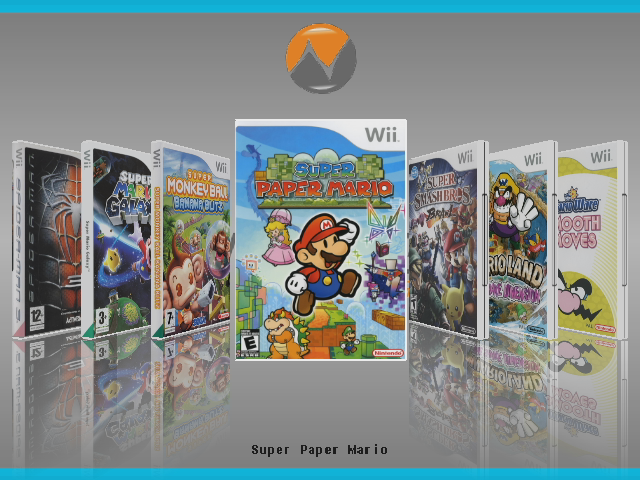
Ok, here's a look at the Coverflow mode in the new version of Configurable:
screenshot14.png


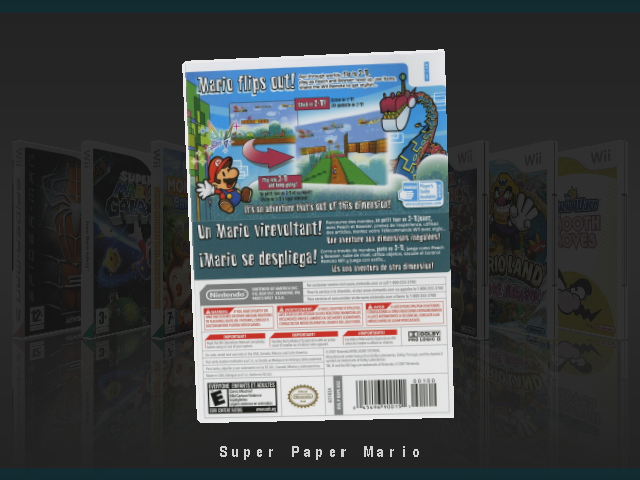
You can also see the backs:
screenshot15.png


Or arrange the covers differently (click for bigger versions):


I'll probably update the GAF bg_gui image soon to make it fit better with these (I plan to eventually use a crop of isoGAF).
 
Hmm can't get Wii Sports Resort working on my Configurable USB. It just keeps rebooting the system back to the Wii Menu when I try and load it.

The game comes out here in NZ today (I actually got it a day early lol gogo breaking launch shops). I got it working with Gecko OS just booting the disc but would prefer it on my hard drive.

Is there any simple fix out there yet? Sorry if its an old problem, I don't follow the scene really so always out of date when a problem rolls along.

PAL, 4.0, all HBC, USB etc hacked and everything already (didn't know if I should upgrade yet or not).
 
Alrighty, after using the excellent guide, I'm not up and running with a hacked Wii. I managed to get USB Loader working and all, and ripped my copy of Punch-Out! and was able to run it just fine off the external HD i'm using (a 320GB drive). Love the GAF symbol wiimote pointer!

I'm still getting used to all this IOS stuff, but I think I have a rudimentary handle on it, except for a few points. Have some questions:

1) I installed BootMii successfully to boot2, but I just realized that I didn't back up my NAND before hacking everything the rest of the way. Did I mess up in doing this, or is my original NAND intact still, and capable of being backed up via BootMii?

2) Apparently, the Wii isn't compatible with some SD cards, is this correct? I had been using a 16GB Kingston SDHC card and was able to run Virtual Console/WiiWare stuff that I bought just fine. Now, when I went to hack my Wii, I was able to install HBC just fine off that card, but nothing else would read off it, giving me read errors. I ended up using a 4GB microSD card I had inside an adapter.

 
For the new page readers:


TwinIonEngines said:
Where can I get images for the spine and back?
There's a few places. The loader (37a and 37ax only) will download them for you if you push D-pad left on Download All Missing Covers after pushing 1 twice. If your Wii is not connected to the net, use my options guide here under the cover URLs part to see the URLs you can use (which will give you the sites to go to).

You actually download the full cover, not just the spine and back.

Conrad Link said:
Hmm can't get Wii Sports Resort working on my Configurable USB. It just keeps rebooting the system back to the Wii Menu when I try and load it.

The game comes out here in NZ today (I actually got it a day early lol gogo breaking launch shops). I got it working with Gecko OS just booting the disc but would prefer it on my hard drive.

Is there any simple fix out there yet? Sorry if its an old problem, I don't follow the scene really so always out of date when a problem rolls along.

PAL, 4.0, all HBC, USB etc hacked and everything already (didn't know if I should upgrade yet or not).
You have to run it once normally, then use the USB version. Once you have seen the MotionPlus video once, it should work fine. Also update, or you will need to keep watching the MotionPlus video every time you have played something of the SD channel in-between WSR plays.

Diseased Yak said:
Alrighty, after using the excellent guide, I'm not up and running with a hacked Wii. I managed to get USB Loader working and all, and ripped my copy of Punch-Out! and was able to run it just fine off the external HD i'm using (a 320GB drive). Love the GAF symbol wiimote pointer!

I'm still getting used to all this IOS stuff, but I think I have a rudimentary handle on it, except for a few points. Have some questions:

1) I installed BootMii successfully to boot2, but I just realized that I didn't back up my NAND before hacking everything the rest of the way. Did I mess up in doing this, or is my original NAND intact still, and capable of being backed up via BootMii?

2) Apparently, the Wii isn't compatible with some SD cards, is this correct? I had been using a 16GB Kingston SDHC card and was able to run Virtual Console/WiiWare stuff that I bought just fine. Now, when I went to hack my Wii, I was able to install HBC just fine off that card, but nothing else would read off it, giving me read errors. I ended up using a 4GB microSD card I had inside an adapter.
Did you mean "now up and running"? A very confusing typo indeed, if you did.

1) You can still back up your NAND, but it will back up with IOS249, the HBC and so on already installed. It would still provide brick protection to go and make a back up now (in case you stuff up in future), as what you have now is working and safe.

2) Yeah, some SD cards won't work so well. I think the HBC only handles 8GB cards, but I could be mistaken.
 
Hey, Clipper, wassup

I have to ask again, because I STILL can't get it to work...

My covers STILL don't download, even when I put those new URLs in the config.txt file. I thought I did it right, but it's still not working. Can you guide me through, step by step? I looked around the guide real quick and didn't find much help. Also, since I have you, how do I start using that bitching coverflow configuration that you use in Configurable USB?

EDIT:

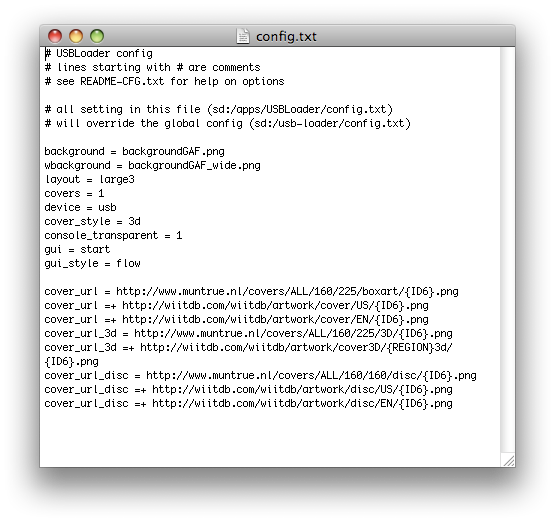
Here's what my config.txt looks like:

Picture1-38.png


what's wrong with that?
 
Clipper said:
There's a few places. The loader (37a and 37ax only) will download them for you if you push D-pad left on Download All Missing Covers after pushing 1 twice. If your Wii is not connected to the net, use my options guide here under the cover URLs part to see the URLs you can use (which will give you the sites to go to).

Where do you get 37a/37ax? 36 is the last version I see mentioned on GWHT or the gbatemp thread, and google isn't helping me right now.

Can I just add a cover_url_full option to my config with 36d?

Edit: nm, the loader can update itself. That's the feature I really wanted before getting distracted by the full covers, anyway :lol
 
TwinIonEngines said:
Where do you get 37a/37ax? 36 is the last version I see mentioned on GWHT or the gbatemp thread, and google isn't helping me right now.

Can I just add a cover_url_full option to my config with 36d?

Edit: nm, the loader can update itself. That's the feature I really wanted before getting distracted by the full covers, anyway :lol
Yeah, 37a is through online updates. 37ax which ONLY works if you are using an SD card for covers and so on (as my tutorial follows) is only available here.

BrandNew said:
My covers STILL don't download, even when I put those new URLs in the config.txt file. I thought I did it right, but it's still not working. Can you guide me through, step by step? I looked around the guide real quick and didn't find much help. Also, since I have you, how do I start using that bitching coverflow configuration that you use in Configurable USB?

http://i209.photobucket.com/albums/bb44/SufjanSays/Picture1-38.png

what's wrong with that?
Those sites aren't the best any more and the links have changed again. Just auto-update to 37a or use my link in the response above to get 37a/37ax and remove all URLs from your config.txt/. If you want to know the new URLs, expand the "I want to change the URLs used to download covers." section on this page.

To get to the coverflow configurations, use D-pad down while in GUI mode. You can also set the gui_style option in config.txt to automatically start on any one of them.

Hmm, should I update my sample GAF config to use one by default now?
 
Yes, I should say so.

Could I get some clarification? How does one auto-update to 37a? I tried just downloading it from the internet, but I'm really unsure where to unzip the contents, even with your guide...do I just leave the USBLoader file in the apps directory alone, and move the SDUSBLoader etc file to the root? Also, when I tried to download the covers with the new sites (assuming I put them in correctly), it gave me an error, saying something along the lines of "Cannot create dir sd/apps/USBLoader/cover 3d or something like that.

Halp :(
 
Nevermind, I've decided to just say fuck it and do a fresh reinstall of EVERTHING on my SD card since I was getting sick of what I had on it. Quick question though; if I had previously installed IOS249 or whatever I was using previously before I restarted everything on my SD card, do I have to do that process again? Shit was annoying to go through last time.
 
To use the in-menu update, hit 1 to access options, 1 again to access global options, and you'll see Check for Updates. Access that, select the newest version (usually up top), and it'll start to download. Once it's done, hit Home to exit the app, and re-enter. Done.

IOSes (and cIOSes) get installed directly to the Wii, not to the SD card.

The new Coverflow option's cool, but without a Flow-Z like pointer-driven interface, it's too clunky to be practical, IMHO. Unless you have a tiny number of games, I guess. At the very least, they should support the nunchuck's analog stick.
 
BrandNew, did you miss this part of the guide:
Updating Configurable USB Loader

With v35a6 and later, this can be done with your Wii online, or you can upgrade manually.
Online installation

1. Start Configurable USB Loader and push 1 twice to get to the Global Options screen.
2. Select Search for updates and push right on the D-pad.
3. A selection of versions will come up. Choose the one you want to install and push A.
4. The new version will download and install over the currently running version.
5. When complete, push any button to return to USB Loader.
6. Exit and restart the loader to try the new version.

Manual installation

1. Download new version
2. Replace sd:/apps/USBLoader/boot.dol with inSDRoot/USBLoader/boot.dol from the zip file.
Oh, I guess that doesn't cover the .dol only releases, or the .rar release of 37a/37ax... Updating now...

Mejilan said:
The new Coverflow option's cool, but without a Flow-Z like pointer-driven interface, it's too clunky to be practical, IMHO. Unless you have a tiny number of games, I guess. At the very least, they should support the nunchuck's analog stick.
Pointer control is in the works.
 
Just what I wanted to hear. Thanks.

Clipper, I've been pretty ill the past week (bad food poisoning, hospital, etc.)
I'm doing better now. You've done amazing work on this tutorial.
I plan on whipping up a quick FTPii tutorial for it sometime this weekend. Match it up to the FireFTP extension in Firefox, and/or the free FileZilla FTP Client. It really makes managing the contents of an SD card (and a Fat32 partition on the Wii's HDD) much more convenient.
 
Clipper said:
Did you mean "now up and running"? A very confusing typo indeed, if you did.

1) You can still back up your NAND, but it will back up with IOS249, the HBC and so on already installed. It would still provide brick protection to go and make a back up now (in case you stuff up in future), as what you have now is working and safe.

2) Yeah, some SD cards won't work so well. I think the HBC only handles 8GB cards, but I could be mistaken.

:lol Man that was a bad typo. Yes, I meant "now up and running". Thanks for clarifying what exactly BootMii was backing up. I'll be sure and get a good snapshot before I do anything more.

Sucks my 16GB SD won't work :/ Guess I'll snag a 8GB.
 
It's worth noting that regular SD cards, in general, are a lot more compatible with both homebrew and retail games than SDHCs.

Your best bet, IMHO, would be to stick with a standard 2GB SD card (Kingston or Sandisk) and create a FAT32 partition on your Wii's HDD to use as an expansion to the SD card. Some homebrew (such as most emulators) can read from such a partition just as easily as the SD card.
 
Mejilan said:
It's worth noting that regular SD cards, in general, are a lot more compatible with both homebrew and retail games than SDHCs.

Your best bet, IMHO, would be to stick with a standard 2GB SD card (Kingston or Sandisk) and create a FAT32 partition on your Wii's HDD to use as an expansion to the SD card. Some homebrew (such as most emulators) can read from such a partition just as easily as the SD card.

Ahh yeah, that sounds like a good idea. I simply formatted the whole 320GB on my USB drive as Wii FS. I'll have to go back and wipe it out and redo things, but I like the idea of having it on the USB instead of the SD card.
 
I had to do the same thing. I stubbornly told myself that I wouldn't need a FAT32 partition, and then changed my mind 60 or so game installations later. It was a huge pain in the ass, but now I have a 25GB FAT32 partition, and the remainder of my 500GB HDD is dedicated to Wii games.

Arguably, I'm not really USING that FAT32 partition for anything. I'm not big on emus, so really, the only thing I'm using it for is to hold Cfg USB Loader. I have it, cheat codes, covers, etc., all loading from the USB instead of the SD card. For no other reason than I wanted to learn how.

I've since learned that most emulators (at least those done by Tantric, it seems) can access a FAT32 partition as well. I see little point in a microSDHC. The game that's most apt to benefit from the extra storage, Rock Band 2, only works with regular SD cards, to my knowledge. And as for the VC and WiiWare. I have almost 11 pages (of the SD Menu's 20) filled with purchases, and I'm not even using half of my SD card's 2GBs.
 
Ok, I got my new HDD partitioned using the Wii into WBFS. I did the same for my old hard drive a long time ago. However, my computer won't recognize either of them and neither will WBFS Manager 3.0. How do I go about transferring the games on my old hard drive to my new one? I don't want to rip all of them again =/
 
Firestorm said:
Ok, I got my new HDD partitioned using the Wii into WBFS. I did the same for my old hard drive a long time ago. However, my computer won't recognize either of them and neither will WBFS Manager 3.0. How do I go about transferring the games on my old hard drive to my new one? I don't want to rip all of them again =/
This should help (describes a WBFS manager that will recognise your drive).
 
Got validated, so I might as well drop a thanks to Clipper now. Your guide was what made it possible for me to kick in the USB loader in half an hour. True bro.
 
Mejilan said:
Just what I wanted to hear. Thanks.

Clipper, I've been pretty ill the past week (bad food poisoning, hospital, etc.)
I'm doing better now. You've done amazing work on this tutorial.
I plan on whipping up a quick FTPii tutorial for it sometime this weekend. Match it up to the FireFTP extension in Firefox, and/or the free FileZilla FTP Client. It really makes managing the contents of an SD card (and a Fat32 partition on the Wii's HDD) much more convenient.
I don't know about anyone else but I've been waiting for you to do this and it's great to hear it's coming soon.
 
Hey Clip, if it's not too much of a hassle, can I ask for a direct link to download the latest Gaf's CFG with coverflow added? I'm at work and I can't browse much...
 
Dash Kappei said:
Hey Clip, if it's not too much of a hassle, can I ask for a direct link to download the latest Gaf's CFG with coverflow added? I'm at work and I can't browse much...
Well, you'll need a recent copy of cfg UL, so either online update or install the .dol from here over your old one.

The GAF theme files are here, and to make it default to coverflow mode, edit sd:/apps/USBLoader/config.txt to change the "gui_style" line to "gui_style=coverflow3d".

You can also just switch the GUI style by pushing D-pad down a few times.
 
Hi everyone !
It looks like I have some problems with my USB Loader :
I have an Iomega prestige, the 500GB one. And it doesn't load very good, sometimes, there's no more music in my games and they freeze, also, I have to switch it on every time before I want to launch the USB Loader.
Do I need to change my HDD ? Or will an update fix my problem ?
 
Mejilan said:
I've since learned that most emulators (at least those done by Tantric, it seems) can access a FAT32 partition as well.

Is it also possible to start dols from the HDD? Or does it only work for the rom folders? Is there a list of apps that support the HDD? Would be great to put SCUMM games on the HDD.
 
Top Bottom