• Hey Guest. Check out your NeoGAF Wrapped 2025 results here!

"I need a new PC!" 2010 Edition

kinggroin said:
You mean in general or just AMD's solution?

Personally, other than being extremely CPU bottlenecked when going Crossfire, I haven't had any issues other than a couple Capcom games (RE5 and SFIV).

From what I understand though, SLI is signifcantly more optimized than XFire, offering about 90% efficiency versus around 70% with ATI. It's why I tried to sel my 5970 and get two 460's.

SLI will rarely reach 90% even in an artificial test. Even some of the better real world cases (2560x1440 with AA) it's in the 80s, and that's with the 460 SLI which has unleashed some new SLI scaling secret sauce. So not all SLI is quite as efficient, although it is almost always a better scaling solution than XFire and more importantly scales better in more games, especially closer to release.

Of the two multi-card solutions, SLI has proven to be a more generally usable solution for me. Right now I'm enjoying single card gaming with a 5870, but if I was going multi-card, it would be SLI.
 
mhayze said:
SLI will rarely reach 90% even in an artificial test. Even some of the better real world cases (2560x1440 with AA) it's in the 80s, and that's with the 460 SLI which has unleashed some new SLI scaling secret sauce. So not all SLI is quite as efficient, although it is almost always a better scaling solution than XFire and more importantly scales better in more games, especially closer to release.

Of the two multi-card solutions, SLI has proven to be a more generally usable solution for me. Right now I'm enjoying single card gaming with a 5870, but if I was going multi-card, it would be SLI.


You're right. I accidentally compared the OC'd 460 SLIs to the stock. Going stock to stock SLI is more aroun 80-85%. Still better than ATI.


edit: I'm hoping ATI really picks up it's game here. So much performance is theoretically left on the table. I guess it'll take some time still, since SLI is a much more mature implementation anyway.
 
Shambles said:
4X is plenty on the PCIE for most cards such as the 5770. Only on the high end would I worry about being lane throttled. Here's a link showing the 5870 running at 95% on a 4x connection.

Single cards sure, but SLI and Crossfire work by communicating over the PCIe bus, makes the amount of bandwidth available a lot more important.
 
Sorry for these tech support-esque questions, but if I'm running Memtest86+ and it lists the settings as 399MHz (DDR798) / CAS: 5-5-5-18 / Dual Channel, does that mean it's properly running as Dual Channel? I ask because CPU-Z reported it as 399MHz for each module when I checked yesterday.
 
Is the hyper 212+ quiet? Ive seen differing opinions.
Also, that thing looks huge. Will it fit inside an Antec 900 case?

Why do I enter this thread? Now Im thinking about buying one and overclocking.
 
Salaadin said:
Is the hyper 212+ quiet? Ive seen differing opinions.
Also, that thing looks huge. Will it fit inside an Antec 900 case?

Why do I enter this thread? Now Im thinking about buying one and overclocking.

It's definitely noisy at fan speeds above 70%. I keep mine at or under 70% with the motherboard's fan controls and I only hit 50 degrees running prime95 while playing WOW. The 900 is a beast case, so I think it would fit
 
brain_stew said:
Single cards sure, but SLI and Crossfire work by communicating over the PCIe bus, makes the amount of bandwidth available a lot more important.

They also talk over the bridges. I'd be interested to see actual test results of CF/SLI setups to see how it pans out. In his case crossfiring 2 5770's won't make much of a difference if it doesn't make a 5870 blink.
 
Question #1
I bought a HD 4850...CPUz shows these stats..is that because I am not in a 3d program so it underclocks or whats the deal? (low clock values)
RGkw8.jpg


Question #2
For SPD under CPUz, is "JEDEC" the manufacturers recommended spec, and if so, should I be running those timings?
 
Got a few questions about AMD's Cool n Quiet Tech. It seems as if mine is not functioning properly? I have a x4 630 cpu and the biostar TA760G mobo. The correct clock speed is 2.8 MHz. I am running everything stock, no overclocking.

From what I understand, Cool n Quiet underclocks the CPU while doing regular, non-intensive applications and idling. Thats fine. It works perfectly in that sense and I'm happy with the resulting lower CPU fan speed and temperatures. The System Properties in Windows XP shows it running at 784 MHz.

I had just upgraded to this CPU/mobo from a 5000+ BE and some other mobo and I ran games like SC2 fairly well on medium or high settings. When playing SC2 last night I found it incredibly choppy, even at times on Low or Medium. This led me to believe that Cool n Quiet wasn't properly clocking the CPU speed back to its 2.8 GHz standard.

Has anyone else run into this problem? I later tested it by switching the setting in Power Options to 'Always On' instead of 'Minimal Power Management', which I guess turns off CnQ? System properties showed 2.8 MHz again and I was able to run SC2 perfectly on all high settings. It also worked when I just completely uninstalled CnQ altogether.

Ideally I'd like to keep the features of CnQ for when I'm just browsing the web or things of that nature, and have it correctly up the CPU power when gaming. Anyone have any ideas to fix this issue? Otherwise I'd have to go into Power Options and change it to 'always on' everytime before gaming, or just lose the CnQ features all together and have the CPU run at full speed at all times.

Sorry for the long post, hope I sufficiently explained the problem
 
brain_stew said:
On the subject of prebuilt machines though, Dell have really knocked it out the park with their Studio XPS 7100, if you buy the highest stock config.

For $1150 you get:

A 2-8-3.3ghz AMD Hexacore.
A HD 5870
A BD combi drive
Windows 7 HP x64
6GB DDR3
Wireless N wifi card
1.5TB 7200RPM drive

Anandtech have a nice review of it here:

http://www.anandtech.com/show/3798/dell-studio-xps-7100
Here she is, just arrived :D (Iphone pics)
4810461001_7193389f05.jpg

4810460159_d2a3acac91.jpg

4811082950_42ff216ddb.jpg

4810459471_ea6af6d1b2.jpg

4810459183_2f392cfeb7.jpg

4810458773_2e927fa13e.jpg

4810457797_75dd8c7640_m.jpg

4810658115_965ebd44ee.jpg


Hard disk speed is a little slow, so I guess I need to go SSD to match with the rest of the scores :D

Everything is awesome, but the power supply concerns me, to low?
4811081118_c4c57a5e79.jpg
 
Classic_Gs said:
Here she is, just arrived :D
Everything is awesome, but the power supply concerns me, to low?
4811081118_c4c57a5e79.jpg

I'm not a huge fan of that...not sure how it can power a 5870 with 18 or so amps.

But...try stressing it with OCCT and see how it fares. If it works at 100% full load for ~hour, you're good. If not...well, not many programs will ever see your PC at 100% load.
 
Lion Heart said:
Question #1
I bought a HD 4850...CPUz shows these stats..is that because I am not in a 3d program so it underclocks or whats the deal? (low clock values)
RGkw8.jpg


Question #2
For SPD under CPUz, is "JEDEC" the manufacturers recommended spec, and if so, should I be running those timings?

Sorry...

Question #3
My "Memory operations per second" in Win 7 performance went from 5.2 to 4.7 after I installed this card. Is there a problem there or is it just being measured relative to the card.
 
darthbob said:
I'm not a huge fan of that...not sure how it can power a 5870 with 18 or so amps.

But...try stressing it with OCCT and see how it fares. If it works at 100% full load for ~hour, you're good. If not...well, not many programs will ever see your PC at 100% load.

Well, I'm assuming Dell has it so that the extra power connectors come from the second rail. I'm assuming the PSU they have in there can support the hardware.

You definitely should run some tests just to be sure though.
 
Yes, you're getting a lot more than 18 amps. The PSU has multiple rails. As for the wattage people are constantly overestimating their needs and why some of us are constantly telling people to go with lower PSUs. Machine looks pretty.

Lionheart: Boot up a game and take a look at the clock speeds. I'd be looking at the ATI CCC before CPU-Z for accurate readings. I wasn't aware of GPUs underclock when idling but it wouldn't surprise me. CPUs have been doing this for years.
 
The pictures sort of answer this, but how much room is there inside of that Dell for the videocard (or cards)? In the past I've found pre-built Dells to be pretty tight on space.

Also, how secure is the PSU? If you wanted to replace it with something with more juice, do you think you could? The custom cases (which yes, look quite nice and not obnoxious like a lot of the custom places sell) Dell uses seem to not want you replacing the PSU ever. The price is certainly very nice though.
 
LaneDS said:
The pictures sort of answer this, but how much room is there inside of that Dell for the videocard (or cards)? In the past I've found pre-built Dells to be pretty tight on space.

Also, how secure is the PSU? If you wanted to replace it with something with more juice, do you think you could? The custom cases (which yes, look quite nice and not obnoxious like a lot of the custom places sell) Dell uses seem to not want you replacing the PSU ever. The price is certainly very nice though.
There is enough room for the card but not for multiples. Its nice and tight but there is enough room to move around. I need to take a closer look at the PSU to see just how secure it is.
 
projekt84 said:
Looks good. $1150 good? Not sure. I mean I guess you pay for the service.

It looks great! It has a ~$400 card in it, a $200 processor, bluray drive, and a $150 OS installed. I'd dare say you'd be hard pressed to get similar value. Of course we all know corners are cut somewhere (mobo, psu, maybe RAM) but otherwise it's a great buy for someone that will never want to build his/her own PC.
 
damn, about time Dell puts out some value. I would recommend this to some of my friends that want to game but are tech illiterate
 
darthbob said:
I'm not a huge fan of that...not sure how it can power a 5870 with 18 or so amps.

But...try stressing it with OCCT and see how it fares. If it works at 100% full load for ~hour, you're good. If not...well, not many programs will ever see your PC at 100% load.

The PSU has 41 amps on its 12v rails, its more than sufficient for that rig. There's plenty ~500w PSUs sold that are rated much lower than that. Dell wouldn't ship it with a PSU that can't power the rig and they've always been very conservative in their PSU ratings.

Its Fine.
 
Damn you windows 7, why won't it install?

the mobo detect both of the HDDs(i have two samsung f3 1tb)but the w7 installation, only detect one.
and it keeps on saying:
"Can't create/locate a system partition"
daaaaamn it's 2hrs that i'm trying everything... i'm soooo pissed.
 
UrbanRats said:
Damn you windows 7, why won't it install?

the mobo detect both of the HDDs(i have two samsung f3 1tb)but the w7 installation, only detect one.
and it keeps on saying:
"Can't create/locate a system partition"
daaaaamn it's 2hrs that i'm trying everything... i'm soooo pissed.

Googling suggests only have one drive hooked up when installing W7, and making sure it is setup in the BIOS for SATA not IDE, but you probably already tried that if you've been at it for hours... hopefully you figure it out soon!

Edit: From here:

BIOS settings : W7 will not install if SATA or RAID drives are configured as AHCI. Change that to IDE/ATA. Some BIOSes have a "protect boot sector" feature, make sure that is disabled. And return BIOS to standard settings on Overclocked systems!
Hardware setup : only one bootable drive on the system. Make sure there are no other bootable devices except the DVD drive and the disk you want to install to. Some USB devices are bootable and those have to be disconnected, also on systems with multiple OSes you might have several partitions marked as "active", how to change that depends on how you ended up with several active partitions. The partition you want to install to and the active partition (in case of a system with several OSes) have to be primary partitions formatted as NTFS
Software configuration : On a OEM pre-installed machine you might have to completely wipe out the disk. Other preinstalled software might also cause problems: norton go-back, acronis hidden partitions.... You have to uninstall any protection or encryption software before you attempt to install
 
Lion Heart said:
Question #1
I bought a HD 4850...CPUz shows these stats..is that because I am not in a 3d program so it underclocks or whats the deal? (low clock values)
RGkw8.jpg

Yep, it clocks down to save energy when in 2d mode.
 
Minsc said:
Googling suggests only have one drive hooked up when installing W7, and making sure it is setup in the BIOS for SATA not IDE, but you probably already tried that if you've been at it for hours... hopefully you figure it out soon!

Edit: From here:
one of the two hdd was defecting me, it seems :P
i've switched cables so many times i don't know what i've tried, but now it works, so.. :lol
yeah, being a noob is not cool. :D

EDIT: So, wait... i'm actually into PC gaming again!! Effin GREAT! ^___^
 
Well, I think I am going to break down and build a new gaming comp. It is the first time I will be doing this. I have installed ram and video cards before, but I have never undertaken something like this. I have done some research, watched that video some one linked in this thread and read other how to articles and I think I can do it.

Going to go with the economizer build from the tech report or some close approximation of it. Just need to pick up the parts and get going(I live near a microcenter and a Fry's). I figure that build will let me play most current games, especially SC2 and later Civ5. I was going to do it today, but our AC is down and I don't feel like putting it together in 85+ degree heat:)(I will be building it at night after the 4 year old is in bed, no way I could get it done with him underfoot) Hopefully the AC will get fixed today and then I can do it tomorrow. Wish me luck!!!
 
So I got the dreaded "Nv4_disp" driver error last night while playing Alien Swarm. My googling leads me to believe I should give the inside of my case and especially the video card a good cleaning. Then I'm going to install EVGA Precision so I can monitor the temperatures on my 320MB 8800 GTS.

What kind of temperatures should I be looking for while idle, and while playing a graphically intensive like Alien Swarm apparently is?
 
I've got a C2D E6750 Conroe 2.66 GHz CPU presently. How worth it would be upgrading to a Quad Core? This is a LGA775 board I'm working with. Running Win7 64-bit if that matters.
 
Last Video Card question 4 me

So I have made my Decision im going to get the 5670.

Should I get the 1 gig card or the 512 card. Also would i be able to play most game including FFXIV at 720p or 1440x900 ?

Thanks again
 
Nakazato said:
Last Video Card question 4 me

So I have made my Decision im going to get the 5670.

Should I get the 1 gig card or the 512 card. Also would i be able to play most game including FFXIV at 720p or 1440x900 ?

Thanks again

If you're going to play XIV I'd say just do what you need to do to get the GTX460. The game in it's current state doesn't get along with ATI cards, and you'll certainly want that 1GB version as well.
 
LaneDS said:
If you're going to play XIV I'd say just do what you need to do to get the GTX460. The game in it's current state doesn't get along with ATI cards, and you'll certainly want that 1GB version as well.
wish i could but i dont have the extra money to spend on a 460 :( my budget is 100 or 110
 
Nakazato said:
wish i could but i dont have the extra money to spend on a 460 :(

Can't hold off for a little while and go that route? XIV is really a system hog and presently runs like ass in the beta for me (I've got an HD5770, 2.66GHz C2D, and 6GB of DDR2). If you're going to be playing a lot of XIV, do what you need to do to get the GTX460 even if it means waiting a couple months.
 
LaneDS said:
If you're going to play XIV I'd say just do what you need to do to get the GTX460. The game in it's current state doesn't get along with ATI cards, and you'll certainly want that 1GB version as well.

Why do you say that, I got a 4800 (scoring higher than someone else with a GTX 480) on the 1080p benchmark with an ATi card, and from the sounds of it, merely putting it on my SSD would have pushed my score in to the mid 6000s.
 
Minsc said:
Why do you say that, I got a 4800 (scoring higher than someone else with a GTX 480) on the 1080p benchmark with an ATi card, and from the sounds of it, merely putting it on my SSD would have pushed my score in to the mid 6000s.

The benchmark runs fine. In-game performance is currently very rough in the beta, but it's a known issue that they're supposedly working on.

For reference, I scored around a 3,000 with this current machine, and it ran terribly. Tried it on my brother's machine (i5, HD5770, 6GB DDR3) where he scored closed to 5,000 on the bench and it had similarly disappointing in game performance.

I'm sure it'll be worked out (and likely soon), but for now it's pretty clear the game is optimized better for nVidia hardware.
 
LaneDS said:
The benchmark runs fine. In-game performance is currently very rough in the beta, but it's a known issue that they're supposedly working on.

For reference, I scored around a 3,000 with this current machine, and it ran terribly. Tried it on my brother's machine (i5, HD5770, 6GB DDR3) where he scored closed to 5,000 on the bench and it had similarly disappointing in game performance.

I'm sure it'll be worked out (and likely soon), but for now it's pretty clear the game is optimized better for nVidia hardware.

So the shitty benchmark is not even a benchmark of how the game will run? Oh lord :lol :lol
 
LaneDS said:
The benchmark runs fine. In-game performance is currently very rough in the beta, but it's a known issue that they're supposedly working on.

For reference, I scored around a 3,000 with this current machine, and it ran terribly. Tried it on my brother's machine (i5, HD5770, 6GB DDR3) where he scored closed to 5,000 on the bench and it had similarly disappointing in game performance.

I'm sure it'll be worked out (and likely soon), but for now it's pretty clear the game is optimized better for nVidia hardware.

I believe its only this past week thats had issues though. Initially, it ran great on ATI cards and actually had Nvidia problems instead. Now the roles are swapped. If he can wait to see how the beta pans out for ATI cards, then he should. For all we know, ATI will be smooth as butter whenever SE rolls out the next beta update.

Like brain_stew said (I think it was him), SE would be foolish to ignore ATI owners now.
 
$400 hard budget, $300 preferred
Build for my brother
NEEDS:
case
cpu
mobo
power supply
OPTIONAL but probably needed video card

He currently uses an 8800gt 256mb video card. His computer is an unupgradable dell xps 400(lga 775 board but 945 lakeport chipset that is incompatible with core 2).

Plays at 1680x1050

Doesn't need to be anything crazy of course, given the budget. Wants to run Fallout 3 and the new Vegas game with the best performance
 
Minsc said:
So the shitty benchmark is not even a benchmark of how the game will run? Oh lord :lol :lol

The development on the game is a scary thing indeed. Just need to sit back and pray that they get their shit together before the launch in a scant two months from now.
 
Started my first build late last night. I was just planning to take everything out of their boxes and reading manuals, but I ended up working on it. Couple hours later it was 1 am. :lol I had to force myself to sleep, and I'm currently paying for it here at work (dead tired!), but I'm looking forward to getting home and finishing up. I just need to install my SSD, HDD and DVD drive and clean up the cables. I must say that for my first build, it's quite satisfying and it wasn't as hard as I thought it would be, though I was super nervous installing the CPU and the Hyper 212. I just hope it powers up later! :D
 
pc-1.png


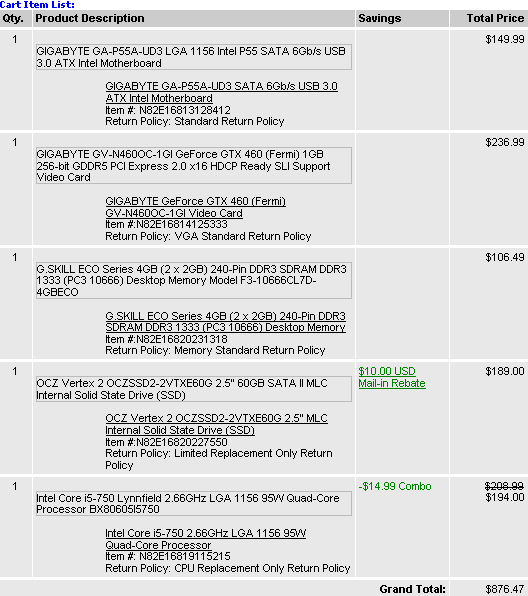
$1005.99 CAD after shipping and taxes.

Using my old case/power supply/sata hdd/optical drive/mouse/monitor/keyboard

That a good SSD? Motherboard seems pretty popular.

In terms of the GTX 460s, are they all pretty much the same?
 
More of a tech questions. I was finally going to get off my lazy ass an oc my launch i7 this weekend following this guide. It appears as though I need to know my RAM timing. I don't have a clue what the timing was on the RAM I bought more than 18 months ago, and it's being covered up by a V10 so I can't really see if there's still a sticker on it. Is there anyway to find out without removing my CPU heatsink and hoping there's a sticker on one of my RAM sticks?
 
Nightz said:
Started my first build late last night. I was just planning to take everything out of their boxes and reading manuals, but I ended up working on it. Couple hours later it was 1 am. :lol I had to force myself to sleep, and I'm currently paying for it here at work (dead tired!), but I'm looking forward to getting home and finishing up. I just need to install my SSD, HDD and DVD drive and clean up the cables. I must say that for my first build, it's quite satisfying and it wasn't as hard as I thought it would be, though I was super nervous installing the CPU and the Hyper 212. I just hope it powers up later! :D
Me too :lol
I have an i5 750, so the socket has all the pins. So worried about fucking up the pins and having to wait for a new mobo. The 3 day shipping on all the parts nearly killed me in the first place. :lol
 
Fixed1979 said:
More of a tech questions. I was finally going to get off my lazy ass an oc my launch i7 this weekend following this guide. It appears as though I need to know my RAM timing. I don't have a clue what the timing was on the RAM I bought more than 18 months ago, and it's being covered up by a V10 so I can't really see if there's still a sticker on it. Is there anyway to find out without removing my CPU heatsink and hoping there's a sticker on one of my RAM sticks?

http://www.piriform.com/speccy
 
Fixed1979 said:
More of a tech questions. I was finally going to get off my lazy ass an oc my launch i7 this weekend following this guide. It appears as though I need to know my RAM timing. I don't have a clue what the timing was on the RAM I bought more than 18 months ago, and it's being covered up by a V10 so I can't really see if there's still a sticker on it. Is there anyway to find out without removing my CPU heatsink and hoping there's a sticker on one of my RAM sticks?

Check the manufacturers website. I know GSkill lists all of their RAM timings on there.
Newegg lists it for some too but I know that with my RAM, their timings differ from what Gskill says so I went with Gskills recommendation.
 
brain_stew said:
Try putting together a rig with better specs than that for $1150, just try.
Intel i7 930 CPU - $199.99 [Microcenter]
EVGA GTX 460 1GB - $229.99 [Newegg]
EVGA 141-BL-E757-TR LGA 1366 Intel X58 ATX X58 SLI LE Intel Motherboard - $160 (MIR) [Newegg]
Antec Sonata III 500 Black 0.8mm cold rolled steel ATX Mid Tower Computer Case 500W Power Supply - $105 (MIR) [Newegg]
CORSAIR XMS3 6GB (3 x 2GB) 240-Pin DDR3 SDRAM DDR3 1600 (PC3 12800) Desktop Memory - $155 [Newegg]
Seagate Barracuda ST315005N4A1AS-RK 1.5TB 5900 RPM SATA 3.0Gb/s 3.5" Internal Hard Drive - $80 [Newegg]
SAMSUNG Black Blu-ray Combo Drive - Bulk SATA Model SH-B083L/BSBP LightScribe Support - OEM - $70 [Newegg]
COOLER MASTER Hyper 212 Plus - $30 [Newegg]
-----------------------------------
Total: $1030

Add in some tax and shipping, and it's still under $1100. Not sure if it's really better though =P
 
Kenak said:
Intel i7 930 CPU - $199.99 [Microcenter]
EVGA GTX 460 1GB - $229.99 [Newegg]
EVGA 141-BL-E757-TR LGA 1366 Intel X58 ATX X58 SLI LE Intel Motherboard - $160 (MIR) [Newegg]
Antec Sonata III 500 Black 0.8mm cold rolled steel ATX Mid Tower Computer Case 500W Power Supply - $105 (MIR) [Newegg]
CORSAIR XMS3 6GB (3 x 2GB) 240-Pin DDR3 SDRAM DDR3 1600 (PC3 12800) Desktop Memory - $155 [Newegg]
Seagate Barracuda ST315005N4A1AS-RK 1.5TB 5900 RPM SATA 3.0Gb/s 3.5" Internal Hard Drive - $80 [Newegg]
SAMSUNG Black Blu-ray Combo Drive - Bulk SATA Model SH-B083L/BSBP LightScribe Support - OEM - $70 [Newegg]
COOLER MASTER Hyper 212 Plus - $30 [Newegg]
-----------------------------------
Total: $1030

Add in some tax and shipping, and it's still under $1100. Not sure if it's really better though =P

You forgot Windows.
 
Top Bottom