• Hey Guest. Check out your NeoGAF Wrapped 2025 results here!

"I need a new PC!" 2010 Edition

From my last post on looking for a laptop from Starcraft 2 I've tried to find laptops with the following cards:

Radeon 4650
Radeon 5650
Nvidia 260M
Nvidia GT330

Unfortunately for the price range and site it has been kind of tough, but I think I found some and I'd like to get your thoughts on which of these do you think is the best:


Toshiba® Satellite 16" AMD Phenom™ II Quad Core Mobile P920 1.6GHz 500GB Notebook

Price...$899.00


MODEL: A665D-S6059

OPERATING SYSTEM: Microsoft® Windows® 7 Home Premium (64-bit)

•Energy Star®, EPEAT Gold compliant
•AMD Phenom II Quad Core Mobile Processor P920 1.6GHz
•2MB L2 cache
•4GB DDR3 RAM (max. 8GB)
•500GB 5400 RPM SATA hard disk drive w/ Toshiba Hard Drive Impact Sensor (3D sensor)
•DVD SuperMulti drive w/ Labelflash supporting 11 formats
•16" diagonal widescreen HD TruBrite® TFT LCD display at 1366 x 768 native resolution (HD+)
•ATI Mobility Radeon™ HD 5650 w/ 1GB DDR3 discrete graphics memory, plus up to 1661MB dynamically allocated shared graphics memory
•Webcam and microphone w/ Toshiba Face Recognition software
•6-in-1 memory card reader
•ExpressCard slot (ExpressCard/34 and ExpressCard/54)
•eSATA/USB combo port w/ USB sleep-n-charge
•LED backlit keyboard and eco utility button
•Wi-Fi wireless networking 802.11b/g/n

Power: 110-240V (auto adjusts), AC, 50/60Hz

Size: 1 1/2"H x 15"W x 10"D

Weight: 5.8 lbs.

HP Pavilion dv7-4060us 17.3" AMD Phenom™ II Triple-Core Mobile 2.10GHz 500GB Notebook

Price...$879.00


MODEL: dv7-4060us

OPERATING SYSTEM: Genuine Windows® 7 Home Premium 64-bit

•VISION Technology from AMD - Ultimate with MD Phenom II Triple-Core Mobile Processor N830
•2.10GHz
•1.5MB L2 Cache
•Up to 3.6 GT/s system bus running at AC/DC mode 35 watt
•4GB DDR3 System Memory (2 DIMM); max. supported = 8GB
•2 accessible memory slots
•ATI Mobility Radeon™ HD 5650 switchable graphics w/ 1024MB DDR3 with up to 2714MB total graphics memory
•500GB (7200 RPM) hard drive (SATA) w/ HP ProtectSmart Hard Drive Protection
•HP TrueVision Webcam with integrated digital microphone
•HP SimplePass with integrated fingerprint reader
•LightScribe SuperMulti 8X DVD±R/RW w/ double layer support
•17.3" diagonal High-Definition HP BrightView LED (1600 x 900) display
•Integrated 10/100/1000 Gigabit Ethernet LAN (RJ-45 connector)
•Wireless LAN 802.11b/g/n WLAN
•5-in-1 integrated Digital Media Reader
•Beats™ Audio and HP Triple Bass Reflex Subwoofer
•101-key compatible with island-style full-size keyboard with integrated numeric keypad
•HP ClickPad with On/Off button
•4 USB 2.0 ports
•HDMI™ port
•eSATA + USB 2.0
•VGA (15-pin) port
•RJ-45 (LAN) connector
•Headphone-out port
•Microphone-in port
•Kensington® MicroSaver lock slot
•Power-on password
•Accepts 3rd party security lock devices

Power: 90W AC Adapter; 9-Cell 93Whr Lithium-Ion Battery; 110-240V (auto adjusts), AC, 50/60Hz

Size: 1 3/8"H x 16 3/8"W x 10 7/8"D

Weight: 8.19 lbs.

Studio XPS 16 with I7 Processor (Dell Laptop)

Price $1,059.99 EPP Discount $106.00
Price $953.99 +$50 GC

Intel® Core™ i7-720QM Quad Core Processor 1.6GHz (2.8GHz Turbo Mode, 6MB Cache)
2GB DDR3 at 1333MHz > free upgrade to 4GB Shared Dual Channel DDR3 at 1333MHz [Included in Price]
HD+ Widescreen 15.6 inch WLED LCD (1600x900) W/2.0 MP, XPS 1647
ATI Mobility Radeon™ HD 5730 - 1GB
250GB 7200 RPM SATA Hard Drive Obsidian Black High Gloss Finish
Genuine Windows® 7 Home Premium, 64bit, English
8X Slot Load CD/DVD Burner (Dual Layer DVD+/-R Drive)
Dell 1397 Wireless-G
1 Year Basic Service Plan

I'm also using this site to compare the different GPUs, it is very helpful.
 
Felix Lighter said:
The Dell appears to have the best CPU, which should help with StarCraft 2 quite a bit I'd think. It would be better if you could bump that 2GB of ram to 4.


Just checked on the customize screen and there is an option for 4GB Shared Dual Channel DDR3 at 1333MHz instead of the 2GB, cool. I updated the post to reflect that.

To me it seems like the Dell is the best of the bunch processing wise, but you're sacrificing hard drive space and screen size. This laptop is for a friend so ultimately he will make the final call but I'm hoping all of these will atleast run SC2 decently.
 
Spare me, I’m a computing dunce.

About ten pages back this configuration from Dell caught my attention. The studio XPS 7100.

For $1150 you get:

A 2-8-3.3ghz AMD Hexacore.
A HD 5870
A BD combi drive
Windows 7 HP x64
6GB DDR3
Wireless N wifi card
1.5TB 7200RPM drive


By and large I’m smitten with those numbers (though I will add an extra 2 gb of ddr3) but I’m a little concerned with the AMD. I plan on using the PC for both gaming and rendering HD video projects for school. I’m also particularly interested in emulating Gamecube, Wii and Ps2 games. Could I do significantly better with an Intel? Secondly are there faster AMD’s I could plop in this configuration without changing any other hardware?
 
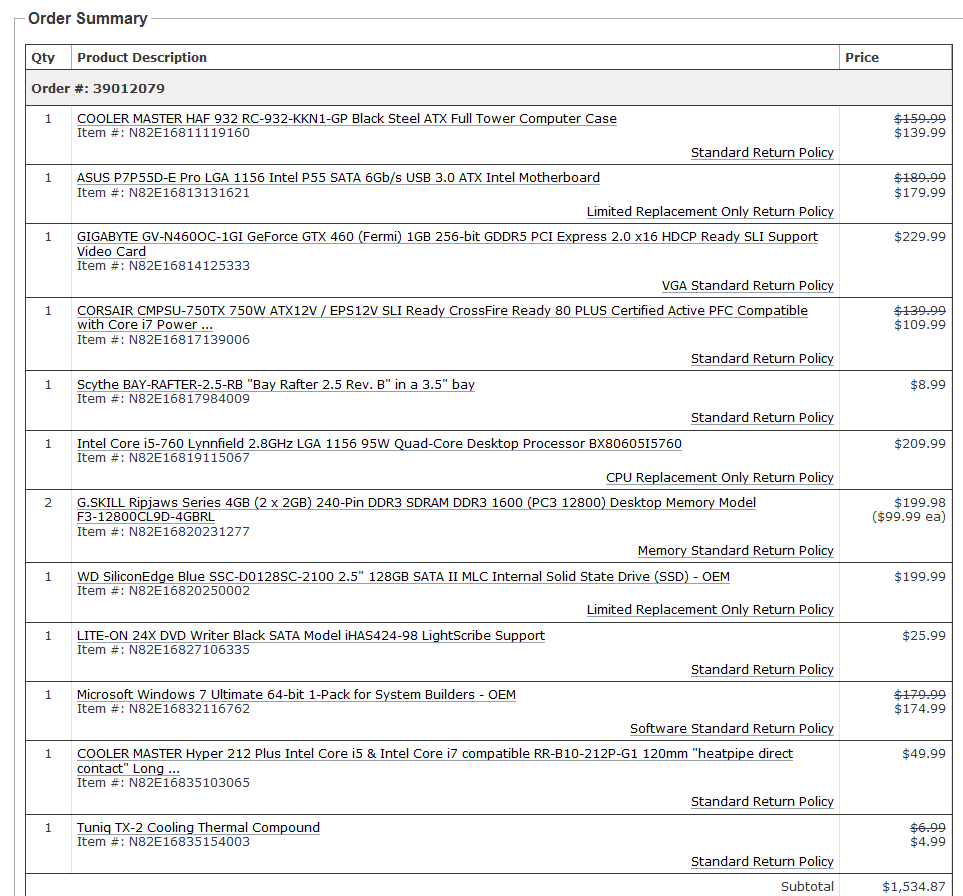
Well guys! Got my parts finally!
Just need to order an aftermarkert cooler but I got!

i7-930 $200
Gigabyte LGA1366 SATA3 ATI CrossFireX ATX Motherboard GA-X58A-UD3R $200
Coolmaster Storm Scout $80
Corsair XMS 3 Dual Channel $99
Corsair 650w $90
Galaxy 460 GC 1gb $230 ( with rebate! )
Samsung F3 Spinmaster 1gig $70
Lite On DVD/CD $22
Total Around $1000!
:D

I'll post pics on Friday! :D
 
I know this isn't exactly a tech support thread, but considering I got new parts for my PC maybe it would be okay to ask this here-

My setup-
E8400
HD4850 512MB
Asus P5Q Pro Motherboard
Antec Sonata III case

I just recently bought a Cooler Master 212+ CPU cooler so I could OC my CPU a bit to get a little extra oopmh from my rig. The installation seemed to go okay, and I'm now at an OC of 3.6GHz (not a lot, but I wanted to start small to get the hang of it.)

The issue is my temperatures, my CPU idles around 48C according to coretemp and my GPU for some reason is now idling around 65C according to Catalyst Control Center. I have a aftermarket cooler already in my GPU and before I installed my CPU cooler it used to idle at 38C.

I checked the seat of the CPU fan and it has a pretty much perfect amount of thermal compound (arctic silver 5 too) so I don't think it's that, would it be my overall case airflow causing this? I only have one case fan, and it's a mid sized case, is the new larger cooler preventing airflow from the case?
 
fatty said:
Just checked on the customize screen and there is an option for 4GB Shared Dual Channel DDR3 at 1333MHz instead of the 2GB, cool. I updated the post to reflect that.

To me it seems like the Dell is the best of the bunch processing wise, but you're sacrificing hard drive space and screen size. This laptop is for a friend so ultimately he will make the final call but I'm hoping all of these will atleast run SC2 decently.

Get the Dell if you can (though I think it takes while to ship compared to the other 2 options). If you can get the laptop from bestbuy maybe you can look for the ~$1000 Asus that has similar specs to the Dell and is highly rated.
 
Repost for new page (sorry but I would like to fix this tomorrow cause I only have one day off in the week).

profit said:
It doesnt really fit this topic 100 % so I hope you dont mind asking me here:

Yesterday while playing WoW, my pc just rebooted itself. After that I can only see the first booting screens (motherboard, ect...) but it wont go any further. Just a black screen. I'm beginning to suspect my graphics card got fried (GTX260) although I have never had any problems with overheating.
Anyone with some experience that has had this happen before or know what I can do?
 
profit said:
Repost for new page (sorry but I would like to fix this tomorrow cause I only have one day off in the week).

Check if its power connectors are loose.

Check if your GPU temperates are shooting up evne on idle.

Try running some other games?
 
BuddhaRockstar said:
The issue is my temperatures, my CPU idles around 48C according to coretemp and my GPU for some reason is now idling around 65C according to Catalyst Control Center.

My E6420 is idling at 46C and my 320MB 8800 GTS is idling at 63C with the fan speed at 60%. (I turn it up to 75% manually when playing Alien Swarm since that game was sending my GPU temp up into the high 70s). I recently gave the inside of my case a very thorough cleaning with compressed air, so these temperatures aren't inflated by dust.

I only recently download programs to let me check the temperatures, but I doubt they ran more than a couple of degrees cooler when I got this PC three years ago. Wait and see what other people who know more than me have to say, but your temps don't sound that bad to me.
 
Curufinwe said:
My E6420 is idling at 46C and my 320MB 8800 GTS is idling at 63C with the fan speed at 60%. (I turn it up to 75% manually when playing Alien Swarm since that game was sending my GPU temp up into the high 70s). I recently gave the inside of my case a very thorough cleaning with compressed air, so these temperatures aren't inflated by dust.

I only recently download programs to let me check the temperatures, but I doubt they ran more than a couple of degrees cooler when I got this PC three years ago. Wait and see what other people who know more than me have to say, but your temps don't sound that bad to me.

Thanks for the comparison, the CPU temp isn't bothering me as much as the GPU temp. As I said it was running at around 38C idle before I installed the CPU cooler, I don't know why adding the cooler would cause it to heat up so drastically.
 
kagete said:
Check if its power connectors are loose.

Check if your GPU temperates are shooting up evne on idle.

Try running some other games?

Nope, nothing loose. I already opened up my pc this morning and checked everything. Everything is running even the graphics cards fan.
And its kinda hard to run other games if I only get a black screen, so windows doesnt even start (sorry if I didnt make that clear enough).
 
profit said:
Nope, nothing loose. I already opened up my pc this morning and checked everything. Everything is running even the graphics cards fan.
And its kinda hard to run other games if I only get a black screen, so windows doesnt even start (sorry if I didnt make that clear enough).

Well do you hear the beeps and familiar hums and whines of your PC booting? Umm is your monitor's cable loose. Just trying to think of simple things that won't cost you... If you don't think it's booting then you're going to do the whole shebang of testing (Psu, connectors, memtest, harddisk diagnostics, etc etc etc). If you think it is booting and it's just the graphics then you're looking at the new GTX460s (LOL you know you want to) or borrowing a spare from a friend just to test.
 
Does anyone see a place on this motherboard
http://bit.ly/d3KudO (You can zoom in rather far on that image)

For this?


It's a "speaker" and it has a small 4 pin connector, with only 2 actual pins. I'm not sure where it'd go/what it does/if I need it. Figure I should ask. I believe it came with my case.
 
WEGGLES said:
Does anyone see a place on this motherboard
http://bit.ly/d3KudO (You can zoom in rather far on that image)

For this?

http://imgur.com/IH7Pxl.jpg

It's a "speaker" and it has a small 4 pin connector, with only 2 actual pins. I'm not sure where it'd go/what it does/if I need it. Figure I should ask. I believe it came with my case.
Resolution isn't high enough, but it looks like the top right connector in the bottom right bank of connectors, which jives with my experience of the system speaker plugging in next to the power, reset, HDD activity etc. spots. Your motherboard's manual will tell you, too.
 
thatbox said:
Resolution isn't high enough, but it looks like the top right connector in the bottom right bank of connectors, which jives with my experience of the system speaker plugging in next to the power, reset, HDD activity etc. spots. Your motherboard's manual will tell you, too.

KmZSy.png


In the orange section?
 
kagete said:
Well do you hear the beeps and familiar hums and whines of your PC booting? Umm is your monitor's cable loose. Just trying to think of simple things that won't cost you... If you don't think it's booting then you're going to do the whole shebang of testing (Psu, connectors, memtest, harddisk diagnostics, etc etc etc). If you think it is booting and it's just the graphics then you're looking at the new GTX460s (LOL you know you want to) or borrowing a spare from a friend just to test.

Nah nothing is wrong with the monitor or cables, as I said before I can see the computer boots cause the Asus logo and such appear just fine when its booting. Its when the windows loading logo is supposed to appear the screen stays black, no errors or whatever just black.

Dunno if you understand what I mean, english aint my primary language and for some reason I cant seem to think of any words to give a better description.
 
profit said:
Nah nothing is wrong with the monitor or cables, as I said before I can see the computer boots cause the Asus logo and such appear just fine when its booting. Its when the windows loading logo is supposed to appear the screen stays black, no errors or whatever just black.

Dunno if you understand what I mean, english aint my primary language and for some reason I cant seem to think of any words to give a better description.


Oh then try booting in safe mode or using your Windows disk to boot and attempt a repair.
 
kagete said:
Oh then try booting in safe mode or using your Windows disk to boot and attempt a repair.
Just tried safe mode and last good configuration, both just give me a black screen. You think its just my windows? Cause I dont have my windows disk here at the moment.
 
Is the hard drive clicking?

I had a complete Windows XP FUBAR from a hard crash once. I could not reboot into Windows and the hard drive was clicking like a mofo. Figured the hard drive was trashed, but reinstalled Windows just because. And it worked.

It doesn't sound like you're getting that far though. I definitely made it past post and it would hang in the loading process.
 
1-D_FTW said:
Is the hard drive clicking?

I had a complete Windows XP FUBAR from a hard crash once. I could not reboot into Windows and the hard drive was clicking like a mofo. Figured the hard drive was trashed, but reinstalled Windows just because. And it worked.

It doesn't sound like you're getting that far though. I definitely made it past post and it would hang in the loading process.
Nope no clicking, all the boot "logo's" and text appear, then when I think its going to load windows and maybe start showing the picture through the graphics card, I get a black screen.
 
profit said:
Nope no clicking, all the boot "logo's" and text appear, then when I think its going to load windows and maybe start showing the picture through the graphics card, I get a black screen.
No clicking at all might indicate a HDD failure (or you may just have a quiet drive). If your GPU is consistently displaying POST messages, I wouldn't think that's where the problem is.

I would try reinstalling Windows as soon as you can, see if that fixes anything.

Can you access your BIOS to check system status?
 
Crunched said:
No clicking at all might indicate a HDD failure (or you may just have a quiet drive). If your GPU is consistently displaying POST messages, I wouldn't think that's where the problem is.

I would try reinstalling Windows as soon as you can, see if that fixes anything.

Can you access your BIOS to check system status?
Yeh I can access my BIOS no problem I think. Where can I check my system status?
 
profit said:
Yeh I can access my BIOS no problem I think. Where can I check my system status?
Depends on your BIOS. You'll need to look through it and see if that option shows up anywhere.
 
Crunched said:
Depends on your BIOS. You'll need to look through it and see if that option shows up anywhere.
The only thing I can find is system information.

Edit: My samsung still appears as my hard drive in my BIOS. Dont know if thats an indicator that there is nothing wrong with it?
 
profit said:
The only thing I can find is system information.

Edit: My samsung still appears as my hard drive in my BIOS. Dont know if thats an indicator that there is nothing wrong with it?
Just to be sure, you're using desktop, right? Not an Asus notebook?
 
I'm looking for a mainly work-related laptop that will also run StarCraft II.

After some suggestions on another forum I'm looking most strongly at the MSI GX640.

Starting at around $1100 you get:

2.26GHz Intel Core i5 Processor
4GB(2GB*2GB) DDR3 1066 SO-DIMM RAM
500GB 2.5-Inch SATA Hard Drive (7200RPM); DVD SuperMulti Optical Drive
15.6" 1680x1050 LCD Display, 1.3MP Webcam
ATI Mobility HD Radeon 5850
Window 7 Home Premium; 6 Cell Battery

The main thing that worries me is the processor. Doesn't SCII recommend a 2.6?
 
RedSwirl said:
I'm looking for a mainly work-related laptop that will also run StarCraft II.

After some suggestions on another forum I'm looking most strongly at the MSI GX640.

Starting at around $1100 you get:

2.26GHz Intel Core i5 Processor
4GB(2GB*2GB) DDR3 1066 SO-DIMM RAM
500GB 2.5-Inch SATA Hard Drive (7200RPM); DVD SuperMulti Optical Drive
15.6" 1680x1050 LCD Display, 1.3MP Webcam
ATI Mobility HD Radeon 5850
Window 7 Home Premium; 6 Cell Battery

The main thing that worries me is the processor. Doesn't SCII recommend a 2.6?

An i5-750 is going for 169.99 at microcenter right now.
 
Dismantled an external hard drive, and installed the driver internally.
Installed that speaker, now my computer beeps at start up. :lol
Did some cable management.

Feel like I should do more,but I imagine it's easy to get obsessive over cables. I'm so OCD :lol
 
So...I think I've settled on a gaming (FF14 + civ 5)/emu/HTPC setup...thoughts and comments would be appreciated.

CPU: Core i5-661
Video: GeForce 250 GTS 512mb (SLi, got both for $120 from EVGA)
RAM: G.SKILL Ripjaws Series 4GB (2 x 2GB)
Mobo: EVGA P55V mATX board
PSU: Either OCZ 500w StealthXStream or ModXStream
Case: Undecided (prefer small if heat isn't an issue...)
CPU HSF: Prolimatech Megahalems Rev B if a small case gets too hot + 120mm fan...

Other stuff I'll just be reusing from my now defunct PC...
 
SuperAwesome said:
Have you tried using a recovery disc?

Even if you don't have one on you at the moment, I'm sure you could find the iso for a recovery disc online somewhere.
No, not yet. Not too sure if I trust a random ISO on the interwebz, although I dont think I could do anything more wrong.
 
WEGGLES said:
Dismantled an external hard drive, and installed the driver internally.
Installed that speaker, now my computer beeps at start up. :lol
Did some cable management.

Feel like I should do more,but I imagine it's easy to get obsessive over cables. I'm so OCD :lol

:lol

Is that what it does? I never install those. Now I know why mine never beep.:lol
 
brain_stew said:
Yeah, your posting in it. :lol

well, then I might as well ask then ;D

phenom x3 720 BEE
two gts 250 1gb running in sli
3gb ( soon to be 4gb ddr 2 ram )

How will I be able to run sc2? I really kinda "need" to run games at 1080p since otherwise the games looks rather blurry on my tv ( which acts as my round the clock monitor ). So will I be able to pull high settings without the fps dipping below 30?
 
brain_stew said:
Yeah, your posting in it. :lol
sorry, i don't even know the full spec of this laptop and wanted a website to tell if I can't or not.

Apparantly I can't run the game because of teh Graphic card, everything else is top notch.

I have (accorrding to the website):

You Have: Pentium(R) Dual-Core CPU T4300 @ 2.10GHz (CPU) passed
You Have: 2.09 GHz Performance Rated at: 3.135 GHz (CPU speed) passed
You Have: 3.9 GB (RAM) passed
You Have: Microsoft Windows 7 Home Premium Edition (build 7600), 64-bit (OS) passed
You Have: Mobile Intel(R) 4 Series Express Chipset Family (Graphic card) failed


I am sad that I can't play this game :(
 
Corky said:
well, then I might as well ask then ;D

phenom x3 720 BEE
two gts 250 1gb running in sli
3gb ( soon to be 4gb ddr 2 ram )

How will I be able to run sc2? I really kinda "need" to run games at 1080p since otherwise the games looks rather blurry on my tv ( which acts as my round the clock monitor ). So will I be able to pull high settings without the fps dipping below 30?

Yeah, you'll be fine, your CPU is probably going to be your bottleneck even at 1080p. It'll be well worth OCing that CPU.

Why don't you try and setup GPU scaling if your HDTV is shitty at it?
 
Top Bottom