
-
Hey Guest. Check out your NeoGAF Wrapped 2025 results here!
You are using an out of date browser. It may not display this or other websites correctly.
You should upgrade or use an alternative browser.
You should upgrade or use an alternative browser.
"I need a new PC!" 2010 Edition
- Thread starter Spy
- Start date
Felix Lighter
Member
Ok, I'll go with a stand alone mic and look into higher quality headphones later on. Thanks for the advice all.
zerodayPopbot
Member
Hawk269 said:Need a quick question answered...
I have an eVGA 460 being put into the rig my friend is working on. I need to go to dinner and will be out for a while. Here is the question:
Does the min-hdmi also carry audio? I am hooking this up to my big screen and am going HDMI. Since I am going out, I wont be back in time to test it and then discover I need to get a optical cable to go from the motherboard to my receiver..since my electronics stores here in town close at 9pm.
My freind says the manual for the card states that it does audio, but he does not have a HDMI monitor as he is testing it and installing all the software on it to be sure.
If anyone knows if the evga 460 min-hdmi out also sends audio as well as video it would be greatly appreciated. I dont go to work till 1pm tomorrow, so I plan on messing with the new rig for a long time tonight.
Thanks to anyone that can answer. My friend says the rig is a beast..cant wait to get home tonight.
Yeah, the GTX 460 sends audio via HDMI no problem.
I think it can bitstream HD audio also(DTS-HD MA, Dolby TrueHD). I can only get 2 channel PCM to work, though.
Classic_Gs said:I've got the Dell rig your referring to (XPS 7100), which I bought for FFXIV. I can tell you I ran the beta phase 2 with max settings (Shadows on Highest and 8xMulti sampling) and it looked wonderful and ran great. Of course Square is still having issues with ATI graphics cards, so the framerate would drop in town (low 20s), but that has more to do with it being a beta than my hardware. Outside of town it was a solid 30 fps, which was the cap during phase 2.
Where have you been all my life? You just sold me on getting this Dell rig. As long as you were able to pump it to max and it ran fine in most cases I'm great with that. I imagine I can upgrade the graphics card again next year and replace it by myself without much of a problem right?
Since it seems about 4 people have pointed me at this machine then I'm locked with it. <3 Gaf for the help. Getting a new PC can be quite a headache when you are as uninformed as I am. :lol
Classic_Gs
Member
It is a sweet machine, I do not think you'll be disappointedzlatko said:Where have you been all my life? You just sold me on getting this Dell rig. As long as you were able to pump it to max and it ran fine in most cases I'm great with that. I imagine I can upgrade the graphics card again next year and replace it by myself without much of a problem right?
Since it seems about 4 people have pointed me at this machine then I'm locked with it. <3 Gaf for the help. Getting a new PC can be quite a headache when you are as uninformed as I am. :lol

I'm checking through ibuypower.com just one last time to see if I can't get more bang with maybe the equal amount of buck.
I came across two things I haven't a clue about though.
1) Is ASUS P6T SE better than [SLI] MSI X58 Pro- E ? They both cost the same, so I'm not sure which is the better choice.
2) Is a 850 Watt -- Thermaltake TR2 W0319RU Power Supply SLI Ready better than 1000 Watt -- Extreme Power Supply [Gaming Series] Quad SLI + Active PFC ? The 850 is actually 15 dollars more than the 1000, so I was a bit confused as to why.
Oh and one other question is again with graphics cards. I was wondering out of the 5870s is it worth the extra 85 bucks to get the 2GB single card or just stick with the single 1GB card?
I came across two things I haven't a clue about though.
1) Is ASUS P6T SE better than [SLI] MSI X58 Pro- E ? They both cost the same, so I'm not sure which is the better choice.
2) Is a 850 Watt -- Thermaltake TR2 W0319RU Power Supply SLI Ready better than 1000 Watt -- Extreme Power Supply [Gaming Series] Quad SLI + Active PFC ? The 850 is actually 15 dollars more than the 1000, so I was a bit confused as to why.
Oh and one other question is again with graphics cards. I was wondering out of the 5870s is it worth the extra 85 bucks to get the 2GB single card or just stick with the single 1GB card?

Hawk269
Member
Need help Badly!!
I just plugged my new rig up and I ran the WIndows Index program where it rates the computer, it is rating my AMD Phenom 2 965 at 3.6? How can it be that low? It is also rattining my Ripsaw memory like 6.2 or somethiingg like that.
what can do or look into?
Thanks...
I just plugged my new rig up and I ran the WIndows Index program where it rates the computer, it is rating my AMD Phenom 2 965 at 3.6? How can it be that low? It is also rattining my Ripsaw memory like 6.2 or somethiingg like that.
what can do or look into?
Thanks...
Mairu said:I've read a lot of negative things about ibuypower. I almost ordered from them, considering it isn't that much more than building yourself, but ended up just building myself.
I just read a few reviews online after you posted this. It seems the only real complaints I've read is that people had their computers take a few extra days to show up than what was the expected date. I read a lot of good things about their customer service being helpful and kind too if you call them.
Is there something else I should know if I go through them? I'm pretty patient on the whole waiting for things to show up in the mail scenario so I'm fine with that, but if there's a lot of negative feedback I'm not seeing that the computers bonk out fast or don't work to begin with, over heat, etc then I def. will stay away from them.
Also, anyone know the answer to the better choices in my previous post ?
That's the one downside to the case. In stock form it's essentially a negative pressure case, especially if you have the entire HDD cage in place. The front fan doesn't do a great job of pushing air into the case. I've since modified my case and have 3 intake fans blowing front to rear, sealed off the fan mounts on the side panel (as well as the bottom opening, next to the PSU), and added another exhaust up top. I'm still working on the airflow balance, but it's an improvement over the stock case layout.Najaf said:What temperature is too high for a GPU?
I am running two GTX 460s in SLI. They are not overclocked. In SCII the primary reaches 87-93 C consistently while the second maxes in the low 60s. I have great airflow and have my fans set at 60 percent at 60 C and incrementally increase to 100 percent at 85 C.
Are these temps unusual? The game runs fine though. No crashes.
I'd recommend looking into some PCI vents. Silverstone Aeroslots are a good choice and Amazon seems to have the cheapest price on them.

SilverStone AEROSLOT Maximum Vented PCI Slot Covers
http://www.amazon.com/dp/B001NPEBEC/?tag=neogaf0e-20
$4.99
Even without any additional fans, they'll help extract some of the heat that's circulating around the cards/chipset/PSU. Along with that, you can try adding another fan to either the HDD cage (exhausting the HDDs and blowing towards your GPUs) or the fan mount on the floor of the case. Personally, I don't like using side fans as they can create air turbulence depending on your particular layout, but you can try using a fan on the side panel as well (you'll likely need some anti-vibration mounts to deaden the door buzzing, though). So for about $10-12 or so (fan+pci vents), and experimenting with placement, you'll get a drop in temps.
Hawk269
Member
Hawk269 said:Need help Badly!!
I just plugged my new rig up and I ran the WIndows Index program where it rates the computer, it is rating my AMD Phenom 2 965 at 3.6? How can it be that low? It is also rattining my Ripsaw memory like 6.2 or somethiingg like that.
what can do or look into?
Thanks...
I figured it out. I guess there is a program in the system tray called EPU..which allows you to modify the CPU for performance, power saving etc. It was set on Power Saving. In that mode when running the Windows Experience Index I received.
3.6 for processore
6.2 for memory
7.2 for Graphics
7.2 for Gaming Graphics
5.9 for Hard Disk
Once I set the EPU to turbo it came back with.
7.3 for Processor
7.5 for memory
7.4 for Graphics
7.4 for Gaming Gra
5.9 for Hard Disk.
Even weider...Turbo is the highest setting, but when I put it on Performance (2nd highest) the numbers were better...
7.3 for processor
7.5 for memory
7.5 for graphics
7.5 for gaming graphics
5.9 for hard disk
So..I feel so much better now...I really thought something was fucked up. My friend said he still needs to update stuff on the motherboard, drivers etc...but he has the latest for all the other stuff. Anyways, just wanted to update...I was freaking out for a while since some of you questioned the Asus Motherboard he put in m4275td.
Should my AMD Phenom II X4 965 3.40 Ghz processor be rated at 7.3 or should it be higher. I am a noob at this stuff..so sorry if I sound so noobish..I just invested alot of money and want to ensure I am maximizing my system and that it is doing what it should be doing.
Thanks again for all he input and help/feedback.
BudokaiMR2
Member
Okay so I recently mentioned how after a move my computer was not sending a signal through my DVI>HDMI adapter provided by ATI. I was afraid something had went wrong on my HD4870 but when I use my old Apple DVI>VGA it works fine, although I am limited to 1368x768. This was working fine recently although a little bit annoying.
I know it is not the cable itself because it works fine with my PS3. So I guess it is either the adapter itself or something weird wrong with the card.
Any ideas at all? I recently figured out I can't get Eve to run. The TV automatically loses the signal before the login screen even shows. And it seems that all the preferences are saved server side I guess? As I can't find a .ini to fiddle with. It seems like it is expecting a different signal or resolution and not accepted the one I am putting out.
How likely is it that the adapter is busted? Any idea how much they cost or if you can even by them separately?
I know it is not the cable itself because it works fine with my PS3. So I guess it is either the adapter itself or something weird wrong with the card.
Any ideas at all? I recently figured out I can't get Eve to run. The TV automatically loses the signal before the login screen even shows. And it seems that all the preferences are saved server side I guess? As I can't find a .ini to fiddle with. It seems like it is expecting a different signal or resolution and not accepted the one I am putting out.
How likely is it that the adapter is busted? Any idea how much they cost or if you can even by them separately?
http://www.la.bbb.org/Business-Report/iBuyPowercom-13141649zlatko said:I just read a few reviews online after you posted this. It seems the only real complaints I've read is that people had their computers take a few extra days to show up than what was the expected date. I read a lot of good things about their customer service being helpful and kind too if you call them.
Is there something else I should know if I go through them? I'm pretty patient on the whole waiting for things to show up in the mail scenario so I'm fine with that, but if there's a lot of negative feedback I'm not seeing that the computers bonk out fast or don't work to begin with, over heat, etc then I def. will stay away from them.
Also, anyone know the answer to the better choices in my previous post ?
Some complainants allege the company ships incomplete orders, or that components are defective. Other customers complain that products sent for warranty or repair services, remain at the service center for extended unreasonable time periods, or are returned back to the sender without repairs being performed. Some complain items have been returned multiple times for the same repair. Other customers claim they received downgraded versions of software ordered, but were charged for the upgraded version.
http://search.complaints.com/search...omplaints&site=complaints&q=ibuypower&x=0&y=0
Was enough to push me away, just easier to build it yourself if you've got the time and are mostly competent.
I need your help guys...I decided to get a new GPU because I have problems with getting DXVA to work on my TV @ 1080p with my crappy ATI Radeon 2600 Pro and now I have to decide between two options - a 4850 512MB and a 8800GT 512MB.
Will the 4850 be a better option or a newer GPU like this will get a bottleneck by my CPU? Also will I see with my current specs better results with 4850 at games than with a 8800GT? Any problems with the drivers of 4850?
my specs are:
Intel E4500 @ 2.2GHz
Gigabyte GA P35 DS3
2GB @ 667Mhz
Thanks in advance.
Will the 4850 be a better option or a newer GPU like this will get a bottleneck by my CPU? Also will I see with my current specs better results with 4850 at games than with a 8800GT? Any problems with the drivers of 4850?
my specs are:
Intel E4500 @ 2.2GHz
Gigabyte GA P35 DS3
2GB @ 667Mhz
Thanks in advance.

learnedhand
Member
Any recommendations for the best video card for about $300?
Every other component in case is fairly new. Plenty of power.
Every other component in case is fairly new. Plenty of power.
learnedhand said:Any recommendations for the best video card for about $300?
Every other component in case is fairly new. Plenty of power.
http://www.newegg.com/Product/Produ...09 600007323 600062521&IsNodeId=1&Tpk=gtx 460
They're not bad set up in single.
Mairu said:http://www.la.bbb.org/Business-Report/iBuyPowercom-13141649
http://search.complaints.com/search...omplaints&site=complaints&q=ibuypower&x=0&y=0
Was enough to push me away, just easier to build it yourself if you've got the time and are mostly competent.
Yo good looking out. That's enough to push me away as well. :lol
I'm going to check locally some computer places too today or Sunday hopefully. Just moved here so I hope to get lucky on maybe finding a really good deal. Otherwise I'll def. be getting that Dell.
I wanna make sure I look at all the right places before settling on a PC so I don't have buyers remorse.

Just wanted to say for any first timers not sure if t hey wanna make a PC, I just finished putting one together, and despite some shitty things (like getting a psu that was DOA) it really is a rewarding experience once you have everything set up and running. You gain tons of useful knowledge, have complete control of your system, and it is so much cheaper to put the PC parts together. What are you waiting for?
The gtx 470.learnedhand said:Any recommendations for the best video card for about $300?
Every other component in case is fairly new. Plenty of power.
There's one on newegg that is right at 300, on my phone though so sorry can't link. It is faster than the 460 but does run hotter. If you don't want the 470 then go for the 460 (the one made by gigabyte seems to be pretty good).
According to tech report, NVIDIAs driver updates have pushed the 470 to around 5870 levels and.sometimes further.
learnedhand
Member
Smokey said:The gtx 470.
There's one on newegg that is right at 300, on my phone though so sorry can't link. It is faster than the 460 but does run hotter. If you don't want the 470 then go for the 460 (the one made by gigabyte seems to be pretty good).
Thanks for the reply. This one was on my short list, since I seen I could get a good price from newegg.
Oh, and sli is not an option for me.
Felix Lighter
Member
I was going to suggest maybe a 5850 but I wasn't aware of the driver related performance increases to the GTX 470. The 5850 needs to drop in price.
PjotrStroganov
Member
Did some diy some while ago.
Removed the vent mesh with a dremel for more efficient airflow at lower rpm. Added tubing to cover the edge. Top and rear fan now running on 5v.
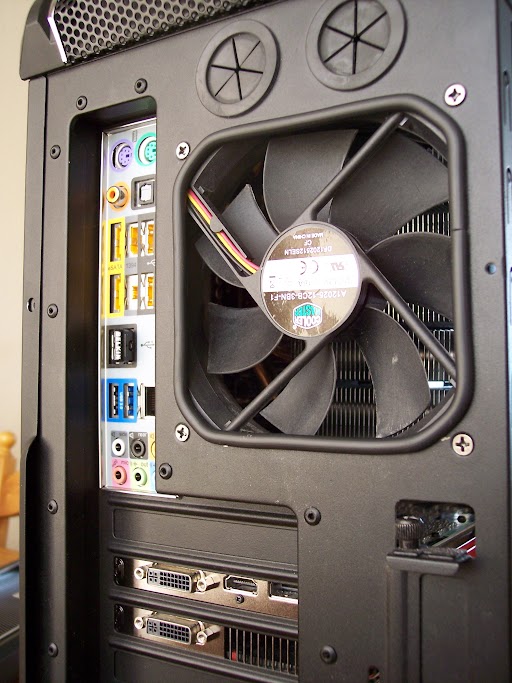
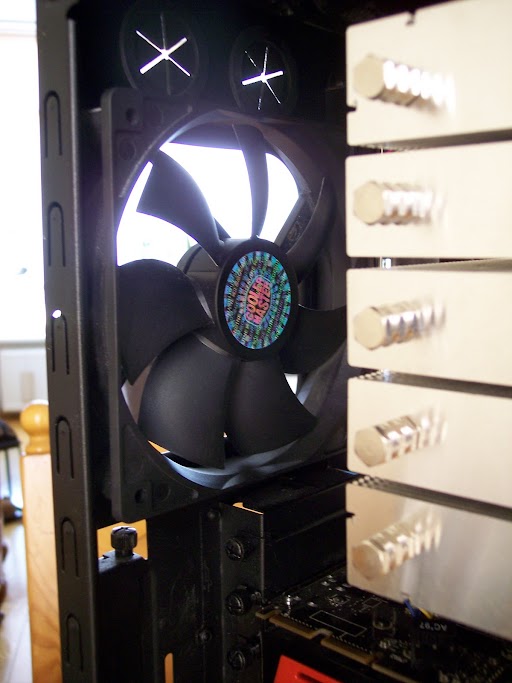
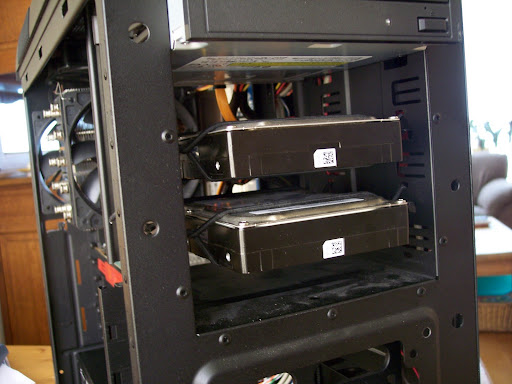
And suspended the hdd with elastic. One of the hdd is till making noise though. At least the case isn't resonating.
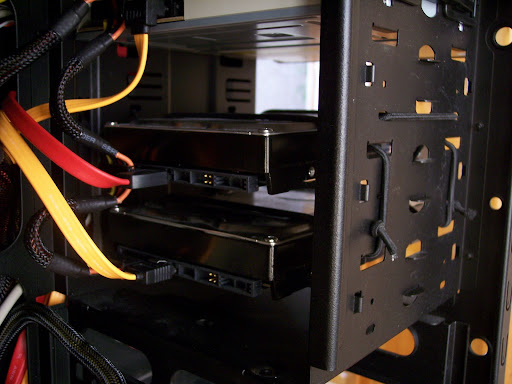
I'm now looking for a 3rd party heatsing to make the hd5850 quiter when idling and under load.
This one caught my eye

Removed the vent mesh with a dremel for more efficient airflow at lower rpm. Added tubing to cover the edge. Top and rear fan now running on 5v.
And suspended the hdd with elastic. One of the hdd is till making noise though. At least the case isn't resonating.
I'm now looking for a 3rd party heatsing to make the hd5850 quiter when idling and under load.
This one caught my eye
So what's peoples take on HP computers?
Genuine Windows 7 Home Premium 64-bit
Intel(R) Core(TM) i7-930 quad-core [2.8GHz, 1MB L2 + 8MB shared L3 cache]
FREE UPGRADE! 9GB DDR3-1066MHz SDRAM [5 DIMMs] from 8GB
FREE UPGRADE! 1TB 7200 rpm SATA 3Gb/s hard drive from 750GB
Microsoft Office Starter 2010
Norton Internet Security(TM) 2010 - 15 month
1GB ATI Radeon HD 5450 [DVI, HDMI, VGA adapter]
30% OFF! HP USB 2.0 stereo speakers
FREE UPGRADE! Blu-ray player & Lightscribe SuperMulti DVD burner
Integrated Ethernet port, No wireless LAN
15-in-1 memory card reader, 1 USB, 1394, audio
No TV Tuner
Integrated sound
HP USB keyboard and optical mouse
HP Home & Home Office Store in-box envelope
You get all this for $1123.99. I added in a 23 inch HD LCD monitor too for an extra 179.99.
Now the graphics card in there is completely not up to snuff on what I need. I need a 5870 or a Nvidia 470X right? My question is could I just order the graphics card off of like newegg and install it myself really easily? Would I have to upgrade the power supply as well or will it work right away?
Genuine Windows 7 Home Premium 64-bit
Intel(R) Core(TM) i7-930 quad-core [2.8GHz, 1MB L2 + 8MB shared L3 cache]
FREE UPGRADE! 9GB DDR3-1066MHz SDRAM [5 DIMMs] from 8GB
FREE UPGRADE! 1TB 7200 rpm SATA 3Gb/s hard drive from 750GB
Microsoft Office Starter 2010
Norton Internet Security(TM) 2010 - 15 month
1GB ATI Radeon HD 5450 [DVI, HDMI, VGA adapter]
30% OFF! HP USB 2.0 stereo speakers
FREE UPGRADE! Blu-ray player & Lightscribe SuperMulti DVD burner
Integrated Ethernet port, No wireless LAN
15-in-1 memory card reader, 1 USB, 1394, audio
No TV Tuner
Integrated sound
HP USB keyboard and optical mouse
HP Home & Home Office Store in-box envelope
You get all this for $1123.99. I added in a 23 inch HD LCD monitor too for an extra 179.99.
Now the graphics card in there is completely not up to snuff on what I need. I need a 5870 or a Nvidia 470X right? My question is could I just order the graphics card off of like newegg and install it myself really easily? Would I have to upgrade the power supply as well or will it work right away?
zlatko said:So what's peoples take on HP computers?
Genuine Windows 7 Home Premium 64-bit
Intel(R) Core(TM) i7-930 quad-core [2.8GHz, 1MB L2 + 8MB shared L3 cache]
FREE UPGRADE! 9GB DDR3-1066MHz SDRAM [5 DIMMs] from 8GB
FREE UPGRADE! 1TB 7200 rpm SATA 3Gb/s hard drive from 750GB
Microsoft Office Starter 2010
Norton Internet Security(TM) 2010 - 15 month
1GB ATI Radeon HD 5450 [DVI, HDMI, VGA adapter]
30% OFF! HP USB 2.0 stereo speakers
FREE UPGRADE! Blu-ray player & Lightscribe SuperMulti DVD burner
Integrated Ethernet port, No wireless LAN
15-in-1 memory card reader, 1 USB, 1394, audio
No TV Tuner
Integrated sound
HP USB keyboard and optical mouse
HP Home & Home Office Store in-box envelope
You get all this for $1123.99. I added in a 23 inch HD LCD monitor too for an extra 179.99.
Now the graphics card in there is completely not up to snuff on what I need. I need a 5870 or a Nvidia 470X right? My question is could I just order the graphics card off of like newegg and install it myself really easily? Would I have to upgrade the power supply as well or will it work right away?
Depends on what power supply is in there already. Also, you are overpaying by a lot to get a rig for over 1,000 WITHOUT the graphics card you need.
alanias said:Depends on what power supply is in there already. Also, you are overpaying by a lot to get a rig for over 1,000 WITHOUT the graphics card you need.
Yeah unfortunately HP doesn't even go into the Nvidia 460X+ or ATI 5870+ territories on these. Going to have to keep looking around. I've checked so many sites it's exhausting.

Felix Lighter
Member
zlatko said:So what's peoples take on HP computers?
Genuine Windows 7 Home Premium 64-bit
Intel(R) Core(TM) i7-930 quad-core [2.8GHz, 1MB L2 + 8MB shared L3 cache]
FREE UPGRADE! 9GB DDR3-1066MHz SDRAM [5 DIMMs] from 8GB
FREE UPGRADE! 1TB 7200 rpm SATA 3Gb/s hard drive from 750GB
Microsoft Office Starter 2010
Norton Internet Security(TM) 2010 - 15 month
1GB ATI Radeon HD 5450 [DVI, HDMI, VGA adapter]
30% OFF! HP USB 2.0 stereo speakers
FREE UPGRADE! Blu-ray player & Lightscribe SuperMulti DVD burner
Integrated Ethernet port, No wireless LAN
15-in-1 memory card reader, 1 USB, 1394, audio
No TV Tuner
Integrated sound
HP USB keyboard and optical mouse
HP Home & Home Office Store in-box envelope
You get all this for $1123.99. I added in a 23 inch HD LCD monitor too for an extra 179.99.
Now the graphics card in there is completely not up to snuff on what I need. I need a 5870 or a Nvidia 470X right? My question is could I just order the graphics card off of like newegg and install it myself really easily? Would I have to upgrade the power supply as well or will it work right away?
Are you shying away from the XPS 7100 because it doesn't have an i7? I saw that the recommended settings suggest an i7, which is very strange but I would get some FFXIV impressions from users who have the AMD X6 1055T before ruling it out.
zlatko said:Yeah unfortunately HP doesn't even go into the Nvidia 460X+ or ATI 5870+ territories on these. Going to have to keep looking around. I've checked so many sites it's exhausting.
Go to http://www.ncixus.com/ build exactly what you want, and I believe they assemble it for you for a fee. Not sure if they do deferred payment though.
Felix Lighter
Member
I'm considering these Headphones
http://www.zipzoomfly.com/jsp/ProductDetail.jsp?ProductCode=386027&prodlist=froogle
Has anyone dealt with the retailer zipzoomfly? I was doing some research and they seem reputable but I don't recognize the name.
http://www.zipzoomfly.com/jsp/ProductDetail.jsp?ProductCode=386027&prodlist=froogle
Has anyone dealt with the retailer zipzoomfly? I was doing some research and they seem reputable but I don't recognize the name.
Dell 7100 > this machinezlatko said:So what's peoples take on HP computers?
Genuine Windows 7 Home Premium 64-bit
Intel(R) Core(TM) i7-930 quad-core [2.8GHz, 1MB L2 + 8MB shared L3 cache]
FREE UPGRADE! 9GB DDR3-1066MHz SDRAM [5 DIMMs] from 8GB
FREE UPGRADE! 1TB 7200 rpm SATA 3Gb/s hard drive from 750GB
Microsoft Office Starter 2010
Norton Internet Security(TM) 2010 - 15 month
1GB ATI Radeon HD 5450 [DVI, HDMI, VGA adapter]
30% OFF! HP USB 2.0 stereo speakers
FREE UPGRADE! Blu-ray player & Lightscribe SuperMulti DVD burner
Integrated Ethernet port, No wireless LAN
15-in-1 memory card reader, 1 USB, 1394, audio
No TV Tuner
Integrated sound
HP USB keyboard and optical mouse
HP Home & Home Office Store in-box envelope
You get all this for $1123.99. I added in a 23 inch HD LCD monitor too for an extra 179.99.
Now the graphics card in there is completely not up to snuff on what I need. I need a 5870 or a Nvidia 470X right? My question is could I just order the graphics card off of like newegg and install it myself really easily? Would I have to upgrade the power supply as well or will it work right away?
You won't find a better machine around that price range. I know you're just checking your options..I'm just saying. Sounds to me you are set on the I7, and if you get anything else you think you'll get buyers remorse (which I understand).
Because really if your ultimate goal here is to play FF14 maxed the dell Amd machine would be an instant buy for you.
Hey gaf would LOVE a quick answer.
quick-backstory : had broken gpu, sent both my gpus in for checking. One was broken and got replaced, the other sent back to me.
problem : both are the same card, a 1gb gts 250 by gainward. However the one that is new is somekind of newer model, maybe less powerconsuming or something.
question : Mr_brit already told me that this wont be a problem but I need to be 150% sure before I plug them together. Will I have a problem or will SLI work the way it is supposed to?

thanks a bunch gaf.
quick-backstory : had broken gpu, sent both my gpus in for checking. One was broken and got replaced, the other sent back to me.
problem : both are the same card, a 1gb gts 250 by gainward. However the one that is new is somekind of newer model, maybe less powerconsuming or something.
question : Mr_brit already told me that this wont be a problem but I need to be 150% sure before I plug them together. Will I have a problem or will SLI work the way it is supposed to?
thanks a bunch gaf.
There is a 99.9% chance it will work, as long as it's the same GPU core.Corky said:Hey gaf would LOVE a quick answer.
quick-backstory : had broken gpu, sent both my gpus in for checking. One was broken and got replaced, the other sent back to me.
problem : both are the same card, a 1gb gts 250 by gainward. However the one that is new is somekind of newer model, maybe less powerconsuming or something.
question : Mr_brit already told me that this wont be a problem but I need to be 150% sure before I plug them together. Will I have a problem or will SLI work the way it is supposed to?
thanks a bunch gaf.

They're both meant to have an SLI finger. You can still use SLI without a bridge however your performance may be impacted.Corky said:eeeeeeeerrrrrr
wtf?
How am I even supposed to connect them together? *scratches head*
this is just fucking great....
Mr_Brit said:your performance may be impacted.
aight, that's all I needed to know. The pc is going back to the dude I bought it from.
Not suprised after all the trouble you've had.Corky said:aight, that's all I needed to know. The pc is going back to the dude I bought it from.
Mr_Brit said:Not suprised after all the trouble you've had.
well this was the straw that broke the camels back. If I only had gotten the same fucking gpu from the store then there wouldn't been a problem. But now I cant even use the pc the way I'm supposed to ? F that
God damnit! The new HDD does the same thing!shigsy said:Ah well result in that case. PC problems can reach a point where you no longer care what the fix is as long as there's a way out. For me thats usually around 3am when I'm hot and livid.
Recap:
- HDD spins up, makes clicking sound, spins down. BIOS can't find it
- Bought a second. Same problem
- HDD works in other computers (tested in two)
- HDD works when powered with a cable from a SATA-to-USB kit
- HDD doesn't work with another PSU (very old
- Two other HDDs work fine in new computer
New suspect: mobo.
I need to try the new PSU and HDD with an old mobo.
PjotrStroganov
Member
abq said:God damnit! The new HDD does the same thing!
Recap:
- HDD spins up, makes clicking sound, spins down. BIOS can't find it
- Bought a second. Same problem
- HDD works in other computers (tested in two)
- HDD works when powered with a cable from a SATA-to-USB kit
- HDD doesn't work with another PSU (very old
- Two other HDDs work fine in new computer
New suspect: mobo.
I need to try the new PSU and HDD with an old mobo.
Have you tried connecting the wonky hdd to another sata connection on your board? Preferably one that the other hdd's are connected to. Also try to do this with another sata cable.
Or just pull the sata out of your good hdd and put it in the one that gives you trouble. Same concept.
I've tried different sata ports and power cables. When I tested the other HDDs, I just pulled the cables from the new and plugged them into the old.PjotrStroganov said:Have you tried connecting the wonky hdd to another sata connection on your board? Preferably one that the other hdd's are connected to.
PjotrStroganov
Member
Weird. I doubt it is the motherboard if it still doesn't work on a sata port that does work for the other hdd.
Other things I can think of:
Not a strong enough PSU
Bios settings
Other things I can think of:
Not a strong enough PSU
Bios settings
Are they both SATA II(3Gbps)?abq said:I've tried different sata ports and power cables. When I tested the other HDDs, I just pulled the cables from the new and plugged them into the old.
The PSU is a 650w Corsair. The GPU (GTX460) seems to get enough power. I've tried without GPU, though, and it still doesn't work.PjotrStroganov said:Weird. I doubt it is the motherboard if it still doesn't work on a sata port that does work for the other hdd.
Other things I can think of:
Not a strong enough PSU
Bios settings
New HDD and one of the old HDDs are 3Gbps. The third one is five years old or so and I don't think it's 3Gbps.Mr_Brit said:Are they both SATA II(3Gbps)?
Classic_Gs
Member
The Dell XPS 7100 is a much better deal for about the same price.zlatko said:So what's peoples take on HP computers?
Genuine Windows 7 Home Premium 64-bit
Intel(R) Core(TM) i7-930 quad-core [2.8GHz, 1MB L2 + 8MB shared L3 cache]
FREE UPGRADE! 9GB DDR3-1066MHz SDRAM [5 DIMMs] from 8GB
FREE UPGRADE! 1TB 7200 rpm SATA 3Gb/s hard drive from 750GB
Microsoft Office Starter 2010
Norton Internet Security(TM) 2010 - 15 month
1GB ATI Radeon HD 5450 [DVI, HDMI, VGA adapter]
30% OFF! HP USB 2.0 stereo speakers
FREE UPGRADE! Blu-ray player & Lightscribe SuperMulti DVD burner
Integrated Ethernet port, No wireless LAN
15-in-1 memory card reader, 1 USB, 1394, audio
No TV Tuner
Integrated sound
HP USB keyboard and optical mouse
HP Home & Home Office Store in-box envelope
You get all this for $1123.99. I added in a 23 inch HD LCD monitor too for an extra 179.99.
Now the graphics card in there is completely not up to snuff on what I need. I need a 5870 or a Nvidia 470X right? My question is could I just order the graphics card off of like newegg and install it myself really easily? Would I have to upgrade the power supply as well or will it work right away?
brain_stew
Member
Corky said:so which GPU is comparable to 2x 250 gts 1gb in both price and / or performance?
A single GTX 460 is a much better buy. Technically it'll probably score lower in a few benchmarks but in reality you'll have a much better experience and it'll age with grace.
brain_stew said:A single GTX 460 is a much better buy. Technically it'll probably score lower in a few benchmarks but in reality you'll have a much better experience and it'll age with grace.
cheers, but how is that possible? I mean that the 460 scores lower in certain benchmarks but will still provide a better experience in said application?
Gary Whitta
Member
So I am building my new PC today! If you care to see it happen LIVE, tune into Tested.com around 3pm PST today, we're streaming the whole process and taking questions from the audience.
Also, anyone got advice for anything I need to put on this thing when I'm done to keep it safe and clean? I am not anticipating many problems as I will ONLY be using this machine for gaming and NOTHING else. Aside from Steam and any game installs, all I will have is Chrome for downloading any driver updates and patches and Skype for any game voice chat where it's not supported natively. I'll have Microsoft Security Essentials on there, is there anything else I really need? I want to keep this system as uncluttered as possible.
(Windows 7 Ultimate, BTW).
Also, anyone got advice for anything I need to put on this thing when I'm done to keep it safe and clean? I am not anticipating many problems as I will ONLY be using this machine for gaming and NOTHING else. Aside from Steam and any game installs, all I will have is Chrome for downloading any driver updates and patches and Skype for any game voice chat where it's not supported natively. I'll have Microsoft Security Essentials on there, is there anything else I really need? I want to keep this system as uncluttered as possible.
(Windows 7 Ultimate, BTW).
Single GPU is always better than multi gpu.Corky said:cheers, but how is that possible? I mean that the 460 scores lower in certain benchmarks but will still provide a better experience in said application?