
• Hey Guest. Check out your NeoGAF Wrapped 2025 results here!

"I need a new PC!" 2010 Edition

Right now I have 4870 512mb and I am wondering if I will see a big jump if I upgrade to a 460? or should I hold out for whatever comes out to replace the 480. Money isn't a big issue but I don't want to drop $$$ unless it is for a new top of the line card. I'm wondering if a 460 would tide me over until the next great card comes out. I was originally planning to upgrade to the 480 when it came out but was disappointed with the performance. The trouble is my 4870 is really starting to show its age. Right now I'm only looking at nvidia because I haven't been totally happy with ati, and it been a while since I've had a big green card.
 
peppermints said:
Thanks. :)

Didn't even notice the lifetime warranty on the XFX one. Definitely sounds like a good choice in that case.

Haven't built a PC for a while. Do I need to buy any thermal paste or will my CPU come with it? It's this one:

http://www.newegg.com/Product/Product.aspx?Item=N82E16819103702

And if a drive is OEM, I should be set because the motherboard will come with all of the necessary cables, right?

They have thermal on the stock cooler but if you're going to overclock you might want to put on your own thermal. But then again if you're overclocking you'd have to put on your own thermal anyhow. :P
 
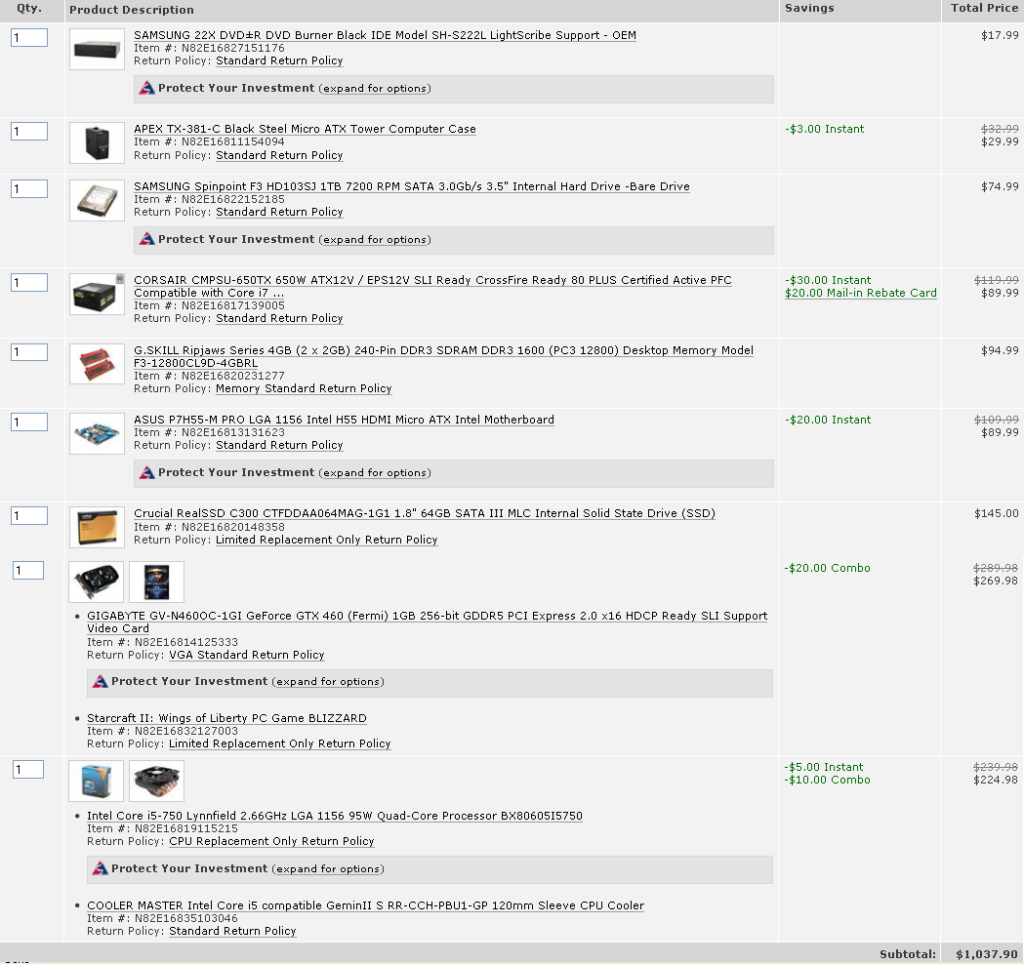
How's this for a build? looking for a way to cut the price back a bit.

Perhaps I should hold off on the video card until my birthday next month?

buildaug17.png
 
Salaadin said:
I was just browsing THIS ARTICLE and came across this line:


Is there any way to fully tell if you have this problem?

I OCed my HD5850 to Core Clock to 760MHz and Mem Clock to 1125MHz. I have an i5 750 CPU running at stock so I just wanted to run it by you guys to see if I should finally OC the CPU?

Im putting it off because my ANtec 900 is hard to work in. I love the case but damn, it can be difficult.


wait, what does the case have to do with OCing your CPU?
 
evil solrac v3.0 said:
wait, what does the case have to do with OCing your CPU?

I need to install a better cooler on the CPU and to do that, Id need to remove the motherboard from the case.

This might be a good chance to mod my case some. If I had a hole right next to the PSU, thing would be much cleaner in there. Id just need to figure out what to do with the SATA cables.
 
jumping in late, but i'm entertaining the thought of upgrading my ~2 year old computer (Q6600 @ 3ghz with 6gigs of DDR2) with an i5 or higher.

if i'm only looking to replace the CPU, mobo and RAM, would i be able to do so for under $500 and see a noticeable bump in performance? outside of the usual web browsing this machine will also see somewhat regular CS5 work, including After Effects.
 
Against the recommendations of some, I ended up going with an i5-650 rather than the 750/760...couldn't justify the $60 price difference I was seeing at most places...

Considering how easily I was able to get the 650 up to 4ghz on stock cooling (albeit about 75C after 1hr of prime95), though, I'm thinking I should have gone down to the i3-530 and overclocked that and saved a few extra bucks, though.

That said, any cooling recommendations that don't required removing the motherboard from the mobo tray? If I have to remove, I'm thinking Prolimatech Megahalems or possibly Corsair H50/H70 since I have case space.
 
Whats this Im reading about "unlinking" your RAM from your CPU before overclocking? I dont remember seeing an option like that in the BIOS.
If possible, Id like to OC my CPU but not touch the RAM. Is this possible?
 
Salaadin said:
Whats this Im reading about "unlinking" your RAM from your CPU before overclocking? I dont remember seeing an option like that in the BIOS.
If possible, Id like to OC my CPU but not touch the RAM. Is this possible?

Yes. Depends on the wording for your bios but mine said linked/unlinked and gave options like 1:1, 5:4, 3:2, and stuff like that under linking. You don't want to change the FSB for both.
 
Salaadin said:
Whats this Im reading about "unlinking" your RAM from your CPU before overclocking? I dont remember seeing an option like that in the BIOS.
If possible, Id like to OC my CPU but not touch the RAM. Is this possible?
It's certainly possible, you run the memory clock to fsb in a ratio, instead of 1:1.
 
rykomatsu said:
Against the recommendations of some, I ended up going with an i5-650 rather than the 750/760...couldn't justify the $60 price difference I was seeing at most places...

Considering how easily I was able to get the 650 up to 4ghz on stock cooling (albeit about 75C after 1hr of prime95), though, I'm thinking I should have gone down to the i3-530 and overclocked that and saved a few extra bucks, though.

That said, any cooling recommendations that don't required removing the motherboard from the mobo tray? If I have to remove, I'm thinking Prolimatech Megahalems or possibly Corsair H50/H70 since I have case space.
The i5-650 is only a dual core though, and I've seen the i5 750 get up to 5GHz on air.
 
dsci0008y.jpg


HAF X side panel (somebody requested it). I took out the H50 and got a DH14. I'm gonna use the H50 in my AMD build which will ironically have a NVIDIA GPU. (Intel With ATI GPU represent!!)

Overclocked the 930 to 4.2 ghz stable with HT.

46052205.png


not happy with temps though. 44 degrees at idle and 85 degrees full load. although some people have said they have similar temps and that it's ok I was kind of expecting more from the DH14. It is however hella stable with linx, prime and intel burn so w/e.
 
sillymonkey321 said:
Isn't it dual core but each core has 2 threads making it kinda like a quad core?
Having 2 threads doesn't magically give you 2 more cores worth of horsepower. Buying a dual core in this market is just asinine.
 
@BigBlackGamer

Nice. I had my 930 nice and stable over 4Ghz but I found that at 3.9Ghz I could keep the voltage quite a bit lower and temps down. The few hundred Mhz didn't seem to be worth it to me in the end.
 
Zaraki_Kenpachi said:
Yes. Depends on the wording for your bios but mine said linked/unlinked and gave options like 1:1, 5:4, 3:2, and stuff like that under linking. You don't want to change the FSB for both.

Ill dig around tonight and see what I find. Thanks.

Ill probably end up getting the Scythe Mugen 2 Rev B CPU cooler and maybe drilling some holes and doing some light wire management in the case as well to get it all nice and clean. If Im going to unhook everything to install a better CPU cooler, I might as well make the most of it while its all taken apart.

Once all that is done, time to overclock.
 
Felix Lighter said:
@BigBlackGamer

Nice. I had my 930 nice and stable over 4Ghz but I found that at 3.9Ghz I could keep the voltage quite a bit lower and temps down. The few hundred Mhz didn't seem to be worth it to me in the end.

I was thinking about going lower, at 4ghz I was getting respectable temps. I'll probably do more tweaking over the weekend.
 
It's pretty fucking amazing. (I'm sure you've read reviews and such) Lot's of space and the best air cooling case you can get IMO. I love the black interior and the wheels it comes with. (small thing but if you have a room with carpet it keeps it high off the ground and makes it easy to move around also better airflow for the PSU)

make sure you get a extra 200mm fan for the top and your good to go.
 
TheHeretic said:
Having 2 threads doesn't magically give you 2 more cores worth of horsepower. Buying a dual core in this market is just asinine.

Hmmmmmm i'll probably be debating whether to get a laptop or not until PS4 comes out :lol :lol

Most of the laptops in my price range ( or atleast the ones that are out of it and looking to drop into it later) are i5's and 5400rpm hard drives, ati 5650 graphics card and 4 gb ddr3. Those are mostly $750ish and i'm waiting for them to drop in price to $600s. Soooooooooooo how bad is the i5 processors? Are they worse than even triple core 2.1ghz processors?
 
BigBlackGamerif you have a room with carpet it keeps it high off the ground and makes it easy to move around also better airflow for the PSU) make sure you get a extra 200mm fan for the top and your good to go.[/QUOTE said:
Omg I do have a room with carpet.Yeah I ordered extra fans, got another fan for the top and one for the gpu shroud so, hopefully I'm all set.
 
What is the minimum cpu and gpu I would need for a laptop if I wanted it to be able to play Left 4 Dead 2 at lowest setting at 45 to 60 FPS?
 
BigBlackGamer said:
Overclocked the 930 to 4.2 ghz stable with HT.

not happy with temps though. 44 degrees at idle and 85 degrees full load. although some people have said they have similar temps and that it's ok I was kind of expecting more from the DH14. It is however hella stable with linx, prime and intel burn so w/e.

What temps do you get with HT off and side panel open. Might give you an idea what you could do to get better temps if you get lower then 85C load.

Also can you turn off all the LED's on that case?
 
Phloxy said:
Omg I do have a room with carpet.Yeah I ordered extra fans, got another fan for the top and one for the gpu shroud so, hopefully I'm all set.
Do you mean a quieter/more powerful fan for the side panel, or a fan for the slot in the removable GPU bracket? The Haf X already comes with a side fan.
 
TheHeretic said:
Buying a dual core in this market is just asinine.

Considering I built this PC for use primarily as an HTPC and PCSX/Dolphin emulation, I don't think going with a higher clocked dual core over a lower clocked quad core (especially considering my poor luck with overclocking in the past) was an asinine decision at all. Last I checked, neither the PS2 or Wii emulators took advantage of more than 2 cores.
 
vertopci said:
What is the minimum cpu and gpu I would need for a laptop if I wanted it to be able to play Left 4 Dead 2 at lowest setting at 45 to 60 FPS?
You mention lowest settings; does that point to your budget, or expectations?

Either way, this HP is the lowest you should go.

AMD Triple-core and Mobility 5650 should handle 45 to 60fps, without resorting to lowest settings.
ImperialConquest said:
What's the best ATI card you can get for $80 ~ $100?

4850
 
Liquid_Bike said:
Right now I have 4870 512mb and I am wondering if I will see a big jump if I upgrade to a 460? or should I hold out for whatever comes out to replace the 480. Money isn't a big issue but I don't want to drop $$$ unless it is for a new top of the line card. I'm wondering if a 460 would tide me over until the next great card comes out. I was originally planning to upgrade to the 480 when it came out but was disappointed with the performance. The trouble is my 4870 is really starting to show its age. Right now I'm only looking at nvidia because I haven't been totally happy with ati, and it been a while since I've had a big green card.

Its about a ~30% upgrade assuming your 4870 isn't VRAM limited. Personally I'd say the GTX 470 is a better fit, for an extra $50 you'll get a 50-60% upgrade, so basically the same upgrade again, as well as more VRAM.
 
K.Jack said:
You mention lowest settings; does that point to your budget, or expectations?

Either way, this HP is the lowest you should go.

AMD Triple-core and Mobility 5650 should handle 45 to 60fps, without resorting to lowest settings.

Mainly budget. Don't really care about maxing stuff out on my laptop since I got a desktop to do that for me.

Also thanks for that suggestion, seems pretty damn nice for the price.

edit: budget isn't set in stone yet, but how would an i3 and a geforce 310m fare? That HP laptop will probably be the one I end up getting but I'm just wondering in case my budget ends up being lower :(
 
vertopci said:
Mainly budget. Don't really care about maxing stuff out on my laptop since I got a desktop to do that for me.

Also thanks for that suggestion, seems pretty damn nice for the price.

edit: budget isn't set in stone yet, but how would an i3 and a geforce 310m fare? That HP laptop will probably be the one I end up getting but I'm just wondering in case my budget ends up being lower :(

Very poorly, its basically Nvidia's integrated graphics chip with some dedicated memory tacked on, the 5650 is in a completely different league.
 
Alright, got my entire rig put together and installed three extra fans. Current setup:

Antec 300 w/ 5 fans
i5 750
Gigabyte GTX 460
4 gb OCZ RAM
650 W Corsair PSU
Gigabyte P55A UD3 mobo
1 tb Samsung F3 HDD
Hyper 212+
Liteon DVD burner/player

First question: What is a good wireless adapter for this thing? The router is about 15 feet away through a wall or two. Would prefer usb and cheap, but whatever.
Second question: Can anyone recommend a gaming mouse/keyboard? Preferably cheap.
Third question: Anyone want to help me with the overclocking on the CPU and GPU?
Fourth: How do I control the fan speeds? It won't let me alter it in the BIOS (it's greyed out) but I can see the rpm.
 
Liquid_Bike said:
Right now I have 4870 512mb and I am wondering if I will see a big jump if I upgrade to a 460? or should I hold out for whatever comes out to replace the 480. Money isn't a big issue but I don't want to drop $$$ unless it is for a new top of the line card. I'm wondering if a 460 would tide me over until the next great card comes out. I was originally planning to upgrade to the 480 when it came out but was disappointed with the performance. The trouble is my 4870 is really starting to show its age. Right now I'm only looking at nvidia because I haven't been totally happy with ati, and it been a while since I've had a big green card.
I'm in the same boat as you. The 460 outclasses it but it's not likely you'll notice much of a difference. Do you currently see your games being GPU limited, what resolution are you playing at? I might end up dropping my 4870 for a 460 but only because the girlfriends X1950 is hurting my eyes and she could make good use of it so in that sense it would be two upgrades in one for me.
 
long time no post

I have a friend that wants me to build him a computer that is mainly just a family computer that isn't for running the heavy performance games. Sweet spot is $500 including a monitor. I've looked at some possibilities with a 23" 1080p monitor, an Athlon II X2, and a 1TB hdd that total around $570 with everything. The problem is he needs everything; case, power supply, Windows, etc.
I'm about to give up and just point out a prebuilt one since I don't think you can get as much value out of building one at such a low budget when you need everything.
 
Lkr said:
long time no post

I have a friend that wants me to build him a computer that is mainly just a family computer that isn't for running the heavy performance games. Sweet spot is $500 including a monitor. I've looked at some possibilities with a 23" 1080p monitor, an Athlon II X2, and a 1TB hdd that total around $570 with everything. The problem is he needs everything; case, power supply, Windows, etc.
I'm about to give up and just point out a prebuilt one since I don't think you can get as much value out of building one at such a low budget when you need everything.

He's probably best off with a prebuilt machine tbh.
 
peppermints said:
Thanks. :)

Didn't even notice the lifetime warranty on the XFX one. Definitely sounds like a good choice in that case.

Haven't built a PC for a while. Do I need to buy any thermal paste or will my CPU come with it? It's this one:

http://www.newegg.com/Product/Product.aspx?Item=N82E16819103702

And if a drive is OEM, I should be set because the motherboard will come with all of the necessary cables, right?

Yeah, I spent under $150 each for my 5770 Vapors, plus they had mail in rebates.
SuperBiiz, as always, has some great deals. use code CLASS15 for $15 off a 5770.
 
DrForester said:
5870 running fine with FFXI. Even runs FFXIV benchmark spectacularly.

Glad my case is huge. The card is enormous.

In the FFIV Benchmark, what is considered a good score? Could not find anything that tells me what the score means.

Thanks!
 
Hawk269 said:
In the FFIV Benchmark, what is considered a good score? Could not find anything that tells me what the score means.

Thanks!

http://www.finalfantasyxiv.com/media/benchmark/na/

[8000 and over] Extremely High Performance
Easily capable of running the game on the highest settings.

[5500–7999] Very High Performance
Easily capable of running the game. Should perform exceptionally well, even at higher resolutions.

[4500-5499] High Performance
Easily capable of running the game. Should perform well, even at higher resolutions.

[3000-4499] Fairly High Performance
Capable of running the game on default settings. Consider switching to a higher resolution depending on performance.

[2500-2999] Standard Performance
Capable of running the game on default settings.

[2000-2499] Slightly Low Performance
Capable of running the game, but may experience some slowdown. Adjust settings to improve performance.

[1500-1999] Low Performance
Capable of running the game, but will experience considerable slowdown. Adjusting settings is unlikely to improve performance.

[Under 1500] Insufficient Performance
Does not meet specifications for running the game.
 
Top Bottom