• Hey Guest. Check out your NeoGAF Wrapped 2025 results here!

"I need a new PC!" 2010 Edition

Niblet said:
I need expert speculation guys. Here is my situation:

You can play the new hardware waiting game forever. I would suggest either waiting for the 6000 Radeons at the end of the year or the likely refresh of the GTX 400 series i.e 475, 485.

If you think you can wait until next year then go right on ahead. Patience is usually rewarded.
 
Ah, it's time for some PC-daydreaming, cuz god knows that's all I can have.


Which of these "builds" would you choose for gaming :

phenom II x3 720 Black edition
SLI Gigabyte 460 gtx

or

phenom II x6 1055T
one Gigabyte 460 gtx.
 
Corky said:
Ah, it's time for some PC-daydreaming, cuz god knows that's all I can have.


Which of these "builds" would you choose for gaming :

phenom II x3 720 Black edition
SLI Gigabyte 460 gtx

or

phenom II x6 1055T
one Gigabyte 460 gtx.
Get the first one then sell it when BD or SB comes out and get them instead. 90% of games releasing in the next twelve months will be exactly the same speed on both.
 
Tensai said:
Get the first one then sell it when BD or SB comes out and get them instead. 90% of games releasing in the next twelve months will be exactly the same speed on both.

Figured as much, though if I'll choose to upgrade to bulldozer I'll definitely stick to gtx 460s for a looong time. I'm not made of money :(
 
Corky said:
Figured as much, though if I'll choose to upgrade to bulldozer I'll definitely stick to gtx 460s for a looong time. I'm not made of money :(
I was only talking about the CPUs. The GTX 460 will be fine for a long time.
 
BigBlackGamer said:
5870 back in case. everything works good. might try some overclocking later tonight.

2hz6zyu.jpg

Which case is that? CM HAF?
 
Corky said:
Ah, it's time for some PC-daydreaming, cuz god knows that's all I can have.


Which of these "builds" would you choose for gaming :

phenom II x3 720 Black edition
SLI Gigabyte 460 gtx

or

phenom II x6 1055T
one Gigabyte 460 gtx.

I think you're fine for now. See where the market is when an upgrade is more urgent. I'm not a big fan of SLI as an upgrade path personally.

Next "upgrade" would be to get a nice HS/F and OC that CPU. Try and get 3.6-3.8ghz.
 
brain_stew said:
I think you're fine for now. See where the market is when an upgrade is more urgent. I'm not a big fan of SLI as an upgrade path personally.

Next "upgrade" would be to get a nice HS/F and OC that CPU. Try and get 3.6-3.8ghz.

Yeah I'm pretty sure the first thing I'd do upgrade-wise is a new heatsink/fan for my cpu and try to get the cpu to 3.4-3.6.

But first of all .... need to get rid of the crashes :'(((((((((
 
-COOLIO- said:
DSC00928.jpg


that shit then wrapped in a zigzag 4 times when you turned the corner. i was in line for 5 hours.

i saved about $100 though, which comes out to $20/hr so i guess that's alright

Hey man, I waited 2 and a half hours later in the afternoon and only bought a 16GB USB stick for $20 :lol
 
Assembled my new computer over the weekend.
It's a Core i7-930 using a Noctua NH-D14 cooler and a single GTX 460 in a Fractal Design Define R3 case. I have two front intake and one rear exhaust fans on the fan controller at lowest setting so it's not the best airflow.

Which program is the best for CPU stability tests? Been using IntelBurnTest configured for 5 runs at maximum. Overclocked to 4GHz with HT enabled and vcore of 1.23v the max core temp was 78C. Is that ok for my case airflow and the NH-D14 with adapter on the 12cm fan, or should i try reseating it?

With one case side open the temps were down to 68C.

Thinking about installing some top fans as well if it'd help, perhaps one intake fan pushing some cool air down into the NH-D14 front fan?
 
I have a core i5 750 I'm looking to overclock to 3.4Ghz(?ish or more) and need a new heatsink. I want something that's easy to install and preferably wont require me to remove the motherboard (unavoidable?). Anything that fits my needs? Something that isn't super gigantic would be a nice as well.
 
What do you guys think of this case? : Define R3: http://www.fractal-design.com/?view=product&category=2&prod=48

It's from a young swedish company, and it's a mid tower case. I think it's beautiful, but I am worried that big graphics card won't fit! But this is the only non-Apple case I have seen that I think has a slick industrialistic design without ugly logos(silverstone, thermeltake, and so on...), LEDs everywhere, windows(whyyy???).

I'm looking for a case that will look more like a piece of sculptured art.


The Silverstone Fortress FT02 also looks like fun.. I just hate that silverstone logo so much. Who gives a fuck right? I know - But I can't help it!
 
WEGGLES said:
1. From what the CM website says it sounds like it has 3.
2. Should be more than sufficient for stock.
3. The card doesn't have video cables, it's usually the monitor that includes them. And your motherboard should provide enough SATA cables to hook up your CD drive and HDD. The video card will come with some adaptors should you need them (DVI -> VGA)
4. The thermal paste will be pre-applied to the stock heat sink. Just snap it into place and you're all set.

Also change out the WD Caviar Blue for a WD Caviar Black. It should be about the same price and the blacks are much more reliable.
Thanks again for the feedback. I have swapped the caviar blue for the black. Does all of the other hardware look solid/compatible? Looks like I should be able to place an order
soon. :)
 
Looking to build a gaming PC for around £800. Will be gaming at 1080p.

Already decided on a Gigabyte 460 1gb, Corsair 750w PSU, 500gb spinpoint F3 and the Coolermaster CM-690 II Advanced Dominator Case.

Brain_stew do you still recommend the Phenom II 1055T? Im looking at this bundle from overclockers. http://www.overclockers.co.uk/showproduct.php?prodid=BU-038-OB&groupid=43&catid=339&subcat=

Its in the deal of the week until the 1st of september and quickly pricing the components separately is around the same price but the bundle comes with the 95w 1055T and is pre overclocked. I remember reading your comment on buying as many cores as you can afford so should i jump on the 1055T deal?
 
Dosia said:
Also, can anbody recommend a cheap (<$40) sound card? The sound blaster I was looking it appears to have issues with win7.
With a decent motherboard, on-board audio these days generally performs well enough in movies and games that, for most people, a sound card becomes an unnecessary expense. Unless you're an audiophile or doing professional work, at which point, you'd likely want a higher end card anyway.


Spookie said:
ElyrionX said:
BigBlackGamer said:
5870 back in case. everything works good. might try some overclocking later tonight.

2hz6zyu.jpg
Which case is that? CM HAF?
CM 690 I think.
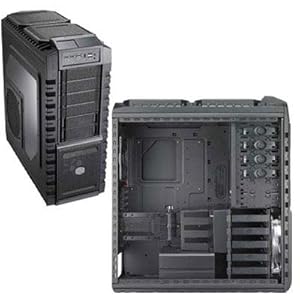
HAF X

41aNgBZ3VoL._SL500_AA300_.jpg


http://www.coolermaster.com/product.php?product_id=6653
 
Weenerz said:
Get an H70, I have read great things about it and it seems quite easy to install.

Thanks, just watched an installation video. It seems easy enough and I like the fact that it's not a giant piece of metal hanging off the motherboard. How high can you get a core i5 750 with one of these installed?
 
·feist· said:
With a decent motherboard, on-board audio these days generally performs well enough in movies and games that, for most people, a sound card becomes an unnecessary expense. Unless you're an audiophile or doing professional work, at which point, you'd likely want a higher end card anyway.


HAF X

41aNgBZ3VoL._SL500_AA300_.jpg


http://www.coolermaster.com/product.php?product_id=6653
Alright and thanks. It sounds like my friend wont need a sound card as he will be using a pair of $80 speakers for gaming. Next question...

-ASUS P7P55D-E LGA 1156 Intel P55 SATA 6Gb/s USB 3.0 ATX Intel Motherboard ($149.99)

Is that considered a decent mobo? He wants me to order the hardware by the end of the day but I still dont feel 100% confident in the parts I selected. Thanks again.
 
Mad Max said:
It's not good, but what does hardware monitor say?

It doesn't list the standby rail. 12v fluctuates between 12.09-12.16, 3.3 is at 3.32, and vcore is 1.32 or something, I can't quite remember. What is the standby rail even used for?
 
Woffls said:
It doesn't list the standby rail. 12v fluctuates between 12.09-12.16, 3.3 is at 3.32, and vcore is 1.32 or something, I can't quite remember. What is the standby rail even used for?

If I remember correctly 5v powers circuits on your mobo, drives, pci cards and some other stuff. And I also know that a low 5v and a high 12v (although your 12v isn't that high) generally means that you're straining your PSU.
 
Mad Max said:
If I remember correctly 5v powers circuits on your mobo, drives, pci cards and some other stuff. And I also know that a low 5v and a high 12v (although your 12v isn't that high) generally means that you're straining your PSU.

Do my numbers tell you anything that might indicate that my crashes are because of potential PSU-issues? ( The picture is 1 month old, and my psu is RMA'd since, I'll hear back from the store soon )

2mdgbjn.jpg
 
Vigilant Walrus said:
What do you guys think of this case? : Define R3: http://www.fractal-design.com/?view=product&category=2&prod=48

It's from a young swedish company, and it's a mid tower case. I think it's beautiful, but I am worried that big graphics card won't fit! But this is the only non-Apple case I have seen that I think has a slick industrialistic design without ugly logos(silverstone, thermeltake, and so on...), LEDs everywhere, windows(whyyy???).

I'm looking for a case that will look more like a piece of sculptured art.


The Silverstone Fortress FT02 also looks like fun.. I just hate that silverstone logo so much. Who gives a fuck right? I know - But I can't help it!
The R3 has got the slick looks going for it, but other than that not so much positive imo. It's rather small meaning less airflow and a bitch to work in. Also cable management isn't optimal since there's very little room behind the motherboard plate for cables. I've heard many comments about the sound-dampening material not sticking to the case, which also happened to me. On one of the sides it had completely loosened. I tried to stick it back but that didn't work, right now waiting for a response on how to handle that. The included fans are pretty much useless, sure they're quiet but that's just because they don't move any air.

The FT02 has much more room, easier to work in and also gives better cable management possibilities as well as much better airflow. In my mind a much better case.

EDIT: Corky, the rails can fluctuate considerably under different levels of load making the system unstable. BIOS readings of PSU rails are under very low load so they don't tell the whole picture.
 
Corky said:
Do my numbers tell you anything that might indicate that my crashes are because of potential PSU-issues? ( The picture is 1 month old, and my psu is RMA'd since, I'll hear back from the store soon )

2mdgbjn.jpg

No, but that could very well be because in the BIOS your system is almost completely idle. And your PSU could give perfect voltages idle but fluctuate a lot when it's under heavy load, which could cause problems.

And in regards to my previous post, if your PSU gives comparable voltages under load and idle it could just be a case of a badly calibrated 5v line.
 
dr3upmushroom said:
What's the new name for that cooler? I'd like to get it for the build I'm getting in a few days but everyone still recommends it as the Scythe Mugen, I think it has a totally different name now.

Scythe Mugen II Rev. B
The item number is SCMG-2100
 
I have a question about mounting PSUs inside cases. I am building my PC right now and I have a Cooler Master storm scout as my case and a Seasonic M12D PSU. The storm requires the PSU to be mounted at the bottom of the case, with the way the Seasonics Fan is positioned (On the bottom of the PSU blowing air into the case, not the back like other PSUs which blow air out of the case directly), this means that the air will be blowing into the bottom of the case with no where to go. Am I supposed to mount the PSU upside down so it's blowing the air towards my MOBO instead? I'm so confused right now.
 
bardia said:
I have a question about mounting PSUs inside cases. I am building my PC right now and I have a Cooler Master storm scout as my case and a Seasonic M12D PSU. The storm requires the PSU to be mounted at the bottom of the case, with the way the Seasonics Fan is positioned (On the bottom of the PSU blowing air into the case, not the back like other PSUs which blow air out of the case directly), this means that the air will be blowing into the bottom of the case with no where to go. Am I supposed to mount the PSU upside down so it's blowing the air towards my MOBO instead? I'm so confused right now.
PSU fans are intakes not outputs, on bottom mounted cases you can mount it facing up or down depending on the clearance between the bottom of the PSU and the case, if it is large enough you can mount it fan facing down, if not mount if fan facing up so it draws air away from your GPU.
 
Mad Max said:
No, but that could very well be because in the BIOS your system is almost completely idle. And your PSU could give perfect voltages idle but fluctuate a lot when it's under heavy load, which could cause problems.

And in regards to my previous post, if your PSU gives comparable voltages under load and idle it could just be a case of a badly calibrated 5v line.

Thanks, I hope that it is infact the psu that is causing all my crashes. Who knows....
 
So this is my build. It's pretty much the Haz recommended build for the most part. The bolded parts are what I've already bought:

Case: Antec Sonata III with an Antec Earthwatts 500w PSU - $70
GPU: Gigabyte GTX 460 1GB - $200
Hard drive: Samsung F3 Spinpoint 1TB - $88
CPU: Phenom II x4 955 BE - $160
RAM: G.SKILL F3-12800CL9D-4GBRL Ripjaws PC3-12800 4GB 2X2GB DDR3-1600 CL9-9-9-24 Core i5 1.5V Memory Kit -$95

Now here's where I'm undecided

MOBO:

Asus M4A89GTD PRO/USB3 Socket AM3 $156

Or

GA-870A-UD3 $110

Specwise, the motherboards seem pretty similar but the M4A is $46 more. Also, it seems that neither board supports DDR3 1600 memory which is weird since the memory that Haz recommended is 1600 mhz.

I switched to an AMD CPU for the AM3 socket so I don't mind spending a good chunk on the board if the features are worth it since I'm hoping to upgrade my processor at least once in the distant future and keep the same board for a while.

So can anyone let me know what the big feature differences are between the motherboards is and if I’m getting the right RAM?

Thanks a ton :D

edit: oh yeah, and i was also wondering if you need a case with usb 3.0 ports to utilize usb 3.0 on the board?
 
Tensai said:
PSU fans are intakes not outputs, on bottom mounted cases you can mount it facing up or down depending on the clearance between the bottom of the PSU and the case, if it is large enough you can mount it fan facing down, if not mount if fan facing up so it draws air away from your GPU.


Great, thanks for the clarification. Mounted it upside down, there was barely any room between the bottom of the PSU and case, only a few millimeters.
 
I stripped my pc down to just the power supply and mobo and 1 stick of ram, but it still won't start. Got all the standoffs in, even tried with the screwdriver. No go. What else could I try?
 
Ok - I'm about to pull the plug on the £759 - http://www.dinopc.com/shop/pc/pcs-gaming.asp?idcategory=94 - I'm losing the OS and getting it for £39 on a student deal, I've upgraded the PSU to the OCZ unit, my friend is paying for delivery because, apparently, I shouldn't have to wait 2 weeks for a PC and my other friend has paypal'd me £20. Should I save the 20 quid to knock off that money on the price, or get a CPU cooler for £19.99?

Also - shall I buy windows 7 off the website and have them install it for me? The MS student deal isn't particularly clear about what you're getting - though 69 quid seems a LOT
 
unrenowned said:
The R3 has got the slick looks going for it, but other than that not so much positive imo. It's rather small meaning less airflow and a bitch to work in. Also cable management isn't optimal since there's very little room behind the motherboard plate for cables. I've heard many comments about the sound-dampening material not sticking to the case, which also happened to me. On one of the sides it had completely loosened. I tried to stick it back but that didn't work, right now waiting for a response on how to handle that. The included fans are pretty much useless, sure they're quiet but that's just because they don't move any air.

The FT02 has much more room, easier to work in and also gives better cable management possibilities as well as much better airflow. In my mind a much better case.

EDIT: Corky, the rails can fluctuate considerably under different levels of load making the system unstable. BIOS readings of PSU rails are under very low load so they don't tell the whole picture.
A little more room behind the motherboard plat would be nice, but you can still hide your cables pretty well in a Fractal. This is my R2 where I've hidden leftover cables behind the HDD cage.

2iloorq.jpg
 
abq said:
A little more room behind the motherboard plat would be nice, but you can still hide your cables pretty well in a Fractal. This is my R2 where I've hidden leftover cables behind the HDD cage.

(pic snipped)

O wow. I'm really digging the white accessories. Nice case and cabling!
 
So, I'm not looking to build my own machine, but I want to get a laptop and this is the best place to ask. I really do not know too much about computers, never been a big PC gamer.

I was wondering what you all thought of this:

Asus UL80Vt laptop
Intel® Core™ i3 Processor
14" Display
4GB DDR3 Memory
500GB Hard Drive
1.3 GHz
NVIDIA GeForce 310M with Optimus Technology (1GB Video Memory)

~$750

I'm not looking for anything to run Crysis. I just want to play WoW and Starcraft II.

This will do the job?!


Thanks.


EDIT: If you guys know of anything better around this price, feel free to let me know:D
 
abq said:
A little more room behind the motherboard plat would be nice, but you can still hide your cables pretty well in a Fractal.
Yeah it works for smaller cables but not so well for thicker PSU cables. For instance the sleeved motherboard power cables on my PSU are rather thick, and thanks to the sleeving they're not very flexible so I had a hard time routing them behind the motherboard plate and to the connectors on the motherboard.

I like how it's all the same color, even on the inside though, and that all the holes are folded so no sharp edges.

Overall I still think the FT02 is a better case though.
 
bardia said:
I have a question about mounting PSUs inside cases. I am building my PC right now and I have a Cooler Master storm scout as my case and a Seasonic M12D PSU. The storm requires the PSU to be mounted at the bottom of the case, with the way the Seasonics Fan is positioned (On the bottom of the PSU blowing air into the case, not the back like other PSUs which blow air out of the case directly), this means that the air will be blowing into the bottom of the case with no where to go. Am I supposed to mount the PSU upside down so it's blowing the air towards my MOBO instead? I'm so confused right now.
Tensai said:
PSU fans are intakes not outputs, on bottom mounted cases you can mount it facing up or down depending on the clearance between the bottom of the PSU and the case, if it is large enough you can mount it fan facing down, if not mount if fan facing up so it draws air away from your GPU.
bardia said:
Great, thanks for the clarification. Mounted it upside down, there was barely any room between the bottom of the PSU and case, only a few millimeters.
Why would you do that?
Your case has a filtered opening at the bottom just so you have the option of mounting it with the fan facing down.

cooler_master_storm_scout_10_thumb.jpg


Even if the space between the bottom of the case and PSU is minuscule, you never want your PSU draw air away from the GPU. If the GPU is an EE design, you don't want to possibly deprive it of any cool air. If the GPU is an internal exhaust design, you certainly don't want your PSU to pull hot air from it either. Obviously hot air rises, so you want your PSU drawing cool air from beneath the case with it's own dedicated intake. If you're on carpet, or feel that you need more clearance beneath the PC, just use a riser of some sort or change/extend the case's feet.

This is one of the reasons that many of us won't buy a case with an exposed, top-mount PSU lay out. Since your PSU has an intake fan instead of an exhaust fan, you really should make use of one of your case's best features.
 
unrenowned said:
Yeah it works for smaller cables but not so well for thicker PSU cables. For instance the sleeved motherboard power cables on my PSU are rather thick, and thanks to the sleeving they're not very flexible so I had a hard time routing them behind the motherboard plate and to the connectors on the motherboard.

One thing I'd recommend for that sort of situation are the pre-individually sleeved cable extensions that NZXT makes:

24-pin ATX

8-pin CPU power

They're cheap and give a 'custom' look, while also making the inflexibility of that 24-cable bundle much easier to deal with.
 
Dosia said:
Next question...

-ASUS P7P55D-E LGA 1156 Intel P55 SATA 6Gb/s USB 3.0 ATX Intel Motherboard ($149.99)

Is that considered a decent mobo? He wants me to order the hardware by the end of the day but I still dont feel 100% confident in the parts I selected. Thanks again.

That's what I've been using for the past month or so. It seems to work fine so far, booted first time no issues, and was easy to OC. You can't use SATA 6 and USB 3 concurrently, one at a time only. There is a splash page option, bios setting, and physical switch on the mobo to change it. Also, using either one drops your PCIE lane down to 8x. You can turn both off to achieve 16x. The recent SLI testing a page or two backs suggests lane width doesn't matter, I'd guess that still holds true for a single card, but not sure. It also only supports 8x/8x Crossfire, not SLI AFAIK.
 
AvidNobody said:
So, I'm not looking to build my own machine, but I want to get a laptop and this is the best place to ask. I really do not know too much about computers, never been a big PC gamer.

I was wondering what you all thought of this:

Asus UL80Vt laptop
Intel® Core™ i3 Processor
14" Display
4GB DDR3 Memory
500GB Hard Drive
1.3 GHz
NVIDIA GeForce 310M with Optimus Technology (1GB Video Memory)

~$750

I'm not looking for anything to run Crysis. I just want to play WoW and Starcraft II.

This will do the job?!


Thanks.


EDIT: If you guys know of anything better around this price, feel free to let me know:D


I bought the ASUS UL30Vt-A1, which has a slower CPU but nearly identical GPU and I've played l4d2 and SC2 on medium-low native res without any problems.
 
Top Bottom