• Hey Guest. Check out your NeoGAF Wrapped 2025 results here!

"I need a new PC!" 2010 Edition

Ok GAF, need some help here.

I picked up Red Faction Guerrilla when it was on sale on Steam over christmas. Great game. Problem is, i cant play more than 10 minutes or so at a time. If i do, the computer simply shuts down, as if it was overheating.

Im running an AMD x2 5400+ @ 2.8Ghz, 4GB 800mhz Ram, and a 9600GT. My rig nothing special, but i dont see how running RFG at 1024x768 on low settings would cause it to perform an emergency shutdown. I've even gone in and cleaned out all the fans just to be sure.

Has anyone else had any issues like this? RFG is buggy at the best of times, but I can only pin it down to either the game itself or my heatsink just not doing the job (although ive only everhad this happen playing RFG). If it is the heatsink, any recommendations to a good replacement on an AM2 board?

According to the BIOS, my CPU idles at about 65 to 70 degrees if that helps.
 
Feorax said:
According to the BIOS, my CPU idles at about 65 to 70 degrees if that helps.
IMO WAY too high, especially for idle temps.

Use HWmonitor and see if that is reporting the same temps. Maybe there's just dust in your case... try blowing it out.

Edit: those temps are in celsius, right?
 
Got my new tower 1 month ago..(would have posted sooner but just got back from a ban).
Intel core i7 860
ATI 5850
8GB DDR3 Ram
2TB HDD in Raid
Windows 7 Home premium.

This thing is a screamer....very happy.
 
You are correct. Just ran CoreTemp, and it shows both cores between 45 and 50.

Having just ran RFG in a window though, the cores shot up instantly. Just at the menu, the cores were showing at 90 degrees withing 30 secs and still rising.

By comparison, I wasnt getting those temps running Crysis at exactly the same settings until I was well into the game.

Im still pretty new to this, what temps should I normally be expecting mid-game?

EDIT: Yup, celcius. Both cores are right back down now.
 
brain_stew said:
Any specific retailers that are preferred (e.g. ncix for the assembly option) or must be avoided (say if Newegg is based in your home state) would be worth mentioning.

Either way, this really needs adding to the op.
Well it's more of a posters first post guide.

The OP covers quite a large amount of info as it is.

I PM'd Spy but no updates yet.
 
Does anyone know the cheapest way to get Windows 7? Yeah... that's all I've got to say; it makes me feel like I'm sponging off of you guys.
 
Feorax said:
Ok GAF, need some help here.

I picked up Red Faction Guerrilla when it was on sale on Steam over christmas. Great game. Problem is, i cant play more than 10 minutes or so at a time. If i do, the computer simply shuts down, as if it was overheating.

Im running an AMD x2 5400+ @ 2.8Ghz, 4GB 800mhz Ram, and a 9600GT. My rig nothing special, but i dont see how running RFG at 1024x768 on low settings would cause it to perform an emergency shutdown. I've even gone in and cleaned out all the fans just to be sure.

Has anyone else had any issues like this? RFG is buggy at the best of times, but I can only pin it down to either the game itself or my heatsink just not doing the job (although ive only everhad this happen playing RFG). If it is the heatsink, any recommendations to a good replacement on an AM2 board?

According to the BIOS, my CPU idles at about 65 to 70 degrees if that helps.

Run OCCT (small data set) for a couple of hours. I can imagine RF:G being the one game to trigger an overheating CPU problem as it is very CPU heavy, if OCCT does the same then you've found your problem.

Edit: Seeing your update and yep, definitely seems like its time to reseat your CPU HS/F, RF: G is indeed much heavier on your CPU than Crysis.
 
Just wanted to say thanks to all the contributors in this thread, been lurking for a while before my acct got approved. Jumped into PC gaming a few months ago because of everything I learned, did some major damage during the STEAM holiday sale and been loving it ever since.
 
I noticed in the ME2 thread that you have to force AA with ATI cards through Catalyst. Is this something you should normally do, or is it always better to let the game handle it if the option is present?
 
Baker said:
I noticed in the ME2 thread that you have to force AA with ATI cards through Catalyst. Is this something you should normally do, or is it always better to let the game handle it if the option is present?

I think ME2 doesn't even have AA in game, so you are forced to do it through the driver.
 
vocab said:
I think ME2 doesn't even have AA in game, so you are forced to do it through the driver.
Yeah that was my question. If I turn it on through Catalyst for ME2, should I turn it off when I play something else that handles it in-game? Or am I safe just leaving it on all the time through the driver?
 
Kamaki said:
Student means in higher education like Uni? Then no, I'm in the final year of 6th form. Not quite there yet I think.

I'll presume you're from the UK due to the use of '6th form' :p. In which case, you're qualified for the student edition and can get it from somewhere like http://www.pugh.co.uk/
 
How about gaming keyboards/mice? I'm thinking about going with the G19 Logitech and the Razer Imperator for my setup. Good choices?
 
AgentWhiskersX said:
How about gaming keyboards/mice? I'm thinking about going with the G19 Logitech and the Razer Imperator for my setup. Good choices?

Yeah I'd like to know this as well. In the market for a brand new keyboard and mouse as my current setup needs to be replaced.
 
On mouses:

Logitech uses palm-shaped mouses primarily. If you control your mouse using your wrist, go for Logitech mouses. Razer primarily (although definately not all of them) uses mousedesigns designed to control the mouse using your fingertips. Basically, just go a store and try a few of them out. Whatever feels best in your hands. I still prefer the mx518 over everything these days, although I hear the G9 is a worthy successor. Don't forget to pick up a nice, big, soft, mousepad.

On keyboards, it really doesn't matter. I got the G15 because I thought the macro keys would come in handy. They rarely did. I used about 8 macro buttons left of tab in WoW, because I needed them there. Macro's? Never used them. The LCD-screen on the keyboard is a nifty gadget, but hardly worth it shelling out 75 euros for it.
 
Final question (I hope): when it comes to monitors for gaming, is it better to go with 1920x1200 or 1920x1080? I hear there might be some compatibility issues with 16:10 monitors. What should I go with if I want to play Mass Effect 2, Crysis, TF2, etc.?
 
looking to build something similar to the $600 US rig, but i'm absolutely clueless about which parts are worth the money, since it seems you can drop a ton on an i7 that isnt much better than an AMD.

also wondering if its even worth it, i'm not looking to play crysis maxed at 1080p/120fps but how would it fare on recent-ish 360/ps3 level games at 720p? i'm thinking stuff like mass effect1/2, anno 1404, left 4 dead, resident evil 5?

trying to put something together here but i just keep getting confused:
http://www.yoyotech.co.uk/

if some kind soul could take a look at these and suggest something it would be very helpful!
http://www.yoyotech.co.uk/listing-products.php?component=Bundle Deals&category=468
http://www.yoyotech.co.uk/listing-products.php?component=Bundle Deals&category=291

(basically double it for dollars :( )

is it possible to put all of this stuff in a micro/shuttle style case or would it even fit? i mainly just want it under the TV to play games using a 360 controller so one of those behemoth cases isnt very appealing, although i could potentially just hide it somewhere.
 
TheFatOne said:
OK I need help deciding between two monitors and was just looking for some advice. My choices are SAMSUNG ToC T240HD Rose-Black 24" and ASUS VW246H Glossy Black 24" 2ms any help would be appreciated.

What are you looking for in a monitor?

As someone who hates laggy LCD TV's and has had bad experience with ghosting, and just bad LCD's in general, the VW246H is amazing. Going from a 100 hertz CRT to this LCD is leaps and bound when it comes to image quality. No ghosting (THANK GOD), and probably one of the lowest input lag monitors on the market (Evo uses the lesser model). It's a solid monitor. Some people will argue the color isn't the best, but it looks find to me. I barely calibrated it, and it looks pretty much perfect.
 
brain_stew said:
What do you mean "create the signal"?

It'll pass through whatever audio your system is outputting. Be that 5.1 LPCM, DD, DTS, stereo LPCM or indeed one of the new HD codecs. What are planning on sending the audio to, just your TV speakers?
this is what I want to know, ok.. so basically the soundcard still creates the audio in whatever format (dolby 5.1, lpcm 5.1, stereo 192Khz/24-bit) and then the HDMI driver of the 5000 series sends that out HDMI? Excellent!
 
Feorax said:
Ok GAF, need some help here.

I picked up Red Faction Guerrilla when it was on sale on Steam over christmas. Great game. Problem is, i cant play more than 10 minutes or so at a time. If i do, the computer simply shuts down, as if it was overheating.

.

What's your temps like on your graphics card?
How bigs your power supply?
 
well the easiest part is now done but the true hardship is yet to come.

again, thanks a lot to everyone that has helped me thus far!

honestly, knowing what parts to buy is the hard part... At least thats the way it was for me when i built my computer for the first time a couple of weeks ago. Just dont forget to take out any screws on the case that you wont use that came pre installed, shorted out my motherboard disallowing my pc from turning on and nearly reducing me to tears over such a dumb thing. Other than stupid shit like that that can happen, setup is a breeze
 
TouchMyBox said:
Yeah, it does turbo-boost to 2.8GHz though. I really can't imagine it being a substantial bottleneck.

*shrugs* I'm not all that giddy about things that say Turbo or SpeedBooster(TM).

Then again, I haven't really read up a ton on CPU specs. If that is as good as it gets, then so be it.

brain_stew said:
That's just about the fastest mobile CPU you can buy these days.

Well, then I guess it could work, although I'm still not a fan of making a laptop your main gaming platform.

Bii said:
A question regarding the 5770. My PC has a 350w PSU, would that be sufficient enough to power the card? I currently have a 9800GT and was looking to upgrade and the 5770 sounds good. I want to see if I can get away with upgrading the GPU without having to buy a new power supply.

The card requires you to have a 450-500 Watt power supply unit at minimum if you use it in a high-end system. That power supply needs to have (in total accumulated) at least 40 Amps available on the +12 volts rails.

Although if you can run a 9800GT with a 350W PSU, I"m sure you could run a 5770, but honestly I wouldn't be at peace of mind giving you that advice. I would especially hate to hear after that I blew your PSU out. :lol

AgentWhiskersX said:
Hello PC GAF! I plan on building my first PC but I don't know where to start. What will $1600 (not including monitor/mouse/keyboard) get me and is it enough to build a PC that'll play this and next year's biggest games? If anybody would be kind enough to build me something I can work with I'd really appreciate it.

I know others have answered, but just wanted to chime in. $1600 is a lot of money, you could probably build an awesome system that would last at least 3 years, before actually requiring you to upgrade your GPU. You could make a kick ass system for $300-400 less, if need be. That is if you know where to look.

doomed1 said:
Curious, how are the Nvida 240 GT chips? I was thinking of getting an MSI one with 1gig of DDR3 memory because of the low power requirements. Would an Asus of the same series with 512 of DDR5 be better?

Honestly I wouldn't go below 250/5770. Everything under is for those pre-made computers like HP or ACER that you find at Best Buy/Futureshop.

I will also keep my stance in not recommending ASUS under any circumstance.

Feorax said:
You are correct. Just ran CoreTemp, and it shows both cores between 45 and 50.

Having just ran RFG in a window though, the cores shot up instantly. Just at the menu, the cores were showing at 90 degrees withing 30 secs and still rising.

By comparison, I wasnt getting those temps running Crysis at exactly the same settings until I was well into the game.

Im still pretty new to this, what temps should I normally be expecting mid-game?

EDIT: Yup, celcius. Both cores are right back down now.

I idle around 47-52 Celsius across all my cores on my Q6600. Although those are a tad high as is. Under load I usually hit 65 Celsius - 70 Celsius, depending on what game and how much it uses. I would try reseating your heatsink. If you do that you will need to go and buy a tube of thermal paste, shouldn't be more than $9.99 (CDN).

Make sure your heatsink is properly pushed down as well. You might be scared to push on it in fear of breaking something, but push that puppy down. Of course I'm not asking you to go Tyson on it. :lol

AgentWhiskersX said:
Final question (I hope): when it comes to monitors for gaming, is it better to go with 1920x1200 or 1920x1080? I hear there might be some compatibility issues with 16:10 monitors. What should I go with if I want to play Mass Effect 2, Crysis, TF2, etc.?

1920x1200. There aren't really any compatibility issues with 16:10. If there are problems, just go to http://www.widescreengamingforum.com/. They usually have all the fixes you need in order to get the game running non-stretched, or squished.

Pikelet said:
honestly, knowing what parts to buy is the hard part... At least thats the way it was for me when i built my computer for the first time a couple of weeks ago. Just dont forget to take out any screws on the case that you wont use that came pre installed, shorted out my motherboard disallowing my pc from turning on and nearly reducing me to tears over such a dumb thing. Other than stupid shit like that that can happen, setup is a breeze

:lol

When I first built my machine 3 years ago, I was almost reduced to frustration, anger, sadness, and pleading with god to make it work. Turns out the cases power connectors for the power button were switched around. Took me 3 hours to figure this out. When it worked it was 1am and I screamed so loud I think my neighbours got pissed. :lol

 
What's the benefit of RAID, and what do the different ones do? Are there downsides? How is it done? (Do the multiple hard drives need to be the same?)
 
Dacvak said:
What's the benefit of RAID, and what do the different ones do? Are there downsides? How is it done? (Do the multiple hard drives need to be the same?)

RAID just helps your hard drives perform a bit faster, nothing astronomically better, but you should notice a slight difference. Although there are different RAID settings like 0+1, 0, 1, etc... You need to know what you want.

The downsides are some of your data (this is a very big could and should not happen) could be lost if one of your hard drives fail. This would usually only happen in a RAID 0 configuration. There are also quite a few other problems with data being written, You really need to read more about it. Otherwise it would take me forever to explain it all, since there are so many different configurations with RAID. I'm sure you can do RAID with different drives.

RAID 0 is the best for gaming. Since it splits the information needed to write across the 2 hard drives, thus taking less time to load up a level for instance. And as mentioned above, if one of your hard drives fail, you lose everything, similar to having just 1 hard drive.

http://en.wikipedia.org/wiki/RAID

Is a good starting point.

Also wanted to add that some consider RAID 5 a safer bet, so try reading into both, before deciding, what you truly want/need.
 
Dacvak said:
What's the benefit of RAID, and what do the different ones do? Are there downsides? How is it done? (Do the multiple hard drives need to be the same?)
First off, there's multiple RAID types. RAID 0 and 1 are the most common, and lay the foundation for the others. You can think of RAID 0 as interleaving blocks of space (stripes) between your two hard drives. So the first stripe would be on HDD0, the second on HDD1, the third on HDD0, etc. When you do a random read/write operation on a file that takes up a single stripe, the other hard drive can do some other task like reading the next file (assuming its on the other HDD.) Now, if you're reading a large file that starts on stripe n, one hard drive will read the entire stripe, and then the next drive will start reading consecutively from stripe n+1. This doesn't really give you any benefit, so choosing a good stripe size is crucial.

So, RAID0 gives you a performance boost, but since you're interleaving data between the two drives, if one fails, then you've lost everything. So, P(failure) = P(HDD0 failing) + P(HDD1 failing) = double the fail probability.

RAID 1 is a lot simpler. Take two drives of equal size, and you only get to use the first one. However, every write onto the first drive is mirrored on the second drive. It's an instantaneous backup essentially, so you're getting a much lower total irrecoverable failure rate P(fail) = P(HDD0 fail) * P(HDD1 fail)

The other RAID (5, 1+0) types can combine these two functions and add some other little bits.

e: Beatsed...
 
AgentWhiskersX said:
Is it worth it to get a standalone soundcard like the Creative X-Fi "Fata1ity" series?

No. It is a waste of money IMO. The onboard audio you get today is just as good. Plus you won't have driver problems with games. Trust me google Creative Sound Card Problems, there are a lot with games, from crashing, to not getting any sound, to hell knows what else.

Doytch said:
(RAID INFO)
e: Beatsed...

Nah dude I think you explain it a lot better in more technical terms. It is good to have both our posts up. Mine is more basic, since I didn't know if he would understand n+1 or stripes. :D

RAID is difficult, you really need to read about it, then know how to setup everything (shouldn't be hard at that point).
 
Smash88 said:
No. It is a waste of money IMO. The onboard audio you get today is just as good. Plus you won't have driver problems with games. Trust me google Creative Sound Card Problems, there are a lot with games, from crashing, to not getting any sound, to hell knows what else.
Cool thanks.

On an entirely different note, is Asus pronounced A-sis or A-soos? :|
 
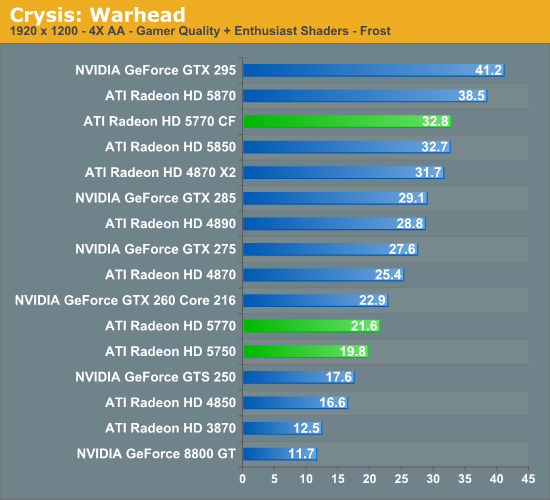
Is the 5770 a powerful enough card to run at 1920 x 1080? I'm thinking of holding off to see some benchs on the 5830. I'd like to be able to run Crysis on High with a stable 40fps, but it's not really a requirement. Only other games I'll likely be playing are GTA4, Mass Effect 2.
 
Smash88 said:
No. It is a waste of money IMO. The onboard audio you get today is just as good. Plus you won't have driver problems with games. Trust me google Creative Sound Card Problems, there are a lot with games, from crashing, to not getting any sound, to hell knows what else.

Nah dude I think you explain it a lot better in more technical terms. It is good to have both our posts up. Mine is more basic, since I didn't know if he would understand n+1 or stripes. :D

RAID is difficult, you really need to read about it, then know how to setup everything (shouldn't be hard at that point).
Interestingly, I've more or less stayed away from both sound cards and RAID because of the cost per marginal performance ratios. Sure you could buy another hard drive and RAID it together to speed up load times a bit, or buy a sound card and get 2-4 FPS in games, but it makes more sense to me to just put that money into getting a better CPU or GPU, or hell, a better kb/mouse.

The one soundcard I did buy was like five years ago: Audigy 2 ZS Gamer which was just a regular Audigy 2 ZS, but came with Splinter Cell, Rainbow 6 3, Halo and Jedi Academy and cost $60. Damn that was a haul, probably up there with ye olde Barton 2500+ for the best deals I've ever gotten.
 
mikespit1200 said:
Is the 5770 a powerful enough card to run at 1920 x 1080? I'm thinking of holding off to see some benchs on the 5830. I'd like to be able to run Crysis on High with a stable 40fps, but it's not really a requirement. Only other games I'll likely be playing are GTA4, Mass Effect 2.

ATI_Radeon_HD5770_Crysis_NoAA.jpg


20445.png
 
ok i think i figured out my setup, the only thing i am confused about is power supply

XFX Radeon HD 5770 1GB GDDR5 PCI-E 2.0 x 16 Graphics Card (HD577A-ZNEA)

Intel Core i5 750 2.66Ghz Socket 1156 CPU

Asus P7P55-M i5 Intel P55 Socket 1156 Micro ATX Intel Motherboard

G-Skill Ripjaws 4GB (2 x 2GB) DDR3 1600 PC3 12800 Memory

i want it to be micro atx, they have cases with built in 500w psu's, is this bad? do i need to get a case with no psu and buy a better one, or can i run this stuff without it?

also is it possible to install windows without an internal dvd drive? i have a usb dvd drive and plenty of laptops around..
 
Thanks for the explanation of raid, guys. Much appreciated.
 
panda21 said:
ok i think i figured out my setup, the only thing i am confused about is power supply

XFX Radeon HD 5770 1GB GDDR5 PCI-E 2.0 x 16 Graphics Card (HD577A-ZNEA)

Intel Core i5 750 2.66Ghz Socket 1156 CPU

Asus P7P55-M i5 Intel P55 Socket 1156 Micro ATX Intel Motherboard

G-Skill Ripjaws 4GB (2 x 2GB) DDR3 1600 PC3 12800 Memory

i want it to be micro atx, they have cases with built in 500w psu's, is this bad? do i need to get a case with no psu and buy a better one, or can i run this stuff without it?

also is it possible to install windows without an internal dvd drive? i have a usb dvd drive and plenty of laptops around..

I would honestly get a reliable PSU like OCZ, Corsair, Thermaltake, etc... Your system will be as good as your PSU is what I always say. Get a shitty PSU and your system will have performance problems, or worse will burn out on you 2 times.

My friend bought a custom made computer, and both times the PSU blew out, with fireworks, because it was either shitty quality or did not have enough watts. Although if you like a good fireworks show with some awesome smelling burnt plastic, by all means go for it. :lol

Installing it with an external DVD drive should be fine, if not slower. When you boot up your computer there will be a button for getting to your "Boot Menu", from there you select your USB device.

Although the thing with micro-atx I should say is there is no OCZ, Corsair, Thermaltake PSU. That is there are no specific mATX PSU's. There should be some compact PSU's from OCZ, Corsairs, etc... that could fit a larger mATX. I honestly wouldn't recommend a mATX PSU. Something like this should work:

http://www.ocztechnology.com/products/power_management/ocz_gamexstream_power_supply-nvidia_sli_ready_

I have this and it works like a beast. They say in a bigger mATX case it should fit.

mATX PSU's overheat like a bitch. So I would advise against them.
 
Smash88 said:
I would honestly get a reliable PSU like OCZ, Corsair, Thermaltake, etc... Your system will be as good as your PSU is what I always say. Get a shitty PSU and your system will have performance problems, or worse will burn out on you 2 times.

thanks! will get the ocz then.

do the mobo/cpu/gpu usually come with all the cables you will need or do i need to ask the guys in the shop? i literally have no idea what i would need.
 
Thinking about ditching this shitty ass X-Fi and picking up an HD Omega Claro with the built in Headphone amp.

Also thanks for the link on that Samsung Spinpoint f3.

Im going to buy one and stick it in for a main drive.

Is there any easy way to clone my drive from my old 250gb Samsung to this new drive?
 
panda21 said:
oh and do i need fans or will whatever comes with the psu/cpu/gpu do the job?

Read my edit above.

If you can try, do not use a stock CPU cooler, especially since mATX cases are smaller and have less ventilation room. If you can find a good heatsink that can fit in an mATX, I would definitely go that route.

panda21 said:
thanks! will get the ocz then.

do the mobo/cpu/gpu usually come with all the cables you will need or do i need to ask the guys in the shop? i literally have no idea what i would need.

Your case should come with the necessary connections and screws to fit the motherboard. The motherboard itself should come packaged with the cables needed to plug into your hard drive and whatever else. This goes the same with your GPU, you should have the cables to plug into your video card.

As for your CPU, the motherboard should have a connector for its fan, so that is fine.
 
vocab said:
What are you looking for in a monitor?

As someone who hates laggy LCD TV's and has had bad experience with ghosting, and just bad LCD's in general, the VW246H is amazing. Going from a 100 hertz CRT to this LCD is leaps and bound when it comes to image quality. No ghosting (THANK GOD), and probably one of the lowest input lag monitors on the market (Evo uses the lesser model). It's a solid monitor. Some people will argue the color isn't the best, but it looks find to me. I barely calibrated it, and it looks pretty much perfect.

I am looking for a bigger monitor to watch movies, play games, and watch tv . My budget for the monitor is $250, but I am willing to spend closer to $300 if its worth it.
 
Top Bottom