
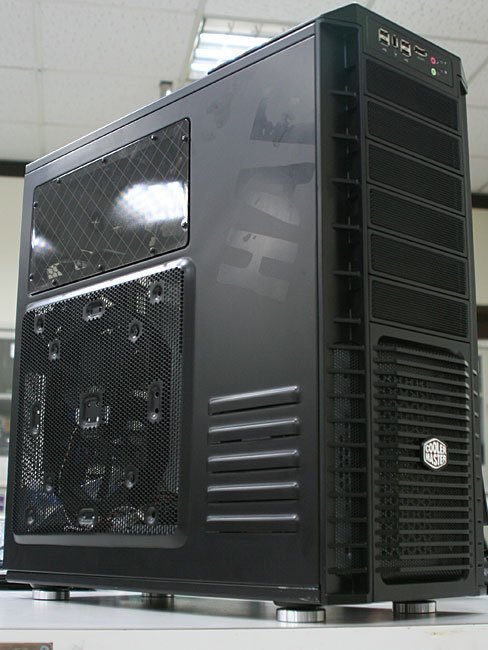
TheExodu5 said:I really think the Coolermaster HAF 932 seems like an amazing case.
http://farm4.static.flickr.com/3340/3292208812_3be21bb35c.jpg[IMG]
Love their tool-less design. Very easy to swap HDDs and PCI components.
The airflow in this thing must be insane, with 3x 230mm fans and 1x 140mm fan. [B]The fans are rated at 75cfm @ 19dbA...nice[/B].
[IMG]http://www.dvhardware.net/news/cooler_master_haf_932_computex.jpg[IMG]
Red LED at the front...but I find their front LEDs very unobnoxious as they're low intensite and the front grate stops the light from reaching you where you're sitting.
BTW, the open back-plate area is awesome. If you've ever installed a back-plate HSF, you know how much that would help.[/QUOTE]
There is no such fan that would/could be rated at 75cfm @19dba. Maybe next to an airport. :lol
Also the 8800GT will be a bottleneck for your computer bizatch.
-
Hey Guest. Check out your NeoGAF Wrapped 2025 results here!
You are using an out of date browser. It may not display this or other websites correctly.
You should upgrade or use an alternative browser.
You should upgrade or use an alternative browser.
"I need a new PC!" 2010 Edition
- Thread starter Spy
- Start date
Smash88 said:There is no such fan that would/could be rated at 75cfm @19dba. Maybe next to an airport. :lol
Also the 8800GT will be a bottleneck for your computer bizatch.
Will it really? I looked up recommended settings for a lot of the games im interested in playing and it seems that the recommended settings are usually along the lines of the 8800GT and a quad core.
But yea, I know I have to upgrade the video card eventually (probably to a 5850) I just figured i'd be good for maxing out atleast GTA 4 and bad company 2...no?
Smash88 said:There is no such fan that would/could be rated at 75cfm @19dba. Maybe next to an airport. :lol
It's a 230mm fan. 75cfm @ 19dbA sounds completely accurate. Good 120mm fans are usually around 40cfm @ 25dbA or so. A 230mm fan would probably only have to spin at 400rpm or so to produce more airflow than a 1200rpm 120mm fan.
edit: I should add that the side fan will probably be loud at default speeds though...most side panels are really noisy. I wouldn't go with the case if a quiet case was the goal...I would go with the Antec P183 in that case. However, I think it'll be hard to beat that case in terms of airflow, and the tool-less design and open back-plate are huge pluses.
TheExodu5 said:It's a 230mm fan. 75cfm @ 19dbA sounds completely accurate. Good 120mm fans are usually around 40cfm @ 25dbA or so. A 230mm fan would probably only have to spin at 400rpm or so to produce more airflow than a 1200rpm 120mm fan.
edit: I should add that the side fan will probably be loud at default speeds though...most side panels are really noisy. I wouldn't go with the case if a quiet case was the goal...I would go with the Antec P183 in that case. However, I think it'll be hard to beat that case in terms of airflow, and the tool-less design and open back-plate are huge pluses.
230mm fan, sure, maybe...why not. The 120mm, no. I didn't know which one you were referring too.

@Biznatch - You could probably max out BFBC2 since it is CPU based, but GTA IV no. Like I said, your graphics card is a bottleneck and has started to show its age. Trust me I know, I have an 8800GT.

What are your specs now? If you have a decent CPU, I would upgrade your RAM and GPU first, then CPU.
CorporalDork
Banned
Heh... I'm actually saving for a Corsair 800D at the moment - without a doubt my favorite case ever.
I"m also over blue lights etc, I've actually taken out all my lighting and put in more quiet black fans throughout the current case (Thermaltake Armor)
I"m also over blue lights etc, I've actually taken out all my lighting and put in more quiet black fans throughout the current case (Thermaltake Armor)
Smash88 said:@Biznatch - You could probably max out BFBC2 since it is CPU based, but GTA IV no. Like I said, your graphics card is a bottleneck and has started to show its age. Trust me I know, I have an 8800GT.
What are your specs now? If you have a decent CPU, I would upgrade your RAM and GPU first, then CPU.
Even my GTX 275 can limit BFBC2. I run with Level of Detail at Medium, Shadows at Low, and HBAO off to get the best framerate.
I'm using a 3.0GHz Q8300.
evil solrac v3.0
Member
meh. you'll take my antec 1200 from my cold dead hands. LOL.
VariantX04
Loser slave of the system :(
EDIT: I realize I am slow.
Hausmeister
Neo Member
GAF I need your help (and don't know if it's been asked already):
I'm very close on buying the 21,5 inch iMac, this one.
I'm in the possession of a 13 inch Macbook Pro, no PC or anything else. Lately I've started a new working project which requires a lot of home office work, etc., so my couch-websurfing-mail-device isn't very comfortable for that. So I definitely need a bigger screen to work on. BUT: 1046 is a whole bunch of money and IF I'm buying a big PC, I want to play StarCraft II and Diablo 3 on it. So, do you think the GForce 9400 will be enoug to play at least with average details? I would buy a PC, if there weren't so many wires around my table then and extra costs on mouse, keyboard, screen, Windows 7, Speakers,.. What do you think is the best way to handle this? :/
I'm very close on buying the 21,5 inch iMac, this one.
I'm in the possession of a 13 inch Macbook Pro, no PC or anything else. Lately I've started a new working project which requires a lot of home office work, etc., so my couch-websurfing-mail-device isn't very comfortable for that. So I definitely need a bigger screen to work on. BUT: 1046 is a whole bunch of money and IF I'm buying a big PC, I want to play StarCraft II and Diablo 3 on it. So, do you think the GForce 9400 will be enoug to play at least with average details? I would buy a PC, if there weren't so many wires around my table then and extra costs on mouse, keyboard, screen, Windows 7, Speakers,.. What do you think is the best way to handle this? :/
CorporalDork
Banned
Buy wireless peripherals for your pcHausmeister said:GAF I need your help (and don't know if it's been asked already):
I'm very close on buying the 21,5 inch iMac, this one.
I'm in the possession of a 13 inch Macbook Pro, no PC or anything else. Lately I've started a new working project which requires a lot of home office work, etc., so my couch-websurfing-mail-device isn't very comfortable for that. So I definitely need a bigger screen to work on. BUT: 1046 is a whole bunch of money and IF I'm buying a big PC, I want to play StarCraft II and Diablo 3 on it. So, do you think the GForce 9400 will be enoug to play at least with average details? I would buy a PC, if there weren't so many wires around my table then and extra costs on mouse, keyboard, screen, Windows 7, Speakers,.. What do you think is the best way to handle this? :/
dynamitejim
Member
TheExodu5 said:I really think the Coolermaster HAF 932 seems like an amazing case.
Love their tool-less design. Very easy to swap HDDs and PCI components.
The airflow in this thing must be insane, with 3x 230mm fans and 1x 140mm fan. The fans are rated at 75cfm @ 19dbA...nice.
Red LED at the front...but I find their front LEDs very unobnoxious as they're low intensite and the front grate stops the light from reaching you where you're sitting.
BTW, the open back-plate area is awesome. If you've ever installed a back-plate HSF, you know how much that would help.
I went for the 922 for my build and it's definitely an awesome case. It's supposed to be the mid-size version, but the dimensions are nearly identical. Tons of space inside and it's very easy to add and remove components. The front LED also has an on/off button. I sit pretty close to my PC and the 2x230mm fans keep me cool.
Hausmeister
Neo Member
CorporalDork said:Buy wireless peripherals for your pc
Yeah, but a Mac has exactly one wire for electricity. A PC at mininum: Power for PC and screen, wire between PC an screen, a wireless dongle for mouse/keyboard and speakers are taking additional space on my desk, which I want to use from time to time as.. a desk

EDIT: I have a 360 and PS3 for gaming, I only have interest in those 2 blizz games :/ But yeah, I already guessed the 9400 isn't good enough. Damn :/
I'm thinking about upgrading my rig. The thing is, my motherboard is pretty old, but it can support a Phenom II X4 945, 95W version. I have an Ati HD 4850 1GB and 4GB DDR2 800.
My question is, how do you see this setup for playing at 1280x1024?
My question is, how do you see this setup for playing at 1280x1024?
brain_stew
Member
Hausmeister said:GAF I need your help (and don't know if it's been asked already):
I'm very close on buying the 21,5 inch iMac, this one.
I'm in the possession of a 13 inch Macbook Pro, no PC or anything else. Lately I've started a new working project which requires a lot of home office work, etc., so my couch-websurfing-mail-device isn't very comfortable for that. So I definitely need a bigger screen to work on. BUT: 1046 is a whole bunch of money and IF I'm buying a big PC, I want to play StarCraft II and Diablo 3 on it. So, do you think the GForce 9400 will be enoug to play at least with average details? I would buy a PC, if there weren't so many wires around my table then and extra costs on mouse, keyboard, screen, Windows 7, Speakers,.. What do you think is the best way to handle this? :/
No chance, its an integrated GPU and Starcraft 2 is going to be pushing the GPU very hard. I'm never going to recommend you spend 1000 Euros on that horribly specced machine. Its barely a step up from your MBP, Just get a nice new 1080p monitor and docking station for that.

Minsc
Gold Member
Hausmeister said:Yeah, but a Mac has exactly one wire for electricity. A PC at mininum: Power for PC and screen, wire between PC an screen, a wireless dongle for mouse/keyboard and speakers are taking additional space on my desk, which I want to use from time to time as.. a desk
EDIT: I have a 360 and PS3 for gaming, I only have interest in those 2 blizz games :/ But yeah, I already guessed the 9400 isn't good enough. Damn :/
Are you comparing an iMac to a PC tower setup? The iMac will be so obliterated it isn't even funny, it will be wishing it had more than one power cord.
Just try putting a 5800 or Fermi card in an iMac, you can't! Those thing will literally probably score over 10x the performance of the card in an iMac, one which you'll never be able to change. It's a lot of money to spend on a machine that can't be upgraded to top of the line products, when that money can easily buy those top of the line products and then some.
Hausmeister
Neo Member
You guys convinced me.. just bought a Samsung 24" TFT:

Apple Wireless Keyboard and Display Port to DVI Adapter are going to be bought tomorrow in a local store. And by the time the blizzard games are released, maybe there will be a new PC, which can be used with the screen. Problem: solved!
Apple Wireless Keyboard and Display Port to DVI Adapter are going to be bought tomorrow in a local store. And by the time the blizzard games are released, maybe there will be a new PC, which can be used with the screen. Problem: solved!
As I said earlier, my ram broke my mobo (I think). If I were to take the ram to a friend's house and put it in his mobo, one stick at a time (and run memtest86) is it highly likely that it would break his mobo too?
The reason I think that the mobo broke my mobo is because I was ocing my cpu and did not reset the bios before sticking in the new ram.
The reason I think that the mobo broke my mobo is because I was ocing my cpu and did not reset the bios before sticking in the new ram.
Zaraki_Kenpachi
Member
Man, my built is coming out to around $1800. I gotta find stuff to cut. :/
My brother is looking to upgrade the graphics card in his pre built HP but I think hes going to nee to bump up the PSU first. Currently, a Bestec ATX 250 is installed. Any suggestions for an upgrade? Hes looking at the new Radeon HD5570 from his current HD4350.
Heres the full specs. Would that be a decent upgrade for him?
Intel(R) Pentium(R) Dual-Core processor E5400 [2.7GHz, 2MB L2, 800MHz FSB]
3GB DDR2-800MHz SDRAM [2 DIMMs]
750GB 7200 rpm SATA 3Gb/s hard drive
512MB ATI Radeon HD 4350 [DVI, HDMI, VGA adapter]
LightScribe 16X max. DVD+/-R/RW SuperMulti drive
Wireless-G LAN card
2 USB, front audio ports
Integrated 7.1 channel sound with front audio ports
Heres the full specs. Would that be a decent upgrade for him?
Intel(R) Pentium(R) Dual-Core processor E5400 [2.7GHz, 2MB L2, 800MHz FSB]
3GB DDR2-800MHz SDRAM [2 DIMMs]
750GB 7200 rpm SATA 3Gb/s hard drive
512MB ATI Radeon HD 4350 [DVI, HDMI, VGA adapter]
LightScribe 16X max. DVD+/-R/RW SuperMulti drive
Wireless-G LAN card
2 USB, front audio ports
Integrated 7.1 channel sound with front audio ports
Zaraki_Kenpachi
Member
Salaadin said:My brother is looking to upgrade the graphics card in his pre built HP but I think hes going to nee to bump up the PSU first. Currently, a Bestec ATX 250 is installed. Any suggestions for an upgrade? Hes looking at the new Radeon HD5570 from his current HD4350.
Heres the full specs. Would that be a decent upgrade for him?
Intel(R) Pentium(R) Dual-Core processor E5400 [2.7GHz, 2MB L2, 800MHz FSB]
3GB DDR2-800MHz SDRAM [2 DIMMs]
750GB 7200 rpm SATA 3Gb/s hard drive
512MB ATI Radeon HD 4350 [DVI, HDMI, VGA adapter]
LightScribe 16X max. DVD+/-R/RW SuperMulti drive
Wireless-G LAN card
2 USB, front audio ports
Integrated 7.1 channel sound with front audio ports
He definitely needs a new psu. What is his price range? You're going for $100 or less?
Hausmeister said:I would buy a PC, if there weren't so many wires around my table then and extra costs on mouse, keyboard, screen, Windows 7, Speakers,.. What do you think is the best way to handle this? :/
If costs were a concern for you buying a mac would be a step backwards.
TheExodu5 said:It's a 230mm fan. 75cfm @ 19dbA sounds completely accurate. Good 120mm fans are usually around 40cfm @ 25dbA or so. A 230mm fan would probably only have to spin at 400rpm or so to produce more airflow than a 1200rpm 120mm fan.
There are good fans and then there are the fans that blew my minds on this matter. Highly recommended :
http://www.noctua.at/main.php?show=productview&products_id=12&lng=en&set=1
I have 3 of these babies and they are silent with high airflow rate.
Zaraki_Kenpachi said:He definitely needs a new psu. What is his price range? You're going for $100 or less?
Hed like to keep it as cheap as possible but I also dont want his PSU blowing out on him if we got some shitty brand.
Zaraki_Kenpachi
Member
Salaadin said:Hed like to keep it as cheap as possible but I also dont want his PSU blowing out on him if we got some shitty brand.
Again, I need a price. Like as cheap as possible so it just works or what does he plan on doing? How much for the video card?
He said 120.00 or less for the PSU. As for the GPU, hes interested in the Radeon HD5570 because of its price and would like to keep that under 100 bucks.
He wants something more capable for games. Not everything needs to be the highest res with max settings but just something that can run games decently. For reference, hes going to be picking up Dragon Age for the PC and thats what sparked this whole upgrade idea.
He wants something more capable for games. Not everything needs to be the highest res with max settings but just something that can run games decently. For reference, hes going to be picking up Dragon Age for the PC and thats what sparked this whole upgrade idea.
Minsc
Gold Member
Salaadin said:He said 120.00 or less for the PSU. As for the GPU, hes interested in the Radeon HD5570 because of its price and would like to keep that under 100 bucks.
He wants something more capable for games. Not everything needs to be the highest res with max settings but just something that can run games decently. For reference, hes going to be picking up Dragon Age for the PC and thats what sparked this whole upgrade idea.

Dragon Age is one of those games that likes a really fast quad core CPU.
Even with the best graphics card money can buy, he won't get 30fps with that CPU in the above benchmark.
What CPU/GPU/Mobo combo should I be looking at if low electricity use and heat are a concern, and I want to keep things cheap? Think MAME box. Also, for the sake of salvage, I'd be hoping to use a case, maybe the PSU, and maybe a hdd from 2001; will compatibility be a big concern?
Great PC minds, could you please recommend a good cost/performance & features x58 mobo.
I don't know anything about overclocking but I think I would want to seeing as though those I7's are such beasts.
My PC will be mainly for 3d modeling and rendering with gaming a little from time to time
Bearing in mind I had originally had my eye on this http://www.newegg.com/Product/Produ...&cm_re=x58_motherboard-_-13-131-614-_-Product :lol
I don't know anything about overclocking but I think I would want to seeing as though those I7's are such beasts.
My PC will be mainly for 3d modeling and rendering with gaming a little from time to time
Bearing in mind I had originally had my eye on this http://www.newegg.com/Product/Produ...&cm_re=x58_motherboard-_-13-131-614-_-Product :lol
Slackbladder
Member
I'm thinking of going from my GTX260 to an ATi HD5870. Question is does my current PSU have the juice to power it? My PSU is a 750W Be Quiet Dark Power PRO and runs my 260 fine. Do I need to upgrade my PSU for a 5870?
Is the GIGABYTE GA-P55A-UD3 LGA worth the price? I am only going to use one video card (the next gen Geforce. I am holding onto my 8800GTS G92 until then). I am not sure if buying a motherboard with USB 3.0 is a good idea or not.
This is what I am thinking of getting, sans video card:
https://secure.newegg.com/WishList/MySavedWishDetail.aspx?ID=17471928
This is what I am thinking of getting, sans video card:
https://secure.newegg.com/WishList/MySavedWishDetail.aspx?ID=17471928
Zaraki_Kenpachi
Member
Slackbladder said:I'm thinking of going from my GTX260 to an ATi HD5870. Question is does my current PSU have the juice to power it? My PSU is a 750W Be Quiet Dark Power PRO and runs my 260 fine. Do I need to upgrade my PSU for a 5870?
Should be fine but what +12V amps do you have just to be sure?
Gully State
Member
Minsc said:
Dragon Age is one of those games that likes a really fast quad core CPU.
Even with the best graphics card money can buy, he won't get 30fps with that CPU in the above benchmark.
I question these benchmarks. I've got an E8400 + 5850 both at stock speeds and I get way better than 37 FPS @ 1920x1080 with everything at max 8x AA and 16xAAF. I'm at least around the high 40's/low 50 frames/sec.

Slackbladder
Member
4x +12V@20amps each. Here's a link to a review www.techpowerup.comZaraki_Kenpachi said:Should be fine but what +12V amps do you have just to be sure?
Zaraki_Kenpachi
Member
Slackbladder said:4x +12V@20amps each. Here's a link to a review www.techpowerup.com
That's overkill. You'll have no problem powering with that. You even meet the inflated ati/nvidia requirements on their site.
Slackbladder
Member
Okay, thanks for that. Good to see I have plenty of juice. Errr...Zaraki_Kenpachi said:That's overkill. You'll have no problem powering with that. You even meet the inflated ati/nvidia requirements on their site.
So I decided to build my computer as opposed to buying an Alienware. Someone on CheapAssGamer suggested some parts and listed newegg links. Because newegg charges NJ tax on me and I have Amazon Prime I'd much rather get it from amazon. I plugged in the model #s into Amazon and not sure some of them are the same but, does this look good? Would cost me $1,018. Does it all look like it's compatible?
http://www.amazon.com/exec/obidos/t...t_shr?_encoding=UTF8&m=ATVPDKIKX0DER&v=glance
http://www.amazon.com/exec/obidos/t...t_shr?_encoding=UTF8&m=ATVPDKIKX0DER&v=glance
http://www.amazon.com/exec/obidos/t...t_shr?_encoding=UTF8&m=ATVPDKIKX0DER&v=glance
http://www.amazon.com/exec/obidos/t...t_shr?_encoding=UTF8&m=ATVPDKIKX0DER&v=glance
http://www.amazon.com/exec/obidos/t...t_shr?_encoding=UTF8&m=ATVPDKIKX0DER&v=glance
http://www.amazon.com/exec/obidos/t...t_shr?_encoding=UTF8&m=ATVPDKIKX0DER&v=glance
http://www.amazon.com/exec/obidos/t...t_shr?_encoding=UTF8&m=ATVPDKIKX0DER&v=glance
http://www.amazon.com/exec/obidos/t...t_shr?_encoding=UTF8&m=ATVPDKIKX0DER&v=glance
http://www.amazon.com/exec/obidos/t...t_shr?_encoding=UTF8&m=ATVPDKIKX0DER&v=glance
http://www.amazon.com/exec/obidos/t...t_shr?_encoding=UTF8&m=ATVPDKIKX0DER&v=glance
http://www.amazon.com/exec/obidos/t...t_shr?_encoding=UTF8&m=ATVPDKIKX0DER&v=glance
http://www.amazon.com/exec/obidos/t...t_shr?_encoding=UTF8&m=ATVPDKIKX0DER&v=glance
http://www.amazon.com/exec/obidos/t...t_shr?_encoding=UTF8&m=ATVPDKIKX0DER&v=glance
http://www.amazon.com/exec/obidos/t...t_shr?_encoding=UTF8&m=ATVPDKIKX0DER&v=glance
http://www.amazon.com/exec/obidos/t...t_shr?_encoding=UTF8&m=ATVPDKIKX0DER&v=glance
http://www.amazon.com/exec/obidos/t...t_shr?_encoding=UTF8&m=ATVPDKIKX0DER&v=glance

turnbuckle
Member
Hmm, now I'm thinking about doing something a little bit different. Thinking about upgrading the mobo / processor / vcard / Ram in my home PC and using my old parts as a base to put together my work PC. My thinking is that my home computer is probably about the level of upgrade I'd want my work PC to be, but if I'm gonna drop some cash on parts I might as well make the home computer better in the process. I'd hate to have my work PC be better than my gaming one, yet I find myself having a hard time being frugal. :lol
I'll post the components for my new build as I compile the list. I must have 30 tabs opened between different stores and review sites atm. :lol
I'll post the components for my new build as I compile the list. I must have 30 tabs opened between different stores and review sites atm. :lol
brain_stew
Member
IPoopStandingUp said:So I decided to build my computer as opposed to buying an Alienware. Someone on CheapAssGamer suggested some parts and listed newegg links. Because newegg charges NJ tax on me and I have Amazon Prime I'd much rather get it from amazon. I plugged in the model #s into Amazon and not sure some of them are the same but, does this look good? Would cost me $1,018. Does it all look like it's compatible?
http://www.amazon.com/exec/obidos/t...t_shr?_encoding=UTF8&m=ATVPDKIKX0DER&v=glance
http://www.amazon.com/exec/obidos/t...t_shr?_encoding=UTF8&m=ATVPDKIKX0DER&v=glance
http://www.amazon.com/exec/obidos/t...t_shr?_encoding=UTF8&m=ATVPDKIKX0DER&v=glance
http://www.amazon.com/exec/obidos/t...t_shr?_encoding=UTF8&m=ATVPDKIKX0DER&v=glance
http://www.amazon.com/exec/obidos/t...t_shr?_encoding=UTF8&m=ATVPDKIKX0DER&v=glance
http://www.amazon.com/exec/obidos/t...t_shr?_encoding=UTF8&m=ATVPDKIKX0DER&v=glance
http://www.amazon.com/exec/obidos/t...t_shr?_encoding=UTF8&m=ATVPDKIKX0DER&v=glance
http://www.amazon.com/exec/obidos/t...t_shr?_encoding=UTF8&m=ATVPDKIKX0DER&v=glance
If you're gaming, spend less on the motherboard/CPU/RAM and more on the GPU. You'll get much better gaming performance from a 5850/i5-750/4GB RAM than you would with that config.
HomerSimpson-Man
Member
Started to test 1 of my games today.
Mass Effect 1, this game gave me hefty performance issues.
The Phenom II x3 720@3.6Ghz made a huge difference when I tried Mass Effect 1. It only managed around mostly 30fps and with drops on my old Athlon 64x2 6000 @3Ghz with medium-high level settings, it's doing a smooth 60fps easy now without breaking a sweat maxed out.
Still on the same trusty 8800GT.
Mass Effect 1, this game gave me hefty performance issues.
The Phenom II x3 720@3.6Ghz made a huge difference when I tried Mass Effect 1. It only managed around mostly 30fps and with drops on my old Athlon 64x2 6000 @3Ghz with medium-high level settings, it's doing a smooth 60fps easy now without breaking a sweat maxed out.
Still on the same trusty 8800GT.
IPoopStandingUp said:So I decided to build my computer as opposed to buying an Alienware. Someone on CheapAssGamer suggested some parts and listed newegg links. Because newegg charges NJ tax on me and I have Amazon Prime I'd much rather get it from amazon. I plugged in the model #s into Amazon and not sure some of them are the same but, does this look good? Would cost me $1,018. Does it all look like it's compatible?
http://www.amazon.com/exec/obidos/t...t_shr?_encoding=UTF8&m=ATVPDKIKX0DER&v=glance
http://www.amazon.com/exec/obidos/t...t_shr?_encoding=UTF8&m=ATVPDKIKX0DER&v=glance
http://www.amazon.com/exec/obidos/t...t_shr?_encoding=UTF8&m=ATVPDKIKX0DER&v=glance
http://www.amazon.com/exec/obidos/t...t_shr?_encoding=UTF8&m=ATVPDKIKX0DER&v=glance
http://www.amazon.com/exec/obidos/t...t_shr?_encoding=UTF8&m=ATVPDKIKX0DER&v=glance
http://www.amazon.com/exec/obidos/t...t_shr?_encoding=UTF8&m=ATVPDKIKX0DER&v=glance
http://www.amazon.com/exec/obidos/t...t_shr?_encoding=UTF8&m=ATVPDKIKX0DER&v=glance
http://www.amazon.com/exec/obidos/t...t_shr?_encoding=UTF8&m=ATVPDKIKX0DER&v=glance
Wrong type of RAM for that motherboard and processor, you would want dual channel (and get either 4GB or 8GB)
But as stated above, I would go with a 5850 and a Core i5 (which is also a dual channel set up)
Fragamemnon
Member
Those benchmarks for Dragon Age only make sense if the parts of the game they benchmark are a lot tougher on the CPU/GPU than most of the game is. FRAPs puts me hovering around 60 FPS in all but the most complex of areas (Denerim) on a 3.0Ghz E6400 and a GTX 260 , running with 4XMSAA/16AF at 1680x1050.
How is this RAM?Struct09 said:Wrong type of RAM for that motherboard and processor, you would want dual channel (and get either 4GB or 8GB)
But as stated above, I would go with a 5850 and a Core i5 (which is also a dual channel set up)
http://www.amazon.com/exec/obidos/t...t_shr?_encoding=UTF8&m=ATVPDKIKX0DER&v=glance
I'm kind of stuck on the idea of getting an i7 instead of an i5. I heard it's better for multitasking and would love that for editing videos...as of now I can't have much open when my computer is running the editing software.
I figure what I save on RAM by getting that (assuming it's compatible) I could then get a 5850. How does the Nvidia GTX 260 compare? I completely forgot about Nvidia 3D vision and remembered that's something I'm interested in.
Minsc
Gold Member
Gully State said:I question these benchmarks. I've got an E8400 + 5850 both at stock speeds and I get way better than 37 FPS @ 1920x1080 with everything at max 8x AA and 16xAAF. I'm at least around the high 40's/low 50 frames/sec.
[IG]http://www.abload.de/img/daorigins2010-01-3118-y6ew.png[/IMG]
The benchmark was benched with this situation:
Dragon Age: Origins - Benchmark and Results
In our benchmark scene our party walks over the market place in Denerim. Due to the amount of displays geometry and NPCs the CPU workload is quite high. In order to prevent a performance limitation by the graphics card we use a Radeon HD 5870 for our tests. The resolution is set to 1680 x 1050 pixels and we choose maximal details with 4x MSAA (in-game) and 16:1 AF (via the driver).
If you're standing still the framerate tends to be a little higher than when your moving and panning the camera. They were also in the Denerium marketplace.
I have almost the exact same setup they used (5870 + 3.3ghz i7 920) and my frame goes from a locked 60 to about the low 50s when walking around in the Denerim marketplace, just like the benchmark says.
I'd say my framerate was locked at 60 for 95% of the game, with occasional dips, so it's harder for me to tell the benches aren't representational of a normal experience, but now that you mention it, I think you're correct, typical framerates will be a little higher than those benchmarks.
Minsc said:
Dragon Age is one of those games that likes a really fast quad core CPU.
Even with the best graphics card money can buy, he won't get 30fps with that CPU in the above benchmark.
Something is extremely fishy with Dragon Age at 4x MSAA btw. The game runs at about double the speed with 8x AA with my GTX 275. The framerate averaged closer to 50-60 with my GTX 275 and E6600 @ 3.0GHz, though it hit lows in the mid 20's (like when you go to the first town). The framerates seem too low in that chart.
edit: oh it's done in the Marketplace. That's pretty much the most intensive part of the game.
Gully State
Member
Minsc said:The benchmark was benched with this situation:
If you're standing still the framerate tends to be a little higher than when your moving and panning the camera. They were also in the Denerium marketplace.
I have almost the exact same setup they used (5870 + 3.3ghz i7 920) and my frame goes from a locked 60 to about the low 50s when walking around in the Denerim marketplace, just like the benchmark says.
I'd say my framerate was locked at 60 for 95% of the game, with occasional dips, so it's harder for me to tell the benches aren't representational of a normal experience, but now that you mention it, I think you're correct, typical framerates will be a little higher than those benchmarks.
Gotcha...I'm just pointing this out only b/c that chart made me hesitant to get the game. Although in it's defense, I'm sure that anything about 30FPS for this game is acceptable as long as the framerate doesn't fluctuate wildly.
Minsc
Gold Member
TheExodu5 said:Something is extremely fishy with Dragon Age at 4x MSAA btw. The game runs at about double the speed with 8x AA with my GTX 275. The framerate averaged closer to 50-60 with my GTX 275 and E6600 @ 3.0GHz, though it hit lows in the mid 20's (like when you go to the first town). The framerates seem too low in that chart.
Yea, I see now it's much more of a worst case scenario, which is never a bad thing, I just need to stop using it as a gauge for performance now. Thanks for the feedback, first time I've seen the benchmarks corrected, and while clearly faster CPU / more cores are important to the engine, it may not be until future expansions when they're stressing the engine more like in Denerium that you start seeing #s like that as more common place.
I actually think the towns could use a order of magnitude more activity, so if mods come out down the road that add dozens and dozens of villagers, or the like, you might see numbers like closer to that chart too.

Erebus
Member
What I have:
- Asus P5W DH Deluxe
- Intel Core Duo E5400 OC @ 3.6GHz (originally running at 2.70GHz)
- 4GB DDR2 800MHz
- 8800GTS 640MB
Basically, the plan is to upgrade my graphics card in order to get better performance in games, though I'm not sure if that's a wise thing to do given the above specs. That's why I'm asking for your opinion. Do you think getting a new gfx card (say 5850 or an nVidia equivalent) would give me a noticeable boost in performance? I'm afraid that my CPU might cause a bottleneck.
FYI with my current setup I can get a 30-45 fps (average) in games like RE5, Dirt 2 and Mass Effect 2 usually with all settings maxed out, 4xMSAA at 1680x1050.
- Asus P5W DH Deluxe
- Intel Core Duo E5400 OC @ 3.6GHz (originally running at 2.70GHz)
- 4GB DDR2 800MHz
- 8800GTS 640MB
Basically, the plan is to upgrade my graphics card in order to get better performance in games, though I'm not sure if that's a wise thing to do given the above specs. That's why I'm asking for your opinion. Do you think getting a new gfx card (say 5850 or an nVidia equivalent) would give me a noticeable boost in performance? I'm afraid that my CPU might cause a bottleneck.
FYI with my current setup I can get a 30-45 fps (average) in games like RE5, Dirt 2 and Mass Effect 2 usually with all settings maxed out, 4xMSAA at 1680x1050.
BravoSuperStar
Member
So I happen to be in the market for a new monitor. Looking for some ideas. Requirements are:
-must have at least 1 hdmi input
-prefer 1920x1080 16x9 resolution
-must support standard vesa mounting
-fast response time required, will be using it for PC and Xbox 360 gaming
I have a budget of up to $500 or so. Right now I'm looking at this 27 inch Asus. Thanks for any help, guys.
-must have at least 1 hdmi input
-prefer 1920x1080 16x9 resolution
-must support standard vesa mounting
-fast response time required, will be using it for PC and Xbox 360 gaming
I have a budget of up to $500 or so. Right now I'm looking at this 27 inch Asus. Thanks for any help, guys.
DarkUSS said:What I have:
- Asus P5W DH Deluxe
- Intel Core Duo E5400 OC @ 3.6GHz (originally running at 2.70GHz)
- 4GB DDR2 800MHz
- 8800GTS 640MB
Basically, the plan is to upgrade my graphics card in order to get better performance in games, though I'm not sure if that's a wise thing to do given the above specs. That's why I'm asking for your opinion. Do you think getting a new gfx card (say 5850 or an nVidia equivalent) would give me a noticeable boost in performance? I'm afraid that my CPU might cause a bottleneck.
FYI with my current setup I can get a 30-45 fps (average) in games like RE5, Dirt 2 and Mass Effect 2 usually with all settings maxed out, 4xMSAA and 1680x1050.
Your CPU will only be a bottleneck in quad-core enabled CPU intensive games (maybe E:TW, Arma 2, Bad Company 2, Grand Theft Auto 4) and a very slightle bottleneck in games like Mass Effect 2 and Dragon Age (slight meaning you'll still be able to manage 60fps the majority of the time).
Go ahead and upgrade to a 5850. You'll still see a massive increase in performance. Down the road you can either put in an Intel Core 2 Quad (my recommendation) or upgrade to an i5/i7 rig.
To anyone that has a motherboard that can support a Core 2 Quad, I think that's the preferable option at this point. You're not getting that much more performance going i5/i7, and you'd need to replace your DDR2 with DDR3. I might suggest otherwise if socket 1156 was a solid platform, but there's no guarantee that LGA1156 boards will offer much future upgradability.