• Hey Guest. Check out your NeoGAF Wrapped 2025 results here!

"I need a new PC!" 2010 Edition

Façade said:
Finally got everything working with regards to my pc. It was something to do with the cpu pins or the placement of the RAM.

Anyway, just wondering what the best software is for monitoring you computer (cpu temp, ram use etc.)?

Real Temp will sit in the system tray as just a 2 digit number for temperature, that is the simple and most non-intrusive imo.

CPU/RAM/HDD/NET widget selection here, I like Quick Monitor.
 
Okay, I'm an idiot, I know what I did wrong! Sorry!

Budget: $1200. Already have a good power supply unit, hard drive and monitor. I need links to everything from video card to which cables I need. I also want to have a "full" tower (please).

Main Use(s): Gaming, Video Editing

Monitor Resolution:1920x1080

I really want to play Starcraft 2, Call of Duty MW 2, Mass Effect 2, Crysis, Borderlands, Half Life 2 Episode 3 (lol). Most of the newest games, I really want to switch to PC gaming.

Thanks guys!
 
Smash88 said:
I like core temp. Easier, better, and clearer, and stats all 4 temps at the bottom right (if you have 4 cores). It even works with the G15 keyboard.

http://www.alcpu.com/CoreTemp/

That's cool it works with the G15 keyboard, but this is what I like about Real Temp:

systray.png


Simple, elegant and unobtrusive. My whole system tray is just 4 icons, nice and clean.

If you want to see all the cores (why the heck would you care, they all run the same temp +/- a degree or two), just hover:

systraypop.png


I just like have the simple numbers in the system tray, and I don't think Core temp is easier (there's nothing to do, it loads w/ startup), nor clearer (how is that possible). The G15 thing would be a big feature if I had a G15 board though, that's pretty sweet.
 
Minsc said:
That's cool it works with the G15 keyboard, but this is what I like about Real Temp:

systray.png


Simple, elegant and unobtrusive. My whole system tray is just 4 icons, nice and clean.

If you want to see all the cores (why the heck would you care, they all run the same temp +/- a degree or two), just hover:

systraypop.png


I just like have the simple numbers in the system tray, and I don't think Core temp is easier (there's nothing to do, it loads w/ startup), nor clearer (how is that possible). The G15 thing would be a big feature if I had a G15 board though, that's pretty sweet.

Well my 3rd and 4th core always run 5-9C cooler than me 1st and 2nd core. ;) And the fact I have a G15. :D
 
mr stroke said:
any recommendations on a backlit keyboard?


looking at the Saitek, but some of the Amazon reviews are mixed...

?

My favorite keyboard ever:

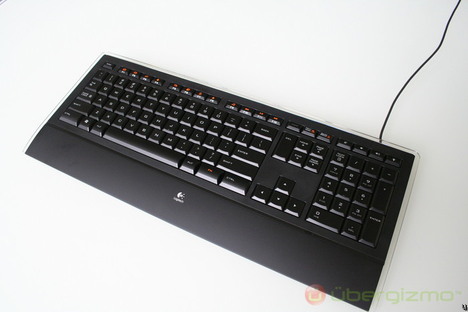
Logitech Illuminated
logitech-illuminated_468.jpg


So you can see the quality of the illumination (this is at one of the lower levels):
logitech-illuminated-keyboard-13.jpg


It's also very thin:
logitech-illuminated-keyboard-3.jpg


The keyboard is also extremely quiet. The keys are like full-sized laptop keys with longer depression. Extremely comfortable to use. The design of the keyboard is also the most elegant I've seen. It's pricey though, for what you get.
 
mr stroke said:
any recommendations on a backlit keyboard?


looking at the Saitek, but some of the Amazon reviews are mixed...

?

Microsoft SideWinder X6 Keyboard <3

Volume knob and backlit knob are wonderful. Keys are nice and quiet, only complaints are weird placement of escape key (you get used to it then it becomes a non-issue), and no usb ports (not a big deal for me).
 
TheExodu5 said:
Logitech Illuminated
I want this for my new build...but the price for it at Amazon has gone up lately =P I'll just have to wait when the price goes down again.

I also want that rechargeable Performance Mouse MX...is this the only rechargeable mouse available from Logitech nowadays? (like via docking or USB; not by just throwing in rechargeable batteries)

Edit: Oh wait, it's now $60, used to be $75 last week...tempting =)
 
Deadly Monk said:
Okay, I'm an idiot, I know what I did wrong! Sorry!

Budget: $1200. Already have a good power supply unit, hard drive and monitor. I need links to everything from video card to which cables I need. I also want to have a "full" tower (please).

Main Use(s): Gaming, Video Editing

Monitor Resolution:1920x1080

I really want to play Starcraft 2, Call of Duty MW 2, Mass Effect 2, Crysis, Borderlands, Half Life 2 Episode 3 (lol). Most of the newest games, I really want to switch to PC gaming.

Thanks guys!

Here I threw this together without much consideration for price/performance ratio. It's pretty much top of the line, so you could save some if you went down a tier on the video card (You DID say Crysis, otherwise I might have put in something a little cheaper). And I still didn't crack $1200.

Antec 1200 Full Tower Case $160
Gigabyte somethin or other mobo $185
XFX Radeon HD5850 $340
AMD Phenom II 3.4GHz Quad Core $180
G.Skill 4GB DDR3 1600 $105
Windows 7 64bit Pro $140
Total: $1110

Edit: I didn't include a mouse or keyboard but fuck that you know how to use the internet right? :)
 
GamePnoy74 said:
I want this for my new build...but the price for it at Amazon has gone up lately =P I'll just have to wait when the price goes down again.

I also want that rechargeable Performance Mouse MX...is this the only rechargeable mouse available from Logitech nowadays? (like via docking or USB; not by just throwing in rechargeable batteries)

Edit: Oh wait, it's now $60, used to be $75 last week...tempting =)

Wow $60 is a nice price. I payed $110 (+tax) when it first came out in Canada. Haven't regretted it one bit.
 
Worth buying a 5870 for 2048 x 1152? I really don't want to spend an extra $100, and the performance seems too similar between a 5850 and 5870 at 1920 x 1200 (2048x1152 only has like 60,000 more pixels) to justify it.
 
Got my coolermaster case plus PSU delivered from Ebuyer today, which would be great if it wasn't for the fact that they sent me the wrong PSU. Not cool.

Gotta wait for them to pick it up tomorrow and then send me another one before I can build my new pc now. Lame.
 
mr stroke said:
Can you remove the arm rest?

Permanent unfortunately, that logitech looks better except for the lack of knobs and it is kinda nice not having another program running (Logitech Setpoint), MS's drivers are integrated seamlessly in to the OS. Setpoint's not a bad program though, it's quite good actually, but it is yet another program! My vote goes to the logitech actually, despite owning the MS one.
 
Also, any Logitech or Razer keyboard has good backlight.

Minsc, just to add, Realtemp and Coretemp are both good. Just whichever suits you best. :D
 
Pctx said:
Ill bite k Jack since I know your the king of mobile.... What comes out in march?
CeBIT, March 2-6. More machines with the Mobility 5870/5850 will be presented, plus Nvidia claims that they'll be revealing new enthusiast-class GPUs, which will be faster than the Mob. 5870. Some CES attendants I know heard this straight from a couple of Nvidia reps.

Whatever they are, they'll be G200 based, 40nm chips, hopefully with more than 128 stream processors.

But, I must say, the G73 by far the best machine in the $1500 range, and probably will be even after CeBIT. Users are overclocking the m5870 back to 5770 levels. The highest I've seen is 799/1099.

What I'm looking for is a 15" machine with the Mobility 5850, or whatever Nvidia G200M has up its sleeve.

EDIT: There's also this Clevo, 15.6", Mobile i7, and currently comes with the equivalent of a downclocked 9800 GTX+. My sources also say that it will become available with the 5870, after CeBIT. The 5870 will also be cheaper than the GTX 285M, bringing the price down.

 
Minsc said:
Permanent unfortunately, that logitech looks better except for the lack of knobs and it is kinda nice not having another program running (Logitech Setpoint), MS's drivers are integrated seamlessly in to the OS. Setpoint's not a bad program though, it's quite good actually, but it is yet another program! My vote goes to the logitech actually, despite owning the MS one.

Don't need to run Setpoint for the keyboard. Works out of the box with Windows 7. All features supported. :)

This keyboard, however, is very basic. For me, that's perfect. I love the simplicity and elegance. It definitely feels like a very high-class product. While it doesn't have a volume knob, it does have 3 volume buttons in the top right (mute, lower, higher). If you're looking for a bunch of macro keys for your MMOs, this probably isn't the keyboard for you.
 
Just wanted to say that the backlight on the original Saitek Eclipse is terrible.
Also endorsement for RatPadz GS which is $10 shipped, feels nice to have a good pad again.
Traced-Velocity said:
Well this is a little discomforting.


Anyone have a guess as to what might have caused this? I'm a bit worried it might be the mobo that's bottlenecking me, but I'm unsure whether or not that's even possible.
I'd reinstall the drivers.
 
TheExodu5 said:
Don't need to run Setpoint for the keyboard. Works out of the box with Windows 7. All features supported. :)

This keyboard, however, is very basic. For me, that's perfect. I love the simplicity and elegance. It definitely feels like a very high-class product. While it doesn't have a volume knob, it does have 3 volume buttons in the top right (mute, lower, higher). If you're looking for a bunch of macro keys for your MMOs, this probably isn't the keyboard for you.
It's nice to get some positive thoughts on it, I've got one coming in the mail. Most other keyboards look butt ugly to me.
 
Worth upgrading from my Phenom x2 550 BE to an AMD Phenom II X4 965 Black Edition 3.4GHz next month? Or is there something worth waiting for round the corner?
 
Great King Bowser said:
Worth upgrading from my Phenom x2 550 BE to an AMD Phenom II X4 965 Black Edition 3.4GHz next month? Or is there something worth waiting for round the corner?

Have you not tries unlocking the extra two cores? I'd hold out for AMD's hexa cores.
 
Great King Bowser said:
Worth upgrading from my Phenom x2 550 BE to an AMD Phenom II X4 965 Black Edition 3.4GHz next month? Or is there something worth waiting for round the corner?
Try unlocking the extra cores. No reason to upgrade when 6 core is right around the corner.
 
Violater said:
Could the CPU speed make that diff?
Well my CPU score went up compared to my old rig, so I doubt it's that.

Technosteve said:
your gpu score is lower? your cpu score is higher? Driver issue maybe?
Just installed another set of drivers and ran another test; no change
2cwredv.jpg
 
K.Jack said:
CeBIT, March 2-6. More machines with the Mobility 5870/5850 will be presented, plus Nvidia claims that they'll be revealing new enthusiast-class GPUs, which will be faster than the Mob. 5870. Some CES attendants I know heard this straight from a couple of Nvidia reps.

Whatever they are, they'll be G200 based, 40nm chips, hopefully with more than 128 stream processors.

But, I must say, the G73 by far the best machine in the $1500 range, and probably will be even after CeBIT. Users are overclocking the m5870 back to 5770 levels. The highest I've seen is 799/1099.

What I'm looking for is a 15" machine with the Mobility 5850, or whatever Nvidia G200M has up its sleeve.

EDIT: There's also this Clevo, 15.6", Mobile i7, and currently comes with the equivalent of a downclocked 9800 GTX+. My sources also say that it will become available with the 5870, after CeBIT. The 5870 will also be cheaper than the GTX 285M, bringing the price down.

So I'm assuming the newer 5870's/5850's will be able to run the modern games without any hitches... I mean.. I'm not expecting 60FPS--- anything above 45 FPS is decent for a notebook IMO.

So I guess I'll just hold off a few more weeks and see what drops. Wanna try and get the best thing out at the time anyways. :)
 
Pctx said:
Finding that I'm needing to be portable more and more with my consulting and quite honestly, I want to punt my f'ning Acer across the room (netbook) because even with 2GB of RAM + SD card w/ Readyboost, the thing is slow.

I'm hoping with a DTR I can have 1) A fast system that works around my needs and 2) I can do some gaming on again. :D


I would never give up the gaming desktop. you sound like you game heavily on PC and giving up the desktop seems counter productive. why not keep things separate? the desktop strictly for games and laptop for your consulting?
 
Traced-Velocity said:
Well my CPU score went up compared to my old rig, so I doubt it's that.


Just installed another set of drivers and ran another test; no change
2cwredv.jpg
Had anyone overclocked your GPU before?

Has your FPS in games dropped?

Is your PCI-E Bandwitch at 1x instead of 16x? (Download CPU-Z and check)
If so go into BIOS and set PCI-E to 100 or 101Mhz.
 
I've used the Logitech Illuminated Keyboard for over a year now, and I don't think I could go back to another keyboard now. I even went out and bought a spare for when this one breaks.

My work involves a lot of typing, and this keyboard really reduced the strain on my hands. It's also surprisingly good for gaming on, although it lacks extra macro buttons. The illuminated keys are a nice touch, but the sleek look, simple features, and comfort are what really sold me on it.
 
I think I figured out my 5.1 audio troubles.

Apparently according to the Nvidia site I can't have both HDMI and uncompressed audio at the same time??? How do I go around that??

From there site:
Question
I am only getting two channel stereo from my computer when using SPDIF cable directly or passing it through the HDMI port on my graphics card.
Answer


Audio streams can be passed through in one of two methods.

1) Compressed

2) Uncompressed

S/PDIF has a limited amount of bandwidth for which the audio can pass through the cable. When an audio signal is uncompressed (i.e. no compression used), it uses more bandwidth than when it is first compressed before sending it through an S/PDIF cable. Unfortunately an S/PDIF cable can not carry more than a two channel (i.e. stereo) audio signal when the audio is uncompressed. Therefore multichannel audio that is uncompressed (eg. video games) must be passed as stereo. If an audio signal is a compressed format (eg. Dolby Digital in movies), it can support more than two channels (up to 5.1 channels). The audio device that receives the audio signal will then uncompress the compressed signal and create the appropriate channels based on the source.
 
Anyone considering building a rig on a strict budget and looking for the best bang for buck, should cast an eye over this chart, produced by Tech Report:

qzez2g.gif


AMD are offering some insane value for money these days. At $100 that Athlon ii X4 630 is such incredible value and is on a platform with the most potential upgrade options as well. Its a heck of a deal.

http://techreport.com/articles.x/18448/17
 
Yeah, AMD is really kicking ass with these processors. Just incredible performance value.

I got a $99 tri-core and clocked it to 3.6Ghz easy, I sure got my money's worth.
 
TheExodu5 said:
My favorite keyboard ever:

Logitech Illuminated
[IMG/]http://www.ubergizmo.com/photos/2008/9/logitech-illuminated_468.jpg[/IMG]

So you can see the quality of the illumination (this is at one of the lower levels):
[IM.G]http://www.ub/ergizmo.com/photos/2008/9/logitech-illuminated-keyboard//logitech-illuminated-keyboard-13.jpg[/IMG]

It's also very thin:
[IMG.]http://galler/y.techarena.in/data/513/logitech-illuminated-keyboard-3.jpg[/IMG]

The keyboard is also extremely quiet. The keys are like full-sized laptop keys with longer depression. Extremely comfortable to use. The design of the keyboard is also the most elegant I've seen. It's pricey though, for what you get.

It's laptop shaped keys are fucking awful. Dealbreaker. I'll settle for a normal keyboard with a shitload of useless macro keys.
 
Hazaro said:
Had anyone overclocked your GPU before?

Has your FPS in games dropped?

Is your PCI-E Bandwitch at 1x instead of 16x? (Download CPU-Z and check)
If so go into BIOS and set PCI-E to 100 or 101Mhz.
GPU has never been overclocked. The scores from my old rig were taken just before I switched out the components, so I doubt it's an overheating issue. Temps haven't changed after putting in the new stuff.

I don't have any old data to compare my FPS in games, but if I were to take a shot in the dark, I would say it's about the same.

Downloaded CPU-Z, not sure if this is the right window or not, but if I'm looking at the right one, seems like it's set to 16x.
2mez4ow.jpg
 
Druz said:
It's laptop shaped keys are fucking awful. Dealbreaker. I'll settle for a normal keyboard with a shitload of useless macro keys.

They're the best part about it. They're big...as big as regular keys. They're laptop style, but with a much longer throw. What this means is that they're full-sized, fast, and very quiet. I love them.

It's something that will be up to personal taste. Friend of mine had the keyboard, and once I tried it, I had to have it.
 
I'm seriously considering getting a quad core cpu to replace my

AMD Athlon 7750 X2
4GB RAM
GA MA 770 UD3
eVGA 8800GT 512MB from 3 years ago.

^^^ Current Build

AMD Athlon II X4 630 101.99$

http://www.newegg.com/Product/Product.aspx?Item=N82E16819103704

or

AMD Phenom II X4 955 C3 revision? $159.99

http://www.newegg.com/Product/Product.aspx?Item=N82E16819103808&cm_re=955-_-19-103-808-_-Product

anyone got a aftermarket cpu cooler AM2+ that is quiet? I can't stand hardware sound, hell I silenced my 8800GT with a Accelero S1 Rev 2.

I can go either way with the CPUs

is it worth the extra 60 bucks to go phenom II ?

I game @ 1600x900 and encode some videos from time to time.
 
evil solrac v3.0 said:
I would never give up the gaming desktop. you sound like you game heavily on PC and giving up the desktop seems counter productive. why not keep things separate? the desktop strictly for games and laptop for your consulting?
Gaming wise I do more on my ps3 than on the pc. If push came to shove... I'd only want TF2 to be 60 fps on the laptop I lugged around.
 
No idea where else to ask this so I figured this might be a good place :lol

I'm looking for a cable to hook my PS3/360 up to my PC monitor/laptop, what exactly should I be looking for? HDMI -> DVI? Any recommendations?
 
Orellio said:
Here I threw this together without much consideration for price/performance ratio. It's pretty much top of the line, so you could save some if you went down a tier on the video card (You DID say Crysis, otherwise I might have put in something a little cheaper). And I still didn't crack $1200.

Antec 1200 Full Tower Case $160
Gigabyte somethin or other mobo $185
XFX Radeon HD5850 $340
AMD Phenom II 3.4GHz Quad Core $180
G.Skill 4GB DDR3 1600 $105
Windows 7 64bit Pro $140
Total: $1110

Edit: I didn't include a mouse or keyboard but fuck that you know how to use the internet right? :)
Getting an i7-860 would be better for video editting. At least an i5 750.
 
i hate to keep flogging this, but would someone mind checking out my question here?

its somewhat minor, but definitely annoying in Stalker. im trying to figure out if i need to return this thing.

thank you.


Daigoro said:
im having a display issue with my new 5770. its a dark "banding" kind of effect that cant be seen at all times.

i first noticed it while using the Steam overlay while playing a game. in the Stalker games it can be seen in most dark areas in game, or if the Steam UI is up.

i didn't notice it really when i played most other games, even like in L4D2 when there were lots of dark sections. i also dont notice it when i have a dark background on my desktop, or while im watching something in a web browser for instance.

i didnt notice it in all games. not to say that its not there, i have only really noticed it in the events i described above.

any ideas?
 
Apologies for the bump, but I'd really appreciate some final feedback before I commit to this build:

Cosmonaut X said:
After a lot more reading and thinking, I wondered what everyone thinks about this for a new build:

£1,227.64 total.

...plus, cannibalised from my Dimension:
  • DVD and CD-RW drives
  • WD Caviar 500GB HDD
  • Logitech wireless KB/M
I threw in the two fans to replace the stock fans in the P183 which are, apparently, pretty noisy when you crank the fan speed up to give better cooling.

I'm still not entirely sure about the monitor, and if anyone can suggest other components that would be of equal quality but might trim a £100+ off the budget that would be great - that cash could then go to the parts for the custom desk I'm going to need for this wee beastie.

Many thanks!
 
Hey Guys, I'm pretty much a n00b when it comes to building PC's, I can work 'em but I've never put one together. With that in mind, would you please outline the highest spec PC I could build with:

Budget: (£600, $950)
Main Use(s): (Graphic Design, Sound Production, Video Editing)
Monitor Resolution: (1680x1050)
SPECIFIC games that you MUST be able to play: (Half-Life 2, other Valve shit, nothing too taxing)


So basically the best all round powerhouse I can build on my budget, I already have a monitor, KB mouse etc. thanks in advance.
 
Cosmonaut X said:
Apologies for the bump, but I'd really appreciate some final feedback before I commit to this build:


Many thanks!

They're all seriously high quality parts, don't think you can go wrong, really.
 
PjotrStroganov said:
ATI, get your 5850 production up to speed! March is the earliest I can get one in Holland.:S

Get your name on a mailing list for one of the companies selling it. When I wanted one, everyone was saying 1-2 months so I just preordered on amazon and got myself on a few mailing lists. In a few days, amazon emailed me saying that my order was shipping and I got emails from newegg and bunch of other sites saying that they were in stock.

I dont know what your options are in Holland but hopefully they come in sooner than march and you can snag one.
 
New Ati drivers come out in a few hours. 5-10 frame increase in a few games tested, and better crossfire performance as well.
 
Top Bottom