• Hey Guest. Check out your NeoGAF Wrapped 2025 results here!

"I need a new PC!" 2010 Edition

confused said:
Depends on what type of performance you want out of it. You won't be able to use a high-end GPU with that power supply, even a mid-ranger like the 5770 is pushing it.

Yeah, Just checked the 5770 specs on newegg, they recommend a 450watt power supply. So I suppose this is about what I can get. Would it be wise to run this card with the PSU I have now.

Also would the size of the card be much of an issue? Reviews imply that it is a large card.

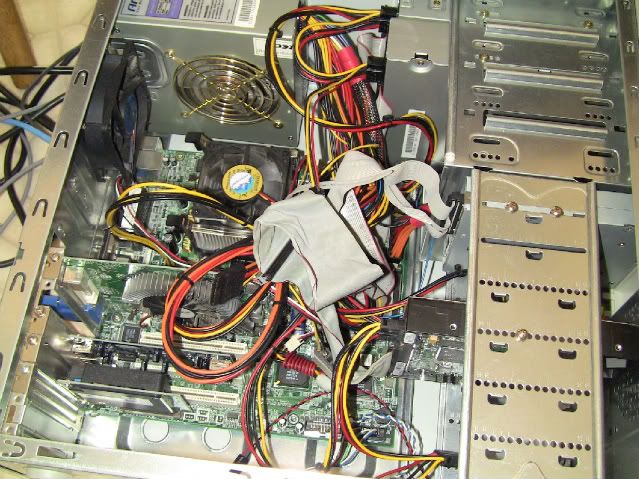
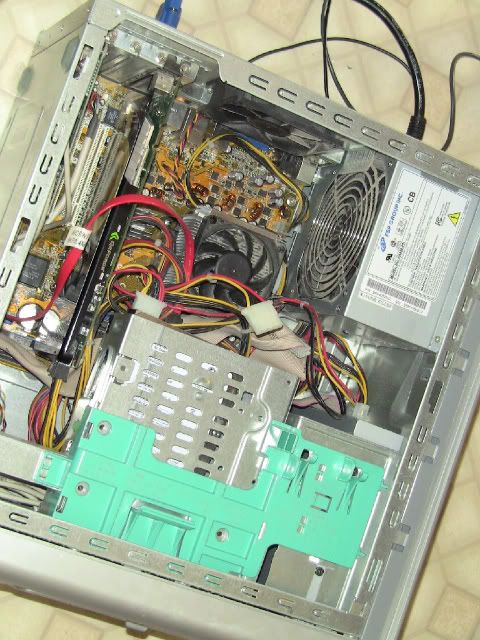
This is my case:

050-355-0008.jpg

ST819WG
 
Hey, anyone ever hear of this before?

When I play TF2 on my laptop, sometimes if I press a certain combo of buttons I will start to hear a bunch of beeping when i'm holding down a specific button (such as S) and it pauses the game fraction of a second whenever there is a beep. If I then go into text chat in-game, I start talking Chinese.

As much respect as I have for Chinese people and Chinese culture, I do not wish to speak Chinese.

Oh, and I don't want my game to pause too.

(I disabled sticky keys and everything I could think of already, this is on an OEM install of windows 7 with as much crapware as I could find removed)
 
coopolon said:
Caveat: I'm not really sure what I'm talking about.

My understanding is, the only way to get 5.1 out of a optical cable to a receiver is to use Dolby Digital Live or DTS connect (these encode your PCs audio into 5.1, whether it started as 5.1 or started as stereo). A few mobo's support this, a lot of sound cards support this. (If this is wrong, please someone correct me.) I personally tried this with my Xfi Xtreme Gamer, but found that there was a lag between video and audio, probably due to the encoding.

Your other options are use discrete analogue connections (which in my experience gives you by far the best audio quality, even though it means a lot of wires), or use an HDMI cable.

This guide at Maximum PC helped me when trying to figure out how best to hook up my PC to my reciever...http://www.maximumpc.com/article/howtos/how_to_connect_your_pc_your_surroundsound_audio_system


Exactly what I was looking for. Thanks a million. I have everything working perfect now.
 
Minsc said:
Definitely go with the green. This is only $10 more though (and sports similar green drives), it's nicer to have a media drive that can move around easily sometimes.

Cool, thanks for the advice. I already have an external hard drive enclosure I could pop it into, but I do like the RAID 1 ability in that WD. Might look into a RAID setup down the line.
 
TheExodu5 said:
Nice. :lol

I see you have the Extreme Plus service. How's that treating you?

It's good. As advertised. On sites that give me full download speed, I get 2.5megabytes/second. Upload is 1megabit, so around 100kilobytes/second. All is good. The main reason we went for it was for the extra monthly allowance.
 
I was thinking of installing a 64gb SSD in my new rig. I will install Windows and games on the SSD, and ill have a normal second hdd for music and videos.

Is this a good idea GAF?
 
Overclocking my i7920
How can I tell if I am doing it right?
besides the pc not crashing.
27x4gih.jpg


How can I bring my temps back down, on default settings they are usually around 44 under full load
 
Avyrocky said:
I was thinking of installing a 64gb SSD in my new rig. I will install Windows and games on the SSD, and ill have a normal second hdd for music and videos.

Is this a good idea GAF?

Yeah, just make sure you get a quality SSD that supports TRIM.
 
Violater said:
Overclocking my i7920
How can I tell if I am doing it right?
besides the pc not crashing.
27x4gih.jpg


How can I bring my temps back down, on default settings they are usually around 44 under full load
you can bring the temps down with better cooling. have you run occt for about 5 hours and monitored the temps?
 
Lkr said:
you can bring the temps down with better cooling. have you run occt for about 5 hours and monitored the temps?

I have a noctua nhu12p
And no I have not run occt

Ok just installed it and being the novice I am where do I start.
Firstly it tells me my dx9 is out of date and it is disabling gpu testing
 
Violater said:
Overclocking my i7920
How can I tell if I am doing it right?
besides the pc not crashing.
27x4gih.jpg


How can I bring my temps back down, on default settings they are usually around 44 under full load
Run prime95 overnight or something to that effect. Are those temperatures idle or under load? Those should be about as high as your load temperatures ever get.
 
Fugu said:
Run prime95 overnight or something to that effect. Are those temperatures idle or under load? Those should be about as high as your load temperatures ever get.
Those temps are while running prime under 100% load.
 
Violater said:
Those temps are while running prime under 100% load.

Those temps are great for 100% load, you've got nothing to worry about. Idle temps are low-mid 30s right? 3.8ghz is way more than enough for now, unless you're just doing it for the fun.
 
Minsc said:
Those temps are great for 100% load, you've got nothing to worry about. Idle temps are low-mid 30s right? 3.8ghz is way more than enough for now, unless you're just doing it for the fun.

Yes the idle temps are in that range, when I set the pc up last night they were in the low to mid 20's but closing the panels up on this case seems to have taken a toll.
I was just wondering if adjusting any settings in the bios would take the temps down even further while keeping the speed the same
 
These seem decent? I'm trying to keep it budget and I have a 9800gt and 500w power supply I am happy enough with to bring over from my current build (for now).

MSI NF750-G55 AM3 NVIDIA nForce 750a SLI HDMI ATX AMD Motherboard - Retail
http://www.newegg.com/Product/Product.aspx?Item=N82E16813130235

I like this board because it's a good price for me and has SLI (so I can reuse my 9800gt as a physx or just have dual card possibilities) and it can unlock the cpu I want into a quad. I want AM3 also.

AMD Phenom II X2 555 Deneb 3.2GHz 2 x 512KB L2 Cache 6MB L3 Cache Socket AM3 80W Dual-Core Desktop Processor - C3 Revision - Retail
http://www.newegg.com/Product/Product.aspx?Item=N82E16819103846

Seems like a good dual core with quad core unlocking possibilities.
 
Lkr said:
i'd love to play bad company 2 with that
I am really happy with my first build so far.
And to think I was going to get a system from ibuypower. I am so glad I canceled that order.
I got a great MB from newegg and a DO stepping i7920
The noctua though a pain in the ass at first and ugly as sin is ice cold.
Are there any codes available for the BC2 demo?

I have setup OCCT to run for the rest of the night and it seems to be maintaining at low 60's.
 
Violater said:
Yes the idle temps are in that range, when I set the pc up last night they were in the low to mid 20's but closing the panels up on this case seems to have taken a toll.
I was just wondering if adjusting any settings in the bios would take the temps down even further while keeping the speed the same

The chip you have is great as those temps are amazing. I'd recommend pushing it even more, personally.

Also, you could try increasing the speed of the CPU fan if you really want to decrease the temps. No point, though...
 
SuperAwesome said:
The chip you have is great as those temps are amazing. I'd recommend pushing it even more, personally.
I live in somewhat of an unconditioned space, I love it when its cold.
Come summer it will be a diff situation for sure.
I think I am comfortable with it saying at low 60's, doubtful I will see much of a diff at say 4.0 ghz
I actually dialed it down to 3.6 and I'm perfectly satisfied.
 
Come on fermi cards, come out sooner! I really want the ATI cards to go down in price. If from what I've been researching about the fermi cards, I might go ATI and suck it up with their shitty drivers. :lol
 
evil solrac v3.0 said:
what is the latest with fermi? it'd be a shame to have to give up PhysX but.....

Not all its cracked up to be. It runs hotter on a bigger die, clocks aren't as high as promised. Although, I'm still waiting to see benchmarks. So I'm taking most of the info out now with a grain of salt.
 
Repost :

Damn.

Still stuck with my dad's I3 buld that refuses to post. I'm really starting to think the RAM is incompatible with the motherboard, causing the computer to start up without posting, then resetting when it doesn't find the RAM. Can anyone confirm this as a possibility before I go out and spend cash on more RAM ?

As for the mobo supposedly beeping when there is no available RAM, according to the manual my motherboard has no error-beeps.
 
Anyone want to give me a quick rundown on safe ways to overclock?

I have a Asus Aspire M7720. So it's a i7 920, 6 GB ram, Ati radeon 4870.

I am just curious if it would be safe to overclock it on the stock cooler. Right now set at the stock 2.66ghz the temperatures have never ran over 55 degrees. I have stress tested it running a couple of games and everything and it never bumps over 55.
 
Just installed my 5850 and testing out some games, im getting pretty much the same performance i was with my 5770. My q8300 is overclocked to 3.3gz. Could there be a reason im not seeing improvements or was i just expecting too much?
 
captain wow said:
Just installed my 5850 and testing out some games, im getting pretty much the same performance i was with my 5770. My q8300 is overclocked to 3.3gz. Could there be a reason im not seeing improvements or was i just expecting too much?

A 5850 should get you 50% higher framerates than the 5770 (20fps -> 30fps, 50fps -> 75fps, etc).

I'm not sure what could be wrong though... not very good at troubleshooting, sorry!
 
Minsc said:
A 5850 should get you 50% higher framerates than the 5770 (20fps -> 30fps, 50fps -> 75fps, etc).

I'm not sure what could be wrong though... not very good at troubleshooting, sorry!

No problem, was just hoping to see a nice increase on something like crysis or borderlands with dynamic shadows on but theres probably about 2-5 frames more on average.
 
So my new build is up and running, and I'm transferring files from my old computer to my new one....can anyone recommend any freeware file backup utility to a USB hard drive? I can't find the install disk for the backup utility that came with one of my old USB drives, figure this is my opportunity to try something new.
 
GamePnoy74 said:
So my new build is up and running, and I'm transferring files from my old computer to my new one....can anyone recommend any freeware file backup utility to a USB hard drive? I can't find the install disk for the backup utility that came with one of my old USB drives, figure this is my opportunity to try something new.

Just to copy your files? I don't understand what you're going for. Can't you just copy them?

If you want to store them compressed, just use 7-zip and create an archive of the entire computer's drive, it will probably take up 1/5th the space that way, and 7-zip handles millions of files fine (be sure to use a block size of under 100MB unless you want to have to process the whole damned thing each time you need to extract a file, though if you use a block size too small you lose out on a lot of reduction in file size), other compression formats will load very slowly when you hit 100s of thousands of files.

If you do want to do it through software, I would recommended ICE Mirror, you can find it from portablefreeware.com.
 
Just need a quick opinion. Will a 8600GTS be strong enough to use as a dedicated Physx card? I'm thinking about using it in conjunction with my 4770 when I get my new Mobo.

Oh and can someone recomend me a moniter that will do 3D vision. It doesn't have to be 1080p but widescreen is a must.
 
I've Reworked my build, but I'm still unsure whether to get the XFX 5570 or the 5770, would the 5770 be a bit overkill for my system you think?

P.S. I've set the budget at £650 and will be getting case + Drive after, these are just the essentials ( I have mouse/KB )

28hpdhv.jpg
 
If you want to build a computer, but don't want to open it up, for a long time(a couple of years)... You just want to build it, and let that be it. With good air flow, and air cooling, and many dust filters.... What sort of Cabinet should I be thinking about getting?

The Corsair Obsidian 800D, looks to be a favorite for many, due to it's size and features. The Cable Management potential looks really impressive in it as well. With it's fans, would it be realistic to have a Core i7 and 2x Powerful GPU's, with air cooling?

I don't want to overclock, mind you. Just want to run stock. Have it powerful, but reliable, and cool.
 
Vigilant Walrus said:
If you want to build a computer, but don't want to open it up, for a long time(a couple of years)... You just want to build it, and let that be it. With good air flow, and air cooling, and many dust filters.... What sort of Cabinet should I be thinking about getting?

The Corsair Obsidian 800D, looks to be a favorite for many, due to it's size and features. The Cable Management potential looks really impressive in it as well. With it's fans, would it be realistic to have a Core i7 and 2x Powerful GPU's, with air cooling?

I don't want to overclock, mind you. Just want to run stock. Have it powerful, but reliable, and cool.
Wouldn't recommend the 800D at all in your situation. The 800D, while a fantastic case, is for strictly enthusiast Water Cooling. It's a horrible air cooler in every sense of the word with very few fans.

Currently the best strictly air cooling cases are the Haf 932 and the Antec 1000. Neither have great cable management , but they are both large enough and cool enough for your needs.
 
I own a HAF 932 and it's cable management is magnificent.

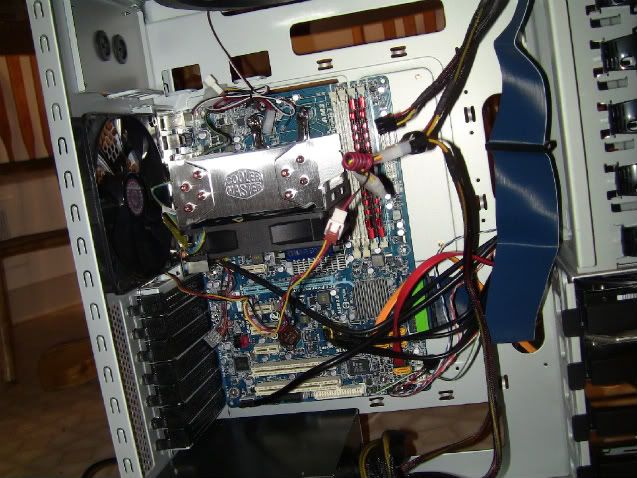
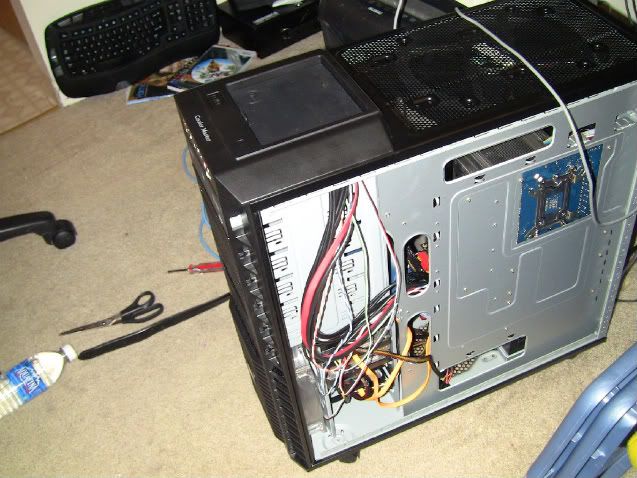
Before: regular stock case

IMG_0378-1.jpg


another stock case:

IMG_0379-1.jpg


After: HAF 932
IMG_0385-1.jpg


IMG_0391-1-1.jpg


Most of the cables are behind the board, out of the way, and the case is huge, so even if you do SLI or Crossfire, you have plenty of room.


What you really need to worry about is dust. There's no such thing as "building a computer and never opening the case. Computer builders tinker, and even if you don't like to tinker, you need to dust off your components if you like an efficient system.
 
Minsc said:
Just to copy your files? I don't understand what you're going for. Can't you just copy them?

If you want to store them compressed, just use 7-zip and create an archive of the entire computer's drive, it will probably take up 1/5th the space that way, and 7-zip handles millions of files fine (be sure to use a block size of under 100MB unless you want to have to process the whole damned thing each time you need to extract a file, though if you use a block size too small you lose out on a lot of reduction in file size), other compression formats will load very slowly when you hit 100s of thousands of files.

If you do want to do it through software, I would recommended ICE Mirror, you can find it from portablefreeware.com.
It would get pretty overwhelming just trying to organize, copy, and backup files manually to an external drive over time, especially if you have a lot of files to keep track of.

Anyways, looking around, seems like an app called 'FBackup' looks decent, I'll give it a try.
 
Ok now this is just weird, some games im getting significantly worse performance with my 5850 than with my 5770, mw2 is struggling to stay at 60fps
 
Is it best to turn off the OC when installing programs?
Getting some weird freezing issues now, ran stress tests with no issues last night.
 
captain wow said:
Ok now this is just weird, some games im getting significantly worse performance with my 5850 than with my 5770, mw2 is struggling to stay at 60fps

What kind of power supply? Also, make your 3d settings are on default, because some of mine got changed and dropped my performance a bunch in some games.

Violater said:
Is it best to turn off the OC when installing programs?
Getting some weird freezing issues now, ran stress tests with no issues last night.

That's not stable then.
 
Top Bottom