
Big Baybee
Member
Is the i7 920 worth the 300 bucks, or should I just go with the i5 750 for $100 less?

Big Baybee said:Is the i7 920 worth the 300 bucks, or should I just go with the i5 750 for $100 less?
I went i5. i7 was way too expensive, and I won't be doing any encoding with any kind of regularity. Bought a Hyper 212+ with it and made it up to 4ghz without breaking a sweat. Arctic Silver is starting to kick in and I'm idling at 36 on the highest core and 68 after a few hours of Prime95. Anecdotal evidence, but I'm very happy that I went i5.Big Baybee said:Is the i7 920 worth the 300 bucks, or should I just go with the i5 750 for $100 less?
GHG said:Depends on what you're using it for. If its just gaming then go for the i5.
Everything in my system is running at stock speeds, haven't had any crashes/shutdowns at all for over a week now.Romance Pie said:That is a good PSU and still plenty of power for your system.
Is anything OCed in your compy? I've found that my rig doesn't like running at 3.8 and would do random shut downs. The same would happened with a friends PC.
Or it could possibly be a overheating issue. Try running realtemp or speed fan and see what your thermals are if your case is cramped.

Big Baybee said:Just gaming.
fatty said:Do you have a Microcenter close by? They are currently selling the i5 750 for $180, i7 860 for $230 and the i7 920 for $200.

Big Baybee said:Is the i7 920 worth the 300 bucks, or should I just go with the i5 750 for $100 less?
Gowans007 said:Holy shit guys!
Thanks to a miss pricing of a 24" 1920x1200 monitor in Comet I now have one for £150, no way I could skip on it.
Its a hp w2448hc
http://i45.tinypic.com/2zs2m3q.jpg[IMG]
ITS HUGE!!!!![/QUOTE]
I have HP w2338h. I guess that makes you better. But, holy shit, yeah. I absolutely love this monitor. You got a great deal on yours.
I'm assuming that they're at least a little similar.
Odious Tea said:I have HP w2338h. I guess that makes you better. But, holy shit, yeah. I absolutely love this monitor. You got a great deal on yours.
I'm assuming that they're at least a little similar.
 Hopefully some of you tech junkies can help an imbecile like myself. So heres the deal, I've been wanting to get a HD capture card for a while because my Hava unit wasn't cutting it(only does 480i) so i picked up an AVerTV HD DVR. Since its less than half the price of other HD capture units I thought Id give it a shot.
I'd jiggle and double check your cables.ntropy said:my display inexplicably turned black and white (hp 2009m), so i switched it to vga and it's fine now. strange thing is that it would start up briefly in color then revert back to b/w. was my dvi cable bad or is this monitor gonna die (plz noooo)?

MiniDitka said:Wow! this thread popped up in a timely fashion
The problem I've encountered is that capturing anything above 720 by 480 results in significant stuttering which makes it look like stop motion. The specs required to run it are
Intel Core 2 Duo E6600 2.4GHz or Equivalent AMD CPU
Graphics Card VGA card with 128MB memory supports DirectX 9.0c or above
Memory 1GB RAM or above
Operating Systems Supported Windows 7/ Vista / XP (32 and 64 Bit)
Others 200MB Hard Drive Space
Sound Card
My CP specs(please dont laugh :lol )
AMD Athalon 64 X2 4200+
Asus 8ANE 939
2 GB Ram
160 GB HD ATA
HIS 4670
My question is do you thinks its one or all the above that is causing my problems and if so what would be the cheapest CPU/MB/RAM I could get to fulfill me needs. I don't game on PC and mostly use it for video capturing purposes so If I need to build a new PC I want the cheapest solution possible. Since I live close to Tiger Direct thats where I would be getting the parts - http://www.tigerdirect.com/
Please GAF, help a poor technically challenged gamer in his hour of need
I thought that might be a problem, unfortunately it doest seem like you can upgrade a 939 socket unless you want to pay exorbitant prices so it appears I might have to build a new PC. Sooo, any suggestions guys on cheap(and I do mean cheap) CPU/MB that can do the job?Minsc said:The Athlon 4200+ is a 2.2Ghz CPU, which even if it were clock for clock equal to the Intel (which it isn't), it still falls short of the 2.4Ghz requirement. That's probably one of your problems for sure.
I'd recommend posting the question on their forums if they have active forums, otherwise, you should only need CPU + adequate HDD speed to capture video. Chances are your HDD is fast enough, but you could always run Crystal Mark to find out, since you're running the OS on the same drive as you're doing the capturing, it might affect performance a little, but I'd think not enough to matter. Chances are, it's just your CPU, since it's below the required specs.
Minsc said:The Athlon 4200+ is a 2.2Ghz CPU, which even if it were clock for clock equal to the Intel (which it isn't), it still falls short of the 2.4Ghz requirement. That's probably one of your problems for sure.
I'd recommend posting the question on their forums if they have active forums, otherwise, you should only need CPU + adequate HDD speed to capture video. Chances are your HDD is fast enough, but you could always run Crystal Mark to find out, since you're running the OS on the same drive as you're doing the capturing, it might affect performance a little, but I'd think not enough to matter. Chances are, it's just your CPU, since it's below the required specs.
MiniDitka said:I thought that might be a problem, unfortunately it doest seem like you can upgrade a 939 socket unless you want to pay exorbitant prices so it appears I might have to build a new PC. Sooo, any suggestions guys on cheap(and I do mean cheap) CPU/MB that can do the job?
Bebpo said:Is there any reason why loading in games would be longer going from XP to Win7 64-bit?
L4D2 is taking 1-2 minutes to load a map, whereas it used to take about 20-30 seconds
Odious Tea said:Is that including a monitor? If it's not you can have a relatively high-end system. Otherwise, knock $250 off that, so you can treat yourself to a decent monitor.
Have you decided between the i5 or the i7? If you already have a build rolling around in your head, post it here and we'll tweak it for you.
There goes my cheap solution :lol Thanks for the info.Shambles said:I would also imagine that you would be CPU constrained as it's not likely that the capture device uses GPU acceleration. At least when you upgrade your PC down the road the capture card will still be a nice add-on.
If the card is indeed CPU driven you'll easily want to go with an i5 or i7 chip based. Phenom II's are great for the vast majority of people out there but for encoding they'll fall pretty far behind.
MiniDitka said:There goes my cheap solution :lol Thanks for the info.
Actually my card does support HDCP - http://www.newegg.com/Product/Product.aspx?Item=N82E16814161287Shambles said:It also appears that the card does not support HDCP which means no captures from Blu-rays and possibly other devices through HDMI. You also have to have a harddrive setup that can handle the write speeds as well. For 720P encoding you're looking at 1.3Gbps=About 165MB/s (Depending on the colour depth/encoding scheme). A traditional HDD will not write that fast and could be more of a bottleneck than your CPU.
Time to break the piggy bank : ( Thanks again.woodsey1982 said:So GAF, Im in the process of putting together a cheap-ish HTPC set up. I already have a case purchased, any recommendations for a mobo and processor ( MATX ) that'll handle HD content ( both from disc and from the HD )? UK stores btw.
Shambles said:It also appears that the card does not support HDCP which means no captures from Blu-rays and possibly other devices through HDMI. You also have to have a harddrive setup that can handle the write speeds as well. For 720P encoding you're looking at 1.3Gbps=About 165MB/s (Depending on the colour depth/encoding scheme). A traditional HDD will not write that fast and could be more of a bottleneck than your CPU.
I'll have to go check that out pronto! Thanks. BTW, who makes that motherboard?Ryoma-Echizen said:MiniDitka
An Athlon II X4 630
Then you just can upgrade to the Phenom II X6 Thuban if needed. I would consider buying a 890GX mobo (they'll probable provide support for the next generation AMD Bulldozer cpu's).
Minsc said:Well if you capture directly to H264 or MPEG-2 at high bitrates, you'd be at more like 40-50Mbit/sec, so no problems... that's only 5-6 Mbytes/sec. I doubt even an core i7 could do realtime H264 though, at 1080p... so perhaps a MJPEG based codec would work better, if you can choose.
I'm not sure if that's an option, but I'd defintely look at a capture card that captures to a near-lossless solution, even most professional HD Camcorders don't use anything close to 165MB/s for 1080p material (that'd be 600 GB/hour).
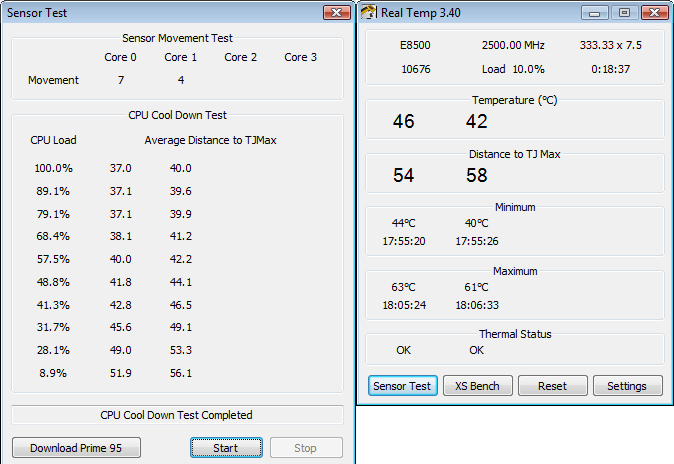
Easy_D said:Everything in my system is running at stock speeds, haven't had any crashes/shutdowns at all for over a week now.
These are the results of running RealTemp tests with Prime95
Odious Tea said:Yeah. I ended up coming into some extra money with the tax refund and figured "What the hell?" I was using MSI Afterburner before to get the 5770 to 960/1320; looks like I'll be getting some crazy performance if I can get it the core to 1ghz. What's your memory currently clocked at?
It was either that or get another 5770 and Crossfire them, but then remembered possible compatibility headaches. Newegg graciously let me return without restocking fee. They've been really good about it.
Congrats, that's a great pick up. You'll get used to the size surprisingly fast, though.Gowans007 said:Holy shit guys!
Thanks to a miss pricing of a 24" 1920x1200 monitor in Comet I now have one for £150, no way I could skip on it.
Its a hp w2448hc
http://i45.tinypic.com/2zs2m3q.jpg
ITS HUGE!!!!!
Minsc said:Well if you capture directly to H264 or MPEG-2 at high bitrates, you'd be at more like 40-50Mbit/sec, so no problems... that's only 5-6 Mbytes/sec. I doubt even an core i7 could do realtime H264 though, at 1080p... so perhaps a MJPEG based codec would work better, if you can choose.
I'm not sure if that's an option, but I'd defintely look at a capture card that captures to a near-lossless solution, even most professional HD Camcorders don't use anything close to 165MB/s for 1080p material (that'd be 600 GB/hour).
Only thing I can think of is going from the second February RC release of the ATI drivers to the final release.Romance Pie said:Those temps are fine, and good to hear that your comp is running fine now.
Still wonder what may have caused them in the past. Did you install anything new like drivers that may have corrected the issue?
If you're going i7, you may as well get a 920 or 930. If you have a Microcenter nearby, I think they're having an amazing sale on them. As far as a motherboard goes, you're gonna have to find one that fits your system and features that you'd like. Newegg ratings are a good barometer, most of the time. Case-wise, I'm absolutely in love with the Cooler Master CM 690 II Advanced. But, a case is something that's really up to personal preference. Just make sure you have good airflow. It's a pretty solid build otherwise, if you need to cut corners you could abstain from an SSD, but if you've got the money, go for it.Smokey said:No that's not including monitor which I already have. Also I think I would go with the i7 860 after reading up on it for a few days. As for a build in mind something like this:
i7 860
SSD
TB HD
8GB RAM
5870/GTX 480
As far as case, motherboard, power supply and other things I'm missing I have no clue. Also I said 1.2k, but I'd be willing to go up to 1.5k but not any higher than that.
An upgrade to ~5850 should be all you really need. Maybe a larger PSU to sport it. But, otherwise I think you'll be good for a little while to come. If I'm wrong in that, please, somebody correct. Not too familiar with AMD processors.FromTheFuture said:Hey guys, I'm going to be upgrading my monitor soon, as some of you might know, and I'm planning to upgrade my PC soon accordingly. If anyone could help me out with some suggestions for parts, that would be great. Essentially, my current monitor is 1440x900, and my new monitor should be around 1920x1080.
My current specs:
At this point, I can run every game at max, and I don't have any problems at all. Obviously, with the upgrade of resolution, I'm going to need to spend some cash to keep all my games maxed out. How much will i need to upgrade?
- Mobo - Gigabyte GA-MA770-UD3
- CPU - Phenom II X3 720 @ ~3.2 GHz
- GPU - Radeon 4870 512MB
- RAM - 4GB DDR2-1066
- PSU - Antec EA430W
MiniDitka said:I'll have to go check that out pronto! Thanks. BTW, who makes that motherboard?
Odious Tea said:If you're going i7, you may as well get a 920 or 930. If you have a Microcenter nearby, I think they're having an amazing sale on them.
Ryoma-Echizen said:. If the X6 Thuban is not backwards compatible with AM2+ mobos, .
FromTheFuture said:Ahh :S 5850's are expensive! Thanks a lot, guys. Now I'm going to go think up some justifications/excuses to tell everyone on why I need buy this thing. :lol
Well, the thing is that I'm really liking the experience I have so far on my 1440x900: I'm running most games at max with around 60 fps. How much of a hit would I take from not upgrading my GPU? Are GPU prices expected to fall by a significant degree by the end of this year?brain_stew said:Honestly, 5850s just aren't worth it atm. With 5870s at $380, you'd be foolish to spend $330 on a 5850. GPU prices are horrible at the current moment in time though I don't expect it to change much any time soon.
http://www.newegg.com/Product/Product.aspx?Item=N82E16814161301&cm_re=5870-_-14-161-301-_-Product
If you're not going to make te leap up to a 5870, I'd just hold out with the 4870. It handles most games @ 1080p just fine.
FromTheFuture said:Well, the thing is that I'm really liking the experience I have so far on my 1440x900: I'm running most games at max with around 60 fps. How much of a hit would I take from not upgrading my GPU? Are GPU prices expected to fall by a significant degree by the end of this year?
Ok, so then where is the middle ground? I'm not a graphics whore or anything, and I'm sure I'll be able to deal with having to turn down my graphic settings no problem (I planned to have the monitor for a little while before buying a new GPU anyways), although I would still be disappointed. Anyway, if a 5870 can allow me to play games on max at above 60 FPS, which GPU would allow me to play at 1080p at 60 FPS? Is it not worth going for that?brain_stew said:There's no point trying to predict where GPU prices are headed, they've been on a steady stream upwards in the last 9 months with no end in sight. Very few expected that to happen so it'd be foolish to predict what the next 9 months bring.
Your performance will probably drop by about a 1/3 on average depending on what is the bottleneck in each particular engine. Upgrading to a 5870 will net you better performance at 1080p than your 4870 managed @ 1440x900.
You always have the option of outputting 720p of course and most modern 1080p monitors will scale that really well..
FromTheFuture said:Ok, so then where is the middle ground? I'm not a graphics whore or anything, and I'm sure I'll be able to deal with having to turn down my graphic settings no problem (I planned to have the monitor for a little while before buying a new GPU anyways), although I would still be disappointed. Anyway, if a 5870 can allow me to play games on max at above 60 FPS, which GPU would allow me to play at 1080p at 60 FPS? Is it not worth going for that?
Also, by the GPU price point question, I was referring to how current market GPU prices might drop. Is there a trend that the market seems to have been following? I don't really keep up with all things PC unless I'm in the market to buy new parts and such, which is the reason why I asked.

