• Hey Guest. Check out your NeoGAF Wrapped 2025 results here!

"I need a new PC!" 2010 Edition

TurtleSnatcher said:
750 to 1000. Would love to not hit 1000 but I don't know. Maybe ill get a Phenom instead.

CPU-Z
:)

Thanks Haz!
I forgot some (all?) Shuttles use their own mobos.
New case time!

Anyway I am still going with what THE TECH REPORT says because every time they make a build guide it is flawless. If you greatly prefer nVidia... you don't really have a lot of good buying options right now. I don't think the GTX 480 launch will change prices either.

vvvvvvvvvv

^^^^^^^^

As for a 5770... it's tough picking a brand / cooler since everyone decides whatever they want.

This RAM:
http://www.newegg.com/Product/Product.aspx?Item=N82E16820231193

You can get the Sonata combo but I like the Cooler Master 690 myself (roomier). Slap in a 550W+ Corsair PSU and you are solid.
 
It'll install just fine. The rest of your rig isn't quite upto scratch but you'll still see a big improvement in most games. CPU heavy games like GTA4 and Bad Company 2 are still going to be an issue but you'll still be able to reuse the 5770 if you ever upgrade your CPU/RAM anyway.
 
brain_stew said:
It'll install just fine. The rest of your rig isn't quite upto scratch but you'll still see a big improvement in most games. CPU heavy games like GTA4 and Bad Company 2 are still going to be an issue but you'll still be able to reuse the 5770 if you ever upgrade your CPU/RAM anyway.
Well that confirms me needing to upgrade. His specs are similar to mine (minus graphics card) :lol
 
When are 6 core Phenoms shipping? I may do that. (lol i was the last post.. crap srry)


EDIT:

Another question

i5-860 or i7-930?

I assume the i7...

I'm confused because the i7-930 is $199.99 at Microcenter yet the i5-750 is $189.99. Only $10.00 less..


I'm guessing this $199.99 is an insane deal.. I may just go out and buy a processor now :lol

http://www.microcenter.com/single_product_results.phtml?product_id=0331303


EDIT2:

Oh whats the difference between the i7-860? I hear components for this may be cheaper then for the i7-930.. but the processor is $229.99 at Microcenter
 
can anyone recommend me a monitor for nvidia vision

i got 8800 gs from my friend for phtysx and dx11 cards not interesting so i decided i throw the money i saved in 3d

thanks
 
Q8D3vil said:
can anyone recommend me a monitor for nvidia vision

i got 8800 gs from my friend for phtysx and dx11 cards not interesting so i decided i throw the money i saved in 3d

thanks

If you plan to use 3D then the DX11 cards are very interesting. You'd ideally want dual GTX 260s or better if you plan to use 3D Vision. All the 120hz monitors available at the moment use TN panels so there's none that are particularly great.
 
TurtleSnatcher said:
When are 6 core Phenoms shipping? I may do that. (lol i was the last post.. crap srry)


EDIT:

Another question

i5-860 or i7-930?

I assume the i7...

I'm confused because the i7-930 is $199.99 at Microcenter yet the i5-750 is $189.99. Only $10.00 less..


I'm guessing this $199.99 is an insane deal.. I may just go out and buy a processor now :lol

http://www.microcenter.com/single_product_results.phtml?product_id=0331303


EDIT2:

Oh whats the difference between the i7-860? I hear components for this may be cheaper then for the i7-930.. but the processor is $229.99 at Microcenter

The i7-930 is a 1366 chipset while the i5-750 is a 1156 chipset. The disadvantage of the 1366 chipset is the motherboards are considerable more expensive and you'll also need triple sticks of ram. The i5 you can just get a duel stick pack.
The difference between the two types will be negligible in games. The money saved getting the i5 setup can go towards a better graphics card.
 
brain_stew said:
If you plan to use 3D then the DX11 cards are very interesting. You'd ideally want dual GTX 260s or better if you plan to use 3D Vision. All the 120hz monitors available at the moment use TN panels so there's none that are particularly great.

You could always go for one of those $2,800 Samsung Series 8 LED LCDs, they start at 46" though, not sure what the input lag/ghosting would be like. For $2800, it should be pretty good, I'd bet.

Would make a pretty awesome monitor, no doubt.
 
If you plan to use 3D then the DX11 cards are very interesting. You'd ideally want dual GTX 260s or better if you plan to use 3D Vision. All the 120hz monitors available at the moment use TN panels so there's none that are particularly great.
i have gtx 295
most of the people uses 3d with gtx 260 so i think gtx 295 is enough for 3d ( for the time being ) .

i'm thinking about getting the acer 24 inch , anyone tried it ?!


You could always go for one of those $2,800 Samsung Series 8 LED LCDs, they start at 46" though, not sure what the input lag/ghosting would be like. For $2800, it should be pretty good, I'd bet.

Would make a pretty awesome monitor, no doubt.
for 2800 $ i can build pc + 3d monitor + 3 nvidia 470
plus i already have 40 inch tv for movies ( there is a couch too :P ).

i will buy 3d tv in the next 2 years but am going for monitor right now :D
 
spazzfish said:
The i7-930 is a 1366 chipset while the i5-750 is a 1156 chipset. The disadvantage of the 1366 chipset is the motherboards are considerable more expensive and you'll also need triple sticks of ram. The i5 you can just get a duel stick pack.
The difference between the two types will be negligible in games. The money saved getting the i5 setup can go towards a better graphics card.
Thanks. Guess I will go for a i5-750.
 
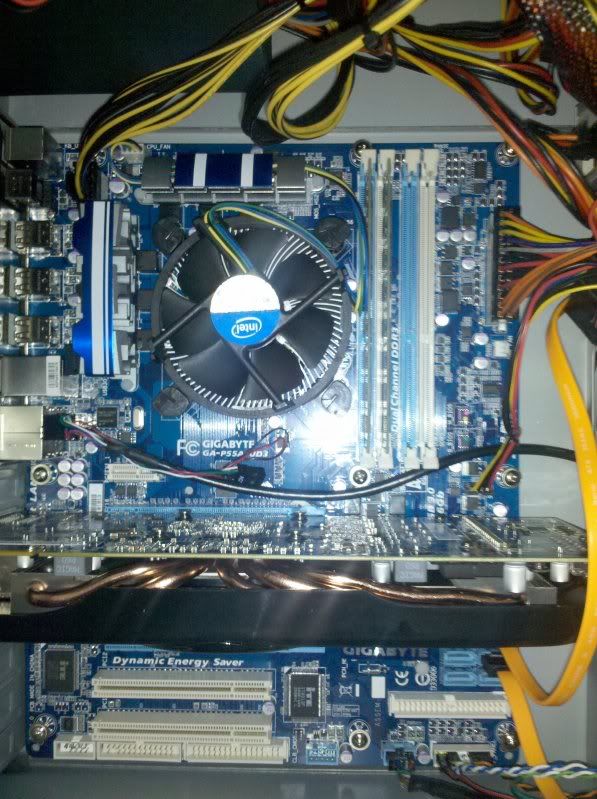
hey guys I got all my parts and put everything in but when I pushed the power button for the first time nothing happened. Here is the motherboard (Gigabyte GA-P55A-UD3) am i missing any connections that you guys can see? I double checked and it seems like everything is connected well.

I used the Tech Report build with the 5850 and Samsung HDD. Do I have enough power?

17225b47.jpg
 
If literally nothing is happening, first thing I'd check is if the power button connection is in the correct position. It's easy to put that in the wrong set on pins as there's generally a little cluster of pins for power button, reset button, various LEDs and such.
 
Ogs said:
Question for Tech Gaf ™ -

System has an AMD X2 240 CPU, 4GB DDR2 and an ATI 5770 1GB, Crysis & Warhead run smooth as butter on High (not FPS, which is still good, i mean stuttering, hitching etc).

Format the computer, stick in a GTX 280 1GB, get the latest drivers and load up Crysis/Warhead again, using the same settings as the 5770, the game stutters like a bitch, and the only way to get rid of it is to drop texture/object settings to medium.

Why would this happen ? Does the 280 require a fast mofo of a CPU to feed it the data quicker ? I dont think its the power supply, its a Corsair VX 550w. So what gives ? I realise the CPU is pretty low end, but i find it strange that the 5770 runs it fine whereas the 280 stutters badly.

Anyone else got any idea why this is happening ? :(
 
cuevas said:
All the pins are connected, the side with the arrow is + I'm assuming.

Well, if not a single LED is on, on the mobo then I'd say it's a problem with the power supply. Test it with another system if possible.
 
TurtleSnatcher said:
The fan doesnt even kick when you turn it on (In the PSU)

No nothing happens when I push the power button, no leds, no fans. I triple checked the connections to the mobo from the front panel and it is right.
 
cuevas said:
Yeah I don't have another system I can test it on :\ Any other way to tell if my psu works?
Some motherboards have a light that will turn on when a PSU is connected. Sorry if this is insulting, but also check for a on/off switch on the PSU itself.
 
Vic said:
Change the orientation of the "Power SW" on the system panel connector.

Okay tried it but no luck :( (negative was going into positive)

Cheeto said:
Some motherboards have a light that will turn on when a PSU is connected. Sorry if this is insulting, but also check for a on/off switch on the PSU itself.

I don't see any lights anywhere on the motherboard. And yeah the switch is on (closed).
 
Also, move the RAM module in the White slot over to the other blue slot. They're not installed correctly for dual channel (you should either have your two modules in both blue slots or bothe white slots), although I don't know if that will make a difference to your powering up problems.

EDIT: And it may sound trivial, but check the switch on your PSU is in the 'on' position.
 
cuevas said:
Okay tried it but no luck :( (negative was going into positive)


I don't see any lights anywhere on the motherboard. And yeah the switch is on (closed).
Best way to continue once you are absolutely sure that everything is plugged in correctly, is to unmount the motherboard from the case and rest it on card board or something next to the case if you have enough slack in the wires. This will rule out any short issues.
 
My last advice would be to unplug then replug everything that's connected on the motherboard.
 
Vic said:
My last advice would be to unplug then replug everything that's connected on the motherboard.

I will try this now. Ill let you guys know what happens.

Cheeto said:
Best way to continue once you are absolutely sure that everything is plugged in correctly, is to unmount the motherboard from the case and rest it on card board or something next to the case if you have enough slack in the wires. This will rule out any short issues.

If replugging everything in doesn't work I will try this.

GHG said:
Also, move the RAM module in the White slot over to the other blue slot. They're not installed correctly for dual channel (you should either have your two modules in both blue slots or bothe white slots), although I don't know if that will make a difference to your powering up problems.

Didn't make it turn on but thanks for the tip.
 
I've already bought these, so this is more "Hey help me feel like I made good choices" than asking for advice. Hopefully I didn't make any dumb mistakes picking parts.

It will all arrive tomorrow and a friend is coming over on Monday to help me put it together. It's my first time building a pc. I figured getting some help might not be a bad idea.


Rosewill R220-P-BK Black SECC Steel ATX Mid Tower Computer Case
GIGABYTE GA-770TA-UD3 AM3 AMD 770 SATA 6Gb/s USB 3.0 ATX AMD
XFX HD-577A-ZNDC Radeon HD 5770 XXX Edition 1GB 128-bit DDR5 PCI Express 2.0 x16
Antec Basiq BP500U 500W Continuous Power ATX12V Version 2.01 Active PFC Power Supply
AMD Athlon II X4 630 Propus 2.8GHz Socket AM3 95W Quad-Core Processor Model
G.SKILL Ripjaws Series 4GB (2 x 2GB) 240-Pin DDR3 SDRAM DDR3 1600 (PC312800)
HITACHI Deskstar 1TB 7200 RPM SATA 3.0Gb/s 3.5" Internal Hard Drive
LG DVD Burner Black SATA Model GH22NS50
Microsoft Windows 7 Home Premium 64-bit
 
Cheeto said:
Sorry if this is insulting, but also check for a on/off switch on the PSU itself.
Also make sure the computer is actually plugged in with a power cord to an outlet, and that the power to your house is on. :lol


I'd just go through the motherboard manual and make sure you have everything plugged in correctly.

diederich said:
Rosewill R220-P-BK Black SECC Steel ATX Mid Tower Computer Case
GIGABYTE GA-770TA-UD3 AM3 AMD 770 SATA 6Gb/s USB 3.0 ATX AMD
XFX HD-577A-ZNDC Radeon HD 5770 XXX Edition 1GB 128-bit DDR5 PCI Express 2.0 x16
Antec Basiq BP500U 500W Continuous Power ATX12V Version 2.01 Active PFC Power Supply
AMD Athlon II X4 630 Propus 2.8GHz Socket AM3 95W Quad-Core Processor Model
G.SKILL Ripjaws Series 4GB (2 x 2GB) 240-Pin DDR3 SDRAM DDR3 1600 (PC312800)
HITACHI Deskstar 1TB 7200 RPM SATA 3.0Gb/s 3.5" Internal Hard Drive
LG DVD Burner Black SATA Model GH22NS50
Microsoft Windows 7 Home Premium 64-bit
I think you made a great choice. I bought a very, very, similar computer a month or so ago. I am very happy with it.
 
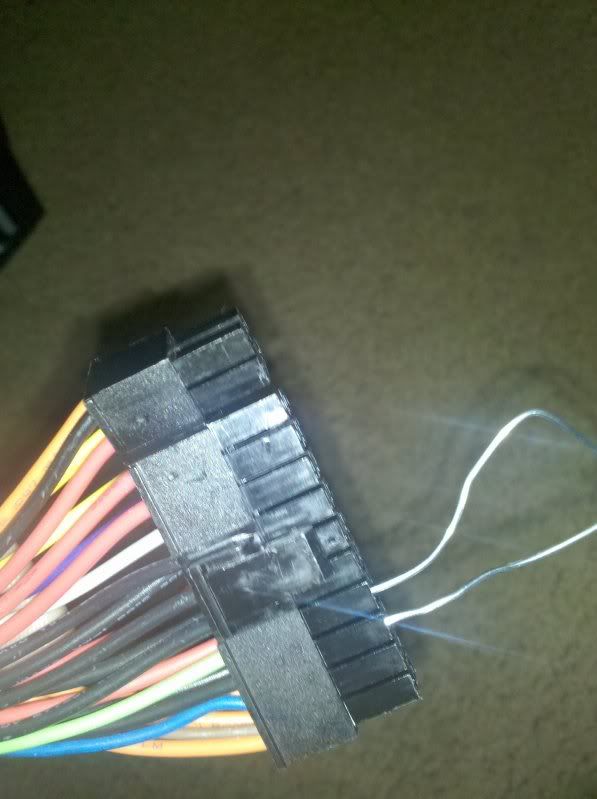
You can test you PSU alone using the Corsair approved paper clip method.

A: You can easily test a power supply for functionality with a simple paperclip. First, disconnect all the cables from your motherboard and other devices, but leave the power supply plugged into the wall. Next, bend the paperclip until you have a U shape. Find the 24-pin ATX connector and plug one part of the paperclip into the socket where the green wire ends, and the other end into the socket where a black wire ends. Make sure the power switch on the back of the PSU is on, (should be the I symbol) and the fan should spin up. If it doesn’t, your power supply may be bad.

atx-power-bypass.jpg


Also, be sure to make sure your RAM is in the right slots. I've had some MBs that require (using your colors) the RAM to be in the white slots if you only have 2 sticks, rather than blue.
 
Dipper145 said:
Also make sure the computer is actually plugged in with a power cord to an outlet, and that the power to your house is on. :lol
You'd be surprised...
Minsc said:
Isn't the GTX 280 a dual card? Maybe he's talking about the micro-stuttering?
Hm maybe, I thought the 285 was the dual one... although I haven't really followed things that closely lately.
 
diederich said:
I've already bought these, so this is more "Hey help me feel like I made good choices" than asking for advice. Hopefully I didn't make any dumb mistakes picking parts.

It will all arrive tomorrow and a friend is coming over on Monday to help me put it together. It's my first time building a pc. I figured getting some help might not be a bad idea.


Rosewill R220-P-BK Black SECC Steel ATX Mid Tower Computer Case
GIGABYTE GA-770TA-UD3 AM3 AMD 770 SATA 6Gb/s USB 3.0 ATX AMD
XFX HD-577A-ZNDC Radeon HD 5770 XXX Edition 1GB 128-bit DDR5 PCI Express 2.0 x16
Antec Basiq BP500U 500W Continuous Power ATX12V Version 2.01 Active PFC Power Supply
AMD Athlon II X4 630 Propus 2.8GHz Socket AM3 95W Quad-Core Processor Model
G.SKILL Ripjaws Series 4GB (2 x 2GB) 240-Pin DDR3 SDRAM DDR3 1600 (PC312800)
HITACHI Deskstar 1TB 7200 RPM SATA 3.0Gb/s 3.5" Internal Hard Drive
LG DVD Burner Black SATA Model GH22NS50
Microsoft Windows 7 Home Premium 64-bit
My setup is extremely similar to yours and let me tell ya, you won't be disappointed :D
 
You tried the paper clip test with no results? It and any fans you have connected should spin up. If it doesn't it's a clear case of busted psu.
 
Cheeto said:
Interesting... how often does it stutter and how long is the pause?

Quite a bit, going down the slope towards the beach on the first mission on Warhead, it starts doing stutters for about a few split seconds, some textures take awhile to load in etc. Im starting to think somethings gone wrong with the memory on the card but i could be completely wrong :/

Minsc said:
Isn't the GTX 280 a dual card? Maybe he's talking about the micro-stuttering?

Nah, single chip.
 
Ogs said:
Quite a bit, going down the slope towards the beach on the first mission on Warhead, it starts doing stutters for about a few split seconds, some textures take awhile to load in etc. Im starting to think somethings gone wrong with the memory on the card but i could be completely wrong :/
Chances are you'd get hard crashes if the memory was bad... but stranger stuff has happened. I'm not sure how you'd fix something like this... perhaps overclocking the GPU to see if the extra memory speed improves the performance?
 
Any word of the 5800 ATI cards going down in price? I want to upgrade my 4870 at some point later. Probably around the time FF14 comes out.
 
Boonoo said:
You tried the paper clip test with no results? It and any fans you have connected should spin up. If it doesn't it's a clear case of busted psu.

You just made me very happy. I now know it is something I did because the fans did turn on. The only thing I can think of is that I put the 8pin into my video card because it said (PCI-E) on it but only used 6 of the pins with another 6 pin. Should I use the two 6 pin adapters for the video card and put the 8 pin one that says PCI-E into the motherboard? On the instructions for the mobo it says 2x4 12v which i had put.

Happiness:

5ecfb864.jpg
 
cuevas said:
You just made me very happy. I now know it is something I did because the fans did turn on. The only thing I can think of is that I put the 8pin into my video card because it said (PCI-E) on it but only used 6 of the pins with another 6 pin. Should I use the two 6 pin adapters for the video card and put the 8 pin one that says PCI-E into the motherboard? On the instructions for the mobo it says 2x4 12v which i had put.

Happiness:]

Glad the PSU checked out. I'd try the rearrange that you're suggesting. Maybe that will do the trick.
 
Boonoo said:
Glad the PSU checked out. I'd try the rearrange that you're suggesting. Maybe that will do the trick.

I got everything back in but turns out the 8PIN would not fit. Could it be the motherboard since nothing works?
 
Hey Guys,

I'm looking to start building a new system for school/gaming/photoshop. I wasn't planning on building for a little bit but I think I found a really good deal on a power supply.

http://www.newegg.com/Product/Produ...C-040810-Index-_-PowerSupplies-_-17341017-L0D

What do you guys think of that PS for $45? Should I jump on it now while it's at this price? If I do I will start buying the parts for my comp over the next month. Is there something else I need to consider before pulling the trigger on this?
 
ninjavanish said:
Hey Guys,

I'm looking to start building a new system for school/gaming/photoshop. I wasn't planning on building for a little bit but I think I found a really good deal on a power supply.

http://www.newegg.com/Product/Produ...C-040810-Index-_-PowerSupplies-_-17341017-L0D

What do you guys think of that PS for $45? Should I jump on it now while it's at this price? If I do I will start buying the parts for my comp over the next month. Is there something else I need to consider before pulling the trigger on this?
Depends on what you'll be pushing with it but chances are you'll be fine with that.
 
Cheeto said:
Depends on what you'll be pushing with it but chances are you'll be fine with that.

Likely a quad core ~2.5-8ghz (unsure if i should go AMD or Intel)
4-6gb DDR3 ram
2 Hard drives
1 gfx card (not something super beefy > $300)
1 dvd-R
 
Is PCI-e 2.0 16x / 4x Crossfire (GA-P55-UD3) worthwhile? Got myself another 5850 for free (Just weeks after buying one after spending months looking for one without getting ripped off, figures... :lol). The information I managed to find is a bit contradicting, some people say it's terribad and others say the performance hit is only <10%.
 
Top Bottom