• Hey Guest. Check out your NeoGAF Wrapped 2025 results here!

"I need a new PC!" 2010 Edition

I hear of people having problems with components during builds and I have to wonder to myself after so many fully functioning builds right off the bat I am headed towards some kind of PC disaster here pretty soon to even out my fate.
 
Amir0x said:
so fancy that the computer DOESN'T WORK

*mumbles to self*
I know I have been in your position before and I can't remember what the hell I did to make my computer work. I'm going to suggest turning the PC off (and PSU, then unplugging it) holding the power button down for 20 seconds, then reconnecting everything, wait a minute and try again.

If that doesn't work try taking out the CPU, booting it, then running it again with the CPU in.
Or something is busted of course.
Who's up for some more trouble shooting!
Stick with it, you will love it all in the end.

20auv6a.jpg
 
some of you will probably kill yourselves after reading my post... but i have an old pc which can't really run anything anymore that i would like to upgrade.

Pb is, I have gotten very much used to my mac for the kind of work i do. I can't afford a mac pro.

Q: is the highest end imac decent for gaming (on windows)?
2.66GHz Intel Core i5
4GB memory
ATI Radeon HD 4850 graphics with 512MB
2k bucks.


I don't care that much about bang/buck ratio, but i'd like this thing to last me more than a year as a decent gaming platform (i don't want to run everything maxed out, but recent games should be running at mid-quality level without horrible perf).

Lost cause?
 
Amir0x said:
I guess I was celebrating too early because now I finally got Windows 7 and my SSD harddrive, nothing shows up on my monitor when I turn my PC on.

Not even the BIOS :(

So all the fans come on now, all the LED lights (DDR Phase, CPU Load, Northbridge Load) come on, the disc drive opens and closes, the HDD sounds like it's running... so the power supply works... but nothing shows up on my monitor.

Monitor definitely works, tested it on my old PC. Tried both DVI and HDMI plug on my new PC, neither worked. It's definitely plugged in when I'm using it. It's brand new. But since the PC doesn't even boot to the BIOS, I guess something else is wrong. I tried to plug and unplug my videocard but it just doesn't turn on.

PC building is so infuriating. I have all this fancy stuff and I'm one step away from getting it to work, but always a barrier :(

You sure your mobo isn't touching the case aka grounded? First build I did same thing you are describing happened, and it was due to part of the mobo touching the case (I didn't use the stubs because I had no idea what they were for :lol )
 
harriet the spy said:
some of you will probably kill yourselves after reading my post... but i have an old pc which can't really run anything anymore that i would like to upgrade.

Pb is, I have gotten very much used to my mac for the kind of work i do. I can't afford a mac pro.

Q: is the highest end imac decent for gaming (on windows)?
2.66GHz Intel Core i5
4GB memory
ATI Radeon HD 4850 graphics with 512MB
2k bucks.


I don't care that much about bang/buck ratio, but i'd like this thing to last me more than a year as a decent gaming platform (i don't want to run everything maxed out, but recent games should be running at mid-quality level without horrible perf).

Lost cause?
Confused what your post is asking. Is that mac $2,000? Is it a tower? (Openable?)
A similar PC would cost ~900 without monitor.

The 4850 is a decent card. Have you also thought about buying a mac pro and installing a 'mac' graphics card? eVGA sells them.
 
Jin34 said:
You sure your mobo isn't touching the case aka grounded? First build I did same thing you are describing happened, and it was due to part of the mobo touching the case (I didn't use the stubs because I had no idea what they were for :lol )

I used the stand-offs, and I don't see any other metal touching the mobo. Anyway, I guess I'll take the PC apart piece by piece and put it back together :(
 
Amir0x said:
I used the stand-offs, and I don't see any other metal touching the mobo. Anyway, I guess I'll take the PC apart piece by piece and put it back together :(
Have you tried turning on with just one DIMM installed?
 
Amir0x said:
I used the stand-offs, and I don't see any other metal touching the mobo. Anyway, I guess I'll take the PC apart piece by piece and put it back together :(
Take out your ram and only plug in one stick and see if it boots. Your mobi has a diagnostic led that is not a temp LCD you can look up the code in your manual.
 
2yl4rwp.jpg


Excluding the fact that there's no RAM yet, for about £650 is this ok? The Witcher 2, Final Fantasy XIV/Guild Wars 2 and maybe Bad Company 2 are the games I would like to play the most and I could, maybe, stretch to 700 if it was absolutely necessary though it's not ideal.
 
Cheeto said:
Do you really need the sound card? That's an easily saved 25 right there

Well, a friend of mine suggested I get one. I don't know too much about building a pc, I just assumed the sound card made... well, sound come out of the pc :p
 
Moobabe said:
Well, a friend of mine suggested I get one. I don't know too much about building a pc, I just assumed the sound card made... well, sound come out of the pc :p
Not the worst logic :lol But really nowadays, onboard sound on the motherboard is pretty good and is just fine for 90% of people.
 
Cheeto said:
Not the worst logic :lol But really nowadays, onboard sound on the motherboard is pretty good and is just fine for 90% of people.

That makes sense, anything I can put that 25 quid towards or does the rest of it look ok?
 
Moobabe said:
Excluding the fact that there's no RAM yet, for about £650 is this ok? The Witcher 2, Final Fantasy XIV/Guild Wars 2 and maybe Bad Company 2 are the games I would like to play the most and I could, maybe, stretch to 700 if it was absolutely necessary though it's not ideal.

You can save a few dollars and boost your CPU by going with an AMD system. I wouldn't invest in a 775 socket at this point. Go for something like an AMD Athlon II X4 and AM3 motherboard like the gigabyte 770 series.
 
mikespit1200 said:
You can save a few dollars and boost your CPU by going with an AMD system. I wouldn't invest in a 775 socket at this point. Go for something like an AMD Athlon II X4 and AM3 motherboard like the gigabyte 770 series.

Can I ask why you wouldn't? Thanks for the advice though, I'll check them out now and compare prices and stuff.
 
Just because Intel's low/mid range CPU offerings are more expensive and provide less performance and all their high end stuff like the i5 and i7 aren't compatible on a 775 motherboard. At least if you go AMD you can get a quad core now and maybe upgrade to a six core later on if need be.
 
mikespit1200 said:
Just because Intel's low/mid range CPU offerings are more expensive and provide less performance and all their high end stuff like the i5 and i7 aren't compatible on a 775 motherboard. At least if you go AMD you can get a quad core now and maybe upgrade to a six core later on if need be.

Sorry to be a bother - but this is what I've come up with using your suggestions. I wasn't sure about the motherboard at all though, especially considering the price by comparison to others I looked at. A friend of mine suggested an AMD Phenom as well rather than an Athlon, though he has a fair bit more money than I do...

Edit - And yes, it's still missing ram.

1z2j2ow.jpg
 
Alternatively, my friend (the one with loads of money) suggested this, it's probably just over budget. Is this really £200 better?

242wr3o.jpg
 
omg I totally got the monitor to display. It does some check... says "Press any key" etc...


Unfortunately, since none of the USB ports are detecting my mouse or keyboard, I cannot progress any further. ONE HURDLE AFTER ANOTHER! :(
 
Moobabe said:
2yl4rwp.jpg


Excluding the fact that there's no RAM yet, for about £650 is this ok? The Witcher 2, Final Fantasy XIV/Guild Wars 2 and maybe Bad Company 2 are the games I would like to play the most and I could, maybe, stretch to 700 if it was absolutely necessary though it's not ideal.

Absoultely terrible choice of components. DON'T ORDER THIS!
 
Amir0x said:
omg I totally got the monitor to display. It does some check... says "Press any key" etc...


Unfortunately, since none of the USB ports are detecting my mouse or keyboard, I cannot progress any further. ONE HURDLE AFTER ANOTHER! :(

There should be an option in your BIOS to enable USB keyboard support.

Easy way is to just plug in an old PS/2 keyboard.
 
Amir0x said:
omg I totally got the monitor to display. It does some check... says "Press any key" etc...


Unfortunately, since none of the USB ports are detecting my mouse or keyboard, I cannot progress any further. ONE HURDLE AFTER ANOTHER! :(

Sounds like my 1st build many moons ago :lol .

Your k/b + m are plug and play devices right?

If not do you have any old keyboards and mouses that are non usb (They use the PS/2 IIRC)?

EDIT: Brain_Stew got there before me.
 
Amir0x said:
omg I totally got the monitor to display. It does some check... says "Press any key" etc...


Unfortunately, since none of the USB ports are detecting my mouse or keyboard, I cannot progress any further. ONE HURDLE AFTER ANOTHER! :(

Talk about trial by fire... jeez, you're going to end up knowing way more about building PCs than you ever hoped (and unfortunately not for good reasons). Well hope you get it sorted out again, SSDs are worth the trouble. Amazing you're still holding up so well!

I do think clearing the CMOS by temporarily removing the battery for 30 seconds and booting with less RAM is worth a shot, but it sounds like you're moving forwards a little, so good luck again!
 
brain_stew said:
There should be an option in your BIOS to enable USB keyboard support.

Easy way is to just plug in an old PS/2 keyboard.

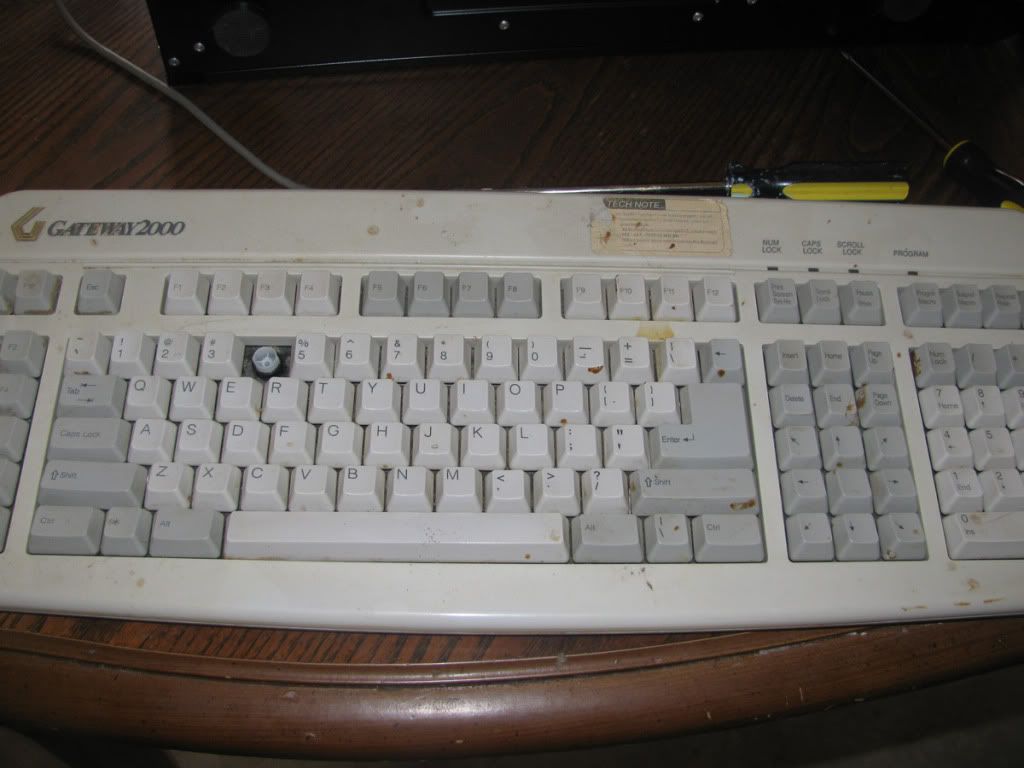
Well I had to dig up my old Gateway keyboard that had cobwebs and shit on it but...

guys...

no false alarms this time...

IT WORKS!

It goes to Bios, I fiddle around and turned on USB keyboards. IT WORKED! I mussed around with settings! I see the option to overclock and you guys were right, now I am curious!

But maybe another time! I TOTALLY CAN INSTALL WINDOWS 7 NOW HOLY SHIT I AM HYPE

Thanks so much for everyone's help. This has been a really crazy learning experience, but one ultimately I am glad I had. Building PCs is not easy so everyone should stop saying that to people :lol

Nonetheless, it is exhilarating when it is done.
 
Amir0x said:
Well I had to dig up my old Gateway keyboard that had cobwebs and shit on it but...

guys...

no false alarms this time...

IT WORKS!

It goes to Bios, I fiddle around and turned on USB keyboards. IT WORKED! I mussed around with settings! I see the option to overclock and you guys were right, now I am curious!

But maybe another time! I TOTALLY CAN INSTALL WINDOWS 7 NOW HOLY SHIT I AM HYPE

Thanks so much for everyone's help. This has been a really crazy learning experience, but one ultimately I am glad I had. Building PCs is not easy so everyone should stop saying that to people :lol

Nonetheless, it is exhilarating when it is done.

You had some awful luck! Imagine some people put the things together and don't have 1 single issue!

Once you have everything running for a while, you should get that RealTemp program, it just sits in your system tray area, and is a number (the temperature of your CPU). Then if there's a problem, you'll notice, because that number will start getting higher, letting you know maybe you need to dust or check the fans or something!

Be prepared to be amazed at how fast everything opens up from a SSD, just remember to put Steam on your larger HDD, and install all non-steam games there as well! Games usually don't benefit much, and are huge, which is bad with the limited amount of space of an SSD.
 
Yeah I just intended to put Windows 7, Firefox, Photoshop, Winamp, etc... just essential programs on the SSD. After that, everything else is going to the 1TB HDD.
 
Amir0x said:
Well I had to dig up my old Gateway keyboard that had cobwebs and shit on it but...

guys...

no false alarms this time...

IT WORKS!

It goes to Bios, I fiddle around and turned on USB keyboards. IT WORKED! I mussed around with settings! I see the option to overclock and you guys were right, now I am curious!

But maybe another time! I TOTALLY CAN INSTALL WINDOWS 7 NOW HOLY SHIT I AM HYPE

Thanks so much for everyone's help. This has been a really crazy learning experience, but one ultimately I am glad I had. Building PCs is not easy so everyone should stop saying that to people :lol

Nonetheless, it is exhilarating when it is done.
Nah, it's easy... besides its a good feeling of accomplishment.

What was the display problem by the way?
 
ah yes. I really don't know what the display problem was to be honest. I simply disconnected every part and then put it back together again, and to my knowledge it was the same as before. Only this time it worked :lol

I think it was a CPU problem because before the CPU Load LED lights were staying on (all the way into the red), but after I put everything back together those LED lights turn off after a few seconds of the PC being on. So I guess that might have been the problem somehow.
 
Amir0x said:
Well I had to dig up my old Gateway keyboard that had cobwebs and shit on it but...

guys...

no false alarms this time...

IT WORKS!

It goes to Bios, I fiddle around and turned on USB keyboards. IT WORKED! I mussed around with settings! I see the option to overclock and you guys were right, now I am curious!

But maybe another time! I TOTALLY CAN INSTALL WINDOWS 7 NOW HOLY SHIT I AM HYPE

Thanks so much for everyone's help. This has been a really crazy learning experience, but one ultimately I am glad I had. Building PCs is not easy so everyone should stop saying that to people :lol

Nonetheless, it is exhilarating when it is done.

Happy to help! :D

I know the feeling, I once had to do the exact same thing to fix my problem onceand I felt dumbfounded when all I needed was a decade old keyboard.
 
Amir0x, sorry you had such an unlucky experience. My first build went off without any hitch, so I did go around mentioning it wasn't terribly difficult. The only issue I encountered was the Corsair power supply I had gotten on sale wasn't modular. Cable management was a nightmare. But that can't really compare to what you've gone through. It's good to see you've got it up and running again, though.
 
brain_stew said:
Happy to help! :D

I know the feeling, I once had to do the exact same thing to fix my problem onceand I felt dumbfounded when all I needed was a decade old keyboard.

GateWayKeyboardFromHell.jpg


This is the demon keyboard from hell :lol

Alexander said:
Amir0x, sorry you had such an unlucky experience. My first build went off without any hitch, so I did go around mentioning it wasn't terribly difficult. The only issue I encountered was the Corsair power supply I had gotten on sale wasn't modular. Cable management was a nightmare. But that can't really compare to what you've gone through. It's good to see you've got it up and running again, though.

Yeah I know everybody has a different experience. I just think, especially if you have no prior experience, it's definitely not easy to do. It requires extensive knowledge of what various terms and acronyms mean, and the ability to troubleshoot a wide array of problems. If even one thing goes wrong, it can be hours or even days before one figures out the problem (if they have no experience and no POST Card).

It took me, total, around 16 hours of tinkering with this thing! :lol
 
brain_stew said:
Absoultely terrible choice of components. DON'T ORDER THIS!

OK, with a bidget of about £600, 650 at a push but I'd rather not, what can I get? Are any of the components ok? I don't think I'm looking for a world beating pc, unless that's what's required for something like The Witcher 2.

And that is a disgusting looking keyboard.
 
Moobabe said:
And that is a disgusting looking keyboard.

I'd say! It was literally sitting in my storage room for over, like, 10 years. It was covered with cobwebs when I found it and crusted with all manner of horrible crap.

But it worked! :lol
 
Moobabe said:
OK, with a bidget of about £600, 650 at a push but I'd rather not, what can I get? Are any of the components ok? I don't think I'm looking for a world beating pc, unless that's what's required for something like The Witcher 2.

And that is a disgusting looking keyboard.

Did you read the OP? Just price the components from the US budget build.
 
Amir0x said:
I'd say! It was literally sitting in my storage room for over, like, 10 years. It was covered with cobwebs when I found it and crusted with all manner of horrible crap.

But it worked! :lol

I love how the '4' key is missing.
 
Amirox > cool story bro! really lit up this thread, hope you continue posting your final impression of your pc. i sense you are curious overclock it, soon or later. it really is only free performance. :D

but please remove that cum stained keyboard, ewwwww.
 
longdi said:
Amirox > cool story bro! really lit up this thread, hope you continue posting your final impression of your pc. i sense you are curious overclock it, soon or later. it really is only free performance. :D

but please remove that cum stained keyboard, ewwwww.

That's just the keyboard I had to use to be able to get into the BIOS to set up my USB keyboard :lol
 
mikespit1200 said:
Did you read the OP? Just price the components from the US budget build.

I am doing now, though the last two parts of it are no longer available so I'm not sure what they are.

This is what I've put together so far using those components and a couple of others

24wvtpt.jpg


Then one of these(?) processors

Click

Click

Click
 
one last little question.

I want to bring a lot of my files from my old PC to my new one. What is the best way to go about this?

If I simply took the HDD and installed it into my new PC, would the fact that Windows XP is installed on it already conflict with the new hardware/software?

Or would I be able to browse the HDD, virus scan the appropriate files before removing them, and place them in the new HDD with relatively little risk?
 
As long as you're not booting from the old HDD then you should be able to just plug it in an access the files like normal.
 
Amir0x said:
one last little question.

I want to bring a lot of my files from my old PC to my new one. What is the best way to go about this?

If I simply took the HDD and installed it into my new PC, would the fact that Windows XP is installed on it already conflict with the new hardware/software?

Or would I be able to browse the HDD, virus scan the appropriate files before removing them, and place them in the new HDD with relatively little risk?

Assuming the old PC still works, I just copied stuff over my network (wireless), went fast enough. A 32gb USB stick would be a decent solution too if you had one, or an external drive, like a WD passport, which requires just a single usb cable to run/power.

You need to stop taking apart your PC for a few days! ! :lol

Stuff like programs and games, you'll most likely need to re-install, and hopefully find newer/64-bit versions.

Edit: And get and download Microsoft Security Essentials (MSE). It's free anti-virus, and awesome. Don't pay for anti-virus unless you browse porn sites 24/7 or something.
 
I've got some reading to do.. about to start building my gaming pc, first one in almost ten years..


is the original post up to date or should i work backwards from the last page of this thread?

i'm hoping to stay around 600-800 dollars
 
Minsc said:
Assuming the old PC still works, I just copied stuff over my network (wireless), went fast enough. A 32gb USB stick would be a decent solution too if you had one, or an external drive, like a WD passport, which requires just a single usb cable to run/power.

You need to stop taking apart your PC for a few days! ! :lol

Stuff like programs and games, you'll most likely need to re-install, and hopefully find newer/64-bit versions.

Edit: And get and download Microsoft Security Essentials (MSE). It's free anti-virus, and awesome. Don't pay for anti-virus unless you browse porn sites 24/7 or something.

porn is awesome!


Real quick... cause I'm gonna visit this thread again as soon as Win 7 is installed...

Can you give me links to things you believe are essential downloads for Win 7/Windows in general?

A link to the MSE? I know WinZip/WinRar, Winamp, etc... none of that is necessary. Just programs that are free, but helps improve this or that.

Thanks! :D
 
Top Bottom