
-
Hey Guest. Check out your NeoGAF Wrapped 2025 results here!
You are using an out of date browser. It may not display this or other websites correctly.
You should upgrade or use an alternative browser.
You should upgrade or use an alternative browser.
"I need a new PC!" 2010 Edition
- Thread starter Spy
- Start date

GHG
Member
Amir0x said:Weird Crysis problem. I finally finished downloading it, I jump out of the plane but then my movement keys don't work. I can put on night vision but it won't detect the keys I have for movement
grrr
You got any other controller attached?
Odious Tea
Member
One hurdle after another. :lolAmir0x said:Weird Crysis problem. I finally finished downloading it, I jump out of the plane but then my movement keys don't work. I can put on night vision but it won't detect the keys I have for movement
grrr
Have you tried to default all the controls?
Also a lot of the graphics are apparently not displaying. For example, during the opening scene I hear people talking to me, but don't see them or the object I'm jumping out of.
fuck me >_<
no other controllers are connected. When I get down, I can use night vision and all my other controls EXCEPT movement. It won't let me move, no matter what I have set as those controls.
This is some bizarre shit.
fuck me >_<
no other controllers are connected. When I get down, I can use night vision and all my other controls EXCEPT movement. It won't let me move, no matter what I have set as those controls.
This is some bizarre shit.
A week ago I got my new Dell Inspiron, I'm happy 
Question, I just bought Bioshock and the sound won't work. (after the first cutscene) I just downloaded the latest Realtek audio driver which should do the trick, but it says you have to remove the first one to install this new version. My question is, is this safe? I'm a complete PC newbie, so don't laugh at me
Question, I just bought Bioshock and the sound won't work. (after the first cutscene) I just downloaded the latest Realtek audio driver which should do the trick, but it says you have to remove the first one to install this new version. My question is, is this safe? I'm a complete PC newbie, so don't laugh at me
Update: My 5770 was still under warranty therefore I went ahead and successfully exchanged my Asus EAH5770 CuCore 1GB for a Sapphire HD 5770 1GB at my local computer shop.
The Accelero S1 is too big to fit on a 5770 reference cards like this Sapphire which disappointed me at first but when I tried the stock cooler, I was surprised by how quiet it is! Way quieter that the CuCore on load, it's nearly inaudible. Defeats the purpose of buying an aftermarket cooler.
Lesson learned:
-Naked die are delicate instruments; do not put strong pressure on them. There's a good reason why today's CPU have an protective heat spreader on them.
After all this debacle with my GPU, I am one step closer to complete my gaming rig
All I need now is a fan controller.
The Accelero S1 is too big to fit on a 5770 reference cards like this Sapphire which disappointed me at first but when I tried the stock cooler, I was surprised by how quiet it is! Way quieter that the CuCore on load, it's nearly inaudible. Defeats the purpose of buying an aftermarket cooler.
Lesson learned:
-Naked die are delicate instruments; do not put strong pressure on them. There's a good reason why today's CPU have an protective heat spreader on them.
After all this debacle with my GPU, I am one step closer to complete my gaming rig
All I need now is a fan controller.

Druz
Member
Amir0x said:Also a lot of the graphics are apparently not displaying. For example, during the opening scene I hear people talking to me, but don't see them or the object I'm jumping out of.
fuck me >_<
no other controllers are connected. When I get down, I can use night vision and all my other controls EXCEPT movement. It won't let me move, no matter what I have set as those controls.
This is some bizarre shit.
You bought the disk version, but is the game patched to full?
GHG
Member
Amir0x said:No I got the Steam version.
Jesus... its like someone or something out there just doesn't want you to have this PC :lol .
What graphics driver are you using?
Druz
Member
GHG said:Jesus... its like someone or something out there just doesn't want you to have this PC :lol .
What graphics driver are you using?
I'm assuming he's using 10.3
I'm going to install Crysis since we have a similar setup, till then play other games since it will assist in finding out the problem.
TouchMyBox
Member
Amir0x said:No I got the Steam version.
right click crysis in steam, goto properties, and then under the files (?) tab, there is a button called something like "verify game cache" press it.
So my 3 year old 680i motherboard finally bit the dust, so i've decided to buy a new one. Also crossing my mind is getting a new cpu as my current one (q6600) runs a bit hot at 45C ambient even after having an aftermarket cooler(coolermaster v8) being installed. I think its probably my shoddy thermal paste application, or the sensor is failed. Any suggestion for a new motherboard and what to do with the processor?

Minsc
Gold Member
Amir0x said:1 file failed to verify and will be reacquired. How odd. Well I hope that works. Thanks for the tip
I seriously feel like a complete noob at PCs after all this :lol
Hopefully, Crysis can look significantly better with a mod or too as well. I used the mstr config one, which really isn't the best, but it's day and night difference in terms of water effects and sun rays etc... worth looking in to before you get to far once it's running. Setting up the mod is usually just a matter of double clicking a file you download, so don't worry much.
You should try out that DiRT 2 game you got for free. If you set everything to max in the options, including 4xAA, exit out of the options, then return and run the video test, your framerate should be in the 50s.
Plus it's a gorgeous game, and also good at displaying issues if there's trouble with your 5870.
NiceeeeeeeAmir0x said:It works. The game cache verification did it.
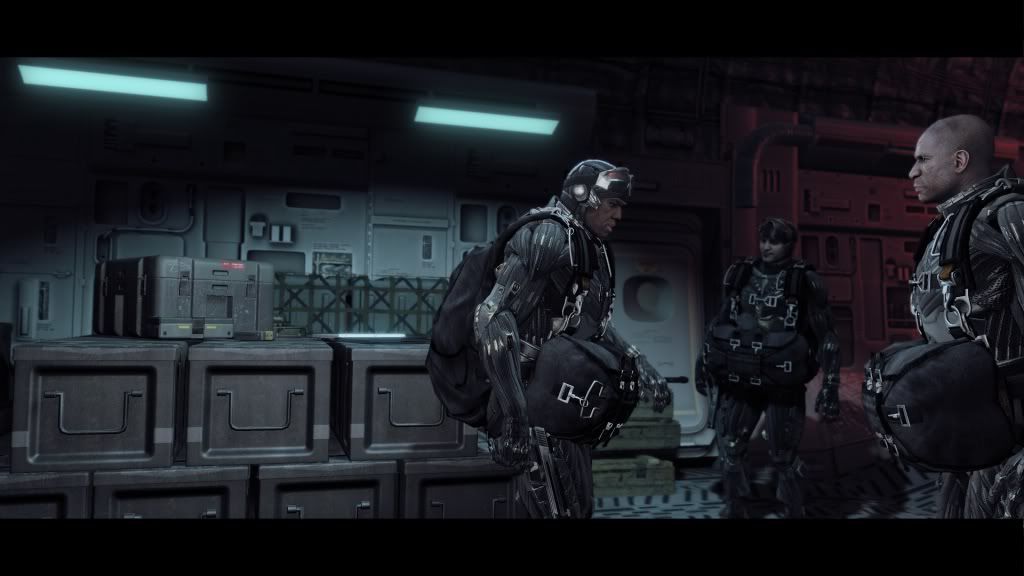
Crysis at all VERY HIGH settings (1900x1080) with 2x AA. Average 35fps~
Jesus christ.
TouchMyBox
Member
Amir0x said:It works. The game cache verification did it.
Crysis at all VERY HIGH settings (1900x1080) with 2x AA. Average 35fps~
Jesus christ.
I don't feel totally useless now. :lol
Foliorum Viridum
Banned
Your struggles with your PC makes me worried.
I got my CPU in, and my brother is coming around tomorrow to help me with the heat sink as I didn't feel confident enough to try that by myself. I basically want him looking over my shoulder to assure I'm doing it right - the instructions that came with it are awful. :lol
I got my CPU in, and my brother is coming around tomorrow to help me with the heat sink as I didn't feel confident enough to try that by myself. I basically want him looking over my shoulder to assure I'm doing it right - the instructions that came with it are awful. :lol
Foliorum Viridum said:Your struggles with your PC makes me worried.
I got my CPU in, and my brother is coming around tomorrow to help me with the heat sink as I didn't feel confident enough to try that by myself. I basically want him looking over my shoulder to assure I'm doing it right - the instructions that came with it are awful. :lol
Haha I was really worried putting my CPU Fan on (Standard AMD), didn't realise the amount of force needed and feared breaking the mobo in half (with my brute strength ofc).
i have a friend that does a lot of video encoding but wants a laptop. i have recommended this based on the fact that its an i7 and its quad core:
http://www.newegg.com/Product/Product.aspx?Item=N82E16834157113
would this be a good fit?
http://www.newegg.com/Product/Product.aspx?Item=N82E16834157113
would this be a good fit?
Amir0x said:link to the mod you think is good for Crysis?
I just picked up Crysis as well, I need help.
so my sisters computer just died and she wants to get a laptop since shes attending Uni now, the only condition is that it must play world of warcraft at decent settings, which probably means nothing extreme
Budget: $500-$800 US (microcenter close)
Main Use: world of warcraft, internet, papers (word, excel), media player
Monitor Resolution: not exactly sure what the standard is for laptops, she has an external 22" monitor she plugs when she's at the house
List SPECIFIC games that you MUST be able to play: world of warcraft
any recommendations?
Budget: $500-$800 US (microcenter close)
Main Use: world of warcraft, internet, papers (word, excel), media player
Monitor Resolution: not exactly sure what the standard is for laptops, she has an external 22" monitor she plugs when she's at the house
List SPECIFIC games that you MUST be able to play: world of warcraft
any recommendations?
Amir0x said:World of Warcraft will distract her from her studies! Don't do it!
shes been playing pretty casually for the past couple of years, I guess for her its more like a social network rather than a game :lol
Minsc
Gold Member
Amir0x said:link to the mod you think is good for Crysis?
I have no idea, mster config is decent. It's what I used and is simple enough to install/remove. Watch this video in 720p+, you'll see how dramatic all the lighting becomes.
Reccomending Mster or HP 1.3.1 also
http://www.crymod.com/thread.php?threadid=13790&page=1
It'll make it look even better. I use Mster myself
http://www.crymod.com/thread.php?threadid=13790&page=1
It'll make it look even better. I use Mster myself
rollingstart
Banned
what I always wonder about master config is how much of an impact will it have on performance?
what is the best way to get a balance of visuals and performance with Crysis? with warhead I used the tweakguide to get the best performance but with all these mods there has got to be a better way
what is the best way to get a balance of visuals and performance with Crysis? with warhead I used the tweakguide to get the best performance but with all these mods there has got to be a better way
Laptops are much harder to talk about since looks / battery life / speakers / screen size / screen resolution / etc. all come into play.J.M.Reyes said:so my sisters computer just died and she wants to get a laptop since shes attending Uni now, the only condition is that it must play world of warcraft at decent settings, which probably means nothing extreme
Budget: $500-$800 US (microcenter close)
Main Use: world of warcraft, internet, papers (word, excel), media player
Monitor Resolution: not exactly sure what the standard is for laptops, she has an external 22" monitor she plugs when she's at the house
List SPECIFIC games that you MUST be able to play: world of warcraft
any recommendations?
I would wait for one of our laptop gurus to eventually swing by, or go post a DETAILED description of what she wants (answer all my questions above + more) and post on a large laptop forum.
Mster I think gave me +2 fps (37 vs 35) from High settings while making it look better and improving the lighting.Linkzg said:what I always wonder about master config is how much of an impact will it have on performance?
what is the best way to get a balance of visuals and performance with Crysis? with warhead I used the tweakguide to get the best performance but with all these mods there has got to be a better way
All you do is replace 1 file, or run the installer if they have one.
I always heard that Crysis was visually impressive, but finally being able to play it on my own pc @_@ HOLY BALLS it looks incredible, even for a 3 year old game.
Also thanks for the configs, can't wait to try them out. Is there a Garry's Mod type of program for crysis or something? I want to have my own sandbox where I can blow up tons of stuff.
Also thanks for the configs, can't wait to try them out. Is there a Garry's Mod type of program for crysis or something? I want to have my own sandbox where I can blow up tons of stuff.
DodgyGeezerFella
Member
Weenerz said:I always heard that Crysis was visually impressive, but finally being able to play it on my own pc @_@ HOLY BALLS it looks incredible, even for a 3 year old game.
Also thanks for the configs, can't wait to try them out. Is there a Garry's Mod type of program for crysis or something? I want to have my own sandbox where I can blow up tons of stuff.
Should be a thing called Sandbox editor in the folders somewhere

Sandbox 2 should be on the disc / or in some folder. I think you can just DL it as well.
Incredible editor, you can just mess around with it or make awesome maps.
I suggest downloading the Intel SP MapPack after you finish the campaign as there are some excellent maps in there.
Messing with the editor was fun as well.
Nothing like sticking 200 AI's inside a giant crater vs flying aliens + 400 chickens running around at 4fps.
The more you kill the more fps you get :lol
Incredible editor, you can just mess around with it or make awesome maps.
I suggest downloading the Intel SP MapPack after you finish the campaign as there are some excellent maps in there.
Messing with the editor was fun as well.
Nothing like sticking 200 AI's inside a giant crater vs flying aliens + 400 chickens running around at 4fps.
The more you kill the more fps you get :lol
PjotrStroganov
Member
Exactly the same here. I didn't want to get over my budget and choose this screen (went over it anywayAmir0x said:I went a little cheaper on the screen because I wanted some extra money to buy games for my PC :<
). It's also esthetically more pleasing than newer sammy screens.Minsc said:I have no idea, mster config is decent. It's what I used and is simple enough to install/remove. Watch this video in 720p+, you'll see how dramatic all the lighting becomes.
Great. I used the CCC mod but it seems to change more that just the cfg file. And it messes with savegames. I'll try the one you mentioned.
After a lot of deliberating, chatting, planning I still have no idea what I'm doing. However, I used the budget build in OP as a guide, though some of the combos no longer exist, and then tried to fill in the blanks. Firstly, does this look ok? Secondly, I could probably stretch another £100 as well if there's going to be a notable improvement but, again, wouldn't know which components to spend the extra on. Help is greatly appreciated.


PumpkinPie
Banned
I have been toying with the idea of building a new PC. I currently have an XPS 420 but it is maxed out with a GTX260 Black, 4GB Corsair RAM, Q9770 3.0ghz...it uses a BTX board so there are no further upgrade paths to take as nothing else will fit in the case (the 260 doesn't even have any room to breathe).
Are the components I have good enough to transplant into a bigger case with a decent motherboard or is it worth upgrading the CPU and graphics card? Currently I'm able to play Crysis on high-very high, nothing is OC'd as the BIOS is locked on the motherboard. I was thinking maybe just buy a new case, upgrade to Vista 64 (or Windows 7 64) and OC for better performance, I know next to nothing about PCs though so I'm unsure of the best path to take.
Are the components I have good enough to transplant into a bigger case with a decent motherboard or is it worth upgrading the CPU and graphics card? Currently I'm able to play Crysis on high-very high, nothing is OC'd as the BIOS is locked on the motherboard. I was thinking maybe just buy a new case, upgrade to Vista 64 (or Windows 7 64) and OC for better performance, I know next to nothing about PCs though so I'm unsure of the best path to take.
The last one was better (with a quad-core).Moobabe said:Ok, me and a friend have had an overhaul. It's a bit more expensive but he gets a discount at Aria so it works out at about £520. How does this look?
[im]http://i44.tinypic.com/a4r9kx.png[/img]
Moobabe said:Ok, me and a friend have had an overhaul. It's a bit more expensive but he gets a discount at Aria so it works out at about £520. How does this look?
I would say the HDD is a bit on the small side and the PSU is more than you need.

BudokaiMR2
Member
Okay so I am still having problems with my sound. Recently I am having a problem with L4D2 sounding way too muted.
The basic problem is that I don't have an ideal way to hook up my PC to my surround speaker. THe ports on the PC are made for normal PC speakers(a jack for each pair) and since my speakers are already running to the receiver there is no way to plug them all directly into the PC.
I really want to get true 5.1 but I don't know what to do.
My friend recently suggested trying a USB>Optical adapter or something similar, but I am not sure how those will work. I looked them up and they seem to exist but I have no idea what brands to look to or anything.
The basic problem is that I don't have an ideal way to hook up my PC to my surround speaker. THe ports on the PC are made for normal PC speakers(a jack for each pair) and since my speakers are already running to the receiver there is no way to plug them all directly into the PC.
I really want to get true 5.1 but I don't know what to do.
My friend recently suggested trying a USB>Optical adapter or something similar, but I am not sure how those will work. I looked them up and they seem to exist but I have no idea what brands to look to or anything.
Your motherboard doesn't have any optical outs? The other easy way is if you have a video card that also carries sound, like the ATI HD series cardsBudokaiMR2 said:Okay so I am still having problems with my sound. Recently I am having a problem with L4D2 sounding way too muted.
The basic problem is that I don't have an ideal way to hook up my PC to my surround speaker. THe ports on the PC are made for normal PC speakers(a jack for each pair) and since my speakers are already running to the receiver there is no way to plug them all directly into the PC.
I really want to get true 5.1 but I don't know what to do.
My friend recently suggested trying a USB>Optical adapter or something similar, but I am not sure how those will work. I looked them up and they seem to exist but I have no idea what brands to look to or anything.