• Hey Guest. Check out your NeoGAF Wrapped 2025 results here!

"I need a new PC!" 2010 Edition

I pulled the trigger on the pieces for a desktop. They're all coming this week. Let me know what you think

CPU: AMD Phenom II X3 720 Black Edition Heka 2.8GHz
MOBO: GIGABYTE GA-770TA-UD3 AM3 AMD 770 SATA III USB3.0
Cooler: Cooler Master Hyper 212 Plus
RAM: G.SKILL Ripjaw Series 4GB (2x2GB) DDR3 1600 - CAS 7 Latency
GPU: ASUS CuCore Radeon HD 5770 128-bit 1GB GDDR5
HDD: Samsung Spinpoint F3 7200RPM SATA II 500GB
Optical: Sony Optiarc 24x DVD/CD Rewritable Drive
WiFi: Linksys Wireless N PCI Adapter
PSU: OCZ ModXStream Modular 700W PSU
Case: Rosewill Wind Knight ATX Mid Tower

All of this was $650 after rebate. I threw the 700W in because I got it for the same price the 500W was when I purchased it.

I then decided to treat myself with an SSD for $115:
SSD: Intel 40GB SATA II

I needed a monitor:
Monitor: ASUS VH226H 21.5" LCD
$160 after rebate.

I get Windows 7 Enterprise free through my university. I figured I should pull the trigger now as I graduate in late May.

All of this for $925 after rebate.

How did I do GAF?
 
if you have a bit more change, def get a Phenom II X4. There isn't a guarantee your X3 will unlock
I'd also scrap the SSD and go for a Radeon HD 5850
 
Lkr said:
if you have a bit more change, def get a Phenom II X4. There isn't a guarantee your X3 will unlock
I'd also scrap the SSD and go for a Radeon HD 5850

I've heard the extra core is negligible when it comes to gaming, and is more necessary for alot of software I don't see myself using. If it unlocks with no cost, great news. Otherwise, I'm not too upset. I'm willing to take the chance.

I'm also not looking for top of the tier gaming right now. My decision to go with an SSD was actually mostly determined by the fact that my school offers Windows 7 Enterprise only without an installation CD and using a generic product key ties to their own CDs. I know I eventually wanted to incorporate SSD for bootup and application loading purposes; if I didn't get the SSD now, I'd have to some time in the next 2-3 years have to buy a 7 OEM. SSDs will likely only drop $60 within the next 2 to 3 years or so (while 7 likely would remain the same price), making getting the SSD now for the benefits worth it.

I don't see my gaming needs needing the best of the best cards, and I was already expecting to replace it within 3 or 4 years time. Alot of my choices were meant around expanding on my system into the future easily.
 
kinggroin said:
That power supply is overkill.

Unless you Crossfire / SLI they always are nowdays.

Edit - After reading around I am slightly concerned about the PSU I purchased as I do not want this to explode on me. Should I get a new PSU asap?
 
kinggroin said:
I think the best advice would be for him to build a rig from scratch for the same price. Then we can talk about which PSU to build around.

edit: Meant Corsair, not antec.

I was under the impression he was looking for parts not affirmation on a pre-built :D , so yes, you have nothing to worry about with the 700W supply (Hopefully depending on the brand)
 
I have a question about Blu Ray players for an HTPC. Is one just as good as another, or if you've installed one do you recommend a brand/make over others?

I'm not really interested in Blu Ray burners right now, but if the price difference is not substantial I would consider a Blu Ray Writer/Player vs a straight player.

Thanks!
 
ChronicleX said:
Unless you Crossfire / SLI they always are nowdays.

Edit - After reading around I am slightly concerned about the PSU I purchased as I do not want this to explode on me. Should I get a new PSU asap?

I'm Crossfiring 2 5770s on a 650w PSU, granted it's a Corsair TX. I've had zero issues with it, but there are many sites that you can enter your components and it will calculate what type of power you'd need. Our systems are very comparable in spec other than you're running a 965 and I have an OC'd 955. I suppose you might need a little bit more power if you Crossfire 5850s, but not much more. Just my 2 cents.
 
phinious said:
Anyone check out this Asus G73 laptop from BB for $1199?

http://www.bestbuy.com/site/Asus+-+Laptop+with+Intel%26%23174%3B+Core%26%23153%3B+i7+Processor+-+Black/9741729.p?id=1218165344675&skuId=9741729


Its got a ATI 5870 video card, looks like a sweet deal to me.
i7 processor
6Gigs of Ram
Zefah said:
That seems like an extraordinarily good deal. The same laptop is on Newegg for $1599.99.

The impressions over at a Newegg sound pretty good as well.

I'm almost tempted to grab that laptop myself as a secondary computer that I can take to friend's houses.
Newegg's has a 1080p LED and two HDDs, but with a single Mobility 5870, the 1600x900 LED is a good idea for maximal performance. I know from experience that the current batch of 900p laptop screens are far inferior to the 1080p LCDs, but it isn't terrible.

Bottom line, it's the best you'll get for $1200, by far.

The G73 is not going to be refreshed with Nvidia's new chip.
 
T1tan said:
I have a question about Blu Ray players for an HTPC. Is one just as good as another, or if you've installed one do you recommend a brand/make over others?

I'm not really interested in Blu Ray burners right now, but if the price difference is not substantial I would consider a Blu Ray Writer/Player vs a straight player.

Thanks!


I have one of these:

PLEXTOR 6X BD-ROM 16X DVD-ROM 48X CD-ROM USB External BD Combo Super Multi Drive

Plextor has a great reputation in the optical drive market. And it's portable so I can use it with my laptop, bring it to my bedroom PC, etc to play blu-rays. A friend of mine just bought one as well after checking mine out, we watched Avatar on it just the other night. Worked great.
 
BravoSuperStar said:
I have one of these:

PLEXTOR 6X BD-ROM 16X DVD-ROM 48X CD-ROM USB External BD Combo Super Multi Drive

Plextor has a great reputation in the optical drive market. And it's portable so I can use it with my laptop, bring it to my bedroom PC, etc to play blu-rays. A friend of mine just bought one as well after checking mine out, we watched Avatar on it just the other night. Worked great.

Thanks for your reply! Ya know, I hadn't even considered an external Blu Ray player due to preserving the economy of desk space, but I will take a look at this if it's available in my neck of the woods.

Edit: Forgot to mention I'm in Region 4 of Blu Ray/DVD land.
 
platypotamus said:
Damn, I think I'm just going to get that system rather than the custom rig I had set up on ncix. Only 500GB instead of a TB hard drive, and a different (but better according the the benchmarks I'm seeing) processor, but it's quite a bit cheaper.

Thanks jbpaz!


No Problem man
 
Can someone suggest a good streaming card? PCIe, Windows 7 compatible, needs to be able to stream S-Video/Composite Video/Audio. Would be a bonus if it could do Component Video and/or HDMI.

I guess I'd also consider a USB solution if it was possible to use it on an OSX machine as well as a Windows 7 one.

I've just never had a reason to own one before so I don't know what exactly to buy, and it seems most come with some sort of HD Tuner now and other bells and whistles.
 
platypotamus said:
Damn, I think I'm just going to get that system rather than the custom rig I had set up on ncix. Only 500GB instead of a TB hard drive, and a different (but better according the the benchmarks I'm seeing) processor, but it's quite a bit cheaper.

Thanks jbpaz!
Are you against building a system yourself? I just quickly spec'd a PC (OS included) with a better case, motherboard and ram for less than that iBUYPOWER.
 
Time for a new pc I thought to myself and went all-in:

CPU: Intel I7 930
CPU Cooler: Noctua NH-U12P SE2
Mobo: GIGABYTE GA-X58A-UD7
GPU: Gainward GTX 480
RAM: Corsair XMS3 KIT 6GB DDR3-1600 CL7
SSD: 80GB Intel X25-M G2 Postville
HDD: 1000GB Western Digital Caviar Black 64MB SATA 3
Case: ATX Big CoolerMaster RC-840
PSU: Corsair HX 850W

Knowing myself well enough, the first thing I'll probably do is play some old DOS games.
 
After speaking to customer services I was able to catch them before dispatching my PC and have upgraded my PSU from the 700W EZCool tornado death hazard to the 650W Corsair TX.

*phew* :D
 
I'm looking into buying an SSD to serve as my boot disk and have narrowed my search down to two choices:

Intel X25-M Mainstream SATA SSD SSDSA2MH080G2R5

or the

OCZ OCZSSD2-1SUM120G

The prices are about the same but the OCZ Summit is 40gigs larger. My biggest concern isn't size per say, but reliability. Does the consensus lean toward Intel drives here?
 
·feist· said:
Are you against building a system yourself? I just quickly spec'd a PC (OS included) with a better case, motherboard and ram for less than that iBUYPOWER.

Kind of, yeah. I don't have the motivation/inclination/time anymore, and am pretty scarred from one time when I fried a motherboard.
 
quin said:
I'm looking into buying an SSD to serve as my boot disk and have narrowed my search down to two choices:

Intel X25-M Mainstream SATA SSD SSDSA2MH080G2R5

or the

OCZ OCZSSD2-1SUM120G

The prices are about the same but the OCZ Summit is 40gigs larger. My biggest concern isn't size per say, but reliability. Does the consensus lean toward Intel drives here?
Yes, the Intel's are still king.

It's amazing how expensive these things still are.
 
Draft said:
Yes, the Intel's are still king.

It's amazing how expensive these things still are.

~$100-220, for most people's needs (an OS drive + some apps)... sure $80 gets you a fast, fast 1TB traditional HDD, but there will always be a huge gap in app-related performance, so the price doesn't seem that bad to me, for what amounts to essential a one-time purchase that never needs an upgrade.

It's actually better to use two drives in your system anyway, so having a smaller SSD and a larger spinning HDD almost always works to one's advantage.
 
quin said:
I'm looking into buying an SSD to serve as my boot disk and have narrowed my search down to two choices:

Intel X25-M Mainstream SATA SSD SSDSA2MH080G2R5

or the

OCZ OCZSSD2-1SUM120G

The prices are about the same but the OCZ Summit is 40gigs larger. My biggest concern isn't size per say, but reliability. Does the consensus lean toward Intel drives here?

Well, I bought Intel one (80 gb) for my setup, and am very happy with it. It's my OS and basic programs disk. (I don't install many programs to begin with, though). Only thing is I really wanted something with SATA 6.0 - but asides "reportedly" buggy Crucial ones (and much more expensive), there were none avail.... so I just decided to go with this for the time being, and I'm very happy with my intel purchase. I'd say go with intel, if you don't mind 80gb. :)
 
GHG said:
Hot damn. Possibility of a 5ghz chip with the correct cooling method? I think so.

These things will give intel a run for their money.

Mid range and lower end, it does seem like it, gaming I'm not so sure. I don't think they'll touch a i7 980X though, will be nice to see benches! Seems like it's been taking forever, but it is this week I believe.
 
UrbanRats said:
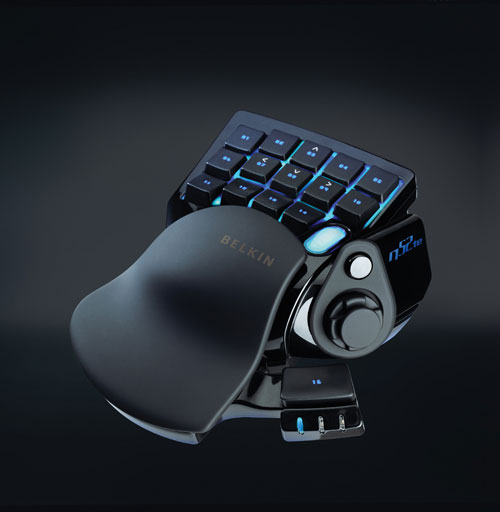
Anybody have something similar to this?
belkin-n52te.jpg

How does these things workout?Are they any good for gaming?Kinda dislike the non ergonomic feeling of the standard keyboard.
No one had experiences with such tools? :(
 
Minsc said:
Mid range and lower end, it does seem like it, gaming I'm not so sure. I don't think they'll touch a i7 980X though, will be nice to see benches! Seems like it's been taking forever, but it is this week I believe.

Doubt they'd even release anything in that price band.

I thought the X4 phenom's were pretty much on par with the lower band i7's when it comes to gaming but its in other tasks the i7's tend to pull away?

Anyway, it'll be interesting to see if the extra 2 cores in the X6 will make any difference for gaming. Do't think many games are even coded for 6 cores? Or do multi-threaded engines these days have multicore-detect so it'll automatically just split the load between all cores available?

Even if it doesn't make much difference at stock speeds the overclocking potential looks very promising. I'd love to see how a 5ghz 6 core CPU would handle GTA IV :D .
 
UrbanRats said:
No one had experiences with such tools? :(

i have the one in the pic and i think it's pretty good. better than keyboard at least.

only downside is it needs a bit of tweaking. default controls in games usually are not well suited for the thing and you may need to build a preset for every game in order to make it works well enough.

i don't game much on pc so take it for what is worth

:)
 
Manp said:
i have the one in the pic and i think it's pretty good. better than keyboard at least.

only downside is it needs a bit of tweaking. default controls in games usually are not well suited for the thing and you may need to build a preset for every game in order to make it works well enough.

i don't game much on pc so take it for what is worth

:)
Thank you very much! :D
 
oh great so it wont work in a m3a79-t?
FUCK YOU ASUS.

Im talking about the phenom 2 X6. I just bought this board a year ago for 200 bucks and you cant be bothered to update the bios to support them?

Last time I buy anything from ASUS.
 
dejan said:
Time for a new pc I thought to myself and went all-in:

CPU: Intel I7 930
CPU Cooler: Noctua NH-U12P SE2
Mobo: GIGABYTE GA-X58A-UD7
GPU: Gainward GTX 480
RAM: Corsair XMS3 KIT 6GB DDR3-1600 CL7
SSD: 80GB Intel X25-M G2 Postville
HDD: 1000GB Western Digital Caviar Black 64MB SATA 3
Case: ATX Big CoolerMaster RC-840
PSU: Corsair HX 850W

Knowing myself well enough, the first thing I'll probably do is play some old DOS games.


That is almost exactly the same setup I'm going with (minues CPU cooler, case, and an extra 480). I'm going with an SLI 480 setup mainly to take advantage of 3-D and still have good framerates.

How much does this run you?
 
UrbanRats said:
No one had experiences with such tools? :(

I haven't personally used a nostromo, but I know a friend that has one and he loves it. Big WoW player. I have one of these:

WOLF KING Warrior 55 Keys USB Keyboard

Works great for FPS games, doesn't take up much space and has an abundance of keys. Has a good resistance/click to the keys. I got a blue one for like $30 at their main website w/ free shipping. But I've heard pretty much nothing but good things about the Nostromo as well. It just didn't have enough keys for me and was hard to find in stock.
 
jbpaz said:
platypotamus said:
Kind of, yeah. I don't have the motivation/inclination/time anymore, and am pretty scarred from one time when I fried a motherboard.
Any friends that can build a PC for you for free/cheap?

69ngia.jpg


http://www.newegg.com/Product/Product.aspx?Item=N82E16827118030 (it was $21 before, can be replaced with a cheaper drive)

http://www.newegg.com/Product/Product.aspx?Item=N82E16811119137

http://www.newegg.com/Product/Product.aspx?Item=N82E16822152181

http://www.newegg.com/Product/Product.aspx?Item=N82E16813131402

http://www.newegg.com/Product/Product.aspx?Item=N82E16814127490

http://www.newegg.com/Product/Product.aspx?Item=N82E16817341019

http://www.newegg.com/Product/Product.aspx?Item=N82E16820231277

http://www.newegg.com/Product/Product.aspx?Item=N82E16819103727

http://www.newegg.com/Product/Product.aspx?Item=N82E16832116754


$899.91
-$45.00 MIR

$854.91


If either of you live near a Fry's location and/or Microcenter, you can reduce that total even further.

After the $15 MIR, that factory overclocked MSI 5770 on Newegg comes to $160. Fry's currently has a stock MSI 1GB 5770 for $160 - $20 MIR. If purchased online it comes to $140 after MIR, but if purchased in-store, it's cheaper at $130 after MIR.

http://www.frys.com/product/6139339


That Cooler Master CM690 is a great case for air or water cooling and has lots of modding guides online if you're into that. In stock form it has superior airflow and cable management to the iBUYPOWER's case. I used a newer CM690 II Advanced with my last build and I love it. The $60 that Newegg has it for is a great price, but you can get it for $50 (in-store only) at Microcenter. Their web price is the same as Newegg.

http://www.microcenter.com/single_product_results.phtml?product_id=0265143


Alternatively, you can get a cheaper mid tower from Newegg for ~$45-55.

http://www.newegg.com/Store/BrandSubCategory.aspx?Brand=2177&SubCategory=7&name=Computer-Cases


Particularly this one for $50 with a nice black interior:

http://www.newegg.com/Product/Product.aspx?Item=N82E16811147120


I've never used Rosewill before, but I hear they're pretty good for the price. Just check online for reviews.

Case wise, I think it's best to look for a lower-end mid tower with a bottom mount PSU location. Lower-priced top mount cases usually don't have the PSU cordoned off so it'll be exposed to heat rising from other components in your PC. Front-, back- and side-mounted PSU cases usually aren't full-featured unless you move into the $100-200+ range. Another option would be something like the tried and tested Antec 300

http://www.newegg.com/Product/Product.aspx?Item=N82E16811129042

$54 on Newegg and about $45-50 at Microcenter (in-store only).


So just online alone you could get that build to ~$820 or less. With the option of in-store purchases and/or mirroring the iBUYPOWER's lower spec, you drop below $800. Keep in mind that Amazon and other sites and stores are already taking pre-orders for the upcoming 6-core CPUs and the entry level chip will only be $20 more than the X4 695. With an X6 you'll be set as more games and apps start utilizing more cores.


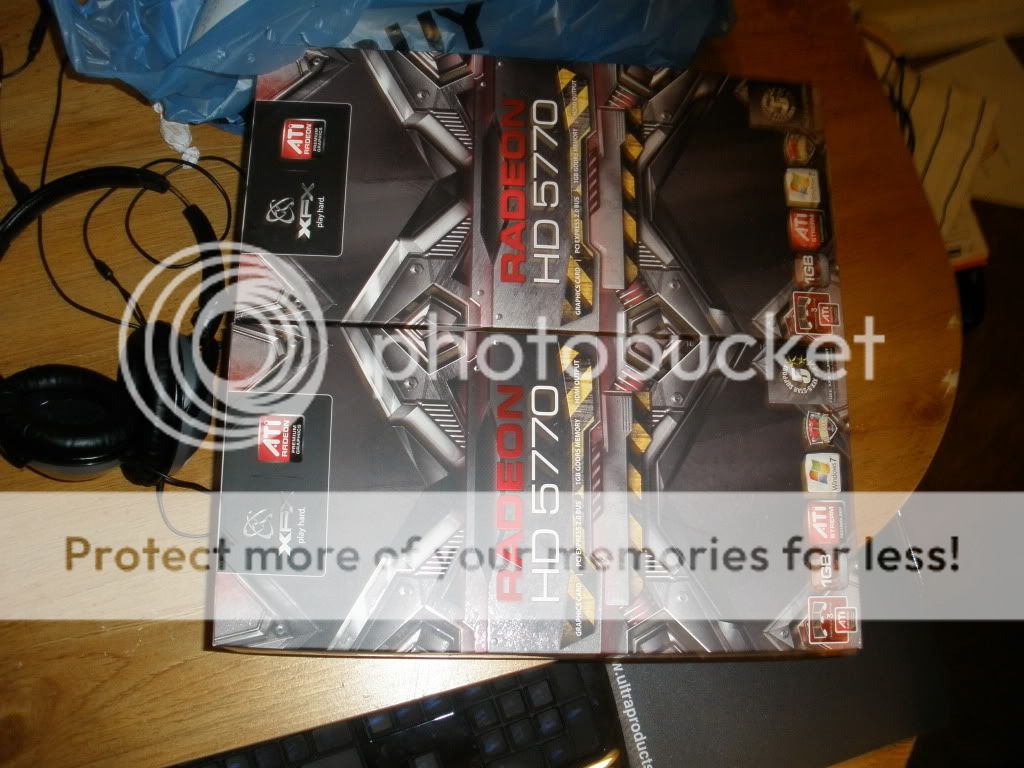
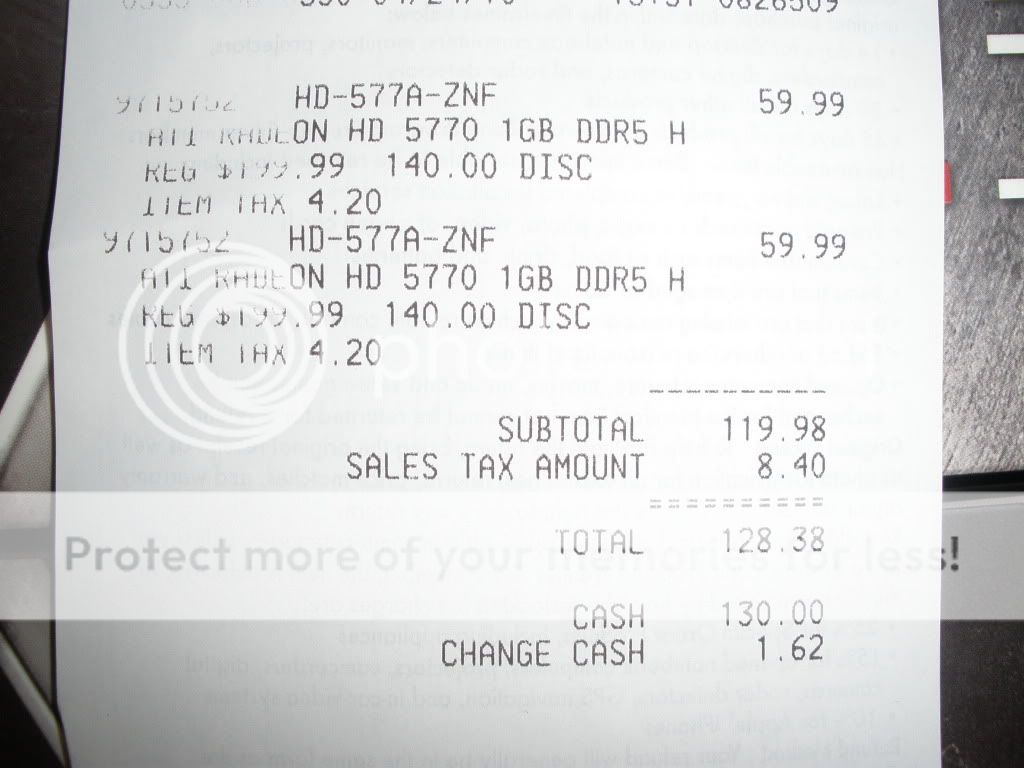
Also, I wish I had learned of the CompUSA gfx card advertising error sooner. I could have passed it on to people in this thread who are looking for 5770s:


(I did not try to get any cards and theses are not my pics)

2.jpg


1.jpg
 
is there an online guide on how to install a PSU?

Specifically, the CORSAIR CMPSU-850TX


Opened it up and was like "goddamn that's a lotta wires" and it's in a mid sized tower so I don't have much space to really move in.
 
rhfb said:
Can someone suggest a good streaming card? PCIe, Windows 7 compatible, needs to be able to stream S-Video/Composite Video/Audio. Would be a bonus if it could do Component Video and/or HDMI.

I guess I'd also consider a USB solution if it was possible to use it on an OSX machine as well as a Windows 7 one.

I've just never had a reason to own one before so I don't know what exactly to buy, and it seems most come with some sort of HD Tuner now and other bells and whistles.
Anyone? The sheer number of choices (and overall poor reviews) are making me crazy :lol
 
diztrukted said:
is there an online guide on how to install a PSU?

Specifically, the CORSAIR CMPSU-850TX


Opened it up and was like "goddamn that's a lotta wires" and it's in a mid sized tower so I don't have much space to really move in.
there's really no need for a guide, though depending on your case you may have to remove your motherboard in order to install the PSU.

the main objective with the wires is to single out the most efficient way to feed power to your system/drives while tying/hiding the rest of the wires to keep airflow moving nicely within the case.

rhfb: what do you mean by 'streaming card'? just a regular low-profile or fanless video card?
 
BravoSuperStar said:
I haven't personally used a nostromo, but I know a friend that has one and he loves it. Big WoW player. I have one of these:

WOLF KING Warrior 55 Keys USB Keyboard

Works great for FPS games, doesn't take up much space and has an abundance of keys. Has a good resistance/click to the keys. I got a blue one for like $30 at their main website w/ free shipping. But I've heard pretty much nothing but good things about the Nostromo as well. It just didn't have enough keys for me and was hard to find in stock.
Thanks to you too man ^^.
I'll look forward into it then. :)
 
Archie said:
Newegg has the Phenom II X6 in stock for $210. Have there been any tests/benchmarks on it? I'm still a few months away from buying my PC and I was going to go with an i5, but if the X6 is better than I would go that route.

There hasn't been anything official, but there should be about 20-30 hardware sites updating benches very soon...
 
The PC bug strikes again!

So I've had my gaming PC for a good two years or so, and while it's served me fantastically, I'm considering upgrading in the near future. Most of the expensive bits need to be replaced, unfortunately.

Here's what I have now:
nVidia 9600
Core 2 Duo @ 3GHz
4GB DDR2

Here's my plan:
The upgrade will probably be a two-part process. The first phase will be the CPU, MoBo, and RAM, while the second phase will the the graphics card. The end goals are to be able to play Just Cause 2 and Final Fantasy XIV at max/near max settings on a single monitor, and have a MoBo that's more friendly towards CPU upgrades a little ways down the line.

CPU Ideas:
Core i7
http://www.newegg.com/Product/Product.aspx?Item=N82E16819115202
http://www.newegg.com/Product/Product.aspx?Item=N82E16819115225

For these two, the prices are almost the same. I'm tempted to spend the extra $15 bucks and get the boosted clock speed, overclocking has always made me a bit antsy.

MoBo Ideas:
Gigabyte
http://www.newegg.com/Product/Product.aspx?Item=N82E16813128423
http://www.newegg.com/Product/Product.aspx?Item=N82E16813128422

I'm eying these two in particular, since they've got USB 3.0 support, and that seems like a pretty cool thing to have access to. Besides, that, they support all/most DDR3 formats.

RAM:
I dunno, something fairly inexpensive but reliable, I suppose. Any suggestions?

Graphics Card:
I'd really like to wait and see how things go once nVidia gets their newer cards farther out into the market. Right now just seems like a bad time to buy a new card.

---

Any opinions on my choices/strategy? If there's any major developments slated to be announced on the MoBo/CPU front, I'd love to hear them.
 
Mii said:
I've heard the extra core is negligible when it comes to gaming, and is more necessary for alot of software I don't see myself using. If it unlocks with no cost, great news. Otherwise, I'm not too upset. I'm willing to take the chance.

I'm also not looking for top of the tier gaming right now. My decision to go with an SSD was actually mostly determined by the fact that my school offers Windows 7 Enterprise only without an installation CD and using a generic product key ties to their own CDs. I know I eventually wanted to incorporate SSD for bootup and application loading purposes; if I didn't get the SSD now, I'd have to some time in the next 2-3 years have to buy a 7 OEM. SSDs will likely only drop $60 within the next 2 to 3 years or so (while 7 likely would remain the same price), making getting the SSD now for the benefits worth it.

I don't see my gaming needs needing the best of the best cards, and I was already expecting to replace it within 3 or 4 years time. Alot of my choices were meant around expanding on my system into the future easily.
Well if you go that route, it looks good. I wouldn't get anything less than a quad core though if you want to play games coming out now. GTA IV for example is unplayable without a quad(not that its playable for the most part anyway)
 
Lkr said:
Well if you go that route, it looks good. I wouldn't get anything less than a quad core though if you want to play games coming out now. GTA IV for example is unplayable without a quad(not that its playable for the most part anyway)

That's simply ridiculous :P

My Core 2 (e8400 @ 4ghz) more than pulls it's weight compared to the older quad intels and the current quad Phenom IIs. Matter of fact, most games I have with the exception of GTAIV, run better with my rig compared to my brother in law's (same exact system, but he went Phenom IIx4). Hell, the PC's biggest visual stunner, Crysis, runs quite a bit better on similarly clocked wolfdales than Phenom IIs.

And even still, saying GTAIV is unplayable with anything other than a quad core is complete and utter horse shit. I ran through that game with nice settings settings at 1080p on my C2D/4870, and had the same framerates the console version were getting at 720p with MUCH worse iq.

That said, if you're getting a PC now, there's no reason you shouldn't go i5/i7 (or maybe x6 AMD). Games will eventually be better optimised for more than two cores; and you benefit in general desktop multitasking as well.
 
Top Bottom