• Hey Guest. Check out your NeoGAF Wrapped 2025 results here!

"I need a new PC!" 2010 Edition

SeriousNanook said:
So it's finally time to go from a 6 year old Dell Dimension 4400 to a pc built by me.

Budget: $1400 with some wiggle room
Main Use: Adobe Creative Suite, video Editing, Gaming
Monitor Resolution: 1900x1200
List SPECIFIC games that you MUST be able to play: Starcraft 2, Witcher, Crysis

I've thought about parts I'm interested in, but I don't know what PSU/case/mobo is best for me.

i7 930 - i have a microcenter near me so woo
Radeon 5850 (or maybe the GTX 460 now, i'm not sure)
6gb of ram? would that be something I'd need for all the video stuff?

Help would be completely awesome PC GAF!

That sounds good, RAM can always be added later. If I were you I'd end up with a 1GB GTX 460 (will inevitably have better PS/Video editing hardware acceleration), i7 930, 6GB RAM, an Intel X-25 80GB SSD (your video + photo apps will fly), 2TB WD Black or Samsung Spinpoint F3 (x2?), and for brands/motherboard/case, I'd just go with something from the Tech Report Summer guide (just not on the cheaper pages).

Edit: Whoops, 2009 guide, fixed to 2010 one.
 
FLEABttn said:
Just because of the shadows. Ultra with the shadows turned down to the minimum plus 1 notch is easily doable with an 8800GT.

Yep, that's very true about the shadows. I think I may resub after I get my new card tomorrow and see if I can run it with the sampling all the way up and all the settings on ultra.
 
Baloonatic said:
Should I bother upgrading my RAM? I currently have 4GB of DDR2 800MHz. Have a GTX460, E8400 and Vista 64 if that makes a difference.

Nope, your CPU is holding back your framerate based on that GPU.
 
So it's finally time to go from a 5 year old Dell Inspiron 6000 to a pc built by me.

Budget: $750
Main Use: Audio, Media Server, Gaming
Monitor Resolution: 1920x1080-1900x1200 (need to buy a monitor as well so not sure yet)
List SPECIFIC games that you MUST be able to play: Starcraft 2, Nothing cutting edge, mostly playing games that I have missed over the last few years


This will be my first attempt at building a PC, but I have updated/replaced every component but the CPU/motherboard at various times on various desktops so not too worried. I'm not really at all sure where to start. I'd like something like the Arstechnica system guides, but their most recent one is from last fall so thats not really any help. Where should I start? Any build suggestions or even advice on any individual components I should be looking at would be greatly appreciated.

A few more questions:

Are dedicated sound cards still worth the money if I want to hook this up to my Home Theater and for use with decent headphones (Audiotechnica A700s)?

Is there any way I can get something that has a dual monitor setup that I can flip over to my TV (so 3 monitors total i guess, but never using more than 2 at a time) if I want using either HDMI or VGA?
 
sharkmuncher said:
Are dedicated sound cards still worth the money if I want to hook this up to my Home Theater and for use with decent headphones (Audiotechnica A700s)?

Is there any way I can get something that has a dual monitor setup that I can flip over to my TV (so 3 monitors total i guess, but never using more than 2 at a time) if I want using either HDMI or VGA?
My Asus Xonar DX blows my onboard away. Dolby Headphone is the real deal. Bad Company 2 sounded almost as good on my AD700s as it did on the full 5.1 surround sound setup that I have in my living room.

You can get a VGA switch box for the monitors from monoprice for about $10. HDMI switch boxes cost more.
 
sharkmuncher said:
So it's finally time to go from a 5 year old Dell Inspiron 6000 to a pc built by me.

Budget: $750
Main Use: Audio, Media Server, Gaming
Monitor Resolution: 1920x1080-1900x1200 (need to buy a monitor as well so not sure yet)
List SPECIFIC games that you MUST be able to play: Starcraft 2, Nothing cutting edge, mostly playing games that I have missed over the last few years


This will be my first attempt at building a PC, but I have updated/replaced every component but the CPU/motherboard at various times on various desktops so not too worried. I'm not really at all sure where to start. I'd like something like the Arstechnica system guides, but their most recent one is from last fall so thats not really any help. Where should I start? Any build suggestions or even advice on any individual components I should be looking at would be greatly appreciated.

A few more questions:

Are dedicated sound cards still worth the money if I want to hook this up to my Home Theater and for use with decent headphones (Audiotechnica A700s)?

Is there any way I can get something that has a dual monitor setup that I can flip over to my TV (so 3 monitors total i guess, but never using more than 2 at a time) if I want using either HDMI or VGA?

Might as well go for three. Start here.

The 5770 handles SC2 nicely, and as you can see here, would give you the ability to output to 3 displays at the same time (via 2x display port and 1x hdmi). So would the GTX 460, though you'd have to push your budget a little further for it; it would last a bit longer, as it's a nice improvement over the 5770, which I'd definitely splurge for it you can afford to.

About audio (from the guide linked earlier):
Should you happen to have a halfway decent analog audio device and the slightest amount of concern about sound quality, though, a good sound card will make a very real, palpable difference. Bass will be less boomy, mids will sound far more detailed, and highs won't chirp away louder than they should. Everything will sound distinctly, unmistakably more natural. If better analog sound is worth an extra $90 to you, then skip over to our alternatives page.

...

Again, onboard audio can't match the analog output quality of a good sound card like Asus' Xonar DX. The Xonar also happens to handle real-time Dolby Digital Live encoding, and it does a pretty good job of emulating EAX 5.0 positional audio effects, which is an extra bonus for gamers. Just about anyone with a decent set of analog speakers or headphones should be able to appreciate the difference in output quality between the Xonar and our onboard audio.

Sounds like you're going to skip on-board audio, and go for a sound card.

Keep in mind the GPU can pass Dolby True HD and DTS-HD Master Audio and a ton of other formats over HDMI, so if somehow you can get the audio from your TV to your receiver, your need for a soundcard would be nil as far as I can see it. You could always add a soundcard later too, to help keep in line with the budget.

Go for a 1080p monitor. GPU performance will be better, and they're replacing the 1200p ones, so you'll find more selection at better prices.


SapientWolf said:
My Asus Xonar DX blows my onboard away. Dolby Headphone is the real deal. Bad Company 2 sounded almost as good on my AD700s as it did on the full 5.1 surround sound setup that I have in my living room.

You can get a switch box for the monitors from monoprice for about $5.

If you were able to just use your GPU's HDMI to pass the audio along to a home theater, wouldn't that be the ultimate solution? It's bit-perfect as it is all digital, right?
 
Thanks for the help, this is what I've come up with. I already have a dvd drive/monitor/soundcard so I think I'm done.

1tlimd.jpg


I'm satisfied with this, it's a bit overbudget once I add in the cpu from microcenter, but I'm ok with that.

Unless there are problems with this build I'll probably go ahead and order it in the next day or so. Silly Pirates of The Caribbean bonus.
 
Minsc said:
If you were able to just use your GPU's HDMI to pass the audio along to a home theater, wouldn't that be the ultimate solution? It's bit-perfect as it is all digital, right?
The problem is that PC games don't natively output in digital, and I don't think that my 5850 can encode it in real time. My gaming PC (with the Xonar DX) doesn't have a receiver anyway, although my living room PC has an Audigy 2 outputting digital sound through a coax connection to my receiver, using Dolby Digital Live.

I typically play PC games with headphones.
 
Minsc said:
Nope, your CPU is holding back your framerate based on that GPU.

Bleh :( How do I find out what CPUs my motherboard supports? I have a Gigabyte GA-EP45-DS3L iP45 Socket 775, I have a feeling it might not support more recent processors.
 
man, judging by this thread alone FFXIV is gonna outsell WoW in no time. :lol
anyways, would it be worth it to upgrade my i5 750 (OCd to 3.8 Ghz) to an i7 860 or 870??
 
evil solrac v3.0 said:
man, judging by this thread alone FFXIV is gonna outsell WoW in no time. :lol
anyways, would it be worth it to upgrade my i5 750 (OCd to 3.8 Ghz) to an i7 860 or 870??

Not really, an overclocked i5 750 is not in the least a bottleneck. You only get virtual cores on the 860 and 870, which makes little difference for the vast majority of games.

Your i5 @3.8ghz is probably faster than my i7 @ 3.3ghz, and will beat similarly overclocked X6s in the vast majority of games too (if not 99% of them).

From solely a performance perspective, the only CPU worth upgrading to from an overclocked i5/X6 would be a i7 980X (with 6 cores and another 6 virtual ones). Factoring in cost, you'd be crazy to do that.

There's really no CPU upgrades worth getting for people with i5/i7 or X6 CPUs imo. Seems like they've been around a while, wonder how much longer till they're considered old technology?
 
SapientWolf said:
The problem is that PC games don't natively output in digital, and I don't think that my 5850 can encode it in real time. My gaming PC (with the Xonar DX) doesn't have a receiver anyway, although my living room PC has an Audigy 2 outputting digital sound through a coax connection to my receiver, using Dolby Digital Live.

I typically play PC games with headphones.

According to this thread and this one, you can pass 7.1 PCM audio over HDMI too.

My games' audio work fine over HDMI, so I am a little confused at what the problem would be.

Are you saying the game's audio isn't digital? That's hard to believe, I thought games stored all their music/voice/etc in digital format then mixed it all in the game and passed it along via PCM or something to where you tell it to have the sound go.
 
Minsc said:
According to this thread and this one, you can pass 7.1 PCM audio over HDMI too.

My games' audio work fine over HDMI, so I am a little confused at what the problem would be.

Are you saying the game's audio isn't digital? That's hard to believe, I thought games stored all their music/voice/etc in digital format then mixed it all in the game and passed it along via PCM or something to where you tell it to have the sound go.
I meant that PC games don't do Dolby Digital natively like movies do. If that was the case then I could just use my A40 mixamp for my headphones.
 
My brother is looking at building a modest gaming PC (600-700 dollar budget) that he's planning on hooking up to his 720p HDTV. I have a 5770 that I bought to replace a 4890 I fried 3 months ago, and I was thinking of selling the 5770 to him and picking up a 460 or maybe a 5850 if prices drop in the next month or so. I mostly play at 1920x1200, so I'm looking for a little extra oomph.

Would this be sensible for both parties? Would a 5770 for 100 or so be fine for what he's looking to do, and would shelling out 100-120 be worth it for an upgrade on my end? My CPU is a q6600 at 3.7.
 
Minsc said:
Not really, an overclocked i5 750 is not in the least a bottleneck. You only get virtual cores on the 860 and 870, which makes little difference for the vast majority of games.

Your i5 @3.8ghz is probably faster than my i7 @ 3.3ghz, and will beat similarly overclocked X6s in the vast majority of games too (if not 99% of them).

From solely a performance perspective, the only CPU worth upgrading to from an overclocked i5/X6 would be a i7 980X (with 6 cores and another 6 virtual ones). Factoring in cost, you'd be crazy to do that.

There's really no CPU upgrades worth getting for people with i5/i7 or X6 CPUs imo. Seems like they've been around a while, wonder how much longer till they're considered old technology?


hmmm, good to know. but will this be it for socket 1156? nothing else down the line?
 
vertopci said:
If you have a decent pair of headphones, get the Auzentech X-Fi Forte. Fucking amazing card :D
Doesn't seem to be made anymore for some reason... which is the only reason why I didn't recommend it (or any X-FI cards for that matter, since Creative cards and their drivers suck ass)
 
SapientWolf said:
The problem is that PC games don't natively output in digital, and I don't think that my 5850 can encode it in real time. My gaming PC (with the Xonar DX) doesn't have a receiver anyway, although my living room PC has an Audigy 2 outputting digital sound through a coax connection to my receiver, using Dolby Digital Live.

I typically play PC games with headphones.


Whoa! This is very wrong.

Almost every single PC game made in the last few years outputs at minimum, 5.1 uncompressed PCM audio. So long as your reciever supports it (HDMI support), and windows audio is configured correctly, you'll get top notch surround sound.

Also, unless your 5850 is a non standard gimped model, you should be able to output that PCM sound through, I believe, the right (when facing the back of the PC) DVI port (it's a non-standard connection) so long as you use the included (it SHOULD be included anyway) hdmi dongle.

Of course, if your card has a standard HDMI out port, that works too.


Also just a heads up (very important):

If you're passing the HDMI audio to your tv, then using a toslink cable from that to your reciever, you'll more than likely only get 2 channel PCM audio. Nothing you acn do about it either (other than having the reciever mix that into a matrix 5.1 field).


edit: If you happen to have an nforce based sound chip, it may decode all PCM audio and convert it to a Dolby Digital bitstream via toslink. I know back in the day, that's what I did to get Dolby Digital surround in nearly all my PC games.
 
Minsc said:
Great amounts of help!

Thanks for that. Exactly what I was looking for. I will probably just output audio via HDMI to my HTR for now and worry about a sound card If/When I decide I need one.

Next question: Which component of this build would it make the most sense to alter in order to trim costs. I still need ~$150 in order to purchase a monitor and this is ~$100 over budget as is. I do have a little wiggle room if I have to, but I'd rather save the money

Also 22-24in monitor suggestions in the $150-200 range would be great
 
Baloonatic said:
Should I bother upgrading my RAM? I currently have 4GB of DDR2 800MHz. Have a GTX460, E8400 and Vista 64 if that makes a difference.

e8400 at what frequency?

It isn't until you're running with a 480, or 5970 that the e8400 starts to really hold back the GPU.

If anything, try to get that CPU at 3.6ghz at least. That should eliminate any doubts of bottlenecks on that end.
 
kinggroin said:
e8400 at what frequency?

It isn't until you're running with a 480, or 5970 that the e8400 starts to really hold back the GPU.

If anything, try to get that CPU at 3.6ghz at least. That should eliminate any doubts of bottlenecks on that end.

I did try to OC it a bit recently but couldn't seem to do it right I guess. Computer kept crashing afterwards. Are there any easy to follow guides that people would recommend for overclocking?
 
sharkmuncher said:
Thanks for that. Exactly what I was looking for. I will probably just output audio via HDMI to my HTR for now and worry about a sound card If/When I decide I need one.

Next question: Which component of this build would it make the most sense to alter in order to trim costs. I still need ~$150 in order to purchase a monitor and this is ~$100 over budget as is. I do have a little wiggle room if I have to, but I'd rather save the money

Also 22-24in monitor suggestions in the $150-200 range would be great

Unfortunately, it's kinda a high-end bare bones, not much you could downgrade without any penalty other than less storage to a 500GB Samsung Spinpoint F3 for a $40 savings though.

It's an amazing set of components, I'd say you could downgrade the GPU, but given you want the 3 video output and audio over HDMI, that doesn't make much sense imo either.

Samsung makes good TN displays, see if you can grab one locally. I love my 24" Westinghouse MVA panel personally, got it for a steal from BB at around $300 a few years ago, but I really don't know what kind of monitor you can get for cheap that large. A lot of the better ones will be around $3-400 I think. I know the end of that guide recommends some pricey ones too.

You could also try and wait a few weeks for the 5770s to come down in pricing. With the GTX 260 at around $200, the 5770s should be sold under $150, preferably in the $130s.

Edit: Actually someone more familar with AMD CPUs could probably just a cheaper one that's compatible w/ that motherboard, and you could always upgrade to the X6 down the road, might save you another $75 or so.

Edit 2: Another thing worth doing is watching prices for deals on weekends/promotions/rebates. With enough patience and luck, you can save a good 20% or more off anything.
 
kinggroin said:
Whoa! This is very wrong.

Almost every single PC game made in the last few years outputs at minimum, 5.1 uncompressed PCM audio. So long as your reciever supports it (HDMI support), and windows audio is configured correctly, you'll get top notch surround sound.

Also, unless your 5850 is a non standard gimped model, you should be able to output that PCM sound through, I believe, the right (when facing the back of the PC) DVI port (it's a non-standard connection) so long as you use the included (it SHOULD be included anyway) hdmi dongle.

Of course, if your card has a standard HDMI out port, that works too.


Also just a heads up (very important):

If you're passing the HDMI audio to your tv, then using a toslink cable from that to your reciever, you'll more than likely only get 2 channel PCM audio. Nothing you acn do about it either (other than having the reciever mix that into a matrix 5.1 field).


edit: If you happen to have an nforce based sound chip, it may decode all PCM audio and convert it to a Dolby Digital bitstream via toslink. I know back in the day, that's what I did to get Dolby Digital surround in nearly all my PC games.
When I said digital I meant AC-3.
 
·feist· said:
http://www.neogaf.com/forum/showpost.php?p=22311953&postcount=8678


I've only ever done purchases from Newegg so I don't know how they handle returns, adjustments and the like.
Shell Shocker items may not fall under normal sales policy, but it wouldn't hurt to give their customer service a call and try to get the difference. Just checked the link and the case is still going for $70 as of this moment.


Just a fan bracket? It could be brand or case specific. What model case do you have?

So I sent them an e-mail about it, with a joke in there...but they gave me a gift card for the difference.

NEWEGG <3 :D :D :D :D
 
oc3485.png


So here's where I'm at now with overclocking. Computer isn't even 24 hours old yet so I'm not trying to go too crazy, but does this all seem within acceptable limits?
 
Amneisac said:
http://i297.photobucket.com/albums/mm240/amneisac/oc3485.png[IMG]

So here's where I'm at now with overclocking. Computer isn't even 24 hours old yet so I'm not trying to go too crazy, but does this all seem within acceptable limits?[/QUOTE]

Are you using the stock fan with the i5-750? I want to OC to about 3ghz and wondering if I need to get an after market fan.
 
demosthenes said:
So I sent them an e-mail about it, with a joke in there...but they gave me a gift card for the difference.

NEWEGG <3 :D :D :D :D
Congrats. That's very big price difference and a giftcard is a perfect win-win since you have some extra money to spend and they'll be happy to take it from you.


SeriousNanook said:
Thanks for the help, this is what I've come up with. I already have a dvd drive/monitor/soundcard so I think I'm done.

http://i28.tinypic.com/1tlimd.jpg

I'm satisfied with this, it's a bit overbudget once I add in the cpu from microcenter, but I'm ok with that.

Unless there are problems with this build I'll probably go ahead and order it in the next day or so. Silly Pirates of The Caribbean bonus.
While you're down there, you may want to have a look at the A-Data X25-M 80GB SSD for $199.99.
H_X25-M_intelSSD_MLC_160.JPG

A-Data X25-M Series 80GB 2.5" Internal SATA II (SSD) Solid State Drive - By Intel
https://www.microcenter.com/single_product_results.phtml?product_id=0338019
 
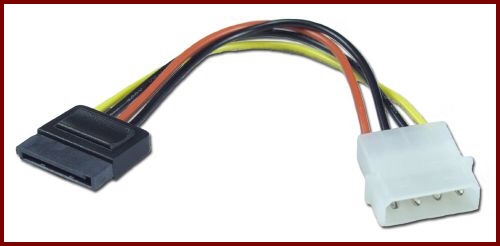
If I bought an OEM hard drive/optical drive that don't come with cables, what cables do I need to buy to power it?

I already have SATA cables.
 
FleckSplat said:
If I bought an OEM hard drive/optical drive that don't come with cables, what cables do I need to buy to power it?

I already have SATA cables.
If you don't have any spare SATA power connectors from your PSU, try a SATA to Molex adapter.

Molex-SATA_TN.jpg
 
Hey guys, couple quick questions: will I run into any problems with depths or widths fitting a Hyper 212+ and a GTX460 into an Antec 300 case? Also, how often do mobo manu's update their RAM compatibility lists? The popular G Skill 1600 sticks don't seem to be listed on Asus's P7P55D boards.
 
Reallink said:
Hey guys, couple quick questions: will I run into any problems with depths or widths fitting a Hyper 212+ and a GTX460 into an Antec 300 case? Also, how often do mobo manu's update their RAM compatibility lists? The popular G Skill 1600 sticks don't seem to be listed on Asus's P7P55D boards.

Wow. I'm getting all three of those in one system tomorrow. I'll let you know.
 
*Reposting*
1)Basic Desktop Questions

Budget: Price Range + Country
Main Use: Gaming, Video editing, or just general usage
Monitor Resolution: What resolution will you be playing your games at? Are you going to upgrade later?
List SPECIFIC games that you MUST be able to play: Self Explanatory

2)General Guide on what to buy (Summer)
Tech Report Builders Guide!
A very good basic guide that has been updated for Summer. Has alternative options and many price points.


3) 15 minute video how-to
http://vimeo.com/5685229
40 minute how-to
http://www.tested.com/news/video-how-to-build-the-best-1500-gaming-pc-step-by-step/152/

SeriousNanook said:
Thanks for the help, this is what I've come up with. I already have a dvd drive/monitor/soundcard so I think I'm done.

Unless there are problems with this build I'll probably go ahead and order it in the next day or so. Silly Pirates of The Caribbean bonus.
I'd swap in a Samsung F3 1TB, but that's it.
Reallink said:
Hey guys, couple quick questions: will I run into any problems with depths or widths fitting a Hyper 212+ and a GTX460 into an Antec 300 case? Also, how often do mobo manu's update their RAM compatibility lists? The popular G Skill 1600 sticks don't seem to be listed on Asus's P7P55D boards.
Fine, fine, 1600 is not a DDR3 standard, all the chips must be overclocked so iirc they can't list them.
FleckSplat said:
If I bought an OEM hard drive/optical drive that don't come with cables, what cables do I need to buy to power it?

I already have SATA cables.
Mobo will come with 4 or so SATA cables, PSU should have 6 or so SATA power connectors.
Amneisac said:
So here's where I'm at now with overclocking. Computer isn't even 24 hours old yet so I'm not trying to go too crazy, but does this all seem within acceptable limits?
Those load temps look fine. 3.5 is too low, get at least to 3.8! Try to stick to 1.31V if you can.
Boonoo said:
My brother is looking at building a modest gaming PC (600-700 dollar budget) that he's planning on hooking up to his 720p HDTV. I have a 5770 that I bought to replace a 4890 I fried 3 months ago, and I was thinking of selling the 5770 to him and picking up a 460 or maybe a 5850 if prices drop in the next month or so. I mostly play at 1920x1200, so I'm looking for a little extra oomph.

Would this be sensible for both parties? Would a 5770 for 100 or so be fine for what he's looking to do, and would shelling out 100-120 be worth it for an upgrade on my end? My CPU is a q6600 at 3.7.
That sounds good to me.
jkoch said:
I have this PC:

http://www.newegg.com/Product/Product.aspx?Item=N82E16883103237

It doesn't have a full size PCIx slot or any additional 4 pin power supply plugs. Can anyone recommend a low profile video card that would work with this PC?
For gaming?
http://www.newegg.com/Product/Product.aspx?Item=N82E16814187061
Don't think it will run on your PSU though. :lol (Could be wrong)
Your motherboard has onboard video so why do you need a graphics card?

If not gaming then something like this is fine:
http://www.newegg.com/Product/Product.aspx?Item=N82E16814127473
 
2i9ksxg.jpg


GPU-Z is reading PhysX enabled for my 5870. Seems weird. I'm using a hybrid set up (w/ GTS250). Anyone else seen this?
 
My computer no longer posts, so it's time for an upgrade. I'm only looking to replace the mobo, CPU, and RAM. My sweet spot is $300. Also, I originally built the computer to be quiet and would like the upgrade to stay the course.

Here's what I'm looking at:

GIGABYTE GA-870A-UD3 AM3 AMD 870
Crucial 2GB 240-Pin DDR3 SDRAM DDR3 1333
AMD Athlon II X4 635
COOLER MASTER Hyper 212 Plus

This all comes in at $311.52 with shipping. Any thoughts? I'm still running XP, BTW.
 
So a while back I was having issues with my computer and was debating which route to go..

I ended up going the AMD X6 1055T route.

Which I am happy to report I have it OC'd to 3.7Ghz right now on air, not stock air, aftermarket. Holds at 41 degrees under full stress which is, in my opinion, awesome.


I know people are going with the i5's right now. However I am VERY happy with the ease at which it was to OC this chip, and the price fit my budget which made me happy.


Only issue I ran into was I was using a new Thermaltake 750W PSU and when I put my computer under stress, the power supply would start buzzing.

I took the plunge and picked up a Corsair HX750w Professional Series, and I am happy to report no issues!
 
Just my luck...NCIXUS doesn't have any 1gb GTX 460 cards available yet. Somewhat tempted to just go with the 5770 and get it over with. :lol
 
Top Bottom