• Hey Guest. Check out your NeoGAF Wrapped 2025 results here!

"I need a new PC!" 2010 Edition

Salaadin said:
Newegg just emailed me. The Crucial RealSSD C300 64GB is in stock.
http://www.newegg.com/Product/Product.aspx?Item=N82E16820148357

I can only find one review of this that seemed to praise it HERE
Would this be a good SSD for the OS + FFXIV + any FFXIV expansions?

140 bucks is a really nice price for this sort of thing. Only thing that worries me is the write speed but I really have no idea if thats good or bad tbh.

Write speed is at least an order of a magnitude less important for a OS drive than the random access speed for reading/writing thousands of small files (under/around 4KB).
 
Salaadin said:
Bought. Paid for the faster shipping too so Id have it before the weekend if they get it processed today. I hope :D

Im really hoping the 64GBs isnt going to lead to space issues later. Are SSDs the same as HDDs where the advertised space is more than what you actually get? How much usuable space will I get with 64GB SSD?

Windows 7 is what? 16 GBs? That leaves me with 48 GBs of working space. Should be enough room for FFXIV and a few other programs.
I think around 58GB - 15GB = 40 ish GB
A small amount of space is also reserved for shuffling around data to make sure your drive is zippy all the time. Be sure to read up on TRIM support while you wait!
Dizzy-4U said:
I don't have any yet since I'm building a pc. I was thinking of buying one xfx 5970. In the future, like one year from now, I intend to buy another 5970 or a newer one to crossfire it. 750w is enough you say?
http://www.guru3d.com/article/radeon-hd-5970-review-test/10

Test was ran with a Core i7 965 @ 3750 MHz also.
 
Hazaro said:
Link me to the store you nabbed it from. I'll check if there's any decent alternatives (Probably not in that price range).

Sucks because it's only $80 AR here.
.

EBUYER. Didn't have a thorough look across the web but that seems to be the average price in my region.
 
So is it normal for a computer to power down and back on after making clock speed changes in the BIOS? I mean like immediately after, like I save and exit the BIOS, powers down, powers right back up.
 
Amneisac said:
A general question about bottlenecks and overclocking:

My new computer has an i5-750 and it's getting the 1GB Palit 460 tonight. So, obviously the CPU can outperform the card, should I still overclock the CPU? I mean the bottlenecking at the GPU isn't that literal right? It isn't like I can't still gain performance from a faster CPU because the GPU is going to be the limiting reagent in my games' performance, right?

I have my i5-750 at 3.5ghz right now and load temps haven't gone past about 62, but I don't really want to push it too hard if I don't really need to.

The performance you gain will depend on the game in a lot of cases. For instance, StarCraft 2 seems to be very dependent on CPU clockspeed, so I would imagine you would see a significant boost if your CPU is overclocked. The performance of GTA IV seemed to be very dependent on your CPU but I believe that game took better advantage of the additional cores. However, games that are more CPU dependent seem to be the exception.

Your temperatures seem quite low though. Did you optimize your voltages?
 
Felix Lighter said:
The performance you gain will depend on the game in a lot of cases. For instance, StarCraft 2 seems to be very dependent on CPU clockspeed, so I would imagine you would see a significant boost if your CPU is overclocked. The performance of GTA IV seemed to be very dependent on your CPU but I believe that game took better advantage of the additional cores. However, games that are more CPU dependent seem to be the exception.

Your temperatures seem quite low though. Did you optimize your voltages?

Nah, I'm way too scared to mess with the voltages.

oc3485.png


One core did get up to 66c though so they were a little higher than advertised. :)
 
Canti said:
EBUYER. Didn't have a thorough look across the web but that seems to be the average price in my region.
http://www.ebuyer.com/product/191826

This XFX is also fairly good. The only reason I'd suggest it is the fact that it is:
1) Modular
2) Cheaper
3) 4x6pins for possible xFire/Sli setup in the future

It does have a little 'bug' for massive loads on the 5V rail (some ripple), but any modern rig (12V based) won't run into that as an issue.
Amneisac said:
So is it normal for a computer to power down and back on after making clock speed changes in the BIOS? I mean like immediately after, like I save and exit the BIOS, powers down, powers right back up.
-
Nah, I'm way too scared to mess with the voltages.
Yup! And please set your CPU voltage manually so you get 1.31V in Windows idle. Auto is not good since it can and will overcompensate.
 
Hazaro said:
Yup! And please set your CPU voltage manually so you get 1.31V in Windows idle. Auto is not good since it can and will overcompensate.

Ah, that makes sense, protip! Thanks. Is there anything else like that I should worry about? I'm trying to change as few things as possible obviously, but I would have never know that about setting the voltage manually.
 
Dizzy-4U said:
Thank you.
Oh also I noticed you said 5970. In general 3+ GPU set-ups do not scale that well in general. (Compared to 70-90% of many single GPU situations)
You will also need a very fast CPU. Just a heads up.

http://www.guru3d.com/article/radeon-hd-5970-review-test/23
Amneisac said:
Ah, that makes sense, protip! Thanks. Is there anything else like that I should worry about? I'm trying to change as few things as possible obviously, but I would have never know that about setting the voltage manually.
Set your RAM voltage and timing to what the manufacturer says if they aren't near that already. Your timings may be lax since you are overclocked so don't worry if they are 9-9-9-27 instead of 8-9-8-24 or something.
 
Hazaro said:
I think around 58GB - 15GB = 40 ish GB
A small amount of space is also reserved for shuffling around data to make sure your drive is zippy all the time. Be sure to read up on TRIM support while you wait!

To be on the safe side, I would figure around 5% of the drive size gone for formatting, 4-8GB for a swap file, 20GB for windows (5GB for restore states), 5-10GB for apps (Internet temp files, MS Office, GIMP, even more if you own Adobe CS Suites or other big software etc), and you'll always want to leave a good 10% of the drive free, if not 20%.

So on a 64GB drive, I'd break it down like this:

64GB - 5% - 20% - 4GB swap - 20GB windows - 5GB apps = 45GB used/allocated.

That leaves around 20GB for games, which FFIV could easily come close to passing, as WoW w/ expansions can reach 30GB if I'm not mistaken.
 
Minsc said:
To be on the safe side, I would figure around 5% of the drive size gone for formatting, 4-8GB for a swap file, 20GB for windows (5GB for restore states), 5-10GB for apps (Internet temp files, MS Office, GIMP, even more if you own Adobe CS Suites or other big software etc), and you'll always want to leave a good 10% of the drive free, if not 20%.

So on a 64GB drive, I'd break it down like this:

64GB - 5% - 20% - 4GB swap - 20GB windows - 5GB apps = 45GB used/allocated.

That leaves around 20GB for games, which FFIV could easily come close to passing, as WoW w/ expansions can reach 30GB if I'm not mistaken.
Ouch. I was considering one of the C300 drives myself.
This is why I don't deal with software, too much junk to deal with. :lol

That's a shame since the C300 has a much lower cost per GB along with impressive read speeds. You could probably fit everything on there, but it would be fairly tight if you weren't playing it safe...

*And why didn't you tell him before! :lol
 
Amneisac said:
Ah, that makes sense, protip! Thanks. Is there anything else like that I should worry about? I'm trying to change as few things as possible obviously, but I would have never know that about setting the voltage manually.

It can all be a little overwhelming at first but once you read a guide or 2 it all makes sense. Once you know how one value affects another and what the acceptable voltages are, it is much less intimidating.
 
Minsc said:
To be on the safe side, I would figure around 5% of the drive size gone for formatting, 4-8GB for a swap file, 20GB for windows (5GB for restore states), 5-10GB for apps (Internet temp files, MS Office, GIMP, even more if you own Adobe CS Suites or other big software etc), and you'll always want to leave a good 10% of the drive free, if not 20%.

So on a 64GB drive, I'd break it down like this:

64GB - 5% - 20% - 4GB swap - 20GB windows - 5GB apps = 45GB used/allocated.

That leaves around 20GB for games, which FFIV could easily come close to passing, as WoW w/ expansions can reach 30GB if I'm not mistaken.

Yikes, so even with an 80GB drive, Id be cutting it close (assuming my math is correct)?

A few more questions now:

Why is it good to keep 20% of the drive free? You intially say 10%. Would I be able to get away with that safely?

I dont use too many apps on my PC. Its primarily for gaming so I didnt really think much about installing too many apps on the SSD. Maybe antivirus and a few other smaller things but I dont use Office or Photoshop too much on it. Would there be any negative drawbacks to keeping Office and Photoshop on the regular 7200RPM HDD?

Hazaro said:
*And why didn't you tell him before! :lol
:lol
 
Metalic Sand said:
So is 1.4 voltage on a Phenom 2 processor good or bad?

Apparently, AMD says 1.425V is the maximum safe voltage for the phenom II x3 720 chip but it appears that overclockers routinely go beyond that. It seems fine.
 
Felix Lighter said:
Apparently, AMD says 1.425V is the maximum safe voltage for the phenom II x3 720 chip but it appears that overclockers routinely go beyond that. It seems fine.


Well i only did a multiplier overclock, only .4 higher. Maybe i should lower the voltage some.
 
Salaadin said:
Yikes, so even with an 80GB drive, Id be cutting it close (assuming my math is correct)?

A few more questions now:

Why is it good to keep 20% of the drive free? You intially say 10%. Would I be able to get away with that safely?

I dont use too many apps on my PC. Its primarily for gaming so I didnt really think much about installing too many apps on the SSD. Maybe antivirus and a few other smaller things but I dont use Office or Photoshop too much on it. Would there be any negative drawbacks to keeping Office and Photoshop on the regular 7200RPM HDD?


:lol

I have an 80GB and the math is pretty solid. I have about 35GB free on my 80GB, and I personally wouldn't want to see it drop to less than 10GB free, preferably 15GB (20%). The more free space you have on the drive, the longer it lives, not that it should ever be a problem, I think worst case scenarios show the drives taking decades to be written to death. You also need space handy for installing crap/temporary files, lots of games are sloppy and use your my documents folder to install DLC (which can take up many GBs), not to mention saves, which in games like The Witcher, can also take over 1GB.

To simplify the formula, I find it to be:

Total drive size -5% - 35GB = free space.

80GB - 4GB - 35GB = ~40GB and I have 35GB free (I believe my swap file is 8GB not 4GB, which accounts for some of the difference).

Not wanting to go under 10-15GB leaves me 20-25GB free to use (which I doubt I ever will, at this point my PC is basically thoroughly broken in).

The drawbacks of putting office and photoshop on a 7200rpm are that they benefit from the SSD significantly more than most any game will. If you never/very rarely use them though, putting them on the SSD does very little good I suppose. I only use office like maybe once a month, and I still would never want it on my 7200rpm drive.

More likely I might just be forcing my personal opinions too strongly, and you'll be fine running it with plenty of space, for all I know your entire windows install could take 20GB with swap file and apps and FFXIV could be just 10GBs, leaving half the drive free.

 
Minsc said:
I have an 80GB and the math is pretty solid. I have about 35GB free on my 80GB, and I personally wouldn't want to see it drop to less than 10GB free, preferably 15GB (20%). The more free space you have on the drive, the longer it lives, not that it should ever be a problem, I think worst case scenarios show the drives taking decades to be written to death. You also need space handy for installing crap/temporary files, lots of games are sloppy and use your my documents folder to install DLC (which can take up many GBs), not to mention saves, which in games like The Witcher, can also take over 1GB.

To simplify the formula, I find it to be:

Total drive size -5% - 35GB = free space.

80GB - 4GB - 35GB = ~40GB and I have 35GB free (I believe my swap file is 8GB not 4GB, which accounts for some of the difference).

Not wanting to go under 10-15GB leaves me 20-25GB free to use (which I doubt I ever will, at this point my PC is basically thoroughly broken in).

The drawbacks of putting office and photoshop on a 7200rpm are that they benefit from the SSD significantly more than most any game will. If you never/very rarely use them though, putting them on the SSD does very little good I suppose. I only use office like maybe once a month, and I still would never want it on my 7200rpm drive.

More likely I might just be forcing my personal opinions too strongly, and you'll be fine running it with plenty of space, for all I know your entire windows install could take 20GB with swap file and apps and FFXIV could be just 10GBs, leaving half the drive free.

Ok thanks. And believe me, Im glad for the input. Id rather hear both ends of the spectrum.

Ultimately, even If I dont end up using this drive for FFXIV, I think the benefits of having an SSD are too good. It sickens me when I go into my Windows Experience Index and see a score of 5.8 because of the HDD speed when everything else is above 7.0.

And even then, FFXIV might not initially take up all the space so I can start off with it on this drive and, if I feel that I need to, I can get another SSD later on and use that. There shouldnt be any issues there, right?


Edit: Friend of mine says WoW + expansions comes out to 18GBs. The reason some people are so high is because of mods plus installation files or something. Hopefully FFXIV is similar.
 
I traded a bunch of used unplayed games to Amazon and should be getting $190 in credit. They received the games yesterday, and I'm just waiting for them to deposit the credit into my account so I can buy the Intel 80 GB SSD. Once I receive that I'll be ready to build my PC this weekend. :D
 
My new computer should be here next week! What's the name of that site that let's you download all sorts of apps that you need in one package? It's like browsers, and music players, and anti virus stuff.
 
AcciDante said:
My new computer should be here next week! What's the name of that site that let's you download all sorts of apps that you need in one package? It's like browsers, and music players, and anti virus stuff.

ninite.
 
can anyone help me or give any suggestions. My pc wont boot to bios or post screen as you will. It does one long beep and 2 short ones. Any idea on how to fix this?
 
What's your ram configuration like? Make sure they're in the right slots. That's always my go to thing to check. Also, are fans spinning up and whatnot?
 
TheExodu5 said:
That's a sweet deal.

I'd go with the 5970.

The only real upside to the two 5850 is if you plan on selling one or sticking one in a lower powered case later on.


One is in stock, and the other isn't. Just seems like same product, new SKU.

I went with the two 5850s, did I get screwed?
 
everything is powred. switched the ram into the slots. still same shit. i dont understand whats going on. all fans/lights are on. they keyboard/mouse dont turn on though.
 
demosthenes said:
I haven't built a computer in 4 years, I thought I needed paste for even the stock cooler, am I that rusty? :lol

In my experience most stock coolers come with some paste already on them.

everything is powred. switched the ram into the slots. still same shit. i dont understand whats going on. all fans/lights are on. they keyboard/mouse dont turn on though.

Are all your power cords plugged in? Sometimes I forget the 8pin MB cord.
 
Terproerg said:
everything is powred. switched the ram into the slots. still same shit. i dont understand whats going on. all fans/lights are on. they keyboard/mouse dont turn on though.

Have you carefully made sure that you have the RAM inserted all the way? This has happened to me on some boards where I felt like the RAM was all the way in (even the little clips were in) but it wasn't actually fully seated.
 
Is TRIM something that I have to run myself or will Win7 do it by itself whenever I delete a file?

Anything else I need to know about SSDs vs HDDs? I know about firmware updates and all that but it looks like there isnt any for the 64GB C300 anyways.
 
Salaadin said:
Is TRIM something that I have to run myself or will Win7 do it by itself whenever I delete a file?

Anything else I need to know about SSDs vs HDDs? I know about firmware updates and all that but it looks like there isnt any for the 64GB C300 anyways.

Windows 7 is pretty good about detecting it all properly. The only other thing that people suggest is to use AHCI in the bios for your drive.

Obviously you don't want to defragment a SSD either.

You can easily verify your SSD is detected properly by running Disk Defragmenter, and you'll see a list of drives and last run column, the SSD drive should be set to "Never Run."
 
Minsc said:
Windows 7 is pretty good about detecting it all properly. The only other thing that people suggest is to use AHCI in the bios for your drive.

Obviously you don't want to defragment a SSD either.

You can easily verify your SSD is detected properly by running Disk Defragmenter, and you'll see a list of drives and last run column, the SSD drive should be set to "Never Run."

Thanks again. AHCI. Ill have to remember that.
 
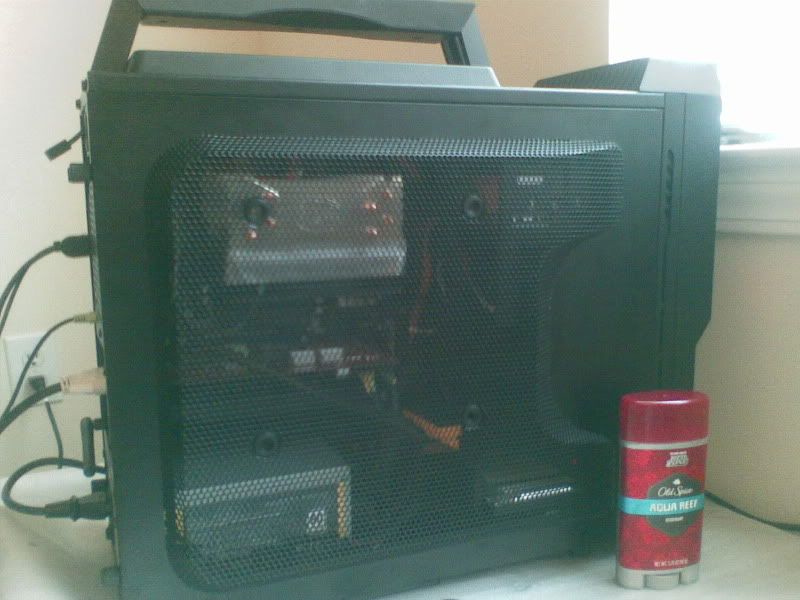
That's it, my PC is officially CLOSED! Side panels screwed all the way in, all case fans set to the lowest speeds they'll go, Cool and Quiet turned on to keep the CPU noise down but the Hyper212+ fan is still loud. I put some heatsinks on my Palit card (I consider them as my early adoption tax for blindbuying this first thing in the morning after reviews released).

Currently only at 3.6 GHz with my Phenom 955 and 800/1600 for my GTX460 but I'm happy with my really low max temps (50 CPU, 63 GPU) at full load for my compact case :D

NewSpice.jpg
 
Answer me this -

I have 2 identical 8800GT's (512Mb, EVGA brand).

I load up Crysis, 1280x720 @ High settings.

1 runs the game smoothly, the other with lots of stuttering (unless i drop the texture & model detail to medium). The stuttering occurs when moving around quickly, in gun fights etc.

All other games run the same on each card.

What would cause this ?
 
Ogs said:
Answer me this -

I have 2 identical 8800GT's (512Mb, EVGA brand).

I load up Crysis, 1280x720 @ High settings.

1 runs the game smoothly, the other with lots of stuttering (unless i drop the texture & model detail to medium). The stuttering occurs when moving around quickly, in gun fights etc.

All other games run the same on each card.

What would cause this ?

One works, the other doesn't :P Might be the heat sink no longer being attached? So it overheats? Dunno, try the RMA if you still can.
 
Top Bottom