• Hey Guest. Check out your NeoGAF Wrapped 2025 results here!

"I need a new PC!" 2010 Edition

I just got a 60GB Vertex 2 SSD and did a fresh Windows 7 install on it. Is there an easy way to make the switch?

I don't have the time to setup Windows the way I had it before and also reinstall all my programs, drivers, games. There has to be an easier way since I already have this crap on my HDD, and I just want to link it to my fresh Windows 7 SSD installation.
 
Anyone have experience with network adapter drivers? I can connect to any game that I play on my PC except Blizzard games (I cant log into a main city of WoW at the moment, and playing StarCraft 2 online BSOD's my PC) I was able to play Alien Swarm perfectly fine (its the only other multiplayer game I have on my pc atm) same with browsing the internet and downloading things, those run perfect, very bizarre...

btw my motherboard is a EVGA X58, I just built this PC this week, this is the first issue Ive had with it :(
 
I kind of semi-expect this to get lost in the thread, but if anyone has any recommendations/advice, it'd be much appreciated.

I'm looking for a new laptop; nothing too flashy or bulky or necessarily a 'gaming' laptop.
I'd love it to be able to run Source games (i.e. HL2, L4D, etc.) and modern RTSs smoothly.

That's all, really. Bonuses would be lightweight, good battery life and such.

If there are any reasonably priced models out there that you guys know of, or even just some basic specs that I should be aiming out, then any info would be great. Thanks :)
 
bigboss370 said:
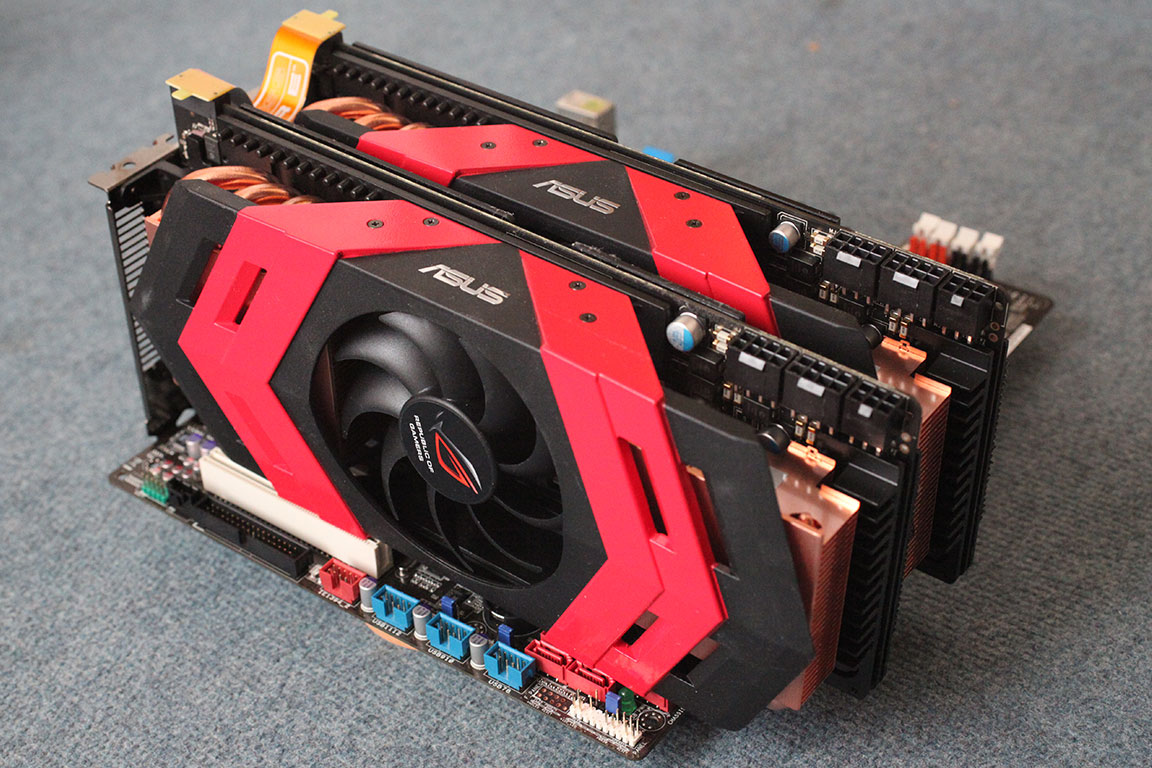
isn't the ati dual 5970s the best/fastest graphics you can get on the market now?
Nope. Dual dual 5970's are.
Also if you are spending that much you should get a Maingear or similar 'boutique' computer from a higher end place. Alternatively if you don't want to deal with parts and warranty you can always get a Dell + full service warranty.

http://www.techpowerup.com/reviews/ASUS/ARES_CrossFire/7.html
4h8qcp.jpg

cards1.jpg

Lambtron said:
I'm thinking about building a home machine that I would run OS X on. Do any of you have experience on this? I was thinking a quad core i5 processor and then I don't know from there. Is there anywhere good I could check mobo/GPU compatibility?
http://wiki.osx86project.org/wiki/index.php/Main_Page
http://www.insanelymac.com/osx86db/
Rrang129 said:
Anyone have experience with network adapter drivers? I can connect to any game that I play on my PC except Blizzard games (I cant log into a main city of WoW at the moment, and playing StarCraft 2 online BSOD's my PC) I was able to play Alien Swarm perfectly fine (its the only other multiplayer game I have on my pc atm) same with browsing the internet and downloading things, those run perfect, very bizarre...

btw my motherboard is a EVGA X58, I just built this PC this week, this is the first issue Ive had with it :(
Sounds like software issue. If you can connect to DNS/Web no reason it shouldn't be for Blizzard. Try opening/forwarding the ports specific to those games.
B-Genius said:
I'm looking for a new laptop; nothing too flashy or bulky or necessarily a 'gaming' laptop.
I'd love it to be able to run Source games (i.e. HL2, L4D, etc.) and modern RTSs smoothly.

That's all, really. Bonuses would be lightweight, good battery life and such.

If there are any reasonably priced models out there that you guys know of, or even just some basic specs that I should be aiming out, then any info would be great. Thanks :)

4) Prospective laptop buyers please fill this out and ask their forum as well.
http://forum.notebookreview.com/wha...ould-i-buy-form-must-read-before-posting.html
 
Gaf, I am looking to build a micro atx gaming rig, capable of playing SC2 on ultra (after my macbook pro's miserable performance). Is this possible, or is this folly? Any hardware recommendations from your vast knowledge before I set myself out on this quest?

Thank you.
 
General Questions

1) What is your budget?
$1,700 max.

2) What size notebook would you prefer?
11"-15"

3) Where will you buying this notebook? You can select the flag of your country as an indicator.
USA

4) Are there any brands that you prefer or any you really don't like?
no preference. just quality.

5) Would you consider laptops that are refurbished/redistributed?
no.

6) What are the primary tasks will you be performing with this notebook?
gaming.

7) Will you be taking the notebook with you to different places, leaving it on your desk or both?
probably staying at my desk for the most part.

8) Will you be playing games on your notebook? If so, please state which games or types of games?
SC2, MW2, D3, etc.

9) How many hours of battery life do you need?
it will be at my desk primarily. wanted to go with the laptop to save space.

10) Would you prefer to see the notebooks you're considering before purchasing it or buying a notebook on-line without seeing it is OK?
buying on-line is ok.

11) What OS do you prefer? Windows (XP or Vista or Windows 7), Mac OS, Linux, etc.
Win7

Screen Specifics

12) From the choices below, what screen resolution(s) would you prefer?
I'd like something ideal for gaming. not sure what that is ;x

13) Do you want a glossy/reflective screen or a matte/non-glossy screen?
probably prefer matte. but I could live with glossy as that is what I have now.

Build Quality and Design

14) Are the notebook's looks and stylishness important to you?
yes, but not more than performance.

15) When are you buying this laptop?
within the next month.

16) How long do you want this laptop to last?
at least 2 years.

Notebook Components

17) How much hard drive space do you need; 80GB to 640GB? Do you want a SSD drive?
I don't need a TB. maybe 120-320

18) Do you need an optical drive? If yes, a CDRW/DVD-ROM, DVD Burner or Blu-Ray drive?
just a DVD rom.
 
MessieurCouchon said:
Gaf, I am looking to build a micro atx gaming rig, capable of playing SC2 on ultra (after my macbook pro's miserable performance). Is this possible, or is this folly? Any hardware recommendations from your vast knowledge before I set myself out on this quest?

Thank you.

This is exactly what I have :D Although I have everything on ultra at 1080p, my framerate dips to the low 40s in big battles in single player and Custom games multiplayer.

I took the budget route:
AMD Phenom II 955BE
Nvidia GTX 460
some Asrock matx mobo that had built in graphics and usb 3.0 (but no SATA 6)
 
MessieurCouchon said:
Gaf, I am looking to build a micro atx gaming rig, capable of playing SC2 on ultra (after my macbook pro's miserable performance). Is this possible, or is this folly? Any hardware recommendations from your vast knowledge before I set myself out on this quest?

Thank you.

My mATX box could house 2 5870s, so I guess it should certainly be possible. All you really need is a GTX 460 which is a tiny card, and an overclocked i5 for best performance to max out SC2 on ultra. So it should be feasible for a bit under $1K, probably like $130 for the case, $450 for the CPU/RAM/Motherboard/etc, and $230 for the GPU.

Edit: Actually an overclocked i7 would score very slightly higher than the i5, SC2 does benefit ever-so-slightly from hyper-threading, at a cost/power/temperature increase though.
 
Ok Gaf, GPU advice needed. I have a Q6600 with 4GB Ram and an 8800GTS 512. Lately i've been having system lockups, for about 3 months. I couldn't pinpoint the problem but with Starcraft 2 I've been getting major artifacting, even in boot and Windows, which means my GPU which is about 2 1/2 years old is dying.

I swapped in a spare 5570 from my HTPC and my computer is fine, so its certainly the problem. I was perfectly happy with the performance of that card, so now I need to replace it. This has me worried as i'm low on cash for something like a PC so I've downclocked my CPU back to 2.4Ghz as i'm in no position to buy an entirely new PC.

So what GPU should I buy now? I'd like to spend as little as possible but while i'm out there I might as well grab a performance boost. A 460 GTX is about $250 which is more than I'd like to spend, I can grab a 5770 for about $190 which is right on the money, but its an old card going into the realm of being obsolete. Should I just grab the 5770, or is there another card i'm not thinking of?

My monitor res is 1680x1050.
 
Thank you again!

Just two specific questions remain, and from there it should be clear sailing for me:

Is there any specific motherboard I should watch out for?
Any case recommendations?
 
TheHeretic said:
Ok Gaf, GPU advice needed. I have a Q6600 with 4GB Ram and an 8800GTS 512. Lately i've been having system lockups, for about 3 months. I couldn't pinpoint the problem but with Starcraft 2 I've been getting major artifacting, even in boot and Windows, which means my GPU which is about 2 1/2 years old is dying.

I swapped in a spare 5570 from my HTPC and my computer is fine, so its certainly the problem. I was perfectly happy with the performance of that card, so now I need to replace it. This has me worried as i'm low on cash for something like a PC so I've downclocked my CPU back to 2.4Ghz as i'm in no position to buy an entirely new PC.

So what GPU should I buy now? I'd like to spend as little as possible but while i'm out there I might as well grab a performance boost. A 460 GTX is about $250 which is more than I'd like to spend, I can grab a 5770 for about $190 which is right on the money, but its an old card going into the realm of being obsolete. Should I just grab the 5770, or is there another card i'm not thinking of?

My monitor res is 1680x1050.
Don't grab a 5770. Since you're cash strapped pick up a used 4870, cheaper than a 5770 with a bit more power, it'd be perfect for your resolution.
 
I will post again when I am off work with official specs, but as I cannot afford a new PC right now I have an older Dell desktop I am trying to fix up a bit to play some games (WoW, TF2). Right now it runs WoW at about 20FPS, but it only has 1GB of RAM.

I need to find a bit more DDR PC3200 RAM, anyone have any they aren't using or know where it is cheap? May just get 2 more 512 sticks off NewEgg.

I am not really good with computer hardware so I am trying to figure out everything I need to at least make this machine a little better for the time being, I believe I need a 100mm fan too.
 
TheHeretic said:
Ok Gaf, GPU advice needed. I have a Q6600 with 4GB Ram and an 8800GTS 512. Lately i've been having system lockups, for about 3 months. I couldn't pinpoint the problem but with Starcraft 2 I've been getting major artifacting, even in boot and Windows, which means my GPU which is about 2 1/2 years old is dying.

I swapped in a spare 5570 from my HTPC and my computer is fine, so its certainly the problem. I was perfectly happy with the performance of that card, so now I need to replace it. This has me worried as i'm low on cash for something like a PC so I've downclocked my CPU back to 2.4Ghz as i'm in no position to buy an entirely new PC.

So what GPU should I buy now? I'd like to spend as little as possible but while i'm out there I might as well grab a performance boost. A 460 GTX is about $250 which is more than I'd like to spend, I can grab a 5770 for about $190 which is right on the money, but its an old card going into the realm of being obsolete. Should I just grab the 5770, or is there another card i'm not thinking of?

My monitor res is 1680x1050.

The 5770 is not that old, not even a year old. It's not a good buy at $190, nor $160, nor $150. If you could get it for like $140 or less, then you're talking.

As you can see here, in SC2, a 5770 beats the pants off a 4890 (~30% faster) - which is faster than a 4870 (thus the 5770 will destroy the 4870), so of course, ymmv depending on where you'll be investing your hours.

I'd save for the GTX 460 if it were me, you're looking at $60 for a 30% faster framerate (over a 5770) on average, a ~65% faster framerate in SC2, and you also get nVidia's drivers & nHancer software.

Edit: Not doing so great with numbers this morning. Should be good now.
 
Minsc said:
The 5770 is not that old, not even a year old. It's not a good buy at $190, nor $160, nor $150. If you could get it for like $140 or less, then you're talking.

As you can see here, in SC2, a 5770 beats the pants off a 4890 (~30% faster) - which is faster than a 4870 (thus the 5770 will destroy the 4870), so of course, ymmv depending on where you'll be investing your hours.

I'd save for the GTX 460 if it were me, you're looking at $60 for a 30% faster framerate (over a 577) on average, nearly a 100% faster framerate in SC2, and you also get nVidia's drivers & nHancer software.

You aren't getting a 5770 in Australia for <140. A 5770 is 190 - 220 give or take, a 460 GTX (if you can find one) is about 240-280.

Edit: At MSY the price points are $180 for a 5770 or $245 for a GTX 460. So you would roll with the 460?
 
TheHeretic said:
You aren't getting a 5770 in Australia for <140. A 5770 is 190 - 220 give or take, a 460 GTX (if you can find one) is about 240-280.

Edit: At MSY the price points are $180 for a 5770 or $245 for a GTX 460. So you would roll with the 460?

The GTX 460 is a very good card even at $245, given you can overclock it to the performance of the GTX 470, which costs in the $350 range. The 5770 is a harder sell now. Was much easier 6 months ago, now you need to be looking at under $150 w/ a tight budget for the 5770 to fit the bill.

To me the GTX 460 is just too nice a card to pass over, the 5770 needs to be at least $100 cheaper to make it a good alternative ($130 vs $230 is more like what I'm thinking).
 
Minsc said:
The GTX 460 is a very good card even at $245, given you can overclock it to the performance of the GTX 470, which costs in the $350 range. The 5770 is a harder sell now. Was much easier 6 months ago, now you need to be looking at under $150 w/ a tight budget for the 5770 to fit the bill.

To me the GTX 460 is just too nice a card to pass over, the 5770 needs to be at least $100 cheaper to make it a good alternative ($130 vs $230 is more like what I'm thinking).

I hear you, the only real issues are the GTX 460 seems to be very rare, as some stores are starting to price hike them, and I don't have a decent GPU in my system. All I really need is something to pass me by for 18 months, i'd be happy with a hard as powerful as my 8800 tbh, though its ridiculous to go out and buy one again.

Edit: Just to confuse matters I can get a 250 GTS 1GB for $120. ><
 
Is there a reason this OC gigabyte gtx 460 is one of the only $229 1 gb gtx 460 cards that is not consistently sold out at newegg? I've been waiting for a plain MSI or Gigabyte 1GB 460 to be in stock to order my new pc, but the rate things are going I don't know when they'll be back.
 
Okay, I definitely need a new PSU, my PC doesn't POST all the time when I turn it on since I got the GeForce 470 card (10% of the time it doesn't turn on or gets stuck at the mobo splash screen). I think I have an OCZ thats 650 or 750, I'm not entirely sure.

My system specs:

Gigabyte P55M-UD4
MSI GeForce 470MTX
i5 750 + 4GB RAM
1 SATA HDD, 1 eSATA HDD
6-8 USB devices including a USB Powered TV Tuner


I'm thinking about getting the Corsair 850TX. Any recommendations? Whether I need more or less or if theres a cheaper option.

Also, should all these power supplies fit in a standard case? some of the PSUs look like they are different sizes but could just be the angle of the pictures.

Just ghosted my HDD and started reinstalling windows before I left for work this morning just in case that was an issue with my video card as well (was having major performance issues-- card keeps going into power saving/2d desktop mode).
 
infinityBCRT said:
Okay, I definitely need a new PSU, my PC doesn't POST all the time when I turn it on since I got the GeForce 470 card (10% of the time it doesn't turn on or gets stuck at the mobo splash screen). I think I have an OCZ thats 650 or 750, I'm not entirely sure.

My system specs:

Gigabyte P55M-UD4
MSI GeForce 470MTX
i5 750 + 4GB RAM
1 SATA HDD, 1 eSATA HDD
6-8 USB devices including a USB Powered TV Tuner


I'm thinking about getting the Corsair 850TX. Any recommendations? Whether I need more or less or if theres a cheaper option.

Also, should all these power supplies fit in a standard case? some of the PSUs look like they are different sizes but could just be the angle of the pictures.

Just ghosted my HDD and started reinstalling windows before I left for work this morning just in case that was an issue with my video card as well (was having major performance issues-- card keeps going into power saving/2d desktop mode).

I personally almost always use the Corsair TX750W in the machines I build. They're pretty popular so they can be found on sale pretty regularly. It's not modular, but I'm pretty good at hiding extra cables. You'll only ever need more than the TX750W if you want to do 3+ gpus or something equally crazy. Pick up the 650W version if you can find it for significantly cheaper, it too will more than satisfy your build's power requirements.
 
TouchMyBox said:
I personally almost always use the Corsair TX750W in the machines I build. They're pretty popular so they can be found on sale pretty regularly. It's not modular, but I'm pretty good at hiding extra cables. You'll only ever need more than the TX750W if you want to do 3+ gpus or something equally crazy. Pick up the 650W version if you can find it for significantly cheaper, it too will more than satisfy your build's power requirements.
I think I'll go with then HX750W then since it is modular. Hopefully this will put an end to my GPU issues.

edit: using the PSU calculator, factoring in Capacitor aging (30% which in the footnotes says would happen after running it 24/7 for 1 year) it says 659W is minimum and 709 is recommended. Considering capacitor aging (this machine does run 24/7 for media centre purposes) should I still be good with 750W?
 
TheHeretic said:
I hear you, the only real issues are the GTX 460 seems to be very rare, as some stores are starting to price hike them, and I don't have a decent GPU in my system. All I really need is something to pass me by for 18 months, i'd be happy with a hard as powerful as my 8800 tbh, though its ridiculous to go out and buy one again.

Edit: Just to confuse matters I can get a 250 GTS 1GB for $120. ><

Considering your budget I'd go with the 250 GTS. I just built a new PC and grabbed the 250 over the higher end cards and have had no qualms with it. I overclocked it and ran ME2, Crysis (with custom Atomic detail settings) and have no hiccups whatsoever. It runs pretty cool in my case as well, so no issues there. I recommend the MSI variant, which is what I picked up.
 
If you guys want a free way to significantly cut your wattage usage, buy a power supply that's rated 80Plus. Would never buy another power supply that wasn't. Unless you like extra heat for no good reason.
 
Just ordered a new laptop....

14" LED screen
Althlon X2 Dual Core M320 (2.1 Ghz, 3200Mhz 1MB Cache)
4 GB DDR2 SDRAM
ATI RADEON HD 4200 512MB RAM
DVD RW (dual layer)
Wifi b/g/n
500 GB Hard drive
Bluetooth
6-cell battery

all for $469

so gaf, good deal or not?
 
Is there anyway to get MSI Afterburner to just load a profile through Windows Task Scheduler. Obviously I'm trying to bypass the UAC prompt w/o turning it off entirely. I don't want it to launch the entire program, or auto-minimize it to my systems tray or anything. I just want it to load a profile like the "Apply Overclocking at System Startup" option does in the actual Afterburner suite. I've tried tons of stuff, but have only succeeded in auto-launching the entire program suite.
 
So I got my new monitor. I have one stuck pixel, but I have something that should hopefully fix it.

My main question here is what should I use to calibrate my monitor?
 
Reallink said:
Is there anyway to get MSI Afterburner to just load a profile through Windows Task Scheduler. Obviously I'm trying to bypass the UAC prompt w/o turning it off entirely. I don't want it to launch the entire program, or auto-minimize it to my systems tray or anything. I just want it to load a profile like the "Apply Overclocking at System Startup" option does in the actual Afterburner suite. I've tried tons of stuff, but have only succeeded in auto-launching the entire program suite.

Why are you using MSI Afterburner over Rivatuner? You can set the profile you'd like for your OC with Riva and it'll load it upon reboot without loading the app just like you want.
 
Reallink said:
Is there anyway to get MSI Afterburner to just load a profile through Windows Task Scheduler. Obviously I'm trying to bypass the UAC prompt w/o turning it off entirely. I don't want it to launch the entire program, or auto-minimize it to my systems tray or anything. I just want it to load a profile like the "Apply Overclocking at System Startup" option does in the actual Afterburner suite. I've tried tons of stuff, but have only succeeded in auto-launching the entire program suite.
SMH. Seriously there is no reason to have UAC on if you've been using a PC for longer than 6 months.
 
1stStrike said:
Why are you using MSI Afterburner over Rivatuner? You can set the profile you'd like for your OC with Riva and it'll load it upon reboot without loading the app just like you want.

Yeah. I gotta say, I don't know why everyone is pimping this Afterburner. I think it's C- territory. I guess some people like it because you can slide the voltages? Doesn't work with my Gigabyte, so it's one worthy feature is worthless for me. Doesn't even tell me what my card is volted at.

EDIT: Also seems to disable my fan settings if I change the other settings and hit apply. I've gone through and tried every single combo. They just don't work.

Cranked it up to 800/1600/2000 and played some GTA IV to get some readings. Stupid fan was locked at 40 percent because I changed the other settings.
 
sharkmuncher said:
Is there a reason this OC gigabyte gtx 460 is one of the only $229 1 gb gtx 460 cards that is not consistently sold out at newegg? I've been waiting for a plain MSI or Gigabyte 1GB 460 to be in stock to order my new pc, but the rate things are going I don't know when they'll be back.

That one is actually sold out now. I was going to try and get it today and they don't have it in stock anymore. Does anyone know if they'll restock anytime soon? I don't really want to wait a month or something to see if they restock that card.
 
That and the fact it seems to get huge inventory. Pretty sure the fact it has the most reviews isn't a coincidence.

EDIT: Shark: You're waiting for a stock MSI or Gigabyte? No! Get the superior heat sinks. A 40hz overclock on the processor isn't harming anything. The superior heatsink will extend the lifespan much more than a slightly slower clock will.
 
Forbiden said:
That one is actually sold out now. I was going to try and get it today and they don't have it in stock anymore. Does anyone know if they'll restock anytime soon? I don't really want to wait a month or something to see if they restock that card.

Yeah... i was just hit with the same issue.. I just tried to order the Gigabyte or MSI GTX 460 1gb... sold out... EVERYWHERE. And when i do manage to find a place that has them, absolutely insane shipping charges.

So im just stuck here,.. waiting. I put like 3 cards on Auto-Notify.

Also... and i could be completely wrong. I tried to Order these cards from some random site, that ended up also being Sold out. But on the same page they also stated that they had another 30 cards being shipped to them and the supposed ETA was 8/4/10. So MAYBE .. MAYBE thats when Newegg gets some new cards in stock as well. But again.. i could be wrong
 
Inkwell said:
OK, what's the best way to fix a stuck pixel?

Learn to not see it. I have two and I don't even notice them, ever, any more. Drove me crazy for two weeks, now I never notice them.
 
Minsc said:
Learn to not see it. I have two and I don't even notice them, ever, any more. Drove me crazy for two weeks, now I never notice them.
I think I can do that. I'm kind of lucky that it's a little off to the left and down so i don't constantly see it.

I have to say I'm a bit disappointed at the motion blur my new monitor still has. I mean, it's much better than my TV and I've played a decent amount of games on that. I'm sure I'll just get used to it.

Edit: I nearly forgot. I want to mention this again in case people skip over it in my earlier post, but I'm also looking for some software/website/etc. to calibrate my monitor.
 
Inkwell said:
I think I can do that. I'm kind of lucky that it's a little off to the left and down so i don't constantly see it.

I have to say I'm a bit disappointed at the motion blur my new monitor still has. I mean, it's much better than my TV and I've played a decent amount of games on that. I'm sure I'll just get used to it.

Edit: I nearly forgot. I want to mention this again in case people skip over it in my earlier post, but I'm also looking for some software/website/etc. to calibrate my monitor.
If you're thinking free, you can probably find what you're looking for over at AVSforums if you can figure your way around there without getting a headache. I start at Lagom. Obviously not the most accurate way, but I don't really mind it. Then run the calibrate thing built into Win7 if you're running it.

As for stuck pixels, you can probably find some kind of scrammbler window thing if you google stuck pixel fix, or you can lightly massage it and see if it goes away.
 
Darkatomz said:
If you're thinking free, you can probably find what you're looking for over at AVSforums if you can figure your way around there without getting a headache. I start at Lagom. Obviously not the most accurate way, but I don't really mind it. Then run the calibrate thing built into Win7 if you're running it.

As for stuck pixels, you can probably find some kind of scrammbler window thing if you google stuck pixel fix, or you can lightly massage it and see if it goes away.
Thanks. I tried scrambler windows, but they didn't seem to work. I'm not quite sure how long I'm supposed to use them for. I tried massaging too, but I don't know if I did it correctly. I'll probably try again later.
 
I think I'd like to build a new PC. I haven't built a PC in years, the last computers I've got were a netbook and a MBP. I have no idea what CPU/Graphics/Motherboards I should be looking at. I appreciate the help. I'd like to build a PC that can run SC2 on Ultra with a stable framerate at 1920x1080.
 
Mairu said:
I think I'd like to build a new PC. I haven't built a PC in years, the last computers I've got were a netbook and a MBP. I have no idea what CPU/Graphics/Motherboards I should be looking at. I appreciate the help. I'd like to build a PC that can run SC2 on Ultra with a stable framerate at 1920x1080.

See my build on the previous page. Including a 23.6" Acer LCD, the cost was $1176 for that and it's been a pretty amazing rig so far. You could probably up the Geforce GTS 250 to something a little bit more powerful if you'd like, but it should have no problem with SC2.
 
1stStrike said:
Why are you using MSI Afterburner over Rivatuner? You can set the profile you'd like for your OC with Riva and it'll load it upon reboot without loading the app just like you want.

No reason besides it seemed like the go-to program. Afterburner does have start-up-profile load w/o launching the program, but it doesn't have UAC clearance, so you have to click yes every time you boot. That is what I'm trying to dodge. I'm guessing Rivatuner wouldn't be able to bypass that either.

Mr_Brit said:
SMH. Seriously there is no reason to have UAC on if you've been using a PC for longer than 6 months.

Unfortunately, I'm not the only one that uses this PC. Got super casual's and facebook fiends on this thing occasionally. Running multiple user accounts wouldn't save me any boot up steps over just hitting yes to UAC.
 
Reallink said:
No reason besides it seemed like the go-to program. Afterburner does have start-up-profile load w/o launching the program, but it doesn't have UAC clearance, so you have to click yes every time you boot. That is what I'm trying to dodge. I'm guessing Rivatuner wouldn't be able to bypass that either.


Unfortunately, I'm not the only one that uses this PC. Got super casual's and facebook fiends on this thing occasionally. Running multiple user accounts wouldn't save me any boot up steps over just hitting yes to UAC.

I have UAC disabled, so I can't tell you if it would, but Rivatuner is superior to Afterburner IMO. It's only a few mb to download so give it a shot.
 
haven't gotten many responses from you guys, probably because I'm such a damn flip-flopper over here, but I was informed at work today that my office receives a discount with Dell. Dell owns Alienware, so I looked at some of their machines.

I configured this system. What do you guys think of this? I know Alienwares are usually overpriced, but with the discount, is it a good deal? Also, anyone know how big the Alienware cases are? I rememeber them being HUGE.

anyway, here is the system, it came out to $1,528.30:


CASE Cosmic Black, Alienware Aurora Chassis edit
PROCESSOR Intel® Core™ i7 920 2.66GHz (8MB Cache) Quad Core Processor edit
OPERATING SYSTEM Genuine Windows® 7 Home Premium, 64bit, English edit
WARRANTY AND SERVICE 1 Year Basic Service Plan edit
VIDEO CARD Single 1GB GDDR5 NVIDIA® GeForce® GTX 460 edit
MEMORY 6GB Triple Channel 1333Mhz DDR3 edit
HARD DRIVE 500GB - SATA-II, 3Gb/s, 7,200RPM, 16MB Cache HDD edit
OPTICAL DRIVE Single Drive: 24X CD/DVD burner (DVD+/-RW) w/double layer write capability edit
SOUND CARD Integrated 7.1 Channel Audio edit
MONITOR 21.5” Alienware AW2210 OptX™ Full HD Gaming Monitor edit
KEYBOARD Alienware Multi-Media Keyboard edit
MOUSE No Mouse
 
Top Bottom