• Hey Guest. Check out your NeoGAF Wrapped 2025 results here!

"I need a new PC!" 2010 Edition

So my Razer Deathadder recently broke (after a year, like most Razer products, good mouse while it lasted though). So I was in the market for something new.

I have tried most gaming mice. Playing with a decade old competitive gaming clan and knowing people working for various PC companies I have not had to get my own hardware often. I have tried just about every Logitech and Razer product on the market and some steelseries as well.

However I was browsing Ncix and saw the Coolermaster Sentinel Advance gaming mouse (Twin laser, 5600DPI, OLED display screen). Thought it looked cool, and it was only $45. So I went for it.

Coolermaster-Sentinel-Advance.jpg


The pictures don't do the mouse justice and the screen is bigger IRL and very clear and sharp.

Long story short it's the best gaming mouse I have ever used. Except for one big problem. The laser has issues tracking movement on certain surfaces. I am talking it won't even fucking work. If it does it could be jittery and randomly stop for a few sec at a time. Also if you lift the mouse and set it back, it won't work for a good 5 sec. It was a massive headache.

I went to their site and they had a list of approved "gaming pads" until they fixed the driver problem (August 16th apparently V1.4). I picked one up and it worked great.

So when this mouse works, it's probably the best gaming mouse on the market bar none. Smooth, accurate, high DPI (allowing you to turn down the sensitivity in game), convient screen, 8 different LED colours, strong sturdy design, great buttons, nice feel, comes with 5 2.5g weights, replacement feet, two customizable LED areas, various profiles, macro and script editor etc..). If you are in the market for a mouse and have an approved mouse pad (or want to pick one up, since both will still be cheaper then a new razer mouse) go for it.

That being said, if you DON'T have an approved mousepad per their site, do not buy it until the problem has been confirmed fixed in V1.4. Great mouse but they shot themselves in the foot with the tracking problems. Hopefully they can fix it because if this is the kind of quality (hardware wise) coolmaster can produce for gaming mice they can be up there with Logitech and Razer.
 
1stStrike said:
Don't try to force the CPU in wrong. It just drops in (match up the arrows). I recommend putting the CPU, CPU fan and ram in before you attach the mobo to the case. It'll save you some frustration later.

Excellent advice. Especially about the CPU fan. I didn't do that on my build and had to take everything out when the fan was obstructed by my RAM
 
Blackface said:
So my Razer Deathadder recently broke (after a year, like most Razer products, good mouse while it lasted though). So I was in the market for something new.

I have tried most gaming mice. Playing with a decade old competitive gaming clan and knowing people working for various PC companies I have not had to get my own hardware often. I have tried just about every Logitech and Razer product on the market and some steelseries as well.

However I was browsing Ncix and saw the Coolermaster Sentinel Advance gaming mouse (Twin laser, 5600DPI, OLED display screen). Thought it looked cool, and it was only $45. So I went for it.

The pictures don't do the mouse justice and the screen is bigger IRL and very clear and sharp.

Long story short it's the best gaming mouse I have ever used. Except for one big problem. The laser has issues tracking movement on certain surfaces. I am talking it won't even fucking work. If it does it could be jittery and randomly stop for a few sec at a time. Also if you lift the mouse and set it back, it won't work for a good 5 sec. It was a massive headache.

I went to their site and they had a list of approved "gaming pads" until they fixed the driver problem (August 16th apparently V1.4). I picked one up and it worked great.

So when this mouse works, it's probably the best gaming mouse on the market bar none. Smooth, accurate, high DPI (allowing you to turn down the sensitivity in game), convient screen, 8 different LED colours, strong sturdy design, great buttons, nice feel, comes with 5 2.5g weights, replacement feet, two customizable LED areas, various profiles, macro and script editor etc..). If you are in the market for a mouse and have an approved mouse pad (or want to pick one up, since both will still be cheaper then a new razer mouse) go for it.

That being said, if you DON'T have an approved mousepad per their site, do not buy it until the problem has been confirmed fixed in V1.4. Great mouse but they shot themselves in the foot with the tracking problems. Hopefully they can fix it because if this is the kind of quality (hardware wise) coolmaster can produce for gaming mice they can be up there with Logitech and Razer.


That's a pretty big but.

Should throw all your receipts in some kind of box. Razer mice have a two year warranty.
 
1-D_FTW said:
That's a pretty big but.

Should throw all your receipts in some kind of box. Razer mice have a two year warranty.

Ya it is, which is the main reason I posted. To make sure people don't buy it unless they have the right mousepad. I never really kept the packaging for most of the products I got since I didn't pay for them and got them fairly abundantly until recently.

The problem with the Coolermaster isn't as bad as the problem with the Razer mice when I got the Deathadder.

You couldn't install the drivers or do anything related to your mouse on any OS except for a 32 bit version of XP. So unless you knew someone with Xp you were generally fucked. Razer fixed that problem though and I am hoping Coolermaster fixes this one.

Razer makes awesome products but they break for most people within a year. Specifically the "double clicking" problem (it starts to randomly double click). The Logitech MX518 is a tank though, I got one when it was new used the shit out of it and gave it away. It still works to this day for the person using it.
 
1stStrike said:
Don't try to force the CPU in wrong. It just drops in (match up the arrows). I recommend putting the CPU, CPU fan and ram in before you attach the mobo to the case. It'll save you some frustration later.

Unless you have one of those, sadly not more common, cases with a motherboard tray with a cutout so you can attack fan after it's mounted. My current case has it, the new one I'm getting sadly does not, but has other features I wanted.


It's not made anymore, but if you can find one, I LOVE this gaming mouse.

http://www.newegg.com/Product/Produ...4079&cm_re=logitech_g9-_-26-104-079-_-Product
 
Ive been using a Logitech G500 for a few weeks now. The new mouse wheel took some getting used to but now I love it. Hyper Scrolling is awesome.
 
Amd Phenom 2 X4 965 black edition
ati radeon 5770
4GB ram
gigabyth 790XTA - UD4

these are the current specs of my brothers pc
he is thinking of getting a new cooler for his cpu
a new graphics card to put in crossfire
and a new power supply something like 650W or something cuz he might get a second HDD

is it wise to get a second 5770 now to put in crossfire so he can get slightly better results than a 5850 or wait for the 6xxx range if its coming this year

also is it smart to overclock with a amd phenom 2
 
Salaadin said:
Ive been using a Logitech G500 for a few weeks now. The new mouse wheel took some getting used to but now I love it. Hyper Scrolling is awesome.

I'm still getting used to the scroll wheel on my Performance MX. Great mouse, hyper scrolling is great and all, but it's still a bit too sensitive. I mean, I can move the scroll wheel just by tilting the mouse forward or back =\

One wrong touch with my finger and I'm half way down a page.
 
I got an updated list of recommendations today. What say you, GAF?

dy84y1.jpg


Oh yeah, I still need a video card! The GTX 460 was recommended to me earlier. Is there anything else that's even better? I'm willing to spend $300 - $400 on a graphics card.
 
Right gaf, my friend is helping me build a new pc so I can finally get into pc gaming (after years of being a dirty console heathen). Bear in mind I know absolutely nothing about this stuff, what do you guys think of this build:


Antec 300 Three Hundred Case £44.98
Sapphire HD 5830 1GB GDDR5 DUAL DVI-I HDMI Display Port Out PCI-E Graphics Card COD MW2 Game Edition £184.20
Crucial 4GB (2x2GB) DDR3 1333MHz/PC3-10600 Memory Kit CL9 1.5V £90.00
ASUS P7P55D iP55 Socket LGA 1156 8 channel audio ATX Motherboard £93.69
Antec TruePower New 650W Modular PSU - 80plus Bronze and SLI Certified 3x SATA £84.99
Intel Core i5 750 2.66GHz Socket LGA1156 8MB L3 Cache Retail Boxed Processor £156.74
Total £654.60


Plus this HDD when its back in stock:
http://www.ebuyer.com/product/150247


Just getting a second opinion, it's not that I don't trust my mate!
 
electricshake said:
Right gaf, my friend is helping me build a new pc so I can finally get into pc gaming (after years of being a dirty console heathen). Bear in mind I know absolutely nothing about this stuff, what do you guys think of this build:


Antec 300 Three Hundred Case £44.98
Sapphire HD 5830 1GB GDDR5 DUAL DVI-I HDMI Display Port Out PCI-E Graphics Card COD MW2 Game Edition £184.20
Crucial 4GB (2x2GB) DDR3 1333MHz/PC3-10600 Memory Kit CL9 1.5V £90.00
ASUS P7P55D iP55 Socket LGA 1156 8 channel audio ATX Motherboard £93.69
Antec TruePower New 650W Modular PSU - 80plus Bronze and SLI Certified 3x SATA £84.99
Intel Core i5 750 2.66GHz Socket LGA1156 8MB L3 Cache Retail Boxed Processor £156.74
Total £654.60


Plus this HDD when its back in stock:
http://www.ebuyer.com/product/150247


Just getting a second opinion, it's not that I don't trust my mate!

I have that same case. It's amazing. You'll love it.
 
electricshake said:
Right gaf, my friend is helping me build a new pc so I can finally get into pc gaming (after years of being a dirty console heathen). Bear in mind I know absolutely nothing about this stuff, what do you guys think of this build:


Antec 300 Three Hundred Case £44.98
Sapphire HD 5830 1GB GDDR5 DUAL DVI-I HDMI Display Port Out PCI-E Graphics Card COD MW2 Game Edition £184.20
Crucial 4GB (2x2GB) DDR3 1333MHz/PC3-10600 Memory Kit CL9 1.5V £90.00
ASUS P7P55D iP55 Socket LGA 1156 8 channel audio ATX Motherboard £93.69
Antec TruePower New 650W Modular PSU - 80plus Bronze and SLI Certified 3x SATA £84.99
Intel Core i5 750 2.66GHz Socket LGA1156 8MB L3 Cache Retail Boxed Processor £156.74
Total £654.60


Plus this HDD when its back in stock:
http://www.ebuyer.com/product/150247

Just getting a second opinion, it's not that I don't trust my mate!
Not bad, but change the 5830 for a GTX460 1GB, it's £10 cheaper on ebuyer AND is faster and is very overclockable.

http://www.ebuyer.com/product/227182

1stStrike said:
I have that same case. It's amazing. You'll love it.
I advised a friend of mine at work to get that case as a good budget case as he was having cooling/airflow issues with his PC. Needless to say he loves it, so in my view you can't go wrong with that.
 
DrForester said:
It's here. Time to build. Even brought out an appropriate film to watch during build :D

See you on the flip side!

14c4j94.jpg

Going to be a nice computer. the Ripjaws are awesome memory for the money (I think thats what you bought from the tiny ass pictures).
 
Stop It said:
Not bad, but change the 5830 for a GTX460 1GB, it's £10 cheaper on ebuyer AND is faster and is very overclockable.

http://www.ebuyer.com/product/227182


I advised a friend of mine at work to get that case as a good budget case as he was having cooling/airflow issues with his PC. Needless to say he loves it, so in my view you can't go wrong with that.

Yeah, I didn't feel like chalking up $150 - $200 for a case as I was on a budget myself. The antec 300 doesn't disappoint. I love how the PSU is on the bottom and the two big ass fans on the top make a huge difference. I have everything OC'd and nothing in my case breaks a sweat when I'm gaming thanks to the airflow throughout.
 
LM4sure said:
I actually took advantage of this, and the computer is enroute! Great deal, especially after the 25% cash back! Can't wait to receive it. Should be here on Monday.
Nice! I've had mine for about two weeks, I think you'll really enoy it. Such a sweet machine and so quiet too!
 
Will anything go horribly wrong if I install 2x2GB RAM on XP-32? I know only 3.25 or so will actually be available but will it still work and not cause crashes or reduce my performance?
 
MomoPufflet said:
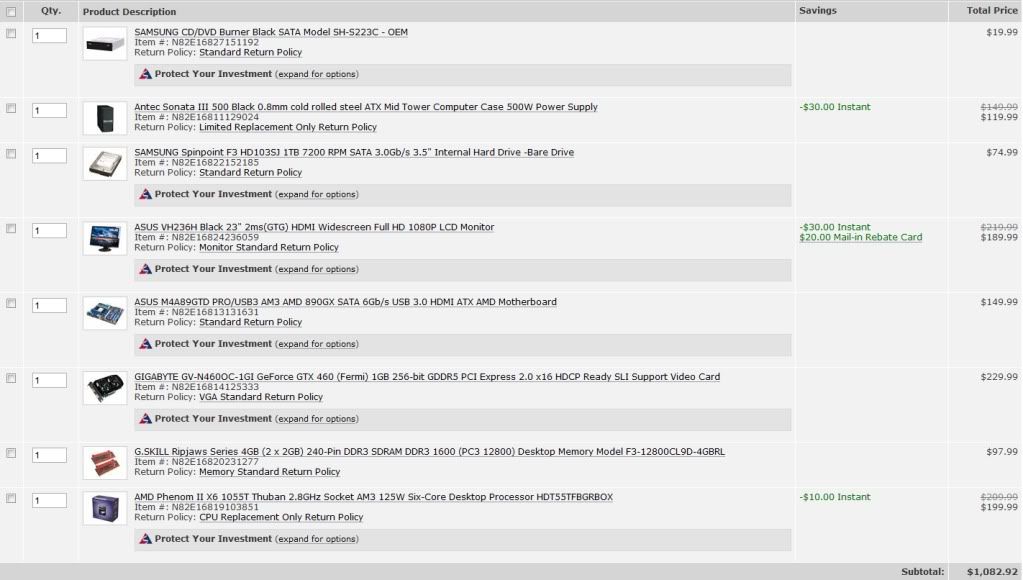
Probably a good call. I changed to this video card and this memory saving about $70. Any improvement I could make on the processor?

Edit:

Upgraded the CPU to 3.4gHz version for an extra $20.
Downgrade it to a 955, both are BE so the OC the same. That's $20 saved.

In addition get a 890 board instead for the same price (Pick one of them):
http://i.imgur.com/A55hA.jpg
YakiSOBA said:
Is the 1000$ canadian deal in the OP still good? I'm looking to get a new system for some SC2 action and hoping to pay cheap cheap! :)
http://i.imgur.com/A55hA.jpg
Najaf said:
Final check before I order. Any problems here? I already have an i7 930 ready to go.

spec2.png
I'd really suggest you get a GTX 460 with the 6 series coming out so soon. The money saved could easily net you a lot more performance in a few months.
Mairu said:
Okay, update on system failure. I left the system on overnight, but it went into sleep mode so it was fine when I woke up and started it back up. But now, after playing SC2 for a couple of hours, the system just completely shut down instantaneously and did not reboot. I turned the power supply off and opened it up to see if anything looked wrong, and nothing seemed out of the ordinary. Resealed the case and was able to turn the computer back on and start it up. Pretty clueless on what the problem is. It seems like for this kind of problem the only explanation is a power issue. Is it possible I have a busted power supply? The system isn't BSODing, no error messages are appearing in Windows or in the Event Log and the system survived a few different CPU/GPU/memory tests.
Unless there's a fuse blowing or tripping because you are drawing more wattage from your outlet or something it's probably a power issue. Possibly a mobo issue, but I'd guess power. Corsair has a 5 year warranty, but I think newegg will handle a broken PSU within a timeframe.
DrForester said:
Unless you have one of those, sadly not more common, cases with a motherboard tray with a cutout so you can attack fan after it's mounted. My current case has it, the new one I'm getting sadly does not, but has other features I wanted.


It's not made anymore, but if you can find one, I LOVE this gaming mouse.

http://www.newegg.com/Product/Produ...4079&cm_re=logitech_g9-_-26-104-079-_-Product
You can buy the G9 in some places, I have one. The updated version is the G9x which tmk is the same, but has double the DPI.
Blueblur1 said:
I got an updated list of recommendations today. What say you, GAF?

dy84y1.jpg


Oh yeah, I still need a video card! The GTX 460 was recommended to me earlier. Is there anything else that's even better? I'm willing to spend $300 - $400 on a graphics card.
Get 4GB of G.Skill RAM
Get a 1TB F3 Samsung
Get a 750W Corsair
Get a 1GB GTX 460
faceless007 said:
Will anything go horribly wrong if I install 2x2GB RAM on XP-32? I know only 3.25 or so will actually be available but will it still work and not cause crashes or reduce my performance?
It's fine, been running 4GB on XP-32bit for 2 years.
 
sharkmuncher said:
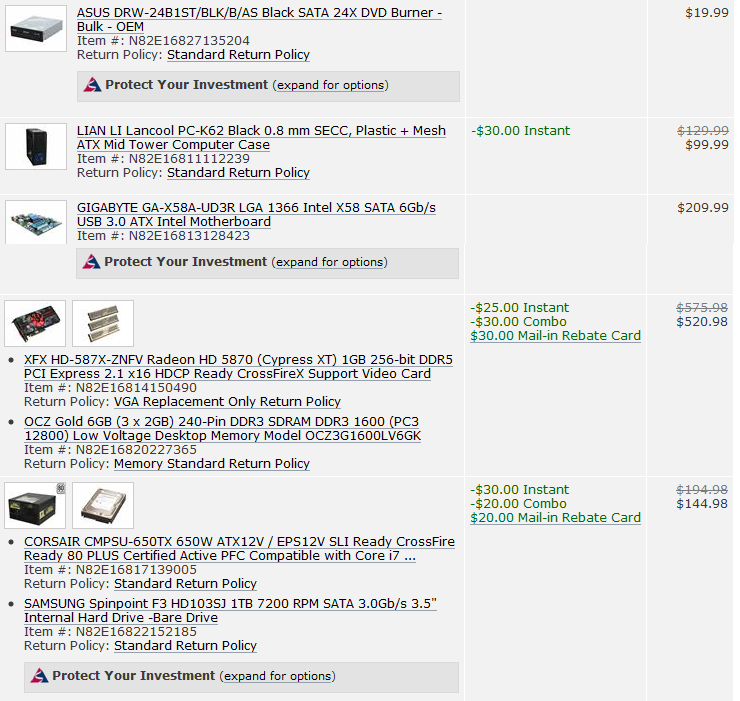
Looking to buy later this evening. Any suggestions for last min. changes?

comp.jpg

Ok, the above arrived today. Put it together, plug in mouse, keyboard, monitor.
Power on and...only lights. LEDs on the front of the case light up, but no monitor signal from any DVI or VGA ports and not BIOS beeps.

HELP! Suggestions?
 
Open her up and check if the front panel power connector is attached to the right section on the mobo. Should be right next the the LED lights inputs.
 
Milabrega said:
Open her up and check if the front panel power connector is attached to the right section on the mobo. Should be right next the the LED lights inputs.

I think so. Small wire on pins next to LEDs, Speaker, Reset etc. Power button on front of case works to turn it on
 
1stStrike said:
I'm still getting used to the scroll wheel on my Performance MX. Great mouse, hyper scrolling is great and all, but it's still a bit too sensitive. I mean, I can move the scroll wheel just by tilting the mouse forward or back =\

One wrong touch with my finger and I'm half way down a page.

Im not sure how the Performance MX works but the G500 has a button below the wheel that lets you switch from regular clicky wheel to hyper scroll. I dont have any issues with it going too fast when I dont want it to.

My biggest problems are the buttons when you click the wheel left and right. It feels like there should be more resistance in them since sometimes Im scrolling down a page and I click on and next thing I know, Im back a few pages in Chrome. I could always turn it off in set point I guess but it doesnt happen too often. It is a little annoying when it does though.


Does anyone here mod their cases? Im debating on modding my Antec 900 but Im not sure where to begin. Any useful links for this?
 
sharkmuncher said:
I think so. Small wire on pins next to LEDs, Speaker, Reset etc. Power button on front of case works to turn it on

all the fans and the dvd drive work?

check your powercables (missing PCIe powercables in graphics card or extra 4 pin cable in motherboard gave me the same issues in the past)

if it still doesn't work, remove all hardware (cables) from the motherboard except for cpu (duh) and 1 stick of ram (890GX = internal graphics right?) and see if that works
 
Salaadin said:
Im not sure how the Performance MX works but the G500 has a button below the wheel that lets you switch from regular clicky wheel to hyper scroll. I dont have any issues with it going too fast when I dont want it to.

My biggest problems are the buttons when you click the wheel left and right. It feels like there should be more resistance in them since sometimes Im scrolling down a page and I click on and next thing I know, Im back a few pages in Chrome. I could always turn it off in set point I guess but it doesnt happen too often. It is a little annoying when it does though.


Does anyone here mod their cases? Im debating on modding my Antec 900 but Im not sure where to begin. Any useful links for this?

Uhh... so THAT'S what that button does. I'm out of touch with modern mice I guess :lol
 
Hazaro said:
Downgrade it to a 955, both are BE so the OC the same. That's $20 saved.

In addition get a 890 board instead for the same price (Pick one of them):
http://i.imgur.com/A55hA.jpg

http://i.imgur.com/A55hA.jpg

I'd really suggest you get a GTX 460 with the 6 series coming out so soon. The money saved could easily net you a lot more performance in a few months.

Unless there's a fuse blowing or tripping because you are drawing more wattage from your outlet or something it's probably a power issue. Possibly a mobo issue, but I'd guess power. Corsair has a 5 year warranty, but I think newegg will handle a broken PSU within a timeframe.

You can buy the G9 in some places, I have one. The updated version is the G9x which tmk is the same, but has double the DPI.

Get 4GB of G.Skill RAM
Get a 1TB F3 Samsung
Get a 750W Corsair
Get a 1GB GTX 460

It's fine, been running 4GB on XP-32bit for 2 years.

The WD 1tb Blacks use bigger platters now and are of comparable to the F3's in performance and are more reliable. Plus they have a 5 year Warranty Vs 3 year. Dunno why Newegg has them $20 more expensive then the F3 though. F3 seems the way to go on that site.
 
Hazaro said:
Unless there's a fuse blowing or tripping because you are drawing more wattage from your outlet or something it's probably a power issue. Possibly a mobo issue, but I'd guess power. Corsair has a 5 year warranty, but I think newegg will handle a broken PSU within a timeframe.
I don't think it's a fuse or tripping issue considering I had my MBP hooked up to the same surge protector along with a lamp, my iphone, and the monitor and the only thing that was turning off/restarting was the computer.

I am impatient, so I went to Fry's and bought another Corsair 750w TX. I also picked up another Hyper N520 and installed it in place of the stock heatsink (fortunately this heatsink actually came with usable clamps). Damn, the temps are so much lower with a real heatsink on the CPU.

Gonna run some tests and leave it running for awhile to see if the new PSU fixed the issue.
 
BrassMonkey1010 said:
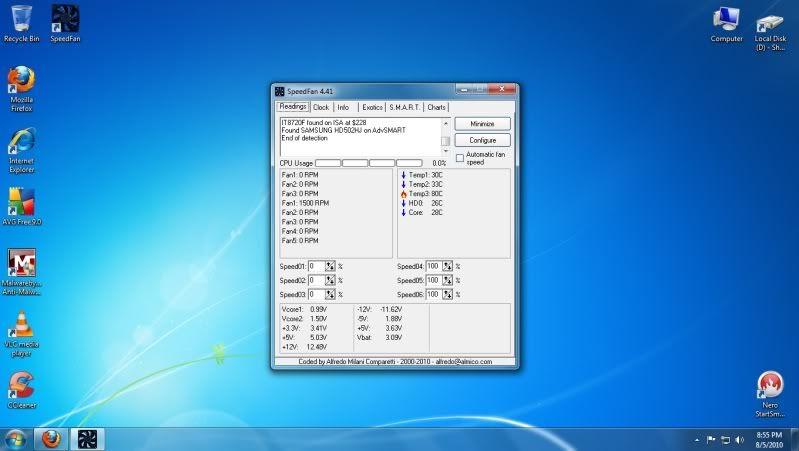
worried about temps...Just got the OS installed on my new pc, and ran speed fan. This is what came up.

*pic*

Why is one of them flaming?

if it's that high on idle, check your bios under the tab "hardware monitoring"

probably it's just a fluke due to a sensor not compatible with speedfan or something

also check Coretemp for CPU and CPUID HWMonitor for the entire system, those two seem to be rather accurate in my experience (HWMonitor doesn't name the temperatures though, so check bios first to distinguish them)
 
brain_stew said:
Says who?

http://techreport.com/articles.x/19330

My opinon is the same a Tech Report's, get the F3.

There was a post not long ago on Xtremesystem about the WD 1tb blacks getting increase platter sizes.

The F3 is awesome and it's an overall more solid drive. But it's also way less reliable, has a shoter warranty and is slower in the things people notice most(not by much tho). Such as Startup/boot up times and most loading times including video game loading times. That being said for $20 cheaper going with the F3 is a no brainier.
 
I have Rivatuner MSI 2009 overclocking edition or something. It's the most downloaded or popular one on Guru3d right now.

Can like somebody tell me how to use the damn thing? It doesn't seem as user friendly as the previous versions I've had. How do I set my GPU or CPU fan to like 35% at all times?
 
Blackface said:
There was a post not long ago on Xtremesystem about the WD 1tb blacks getting increase platter sizes.

The F3 is awesome and it's an overall more solid drive. But it's also way less reliable, has a shoter warranty and is slower in the things people notice most(not by much tho). Such as Startup/boot up times and most loading times including video game loading times. That being said for $20 cheaper going with the F3 is a no brainier.

You keep saying this but back it up with nothing. I've seen nothing to suggest that Smasung's drives are unreliable. You're discounting noise levels as well, no one wants a noisy drive.
 
Has there been any update to when the 6000 series will come out? I'm getting ready to build a new PC in a few weeks, I'll be ordering part the first week in September. I've pretty much decided to get a Phenom 555, 4 gigs of RAM, and a GTX 460, but I have a 5670 that I just bought a couple months ago for the computer I'm currently using and I'm kind of torn on whether I should just keep using that for awhile.

The 5670 was the only card I could get for the current computer because it has a crappy power supply, so I hate to buy a brand new computer and have it totally hampered by the graphics card. However, I also hate to feel like this card that I just bought is now going to go to waste. I'm guessing I could only sell for around $50.

Also, if the 6000 series comes out either at the end of this year or at the very beginning of this year, I know I'm not going to want to get one because I'll feel as though I haven't gotten my monies worth out of the 460, I'd like to use whatever card I end up with for a solid year at least.

So I'd like to ask two questions: If there's been any solid info on the release date of the 6000 cards (because I think I could deal with a weak card for a few months, but over 4 or 5 and I'd rather just get a 460 and live with it) and also how weak the 5670 is. The only new games I want to play this year are StarCraft, Civ, Fallout New Vegas, and Fable 3. Would a 5670 do me alright if I'm only wanting to play those and not Crysis 2 and stuff like that?
 
Need some GPU advice, GAF.

Currently have an ATI Radeon 4850 (the actual made by ATI version). Great card performance wise, but it is getting ridiculously hot. With fan speed around 50% it idles at 70c, and reaches 100c playing Crysis at 1080p with the fan speed at 70%.

I've read the card can actually handle temps up to 120c (!), but I just don't like the idea of having a component reaching boiling point inside my case.

Ideally, I'd like to just buy some Arctic Silver Ceramique and reseat the HSF. But I'm wary because I've never done that before (is it difficult?), and I've read conflicting things on how much the temps would drop.

Would I be better off buying a better cooler for it?
 
Should I worry with my temps getting this high with the stock Intel cooler:
http://i34.tinypic.com/x6eatx.jpg

Intel lists the i5 750 at a max temp of 72.5C

I can get the Scythe Mugen 2 Rev B for 45 bucks or something. Is that worth it?
I might just plunk down and get a new HSF, a 1TB F3 for backups and FRAPS recording, and maybe mod my case for wire management.
 
Currently posting from my new PC! So far its amazing. Aside from reinstalling all my old programs and transferring files, is there anything else I should do?

*goes back anxiously waiting for steam games to download/install*
 
I'd expect 6xxx series Radeons to hit early Q4. That's nothing more than an educated guess though. They won't be a revolution, so don't expect a price collapse.
 
sharkmuncher said:
Currently posting from my new PC! So far its amazing. Aside from reinstalling all my old programs and transferring files, is there anything else I should do?

*goes back anxiously waiting for steam games to download/install*

Get D3DOverrider installed.
 
sharkmuncher said:
Currently posting from my new PC! So far its amazing. Aside from reinstalling all my old programs and transferring files, is there anything else I should do?

*goes back anxiously waiting for steam games to download/install*

Nice. Welcome to the "new PC club".

One thing that made the transition easier for me was syncing my files over the network from my laptop to my new desktop. Saved me a lot of downloading time.
 
brain_stew said:
I'd expect 6xxx series Radeons to hit early Q4. That's nothing more than an educated guess though. They won't be a revolution, so don't expect a price collapse.
Does that mean that they won't replace the 5850/5870 at their price points? I was assuming that that would be the case and that I'd be able to get a 6850 or whatever they end up calling their new upper-mid range card for ~$300, I wouldn't want to pay more than that for a card.
 
I've been sitting on an Antec Sonata case for a few years. Has an Antec Earthwatts 500 PS. I do want a quiet system and planned on passive cooling and a mid to low end passive video card. My last gaming system was built around a 9800 Pro - and I honestly never got into PC gaming. I might want the option to play games but it's really not my focus with this build.

I just won this MB from EVGA - EVGA P55 FTW http://www.evga.com/products/moreInfo.asp?pn=132-LF-E657-KR&family=Motherboard Family Does my PS have the appropriate connectors for this? My last build was a P IV system so I don't have much recent experience with components.

I was planning on building a i750 system based on the price/performance ration but am wondering what my best option is. I live relatively close to a Microcenter so I have these choices:

i7 870 - $249
i7 860 - $219
i5 655K - $199
i5 760 - $189
i5 750 - $159

The cheaper the better - but is the 760 worth $40 more than the 750? The 870 is a bit more than I'd like to spend. Any of the prices really good? What do you suggest? I don't plan on overclocking - but might someday since that MB seems to be built for it. Thanks in advance.
 
dr3upmushroom said:
Does that mean that they won't replace the 5850/5870 at their price points? I was assuming that that would be the case and that I'd be able to get a 6850 or whatever they end up calling their new upper-mid range card for ~$300, I wouldn't want to pay more than that for a card.

With the introduction of the 5xxx you actually ended up getting less performance for your money at each and every price point. I wouldn't be surprising if this happened again especially since they're launching at the busiest time of the year and supply probably won't be fantastic out of the gate.

Its actually rare that the release of a new series of GPUs sparks a huge change in the price:performance proposition. It usually just adjusts gradually over time.
 
Top Bottom