• Hey Guest. Check out your NeoGAF Wrapped 2025 results here!

"I need a new PC!" 2010 Edition

RadicalRad said:
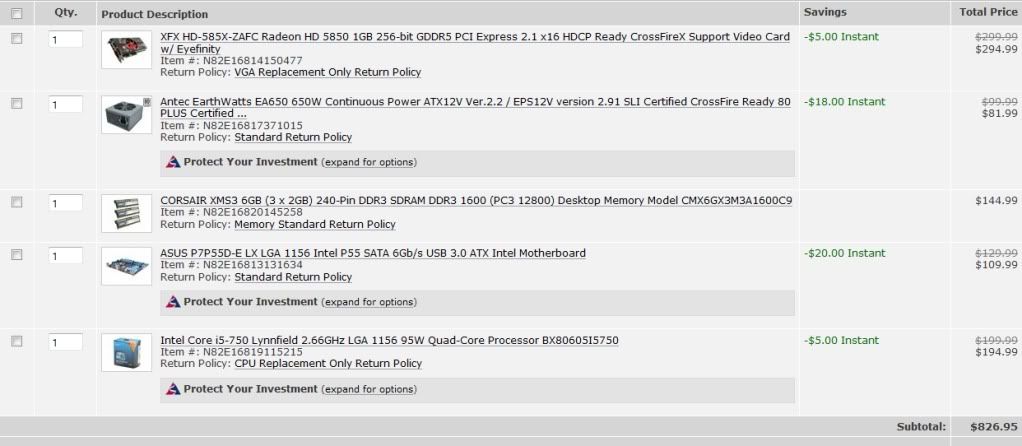
I'm looking into building myself a gaming rig. (I haven't really had one since 2004) This is what I've got so far.
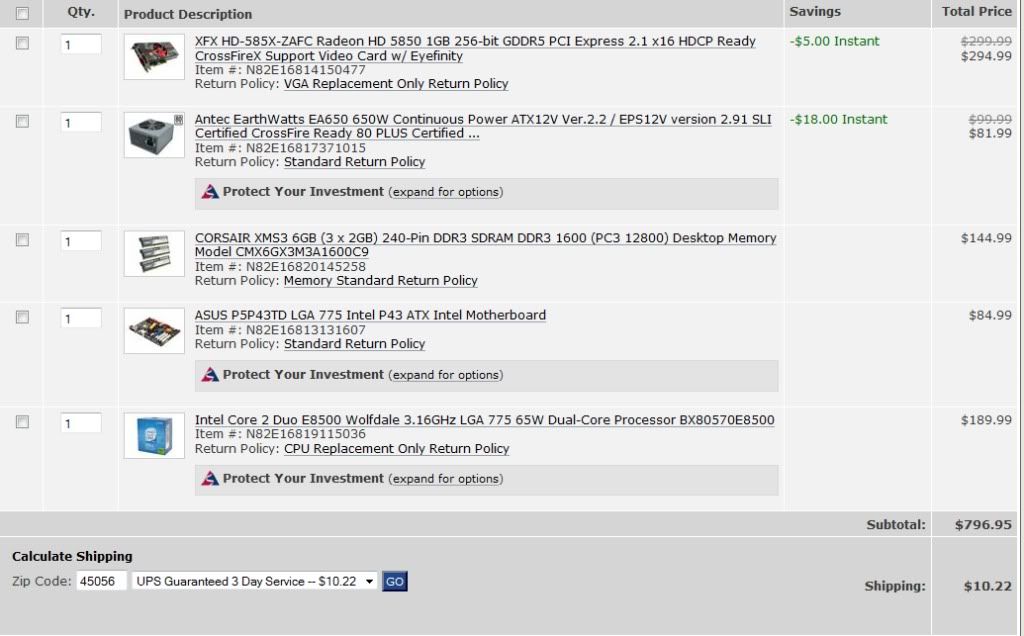
compparts.jpg


I'm hoping to cut costs where I can. I have an old case I'm hoping to fit it all into. Also I have some parts left over from my recently fried tower that I may be able to reuse. (I hope) Like a wireless card, dvd drive, and maybe my old hard drive.

Socket 775!? :lol

You're going to want to change that quite a bit. :lol
 
Metalic Sand said:
^ ^ ^

Why go with such a old socket? seems like a waste of money, Also Triple channel. that board is only dual channel.

With what your spending you should do a i5 build.

Edit: You are essentially buying a outdated MB and CPU there when you can go down to 4 gigs of ram saving $50 and use that to pretty much have enough for an i5 and the MB needed.

http://www.newegg.com/Product/Product.aspx?Item=N82E16819115215&cm_re=i5-_-19-115-215-_-Product

1156 socket MB's

http://www.newegg.com/Product/Produ...ESTMATCH&Description=Motherboard+1156&x=0&y=0

Listen to this man.
 
RadicalRad said:
What's wrong with 775? Besides it being outdated.

I haven't built a machine in ages so I have a tad catching up to do.
you're buying a socket that's already outmoded - no new chips will be coming out for it.
 
RadicalRad said:
What's wrong with 775? Besides it being outdated.

I haven't built a machine in ages so I have a tad catching up to do.

People are currently upgrading away from it because it's a dead platform, and the prices on the CPUs are not competitive at all. You're paying more money and getting less in many cases.
 
RadicalRad said:
What's wrong with 775? Besides it being outdated.

I haven't built a machine in ages so I have a tad catching up to do.

Its not simply outdated, its literally dead. No new socket 775 chips have been released in agaes and all the ones still available are horrible value, like the $200 dual core chip you picked in a world when a nice quad core can be had for $100.
 
Diablohead said:
lovely looking setup but I wonder, are you running your screen in low res for any reason?

it's running in 1080p, but it might look atypical due to Firefox being zoomed in. personally I like to use the computer leaning back in the chair rather than hunched over the screen. just a personal preference, generally no way is the right way except YOUR way, which in this case is my way :D
 
http://www.newegg.com/Product/Product.aspx?Item=N82E16819115057&cm_re=q8400-_-19-115-057-_-Product

Or at least pick up the quad core for 169.99. I was looking at the best upgrade I could make for my P35 after I bought the 460GTX and that was pretty much it. Thanks to a robust overclock on my e6750, I no longer have the temptation. But no. What are you doing? Listen to these people. Buy something that's current and best bang for the dollar. Three year old parts are not priced competitively.
 
Allan Holdsworth said:
So what are the parts on the $600 build? Two of the combo deals are gone and they don't show up.

Have been out of the PC hardware loop for too long to go picking random parts, so need a guide for one at about $500-$600.
http://secure.newegg.com/WishList/PublicWishDetail.aspx?WishListNumber=19717308
If you plan to upgrade in the future I'd look at the Antec Sonata + 500W PSU and a GTX 460.

http://i.imgur.com/A55hA.jpg
RadicalRad said:
I'm looking into building myself a gaming rig. (I haven't really had one since 2004) This is what I've got so far.

I'm hoping to cut costs where I can. I have an old case I'm hoping to fit it all into. Also I have some parts left over from my recently fried tower that I may be able to reuse. (I hope) Like a wireless card, dvd drive, and maybe my old hard drive.
http://i.imgur.com/A55hA.jpg
 
Metalic Sand said:
^ ^ ^

Why go with such a old socket? seems like a waste of money, Also Triple channel. that board is only dual channel.

With what your spending you should do a i5 build....


Thanks! That helped a lot!
 
Allan Holdsworth said:
So what are the parts on the $600 build? Two of the combo deals are gone and they don't show up.

Have been out of the PC hardware loop for too long to go picking random parts, so need a guide for one at about $500-$600.

Push upto $650 after rebates and you can score an absolutely fantastic rig without really cutting any significant corners in any areas:

http://www.newegg.com/Product/Product.aspx?Item=N82E16827135204
http://www.newegg.com/Product/Product.aspx?Item=N82E16811119203
http://www.newegg.com/Product/Product.aspx?Item=N82E16822152185
http://www.newegg.com/Product/Product.aspx?Item=N82E16813130290
http://www.newegg.com/Product/ComboDealDetails.aspx?ItemList=Combo.470415
http://www.newegg.com/Product/Product.aspx?Item=N82E16820227558
http://www.newegg.com/Product/Product.aspx?Item=N82E16819103702

2.9ghz Quad core, 4GB DDR3, 1TB HDD, 600w modular PSU, 1GB GTX 460, 870 AMD motherboard for $650 after rebate I think that's utterly fantastic. Blazing fast and fantastic upgrade options for the future.

You can also get Starcraft 2 for $20 off if you buy those components as well.

Hazaro, could you do a wishlist link for this build (and check it over) I could never get them to work for me.
 
Its getting there but you've still got triple channel RAM on a dual channel board. Get 2X2GB instead.

Get a GTX 460 for the GPU, save a lot of cash and don't really lose much performance.

I think that PSU is a little overpriced considering its not modular. You don't actually need more than a 500W PSU for a single GPU rig anyway (unless you buy a GTX 480, perhaps).
 
brain_stew said:
Its getting there but you've still got triple channel RAM on a dual channel board. Get 2X2GB instead.

Get a GTX 460 for the GPU, save a lot of cash and don't really lose much performance.

I think that PSU is a little overpriced considering its not modular. You don't actually need more than a 500W PSU for a single GPU rig anyway (unless you buy a GTX 480, perhaps).

Pardon my ineptness. The motherboard says DDR3.. as is the ram.. what am I not getting here?

Seriously soon as I think I understand I don't =P

Edit: Never mind I get it now - I'm dumb
 
So my little brother would like to get a gaming desktop. He's got a budget of up to 1500 bucks, but that has to include windows, keyboard, mouse, and a crappy monitor (he's getting a HD projector when he moves to his new place in a few months)

Neither of us have built a computer before, but he's a smart kid and he wouldn't MIND doing it... would it just be better to go with a pre-made desktop or is building a computer feasable with little to no initial knowledge?

If I was going to link him a set of parts to get, should I use the http://i.imgur.com/A55hA.jpg build?
 
GiJoccin said:
So my little brother would like to get a gaming desktop. He's got a budget of up to 1500 bucks, but that has to include windows, keyboard, mouse, and a crappy monitor (he's getting a HD projector when he moves to his new place in a few months)

Neither of us have built a computer before, but he's a smart kid and he wouldn't MIND doing it... would it just be better to go with a pre-made desktop or is building a computer feasable with little to no initial knowledge?

If I was going to link him a set of parts to get, should I use the http://i.imgur.com/A55hA.jpg build?

If you go the prebuilt road then get a Dell Studio XPS 7100 otherwise, yes, just link him to Hazaro's guide.
 
brain_stew said:
Push upto $650 after rebates and you can score an absolutely fantastic rig without really cutting any significant corners in any areas:

http://www.newegg.com/Product/Product.aspx?Item=N82E16827135204
http://www.newegg.com/Product/Product.aspx?Item=N82E16811119203
http://www.newegg.com/Product/Product.aspx?Item=N82E16822152185
http://www.newegg.com/Product/Product.aspx?Item=N82E16813130290
http://www.newegg.com/Product/Product.aspx?Item=N82E16814125333
http://www.newegg.com/Product/Product.aspx?Item=N82E16820227558
http://www.newegg.com/Product/ComboDealDetails.aspx?ItemList=Combo.468992

2.9ghz Quad core, 4GB DDR3, 1TB HDD, 600w modular PSU, 1GB GTX 460, 870 AMD motherboard for $650 after rebate I think that's utterly fantastic. Blazing fast and fantastic upgrade options for the future.

You can also get Starcraft 2 for $20 off if you buy those components as well.

Hazaro, could you do a wishlist link for this build (and check it over) I could never get them to work for me.
Combo's don't like Wish Lists.
http://secure.newegg.com/WishList/PublicWishDetail.aspx?WishListNumber=20089348
 
Hey brain_stew I need some of your stew.

What would you suggest for ram then? I've been bouncing around trying to figure this out and I keep coming up with something incorrect.
 
RadicalRad said:
Hey brain_stew I need some of your stew.

What would you suggest for ram then? I've been bouncing around trying to figure this out and I keep coming up with something incorrect.
http://www.newegg.com/Product/Product.aspx?Item=N82E16820231193

You can get OCZ (or actually a set of Patriot) on a $20 MIR right now, but I've always been hesitant about OCZ RAM although their company is good.

http://www.newegg.com/Product/Product.aspx?Item=N82E16820220435
OCZ: See link
 
Guys, some assistance is needed.

I have a pre-built HP system with a 300W Power Supply with 19Amps on the 12V line. Now, it came with a 7600GT which performed great until I was accepted into the StarCraft 2 beta. Before I even could have a chance to test out the beta, the card started overheating to the point where I would get all kinds of different coloured blocks on the screen and would have to go into safe mode, change the driver to standard and restart.

I purchased a BFG Tech GT 220 card and now that SC2 has finally released, it too goes on the blink and the overheats whenever I try to get into the game. I have set up an RMA, but they don't do video cards any longer and have said that it could take up to a month to get my card back. I cannot be computerless for a month.

So, I need a video card that can run on a 300W power supply. I can't afford a PSU at this point, so it needs to be a card only. I hope to get an entirely new system either later this year or early next, but I really need to play StarCraft 2 for right now.

I did purchase an XFX Radeon 4350 1GB DDR2 card from TigerDirect, but it is fanless. I have not opened the card and I am thinking of returning it because being fanless scares me and I've only ever owned Nvidia cards.

Is there anything else I can put into this system?
 
Spike said:
So, I need a video card that can run on a 300W power supply. I can't afford a PSU at this point, so it needs to be a card only. I hope to get an entirely new system either later this year or early next, but I really need to play StarCraft 2 for right now.

I did purchase an XFX Radeon 4350 1GB DDR2 card from TigerDirect, but it is fanless.
Radeon 4350 1GB DDR2
4350 1GB DDR2
4350 1GB DDR2
4350 1GB DDR2
This was not a wise decision.

Also SC2 is semi dependant on your CPU as well, but GPU wise if the GT220 was an ok preformer...

Well a 9800GT/8800GT/5770 will be much better to say the least.
You can pick up used 9800GT's for $50-60 shipped now.

**Oh wow MIR to the rescue...
http://www.newegg.com/Product/Product.aspx?Item=N82E16814130535&cm_re=9800gt-_-14-130-535-_-Product
http://www.newegg.com/Product/Product.aspx?Item=N82E16814125288&cm_re=9800gt-_-14-125-288-_-Product

Dell and HP tmk ship computers with 9800GT/5770/4850 (This one cuts a bit close, might use 350w or a 380w) on their base models so you should be in the clear.
 
Hey, I was wondering if anyone could help me out here real fast.

I just started building my new computer, and I've got everything hooked up barring my case fans. Should I plug the fans directly into my mobo like the mobo manual suggests? My case has 4 fans, a 230, 2 120's and some other small one. I'm scared that this might pull too much current from the board or something.

Are there disadvantages to hooking up any of the fans straight to the power supply? Could I do a mix? Any help is appreciated.

For those curious my build is:
intel core i7 930
asus P6X58D-E
Nvidia GTX 460
6 gigs DDR3 ram
1 Tb seagate HD
coolermaster HAF 932 case
Windows7 home
already had a 21.5 inch screen
residual shitty speaker system :)

dropped about 1400 for this baby, so no mistakes allowed. Any quick responses appreciated.
 
Mobo is fine.
A normal 120mm fan is around 12V*0.4A so it's 5 watts.
Bonus: Fan control and monitoring.

Mix is fine. Just don't connect the 4 pin and the 3 pin at the same time. Baaaaaaad.
 
sillymonkey321 said:
Are laptops hard to upgrade?

harder than a desktop PC that's for sure. may not even be possible depending on the specific laptop, as some manufacturers solder parts in permanently. but if you're very dexterous and have suitably tiny tools go for it!
 
sillymonkey321 said:
Are laptops hard to upgrade?
Most laptops only let you upgrade a few things.

RAM, Hard Drive, and if you're daring you can get to the processor and usually upgrade that.

They're not designed to let you upgrade things like the video card, but you could always try and find parts on ebay or even through he manufacturer.
 
Hazaro said:
Mobo is fine.
A normal 120mm fan is around 12V*0.4A so it's 5 watts.
Bonus: Fan control and monitoring.

Mix is fine. Just don't connect the 4 pin and the 3 pin at the same time. Baaaaaaad.

Thanks man. Apparently I don't have any way to connect my dvd-rw drive to my mobo. The one I pulled out of my last computer doesn't have sata cables or anything I see that can hook my stuff up. Oh well, should be cheap enough to get tomorrow.
 
Hazaro said:
Mobo is fine.
A normal 120mm fan is around 12V*0.4A so it's 5 watts.
Bonus: Fan control and monitoring.

Mix is fine. Just don't connect the 4 pin and the 3 pin at the same time. Baaaaaaad.
Mind clarifying this? I don't believe I've ever heard what I think you're getting at.
 
·feist· said:
Mind clarifying this? I don't believe I've ever heard what I think you're getting at.
I had some 130CFM 120x38mm fans that were 3 pin only and I was trying to run two of them (keep in mind these use 4x the power of a normal fan) so I cut the wires and soldered a 3pin with a molex power lead to them.

They didn't run full speed from the mobo so I plugged them into both at the same time.
:lol
 
That's just hilarious. You know, as obsessed as I can be about low temps (7 fans in my case right now) I've never been one for those Delta-style 120x38 fans. Having the PC area sound like a laundromat would drive me nutty.
 
Hazaro said:
http://www.newegg.com/Product/Product.aspx?Item=N82E16820231193

You can get OCZ (or actually a set of Patriot) on a $20 MIR right now, but I've always been hesitant about OCZ RAM although their company is good.

http://www.newegg.com/Product/Product.aspx?Item=N82E16820220435
OCZ: See link

Well I actually use OCZ RAM myself but it wouldn't be my first choice to recommend as they tend to expect you to run your RAM at a higher voltage to get the advertised specs. Having said that, it'll do that just fine but you'll probably have to manually set it yourself, and that RAM is speified really well, so even if it defaults lower its no big loss really. At that price and the super tight budget I was working to it was a worthy compromise.

I'd probably still say go with the G.Skill if you can budget the extra $30 and aren#t a fan of MIRs.

That Patriot RAM expects a 1.65V as well so I don't see any reason to pick it over the OCZ stuff, especially when those particular OCZ stick has good reviews.
 
Kenichi said:
Can an HP Pavilion p6510f Desktop PC with a 250 w psu support an ati radeon 5670 without upgrading the psu? I have read conflicting reports. Thanks in advance!

computer specs: http://h10025.www1.hp.com/ewfrf/wc/document?docname=c02153181&cc=us&lc=en&dlc=en&product=4215700

Possibly, I'd just say go ahead and replace the PSU, least that way you can pick up something like a 4850 for less money and get much better performance.


Take a picture of the side of the PSU if you can or at least have a look and see what it has specified for its 12V rails (it'll be in amps).
 
·feist· said:
That's just hilarious. You know, as obsessed as I can be about low temps (7 fans in my case right now) I've never been one for those Delta-style 120x38 fans. Having the PC area sound like a laundromat would drive me nutty.
They don't lower temps much, I was just interested to see how they ran. I took them off after about a week.

Like this, but these are 60CFM fans that are 38mm. And my mobo is an ATX board, not mATX. Case is big. Sometimes I think it's too big.
Sure is easy to work in though.
xqcqw6.jpg
 
·feist· said:
That's just hilarious. You know, as obsessed as I can be about low temps (7 fans in my case right now) I've never been one for those Delta-style 120x38 fans. Having the PC area sound like a laundromat would drive me nutty.

The Antec P180 and P190 series were designed to be quiet while having a lot of fans. Made of metals and plastics in just the right places The P193 series has a 200mm side intake fan with an internal 3 speed controller and even on high is almost silent. It has two 140mm top exhausts and 1 rear 120 mm exhaust fan, all attached to a rear 3 speed fan controller. There is room on the front for two front intake 120mm fans but are not included (P180 series is the same, but without side intake). Best part is easy to access (don't even have to open the case) fan filters on the front and side intakes. I installed two low RPM/noise fans in mine and the thing is whisper quiet, even when I'm gaming.
 
Spike said:
G
I did purchase an XFX Radeon 4350 1GB DDR2 card from TigerDirect, but it is fanless. I have not opened the card and I am thinking of returning it because being fanless scares me and I've only ever owned Nvidia cards.
?


It'll run fine fanless but that's because its barely a step up from integrated graphics. Return it because its a worthless POS not because you think it'll run hot.
 
brain_stew said:
Possibly, I'd just say go ahead and replace the PSU, least that way you can pick up something like a 4850 for less money and get much better performance.


Take a picture of the side of the PSU if you can or at least have a look and see what it has specified for its 12V rails (it'll be in amps).

Ok if i go with the 4850 would this psu be fine: Thermaltake - 430W TR2 ATX Power Supply?

link: http://www.newegg.com/Product/Produ...3&Tpk=Thermaltake - 430W TR2 ATX Power Supply

Thanks again!
 
Hazaro said:
They don't lower temps much, I was just interested to see how they ran. I took them off after about a week.

Like this, but these are 60CFM fans that are 38mm. And my mobo is an ATX board, not mATX. Case is big. Sometimes I think it's too big.
Sure is easy to work in though.
http://i37.tinypic.com/xqcqw6.jpg
In a pinch, you could rent out that space above the mobo. Even though mid-towers are nearly at full-tower sizes, it looks like you'd definitely miss that open work area you have going.


DrForester said:
The Antec P180 and P190 series were designed to be quiet while having a lot of fans. Made of metals and plastics in just the right places The P193 series has a 200mm side intake fan with an internal 3 speed controller and even on high is almost silent. It has two 140mm top exhausts and 1 rear 120 mm exhaust fan, all attached to a rear 3 speed fan controller. There is room on the front for two front intake 120mm fans but are not included (P180 series is the same, but without side intake). Best part is easy to access (don't even have to open the case) fan filters on the front and side intakes. I installed two low RPM/noise fans in mine and the thing is whisper quiet, even when I'm gaming.
Yeah, I still kick myself for missing out on the Mini P180 back when Newegg had it on sale and I was looking at doing an m-ATX build. The next quiet build that I do for myself will likely be with a Silverstone case, though. If only they didn't overcharge for everything...
 
Kenichi said:
ok cool thanks. the reason i may go with the other psu is b/c i have a $60 bestbuy giftcard lying around, and they stocked the thermaltake one.
Bestbuy should also have Antec EartWatts.
I'd get that instead if it's around the same price. Comes in 380/430/500W

Should be over 15% more efficient as well saving you money in the long run.
 
Visualante said:
Aloha, looking to upgrade to a quad core, I will be doing 3D and 2D videowork. Including rendering. I'd like something that will perform well but isn't super cutting edge.

Any variety of good suggestions would be appreciated and then I'll let you know what sort of ballpark I'm in price wise. Currently on an Asus P5K-e wireless motherboard. 775 P35 chipset.
repost for new page. I read the above advice on how 775 is outdated, bad value. But I can't afford a new motherboard so please don't ignore it because of that.
 
I'm building a PC for somebody, but not for gaming. The strengths of the system should be geared towards Photoshop and the like.

It will be low end, with an eye for it being upgraded at a later date. Because of the budget, it'll likely begin with onboard graphics, and 2 GB RAM. I want some pointers on priorities...


CPU: More cores or higher clock speeds? Or more cache and cache levels? Where should the priorities lie?

RAM: How important is more RAM compared to faster RAM? And how much would having 2x 1GB stick in dual channel be an improvement on a single 2GB stick?

Graphics: Would onboard graphics suffice? Or are there any cheap graphics cards that would make all the difference?


I'm aware of the advantages of a graphics card in later Photoshop iterations, as well as having more than one HDD for scratch disc, but the budget doesn't allow for these except at a later date.
 
Parl said:
I'm building a PC for somebody, but not for gaming. The strengths of the system should be geared towards Photoshop and the like.

It will be low end, with an eye for it being upgraded at a later date. Because of the budget, it'll likely begin with onboard graphics, and 2 GB RAM. I want some pointers on priorities...


CPU: More cores or higher clock speeds? Or more cache and cache levels? Where should the priorities lie?

RAM: How important is more RAM compared to faster RAM? And how much would having 2x 1GB stick in dual channel be an improvement on a single 2GB stick?

Graphics: Would onboard graphics suffice? Or are there any cheap graphics cards that would make all the difference?


I'm aware of the advantages of a graphics card in later Photoshop iterations, as well as having more than one HDD for scratch disc, but the budget doesn't allow for these except at a later date.
Budget?
Would they be overclocking?
Visualante said:
repost for new page. I read the above advice on how 775 is outdated, bad value. But I can't afford a new motherboard so please don't ignore it because of that.
Used Q6600 / Q8400.
A new mobo isn't that much more... You could possibly get a new mATX mobo that used DDR2 + a AMD x4 635 or so for the same price/little more.
 
Hazaro said:
Used Q6600 / Q8400.
A new mobo isn't that much more... You could possibly get a new mATX mobo that used DDR2 + a AMD x4 635 or so for the same price/little more.
Thanks. I'll get a new motherboard when the quad doesn't perform well enough for me. I'm not paying extra + the effort of assembling in a recession. The Core2Quad will be a huge increase from what I'm currently on.
 
Parl said:
I'm building a PC for somebody, but not for gaming. The strengths of the system should be geared towards Photoshop and the like.

It will be low end, with an eye for it being upgraded at a later date. Because of the budget, it'll likely begin with onboard graphics, and 2 GB RAM. I want some pointers on priorities...

Does not compute.

You're probably best off with something that's prebuilt tbh.

If you do go ahead with it, an 880G motherboard + an Athlon X4 635 will give you a quad core and excellent upgrade options + good onboard graphics for $175.

I'm talking this mobo and CPU in particular:

http://www.newegg.com/Product/Product.aspx?Item=N82E16813130295&cm_re=880g-_-13-130-295-_-Product

http://www.newegg.com/Product/Product.aspx?Item=N82E16819103702&cm_re=x4_635-_-19-103-702-_-Product

You can get 4GB of that OCZ RAM for $55 after rebate so no reason to go with 2GB. It'll cripple photoshop and even general OS use in Windows 7.
 
Top Bottom