• Hey Guest. Check out your NeoGAF Wrapped 2025 results here!

"I need a new PC!" 2010 Edition

Can someone please help me out! I'm begging here.:lol

My wife and I have about $1000 to blow on a PC. I'm pretty sure I can gut it together, I just have no idea where to start! I'm seeing all these different mobo's and cpu's and gpu's. My head is spinning. I'd really appreciate it if someone could put together a quick outline of what I need to be looking for. Put together a few builds. Help a noob out. Thanks in advance!

I do know that I want an intel cpu and an nvidia gpu. Maybe 6gb of ram.
 
Reallink said:
Best value is going to be the Intel T4500 CPU at this price, unless someone happens to run a $399 sell on a Core i3 system.
While the AMDs tend to have better GPUs at that price, the T4500 looks to be the best choice, especially since a faster CPU seems like the way to go for the recipient of the laptop.

Thanks.
 
Big Baybee said:
Can someone please help me out! I'm begging here.:lol

My wife and I have about $1000 to blow on a PC. I'm pretty sure I can gut it together, I just have no idea where to start! I'm seeing all these different mobo's and cpu's and gpu's. My head is spinning. I'd really appreciate it if someone could put together a quick outline of what I need to be looking for. Put together a few builds. Help a noob out. Thanks in advance!

I do know that I want an intel cpu and an nvidia gpu. Maybe 6gb of ram.
Their are quite a few AMD and Intel builds on the past few pages that may be good for you.

Depending on your usage and actual needs, the below is a good starting point (though some of it is a bit dated):


http://www.neogaf.com/forum/showpost.php?p=22120559&postcount=7952


Hazaro said:
*Reposting*
1)Basic Desktop Questions

Budget: Price Range + Country
Main Use: Gaming, Video editing, or just general usage
Monitor Resolution: What resolution will you be playing your games at? Are you going to upgrade later?
List SPECIFIC games that you MUST be able to play: Self Explanatory

2)General Guide on what to buy (Spring)
Tech Report Builders Guide!

A very good basic guide that has been updated for Spring (Right now there is some new stuff coming out + new GPU's on the way, so once that gets out of the way hopefully they will update.)
http://techreport.com/articles.x/18747/2

3) 15 minute video how-to
http://www.maximumpc.com/article/features/video_how_build_pc_ever_step_explained
40 minute how-to
http://www.tested.com/news/video-how-to-build-the-best-1500-gaming-pc-step-by-step/152/
 
Hello, long time no see. I finally have the money for a new PC. I remember what was recommended to me a month or so ago.

Is there any way I can get it cheaper than what is listed there? Maybe there's a better monitor for less money or EVGA fixed their screw up with the 460's.

Here's a screenshot so I don't clutter the thread with a huge image.
http://i52.tinypic.com/1z1xr4n.jpg
 
advice needed...

pcspec1.jpg


I think this is pretty decent rig for the price, does everything required in nice micro ATX case(Review) changing PSU because not sure on standard one it comes with will handle 5770
 
Big Baybee said:
Can someone please help me out! I'm begging here.:lol

My wife and I have about $1000 to blow on a PC. I'm pretty sure I can gut it together, I just have no idea where to start! I'm seeing all these different mobo's and cpu's and gpu's. My head is spinning. I'd really appreciate it if someone could put together a quick outline of what I need to be looking for. Put together a few builds. Help a noob out. Thanks in advance!

I do know that I want an intel cpu and an nvidia gpu. Maybe 6gb of ram.

Intel i5 760
GTX460
1156 p55 motherboard
4gigs of ram
500w or more power supply
Samsung f3 spinpoint 1tb HD
DVD-drive
case of your choice.

This should run you ~900 without a monitor.
 
A coworker asked me to pick out a pc for his son for right around $600 that will play StarCraft 2. He was hoping for prebuilt but I just can't find anything at that price point that would perform well as a gaming machine. He says he'll consider building a PC if someone can guarantee him the components he buys will be compatible. Here's what I came up with:

2aafr7k.jpg


It's based mostly on some of Hazaro's budget builds with some different combo deals. Anything wrong with this build? Any amazing deals I'm missing out on? I'd imagine it could handle StarCraft 2 at 1920x1080 on High pretty well.
 
Felix Lighter said:
A coworker asked me to pick out a pc for his son for right around $600 that will play StarCraft 2. He was hoping for prebuilt but I just can't find anything at that price point that would perform well as a gaming machine. He says he'll consider building a PC if someone can guarantee him the components he buys will be compatible. Here's what I came up with:

It's based mostly on some of Hazaro's budget builds with some different combo deals. Anything wrong with this build? Any amazing deals I'm missing out on? I'd imagine it could handle StarCraft 2 at 1920x1080 on High pretty well.
Seems fine to me. Make sure that motherboard is AM3 compatible (which I believe it is, but I'm on my cell and can't check). I just set up my new computer with the 640 and a 5770, which should be quite comparable to yours. I'll see how well Starcrfaft runs soon.
 
DSN2K said:
advice needed...

http://premium1.uploadit.org/dsn2000//pcspec1.jpg

I think this is pretty decent rig for the price, does everything required in nice micro ATX case(Review) changing PSU because not sure on standard one it comes with will handle 5770
That PSU is considerably more power than you need. You can step down to a quality 550-650w unit that would easily run that and still give you a good deal of breathing room for future upgrades/additions. If you stay with Novatech, find out who the OEM is for the particular PSU you opt for and look up some reviews online. That way you'll get a broader range of reviews than just looking under the Novatech rebrand.

As for GPU, the Nvidia GTX460 is the current mid-range king, but if you wait just a bit longer the upcoming AMD 6770 should easily meet (and more than likely exceed) the 460 and fall somewhere around US$200. Either one would be a better option than the 5770 you're considering.
 
The Big Rig said:
Seems fine to me. Make sure that motherboard is AM3 compatible (which I believe it is, but I'm on my cell and can't check). I just set up my new computer with the 640 and a 5770, which should be quite comparable to yours. I'll see how well Starcrfaft runs soon.

Thanks, I appreciate that.
 
Almost done with my first build, will go out to get some ram today (any suggestions? max range 300$).


http://i53.tinypic.com/ojfcx1.jpg


Overall it was a really enjoyable experience, and I'm sure it will be super satisfying when I finally boot up the thing (without any issues hopefully).

The process was even easier than what I initially thought, but I took much longer time than the usual tutorial videos out there. :lol But hey! Check out all dat cable management.

People still on the fence should jump over. :D

Also many thanks to all the good people who helped me out here, I would've not been encouraged to build me my own pc without this thread.
 
DeathNote said:
What's the best non SSD hard drive?
Samsung F3 1TB right now for the price, speed, and noise
L0st Id3ntity said:
Almost done with my first build, will go out to get some ram today (any suggestions? max range 300$).


http://i53.tinypic.com/ojfcx1.jpg


Overall it was a really enjoyable experience, and I'm sure it will be super satisfying when I finally boot up the thing (without any issues hopefully).

The process was even easier than what I initially thought, but I took much longer time than the usual tutorial videos out there. :lol But hey! Check out all dat cable management.

People still on the fence should jump over. :D

Also many thanks to all the good people who helped me out here, I would've not been encouraged to build me my own pc without this thread.
Awesome.
I'd pick up a 1600 3x2GB (6GB) kit. Should run you about $150. More than that is most likely overkill and it doesn't speed up your system.
Do you have an SSD?
Clevinger said:
Is push/pull/double fans for the CPU worth it? I've only ever seen examples of a few degrees, though I haven't read all that much about it.
Worth it if you run 2 lower noise fans, otherwise not really. It does help streamline air flow though. Like you said it's just a few C
 
Clevinger said:
Is push/pull/double fans for the CPU worth it? I've only ever seen examples of a few degrees, though I haven't read all that much about it.
It helped me by 2 degrees on the H50. I ended up removing the pull fan and used it on the case.

No overclock yet but as you can see I didn't need a second fan... perhaps I will when overclocking.

4968544683_fac46bcc79_z.jpg
 
Amazon is crazy when it comes to customer service.
It's like a robot that gives out free stuff and you can't negotiate with them.
 
Hey guys, more theory-questions your way :

IF my rams settings are 5-5-5-15 , 2.1 v , 1066 ; can I for the sake of stability lower the freq to say 800mhz but still use same timing and voltage?

( ps. Still dont have shit up and running FML FML FML ad naseam)
 
Corky said:
Hey guys, more theory-questions your way :

IF my rams settings are 5-5-5-15 , 2.1 v , 1066 ; can I for the sake of stability lower the freq to say 800mhz but still use same timing and voltage?

( ps. Still dont have shit up and running FML FML FML ad naseam)
Yes
 
·feist· said:
That PSU is considerably more power than you need. You can step down to a quality 550-650w unit that would easily run that and still give you a good deal of breathing room for future upgrades/additions. If you stay with Novatech, find out who the OEM is for the particular PSU you opt for and look up some reviews online. That way you'll get a broader range of reviews than just looking under the Novatech rebrand.

As for GPU, the Nvidia GTX460 is the current mid-range king, but if you wait just a bit longer the upcoming AMD 6770 should easily meet (and more than likely exceed) the 460 and fall somewhere around US$200. Either one would be a better option than the 5770 you're considering.

that case comes with a 650W PSU, will that be enough to be going on with?

And with it being a micro ITX case, does that limit the options for GPUs? (I like the look of the compact size and if its a good build may try it myself but bump up the GPU to a GTX460/480 or wait on the new ATI ones.
 
mrklaw said:
that case comes with a 650W PSU, will that be enough to be going on with?

And with it being a micro ITX case, does that limit the options for GPUs? (I like the look of the compact size and if its a good build may try it myself but bump up the GPU to a GTX460/480 or wait on the new ATI ones.
Depends on the brand of the PSU. If its an antec/seasonic that's preferred. Cooler Master is ok.

All cases are different so search for it + a GPU measurement of some kind. The GTX 460 is actually pretty small in length compared to recent cards, but you might be limited to low-profile which really screws your selection choices.
 
Somebody I know has a really shoddy computer, but they don't use it for much, but would like a cheap upgrade if it'd make it faster. Already done a clean install.

It's a P4 2.4GHz, with 256 RAM. Is it worth me putting in an extra 512 MB, or would you expect the HDD to be its main bottleneck for general desktop/browsing performance.
 
Parl said:
Somebody I know has a really shoddy computer, but they don't use it for much, but would like a cheap upgrade if it'd make it faster. Already done a clean install.

It's a P4 2.4GHz, with 256 RAM. Is it worth me putting in an extra 512 MB, or would you expect the HDD to be its main bottleneck for general desktop/browsing performance.
A reinstall is probably going to be the only thing to make it faster.
 
Hazaro said:
A reinstall is probably going to be the only thing to make it faster.
At 256 MB RAM, it's using a good chunk of virtual memory, adding physical RAM would surely give it a boost, would it not?
 
Parl said:
At 256 MB RAM, it's using a good chunk of virtual memory, adding physical RAM would surely give it a boost, would it not?
Running WinXP I did notice better performance going from 512MB to 1GB even when doing mundane tasks like using Firefox(when I had multiple tabs open the page file would get used less often when switching between tabs, also my browser would no longer choke on web pages with lots of high res images). At only 256MB adding another 256MB is the least you can do.
 
vazel said:
Running WinXP I did notice better performance going from 512MB to 1GB even when doing mundane tasks like using Firefox(when I had multiple tabs open the page file would get used less often when switching between tabs, also my browser would no longer choke on web pages with lots of high res images). At only 256MB adding another 256MB is the least you can do.
Brilliant. Thanks, it's been a long while since I've dealt with such low RAM capacities.

Currently, it just seems to freeze at moments, despite being a brand new fresh install, with the services streamlined, etc. There's only so much 256 MB can handle.
 
Parl said:
Brilliant. Thanks, it's been a long while since I've dealt with such low RAM capacities.

Currently, it just seems to freeze at moments, despite being a brand new fresh install, with the services streamlined, etc. There's only so much 256 MB can handle.
Ugh, that's what get to tabbing into the thread this early. I didn't see the 256MB, thought it was just a flat out general question.

Adding 512MB will certainly help as the OS probably uses around 240MB of that RAM and is writing the rest to the HDD, hence it being realllllllllly slow. *You might also want to run a HDD diagnostic on the drive as well if it is freezing.

You can also modify the OS install for a 'Lite' version, but I'm not sure how to go about that. Either way you probably want 512MB or more.
 
In 2 hours and a half i'll have pretty much all my components to start building my PC. Received the MSI 460 hawk yesterday, and im getting the X6 1090T + MSI GD70 + antec earth 750W today. Received the HDD, SSD, memory, case, heatsink+fan and monitor earlier this week. Only thing missing is the bluray drive which has shipped but since its the weekend i dont think it'll show up till monday >_< I have Ubuntu on USB though so at least i'll be able to check the system running.... i hope.

About thermal paste, i got the Zalman CNPS 10X performa CPU cooler, the included thermal paste on it that they call ZM-STG2M, should be plenty good? I have some artic silver 5 somewhere, its a few years old. Should i even bother to use it over the zalman's one?
 
my windows index score is being held back by my HDD. Is the only way to fix this to get a solid state drive? or does anyone have a personal experience with their hard drive getting higher than a 5.9?

And is there a huge downside to Solid state drives?
 
Aurarian said:
Hello, long time no see. I finally have the money for a new PC. I remember what was recommended to me a month or so ago.

Is there any way I can get it cheaper than what is listed there? Maybe there's a better monitor for less money or EVGA fixed their screw up with the 460's.

Here's a screenshot so I don't clutter the thread with a huge image.
http://i52.tinypic.com/1z1xr4n.jpg

Reposting to get some opinions.
 
dorkimoe said:
my windows index score is being held back by my HDD. Is the only way to fix this to get a solid state drive? or does anyone have a personal experience with their hard drive getting higher than a 5.9?

And is there a huge downside to Solid state drives?

That's the magic number for mechanical hard drives it seems. There's no way to improve it outside of buying a SSD.

I think the biggest downside is still the price to storage ratio but other than that, I've seen a lot of people in this thread raving about the improved performance.
 
MomoPufflet said:
Just got my Corsair H70 for my i5 750. What utilities should I run before installing/overclocking to get a good performance baseline?
I'd recommend super pi mod 1.5 and cinebench 10.
 
Felix Lighter said:
That's the magic number for mechanical hard drives it seems. There's no way to improve it outside of buying a SSD.

I think the biggest downside is still the price to storage ratio but other than that, I've seen a lot of people in this thread raving about the improved performance.

i think ill try one out, thanks for the quick response

ill take a quick hit to the wallet to improve this. Its stupid that everything is 7.4 or 7.7 and my hdd is a poopy 5.9. I will get the Ssd for my main windows drive and keep all the hard drives for my files
 
Buggy Loop said:
In 2 hours and a half i'll have pretty much all my components to start building my PC. Received the MSI 460 hawk yesterday, and im getting the X6 1090T + MSI GD70 + antec earth 750W today. Received the HDD, SSD, memory, case, heatsink+fan and monitor earlier this week. Only thing missing is the bluray drive which has shipped but since its the weekend i dont think it'll show up till monday >_< I have Ubuntu on USB though so at least i'll be able to check the system running.... i hope.

About thermal paste, i got the Zalman CNPS 10X performa CPU cooler, the included thermal paste on it that they call ZM-STG2M, should be plenty good? I have some artic silver 5 somewhere, its a few years old. Should i even bother to use it over the zalman's one?

The Zalman stuff is good, not much worse than MX-2.
 
MomoPufflet said:
Nb0AH.jpg


Just got my Corsair H70 for my i5 750. What utilities should I run before installing/overclocking to get a good performance baseline?

A cooler that retails for $120 for a cpu that retails at $199.

I like your style, kid. ;)

Go check out some overclocking communities and see what people with the same stepping as you are accomplishing.
 
dorkimoe said:
i think ill try one out, thanks for the quick response

ill take a quick hit to the wall to improve this. Its stupid that everything is 7.4 or 7.7 and my hdd is a poopy 5.9. I will get the Ssd for my main windows drive and keep all the hard drives for my files


I wouldn't buy one just to improve that number, though. I'd get some opinions from some people in this thread that are actually using an SSD. You're going to see improvements in certain applications and especially in the windows boot time but you won't see much in terms of gaming.
 
TouchMyBox said:
A cooler that retails for $120 for a cpu that retails at $199.

I like your style, kid. ;)

Go check out some overclocking communities and see what people with the same stepping as you are accomplishing.

Hey, it's my first time :lol And to be fair I got it for $100 all told on Amazon.

I got a list of baseline programs from this guide; installing them now.
 
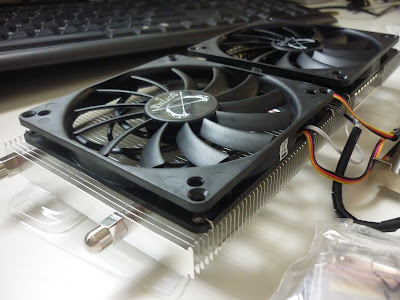
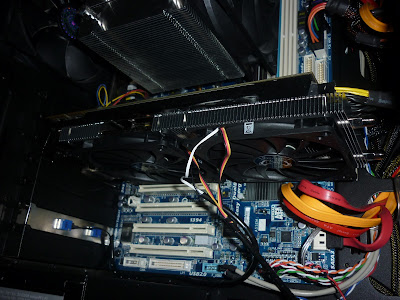
Decided to go with the scythe musashi

P1010678.JPG
P1010679.JPG


Decided to keep the baseplate as it cools much better than aftermarket vrm heatsinks. As I feared (even after adding the copper spacer), the fins of the cooler touch the baseplate, which creates a bit of tension. The cooler still makes full contact though, so I decided not to mod it.

It runs nice and quiet.:D
 
TouchMyBox said:
A cooler that retails for $120 for a cpu that retails at $199.

I like your style, kid. ;)

Go check out some overclocking communities and see what people with the same stepping as you are accomplishing.
There are people that spend much more than their CPU cost on a top of the line watercooling setup. I would too if I could.
 
MomoPufflet said:
Hey, it's my first time :lol And to be fair I got it for $100 all told on Amazon.

I got a list of baseline programs from this guide; installing them now.

The stuff in that article is pretty outdated, but the principles have more or less stayed the same. When I'm OCing, i've got my monitor littered with cpu-z, gpu-z, OCCT, prime95, and hwmonitor. Utilities that claim to auto-oc your computer for you are pretty lame, so make sure that whatever you're doing, it's done in the bios. I'd say see how high you can clock your system on stock voltages, and go from there. You're probably not going to want to overclock your ram unless you spent like $300+ on modules that are hand picked for overclocking. Generally, you'll want to underclock the ram a little bit. I'm still fairly new to overclocking but even I am able to see great results as long as I have the right gear and do a little reading.

If you're like me, be prepared to watch windows blue-screen for hours until you find the sweet spot for your system.

vazel said:
There are people that spend much more than their CPU cost on a top of the line watercooling setup. I would too if I could.

Watercooling is quite a different beast though since those who watercool are typically completely nuts, and I mean that in the nicest possible way. I'd be in that camp too if I weren't such a lazy bastard, but lately I'm more interested in having a completely silent machine rather than trying to squeeze the last ounce of performance I can out of a system.
 
Felix Lighter said:
I wouldn't buy one just to improve that number, though. I'd get some opinions from some people in this thread that are actually using an SSD. You're going to see improvements in certain applications and especially in the windows boot time but you won't see much in terms of gaming.

well boot time is always nice. and any load time will help. Also moving files around is something I do alot, so that will be nice
 
Top Bottom