• Hey Guest. Check out your NeoGAF Wrapped 2025 results here!

"I need a new PC!" 2010 Edition

-COOLIO- said:
hmm :[

ive had this computer for about a week and the processor has been at around 70 degrees on idle since i got it. i only recently just realized that this is bad. the 460 is at 30 degrees on idle and im reading that 40 c on an i5 750 is normal for idle. i dont get where this extra 30 degrees could be coming from.

just in case this isnt ncix's fault ill edit it out though until i know whats up.

What are your load temps?
 
-COOLIO- said:
i5 760 shouldnt be at 60 degrees celsius on idle right?
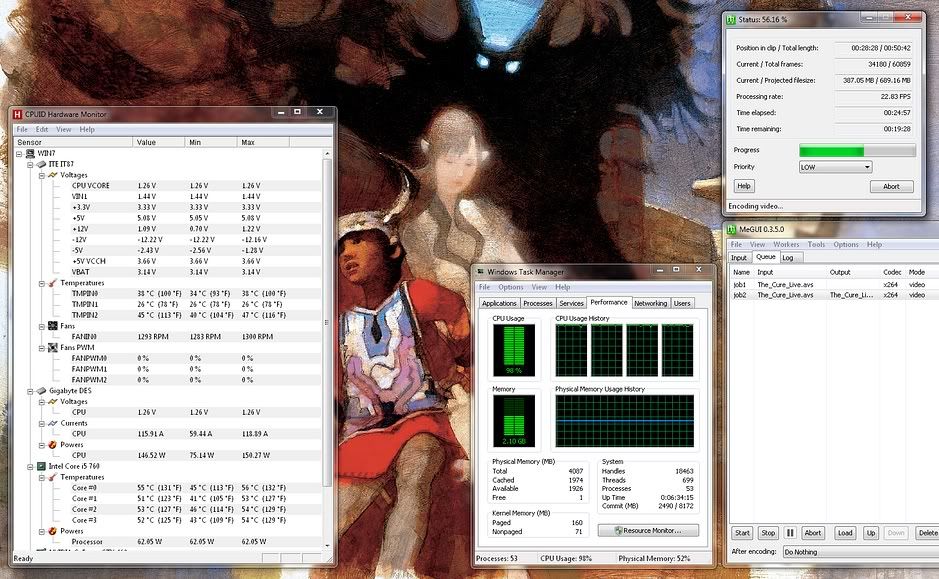
My i5 760 is around 30C idle and close to 60C under full load, stock clock:
Capture.jpg

I started the HW Monitor when the encoding was already running, that's why the min temp is 45C.

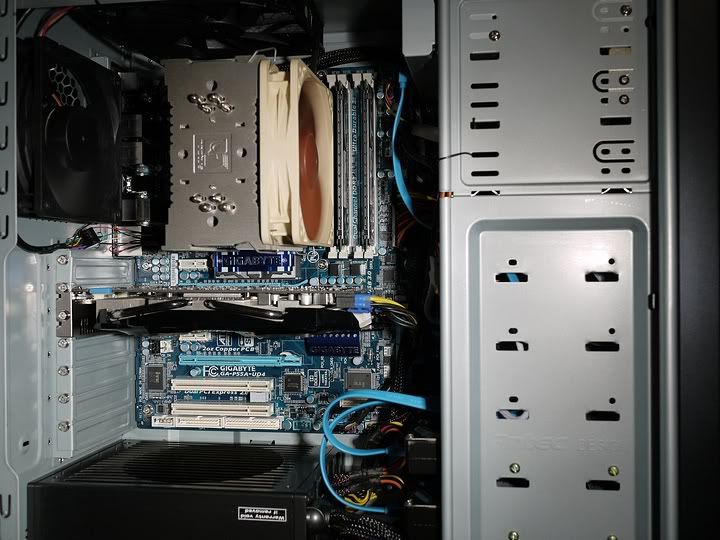
Sporting the Noctua NH-U12P here:
p1010858.jpg

It's not just a very good heat sink, they also included kick ass thermal paste.
 
toasty_T said:
I installed an Asus Xonar Essence ST sound card in my computer today and it makes an electrical cracking on boot up and shut down. I intend to get it replaced asap but I'm wondering if it's safe to keep it in my computer until I do that. It's working just fine (incredibly fine actually) and I'm enjoying it too much to rip it out and go back to on board sound.
It does that, just the components getting power. It makes the same snap when you switch to headphone output or when you power off your computer.

Have you replaced your op-amps? There are some better choices than the stock ones (although the stock sound is nothing to sneer at).
 
And so my tragic story continues! :) , but with a TWIST!

I dont think anybody remembers my shitty problems but the last chapter ended with me sending in my PSU and motherboard for testing ( after 2 pair of broken ram, and a grand total of 4 gpus). Result? PSU was broken, motherboard was broken ....fml

Will be getting a new PSU and will be refunded a wopping 200$ for my motherboard ( which nowadays is worth half of that? ).

Soooo...
I'm down a motherboard. I'm thinking about doing a little bit of revisions to my pc.

The parts I'm going to save are

Harddrive
PSU ( 650w)
Case
Optical
Gpu ( 460 gtx )

and my budget for the parts is around 500$, so ram,cpu and motherboard for around 500ish I guess. But if I'm to spend 500 on that I'd like to have a pc that "holds" for atleast a year or so.

Only thing I'd want is that whatever motherboard I choose I want it to have sli support.
So which route should I go? It seems both intel and amd chipets are a dead end nowadays when it comes to backwards compatibilities. Bulldozer will require am3+ and sandy will be new boards aswell I guess.

Come on gaf, shower me with spit and knowledge!
 
Does Thermal Paste come with my CPU or motherboard or is it something I need to buy separately? It's been over ten years since I've put together a computer.
 
HooCares said:
Thanks!

It's retail so I guess I'm good. Only other supplies I need then are screwdriver, q-tip, cable ties, and rubbing alcohol then? I'm following this guide btw: http://techreport.com/articles.x/13671/1
Thermal compound is preapplied, so no need for q-tip or rubbing alcohol, just slam it on there.

I don't know why they use rubbing alcohol and a q-tip to apply paste, since it's actually used to remove paste.
 
Darkatomz said:
It does that, just the components getting power. It makes the same snap when you switch to headphone output or when you power off your computer.

I figured it had something to do with them getting powered and I'm also noticing the sound when switching output devices. Hearing sounds like that coming from my otherwise silent case made jump the first few times and I leaped in and checked everything top to bottom to no avail.

I think I'm going to roll with the stock op amp although I'm not liking the sound of hip-hop music (voices sound over processed) everything else is fantastic particularly things that have actual instruments, electronic is great too.

With regards to the front panel audio connectors, does the card take AC-97 or HD Audio? I plugged HD Audio in and I'm not getting any feedback from my front connectors although I'll probably never use them.
 
So looking for a desktop wifi card. Should I just grab the cheapest g/n card I can find or does performance vary greatly like in routers? Any suggestions would be great. Would prefer to keep it wired, but I get free wifi and you can't beat free!
 
Hazaro said:
Dash Kappei said:
So, I'm still trying to figure out my new rig
(here's my first post with the pics of the HTPC's room).
You guys have obviously forgot so a little reminder:

This is my case:

* Thermaltaake DH 101


http://i55.tinypic.com/xatqav.jpg
http://i51.tinypic.com/35jvvj4.jpg


This is the build I've figured out with my buddy:
Components:

* INTEL CPU Core i7 930 (Bloomfield) Quad Core 2,8 Ghz socket LGA1366 Boxed
€291,99
* GIGABYTE Motherboard GA-X58A-UD5 socket LGA1366 chipset Intel X58 ATX
€304,99
* ANTEC PSU CP-1000 Modular 1000 Watt steady ATX 12V version 2.3 and EPS version 2.91
€126,49
* SEAGATE Surveillance SV35.5 1 Tb Sata 300 Buffer 32 Mb 7200 Rpm
€79,69
* CORSAIR Dimm Dominator 6Gb (3x2Gb) DDR3 Triple Channel 1600 Mhz Unbuffered CL 8-8-8-24
€165,99
* SAPPHIRE Radeon HD 5850 1Gb ddr5 Pci-E Dual DVI HDMI Display Port Sapphire Design
€259,99

TOTAL (19% Italian IVA TAX INCLUDED): € 1.229,14 <-- too much!!


So, yeah I'd go waaaaay overbudget with this.
Is there a way to maintain similar performance (and how would you rate this custom build compared to the one you'll be -hopefully!- suggesting) but keeping it at €900 total?
Note that I have a side budget for the case and audio card (which, I'll stress it again so to not have replies focusing about that, I do actually need).

Okay first off that 1000W Antec iirc is the standard Antec made and is not standard ATX. It probably won't fit. Secondly it is super overkill for power. -$50

Roger that!
Which one should I consider that's going to fit AND it is not overpowered?

Next is i7, also overkill, get an i5. -$250
Get a GTX460 1GB instead. -$50
4GB RAM -$50

Alrighty, performance wise I'm not going to lose that much? Can I still achieve 1080p@60fps with current/next-year racing games? I guess v-synch would be too taxing, am I going to suffer severely from screen-tearing?
And I've read pretty much anywhere that AMD(ATI) was the choice to go for HD video decoding, is the NVidia as good and do you only recommend the Gigabyte brand for the X460 or can I go with any one I find at the best price?

For a cooler see the list in the image, get some nice fans. +$40

See, this is what worries me A LOT.
I need it to be quiet!
Is the Cooler Master Hyper Plus 212 the right choice, consider I'll be watching a lot of movies in my dedicated room with this rig?

The Samsung F3 1TB drives run pretty nicely.


Better than the seagate I've posted?
Take into account that to me they are going to cost the same.

mescalineeyes said:
Get a 1gb gtx460 instead of the 5850... Same Performance, €50 less, for starters.
an i5 would also severely lower the costs, I think the i7 is a bit much.
TheExodu5 said:
You're going to be going away from the i7 930. Either tha i5 750 if you want to stay with Intel, or someone else can offer the current AMD alternative as well

Noted! Thanks to you guys as well, much appreciated!
 
Got a couple rigs up for sale in the Buy/Sell/Trade, and I'm still going to be building a bunch more.

Thanks for getting me into another hobby, GAF :lol
 
Alright so I kept looking around for what the best solution for a sli 460 rig would be,

i5-760 180$
Gigabyte-P55A-UD4 1156 socket, 170$
Corsair 4GB (2x2048MB) 1600MHz XMS3 DHX+ 100$

Comes to 450$.


dingdingding questions :

1) I know that the gigabyte P55A only supports single x16 and dual x8 pci-e, seing as I'm going for SLI 460s will this really be a problem for me ?

2) Anything I should keep in mind? I'm willing to do whatever the fukc it takes in order to NOT run into problems. I just want to game!


HAAAAALP * flashes brainy symbol on sky* Slide into my heart you
 
Nabs said:
Corky, what happened to your PSU/Mobo rma?

I wrote it a couple of post up but just cuz I love you <3 :

PSU was faulty, getting a new one
Mobo was faulty, getting 200$ refund :)

edit :

reading up on the gigabyte p55A ud4, somebody on a swedish forum quoted the following :

" Only x8 for your graphic-card, Yes only x8!!! Huh Sad
Or x16 using pcie rev 1.
and rev 1 is half speed of rev 2 = 250 for rev 1 and 500 for rev 2
So only way to get full speed on the x16 (rev 2)for your graphic card is not to use usb3 or sata .
As soon as using usb3 or sata3 then you cripple the graphic card bus.
For everyone to understand what I am saying I will give example

ex1
not enabled usb3 or sata 3
x16 = 16 lanes of pcie rev 2 =16 x 500 = 8 000 speed x16 port for your Gf card

ex 2
enabled usb3 or sata 3 using rev 1 (this set up will criple the sata 3 and usb3)
x16 = x16but in rev 1 = 16 x 250 = 4 000 max speed x16 port for your Gf card


ex 3
enabled usb3 or sata 3 using rev 2
x16 will be x8 but in rev 2 = 8 x 500 = 4 000 max speed x16 port for your Gf card


Sorry this Mb do not look as good as it´s cover!!!!
Sad Sad Sad"


I'm not really sure what that truly entails, should I stear clear of this motherboard if I'm going for sli 460s?
 
Clevinger said:
Most do, anyway. I just ordered a 875K and it doesn't come with a heatsink.
That's an "unlocked" processor for overclocking and such, they probably figured anyone seeking out that processor wouldn't be using the stock cooler.
 
Oi! Why is it that when I'm down and out in the gutter this thread speeds a million miles per hour but whenever I stop by for a visit it dies asap.

Ya'll make me feel like that aunt everybody has and hates :(

*sniff*
 
Corky said:
Oi! Why is it that when I'm down and out in the gutter this thread speeds a million miles per hour but whenever I stop by for a visit it dies asap.

Ya'll make me feel like that aunt everybody has and hates :(

*sniff*

Hey Corky, sorry I can't give you the links right now as I'm just about to leave work but HardOCP did some detailed benchmarks for 16x versus 8x performance in SLI and Xfire and basically found an almost negligible difference. You should be fine but make sure you track the article down for 110% peace of mind
 
kagete said:
Hey Corky, sorry I can't give you the links right now as I'm just about to leave work but HardOCP did some detailed benchmarks for 16x versus 8x performance in SLI and Xfire and basically found an almost negligible difference. You should be fine but make sure you track the article down for 110% peace of mind

:D I've actually stumbled upon that article. And you are indeed right, the performanceloss seem to be negligable.

Now all I we need is to figure if the parts I'm buying work "flawlessly" together. ( and wait a day or so to see if anybody advises against my purchase)

<3
 
Corky said:
reading up on the gigabyte p55A ud4, somebody on a swedish forum quoted the following :

" Only x8 for your graphic-card, Yes only x8!!! Huh Sad
Or x16 using pcie rev 1.
and rev 1 is half speed of rev 2 = 250 for rev 1 and 500 for rev 2
So only way to get full speed on the x16 (rev 2)for your graphic card is not to use usb3 or sata .
As soon as using usb3 or sata3 then you cripple the graphic card bus.


I had the same questions, before I bought my GA-P55A-UD4. Here are a few good links:

http://www.overclockers.com/superspeed-usb-gigabyte-turbo-asus-true-usb30/
http://www.overclockers.com/gigabyte-p55a-series-motherboards-part-2-superspeed-usb-pushed-limit/

I'm using the DMI mode. Sure it's a compromise and I'm not getting the full performance of USB3.0/SATA3, but are there any devices that are able to operate at those specs? Are you going to use a SSD as usb flash drive? SSD is now somewhat able to max sata2 and that's plenty performance and even those still cost premium compared to hhd. Maybe in a few years it's going to be important to have that stuff at its fullest potential, but for now I couldn't care less.
 
ChryZ said:
I had the same questions, before I bought my GA-P55A-UD4. Here are a few good links:

http://www.overclockers.com/superspeed-usb-gigabyte-turbo-asus-true-usb30/
http://www.overclockers.com/gigabyte-p55a-series-motherboards-part-2-superspeed-usb-pushed-limit/

I'm using the DMI mode. Sure it's a compromise and I'm not getting the full performance of USB3.0/SATA3, but are there any devices that are able to operate at those specs? Are you going to use a SSD as usb flash drive? SSD is now somewhat able to max sata2 and that's plenty performance and even those still cost premium compared to hhd. Maybe in a few years it's going to be important to have that stuff at its fullest potential, but for now I couldn't care less.

hey chryz

I don't have any plans of using a SSD as an usb flash drive. But I might use it as a regular ( am I derping? ) HDD.

Are you happy with your UD4? Whats your cpu/ram ? :)
Got anything to add other than those articles? ( thanks btw, seems though that as gaming is my main focus I wont be bothered with anything the article touches upon ).

edit : as long as my gaming performance isnt affected I'm all happy :3


<3 cheers, will wait with the order until you guys let me order!
 
Corky said:
hey chryz

I don't have any plans of using a SSD as an usb flash drive. But I might use it as a regular ( am I derping? ) HDD.

Are you happy with your UD4? Whats your cpu/ram ? :)
Got anything to add other than those articles? ( thanks btw, seems though that as gaming is my main focus I wont be bothered with anything the article touches upon ).

edit : as long as my gaming performance isnt affected I'm all happy :3

<3 cheers, will wait with the order until you guys let me order!
I'm very happy with my UD4 (i5 760, 4GB G.SKILL DDR3-12800 1600 CL7). Single GTX460, SLI is an option for later maybe. I already did some stress testing and the whole setup is super solid. The build quality of the Gigabyte stuff is pretty excellent.

Make sure to disable the "turbo" for USB3.0/SATA3 in the bios and your gaming performance is safe. You can always re-enable it, if you have to move lots of data around and then disable it when you're done. It's all just a reboot away.
 
toasty_T said:
I figured it had something to do with them getting powered and I'm also noticing the sound when switching output devices. Hearing sounds like that coming from my otherwise silent case made jump the first few times and I leaped in and checked everything top to bottom to no avail.

I think I'm going to roll with the stock op amp although I'm not liking the sound of hip-hop music (voices sound over processed) everything else is fantastic particularly things that have actual instruments, electronic is great too.

With regards to the front panel audio connectors, does the card take AC-97 or HD Audio? I plugged HD Audio in and I'm not getting any feedback from my front connectors although I'll probably never use them.
Most of my hip-hop and rap sound fine, you might want to check your settings on the audio console. Or, it could just be your speakers or bass/treble settings, or equalizer if you use one.

Let me know if you're looking for op-amp suggestions. If you're a student, you can get 2/3 of the op-amps that you (should) get for free.

As for the front panel pins, I honestly have no idea. I don't find a reason to use it anyways, since the audio console lets you actively switch the audio source.
 
ayo PC-GAF, would it be possible to have a dual monitor set-up with my desktop going to my TV, and then like somehow it connecting to my laptop? i couldn't think of a way it would work, but maybe there is.
i'm just sick of trying to drag my cursor from my TV to my laptop only to realize that they're not one. :(
 
//B1G said:
ayo PC-GAF, would it be possible to have a dual monitor set-up with my desktop going to my TV, and then like somehow it connecting to my laptop? i couldn't think of a way it would work, but maybe there is.
i'm just sick of trying to drag my cursor from my TV to my laptop only to realize that they're not one. :(
So you want to have your desktop PC display on a TV?
And control it with your laptop?

you can do the first, assuming your TV and graphics card support HDMI, or some other connection that they both have.


As for using your laptop to control your PC. You could just get a keyboard with a trackpad built in

http://www.amazon.com/dp/B000W5RBQE/?tag=neogaf0e-20
 
no, i want ... well i'm not sure exactly what i want i guess.
i guess like a triple display? i've already got my PC connected to my TV via HDMI, and my laptop's got an HDMI-out, but is there any way to use the TV as a sort of medium to extend the PC's resolution?
 
//B1G said:
no, i want ... well i'm not sure exactly what i want i guess.
i guess like a triple display? i've already got my PC connected to my TV via HDMI, and my laptop's got an HDMI-out, but is there any way to use the TV as a sort of medium to extend the PC's resolution?
Not really clear on what you're asking. You have three displays, and two machines. Do you want the PC to occupy all three displays?
 
sharkmuncher said:
So looking for a desktop wifi card. Should I just grab the cheapest g/n card I can find or does performance vary greatly like in routers? Any suggestions would be great. Would prefer to keep it wired, but I get free wifi and you can't beat free!
Just read newegg and amazon reviews.
It can be a crap shoot, even if they work well for most. I'd imagine PCI card with antennas is good, but I've heard that some of those USB ones are actually ok.

Dash Kappei said:
Roger that!
Which one should I consider that's going to fit AND it is not overpowered?
Corsair 650W

Alrighty, performance wise I'm not going to lose that much? Can I still achieve 1080p@60fps with current/next-year racing games? I guess v-synch would be too taxing, am I going to suffer severely from screen-tearing?
The 460 1GB will run Dirt2 at 4xAA, 16xAF, max settings at a 60FPS average. Use triple buffering for tearing.
And I've read pretty much anywhere that AMD(ATI) was the choice to go for HD video decoding, is the NVidia as good and do you only recommend the Gigabyte brand for the X460 or can I go with any one I find at the best price?
Any 4xxx,5xxx,9xxx, 2xx, or 4xx series has great video decoding now. Most brands are fine. Amazon even has 460's for $220 right now.

I need it to be quiet!
Is the Cooler Master Hyper Plus 212 the right choice, consider I'll be watching a lot of movies in my dedicated room with this rig?
The stock fan on it is a tad noisy. Buy some low speed 120mm fans to use instead. Noctua is a good brand. You'll probably want 25-40 CFM. Also maybe check spcr.com
Better than the seagate I've posted?
Faster + Quieter
ChryZ said:
I had the same questions, before I bought my GA-P55A-UD4. Here are a few good links:

http://www.overclockers.com/superspeed-usb-gigabyte-turbo-asus-true-usb30/
http://www.overclockers.com/gigabyte-p55a-series-motherboards-part-2-superspeed-usb-pushed-limit/

I'm using the DMI mode. Sure it's a compromise and I'm not getting the full performance of USB3.0/SATA3, but are there any devices that are able to operate at those specs? Are you going to use a SSD as usb flash drive? SSD is now somewhat able to max sata2 and that's plenty performance and even those still cost premium compared to hhd. Maybe in a few years it's going to be important to have that stuff at its fullest potential, but for now I couldn't care less.
Cool to see, was wondering how much that PLX chip mattered.
But if you have $170 to sped, get the ASUS. Really.
http://www.newegg.com/Product/Product.aspx?Item=N82E16813131621
 
Aselith said:
Help! I got this: http://www.newegg.com/Product/Produ...k=False&VendorMark=&IsFeedbackTab=true&Page=2 from Newegg today and I can't for the life of me figure out how to detach the low-profile brackets so that I can attach the full height bracket. Anyone ever done this operation? I detached a screw that was holding the plate on the card and it still won't seem to come off. Neither the instructions or the Sapphire website have instructions that I can see.
Did you remove the screws on the outside on either side of the DVI port? You screw into them when plugging a cable in, but it looks like they come out too.
 
Hazaro said:
Dash Kappei said:
Which one should I consider that's going to fit AND it is not overpowered?
Corsair 650W

This one"
ATX 650W CORSAIR 650TXEU?
I can't find it for less than €100 shipped.. isn't that a lot for a 650W?
But you've also said that the ANTEC CP1000 ATX wouldn't fit with my Thermaltake DH101 case, so I guess it's my only choice.

Hazaro said:
Dash Kappei said:
Alrighty, performance wise I'm not going to lose that much? Can I still achieve 1080p@60fps with current/next-year racing games? I guess v-synch would be too taxing, am I going to suffer severely from screen-tearing?
The 460 1GB will run Dirt2 at 4xAA, 16xAF, max settings at a 60FPS average. Use triple buffering for tearing.
Uhmm, I "need" that locked at 60fps, hopefully if I go lower on the AF or, last option, with AA, I can still achieve that.
Hazaro said:
Dash Kappei said:
And I've read pretty much anywhere that AMD(ATI) was the choice to go for HD video decoding, is the NVidia as good and do you only recommend the Gigabyte brand for the X460 or can I go with any one I find at the best price?
Any 4xxx,5xxx,9xxx, 2xx, or 4xx series has great video decoding now. Most brands are fine. Amazon even has 460's for $220 right now.

Perfect, I'll believe you... times have indeed changed then, I still remember the old times when Radeon was definitely the ones and only cards of choice for that!
Can't make with the Amazon deal since I'll be shopping this rig in Italy, but I'm quite sure there are good deals around anyway since you've said I can just go with any brand.

Hazaro said:
Dash Kappei said:
I need it to be quiet!
Is the Cooler Master Hyper Plus 212 the right choice, consider I'll be watching a lot of movies in my dedicated room with this rig?
The stock fan on it is a tad noisy. Buy some low speed 120mm fans to use instead. Noctua is a good brand. You'll probably want 25-40 CFM. Also maybe check spcr.com

Will do, shouldn't be that hard to replace the fans anyway so at least I can do that myself.

Hazaro said:
Dash Kappei said:
Better than the seagate I've posted?
Faster + Quieter

Again, consider the Samsung bought! :)

Thanks a lot, man.
Much appreciated!
 
Dr.Acula said:
Getting another damned error with my card now. The only thing that changed was I got a Windows Update update. Now I can't run any videos without my monitor losing signal. :(

WTF? So tried uninstalling in safe mode, running that nvidia driver sweeper, re-installing, still no go.

Just wonky in general.

This isn't the first time this card has given me trouble.

What brand is your 460? I bought the gigabyte one when it was released and it died like 2 days after I got it with symptoms similar to yours. Heavy artifacting when any GPU acceleration was used which eventually led to hard lockups. I RMA'd it back to newegg and got a new one, that lasted about a month before dying last weekend. I posted a user review on newegg's site and saw there were a ton of other reviewers who had the same problem. Gigabyte contacted me and asked for the serial number of my card, I sent it back to them and got another RMA number back within the hour. Seems like a bad batch of cards or something, I hope the next one lasts longer.
 
Fredescu said:
Did you remove the screws on the outside on either side of the DVI port? You screw into them when plugging a cable in, but it looks like they come out too.

Yeah, that's what it was. :P I came back downstairs and noticed that screw ends were sticking through on the backside of the port and got her all fixed up. I thought those were integrated into the plug. I didn't even think about them being able to come off.

Fuck yeah! What a difference a graphics card makes. Went from getting 6 fps average in Dawn of War 2 test on medium to getting 20 fps average on Ultra. Not the best in the world but certainly worth $40. :D
 
Dash Kappei said:
This one"
ATX 650W CORSAIR 650TXEU?
I can't find it for less than €100 shipped.. isn't that a lot for a 650W?
But you've also said that the ANTEC CP1000 ATX wouldn't fit with my Thermaltake DH101 case, so I guess it's my only choice.

Uhmm, I "need" that locked at 60fps, hopefully if I go lower on the AF or, last option, with AA, I can still achieve that.
Italy might have some better options on Seasonic PSU's. Maybe a 650W or 750W from them would be cheaper?
You are paying for build quality, although I would think the Antec 1000W is solid. Just not sure on the ATX spec size like I said.

Link me to where you are buying from.

As for 'Locked'(e.g. minimum frames) you'll need a better card, or set some settings to High instead of Ultra/Max. Luckily in racing games the FPS tends to be solid, and if you OC your GPU you'll probably be right on the edge at 60FPS min. If you don't OC I mean we are talking like a 50FPS minimum or so, so it'll be dips.
The 5850 isn't much better than a 460, and the 460 is considerably cheaper.

You might want to buy a stop gap 460 now and a better 6xxx series in a few months perhaps?
 
SuperLurker said:
What brand is your 460? I bought the gigabyte one when it was released and it died like 2 days after I got it with symptoms similar to yours. Heavy artifacting when any GPU acceleration was used which eventually led to hard lockups. I RMA'd it back to newegg and got a new one, that lasted about a month before dying last weekend. I posted a user review on newegg's site and saw there were a ton of other reviewers who had the same problem. Gigabyte contacted me and asked for the serial number of my card, I sent it back to them and got another RMA number back within the hour. Seems like a bad batch of cards or something, I hope the next one lasts longer.

Yep, that's the one. Got it launch too. That makes me feel better in some ways.
 
Hazaro said:
Link me to where you are buying from.

www.eprice.it

Here's my shopping basket
, with the choice of the gfx card and mobo gone to the cheapest (read below please)


Since I'm following your tips and going from an i7 to the i5, I suppose I need the MOBO as well, right?
I hoped to stay with that one since the difference should be €100 but when in the future, a couple of years down the road, I'll need to upgrade then I'll be forced to change the mobo as well, all over again, sigh :-/

Before with the i7 the choice was the:
GIGABYTE Mobo GA-X58A-UD5 socket LGA1366 chipset Intel X58 ATX
€286,99

Now which one should I buy for the i5-750, I'm clueless but do these seem good choices to you, and in case what's the difference in terms of gaming performances (if there are any):

GIGABYTE Mobo GA-P55-UD6 socket LGA 1156 chipset Intel P55 ATX
€236,00

or

GIGABYTE - Motherboard GA-P55A-UD4 socket LGA 1156 chipset Intel P55 ATX
€189,00
--

Another question is regarding the GPU.
You guys botched the:
SAPPHIRE Radeon HD 5850 1Gb ddr5 Pci-E Dual DVI HDMI Display Port Sapphire Design
€259,99
because of its price, but the GTX460 1GB I'm not really finding it that cheaper...
http://www.eprice.it/default.aspx?sb=1&descCat1=Informatica&search=GTX460+1GB
this brand I don't know:
GAINWARD - GeForce GTX 460 1 Gb ddr5 Pci-E Dual DVI / VGA / Mini HDMI Golden Sample + Coupon FREE Download MAFIA II
It's €229 or €269 for the 2GB model (would it be better this one 2GB or the Radeon 1GB for the same price?)
then in-between there are Asus and Gigabyte model, from €239 to €259... so the same as the Saphhire Radeon, and I don't care AT ALL about Mafia 2! :lol
 
Incredibly small performance gains.

Get a GA-P55A-UD3 or P7P55D-E.
If you plan on 2 cards later get a P7P55D-E PRO
Antec 650W Earthwatts is a bit cheaper
 
Hazaro said:
Incredibly small performance gains.

Get a GA-P55A-UD3 or P7P55D-E.
If you plan on 2 cards later get a P7P55D-E PRO
Antec 650W Earthwatts is a bit cheaper

Ok wait a sec (or whenever you'll have time), I'll update my shopping basket right now and link it to you if you find any faults before I take the plunge it'd be awesome.
Anyway, I don't wanna kiss ass any more than it's due, but man you can't even realize how much you're helping me not wasting my money! thanks, thanks... and thanks again.
 
Here's the updated shopping basket!

Only thing I'm unsure about still is the gfx card, since you've replied to my post before my edit.

shopping basket said:
Case THERMALTAKE DH101
€ 116,49

ASUS Motherboard P7P55D-E PRO
€ 179,99

ANTEC PSU EarthWatts 650W
€ 75,89

INTEL Core i5 750 (Lynnfield) Quad Core 2,66 Ghz socket LGA1156 Boxed
€ 179,99

CORSAIR Dimm XMS3 4 Gb (2x2) ddr3 Dual Chan. 1333 Mhz Unbuff CL 9-9-9-24
€ 85,89

HDD SAMSUNG Spinpoint F3 1 Tb Sata 300 Buffer 32 Mb 7200 rpm
€ 67,89

GIGABYTE GeForce GTX 460 1 Gb OC Edition+ PC MAFIA II*
€ 241,99

COOLERMASTER Hyper 212 Plus
€ 26,29

Here's what I wrote above about the gpu card:
Another question is regarding the GPU.
You guys botched the:
SAPPHIRE Radeon HD 5850 1Gb ddr5 Pci-E Dual DVI HDMI Display Port Sapphire Design
€259,99
because of its price, but the GTX460 1GB I'm not really finding it that cheaper...
http://www.eprice.it/default.aspx?sb...rch=GTX460+1GB
this brand I don't know:
GAINWARD - GeForce GTX 460 1 Gb ddr5 Pci-E Dual DVI / VGA / Mini HDMI Golden Sample + Coupon FREE Download MAFIA II
It's €229 or €269 for the 2GB model (would it be better this one 2GB or the Radeon 1GB for the same price?)
then in-between there are Asus and Gigabyte model, from €239 to €259... so the same as the Saphhire Radeon, and I don't care AT ALL about Mafia 2... maybe I'll play it, someday, if somebody wants to give me a retail version, no way Im going to d/l all those gigs! :lol

Hazaro said:
Delicious Euros :lol

Damn you! :lol
I wish my payslip was still in GBP! But no, now it's in Euros and yet I have to pay fucking jacked up prices for my shopping... plus I have a bit of money "blocked" in the US which are worth less and less by the day -__-
 
Milpool said:
What are your load temps?

they were about 80 before i fiddled with the heatsink. ever since i dismounted the heatsink the temps started rising steadily the momement i turn on the computer and i cant use it anymore. the pins are all the way in though.

im getting a new cooler on saturday and some new paste. hopefully my 760 is still healthy

ChryZ said:
My i5 760 is around 30C idle and close to 60C under full load, stock clock:
http://img.photobucket.com/albums/v215/Brainshrimp/Capture.jpg[IMG]
I started the HW Monitor when the encoding was already running, that's why the min temp is 45C.

Sporting the Noctua NH-U12P here:
[IMG]http://img.photobucket.com/albums/v215/Brainshrimp/p1010858.jpg[IMG]
It's not just a very good heat sink, they also included kick ass thermal paste.[/QUOTE]

even if their stock sucks, it shouldnt overheat to an unsafe temp by default. something is wrong with either my particular cpu, or the installation. either way ill buy a new cooler and see how it works out
 
Dash Kappei said:
Only thing I'm unsure about still is the gfx card.

Rethink Gigabyte. A lot of people are having trouble with that model (click "feedback"), including myself. I'm probably gonna have to RMA it. Hopefully it's just a bad batch (mine's a launch), but if you can find another brand at a similar price I'd consider it. You'll prolly be fine with them though.

Other than it wonking out on me a couple of times, the card's been excellent, so 460 gets a vote from me.
 
Top Bottom