• Hey Guest. Check out your NeoGAF Wrapped 2025 results here!

"I need a new PC!" 2010 Edition

JudgeN said:
Stay far away from that seagate hard drive, its the same kind of drives we get with our HP at my office and they fail all the time. Buy this instead:

http://www.newegg.com/Product/Product.aspx?Item=N82E16822152185

How much do you want to spend and what the PC be used for? GPU isn't really powerful enough for 1080p gaming with good frame rates. Next your buying DDR3 ram but if your MB is from 2004 it isn't going to support DDR3 so your probably going to need a new board.

If you need a board here is what I recommend, great price and features.

http://www.newegg.com/Product/Product.aspx?Item=N82E16813128443

Thanks for the heads up on the HDD.

I'm looking to spend in the range of $450-$550, and 1080p gaming is one of the perks, yes, though I would 'settle' for 1680x1050. I can hold off on a Blu Ray drive purchase since I will definitely need a new motherboard and power supply.

The 4870 benchmarked Crysis on High settings 1900x1200 (no AA or AF) at 37FPS (21FPS with 4xAA/AF) here.

What would you recommend as an affordable alternative?

And where should I look for motherboard/power supply compatibility?

Edit: NVM, thanks for the link

Edit2: The Radeon 5770 seems a bit better suited for my purposes.
 
At Newegg the MSI and Gigabyte 460 1GB cards are both $210 after MIR which is as low as I've seen them for a while. I might pick up one now at that price and see if they drop further depending on AMDs news (if any) this month before getting a second for SLI.
 
Sho_Nuff82 said:
Thanks for the heads up on the HDD.

I'm looking to spend in the range of $450-$550, and 1080p gaming is one of the perks, yes, though I would 'settle' for 1680x1050. I can hold off on a Blu Ray drive purchase since I will definitely need a new motherboard and power supply.

The 4870 benchmarked Crysis on High settings 1900x1200 (no AA or AF) at 37FPS (21FPS with 4xAA/AF) here.

What would you recommend as an affordable alternative?

And where should I look for motherboard/power supply compatibility?

Edit: NVM, thanks for the link

Edit2: The Radeon 5770 seems a bit better suited for my purposes.

5770 would be the way to go, speaking of PSU not sure what wattage your one from 2004 is but you "might" need to replace it as well. If so here is what I could find that is affordable and with good reviews.

http://www.newegg.com/Product/Produ...371016&cm_re=antec_550-_-17-371-016-_-Product
 
Sho_Nuff82 said:
Thanks for the heads up on the HDD.

I'm looking to spend in the range of $450-$550, and 1080p gaming is one of the perks, yes, though I would 'settle' for 1680x1050. I can hold off on a Blu Ray drive purchase since I will definitely need a new motherboard and power supply.

The 4870 benchmarked Crysis on High settings 1900x1200 (no AA or AF) at 37FPS (21FPS with 4xAA/AF) here.

What would you recommend as an affordable alternative?

And where should I look for motherboard/power supply compatibility?

Edit: NVM, thanks for the link

Edit2: The Radeon 5770 seems a bit better suited for my purposes.

The only purpose I see the 5770 supporting is the ability to run 3 monitors. As I've seen 4870's that are just as fast as the 5770 but are selling for under 100$ you might as well just save yourself the 40$, especially on a tight budget like yours.

Looking around that must have just been one hell of a sale I saw earlier or perhaps American pricing has reached sub 100$ on the 4870, I can't seem to find it for that rate up north. Anyways it's worth taking a look at 4870 pricing near you, if it's around the same of course go with the card that supports eyefinity.

Here we go, 100$ XFX 4870 from newegg.com. 100$ Asus 4870 (Boo MIR)
 
Which CPU cooler would you folks recommend for overclocking an i5 750? I'm not 100% sure how high I want to OC it yet, but I know I want some good, durable cooling that can fit inside my case (Antec 900).

I'm trying to decide between the Noctura NH-D14 or the H50 Any advice?
 
Budget: $800-1000 (US)
Main Use: Gaming for the most part
Monitor Resolution: Hopefully 1080P?
List SPECIFIC games: Starcraft II, SW: The Old Republic

I had initially planned on building my new rig when Diablo III came out, but since that's not arriving until some far off stardate, I then decided to wait until The Old Republic was released.

That plan got ruined when I bought Starcraft II and got a bad itch to get back into PC gaming again. I'm currently using an old P4 3.0GHZ (single core :-\ ), so it's been a while since I bought a new computer and I don't really have much of an idea what passes for good hardware anymore.

I already have this hard drive (SAMSUNG HD103SJ 1TB,7200RPM,32MBCache), which I planned on using in my new system, so I think that's taken care of. Any help beyond that would be appreciated though.
 
Dr. Acid Avatar said:
Which CPU cooler would you folks recommend for overclocking an i5 775? I'm not 100% sure how high I want to OC it yet, but I know I want some good, durable cooling that can fit inside my case (Antec 900).

I'm trying to decide between the Noctura NH-D14 or the H50 Any advice?


The size of the Noctura is a fucking beast, damn son.

IMG_0165.jpg
If noise is an issue from the recordings I've heard, the H50's pump can be annoying in the acoustical department.
 
teiresias said:
If noise is an issue from the recordings I've heard, the H50's pump can be annoying in the acoustical department.


I have the H50, it's a pretty hassle free and great performing system. pretty quiet too. don't know who said that it was loud but i'd have to strongly disagree with them.
 
Dr. Acid Avatar said:
Which CPU cooler would you folks recommend for overclocking an i5 775? I'm not 100% sure how high I want to OC it yet, but I know I want some good, durable cooling that can fit inside my case (Antec 900).

I'm trying to decide between the Noctura NH-D14 or the H50 Any advice?

Someone on gaf recommended me the hyper 212+, thing cools like no other and is modestly priced at 29.99. You can even attach a second 120mm fan on it.
Cooler%20Master%20Hyper%20212%20Plus.jpg
 
Yep, as long as the motherboard supports it and the power supply is up to it. Technically he could even crossfire the 5870 with a 5850:

CF_combo_chart.jpg
 
Mr Nightman said:
Someone on gaf recommended me the hyper 212+, thing cools like no other and is modestly priced at 29.99. You can even attach a second 120mm fan on it.
I'll vouch for this as well -- it dropped my temps by about 4 degrees and it's massively quieter than the AMD stock cooler. Probably not the best cooler out there, but for the price it's a really nice option.
 
Fredescu said:
Yep, as long as the motherboard supports it and the power supply is up to it. Technically he could even crossfire the 5870 with a 5850:
http://game.amd.com/us-en/content/images/crossfirex/CF_combo_chart.jpg
His motherboard and PSU. Should be okay, I think. Holy shit is New Vegas going to run like awesome on that thing. So this is the 5870 I ordered for him to add to his current one.

Okay, so here's what I got on my "~$1k" budget: link.

Turning my current PC into an HTPC for my ma, so I'm taking all the HDDs out of here and throwing in that WD 640GB drive. The 2TB drive I ordered is going to be additional storage for my media, I need to get back to ripping the rest of my DVDs into x264. My brother's getting the i7-875k and 5870, I'm taking his i7-860 and I was originally planning on taking his 5870 but instead I just got myself a 5850. I kind of need a monitor and keyboard that don't suck but I'll just wait until Black Friday and other holiday deals to secure those.
 
rohlfinator said:
I'll vouch for this as well -- it dropped my temps by about 4 degrees and it's massively quieter than the AMD stock cooler. Probably not the best cooler out there, but for the price it's a really nice option.

I might be willing to give this cooler a shot. Doesn't seem that expensive either. Anyone have a good installation guide for a noob like me handy?
 
evil solrac v3.0 said:
I have the H50, it's a pretty hassle free and great performing system. pretty quiet too. don't know who said that it was loud but i'd have to strongly disagree with them.

SilentPCReview's H50 review is where I hear the recordings (on page 7 of the review). It's a noise they've seen on two samples from the pump. Maybe yours doesn't sound like that, but I'm a bit leery of getting one with a pump exhibiting that buzz. That, and I'm not really sure I want the trouble of having to mount the radiator.

I'm planning to get a 212+ and replace the stock fan with an 800RPM Scythe Slipstream which should be pretty silent in comparison to the graphic card fans if I do end up SLI'ing two 460s.
 
Hey I'm having some trouble when I boot my new computer. I've seen this "Hyper Transport sync flood error occurred on last boot" error 3 times in the last week, and I'm wondering what could be the issue. I've got an Athlon II X4 640, and I've read that the issue could be fixed by increasing the voltage of my CPU. Should I do that?
 
AMD recently made several blog posts about their upcoming Bulldozer processor, but this point in particular will have relevance when building your own PC whatever the processor:

http://blogs.amd.com/work/2010/09/13/bulldozer-20-questions-part-3/
AMD OpteronTM processors will be available in dual socket systems, but those will not have the overclocking capability that you are looking for. Server customers do not manually overclock their systems; they need to ensure reliability. While you can run a processor outside of its specified operating range (overclocking it to a higher frequency), when you do that you take on some risks.

First, you diminish the useful life of the processor. By how much is hard to say because all processors are different. But overclocking increases the potential for failure, not something you want on a server. Secondly, when you overclock, sometimes your results are not what you expected. 2+2=5.
Not a problem if you are playing a game, but a real problem if you are using a server to run automated systems, make business decisions or keep financial records straight.

2+2=5 can also cause your system to crash if it occurs in a critical area of memory. now that's nothing a quick reboot won't fix, with the caveat that damage to silicon tends to be cumulative. re: "diminish the useful life of the processor." after a year, the system may still technically work, but will it still be useful? if a system crashes every day, I would question it's usefulness.

obviously you're free to overclock yourself to the moon if you want, but bear in mind that all bets are off when operating outside of manufacturers specifications. I personally prefer my processor to be rock solid for the 2-3 years it will be in use.
 
Can someone answer a question for me?

I should have all of my parts for my build by the middle of next week - minus the monitor. Since I'm currently on an iMac I won't really have a monitor available until I get one. I've never dealt with a graphics card with HDMI on it before, but if I were to hook the PC up to my plasma via HDMI would I be able to see output from the HDMI connector before actual drivers are installed? The BIOS, the Win7 install screens, etc?

Just wondering if I need to borrow a monitor from someone when I do the build if I havent' gotten mine yet?
 
MrBelmontvedere said:
AMD recently made several blog posts about their upcoming Bulldozer processor, but this point in particular will have relevance when building your own PC whatever the processor:

http://blogs.amd.com/work/2010/09/13/bulldozer-20-questions-part-3/


2+2=5 can also cause your system to crash if it occurs in a critical area of memory. now that's nothing a quick reboot won't fix, with the caveat that damage to silicon tends to be cumulative. re: "diminish the useful life of the processor." after a year, the system may still technically work, but will it still be useful? if a system crashes every day, I would question it's usefulness.

obviously you're free to overclock yourself to the moon if you want, but bear in mind that all bets are off when operating outside of manufacturers specifications. I personally prefer my processor to be rock solid for the 2-3 years it will be in use.


sounds like a bunch of FUD to me.
edit: and anyways they seem to be reffering more to server problem than gaming, i'd say overclock away.
 
MrBelmontvedere said:
AMD recently made several blog posts about their upcoming Bulldozer processor, but this point in particular will have relevance when building your own PC whatever the processor:

http://blogs.amd.com/work/2010/09/13/bulldozer-20-questions-part-3/


2+2=5 can also cause your system to crash if it occurs in a critical area of memory. now that's nothing a quick reboot won't fix, with the caveat that damage to silicon tends to be cumulative. re: "diminish the useful life of the processor." after a year, the system may still technically work, but will it still be useful? if a system crashes every day, I would question it's usefulness.

obviously you're free to overclock yourself to the moon if you want, but bear in mind that all bets are off when operating outside of manufacturers specifications. I personally prefer my processor to be rock solid for the 2-3 years it will be in use.

Back in the day this line of argument from Intel and AMD held more validity, when processors were actually binned almost solely on verification testing after fabrication. Nowadays, a processor is as likely to be binned a certain way just for marketing purposes rather than operational parameters, in which case this is boogey-man scare tactics. I also question whether a logic fault due to clock issues is actually going to cause any kind of silicone degradation in the long term. Exposing a processor to over-voltage conditions in order to reach higher clocks? Sure, that can cause long-term damage, but if you can up the multiplier or bus without needing to up the voltage I don't see how you're going to kill anything.

Anyone running a corporate, mission-critical server on overclocked processor is stupid anyway.
 
MrBelmontvedere said:
AMD recently made several blog posts about their upcoming Bulldozer processor, but this point in particular will have relevance when building your own PC whatever the processor:

http://blogs.amd.com/work/2010/09/13/bulldozer-20-questions-part-3/


2+2=5 can also cause your system to crash if it occurs in a critical area of memory. now that's nothing a quick reboot won't fix, with the caveat that damage to silicon tends to be cumulative. re: "diminish the useful life of the processor." after a year, the system may still technically work, but will it still be useful? if a system crashes every day, I would question it's usefulness.

obviously you're free to overclock yourself to the moon if you want, but bear in mind that all bets are off when operating outside of manufacturers specifications. I personally prefer my processor to be rock solid for the 2-3 years it will be in use.

that's a bit of selective quoting there, as the question mainly refers to dual cpu systems (like the EVGA SR-2) and you let out this bit at the end

Marketing AMD OpteronTM Processors as “overclockable” would not help us in growing server share in the commercial market (and most likely hurt us), so it is not something that we will be pursuing.

all in all nothing that indicates the Bulldozer reacts differently than past cpu's did to overclocking

stability is no issue with the right cooling and voltage, and lifespan is diminished mainly by the amount of voltage used ... all my 6 year old systems still run their overclocked settings, and anything older than that is only useful to decorate the walls in the garage with

(no use for a 6 year old energy guzzling system when I can buy a new pc for ~150 euros that uses as much energy as a lightbulb...)
 
teiresias said:
Back in the day this line of argument from Intel and AMD held more validity, when processors were actually binned almost solely on verification testing after fabrication. Nowadays, a processor is as likely to be binned a certain way just for marketing purposes rather than operational parameters, in which case this is boogey-man scare tactics. I also question whether a logic fault due to clock issues is actually going to cause any kind of silicone degradation in the long term. Exposing a processor to over-voltage conditions in order to reach higher clocks? Sure, that can cause long-term damage, but if you can up the multiplier or bus without needing to up the voltage I don't see how you're going to kill anything.

Anyone running a corporate, mission-critical server on overclocked processor is stupid anyway.

that's the thing. if overclocking were as safe as you say long term, there would be no reason not to OC a mission critical piece of equipment. those fools, they're just leaving performance sitting on the table! ah, but the fact that you don't see IT admins relying on this practice speaks for itself.

I may be overly cautious, but I fail to see the advantage of a 30% overclock if it means your processor might die 1-2 years down the line. or it might not, in which case consider yourself lucky. but I have problems relying on "luck" for the well being of my equipment.

as for overvolting vs. "standard" overclocking, it's a case of worse vs. bad. all these practices put additional strain on the hardware to varying degrees, strain they were not designed to handle. one might result in a failure 50% of the time vs. 25% of the time (imaginary numbers, but you see my point).
 
Ho
MrBelmontvedere said:
that's the thing. if overclocking were as safe as you say long term, there would be no reason not to OC a mission critical piece of equipment. those fools, they're just leaving performance sitting on the table! ah, but the fact that you don't see IT admins relying on this practice speaks for itself.

I may be overly cautious, but I fail to see the advantage of a 30% overclock if it means your processor might die 1-2 years down the line. or it might not, in which case consider yourself lucky. but I have problems relying on "luck" for the well being of my equipment.

as for overvolting vs. "standard" overclocking, it's a case of worse vs. bad. all these practices put additional strain on the hardware to varying degrees, strain they were not designed to handle. one might result in a failure 50% of the time vs. 25% of the time (imaginary numbers, but you see my point).

To be frank you need to grow a pair.... I've been clocking for over a decade and never had an issue. I always make sure temps and voltage are well within spec. As long as you do that you're golden, and you won't have issues.
 
teiresias said:
Can someone answer a question for me?

I should have all of my parts for my build by the middle of next week - minus the monitor. Since I'm currently on an iMac I won't really have a monitor available until I get one. I've never dealt with a graphics card with HDMI on it before, but if I were to hook the PC up to my plasma via HDMI would I be able to see output from the HDMI connector before actual drivers are installed? The BIOS, the Win7 install screens, etc?

Just wondering if I need to borrow a monitor from someone when I do the build if I havent' gotten mine yet?

Curious about this too.
 
MrBelmontvedere said:
that's the thing. if overclocking were as safe as you say long term, there would be no reason not to OC a mission critical piece of equipment. those fools, they're just leaving performance sitting on the table! ah, but the fact that you don't see IT admins relying on this practice speaks for itself.

I may be overly cautious, but I fail to see the advantage of a 30% overclock if it means your processor might die 1-2 years down the line. or it might not, in which case consider yourself lucky. but I have problems relying on "luck" for the well being of my equipment.

as for overvolting vs. "standard" overclocking, it's a case of worse vs. bad. all these practices put additional strain on the hardware to varying degrees, strain they were not designed to handle. one might result in a failure 50% of the time vs. 25% of the time (imaginary numbers, but you see my point).
CPU's last 10-15 years. Slap on a mild overvolt and you might cut that by 1-3 years.
Overclocking properly with good testing (You use programs like OCCT/Prime to load the CPU with more computations harder than it will EVER be worked) for 8 hours straight and these check back for any misrounded or miscomputated error.

In a server environment or a simulation environment CPU's should be kept in spec speed because if you are running weather simulations you don't even want that 0.000000000000001% of an error because it is computing billions of calculations a second.
You don't have anything to worry about running overclocked and overvolted processors today.

I've been on my E7200 almost 2 years now running it at 1.3V @ 3.8Ghz (From 2.5Ghz stock) completely solid and I've never needed to touch anything. I load tested it a week or two ago and it's still as solid as it ever was.

And computer hardware is more physical and durable than most people think.
BigAT said:
Budget: $800-1000 (US)
Main Use: Gaming for the most part
Monitor Resolution: Hopefully 1080P?
List SPECIFIC games: Starcraft II, SW: The Old Republic

I had initially planned on building my new rig when Diablo III came out, but since that's not arriving until some far off stardate, I then decided to wait until The Old Republic was released.

That plan got ruined when I bought Starcraft II and got a bad itch to get back into PC gaming again. I'm currently using an old P4 3.0GHZ (single core :-\ ), so it's been a while since I bought a new computer and I don't really have much of an idea what passes for good hardware anymore.

I already have this hard drive (SAMSUNG HD103SJ 1TB,7200RPM,32MBCache), which I planned on using in my new system, so I think that's taken care of. Any help beyond that would be appreciated though.
Slap in i5. Done. I'll update this soon.
A55hA.jpg
 
n0n44m said:
that's a bit of selective quoting there, as the question mainly refers to dual cpu systems (like the EVGA SR-2) and you let out this bit at the end

Marketing AMD OpteronTM Processors as “overclockable” would not help us in growing server share in the commercial market (and most likely hurt us), so it is not something that we will be pursuing.

all in all nothing that indicates the Bulldozer reacts differently than past cpu's did to overclocking


all in all nothing that indicates the Bulldozer reacts differently than past cpu's did to overclocking

that was implicit in my initial statement:

"AMD recently made several blog posts about their upcoming Bulldozer processor, but this point in particular will have relevance when building your own PC whatever the processor:"

whatever the processor, not just picking on AMD here.

as for the statement:
would not help us in growing server share in the commercial market (and most likely hurt us)

most likely hurt you? why? the reason is if the systems were to be overclocked their failure rates would go up, and that is unacceptable in the environments those chips run, so they don't promote it as a feature. for consumer class systems, failure IS an option so they do it there, as Intel does with their "extreme" or whatever processors.
 
kitch9 said:
Ho

To be frank you need to grow a pair.... I've been clocking for over a decade and never had an issue. I always make sure temps and voltage are well within spec. As long as you do that you're golden, and you won't have issues.

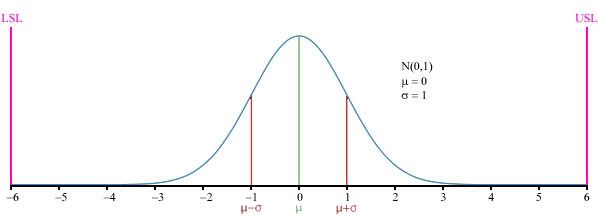
6_Sigma_Normal_distribution.jpg


this is a bell curve. you want to be on the outer edges of the curve, where defects are very low. the more you overclock (move outside manufacturers specifications) the more you move towards the middle of the curve, where defects are higher. this doesn't mean that the minute you overclock a processor all hell breaks loose, it means that the PROBABILITY of encountering a defect is higher. granted that probability may remain low except for the most extreme cases of overvolting with >30% overclock, nevertheless if you did a survey of 1,000 people with stock clocks and 1,000 people with overclocked processors the defect rate would be higher in the latter group. without question. even though there would certainly be cases of successful overclocking for 2-3 years, I'm talking about probability here, not individual cases.

I'm just trying to give advice for those GAFers that might not know about these things. if you accept the risk and tread lightly, more power to you.
 
teiresias said:
Can someone answer a question for me?

I should have all of my parts for my build by the middle of next week - minus the monitor. Since I'm currently on an iMac I won't really have a monitor available until I get one. I've never dealt with a graphics card with HDMI on it before, but if I were to hook the PC up to my plasma via HDMI would I be able to see output from the HDMI connector before actual drivers are installed? The BIOS, the Win7 install screens, etc?

Just wondering if I need to borrow a monitor from someone when I do the build if I havent' gotten mine yet?
Yes, on my HTPC I've gone into the BIOS on my plasma.
 
yeah but the whole bell curve for processors is useless anyway as they are pretty much indestructible unless you start using extreme voltages

if anything the extra powerload will impact your motherboard and its capacitors/pwm/electrical circuit more than your cpu

besides there are margins to each cpu anyway, and those that don't make it just get dropped down to a product where they do pass certifications (disabling a few cores, disabling some cache, dropping the frequency etc)


I've frequented all kinds of tech boards for years and have seen all sort of stuff from exploding psu's to pci-e slots burning out to mosfets melting due to extreme voltages

never have I seen someone with aircooling manage to kill a cpu without doing something really really silly like doubling the voltage


---

regarding the bios on plasma: just make sure the TV (and receiver if applicable) are turned on before you turn on the PC (if you've got a recent nvidia card) else the card won't display anything
 
OK, I need opinions.

Would people think it possible to get by with only a USB DVD drive rather than an internal drive? A drive would seem to be used so rarely nowadays - the rare disc-based install - that I wouldn't mind having to plug one in to do stuff.

I'll admit, my main motivation is hating having an internal drive that doesn't quite match the coloring of my case (why are there so many shades of black?).
 
teiresias said:
OK, I need opinions.

Would people think it possible to get by with only a USB DVD drive rather than an internal drive? A drive would seem to be used so rarely nowadays - the rare disc-based install - that I wouldn't mind having to plug one in to do stuff.

I'll admit, my main motivation is hating having an internal drive that doesn't quite match the coloring of my case (why are there so many shades of black?).

I would still recommend an internal drive, since if it breaks, its only like 20 bucks for another one. Externals run from like 40 bucks and up don't they?
 
teiresias said:
Would people think it possible to get by with only a USB DVD drive rather than an internal drive? A drive would seem to be used so rarely nowadays - the rare disc-based install - that I wouldn't mind having to plug one in to do stuff.
Yep, I have been. My internal drive died and I got a good deal on a Pioneer external so I ended up with that and have been using it for two years or so.
 
teiresias said:
OK, I need opinions.

Would people think it possible to get by with only a USB DVD drive rather than an internal drive? A drive would seem to be used so rarely nowadays - the rare disc-based install - that I wouldn't mind having to plug one in to do stuff.

I'll admit, my main motivation is hating having an internal drive that doesn't quite match the coloring of my case (why are there so many shades of black?).
Yes. There's no real need for an internal over an external, considering you can boot from USB anyways. Internal is cheaper than external but if you don't want an internal because it doesn't fit your case you won't really lose anything by not having it in the system at all times
 
MrBelmontvedere said:
6_Sigma_Normal_distribution.jpg


this is a bell curve. you want to be on the outer edges of the curve, where defects are very low. the more you overclock (move outside manufacturers specifications) the more you move towards the middle of the curve, where defects are higher. this doesn't mean that the minute you overclock a processor all hell breaks loose, it means that the PROBABILITY of encountering a defect is higher. granted that probability may remain low except for the most extreme cases of overvolting with >30% overclock, nevertheless if you did a survey of 1,000 people with stock clocks and 1,000 people with overclocked processors the defect rate would be higher in the latter group. without question. even though there would certainly be cases of successful overclocking for 2-3 years, I'm talking about probability here, not individual cases.

I'm just trying to give advice for those GAFers that might not know about these things. if you accept the risk and tread lightly, more power to you.
Statistical insight is fine but when I run over one quadrillion calculations on my processor and nothing shows up that is a pretty fucking good probability it is fine.

Overclocked life is far far beyond what almost everyone will use it for... and guess what? If it does somehow start reporting errors you can check and tone back your clock speed lower, even back to stock, even undervolt it and it will run perfectly fine because it is simply a reading of 0's and 1's and the voltage difference between them is pretty damn tight.
A processor doesn't just 'break'. Running a tiny bit of overspecced voltage will cause some deterioration in the circuit, moreso than stock voltage. Keeping it cooler than stock will help offset that a bit (Note: voltage is exponential and heat is linear so you cannot compensate for a lot of voltage).

You are making a deal of this when it's not targeted at end consumers but people who work in the financial market who buy those $2,000 server chips that are built to run at 80C and not error over 15 years using less voltage. THEY can't afford to have the thing error on a $5,000,000 wire transfer or whatever. It's not targeting the end users here.

*Lastly you can overclock without touching the voltage. Many people run their Q6600's at 3.0 or 3.2Ghz from stock 2.4 on default volts.
 
Hazaro said:
Statistical insight is fine but when I run over one quadrillion calculations on my processor and nothing shows up that is a pretty fucking good probability it is fine.

Overclocked life is far far beyond what almost everyone will use it for... and guess what? If it does somehow start reporting errors you can check and tone back your clock speed lower, even back to stock, even undervolt it and it will run perfectly fine because it is simply a reading of 0's and 1's and the voltage difference between them is pretty damn tight.
A processor doesn't just 'break'. Running a tiny bit of overspecced voltage will cause some deterioration in the circuit, moreso than stock voltage. Keeping it cooler than stock will help offset that a bit (Note: voltage is exponential and heat is linear so you cannot compensate for a lot of voltage).

a processor can "just break" due to electromigration as a result of overclocking. and time will play an significant role, and heat. an overclock may work perfectly fine for a month or a year, then suddenly your PC exhibits strange behavior like frequent crashes or a total failure to boot. these problems are usually intermittent if the lattice structure of the silicon is only partially disturbed and exhibit themselves under conditions of increased thermal vibration (such as running a game. hey what happened my PC was fine just a minute ago? oh but the heat caused by running your game resulted in the thermal expansion of a stray atom, caused by electromigration, which resulted in your system crash due to an important element in your processor shorting out).

remember the normal curve? an unmolested processor will have the highest probability of existing happily at the tail end of that curve, and as you overclock more aggressively you increase the probability of moving up the curve dramatically.

I see a lot of posts in this thread from people with problems symptomatic of what I describe. so this is "best practices" advice basically for first time DIYers (which does seem to describes most of the posters in this thread). if you are familiar with what you are doing, then you wouldn't be coming here for advice, but presumably to help others.
 
MrBelmontvedere said:
a processor can "just break" due to electromigration as a result of overclocking. and time will play an significant role, and heat. an overclock may work perfectly fine for a month or a year, then suddenly your PC exhibits strange behavior like frequent crashes or a total failure to boot. these problems are usually intermittent if the lattice structure of the silicon is only partially disturbed and exhibit themselves under conditions of increased thermal vibration (such as running a game. hey what happened my PC was fine just a minute ago? oh but the heat caused by running your game resulted in the thermal expansion of a stray atom, caused by electromigration, which resulted in your system crash due to an important element in your processor shorting out).

remember the normal curve? an unmolested processor will have the highest probability of existing happily at the tail end of that curve, and as you overclock more aggressively you increase the probability of moving up the curve dramatically.

I see a lot of posts in this thread from people with problems symptomatic of what I describe. so this is "best practices" advice basically for first time DIYers (which does seem to describes most of the posters in this thread). if you are familiar with what you are doing, then you wouldn't be coming here for advice, but presumably to help others.
Electron migration is a factor, but negligible.

I appreciate your concern for people looking at overclocking, but with the minor voltage bumps and solid aftermarket heatsinks I really feel that it is a non-issue unless people are looking to use the CPU for over 6 years.
 
So, Nvidia is going to start selling GPUs, under their own name, in Best Buy locations and the cards will likely be manufactured by Foxconn.

Hmmm.....
 
Hazaro said:
Electron migration is a factor, but negligible.

I appreciate your concern for people looking at overclocking, but with the minor voltage bumps and solid aftermarket heatsinks I really feel that it is a non-issue unless people are looking to use the CPU for over 6 years.

I'm talking about electromigration, not Electron migration. that's a misnomer, electromigration is the transport of atoms through conducting electrons and diffusing metal (as in a wire). this is actually getting worse as the lithographic nodes (and thus the "wires") get smaller.
 
Hazaro said:
Slap in i5. Done. I'll update this soon.
http://i.imgur.com/A55hA.jpg[IMG][/QUOTE]
Thanks for the advice. Here's what I think I'm going to go with:

CASE - [url=http://www.amazon.com/Antec-Three-Hundred-External-Internal/dp/B000GQMHBI/ref=sr_1_1?ie=UTF8&qid=1286462903&sr=8-1]Antec Three Hundred Gaming Case[/url] - $60

CPU - [url=http://www.buy.com/prod/intel-core-i5-i5-760-2-80-ghz-processor-quad-core-1-mb-l2-8-mb-l3/q/loc/101/216734294.html]Intel Core i5-760[/url] - $205

MOBO - [url=http://www.amazon.com/LGA1156-4DDR3-2200-CrossFireX-Motherboard-GA-P55A-UD3/dp/B002XDQC4K/ref=sr_1_1?s=electronics&ie=UTF8&qid=1286463029&sr=1-1]GIGABYTE GA-P55A-UD3 LGA 1156 Intel P55[/url] - $136

HARD DRIVE - [url=http://www.superbiiz.com/detail.php?name=HD-HD103SJ&title=Samsung-SpinPoint-F3-HD103SJ-1TB-SATA2-7200rpm-32MB-Hard-Drive&c=CJ]Samsung SpinPoint F3 HD103SJ 1TB[/url] - Already have this drive on my current system, will be putting it in my new one

VID CARD - [url=http://www.tigerdirect.com/applications/SearchTools/item-details.asp?afsrc=1&EdpNo=6491183&sku=G458-0464&SRCCODE=LINKSHARE&cm_mmc_o=-ddCjC1bELltzywCjC-d2CjCdwwp&AffiliateID=lw9MynSeamY-vmdXPFWG8rYZqkRkPEFayw]Galaxy GeForce GTX 460 GC Edtion 768MB[/url] - $160 (w/ additional $20 rebate)

MEMORY - [url=http://www.newegg.com/Product/Product.aspx?Item=N82E16820231277&nm_mc=AFC-SlickDeals&cm_mmc=AFC-SlickDeals-_-NA-_-NA-_-NA]G.SKILL Ripjaws Series 4GB (2 x 2GB) 240-Pin DDR3 1600[/url] - $85

POWER SUPPLY - [url=http://www.amazon.com/Corsair-CMPSU-650TX-650-Watt-Certified-compatible/dp/B000X24ISU/ref=sr_1_1?ie=UTF8&qid=1286463410&sr=8-1]Corsair CMPSU-650TX 650-Watt TX Series 80 Plus[/url] - $90 (w/ additional $10 rebate)

CPU COOLING - [url=http://www.amazon.com/Cooler-Master-RR-B10-212P-G1-Universal-Heat-Pipe/dp/B002G1YPH0/ref=sr_1_1?ie=UTF8&s=electronics&qid=1286463473&sr=1-1]Cooler Master Hyper 212 Plus[/url] - $30

OPTICAL - [url=http://www.newegg.com/Product/Product.aspx?cm_mmc=TomshardwareSBM-_-SystemBuilderEditorial-_-NA-_-NA&item=N82E16827106289&IsFeedbackTab=True&nm_mc=ExtBanner]LITE-ON Black 24X DVD+R[/url] - $17

[b]Total: $783[/b] (and $30 in rebates)

I tried to avoid NewEgg wherever possible, unfortuantely I get charged tax with them by being in New Jersey. The monitor I'm currently looking at is the [url=http://www.buy.com/cat/lcd-monitor-flat-screen-display/17154.html]23.6" Samsung SyncMaster 2494LW 1080p Widescreen LCD[/url], but I don't know too much about monitor quality so I'll be doing some research on that today.

Any advice on any miscellaneous things I need to pick up in addition? Cables and such.
 
BigAT said:
Thanks for the advice. Here's what I think I'm going to go with:

CASE - Antec Three Hundred Gaming Case - $60

CPU - Intel Core i5-760 - $205

MOBO - GIGABYTE GA-P55A-UD3 LGA 1156 Intel P55 - $136

HARD DRIVE - Samsung SpinPoint F3 HD103SJ 1TB - Already have this drive on my current system, will be putting it in my new one

VID CARD - Galaxy GeForce GTX 460 GC Edtion 768MB - $160 (w/ additional $20 rebate)

MEMORY - G.SKILL Ripjaws Series 4GB (2 x 2GB) 240-Pin DDR3 1600 - $85

POWER SUPPLY - Corsair CMPSU-650TX 650-Watt TX Series 80 Plus - $90 (w/ additional $10 rebate)

CPU COOLING - Cooler Master Hyper 212 Plus - $30

OPTICAL - LITE-ON Black 24X DVD+R - $17

Total: $783 (and $30 in rebates)

I tried to avoid NewEgg wherever possible, unfortuantely I get charged tax with them by being in New Jersey. The monitor I'm currently looking at is the 23.6" Samsung SyncMaster 2494LW 1080p Widescreen LCD, but I don't know too much about monitor quality so I'll be doing some research on that today.

Any advice on any miscellaneous things I need to pick up in addition? Cables and such.
Just fyi, Microcenter had the same processor for $169.99. They may be out of stock but if there is one near you just give them a call and find out. Definitely worth the cheaper price. :)
They also have the core i5-655K unlocked for $149.99.
 
Top Bottom