• Hey Guest. Check out your NeoGAF Wrapped 2025 results here!

"I need a new PC!" 2010 Edition

Ryoma-Echizen said:
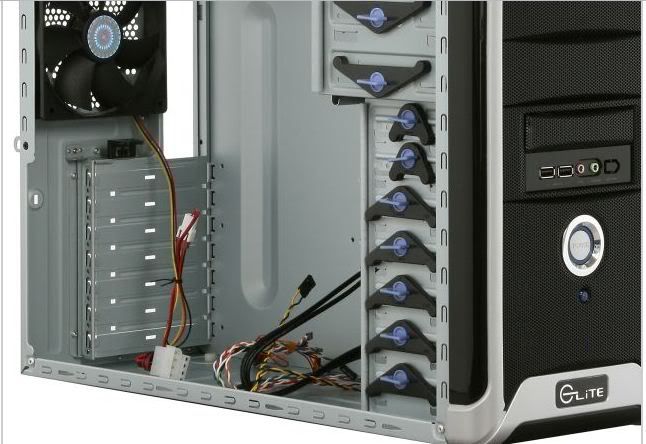
I would change that case to the Elite 370. Can even hold a gpu with the lenght of the 5970.
I believe that they use the same frame? The 330 can fit a 5970 I am fairly certain.
Wraith RazieL said:
Hey GAF. I haven't built a PC myself in 10 years and I don't want to buy a PC knowing I can make a better one cheaper. I'm jumping back in to PC gaming (still have steam games that i need to play and looking forward to upcoming sales) and ready to do some true PC gaming once again.
Please check out my current build and give your impressions (good or bad). If I am missing anything, please let me know. This PC will be primarily used for gaming among all the normal computing stuff. Also, I know PCI 3.0, new chipsets and all that stuff will come out later next year but that will be expensive and I believe what I'm building now will last me for years.
They shouldn't be any more expensive than the parts you are buying now actually.
If you can wait of course :lol
Shambles said:
For gaming at 19x12 I think you'd be more than happy with a 6850. Usually once you go over 200$ you start to get significant diminishing returns on how much you are spending vs the increase in performance. I wouldn't even mind going 19x12 on a weaker card like the 5770.
Exactly.
 
IrishNinja said:
yeah, if there's one thing ive learned every few pages on this thread, its that the gap between duo and quad core is so small, there's no logical reason to go with the former at all.
Yup. I know it's just one game, but BC2 ran like shit on a dual*. Got a quad. *BAM* Shit runs beautifully. Heard the same thing for GTAIV, though I never tried it on a dual.

It's only going to get worse for duals. Not sure how the Athlon quads perform, but I've heard it's not good compared to a Phenom.

Oh and the lightning speed multi-tasking (even when in intense games like BC2) is pretty sweet, too. :)

*I've heard it runs *alright* on the better intel duals though.
 
Going to post here as well since it gets a little more views

I'm looking to buy a laptop, ideally I would like this laptop to play world of warcraft and cod black ops, my budget is around $1000. I was checking this one ASUS Republic of Gamers G51JX-X3, which fits exactly on my price range.

Core i5 2.26GHz
Nvidia GTS360m
4GB DDR3
1920x1080

Anybody has any experience with this particular model? Are there any other machines I can check out?

edit: I found this other 2 computers which seem good enough, not sure about MSI but the specs can't be beaten and the other Asus looks good too

MSI GX640-260 15.4-Inch Gaming Laptop - Black/Red

Core i5 2.4GHz
ATI 5850
4GB DDR3
1680x1050

ASUS N61JQ-XV1 16-Inch Versatile Entertainment Laptop

Core i7 1.73GHz
ATI 5730
4GB DDR3
1366x768 res

All of them seem ok but I do not know which one would be better
 
Does anyone know of a really reliable and good P55 motherboard? I got a Gigabyte P55 USB3 and it was dead on arrival with the infamous infinite reset/boot loop, and now I'm hesitant to try another Gigabyte board. Something under $250 would be preferable.
 
Updated for Q4 2010 (Pre-Sandy Bride / AM3+)

1)Basic Desktop Questions
Budget: Price Range + Country
Main Use: Light Gaming, Gaming, Video editing, 3D work, general usage (Word, Web, 1080p playback)
Monitor Resolution: What resolution will you be looking to play your games at? Are you going to upgrade later?
List SPECIFIC games that you MUST be able to play: Self Explanatory

2)General Guide on what to buy
$500-$600 Budget build: http://imgur.com/gdc1C.png
1k build: To be updated

3)15 minute video how-to
http://vimeo.com/5685229
40 minute how-to
http://www.tested.com/news/video-how-to-build-the-best-1500-gaming-pc-step-by-step/152/

4)Prospective laptop buyers please fill this out and ask their forum as well.
http://forum.notebookreview.com/wha...ould-i-buy-form-must-read-before-posting.html
GAF Thread: http://www.neogaf.com/forum/showthread.php?t=386622

gdc1C.png
 
Clevinger said:
Does anyone know of a really reliable and good P55 motherboard? I got a Gigabyte P55 USB3 and it was dead on arrival with the infamous infinite reset/boot loop, and now I'm hesitant to try another Gigabyte board. Something under $250 would be preferable.
Every brand gets lemons occasionally, but another board would be:
http://www.newegg.com/Product/Product.aspx?Item=N82E16813131620
or this if you want two higher end cards down the line
http://www.newegg.com/Product/Product.aspx?Item=N82E16813131621
 
GAF, two questions:

1. Why are they rated in VA (volt-amps)? Why can't they just rate it in terms of the wattage they can support? I had to do a lot of research before finding out that a 650VA UPS would be fine for a rig that eats up 400-450W.

2. I've got 2GB DDR800, and an AthlonX2 5000+.

Is it even worth upgrading the memory to DDR1333? My motherboard only supports up to DDR1066, and is "AM3 CPU Ready".
http://www.asrock.com/mb/overview.asp?Model=N68PV-GS

However, it doesn't sound like it natively supports AM3 processors, since I'm aiming for an X2 II 255. So I'm down to two options:

a) Keep board, just get another 2GB DDR800, upgrade processor.
b) Upgrade board, upgrade to 4GB DDR1333, upgrade processor.

So yeah, which is worth the money? Will the memory speed and motherboard upgrade provide noticeable performance boost?

I'm upgrading so I can record more smoothly with Fraps, and to get smoother framerates on Dolphin.
 
Wolf Akela said:
GAF, two questions:

1. Why are they rated in VA (volt-amps)? Why can't they just rate it in terms of the wattage they can support? I had to do a lot of research before finding out that a 650VA UPS would be fine for a rig that eats up 400-450W.

2. I've got 2GB DDR800, and an AthlonX2 5000+.

Is it even worth upgrading the memory to DDR1333? My motherboard only supports up to DDR1066, and is "AM3 CPU Ready".
http://www.asrock.com/mb/overview.asp?Model=N68PV-GS
http://www.asrock.com/mb/cpu.asp?Model=N68PV-GS

1) Wattage draw from the utility =/= VA. A prime example of this is because of the power factor involved in T8 vs T12 lamps for example. The smaller T8 lamps use more VA, butt less watts. If someone can explain this better, please do.

2) Don't upgrade RAM. Gains are marginal at best. 1-3%.
Just update your BIOS and put in an AMD Phenom II x4 945 or Athlon x4 640
http://www.asrock.com/mb/download.asp?Model=N68PV-GS&o=BIOS
 
Ryoma-Echizen said:
Hazaro
I would change that case to the Elite 370. Can even hold a gpu with the lenght of the 5970.

cooler_master_elite_370_negro_5.jpg
Hazaro said:
I believe that they use the same frame? The 330 can fit a 5970 I am fairly certain.
Slightly different. While the 370 is a "better" case (and goes for $38 via Amazon), the 330 will fit a 5970 just fine.

ix4jf8.jpg


The Elite 33x cases are essentially all the same so the others will fit that card as well. As for why someone would want to run a 5970-level GPU in a case like that, well...
 
Yo Hazaro, you probably don't even remember but you helped me build a racing-gaming/htpc rig a month ago (i5 750, HD5850, the Thermaltake case...)
It's going great, thanks again :D

Anyway, I might as well ask it here since you guys helped me with finding out about D3DOverrider and RadeonPro: is there a way to lock PC games to 30fps (upper limit)? I know about locking them to 60 (upper limit), with v-sync in 1920x1080@60Hz, but since some games fluctuate too much depending on the game's genre and how gpu heavy it is, so when my rig can't give me locked 60fps I'd like to be able to have a locked 30 instead of 30 then 45 then 33 then 52... lol, and so on and on.
Is that possible?
 
Dash Kappei said:
Yo Hazaro, you probably don't even remember but you helped me build a racing-gaming/htpc rig a month ago (i5 750, HD5850, the Thermaltake case...)
It's going great, thanks again :D

Anyway, I might as well ask it here since you guys helped me with finding out about D3DOverrider and RadeonPro: is there a way to lock PC games to 30fps (upper limit)? I know about locking them to 60 (upper limit), with v-sync in 1920x1080@60Hz, but since some games fluctuate too much depending on the game's genre and how gpu heavy it is, so when my rig can't give me locked 60fps I'd like to be able to have a locked 30 instead of 30 then 45 then 33 then 52... lol, and so on and on.
Is that possible?
Vsync will lock at 60 if possible, if not it will lock at 30.
Of course I remember you, you owe me food (or a beer)! :D
 
Hows this look for $500 plus shipping (around 50)?

AMD X3 720 Phenom II Black Edition Triple Core Processor Current Price: overclocked (stable, no voltage added) to 3.0 GHz
MSI K9A2 CF-F V2 AM2+/AM3 Motherboard Current Price:
4 GB GSkill DDR2 1066 RAM Dual Channel Current Price:
HIS Radeon 5850 1GB PCI-E 2.0 DX11 Graphics Card Current Price
DVD-CDRW Combo Drive Current Price:
500 GB Western Digital Black 7200 SATA 3Gbps Hard Drive Current Price
630W RaidMax Hybrid Modular Power Supply Current Price
135mm cooling fan draws in cool air from underneath (outside) case
Microsoft Windows 7 Home Premium 64bit
Cooler Master Storm Scout ATX Case
 
asdad123 said:
Hows this look for $500 plus shipping (around 50)?

AMD X3 720 Phenom II Black Edition Triple Core Processor Current Price: overclocked (stable, no voltage added) to 3.0 GHz
MSI K9A2 CF-F V2 AM2+/AM3 Motherboard Current Price:
4 GB GSkill DDR2 1066 RAM Dual Channel Current Price:
HIS Radeon 5850 1GB PCI-E 2.0 DX11 Graphics Card Current Price
DVD-CDRW Combo Drive Current Price:
500 GB Western Digital Black 7200 SATA 3Gbps Hard Drive Current Price
630W RaidMax Hybrid Modular Power Supply Current Price
135mm cooling fan draws in cool air from underneath (outside) case
Microsoft Windows 7 Home Premium 64bit Current Price
That's not bad (Is this pre-built/used?).

The mobo could be a bit better, and the PSU you will want to swap out.
If you are in the market I suggest you look up a few posts. :D
Better CPU, mobo, PSU for only $50 more. You'll need a copy of Windows though.
 
Hazaro said:
That's not bad (Is this pre-built/used?).

The mobo could be a bit better, and the PSU you will want to swap out.
If you are in the market I suggest you look up a few posts. :D

Its actually someone selling it on a different forum. Was wondering if it was worth it to jump on it lol.
 
Dash Kappei said:
Yo Hazaro, you probably don't even remember but you helped me build a racing-gaming/htpc rig a month ago (i5 750, HD5850, the Thermaltake case...)
It's going great, thanks again :D

Anyway, I might as well ask it here since you guys helped me with finding out about D3DOverrider and RadeonPro: is there a way to lock PC games to 30fps (upper limit)? I know about locking them to 60 (upper limit), with v-sync in 1920x1080@60Hz, but since some games fluctuate too much depending on the game's genre and how gpu heavy it is, so when my rig can't give me locked 60fps I'd like to be able to have a locked 30 instead of 30 then 45 then 33 then 52... lol, and so on and on.
Is that possible?

Yes there is, download the Java applet linked halfway down this post:

http://www.neogaf.com/forum/showthread.php?t=340281

It will crate .bat files which you can use to launch your games with capped framerate.

It won't work with DX10/11 titles mind, but a lot of game engines have framerate capping functionality built in if you do some digging
 
I just placed my Newegg order for Hazaro's $500-600 build (except I opted for the HD 6850 instead). With an HDMI cable and an extra USB extension cord, it came to $652.10 (with shipping and "Rush Processing"). Trying out "Bill Me Later" and their 6 month no interest/no payments. That way by the time I pay for it, it'll be far surpassed by the stuff releasing in Q1 :lol

Thanx Gaf!
 
http://www.xbitlabs.com/news/video/...onfirms_Plans_to_Release_GeForce_GTX_500.html

12_03_2009_nvidia_geforce_logo.jpg


Nvidia Accidentally Confirms Plans to Release GeForce GTX 500.

Nvidia GeForce GTX 580 Incoming
[10/21/2010 11:05 PM]
by Anton Shilov

Nvidia Corp. reportedly accidentally leaked its own plans to refresh its product lineup with GeForce GTX 580 graphics card. The new flagship product should start the refresh of the whole family that was confirmed by the company back in September at its GTC 2010 event.

The accidental confirmation came in the form of listing of the GeForce GTX 580 graphics board in the catalog of 3D Vision-compatible components. The leak was quickly removed, but screenshots of the page are available on various web-sites or forums (here, for example) at the moment.

Unfortunately, at the moment we know almost nothing about the GeForce GTX 580 graphics card. Semiaccurate web-site claims that the novelty is based on a new code-named GF110 graphics processing unit that has 512 stream processors along with other improvements. Given the fact that Nvidia already has experience with GF100 with 512 SPs and its costs, it is logical to expect Nvidia to maintain the number of stream processors and refine the design of the chip rather than to design a chip with higher amount of execution units.

Given the fact that Nvidia has already confirmed the refresh of the whole Fermi lineup in 2011, it is possible to expect chips with code-names like GF112, GF114, GF116 or something like this to transpire shortly.

580_01.gif
 
No GTX 460+? I guess the price dropped 470 will take that position.
gotee12 said:
I just placed my Newegg order for Hazaro's $500-600 build (except I opted for the HD 6850 instead). With an HDMI cable and an extra USB extension cord, it came to $652.10 (with shipping and "Rush Processing"). Trying out "Bill Me Later" and their 6 month no interest/no payments. That way by the time I pay for it, it'll be far surpassed by the stuff releasing in Q1 :lol

Thanx Gaf!
Excellent! Enjoy and take pics.
 
Yeah, I just assumed we'd be getting the full bore 460+ and 480+ at some point. If the rough equivalent to those two arrive as the 580 and "560," along with revisions to improve the thermal/consumption characteristics somewhat, it could be a nice way to tide things over until the 28nm Keplers get here.

Either way, Nvidia really needs to get their act together when it comes to efficiency.
 
didn't know where else to post this

I was just wondering if anyone had experienced any problems with the new nvidia drivers? (260.89)

TF2 keeps crashing back to the desktop and windows is telling me there's a video hardware failure. And just now I had a blue-screen.

here's some screenshots from the little reliability thing built into windows

21/10/10
22/10/10
24/10/10

and here's the technical details (I don't know what any of this means)

The card is just over a year old and this is the first time I've had any real problems with it.

thanks for any help.

and to keep it on-topic: if this pos dies, what's a good replacement for a GTX 260 nowadays?
 
elite.jpg

On my case I absolutely hate the rear tool less setup for the card slots, doesnt hold my video card for shit lol, can I just use screws on it instead? If so what kind of screws are best suited?
 
Hazaro said:
Vsync will lock at 60 if possible, if not it will lock at 30.
Of course I remember you, you owe me food (or a beer)! :D

Hell yeah I do! :D

brain_stew said:
Yes there is, download the Java applet linked halfway down this post:

http://www.neogaf.com/forum/showthread.php?t=340281

It will crate .bat files which you can use to launch your games with capped framerate.

It won't work with DX10/11 titles mind, but a lot of game engines have framerate capping functionality built in if you do some digging

brain_stew to the rescue!
Awesome. Do you think we'll ever get something similar/an update for DX10/DX11 games (Dead Space 2 is coming and who knows what'll be and iirc Dead Rising 2 is DX10 as well)?
 
gonna pull the trigger later but i just wanted to double check with you guys
i5 760
xfx 6850
gskill DDR3-1600 2x2gb
P55A-UD3
antec 900
modxstream 600w
caviar black 1tb
hyper 212+
_________
875$CDN before tax/shipping after pm
 
86vtx said:
gonna pull the trigger later but i just wanted to double check with you guys
i5 760
xfx 6850
gskill DDR3-1600 2x2gb
P55A-UD3
antec 900
modxstream 600w
caviar black 1tb
hyper 212+
_________
875$CDN before tax/shipping after pm
solid
 
Does any one here have experience with cross shipping on an RMA?

Does the item get sent as soon as I pay for it, or when the defective item arrives back at their facilities?

I am just confused because when I decided to do a cross ship I didn't get a tracking number... just some invoice sheet pdf... not exactly sure what to do with that, if anything :lol
 
86vtx said:
gonna pull the trigger later but i just wanted to double check with you guys
i5 760
xfx 6850
gskill DDR3-1600 2x2gb
P55A-UD3
antec 900
modxstream 600w
caviar black 1tb
hyper 212+
_________
875$CDN before tax/shipping after pm

The build I'm now going with is damn near that exact same thing. My mobo is a Asus P7P55D, and I went with the Gigabyte 6850 (two fans > one fan? :lol I really just rolled the dice).

Also, I ended up getting the version of the Antec Sonata case that didn't have a PSU, in case I want to Crossfire the 6850 down the road (built in PSU is only 500w). Newegg has a bundle where you get 4 gigs of Corsair PC3-12800, and you get like $100 knocked off a Corsair 750 watt PSU (actually, it might have been vice versa, heh).

Going to place my order as soon as the funds come in. I am kicking around the idea of shooting the moon and picking up a 128 gig SSD for my boot/games/video editing drive, and throw a cheap 500+ gig drive in there for storage. The Corsair SSDs get pretty high reviews, but I need to investigate more. Those things are real "flavor of the month" when it comes to which one is best.
 
ZZMitch said:
Does any one here have experience with cross shipping on an RMA?

Does the item get sent as soon as I pay for it, or when the defective item arrives back at their facilities?

I am just confused because when I decided to do a cross ship I didn't get a tracking number... just some invoice sheet pdf... not exactly sure what to do with that, if anything :lol

"Cross ship" is just that - they send the item as soon as your credit card checks out, it's just like buying it really. Then they release the hold/reverse the sale on your credit card as soon as your RMA'ed item show up.

You got an invoice because they processed it as a sale.
 
I just got myself a ATi 6850 1GB and an old Intel Core 2 extreme QX9650. This is coming from a ATi x1900xt 256MB and E6600 core 2 duo. Only got 2GB DDR2 800 RAM (2x1GB), Probably will get 2x2GB DDR2 1066, since its pretty cheap these days.

Oh, and im moving on from XP to windows 7, time to get some DX10/11 goodness!
 
I was thinking about upgrading my current pc’s graphic card, it’s a Packard Bell Imedia 1804 I believe and since its an older model its hard to search for information regarding what parts/makes I would need since every search just comes up with memory upgrades.

If anyone would know of what type of graphics card I would need (think its only 256mb at the moment so anything bigger would do) would be a great help.
 
So I ordered my Studip XPS 7100 last week, haven't gotten it yet, but I'm already thinking about upgrades. :lol

I haven't looked close at the cpu/mb/graphics card game in a long time. It's a micro-ATX case but I know it can hold a 5870 because that's one of the config options (I had to go with the 5770 for now due to financial reasons). Since it's a Dell I don't have any info on the mb, but I can tell you it's got a Phenom II X6 1075T. Can I put an NVIDIA card in it if I want to? Will I be able to put in an ATI card newer/more powerful than a 5870? It has a 460w PS but I guess I can replace that if needed, though I dont know at what point I would need a better one.

Here's some specs from thier site:

PCIe x16 (1)
PCIe x1 (2)
PCI (1)
SATA (4)


I guess the recommendation will probably be to get a new mb, ps, and case and migrate everything over.
 
Cheech said:
"Cross ship" is just that - they send the item as soon as your credit card checks out, it's just like buying it really. Then they release the hold/reverse the sale on your credit card as soon as your RMA'ed item show up.

You got an invoice because they processed it as a sale.
Alright, thank you :D

So it should arrive soon... wish I could get a tracking number for it lol
 
Yet another 5.0GHz Sandy Bridge i7 2600K, this time from regular tech leaker "JCornell" who puched it to 5.5 on air and under 1.4v


·feist· said:
intel_corei7_logo.gif


http://www.semiaccurate.com/2010/10/25/first-k-series-sandy-bridge-gets-overclocked/

First K-series Sandy Bridge gets overclocked
Hits a respectable 5GHz

by Lars-Göran Nilsson

October 25, 2010

INTEL'S UPCOMING LGA-1155 Sandy Bridge processors have already been criticized for being bad overclockers, but judging by some screenshots (over at a Taiwanese forum) the K-series of unlocked processors does hold some promise. The bad news is that in this early attempt, the bus speed hasn't been pushed a single MHz.

As the K-series of processors from Intel have an unlocked multiplier, we’re taken back to the early days of overclocking before processors had a multiplier lock. This was a feature implemented to prevent fraudulent sale of overclocked processors, or at least that’s how the story goes. Intel brought this feature back with its K-series of processors, and this will potentially be a lifeline to overclockers using the LGA-1155 platform.

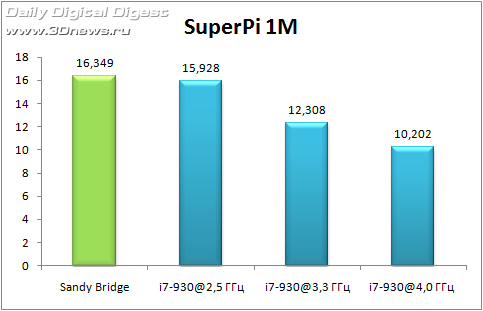
With regards to the screen shots posted over at the Coolaler forums, well, a poster by the name of JCornell has provided a few screenshots of an early Intel Sandy Bridge Core i7 2600K which has a stock clock speed of 3.4GHz with a BClk of 100MHz. To give us an idea of the stock performance, screenshots were posted of it running SuperPI 1M in 10.031 seconds, and the CPU also scored 6.35 in Cinebench 11.5. These are pretty impressive numbers on their own, but it gets much better.

Sadly the poster didn’t provide Cinebench figures for the CPU at 5GHz with the CPU still at a 100MHz BClk, but with it running at a crazy 50x multiplier. It might only be an extra 16 steps up from the stock multiplier, but this helped to improve the SuperPI 1M score by a massive amount bringing it down at 7.488 seconds. It seems like these new processors can go all the way up to 65x multiplier, although it’s unlikely that we’ll see someone hitting 6.5GHz anytime soon. Oh, and this was all done using an air cooler and at below 1.4V which in itself is a pretty mean feat.

The question still remains as to whether or not it’s possible to push the BClk on the LGA-1155 platform, something that’s not really expected to be possible. We’re still about two months and a week or two away from the launch, but hopefully we’ll have had the BClk issue clarified by then, be it by Intel, the motherboard manufacturers, or an overzealous overclocker. Still, there are some question marks about Intel’s new platform, especially with regards to how long this yet again "new" socket will last. There are quite a few unhappy LGA-1156 owners out there that feel like they’re getting the short end of the stick with Intel’s move to a new CPU socket so quickly.S|A


``````````````````````````````````````````````````````````````````````````
``````````````````````````````````````````````````````````````````````````


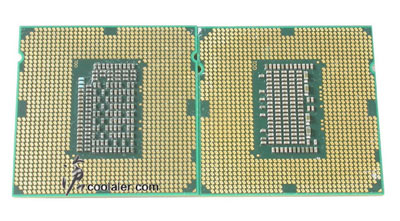
Here's a comparison shot of 1155 vs 1156, and 2011 vs 1366

SBxx.jpg


The above mentioned thread:

有沒有看過 Sandy Bridge 1155 i7-2600K unlocked 上 5GHz ?
http://forum.coolaler.com/showthread.php?t=251959

SB1.jpg


SB3.jpg


SB5.jpg


Unrelated teaser image:

SBx2-1.jpg


Socket 2011:

SBx2.jpg


SBx5.jpg


SBx00.jpg


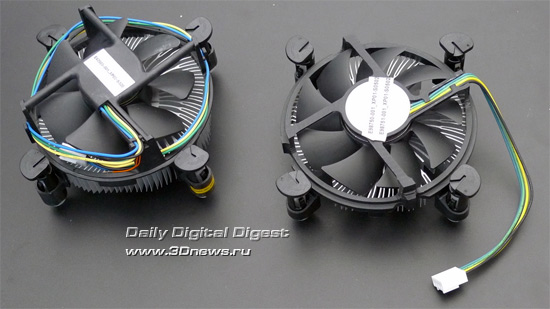
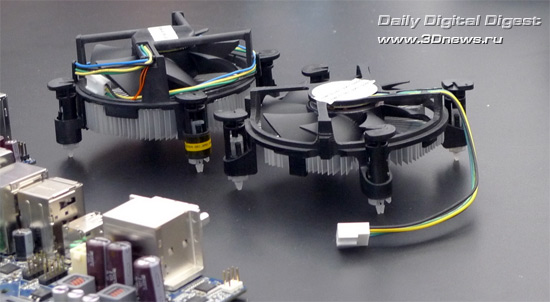
Stock Coolers:

http://www.3dnews.ru/news/idf-2010-kulera-intel-dlya-sandy-bridge-stanut-tonshe

30.jpg


31.jpg


IDF 2010: подробности об Intel Sandy Bridge

http://www.3dnews.ru/news/idf-2010-podrobnosti-ob-intel-sandy-bridge
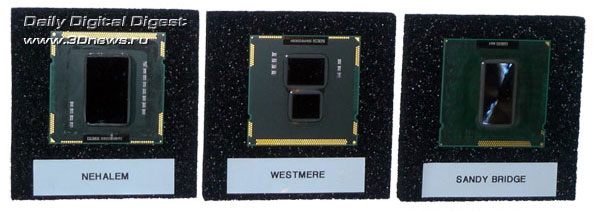
http://www.3dnews.ru/news/idf-2010-semeynoe-foto-nehalemwestmeresandy-bridge
http://www.3dnews.ru/news/pervoe-testirovanie-grafiki-sandy-bridge-core-i5-2400
http://www.3dnews.ru/news/Sandy-Bridge-LGA-1155-razgon-inache
http://www.3dnews.ru/news/fotografii_i_skrinshot_dvuhyadernogo_protsessora_sandy_bridge_lga_1155
http://www.3dnews.ru/news/protsesso...olko_na_odin_kontakt_otlichaetsya_ot_lga_1156

24.jpg


10.jpg


http://www.3dnews.ru/news/Testirovanie-chetireh-yadernogo-Sandy-Bridge

1m.gif


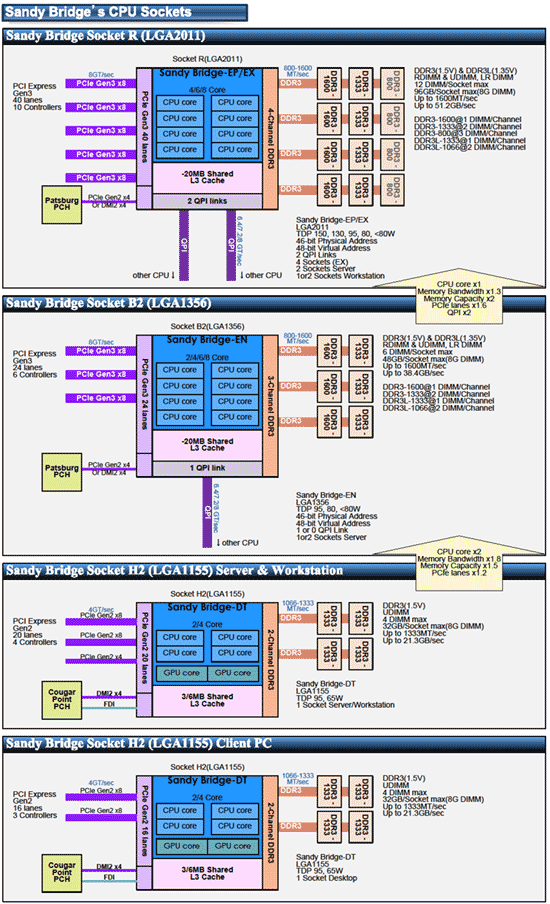
Под Sandy Bridge заготовлены LGA 1155, LGA 1356 и LGA 2011

http://www.3dnews.ru/news/Pod-Sandy-Bridge-zagotovleni-LGA-1155-LGA-1356-i-LGA-2011
http://www.3dnews.ru/news/kak_budet_proishodit_perehod_na_intel_sandy_bridge

6.gif


171609.jpg


Intel CPU Transition:

http://www.3dnews.ru/_imgdata/img/2010/04/13/171607.jpg


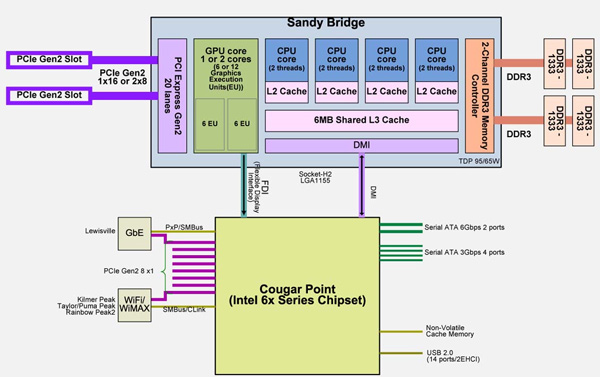
Sandy Bridge (microarchitecture)

http://en.wikipedia.org/wiki/Intel_Sandy_Bridge_(microarchitecture)
 
DeathNote said:
ordered something used from hardforum.com

taking forever to get it shipped.

ugh.
All my forum transactions on [h] or Anandtech have been very positive. (70+)
Sometimes you can get a slack person, but that is usually reflected by how they made their F/S thread.
·feist· said:
Yet another 5.0GHz Sandy Bridge i7 2600K, this time from regular tech leaker "JCornell" who puched it to 5.5 on air and under 1.4v
4 channel DDR3 isn't correct... is it? I mean wat.

And soon all we will need is a fan and no heatsinks considering how small stock coolers are getting.
 
Hazaro said:
All my forum transactions on [h] or Anandtech have been very positive. (70+)
Sometimes you can get a slack person, but that is usually reflected by how they made their F/S thread.

4 channel DDR3 isn't correct... is it? I mean wat.

And soon all we will need is a fan and no heatsinks considering how small stock coolers are getting.
Yeah, that's just... wow (if true, of course).
By most accounts, the upper end desktops aren't slated to go passed triple-channel, but who knows. Even now there's quite a bit of rumors to sift through, and preliminary spec that may or may not have changed by this point. For one, 1155, 2011 and 1356? That can't be right. Still waiting for concrete info to materialize.
 
What's the best way of re-partitioning my hard drive?

I currently have a 1TB split into three partitions and I'm looking to remove some space from my D: & E: partitions and tack it onto my C: (windows/system drive).

Thought there was some way to do this in the disk management tool built into Windows but I'm not getting any luck.

Using Windows 7 Pro 64bit if that matters.
 
MoFuzz said:
What's the best way of re-partitioning my hard drive?

I currently have a 1TB split into three partitions and I'm looking to remove some space from my D: & E: partitions and tack it onto my C: (windows/system drive).

Thought there was some way to do this in the disk management tool built into Windows but I'm not getting any luck.

Using Windows 7 Pro 64bit if that matters.

I usually grab a Parted Magic Live CD when I need to edit partitions at work. You obviously want to back up anything important on the D: and E: drives, then boot off of the Parted Magic Live CD, blow the D: and E: partitions away, boot back into Win7, run Disk Management and let Win7 claim the now unpartitioned space.

Of course YMMV, no warranty implied, yadda yadda...

edit: re-reading your question, are you still wanting to leave portions of the D: and E: partitions in place? Shaving off some space from the D: and E: partitions and adding the cumulative extra space to the C: is not possible, if that's what you meant. At least I've never heard of it and I'd definitely advise AGAINST having a partition that was not made of consecutive blocks on the drive.

If you still wish to have the D: and E: drives, backup any data on D: and E:, resize C: just a little as stated in my original reply and then recreate the D: and E: drives and then copy the backed up data back onto D: and E:
 
As I creep closer to my buy date this Friday, every day I find something new, so now Microcenter, which is apparently like a 10 minute drive from me here in KCMO has the I7-950 and the Hyper 212+ cheaper than I would get it from Newegg. Getting it from them would save me like 30$. That's an amazing deal considering I have to pay tax at Micro and don't have to with Newegg.


Guess I'm going for a drive Saturday, that's just enough of a discount to get me interested. I even tried to talk myself out of it. Factoring in the price of gas for the drive and shit :lol But I would come out ahead picking them up at MC. Oh well.
 
sestrugen said:
Going to post here as well since it gets a little more views

I'm looking to buy a laptop, ideally I would like this laptop to play world of warcraft and cod black ops, my budget is around $1000. I was checking this one ASUS Republic of Gamers G51JX-X3, which fits exactly on my price range.

Core i5 2.26GHz
Nvidia GTS360m
4GB DDR3
1920x1080

Anybody has any experience with this particular model? Are there any other machines I can check out?

edit: I found this other 2 computers which seem good enough, not sure about MSI but the specs can't be beaten and the other Asus looks good too

MSI GX640-260 15.4-Inch Gaming Laptop - Black/Red

Core i5 2.4GHz
ATI 5850
4GB DDR3
1680x1050

ASUS N61JQ-XV1 16-Inch Versatile Entertainment Laptop

Core i7 1.73GHz
ATI 5730
4GB DDR3
1366x768 res

All of them seem ok but I do not know which one would be better

Since your avatar is hot...

Personally I like the GX640 the best. I considered it this summer but it was out of my price range. The 5850 will give you about a 10% increase over the 360m however in games that pocket money from nvidia you will see that flip around. Overall between the two you will have a similar experience. The 5730 is a noticable step below both. Also I wouldn't care for an i7 chip in my laptop that will suck power faster. The 16 inch is worse in almost every respect. Between the first two just pick whichever impresses you the most. Performance will be quite similar. Personally I like the 16:10 ratio better even with the lower resolution.

Take a look at reviews and see what people who have bought both are saying about them.

Edit: Looking around it doesn't appear that either support switchable graphics which is a pretty big con in my books.
 
D4Danger said:
didn't know where else to post this

I was just wondering if anyone had experienced any problems with the new nvidia drivers? (260.89)

TF2 keeps crashing back to the desktop and windows is telling me there's a video hardware failure. And just now I had a blue-screen.

here's some screenshots from the little reliability thing built into windows

21/10/10
22/10/10
24/10/10

and here's the technical details (I don't know what any of this means)

The card is just over a year old and this is the first time I've had any real problems with it.

thanks for any help.

and to keep it on-topic: if this pos dies, what's a good replacement for a GTX 260 nowadays?


yeah, I had weird image issues with the new drivers. nearly all my games had weird color bands runnign thru them. switched back to 258 drivers and it went away.
 
Hey guys. Well it's that time again; build a new PC.

Anyways, I have pretty much know what I want but I'm stuck on the VC.

Right now I'm running a ATi 4870x2 and I would like a big upgrade. I was thinking buying two GTX 470's, or waiting on the new GTX 580 or the 69XX series?

Suggestions?
 
Oh no!

I opened up my PC to take a look and noticed it's gettin rather dusty.

The case has a small amount of dust through out it, which shouldn't be too hard to get rid of. Careful vacuuming.

The videocard has dust on the back, but that I just hit with a can of air duster, correct?

My CPU cooler has dust through out... it's a Scythe Mugen II Rev B (AKA: A giant metal block :lol)


Dust all through the fins...

How would I go about getting rid of that? Air duster as well? Seems like it would be tedious. Is that even enough dust to worry about?

And why is there so much damned dust anyways? The top and front of my case are all mesh with dust filter in the way. The only areas with out it are spots where fans could go on the side panel. Would that be enough to let dust in? It's not like a fan is sucking in from them. If so, do they sell material to prevent dust from coming in through there?


It was built this August. For reference.
 
WEGGLES said:
Oh no!

I opened up my PC to take a look and noticed it's gettin rather dusty.


You could take the heatsink off and soak it in rubbing alcohol. Or just get case filters and clean it out as much as you can with compressed air. Dust coated on it isn't really hurting it much as long as there is good airflow. It doesn't have to be completely shiny.
 
R2D4 said:
You could take the heatsink off and soak it in rubbing alcohol. Or just get case filters and clean it out as much as you can with compressed air. Dust coated on it isn't really hurting it much as long as there is good airflow. It doesn't have to be completely shiny.
Ah, ok. There should still be plenty of air-flow. The case is mostly empty. Took out the extra HDD racks at the front, did some cable management. I'll look into case filters for the side panels though. I'm sure that's where the dust is coming in.
 
Top Bottom