
-
Hey Guest. Check out your NeoGAF Wrapped 2025 results here!
You are using an out of date browser. It may not display this or other websites correctly.
You should upgrade or use an alternative browser.
You should upgrade or use an alternative browser.
"I need a new PC!" 2010 Edition
- Thread starter Spy
- Start date
ClovingWestbrook
Banned
Hey guys and gals. Any idea of how much 8 gigs of ram would go for?
Angelus Errare
Banned
LovingSteam said:Hey guys and gals. Any idea of how much 8 gigs of ram would go for?
DDR2? DDR3? lolDDR1?
Cheap reliable stuff can be had for $100.
You'll save time by looking on newegg instead of asking us.
Metalic Sand
who is Emo-Beas?
LovingSteam said:Hey guys and gals. Any idea of how much 8 gigs of ram would go for?
http://www.newegg.com/Product/Produ...cm_re=g_skill_DDR3_4gb-_-20-231-311-_-Product
There you go.
ClovingWestbrook
Banned
Thanks Metallic!
You need a Micro SATA to SATA adapter like this:Unicorn said:I'm not crazy, and here's why:
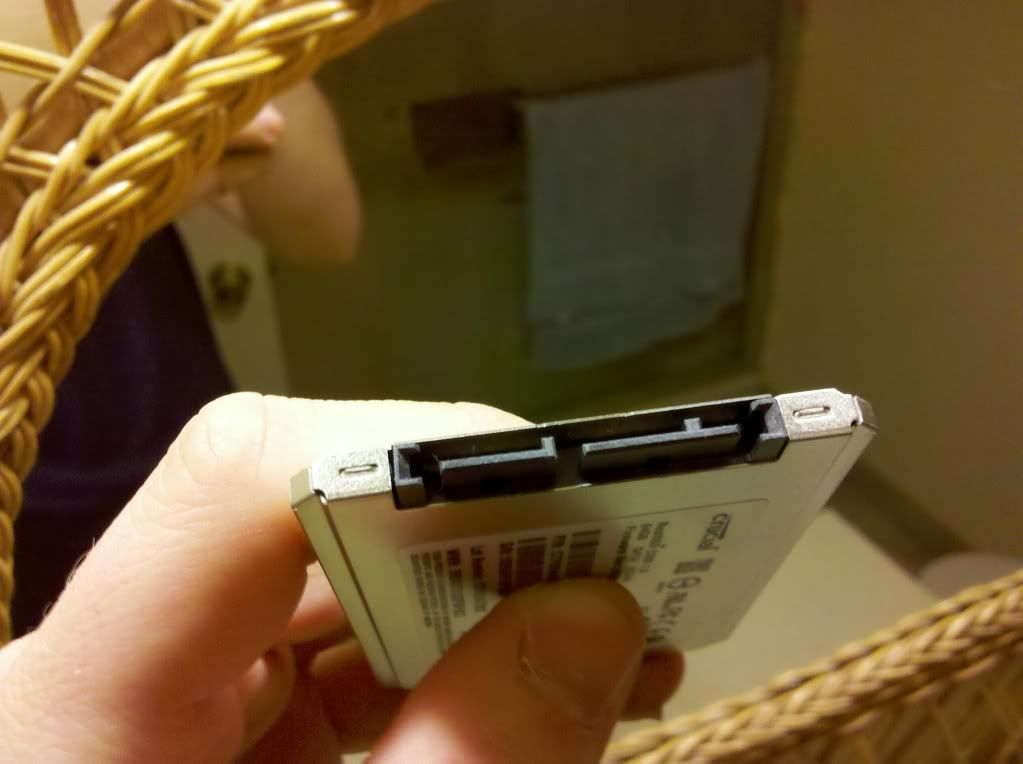
The slot I'm talking about is the one on the right. I have the cord for the left one, which connects to the SATA on the mobo.
edit:
p.s.
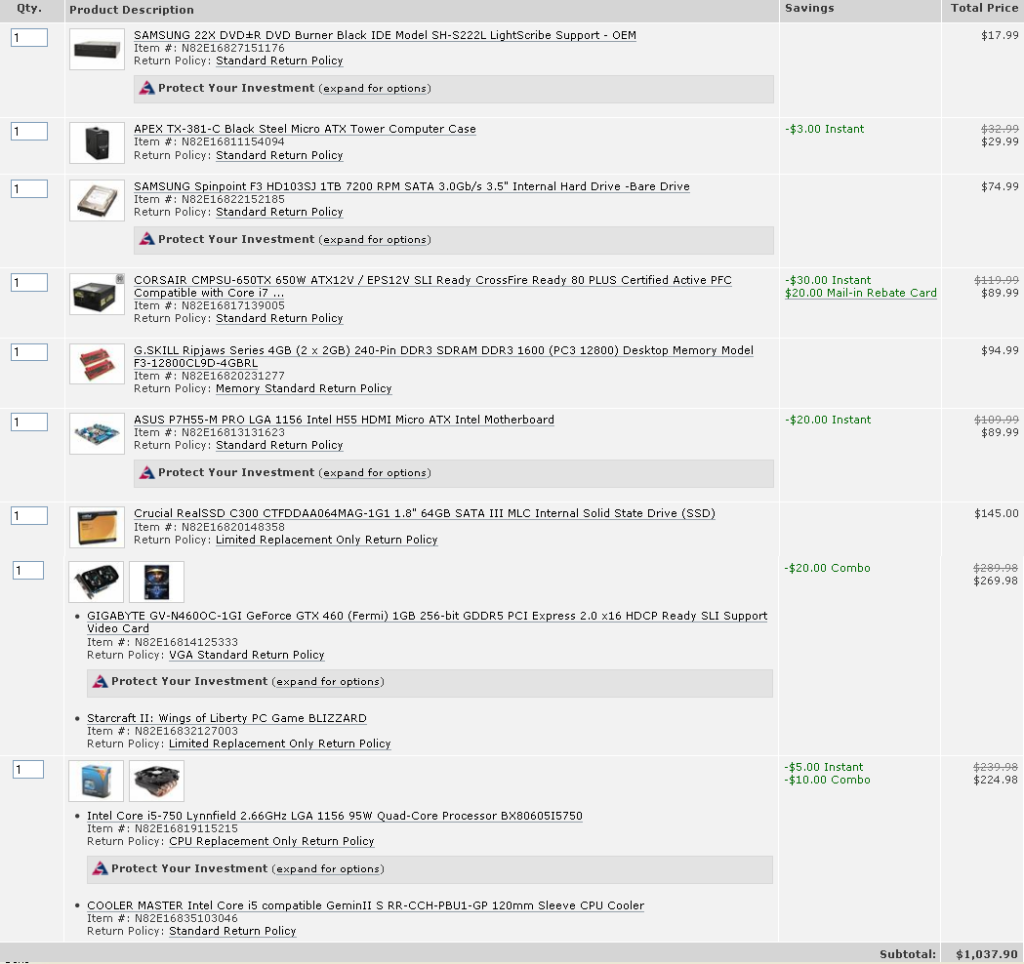
link to the img of my build for anyone curious; or perhaps to anyone who can help answer my problem...
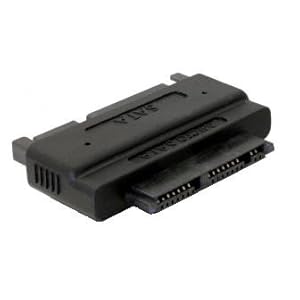
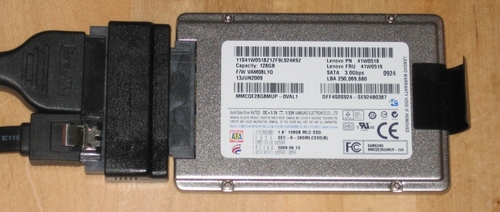
Some options:
http://www.newegg.com/Product/Produ...rder=BESTMATCH&Description=micro+sata&x=0&y=0
http://www.amazon.com/s/ref=nb_sb_n...electronics&field-keywords=Micro+SATA&x=0&y=0
Unicorn said:I'm not crazy, and here's why:
The slot I'm talking about is the one on the right. I have the cord for the left one, which connects to the SATA on the mobo.
edit:
p.s.
link to the img of my build for anyone curious; or perhaps to anyone who can help answer my problem...
Annnnnnnd there we go. Ok, what happened is it looks like you bought a 1.8" crucial ssd. Pretty much all of the ssd's have options for that size, however as far as I know (I could be wrong about this) 1.8" are models normally used in laptops not desktop pc's. The 2.5" ssd's are the ones normally used in desktop PC's. I dont think any of us knew you had that size drive, so we were giving bad advice. But Feist has you covered.
Shubit said:This entry is interesting:
RAM 4.0GB Single-Channel DDR2 @ 533MHz (5-7-7-20)
How many sticks of RAM are you running, two? Seems like you have both modules populating the same channel. Try running them in the yellow DIMM slots only. Also I don't know the type, but unless you've got some generic cheapo modules, the frequency and timings seem mighty loose. 800mhz and timings of 5-5-5-15 at 1.8V were common for ddr2 before ddr3 took over. Try to establish the exact model and look up specs online.
If you only have the one stick, it's what's holding you back. A nice kit of 2x2GB (or even 2x4GB if you were willing to splurge) from Kingston, Corsair or G.Skill will do wonders in this case.
So, uh, lets say I have two sticks and it still says Single Channel. What did I do wrong? Just wrong slots? And are the 'timings' and speed and whatnot correct? I don't know much about the advanced intricacies of RAM.

Ryoma-Echizen
Member
Look at your mobo manual. That should tell you in what slots you have dual channel (most of the time, the ones with the same color).
Yeah. I figured there had to be 2 kinds of SSDs, especially considering everything in the manual that came with it was talking about installing it into a laptop :lolCipherr said:Annnnnnnd there we go. Ok, what happened is it looks like you bought a 1.8" crucial ssd. Pretty much all of the ssd's have options for that size, however as far as I know (I could be wrong about this) 1.8" are models normally used in laptops not desktop pc's. The 2.5" ssd's are the ones normally used in desktop PC's. I dont think any of us knew you had that size drive, so we were giving bad advice. But Feist has you covered.
·feist· said:You need a Micro SATA to SATA adapter like this:
[IM]http://ecx.images-amazon.com/images/I/31AKw3dnQpL._SL500_AA300_.jpg[/IG]
http://ecx.images-amazon.com/images/I/61zcCpIC3lL.jpg[/MG]
Some options:
[url]http://www.newegg.com/Product/ProductList.aspx?Submit=ENE&DEPA=0&Order=BESTMATCH&Description=micro+sata&x=0&y=0[/url]
[url]http://www.amazon.com/s/ref=nb_sb_noss?url=search-alias%3Delectronics&field-keywords=Micro+SATA&x=0&y=0[/url][/QUOTE]
Thanks a ton! exactly what I was trying to find out what I needed for this drive :lol
Now, I suppose I need a cradle so it's not just dangling around inside my case. I've seen the SSD cradles for "regular" sized SSDs, but what options do I have for this tinier one?
opticalmace
Member
Probably the wrong slots. Check your manual or post a pic. Heck, it could very well even be color-coded... go double check.TheEastonator said:So, uh, lets say I have two sticks and it still says Single Channel. What did I do wrong? Just wrong slots? And are the 'timings' and speed and whatnot correct? I don't know much about the advanced intricacies of RAM.
[IM]http://i161.photobucket.com/albums/t223/immrdurp/Capture-3.png[/IMG]
So im having a minor issue with my newly-built desktop whereas windows wont list my 2nd harddrive although both the BIOS and device manager recognizes it just fine:
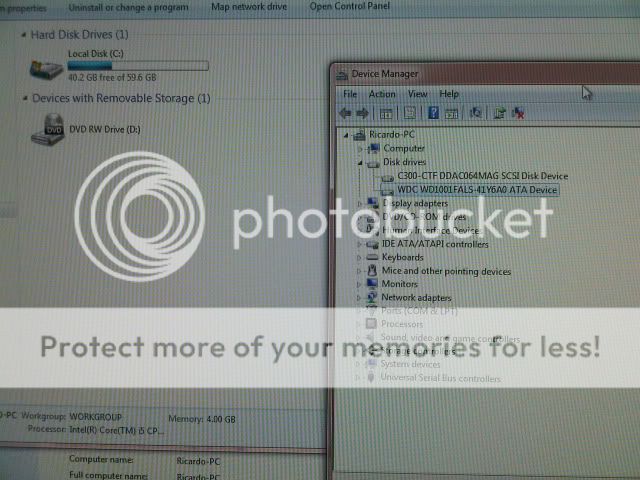
How do i fix this? Window on the left is the My computer screen where only my SSD drive shows up, window on the right, device manger, shows it recognizes my 1TB drive as well as my SSD? What's the conflict?
I wanna install my games already
How do i fix this? Window on the left is the My computer screen where only my SSD drive shows up, window on the right, device manger, shows it recognizes my 1TB drive as well as my SSD? What's the conflict?
I wanna install my games already

Manp
Member
Arsenic said:So im having a minor issue with my newly-built desktop whereas windows wont list my 2nd harddrive although both the BIOS and device manager recognizes it just fine:
How do i fix this? Window on the left is the My computer screen where only my SSD drive shows up, window on the right, device manger, shows it recognizes my 1TB drive as well as my SSD? What's the conflict?
I wanna install my games already
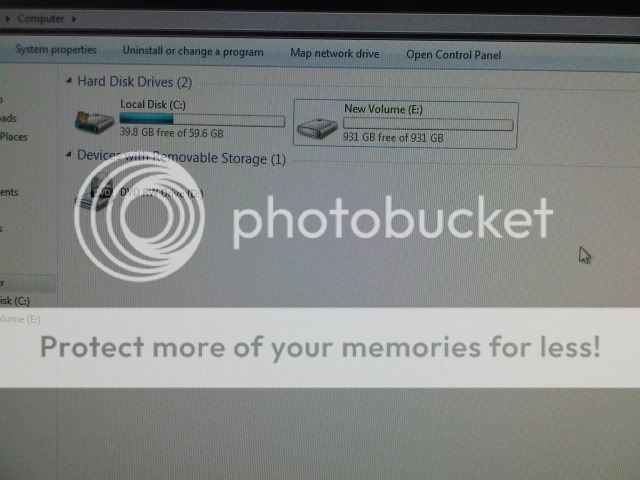
that's because the drive doesn't have a partition. you need to create a partition from disc management (Start -> Run -> diskmgmt.msc ) -you'll see the drive with no partitions in the lower half of the window- and then format it

Felix Lighter
Member
Unicorn said:Thanks a ton! exactly what I was trying to find out what I needed for this drive :lol
Now, I suppose I need a cradle so it's not just dangling around inside my case. I've seen the SSD cradles for "regular" sized SSDs, but what options do I have for this tinier one?
Some people just find an open spot in the case and use double sided tape to secure it.
I love you manManp said:that's because the drive doesn't have a partition. you need to create a partition from disc management (Start -> Run -> diskmgmt.msc ) -you'll see the drive with no partitions in the lower half of the window- and then format it

Thank a bunch!
TheEastonator said:So, uh, lets say I have two sticks and it still says Single Channel. What did I do wrong? Just wrong slots? And are the 'timings' and speed and whatnot correct? I don't know much about the advanced intricacies of RAM.
Others have covered the slots, although if dual channel didn't engage after populating the correct ones a BIOS reset is in order. As for timings and whatnot, they seem pretty ordinary for value segment DDR3 sticks. Knowing the exact model and looking up specs online is your best bet if you want to squeeze the most out of them.
Dear sirs,
I have been reading the GAF PC threads with awe and slight envy, due to abandoning PC six years ago to become a Mac user & console gamer. Not anymore, I say: I will join the ranks of "one gen ahead but still on the comfy couch".
First decision is a hard one: what kind of PC would be the best. My missus won't probably love a LED-lit tuner case with loud fans so...
1) Use a HTPC case and try to squeeze enough performance for 720p or 1080p (need a new telly which I'll buy after a move) full detail games
2) Use long cables & wireless controller/mouse to hide the unit somewhere far away from our living room
3) Build a silent but deadly ATX case & try and make it blend into our living room
I'm stoked about the idea of nice AA, triple buffering etc... Please help me join your elite ranks!
edit: Oh and to add: I will build my own. No prebuilt nonsense for me.
I have been reading the GAF PC threads with awe and slight envy, due to abandoning PC six years ago to become a Mac user & console gamer. Not anymore, I say: I will join the ranks of "one gen ahead but still on the comfy couch".
First decision is a hard one: what kind of PC would be the best. My missus won't probably love a LED-lit tuner case with loud fans so...
1) Use a HTPC case and try to squeeze enough performance for 720p or 1080p (need a new telly which I'll buy after a move) full detail games
2) Use long cables & wireless controller/mouse to hide the unit somewhere far away from our living room
3) Build a silent but deadly ATX case & try and make it blend into our living room
I'm stoked about the idea of nice AA, triple buffering etc... Please help me join your elite ranks!
edit: Oh and to add: I will build my own. No prebuilt nonsense for me.
Mr Nightman
Banned
Hmm, well what kind of graphics chipset is it?Le-mo said:I ran the Windows 7 Upgrade advisor to see if my computer could run it and my computer passed all the past, except it couldn't confirm my video cards compatibility. I downloaded the latest driver and it still didnt' fix the issue. Any ideas guys?
What do you mean by chipset? This is the graphics card that I have.Mr Nightman said:Hmm, well what kind of graphics chipset is it?
http://www.newegg.com/Product/Product.aspx?Item=N82E16814150501
Edit: I tried to install Windows 7 last night despite the advisor not being able to confirm my graphics compatibility. It went through the entire process (copy files, harddrive partition, etc..), but once it restarted and got to the "Starting Windows" screen the windows logo started to assemble and then it just froze.
Mr Nightman
Banned
Thats really odd, that card is plenty new, may be some settings in the bios screwing up, I got a gtx 460 recently and windows would lock up and blue screen on that little loading icon, changed some acpi settings in my bios to on, and it worked fine afterwards. What make/model motherboard do you have?Le-mo said:What do you mean by chipset? This is the graphics card that I have.
http://www.newegg.com/Product/Product.aspx?Item=N82E16814150501
Edit: I tried to install Windows 7 last night despite the advisor not being able to confirm my graphics compatibility. It went through the entire process (copy files, harddrive partition, etc..), but once it restarted and got to the "Starting Windows" screen the windows logo started to assemble and then it just froze.
http://www.newegg.com/Product/Product.aspx?Item=N82E16813130290Mr Nightman said:Thats really odd, that card is plenty new, may be some settings in the bios screwing up, I got a gtx 460 recently and windows would lock up and blue screen on that little loading icon, changed some acpi settings in my bios to on, and it worked fine afterwards. What make/model motherboard do you have?
I will try messing with the BIOS tonight if that's the case.
Mr Nightman
Banned
Yea man give her a try, and I will still research a bit, will update if I find anythingLe-mo said:http://www.newegg.com/Product/Product.aspx?Item=N82E16813130290
I will try messing with the BIOS tonight if that's the case.
Mr Nightman said:Yea man give her a try, and I will still research a bit, will update if I find anything
Thank you, I did a little research myself, but couldn't really find any real solution to the problem. I'll mess with the BIOS after work and school.
Very FEW laptops have some sort of update-able video card, and those that do, need a card that has to fit physically (there are multiple variants of the MXM port) and with the thermal/electrical design (ie, not set your laptop on fire); also has to be supported by the BIOS.Fix The Scientist said:Pathetic question incoming but please help me. I have a standard laptop and tomorrow i'm buying a graphics card for it, do i have to check what type of motherboard i have? Or will most laptop graphics cards just fit in regardless of model?
There are some external solutions though, like the ViDock or its DIY variant. Mind you that these require an external PSU and monitor (dependant on your laptop and video card), and have some bandwidth issues (can't run at x16).
Anyone use a standalone podcast player on their PC? I use Winamp for my media but it's pretty terrible for podcasts. It downloads your podcasts into your music library, spontaneously stops and loses your spot when you pause or put your computer to sleep, and seems to do a pretty bad jobs of checking for updates. I'd rather have a 2nd piece of software to run independently that just does podcasts well, or does podcasts and music well but still keeps them seperate.

Hari Seldon
Gold Member
What do you guys think of this build?
Case: Cooler Master HAF X
CPU: Core i7-950
Graphics: AMD 4870 (recycled from current pc) + 1 more in crossfire
Power Supply: Undecided yet? Recommendations??
Motherboard: Asus Sabertooth X58
Memory: G Skill Ripjaw 2x4GB (for future upgrading)
I'm not sure about the mobo though I just kind of picked one that had the requirements for the i7-950.
Also is it difficult to do 2x 4870s? I have never done the dual GPU thing before. Is it worth it for most games?
Edit: Nvm on the 2x 4870s. I'm just going to stick with 1 until I save enough for a DX11 solution.
Case: Cooler Master HAF X
CPU: Core i7-950
Graphics: AMD 4870 (recycled from current pc) + 1 more in crossfire
Power Supply: Undecided yet? Recommendations??
Motherboard: Asus Sabertooth X58
Memory: G Skill Ripjaw 2x4GB (for future upgrading)
I'm not sure about the mobo though I just kind of picked one that had the requirements for the i7-950.
Also is it difficult to do 2x 4870s? I have never done the dual GPU thing before. Is it worth it for most games?
Edit: Nvm on the 2x 4870s. I'm just going to stick with 1 until I save enough for a DX11 solution.
Mr Nightman
Banned
yup no prob, lemme know how your trials goLe-mo said:Thank you, I did a little research myself, but couldn't really find any real solution to the problem. I'll mess with the BIOS after work and school.
Schmattakopf
Member
Why'd you choose that processor?Hari Seldon said:What do you guys think of this build?
Case: Cooler Master HAF X
CPU: Core i7-950
Graphics: AMD 4870 (recycled from current pc) + 1 more in crossfire
Power Supply: Undecided yet? Recommendations??
Motherboard: Asus Sabertooth X58
Memory: G Skill Ripjaw 2x4GB (for future upgrading)
I'm not sure about the mobo though I just kind of picked one that had the requirements for the i7-950.
Also is it difficult to do 2x 4870s? I have never done the dual GPU thing before. Is it worth it for most games?
Edit: Nvm on the 2x 4870s. I'm just going to stick with 1 until I save enough for a DX11 solution.
Hari Seldon
Gold Member
Schmattakopf said:Why'd you choose that processor?
No reason really, looks like it is pretty powerful for $300. Why is there a better one for that price?
Hari Seldon
Gold Member
Crap I think I am making a mistake on the RAM also. It looks like it should be triple channel instead of 2x. Am I right in this?

JetBlackPanda
Member
hey everyone quick question: is TR fall econobox still a pretty decent build for the price?
Tech Report Fall Econobox
Tech Report Fall Econobox
Hari Seldon said:What do you guys think of this build?
Case: Cooler Master HAF X
CPU: Core i7-950
Graphics: AMD 4870 (recycled from current pc) + 1 more in crossfire
Power Supply: Undecided yet? Recommendations??
Motherboard: Asus Sabertooth X58
Memory: G Skill Ripjaw 2x4GB (for future upgrading)
I'm not sure about the mobo though I just kind of picked one that had the requirements for the i7-950.
Also is it difficult to do 2x 4870s? I have never done the dual GPU thing before. Is it worth it for most games?
Edit: Nvm on the 2x 4870s. I'm just going to stick with 1 until I save enough for a DX11 solution.
X58 is a triple channel DDR board. Which you need for the 1366 socket of that i7, so add triple channel ram not dual channel.
Hari Seldon
Gold Member
Hmm I am reading that the i5-760 is a pretty good CPU if you don't plan on more than 2 graphics cards. Maybe I'll go with that instead of the i7-950 and save some cash. Ugg too many options lol. My wife needs my build before we leave on vacation so it will be in by Christmas. :lol
Metalic Sand
who is Emo-Beas?
JetBlackPanda said:hey everyone quick question: is TR fall econobox still a pretty decent build for the price?
Tech Report Fall Econobox
I wouldnt buy the GTS 450 If you plan on doing 1080p gaming. Also 2GB of ram for $35 seems kind of a rip since you can buy 4 gigs for $50-60 now. Everything else is fine.
Schmattakopf
Member
The i5 760 is probably the same to you unless you'll make use of hyper-threading, and it's $100 cheaper. Either way, if you can wait until after the holidays, new Intel CPUs and ATI GPUs are being released.Hari Seldon said:No reason really, looks like it is pretty powerful for $300. Why is there a better one for that price?
JetBlackPanda
Member
Metalic Sand said:I wouldnt buy the GTS 450 If you plan on doing 1080p gaming. Also 2GB of ram for $35 seems kind of a rip since you can buy 4 gigs for $50-60 now. Everything else is fine.
thanks man
Keio said:Dear sirs,
I have been reading the GAF PC threads with awe and slight envy, due to abandoning PC six years ago to become a Mac user & console gamer. Not anymore, I say: I will join the ranks of "one gen ahead but still on the comfy couch".
First decision is a hard one: what kind of PC would be the best. My missus won't probably love a LED-lit tuner case with loud fans so...
1) Use a HTPC case and try to squeeze enough performance for 720p or 1080p (need a new telly which I'll buy after a move) full detail games
2) Use long cables & wireless controller/mouse to hide the unit somewhere far away from our living room
3) Build a silent but deadly ATX case & try and make it blend into our living room
I'm stoked about the idea of nice AA, triple buffering etc... Please help me join your elite ranks!
edit: Oh and to add: I will build my own. No prebuilt nonsense for me.
1) Look into the following and see if there is something both you and the missus like:
Antec fusion Remote Max - almost unnecessarily big, blends well with audio components, can fit pretty much any hardware you throw at it, good noise damping properties
Silverstone grandia GD04 - mATX, small footprint yet able to fit decent hardware, height limitation on aftermarket CPU coolers, max graphics card length 11 inches
Lian Li PC-C50 - similar to above and can generally fit more but restricted in graphics card length (10 inches), all aluminum though -> prone to vibration?
Origen AE S16V/S16T - only if you've got serious cash to blow and are really into aesthetics, T version comes with a TFT touchscreen
2) wireless everything is almost a must from a couch anyway so...
3) What you are describing already sort of exists: Lian Li PC-X2000F

(LEDs in this shot are just PR, it's as classy a case as you are able to get your hands on)
Hari Seldon said:Crap I think I am making a mistake on the RAM also. It looks like it should be triple channel instead of 2x. Am I right in this?
Yes. Dual works though, you just aren't realizing the platforms full potential.
Hari Seldon
Gold Member
Schmattakopf said:The i5 760 is probably the same to you unless you'll make use of hyper-threading, and it's $100 cheaper. Either way, if you can wait until after the holidays, new Intel CPUs and ATI GPUs are being released.
Yeah I read that. I think I'm going to go with that i5. Pretty cheap and the mobo is cheaper. I don't plan on running more than 2 GPUs ever. I am going to wait on getting a new GPU until after the holidays.
Shubit said:3) What you are describing already sort of exists: Lian Li PC-X2000F
(LEDs in this shot are just PR, it's as classy a case as you are able to get your hands on)
It's also $500, and Lian-Li uses some ridiculously thin aluminum for their cases nowadays.
I'd look into Silverstone.