• Hey Guest. Check out your NeoGAF Wrapped 2025 results here!

"I need a new PC!" 2010 Edition

SpaceDrake said:
Now, as a caveat, there is one area where I think splurging a bit is worth it for gamers, and where I plan on dropping some benjamins when I build my next computer: solid-state drives. On load-heavy games (like FPSes or MMOs), it's seriously like the invention of the warp drive. Load times disappear when you play from an SSD, so it can definitely be worth it to load up a nice big SSD (or even put multiple drives in or RAID-0 them together) to play your most load-intensive games from. Especially with Intel's next-gen drives coming out (which push the write-limits into "this will last as long as a comparable physical drive" territory) there's really no downside to them, aside from the price.

So those are confirmed prices, excellent. Definitely making the right choice on waiting for the 2x00s then. Is there a confirmed price/date for the G3 SSDs yet or are those still a nebulous "Q2 2011" deal? (I tried looking for this stuff, but for some reason you guys seem to know stuff the rest of the Internet doesn't, partially because you follow the Chinese Bothans I suspect :V )

I do hope the 560 is under $300, though. I was hoping that'd be more a refresh of the 460 the way the 6850/70s were price refreshes for their respective predecessors in the 5 line. I'd really like to pop an Nvidia in the rig I'll be building soon (partially since it'll serve as another testbed rig), but if the 560 is up near $300 I might just have to go with a 460 and save a benjamin (for diverting into pimpin' SSDs of course :V )
Well SSD's aren't that magical, but they do help for MMOs, not as much for FPS. 7200RPM drives are pretty speedy since they are packing 334GB a platter on them now.

As for the intel stuff, the leaked document says Q1 and all the models will be doubling in capacity, taking the place of their old counter parts. It's my guess that the prices will stay around the same, and we get the benefits of 2x the space and faster drives to boot. Sandforce is around that time, but probably later so I say early 2011.

GTX560 I'd expect $280-$300. Maybe wait a week and AMD will play another card at that price point, who knows. With suspected delays for the new stuff I'm willing to plunk down $300 on a GPU next month.
 
·feist· said:
First, the P5Qs are some of the best clocking 775 boards so you should definitely increase your speed. Your CPU should do 3.2-3.4GHz, or north of 3.8GHz on the more extreme end of the spectrum.

GPU wise, have a look at benches for the 6870, 6950 and GTX 570 to see if their price/performance offers enough of an increase over your current card. I'd say to try overclocking your CPU first, and then run through some games. You may not be able to run 8xAA at a high frame rate, but if you're happy with the results, then it may be a good idea to skip this GPU generation entirely. By this time next year we should have Bulldozer 1, 28nm GPUs from both camps, and Ivy Bridge will either be on shelves, or we will at least have performance figures for them.

Hazaro said:
Definetly clock you Q6600 to 3.0 or 3.2Ghz. As for GPU's wait until end of January to buy.

thx guys. and to overclock I should not use the boxed cooler that came with the CPU right? any prefered cpu cooler for the Q6600?
 
So im getting 8 more gigs of ram, a TB drive, and im looking to start making my system run beastly by overclocking and setting up a RAID CONFIG. I need some to-the-point info on overclocking and configuring RAID. I've got a phenom x4 620(?) (2.6 ghz) and gigabyte am3 board. Ill post specific models in a bit.
 
INDIGO_CYCLOPS said:
So im getting 8 more gigs of ram, a TB drive, and im looking to start making my system run beastly by overclocking and setting up a RAID CONFIG. I need some to-the-point info on overclocking and configuring RAID. I've got a phenom x4 620(?) (2.6 ghz) and gigabyte am3 board. Ill post specific models in a bit.
What on earth do you need 16GB of RAM for?
 
INDIGO_CYCLOPS said:
So im getting 8 more gigs of ram, a TB drive, and im looking to start making my system run beastly by overclocking and setting up a RAID CONFIG. I need some to-the-point info on overclocking and configuring RAID. I've got a phenom x4 620(?) (2.6 ghz) and gigabyte am3 board. Ill post specific models in a bit.

Buying that extra RAM is going to limit your OCs.
 
I'm currently on an i7 930 stock , 6Gb ram and 5870 1GB.

I have 2 choices :

Sell the gpu, add 200 bux and buy a new gtx 580

2nd choice is, my friend has 2 x 5870-2gb which he is willing to give to me(obviously used), and take my 1gb 5870.

I have a 800 PSU.

Which to go for ? thnx !!
 
INDIGO_CYCLOPS said:
So im getting 8 more gigs of ram, a TB drive, and im looking to start making my system run beastly by overclocking and setting up a RAID CONFIG. I need some to-the-point info on overclocking and configuring RAID. I've got a phenom x4 620(?) (2.6 ghz) and gigabyte am3 board. Ill post specific models in a bit.


how much RAM do you have? 8 is way too much unless you are doing video editing or something...
 
twdnewh_k said:
I'm currently on an i7 930 stock , 6Gb ram and 5870 1GB.

I have 2 choices :

Sell the gpu, add 200 bux and buy a new gtx 580

2nd choice is, my friend has 2 x 5870-2gb which he is willing to give to me(obviously used), and take my 1gb 5870.

I have a 800 PSU.

Which to go for ? thnx !!

How much will you be spending to go crossfire then?
 
I am in need of some serious assistance. I just got my 6870 in the mail yesterday and after a bunch of bullshit, I managed to get the drivers installed and the card working. "Oh cool. I think I'll play the Dirt 2 demo!!"

I start installing the demo from Steam and in the middle of the install, It crashes (I've been getting a lot of those too.) This time the crash seems to have taken my card with it! I can't get a signal to my TV to fix the problem! Has anyone ever dealt with anything like this? It's really taking the wind out of my sails for PC gaming :(
 
Hazaro said:
What on earth do you need 16GB of RAM for?
I actually only have 2 in there now sorry for not being clear. I do a lot of work in creative suite but also game with it. Still think that's too much?

Would you guys suggest just using the new 8 gb? I suppose I should have used my money to buy something other than more memory...
 
INDIGO_CYCLOPS said:
I actually only have 2 in there now sorry for not being clear. I do a lot of work in creative suite but also game with it. Still think that's too much?

Would you guys suggest just using the new 8 gb? I suppose I should have used my money to buy something other than more memory...
Running mismatched module speeds and/or sizes isn't advisable. You can do it, though performance will take a hit and you would be introducing a raft of potential issues. Sounds like you've purchased 2x4GB. I'd just run those two by themselves, instead of filling every slot. It'll be less stressful on your components and, generally, better for your overclock.


PumpkinPie said:
I bought this, biatches!

red9223.jpg


I've removed the hard drive rack so there is fucking enormous air flow from the front 200mm fan. I'm using a Lian Li EX 33B1 caddy to mount the hard drives in the spare CD bays:

lian-li-ex-33b1-p-black-aluminum-internal-meshed-hdd-cage-frch-laex33bp.jpg


^This beast has a fan built in so it keeps the drives cool too. It takes up 3 bays and then I have my Blu-Ray RW and memory card reader to fill the front up nicely!


BTW, does anyone have any experience with the Gigabyte GA-X58A-UD3R mobo, or even the UD5 or UD7 for that matter?
What country do you live in?
I've had my eye on the all black version of the 3-into-4 Lian Li EX-34NX, but last I checked, it was only available through limited German and Asian sources. I'd rather not settle for the EX-34NB.
EX-34N-03s.jpg
 
Sanjay said:
How much will you be spending to go crossfire then?

I wont be spending anything since my mobo supports it and I think 800w is enough (correct me if Im wrong). Its essentially a free upgrade from a single 5870 1gb to 2x 5870 2gb

Im just worried about crossfire, as I've heard it might cause issues. Plus the increased heat/noise.
I also dunno how well optimised the 2nd card will be.

Im using a single monitor setup and this setup will have 4gb bandwith which Im not sure I need.
 
I'm considering moving a game to my SSD but I don't know if I plan on leaving it there permanently. Is it a bad idea to move very large application to the drive and then say 3-4 months down the road remove them? I'm somewhat aware of performance degradation of SSDs so I'm a little paranoid. I also don't want to drastically reduce the life of the drive.
 
·feist· said:
Running mismatched module speeds and/or sizes isn't advisable. You can do it, though performance will take a hit and you would be introducing a raft of potential issues. Sounds like you've purchased 2x4GB. I'd just run those two by themselves, instead of filling every slot. It'll be less stressful on your components and, generally better for your overclock
I do know this but wasn't aware that it extended to the size of the module. I don't want instability issues at all. At tiis point id say 8 gb of ddr3 is large enough for my demands.

Any general info on overclocking would be greatly appreciated.
 
Hey guys!

I'm looking to buy a new PC. Here's what I chose so far :

ASUS SABERTOOTH 55I P55 DD3 A+SR+GBL+1394
Intel Core i5 Quad 760 2.80GHz 8.0MB 2.5GT/S S1156
4 * Kingston 2.0 GB DDR3-1333 CL9
LG Electronics GH24NS50 22X DVD+/-RW SATA w/SW OEM
2 * nVidia Geforce GTX460 1GB PCI-E 2xDVI MiniHDMI SLI
Western Digital - Cavier Caviar Black 640GB 7200RPM SATA600 64MB
Western Digital - Cavier Caviar Black 1.0TB 7200RPM SATA600 64MB
Antec 300 Versatile Case Black NOPS
Corsair 650W HX Series ATX12V+EPS 120mm Fan
Windows 7 Home Premium OEM DVD - 64-bit English
Total + taxes: 1,623.14 $

What do you guys think? Keep in mind, I'm from Canada, and I'm not totally comfortable building my own computer with different parts. I have a 1800$ CAD budget.

My needs are mostly video editing, Computer animation, graphic design and a little bit of gaming. Would this be good? Should I change for a i7 for the long term?

Thanks!
 
Littleberu said:
Hey guys!

I'm looking to buy a new PC. Here's what I chose so far :


What do you guys think? Keep in mind, I'm from Canada, and I'm not totally comfortable building my own computer with different parts. I have a 1800$ CAD budget.

My needs are mostly video editing, Computer animation, graphic design and a little bit of gaming. Would this be good? Should I change for a i7 for the long term?

Thanks!

Drop it to a single GTX 460. SLI is really not worth it for a 'little bit of gaming', especially since SLI can add extra headaches for certain games.

I would probably recommend you take the money for the second GTX 460 and put it towards a SSD. That will make Photoshop and other programs, as well as Windows, a lot more responsive.

Also, why a 640GB and a 1TB drive? Why not 2x 1TB drives? Why not a single bigger 2TB drive? Just curious.

Lastly, go with 2x 4GB sticks, not 4x 2GB sticks.
 
TheExodu5 said:
Drop it to a single GTX 460. SLI is really not worth it for a 'little bit of gaming', especially since SLI can add extra headaches for certain games.

I would probably recommend you take the money for the second GTX 460 and put it towards a SSD. That will make Photoshop and other programs, as well as Windows, a lot more responsive.

Also, why a 640GB and a 1TB drive? Why not 2x 1TB drives? Why not a single bigger 2TB drive? Just curious.

Lastly, go with 2x 4GB sticks, not 4x 2GB sticks.


I'd echo most of this. Getting a chip that supports hyperthreading would also make sense given the uses.
 
TheExodu5 said:
Drop it to a single GTX 460. SLI is really not worth it for a 'little bit of gaming', especially since SLI can add extra headaches for certain games.

I would probably recommend you take the money for the second GTX 460 and put it towards a SSD. That will make Photoshop and other programs, as well as Windows, a lot more responsive.

Also, why a 640GB and a 1TB drive? Why not 2x 1TB drives? Why not a single bigger 2TB drive? Just curious.

Lastly, go with 2x 4GB sticks, not 4x 2GB sticks.

Cool, thanks!

For the 640GB and the 1TB, it's to put all the videos on the same drive, and keep the other drive for applications/games. I read about (and noticed) improved performance in Premiere when exporting/encoding when doing this.

I was wondering if only one 460 was enough for gaming, though?
 
Hey GAF. I have an ancient PC from 2003. Yesterday I ran into a bunch of blue screen errors and it would reboot the PC. I couldn't even get a chance to read the blue screen because it kept resetting. Anyway I figured out the error it was giving me and after a bit of research I figured out it was a ram problem. Pulled out one ram things and it still wouldn't work so I put that one back in and pulled the other and I could finally boot Windows.

Now I'm down to 512 MB from 1 gig.

I had 2 512MB DDR PC2700 CL2.5 things of RAM. WHATEVER I don't understand any of that. Anyway, this is a good reason as any now to buy some RAM and I need some help. I'm interested in 2 gigs and I figure DDR would fit since the old RAM is DDR but beyond that I'm confused. I check NEWEGG and I see stuff like DDR2 and DDR3, PINs, and then of course there is SPEED. It's confusing the hell out of me. Can anyone help me out?
 
Littleberu said:
Cool, thanks!

For the 640GB and the 1TB, it's to put all the videos on the same drive, and keep the other drive for applications/games. I read about (and noticed) improved performance in Premiere when exporting/encoding when doing this.

I was wondering if only one 460 was enough for gaming, though?

That's why you buy an SSD. Your programs go there, your media onto the mechanical drive.

I use a single GTX 260 for 1080p gaming and I'm perfectly contented. You'll be fine with a single GTX 460 for "light gaming". Heck, an old ass 8800GT is still more fine for that.
 
Kuroyume said:
Hey GAF. I have an ancient PC from 2003. Yesterday I ran into a bunch of blue screen errors and it would reboot the PC. I couldn't even get a chance to read the blue screen because it kept resetting. Anyway I figured out the error it was giving me and after a bit of research I figured out it was a ram problem. Pulled out one ram things and it still wouldn't work so I put that one back in and pulled the other and I could finally boot Windows.

Now I'm down to 512 MB from 1 gig.

I had 2 512MB DDR PC2700 CL2.5 things of RAM. WHATEVER I don't understand any of that. Anyway, this is a good reason as any now to buy some RAM and I need some help. I'm interested in 2 gigs and I figure DDR would fit since the old RAM is DDR but beyond that I'm confused. I check NEWEGG and I see stuff like DDR2 and DDR3, PINs, and then of course there is SPEED. It's confusing the hell out of me. Can anyone help me out?


DDR RAM is stupidly overpriced and for ~$400 you could build a machine that utterly decimates your current rig. Save your cash, any money pumped into that machine is money wasted.
 
Littleberu said:
You're saying buying a 80Gb drive isn't worth it, then?


No definitely not. An 80 will house your OS, your browsers and maybe some frequently used office software, but there likely wouldnt be a lot of spare room. I do a lot of gaming, so some larger games I want room for. If your not planning on having any games on it, and just need it for a quick boot and Browser/MSOffice software, 80 would be perfect.

Plus, lord knows the prices on ssd's will go down and down and down. Its just that with a 120, you can put a couple of large games, your os, software and other stuff comfortably.
 
Since your on the subject of SSD's. Could anyone recommend me a good one for my desktop? Thinking of making the plunge and using my existing hard drives for media storage.

Few games I would like to put on there, but don't plan to go overboard. 120+ would be nice.
 
Cipherr said:
No definitely not. An 80 will house your OS, your browsers and maybe some frequently used office software, but there likely wouldnt be a lot of spare room. I do a lot of gaming, so some larger games I want room for. If your not planning on having any games on it, and just need it for a quick boot and Browser/MSOffice software, 80 would be perfect.

Plus, lord knows the prices on ssd's will go down and down and down. Its just that with a 120, you can put a couple of large games, your os, software and other stuff comfortably.

Outside of MMOs, you're not going to see much benefit from installing your games to an SSD.
 
I know from personal experience that a 80 GB SSD is a pain in the ass, even if you keep only your OS and apps on it. I guess it depends on how much stuff you have installed, but for me just the WinSXS part of the OS takes up 11 GB now. I think 120 is the least to be somewhat comfortable, but I'd really like 256 GB drives to become more affordable.
 
It really does depend on your gaming habits - ie. how many games you tend to keep installed on your system at once. I tend to only have two or three games actually installed on my system at one time - the ones I'm playing. However, I don't play any MMOs, so the install sizes aren't too bad, so my 120GB Vertex2 SSD hasn't really felt small. If I want to try out LOTRO or WoW it will feel a bit cramped I suppose.
 
guys my msi p55A-gd65 motherboard supports one click OC, is it smart to let it overclock for me to 3.6 or something.
i have a intel i5 760.
also what cooler would be the best to get for it under 60 euro that is not realy loud.
i was thinlking about the vemous or the noctua.
 
brain_stew said:
Outside of MMOs, you're not going to see much benefit from installing your games to an SSD.

I was considering Mass Effect. I was hoping it would improve load times and eliminate the minor texture pop in. I know it won't improve framerate but I have 60 GB free right now.
 
A 60GB SSD is fine for an OS + apps, I've got Win7 and Office on mine, with all my other programs and Starcraft 2 (probably not much of an improvement, but my most played game so why not) and I've got 20GB free.
 
Just checking before I plonk down $AU330 on a second 5870. I'm pretty sure it's fine BUT can I mix an Asus with a gigabyte card? They have the same memory and the same basic features (clocks etc). Now I know this may sound like a stupid question, but I remember this being an issue a while a go, I just want to make sure it isn't anymore. Cheers.
 
I have an Intel 80GB, I keep WoW and Starcraft 2 on there. Not much of a difference in speed, but I play both very often, so why not? Also, no drive noise. Otherwise though, just keep your games on a second drive.

The reason to get an SSD is for reasons outside of gaming. Your OS bootup will be a lot faster, applications will load up nearly instantly compared to an HDD, and multitasking is seamless.

Littleberu said:
Cool, thanks!

For the 640GB and the 1TB, it's to put all the videos on the same drive, and keep the other drive for applications/games. I read about (and noticed) improved performance in Premiere when exporting/encoding when doing this.

I was wondering if only one 460 was enough for gaming, though?

One 460 is plenty for gaming. Anything more is for the seriously discerning. You'll still be able to play any game maxed at 1080p, and most at 60fps (outside of Crysis and Metro).
 
AkIRA_22 said:
Just checking before I plonk down $AU330 on a second 5870. I'm pretty sure it's fine BUT can I mix an Asus with a gigabyte card? They have the same memory and the same basic features (clocks etc). Now I know this may sound like a stupid question, but I remember this being an issue a while a go, I just want to make sure it isn't anymore. Cheers.
EDIT: Nevermind, didn't realize this was 2 vid cards which I know nothing about.
 
brain_stew said:
Outside of MMOs, you're not going to see much benefit from installing your games to an SSD.


Yeah, I just plan on playing Planetide, SW TOR, Diablo III, and maybe some wow. All are MMO's or have an MMO like design. I want all of those off of a SSD. I might even need a new larger capacity one, I doubt I could fit all that on my current one.
 
DrForester said:
Looking at this SSD. Thoughts? Plan to install on desktop. What type of mount will I need?

http://www.amazon.com/dp/B00486UR2I/?tag=neogaf0e-20


A 2.5 to 3.5 inch bay converter. (Which I believe is included in that box with the drive)

And if you can wait, in the first quarter of 2011 intel is rolling out their new line of SSD's. Will be significantly faster than the current ones, and they are claiming their tinkering now allows twice the space at the same cost. In two months or so its possible there will be a listing for a drive at that same price that is 240 GB and much much faster.

Just something to keep in mind.
 
*Venting*

Eurgh, went into PC World/Currys with my brother as he was interested in some tablet things. Never go into these stores anymore since everythings far cheaper online, but it annoyed me to still find they flog "Gaming PCs" with sack of shit graphics cards. Cases bigger than a fridge, nice quad core cpu's, lots of ram, big hard drives etc..... then an ATI 5550 for the gpu. All yours for £1000 !

Nothing new of course, just pains me to know some poor sod is gonna grab this thinking its a Crysis killer and find best they can do is Medium at a low res.

Bah venting over.
 
Ogs said:
*Venting*

Eurgh, went into PC World/Currys with my brother as he was interested in some tablet things. Never go into these stores anymore since everythings far cheaper online, but it annoyed me to still find they flog "Gaming PCs" with sack of shit graphics cards. Cases bigger than a fridge, nice quad core cpu's, lots of ram, big hard drives etc..... then an ATI 5550 for the gpu. All yours for £1000 !

Nothing new of course, just pains me to know some poor sod is gonna grab this thinking its a Crysis killer and find best they can do is Medium at a low res.

Bah venting over.


I see this at best buys alot too. All of them in my area have these honking shiny cases large capacity HD's, lots of ram and an 1156 quad core or equivalent, with an old GPU and the price is through the roof. Amazing stuff.
 
zsandy64.jpg


Intel's Sandy Bridge will debut at CES

"With Intel anti-theft technology built into Sandy Bridge, Allen said users can set it up so that if their laptop gets lost or stolen, it can be shut down remotely. The microprocessor also comes with enhanced recovery and patching capabilities."

http://www.itbusiness.ca/it/client/en/home/News.asp?id=60539&cid=6


INDIGO_CYCLOPS said:
I do know this but wasn't aware that it extended to the size of the module. I don't want instability issues at all. At tiis point id say 8 gb of ddr3 is large enough for my demands.

Any general info on overclocking would be greatly appreciated.
http://forums.amd.com/forum/messageview.cfm?catid=16&threadid=125635
http://www.anandtech.com/show/2836/9
http://www.tomshardware.com/forum/255794-29-overclocking-athlon
 
Crunched said:
Working on a build right now for a friend. He wants maximum gaming performance on an $800 budget. Might be able to go a little bit higher.

This is what I have for him so far:
radeon hd 6950
corsair modular 750 watt psu
cooler master elite rc-310
asus m4a77td am3 mobo
amd phenom II x4 965 black
4 gb g skill ripjaw ddr3

I am assuming he has an HDD and disc drive I will be able to use from his old PC. How do you guys think that build looks?
·feist· said:
Crunched,
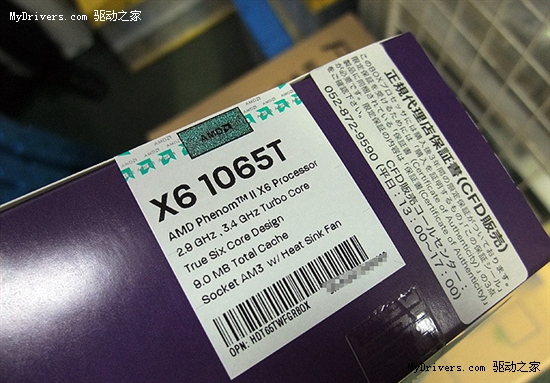
I agree with stepping down to a 955 to save money, or consider looking into a Phenom X6. Remember, games are already starting to scale for 6- and 8-core CPUs. The 125W X6 1055T is fairly priced right now, and the faster, 95W 1065T is already on shelves.

S11505296.jpg


Unlike the 95W version of the 1055T, the 1065T will be readily available worldwide. The NZXT I posted has gone back up to $50, though when you consider Newegg wants $40 for the CM case, plus $10 shipping, the Elite really doesn't look like good value. $50 for the NZXT from Amazon with free shipping. Both Amazon and Microcenter have the Antec 300 for $50.

You may want to see how the GTX 560 shapes up, and have a look at some AM3 boards with USB3/SATA3

http://www.newegg.com/Product/Produ...der=BESTMATCH&Description=am3+usb+3.0&x=0&y=0


Ecto311 said:
quick advice q:

overclock my e6300 1.8ghz or upgrade to e6500 2.9ghz?
That's a terrible upgrade.

If your CPU is the only thing really hampering you right now, and you'd like to remain using that PC for a while still, either overclock the current chip or try this if you can:

·feist· said:
Speaking of Q9300s, for Zaraki_Kenpachi, or anyone else who is looking for a cheap 775 upgrade, Microcenter is selling it for $100, in store only.

70kefr.png


http://www.microcenter.com/single_product_results.phtml?product_id=0328258

It's a better buy than the $90 Q8300 they have, and while it doesn't clock as easily as the Q6600 or Q9x50s, it also costs far less for a new chip than those other quads go for on the used market. Despite the low multiplier, a decent motherboard and component combo should be able to do ~3.6GHz without much trouble.

As always with Microcenter and Fry's, if you don't live near one, try to utilize friends and family who do.

http://www.neogaf.com/forum/showpost.php?p=24914705&postcount=19341
 
Top Bottom