• Hey Guest. Check out your NeoGAF Wrapped 2025 results here!

Proper way to set up home theater wiring? (DVD, TV, VCR, Gamecube distorted picture)

Status
Not open for further replies.

Fatalah

Member
I've been dealing with this problem for the last few years.

It seems that something must be out-of-whack. When I watch cable on Video 2, it's very clear. Video 1 shows a grainy cable picture.

Video 1 is also used for the Gamecube, but the Gamecube picture shows moving lines scrolling on the picture.

My DVD is the worst as it shows both moving lines and a grainy picture.

How can I fix all these problems? I probably need to do a total revamp wiring job, but I'm so bad with these things--I don't know the optimal way to set things up.
 
What do you have them going through? a switch? also what cables are you connecting with them? component? coaxial? if you have the GC and cable daisy chained on a coax it can cause a horribly fuzzy picture
 
No switch. I'm using component cables, not s-video because the TV doesn't support it. (Sony XBR 15 years old)

I think the Gamecube is using an RF connector, is that coaxial?
 
Fatalah said:
No switch. I'm using component cables, not s-video because the TV doesn't support it. (Sony XBR 15 years old)
So they're all going in different inputs? Might just be something wrong with the TV. Has it always done this?
 
Nope, it's a pretty solid box. It displays cable on video 2 perfectly.

PS--What do you mean by different inputs? Like video 1, video 2, video 3? Right now everything is fighting over video 1!
 
Fatalah said:
Nope, it's a pretty solid box. It displays cable on video 2 perfectly.

PS--What do you mean by different inputs? Like video 1, video 2, video 3? Right now everything is fighting over video 1!
You have everything going through video one? So do you just keep switching them out and whatnot? try getting a component switch.
 
Well basically, which ever device is powered on gets the signal. Don't ask me what happens when all the devices are powered on (end of the world?)
 
Fatalah said:
No switch. I'm using component cables, not s-video because the TV doesn't support it. (Sony XBR 15 years old)

I think the Gamecube is using an RF connector, is that coaxial?

how in the world could your gamecube, using an RF connector, be hooked up to the same input as your other components which you say are using component input?
 
Fatalah said:
Well basically, which ever device is powered on gets the signal. Don't ask me what happens when all the devices are powered on (end of the world?)
Um, however the hell you have it hooked up sounds like the problem. I can't for the life of me comprehend it. Like what Neverevar said. Post a picture if you can. But I think your solution would be a switch.
 
Fatalah said:
Well basically, which ever device is powered on gets the signal. Don't ask me what happens when all the devices are powered on (end of the world?)

That is the problem right there. None of the devices have a dedicated signal path. For instance if you take one of those adaptors that work for GC, PS2 and Xbox and plug more than one system in at a time then nothing will work. Even with a system off the signal pathway is distrupted.

Get a switch or/and start using different inputs.
 
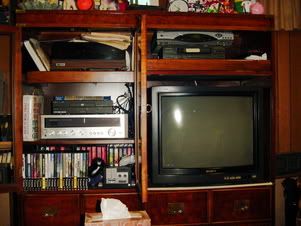
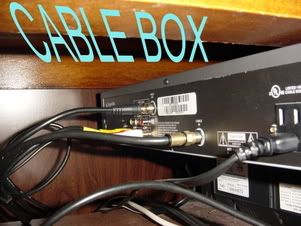
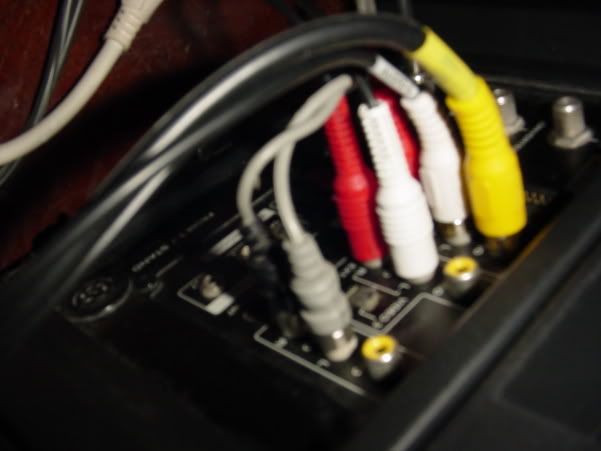
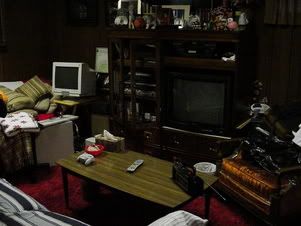
Alright Alan, just for you because you've been so helpful:

1.jpg


2.jpg


3.jpg


4.jpg


5.jpg


6.jpg


7.jpg
TELEVISION
 
Fatalah said:
No switch. I'm using component cables, not s-video because the TV doesn't support it. (Sony XBR 15 years old)

I think the Gamecube is using an RF connector, is that coaxial?

First of all, you're not using component, it didn't even exist 15 years ago. You're using RCA composite.

Secondly, if your Gamecube is using RF, that explains the graininess. RF is crap, outdated 80s crap. Buy a composite switch box (they're cheap, like $30) and plug in everything to that and then back into your tv.
 
Wow cool, composite switch box will solve all my problems?

Can you show me a picture of one that would work for me?
 
Fatalah said:
Wow cool, composite switch box will solve all my problems?

Can you show me a picture of one that would work for me?

Any will do, i just got a shitty generic brand one and it works great. I paid $30 canadian for it like 4 years ago so you can probably find one much cheaper now. If the inputs for video2 are that much better than video1, connect the box to video2 instead.

Here's an example of one, this one is $18. (don't buy this one, it's on backorder, i just used it as an example)

http://www.pcconnection.com/ProductDetail?sku=6271961&SourceID=k40132

Edit: Most of them have an s-video input on them, like the one above, but you don't need to use the s-video port if you don't have one.
 
Fatalah said:
Even though my TV doesn't support s-video, will my switchbox be able to convert?

It can't convert, you just ignore the s-video input. Plug in the red/white/yellow composite from your gamecube, vcr, dvd etc into the box, then plug in the red/white/yellow out from the box to your tv.
 
Hey, I bought this:

pRS1C-2110636w345.jpg


(but actually a model $10 more with an automatic sensor to detect which device is powered on)

and everything is looking beautiful. I'd like to thank everybody who came here and replied to help me out. I've been playing my Gamecube the last 5 years down there in my basement with an unclear screen. I feel like I have to replay all my games now!

I'm also geared up for my friend to bring his "Quantum Leap" DVD's over. Ahh, it feels so good! No more scratchiness, lines, frizzyness! WOOOO!!!!
 
Status
Not open for further replies.
Top Bottom