• Hey Guest. Check out your NeoGAF Wrapped 2025 results here!

Should I format my 360 HDD?

FightyF

Banned
I've got connection probs to Live, and according to the networking utility my connection to Live is perfect, but rather it's my HDD's incapability to get any updates from the web that's barring me from signing up onto Live.

Now, I've heard I should go to MS and get it exchanged and all that jazz, but I'm wondering if I could fix it by formatting. I've got all my saves and user profile onto a MemCard so I'm good there.

Now...does formatting it mean that it'll wipe EVERYTHING off, including important system files?

Or does it do a recovery, and copy all necessary system files while cleaning out everything else?

I was thinking that perhaps...there's a slight possibility that it would clean out EVERYTHING as it's an option for those who buy a second HDD to get more disc space out of it (system files take up to 7 GB AFAIK).

I need a quick answer, I really appreciate it if anyone could help?

MS's own document doesn't address my question:
http://support.microsoft.com/?scid=kb;en-us;906502

This second one implies that I should be ok:
http://support.microsoft.com/default.aspx?scid=kb;en-us;907618

Very implicit though...
 
Yeah I was on hold for 58 minutes, and I was using my cell phone (my only phone)...I'm not going to eat up any more minutes with that nonsense.

Anyways I did start it around an hour (or more) ago and it's still at the beginning of the format, meaning that it's not even gonna do that.

It says "Please don't turn off your console" but I got no choice, plus I doubt there's any HDD activity atm.
 
Fight for Freeform said:
Yeah I was on hold for 58 minutes, and I was using my cell phone (my only phone)...I'm not going to eat up any more minutes with that nonsense.

Anyways I did start it around an hour (or more) ago and it's still at the beginning of the format, meaning that it's not even gonna do that.

It says "Please don't turn off your console" but I got no choice, plus I doubt there's any HDD activity atm.

Gah! If only you tried this during working hours I could have found out what would or could happen. I can't totally circumvent the process to get to support folks, but somebody I know might know something off the top of their heads.

I know you probably couldn't bring it up then.

Let me know what happens.
 
Well if it's of any interest to the debuggers and such, here is a breif but concise overview of my problem and attempted solution:

1) Bought 360, connected it to router, installed Windows Media Connect, Turned on 360, created user, streamed Music, and started playing Ridge Racer 6 (with streaming music too).

2) Wanted to join Live, went to "Transfer my Live Account". It told me I had to exit my user account and so I did. It then had a screen (which was a blade) that said it was downloading updates. It would take forever and (I assume) time-out, not allowing me to get them.

3) Searched online, found some downloadable stuff from microsoft.com to give the 360 Backwards Compatibility. Dloaded, burned and installed onto my 360.

4) Tried signing up to Live again (trying a new account this time), and it asks me to sign out, I do so (and wait a few seconds so I know it's out), and it now goes to a yellow background with "Connecting to Live", after a few seconds it goes to "Downloading updates". It stays at that screen anywhere from 1 to 15 minutes. A blade appears stating that, "Xbox Live singup is currently unavailable. Please try again later."

5) I thought it was the servers, tried repeatedly over a period of 48 hours. Did another search and others are having the same problem, even before the launch (some first to play winners had the problem too). Posted the prob here and someone mentioned that it was because of the bad HDD.

NOTE: During the repeated attempts, I've directly connected it to the cable modem, forwarded ports on the router and the Live Connection Tests passed at all times even before the changes.

6) Tried to format HDD, but it remained at the beginning of the progress bar for an hour or so. I turn it off, hoping that there wasn't any disc activity. Turned it on, and it's fine. Tried format again and it worked, only took a few seconds and removed everything (saves, hexic, etc.). 13 Gb free.

7) Try signing up again, and I the same problem exists.

It's worth noting that it occurs at different screens, before and after the update I installed via CD, but it seems to be the same problem. Also noteworthy is that it is still the yellow screen after the format...so it looks like the format didn't remove my BC upgrade.

So rather than a recovery, the format is just a deletion of user data, and the system data remains the same. I was hoping that it would be much like a "recovery" that PCs use, and that it would explain why 7 Gb was used for system data (seems like a lot to me, and I thought it would mean a recovery partition).

Although it's probably solvable through a patch, I fear that it's something I'm gonna have to send to MS. That really bites as I was hoping to start playing over Live...and there's new XBLA content too! Ah well...I was lucky enough to get a 360 in the first place!
 
oh. I thought you meant new as in like tonight

When you do the connection test, what result does it give you for NAT?
 
sangreal said:
oh. I thought you meant new as in like tonight

When you do the connection test, what result does it give you for NAT?

Heh, it was new to me since I wanted them for days. :P

I believe it was "Open" or something like that. I did open the required ports...I will add that to myabove post, thanks for reminding me!

I'm trying to do the tests now, and while I was able to consistantly pass, I've failed twice, once for my MTU (which I just adjusted...it was right all along though), and secondly now fo my ICMP.

ICMP has failed a second time. This is bizarre as every single test I've ran worked out fine, but doing the tests NOW, I've failed...

Going to powercycle...I think this is a side issue that's new and it doesn't have to do with my earlier problem, but I will address it so that all my router settings are very explicit just so I'm not wasting anyone's time here.
 
sangreal said:
What router are you using?

I've connected it directly to my cable modem, and faced the same ICMP issue! I powered it down, plugged it in again, and now the connection is working perfectly.

I've now connected it to my router and again, it has passed all the tests (NAT is Open).

I'm using a BEFW11S4 Linksys B-Router (with wireless disabled). I've forwarded ports 88 on UDP, and 3074 on TCPandUDP. I've recently manually enabled MTU at 1500.

I'm looking at getting it to work directly connected to my Cable Modem first...and if I can get that going, I'll look at making sure my router is 100% correct.

If I'm back home before they close, I'll call my Cable company and see if they've had any issues with 360s getting online.
 
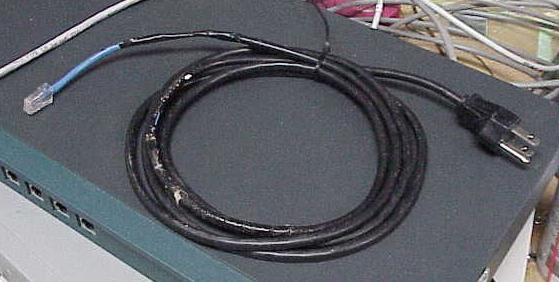
You need a new network cable.
etherkiller.jpg
 
What do you mean? The cable works fine for streaming music off of my PC, and I thought that the router would be able to use a crossover/normal just fine as it would recognize that the pins are crossed over and adapt.

I can't try anything tonight...gotta wake up in 4 hours and work another 18 hour day :P
 
Good luck.

BTW, I just got mine today and setup everything with my cable connection and the X360 Hdd. Those updates that you kept on freezing on, they each took less than a minute on my setup... though the first one required the X360 to reboot (which it did automatically). Barring serious connection problems, no single individual task took me anywhere near 10 or 15 minutes.

Just an FYI.
 
Mejilan said:
Good luck.

BTW, I just got mine today and setup everything with my cable connection and the X360 Hdd. Those updates that you kept on freezing on, they each took less than a minute on my setup... though the first one required the X360 to reboot (which it did automatically). Barring serious connection problems, no single individual task took me anywhere near 10 or 15 minutes.

Just an FYI.

Cool, thanks! It's good to know what the expected performance will be like, so I know if I am making some progress here.

Shompola, great idea...but no luck, the same result.

Kinda busy with work, but I'm keeping my eyes peeled. It seems like an internal software issue, rather than a networking/ISP or hardware issue.

There are others with a similar problem, and the one fix I did (updating for BC via CD) solved most of those. Despite the format, that update is still on my Xbox AFAIK as it updated the system software. I'm pretty sure...to double check I'll run that CD again.
 
Thanks for the prayers! :)

I'll need them! :)

Here is a video of the problem, I edited due to time issues, as the "downloading updates" part took 6 minutes in reality. Also, the "Signing in to Xbox Live" part took unusually long in this case, it usually isn't the case.

http://s22.yousendit.com/d.aspx?id=14MSSK48XGHIV3R8UYWDU0C95C

arne: I don't suppose you could forward that link to someone at MS so they can see the problem for themselves? Unfortunately it looks like a unique problem that no one else on the internet has faced!
 
Brought my 360 to another city and tried it with a different ISP. "Shaw" is recognized on xbox.com as being an ISP that supports Live.

And it worked!

So despite claiming that it can connect to Live through the diagnostic...it is an issue with the ISP.
 
Fight for Freeform said:
Brought my 360 to another city and tried it with a different ISP. "Shaw" is recognized on xbox.com as being an ISP that supports Live.

And it worked!

So despite claiming that it can connect to Live through the diagnostic...it is an issue with the ISP.


Holy shit! Well at least you're on the right track now. This has been insane!
 
Yes. And don't forget to re-partition.
 
Uh, it's not like the dashboard runs off the HDD. Nothing critical is stored there. Format away. You'll forever lose your lame HD movies that came with it. And Hexic, unless you copy it to a memory card.
 
No way to restore Hexic HD if it's lost?

I got rid of the bullshit vids already, and don't feel that loss. :p
 
I tried copying Hexic to the mem card but it didn't let me.

Hexic will be available for download in January, apparently.

I may just swap HDDs with my bro's 360, swapping all save files and gamer data because he doesn't play Hexic.

G-d answered, Mej! :)
 
I checked out my Xbox 360 for the first time yesterday and I noticed that the HDD had 12gb free. Is that what everyone else had when they first turned on their 360?
 
Celeryface said:
Yeah, I thought it was a 20gb drive. I guess the preloaded songs, gamer pics, videos, and XBL take up 8gbs? :P

No, you simply cause use the space. Its "Reserved"
 
Celeryface said:
Oh really? Has Microsoft said what it's reserved for?

Nothing offical, it's for streaming for games and such. Probably for BC to.
 
Don't forget cache for both Xbox and Xbox 360 games. But I think it's stupid it says it's a 13GB HD, when it's really 20GB. That just causes confusion. Say "20GB, xGB reserved for system use."

Slightly off topic, but has anyone compared loading times for games with and without the HD?
 
Suikoguy said:
Nothing offical, it's for streaming for games and such. Probably for BC to.

Yeah, reserving 8gb for backwards compatibility makes sense actually. The original Xbox had a reserved section of the HDD for streaming as well, right?

Off topic: I'm a new member, and I was wondering how the GAF member ranking works?
 
Fight for Freeform said:
Brought my 360 to another city and tried it with a different ISP. "Shaw" is recognized on xbox.com as being an ISP that supports Live.

And it worked!

So despite claiming that it can connect to Live through the diagnostic...it is an issue with the ISP.

Were you using the same exact hardware from home to duplicate the problem so the ISP is the only difference?

I can't understand why an ISP wouldn't work. That's a really bad ISP if thats the case.
 
Fight for Freeform said:
arne: I don't suppose you could forward that link to someone at MS so they can see the problem for themselves? Unfortunately it looks like a unique problem that no one else on the internet has faced!

With the holidays, I don't think anyone I know will have looked at it yet.

But...


Fight for Freeform said:
Brought my 360 to another city and tried it with a different ISP. "Shaw" is recognized on xbox.com as being an ISP that supports Live.

And it worked!

So despite claiming that it can connect to Live through the diagnostic...it is an issue with the ISP.


Well, looks like something worked at least, you will have to pm me your ISP just in case that does seem to be the issue as well.
 
Fight for Freeform said:
I'm using a BEFW11S4 Linksys B-Router


There is your problem right there, and I mean it.

I also have a BEFW11S4, and I dont know if you know this, or have read about it, but occassionally (depending on your firmware on the router) it will just keel over and die. All the lights will be on, but all interent traffic just stops, PC, xbox, whatever you're using. It needs a full power cycle in order to reboot.

What I have done, is downgraded my firmware to the FIRST release for the router - it still locks up, but not NEARLY as much as the newer firmwares... This unfortunately, still hasnt been fixed by linksys... Basically it seems that once you've transfered a certain amount of packets, it just dies.. and you gotta power cycle the router.

That seems like the most logical issue right there, try a different router if you can, because with all the data transfer live uses, it will more than likely lock up on you while you're playing -- i know this because it did it to me on my original xbox. Since then, I've gotten a new router (It's actually built into my modem) and it works perfectly fine.


So yeah, try going DIRECT to your modem, and see if that solves it.
 
Top Bottom