• Hey Guest. Check out your NeoGAF Wrapped 2025 results here!

Watch Dogs 2 PC performance thread

Are you forcing anything in the Nvidia control panel? If so it could be messing things up. If not I'm out of guesses. It's certainly not supposed to look like that. :(

Nope. Havent touched the control panel :(.
I tried it again and noticed that it seems to be totally gone in cutscenes. Also it isnt that pronounced all the time. it ranges from mildly annoying to that image... so yeah.
Weird.
 
Locked 60 fps at 1440p with temporal filtering. Happy with the performance without patches.

13 screenshots

watchdogs22016-11-292irkxb.png


watchdogs22016-11-292emj2i.png


watchdogs22016-11-292uok8t.png


watchdogs22016-11-292xry2z.png


watchdogs22016-11-292zdx8z.png


watchdogs22016-11-292c5bj2.png


watchdogs22016-11-292l1apu.png


watchdogs22016-11-292bdxx4.png


watchdogs22016-11-292n7sl1.png


watchdogs22016-11-292hts4o.png


watchdogs22016-11-292g9xyp.png


watchdogs22016-11-2926yx5r.png


watchdogs22016-11-292bgzht.png
 
I had to quit the game temporarily due to a bug that made it impossible to talk to a character in dedsec HQ (Horatio) to progress the story. After eating, checking gaf and preparing myself to attack the game again, I am faced with this:


WTF Ubisoft? I thought we were over this shit after the AC2 always online debacle.

To clarify, my game was bought for the full, ridiculous and expensive EU price directly from Steam.
 
Hey,
While the game seems like good fun i'm having a weird issue with the temporal filtering option. Whenever i turn it on i get these very weird looking edges. I have tried restarting the game, and my computer. Playing the game without the filtering seems a bit iffy on performance (1080p/FXAA and most setting on very high or high).
I'm on the newest Nvidia drivers (376,09). Windows 10, i7-6700K and GeForce 1070.
Any ideas on what is going on?

31322298375_00b825e6c3_o.jpg

Looks like a resolution issue. Try forcing the resolution for the game via the Nvidia Control panel also, find the .exe in the game folder, Right click on it and go to properties. Under the compatibility tab, try enabling/disabling display scaling on high DPI settings.

I don't own this game as I was burned on the first one but I wanted to see the performance and opinions first if I decided to get it.
 
So is it CPU bound? is the GPU being used to 98% of its capacity or so? It annoys me in games like Dishonored 2 when running at 1080p on highest settings i get fluctuating fps and the card is running at 50-60%.

Cpu is maxed out and gpu usage is low. Somethings wrong with the game. If riva tuna worked then I could use that to test if limiting the frame rate decreased cpu usage(the in game limiter doesnt seem to work). I think I might see if I can get a refund.
 
I had to quit the game temporarily due to a bug that made it impossible to talk to a character in dedsec HQ (Horatio) to progress the story. After eating, checking gaf and preparing myself to attack the game again, I am faced with this:


WTF Ubisoft? I thought we were over this shit after the AC2 always online debacle.

To clarify, my game was bought for the full, ridiculous and expensive EU price directly from Steam.

I have yet to run the game due to this :(

Left the game installing for the 3rd time this morning. Hopefully it will work when i get home.

Cpu is maxed out and gpu usage is low. Somethings wrong with the game. If riva tuna worked then I could use that to test if limiting the frame rate decreased cpu usage(the in game limiter doesnt seem to work). I think I might see if I can get a refund.

This irks me. When a good card is not being used to its fullest and the game still struggles.

Good luck. I am not sure if Origin will do a refund. But if this activation issue is still a thing i will deffo try to get one.
 
Cpu is maxed out and gpu usage is low. Somethings wrong with the game. If riva tuna worked then I could use that to test if limiting the frame rate decreased cpu usage(the in game limiter doesnt seem to work). I think I might see if I can get a refund.

The game is very CPU dependent, it wants cores.
 
Is 60fps possible on a 980 with any combination of settings @ 1080p?

Yes. I am getting near 60 with a 980FTW at 1440p

Cpu is maxed out and gpu usage is low. Somethings wrong with the game. If riva tuna worked then I could use that to test if limiting the frame rate decreased cpu usage(the in game limiter doesnt seem to work). I think I might see if I can get a refund.

exact opposite for me. GPU constantly maxed with CPU hovering around 30-50% with scaling across all cores.

4790k @4.8
16GB ram
Win 10
GTX 980FTW
Latest drivers
 
Guys, I have to decide between the highest shadow setting or turning up extra details.

Those two seem to be the big performance hogs at 4K.

Which one do you think makes a more noticeable difference? Every other setting is turned all the way up, except for AA because of Temporal Filtering.

Also, Ubi have stated their is a patch on the way later this week, so maybe it's best to wait to play it if you have other games.
 
Cpu is maxed out and gpu usage is low. Somethings wrong with the game. If riva tuna worked then I could use that to test if limiting the frame rate decreased cpu usage(the in game limiter doesnt seem to work). I think I might see if I can get a refund.

Yes. I am getting near 60 with a 980FTW at 1440p

exact opposite for me. GPU constantly maxed with CPU hovering around 30-50% with scaling across all cores.

4790k @4.8
16GB ram
Win 10
GTX 980FTW
Latest drivers


Wow, this might be the first time a fairly modern i5 is unable to run a game at 60 fps.

Dips to 40 fps don't sound right with how powerful that CPU is, something must be up.

Hopefully the performance improves with patches, you're on the latest drivers right?
 
So here's a strange update on my "gpu overclock is not working" with this game mystery. Playing this game before launch on the 375.95 driver my overclocks worked. Not so with the new game ready driver. I was forced in to stock performance which was not cool.

Separately as we've discovered RTSS overlay does not work with Watch Dogs 2 at the moment. So I installed the 6.30 version of RTSS that does work, and lo and behold my overclocks are working and in turn my performance is back where it should be.

It's a weird little situation but you guys might want to double check you're getting your OC performance too.

Hardware:
CPU: i7 6700k @ stock
GPU: gtx 980ti w/ big OC
RAM: 32GB DDR4 3000
1TB SSD
Driver: 376.09

Settings:
Res: 2560x1440
Hi Res Textures: Installed
Depth of Field and Motion Blur set to off. (personal preference)
Temporal Filtering + SMAA on
Ambient Occlusion: HBAO+
Extra Details (cpu hog) set to 0%
Shadows: Ultra
Everything else max.

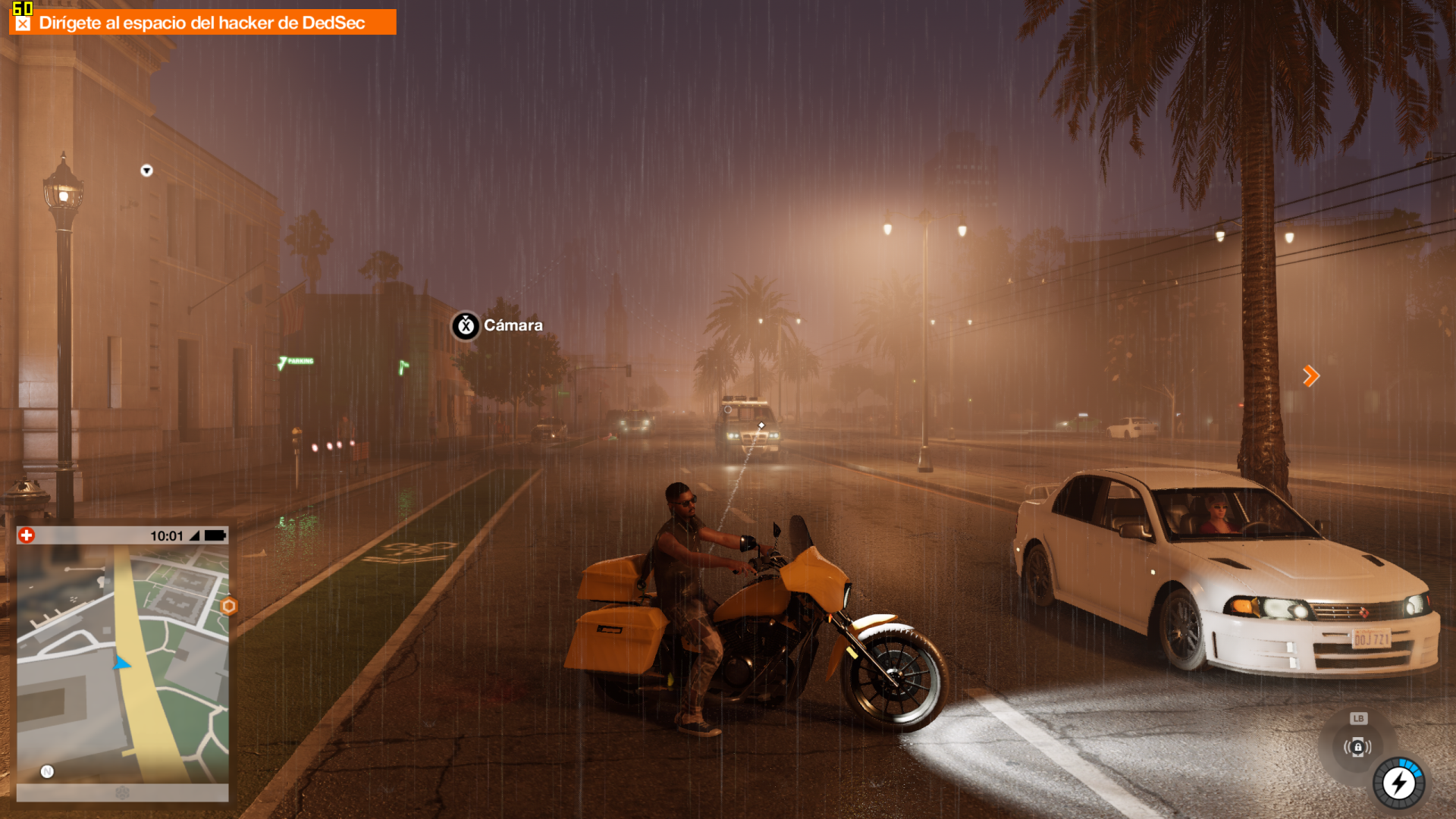
FPS well over 60 is common, over 60 is 90 percentile. Drops in to the 50's happen in some areas with tons of vegetation/trees that are casting a lot of shadows. Performance can vary in the same area depending on time of day in game. All in all great performance and solid image quality. The image below does not represent quality while playing due to temporal filtering not being photogenic. So disregard jaggies as presented.

 
Hey,
While the game seems like good fun i'm having a weird issue with the temporal filtering option. Whenever i turn it on i get these very weird looking edges. I have tried restarting the game, and my computer. Playing the game without the filtering seems a bit iffy on performance (1080p/FXAA and most setting on very high or high).
I'm on the newest Nvidia drivers (376,09). Windows 10, i7-6700K and GeForce 1070.
Any ideas on what is going on?

31322298375_00b825e6c3_o.jpg

Yeah this is how it looks for me too. Atrocious.

Edit: Fixed it!!

It was due to having MFAA forced in Nvidia driver settings.
 
Thinking of double dipping on PC but seeing the above screenshots I'm not seeing a massive improvement over PS4 tbh.

What sort of settings are the consoles running? (apart from 30fps).
 
It's beautifully ironic that a game centred around encouraging the player to hack everything in sight, employs its own mechanisms to prevent even a commonly used performance overlay from working. Touché, Ubisoft. Touché.
 
whats your rig? those look pretty nice at first glance.

Gtx 1080 over clocked, i7 6700. I should have also said that shadows are on very high, not ultra. Fog is also on, and I managed to drive across the bridge with medium fog without a massive framerate drop.
 
Gtx 1080 over clocked, i7 6700. I should have also said that shadows are on very high, not ultra. Fog is also on, and I managed to drive across the bridge with medium fog without a massive framerate drop.

Whats your GPU workload at? Or is it mostly relying on your i7?

Just curious cuz i have the same setup except for the i7, mine is a 4790 @3.60Hz.
 
Guys, I have to decide between the highest shadow setting or turning up extra details.

Those two seem to be the big performance hogs at 4K.

Which one do you think makes a more noticeable difference? Every other setting is turned all the way up, except for AA because of Temporal Filtering.

Also, Ubi have stated their is a patch on the way later this week, so maybe it's best to wait to play it if you have other games.

I have been playing games with low/off shadows for years. Still do it after I got my 1060 a month ago.
 
been playing with some settings to find something I'm happy with..

decided to make a comparison -

pics said:
4k w/ temporal filtering
wd2_4ktemporalrpstm.jpg


4k native w/ 8x TXAA

wd2_4kdosz6.jpg

right now I'm leaning towards 4k w/ temporal filtering.. everything on ultra, extra details @ 50%
 
Whats your GPU workload at? Or is it mostly relying on your i7?

Just curious cuz i have the same setup except for the i7, mine is a 4790 @3.60Hz.

99 percent on gpu, but cpu shoots up to 90 percent a lot of the time too! Don't think that's related to my graphics settings though.
 
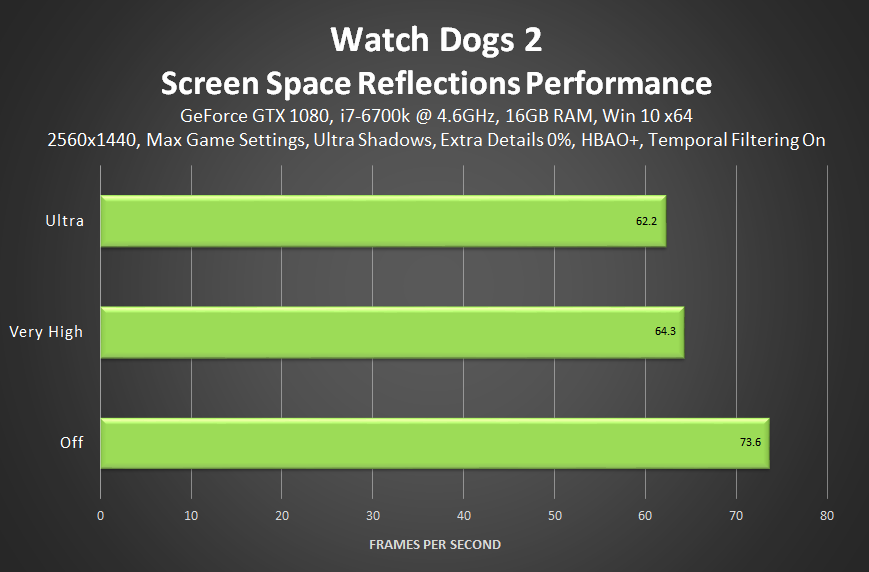
Son of A - turning off Screen Space Reflections nets me an extra 20FPS.

That's bringing me from 40 to 60FPS in the most taxing part of the open world. I can crank everythign else up to Ultra and my FPS won't take a hit.

What the hell. Guess either my 1080 isn't built for 1440p or something is wrong here...
 
I looked through the dump file and found it was caused by Afterburner. though I'm sure it was no coincidence it was while I was starting the game too.

The latest version of Rivatuner is supposedly blocked by Easy Anti Cheat, maybe they both had a fight and Windows got hurt? LOL.

Son of A - turning off Screen Space Reflections nets me an extra 20FPS.

That's bringing me from 40 to 60FPS in the most taxing part of the open world. I can crank everythign else up to Ultra and my FPS won't take a hit.

What the hell. Guess either my 1080 isn't built for 1440p or something is wrong here...

It's a really demanding setting. Have you tried using temporal filtering?

 
Uhh.. This game ran once--with horrible color banding and ridiculously pixelated edges on world objects (this is all on ultra/maxed out settings at 1080p on a Titan X).

Now I cannot get the game to run without it freezing up my entire PC during the loading screen. Even the loading music stutters and jams up. Nothing to do but restart my system.

Anyone else experiencing this? I even tried verifying my game files and lowering my settings. The game just refuses to run now.

EDIT: I looked a few pages back to see that MSI Afterburner could cause issues. So I uninstalled it and the game seems to run fine. But what is with these colors???

KadTaNX.jpg

464jWDO.jpg
 
Am I supposed to see enemies through walls even when I'm not in detective mode or whatever they call it? I see red outlines through walls.
 
I've got four of them at 4.3 GHZ, surely that should be enough? Its probably some kind of configuration aberration that will never be solved.

Some settings are CPU dependent, the Nvidia guide discusses in detail. But if the CPU is maxed, while GPU is low, it's a draw call bottleneck at the CPU.
 
Am I supposed to see enemies through walls even when I'm not in detective mode or whatever they call it? I see red outlines through walls.

When they are tagged by a camera you've used, yes. Not sure if Marcus spotting them in person also triggers it. If you haven't seen them before though in some sort of fashion, no.
 
There are loads and loads of complex AI and systemic processes at work in the game. I won't be surprised at all if it's bound by CPU cores.
 
Some settings are CPU dependent, the Nvidia guide discusses in detail. But if the CPU is maxed, while GPU is low, it's a draw call bottleneck at the CPU.

Or it could be something else is running and taking up cpu cycles, like drm checks or the online aspect.

I put the graphics down to low settings and it made almost no difference.
 
It's a really demanding setting. Have you tried using temporal filtering?

Yeah, so with the latest Nvidia drivers I wasn't losing 12 FPS on my GTX 1080, I was losing 20+. And that's dropping me down from 60 to 40. That's a 50% performance cost for a barely noticeable feature. That's insane.

I highly, HIGHLY recommend everyone who's playing at 1440p or above to just forgo it completely and use ultra on most other things instead.

Haven't tried using temporal filtering. Didn't notice any changes - should it just be improving performance at a super minor hit to the visuals?
 
I'm pretty happy with the performance here. i5-6600k, GTX970, 16gb ram. Running on the high preset I get 60+fps in most situations and during the most load of full speed driving through the city it drops to the low 50s, remains smooth while doing so and not a terrible stutter like Forza or anything.
 
Is Uplay just broken? I tell it I don't want it to give me notifications about friends coming online, and it still does it. This is only an issue in game, out of game it seems to know how to do that, but in game they all still pop up.
 
Does the game look good yall? From the screenshots it doesnt look all that. Wondering if i should get it on PC or console.

Like the vast majority of PC ports, it's the best way to play the game. Unless your PC isn't so great or you're keen on staying with your console friends list, PC's the way to go.
 
Top Bottom