• Hey Guest. Check out your NeoGAF Wrapped 2025 results here!

GTA V PC Full Graphics Options Revealed

Would be nice if they released a small demo of this, just so you could use it as a benchmark.

I have no interest in triple-dipping (Xbox 360, PS4) on GTAV even though it was a fine game, but I'm curious to see how it would run on my PC.
 
Would be nice if they released a small demo of this, just so you could use it as a benchmark.

I have no interest in triple-dipping (Xbox 360, PS4) on GTAV even though it was a fine game, but I'm curious to see how it would run on my PC.

No doubt it will be added as a benchmark by various sites if it has any kind of prerecorded benchmark or easily repeatable, demanding section maybe via the director mode. In fact I think GTA V might be pretty great for benchmarking performance because it should be both CPU and GPU limited thanks to high amounts of cars, people etc running around.
 
No doubt it will be added as a benchmark by various sites if it has any kind of prerecorded benchmark or easily repeatable, demanding section maybe via the director mode. In fact I think GTA V might be pretty great for benchmarking performance because it should be both CPU and GPU limited thanks to high amounts of cars, people etc running around.

i think there is a benchmarking utility in the game. "benchmark testing" is listed under "advanced graphics"
 

k37UsRP.jpg


At this rate, I might pre order or buy it at launch.
 
That explains it.

What is the source of the quote? EDIT - found it

So I might need 16 more gigs of ram then. Got it.

I have three 980s, that same processor at 4.6 GHz and ample SSD space, but *only* 16 gigs of RAM.

Can't wait. Now if Nvidia would just make SLI + GSYNC + DSR work simultaneously.

That isn't the spec you will need, that is just the spec of the system they used. It doesn't mean much of anything in terms of requirements
 
What is the source of the quote?


That isn't the spec you will need, that is just the spec of the system they used. It doesn't mean much of anything in terms of requirements

I'm joking :) but this PC was in no small part built to play this game. I've been waiting a long time. It's a relief to know I should be able to max it out.
 
Let's see if controller rumble actually works properly here. It didn't work with automatic weapons in Max Payne 3, and was never patched.
 
Did anyone else notice that in the screenshots it seems to allow you to enable FXAA, MSAA and TXAA at the same time?

s0xgX0T.jpg
 
Do we know if it has borderless windowed / fullscreen windowed?

The whole focus lost option would imply they are at least covering multi-monitor and hence windowed gaming, whether that is border-less is another question.

For example, there is a screen type option and we have yet to see the "display" menu.
 
AMD's CHS would probably be a far better choice in this case, as the performance impact is nowhere near as big as PCSS and it looks fairly similar.

If CHS is Contact Hardening Shadows then it does not look similar to PCSS at all because that's just one effect actually and ShadowWorks include CH in them among a lot of other things.

Here's the newest presentation on what NV's "PCSS" actually do in games: http://developer.download.nvidia.com/assets/events/GDC15/GEFORCE/FC4_ACU_WT_GDC15.pdf
 
I'm interested to know what settings are the equivalent of how the PS4/One version looks. I only played the 360 version so getting 60fps with graphics similar to the PS4 version @ 1080p would be more than enough for me.

I have a i5 4670, 16GB Ram and a GTX960 (which should be better than a 760 i assume)
 
Did anyone else notice that in the screenshots it seems to allow you to enable FXAA, MSAA and TXAA at the same time?

s0xgX0T.jpg

That's kind of weird regarding TXAA and MSAA, usually it's one OR the other. MSAA and FXAA can work very well in concert.

Either way, FXAA is the only sensible choice in my case. MSAA/TXAA are too demanding for my system if I aim for 50-60fps at 1080p.

If CHS is Contact Hardening Shadows then it does not look similar to PCSS at all because that's just one effect actually and ShadowWorks include CH in them among a lot of other things.

Here's the newest presentation on what NV's "PCSS" actually do in games: http://developer.download.nvidia.com...U_WT_GDC15.pdf
Thanks a lot for this. Great to see devs improving their PC versions with the help of Nvidia/AMD.
 
That's kind of weird regarding TXAA and MSAA, usually it's one OR the other. MSAA and FXAA can work very well in concert.

Either way, FXAA is the only sensible choice in my case. MSAA/TXAA are too demanding for my system if I aim for 50-60fps at 1080p.

Yeah, it does seem a bit odd. Maybe screenshot from a dev version or something?

Anyway, what I'm going to do is use ReShade+SweetFx to add SMAA support and you should do the shame. In my experience it provides far better quality than FXAA without blurring the image. I still can't understand why developers for some reason avoid this form of AA.
 
I wonder why that is still a problem... Gsync has been out for how long and you still cannot do DSR + GSync + SLI?

Yeah it's strange. I mean SLI + DSR works perfectly fine, but the moment you have a G-Sync display connected the DSR option just disappears if SLI is enabled. It doesn't matter if you disable G-Sync, you just don't see that option until you disconnect the G-Sync display.

I would be happy if I could at least use SLI+DSR without G-Sync sometimes.
 
Yeah, it does seem a bit odd. Maybe screenshot from a dev version or something?

Anyway, what I'm going to do is use ReShade+SweetFx to add SMAA support and you should do the shame. In my experience it provides far better quality than FXAA without blurring the image. I still can't understand why developers for some reason avoid this form of AA.
You know FXAA is fine by me if compounded with 1080p resolution. I don't know why Rockstar haven't implemented something better though, but there is only so much even they can achieve.

The VRAM usage estimator thingy in Rockstar's ports is something that more PC games should use.
Agreed. It's paradoxical that Rockstar of all goes the extra mile in that regard. But hey, I'm of those crazies who does not hold GTA 4 as the spawn of Satan it is for some. Nice range of options and excellent performance on my admittedly fairly powerful PC at the same (Core 2 Duo E8600 and 8800GT, 2gb of RAM).
 
It's not like FXAA at all. FXAA has a fixed frametime cost while for SMAA this cost is different based on the frame content. FXAA is used more often because it is more predictable for consoles usage. Why omit SMAA for PC versions - I dunno, laziness?

Oh. I was just saying how they're both post processes. I guess I learned something this morning.

Also, I feel like saying that we shouldn't be assuming the PCSS shadows will tank performance just because they do in Far Cry 4. Yeah, FC4 runs better that Watch Dogs or AC Unity, but I still don't think it runs as well as it should.
 
I'm sure it won't be a problem, but I am hoping my GTX 970 can run this at 1080/60 with max settings. For the more knowledgeable, does this seem like a fair assumption? I have an i5-3570 with 16GB RAM.

I have yet to even TOUCH this game, so I am pretty excited that I waited for a PC release.
 
I'm sure it won't be a problem, but I am hoping my GTX 970 can run this at 1080/60 with max settings. For the more knowledgeable, does this seem like a fair assumption? I have an i5-3570 with 16GB RAM.

I have yet to even TOUCH this game, so I am pretty excited that I waited for a PC release.

I'll be very surprised if your assumption turns true.
There are some very punitive settings in there, that we know, and when you factor in DX11 inefficiencies I'm not at all convinced a single 970 will run this at "max" (even with FXAA) at anything close to 60fps.

We shall see.
 
I'm sure it won't be a problem, but I am hoping my GTX 970 can run this at 1080/60 with max settings. For the more knowledgeable, does this seem like a fair assumption? I have an i5-3570 with 16GB RAM.

It seems to scale to the very high end, so no, I don't think it's a fair assumption. There are settings that I'm sort of expecting to crush even Titan Xs (multiple).
 
I'm sure it won't be a problem, but I am hoping my GTX 970 can run this at 1080/60 with max settings. For the more knowledgeable, does this seem like a fair assumption? I have an i5-3570 with 16GB RAM.

I have yet to even TOUCH this game, so I am pretty excited that I waited for a PC release.

I have a similar rig (i7-3770k instead) and while I do not expect to max it, I am pretty confident we will have much more nice graphics than the PS4 version AND 60fps, which is what I need.

The sub-30fps average experience killed my two playthroughs on Xbox 360.
 
I'll be very surprised if your assumption turns true.
There are some very punitive settings in there, that we know, and when you factor in DX11 inefficiencies I'm not at all convinced a single 970 will run this at "max" (even with FXAA) at anything close to 60fps.

We shall see.

I've got a 970, and I'm definitely not running this game at the 'absolute max' settings. I've never cared for tesselation outside of smoothing Agent 47's bald head, and stuff like reflection AA seems pretty gratuitous.
I just had the idea of using the Rockstar Editor to set up a sort of 'benchmark' scene.
 
honestly i think the PS4 version looks really good. i just want better AA, 60fps, better loading times for character switching and less texture pop in.
 
I'm sure it won't be a problem, but I am hoping my GTX 970 can run this at 1080/60 with max settings. For the more knowledgeable, does this seem like a fair assumption? I have an i5-3570 with 16GB RAM.

I have yet to even TOUCH this game, so I am pretty excited that I waited for a PC release.

You might have to turn down AA a notch but otherwise I think you should be fine, especially if your 3570 is overclocked. GTA IV was pretty CPU intensive so I expect this one will be as well.

I borrowed the PS3 version just so I could quickly make an account offline and online and get the preorder bonuses.
 
When people say "maxed out", do they also mean pushing every slider option (Npc density, traffic, etc) to it's limit too? Cause that'll probably tank your framerate pretty hard, if you don't have the newest CPU's. Right? I hope people realize this.

These should probably be the first options to tone down if you've got an old CPU but fairly-new GPU.
 
When people say "maxed out", do they also mean pushing every slider option (Npc density, traffic, etc) to it's limit too? Cause that'll probably tank your framerate pretty hard, if you don't have the newest CPU's. Right? I hope people realize this.
Sounds unoptimized.
 
When people say "maxed out", do they also mean pushing every slider option (Npc density, traffic, etc) to it's limit too? Cause that'll probably tank your framerate pretty hard, if you don't have the newest CPU's. Right? I hope people realize this.

These should probably be the first options to tone down if you've got an old CPU but fairly-new GPU.
The max way is the best way.

At the least I'll max the population and vehicle sliders. Those are the most important.
 
I'll be very surprised if your assumption turns true.
There are some very punitive settings in there, that we know, and when you factor in DX11 inefficiencies I'm not at all convinced a single 970 will run this at "max" (even with FXAA) at anything close to 60fps.

We shall see.

Even at 1080p you think? And I shouldn't have truly said "max" settings for everything. But I would hope I can max out a few of the more important sliders and still maintain 60fps.

Really hoping so, at least!

Thanks for the input though, guys. I'm not very savvy when it comes to PC gaming, tbh. I have this card mainly for VR stuff, so this will be my first big game to actually play on it since I purchased it. Looking forward to it, though!
 
Yeah, it does seem a bit odd. Maybe screenshot from a dev version or something?

Anyway, what I'm going to do is use ReShade+SweetFx to add SMAA support and you should do the shame. In my experience it provides far better quality than FXAA without blurring the image. I still can't understand why developers for some reason avoid this form of AA.

Arma 3 has AA and PPAA as different options, it's pretty good so you can choose for example 2x AA and lighter SMAA on top of it.
 
The max way is the best way.

At the least I'll max the population and vehicle sliders. Those are the most important.

You don't necessarily want to do that for vehicles. In GTA IV maxing vehicles caused constant traffic jams. About 70-75% seemed to be ideal amount of vehicles in that game. Performancewise there wasn't much of a different. I do like having the option though.

It remains to be seen if R* have made changes for the PC version to handle a wider variety of vehicles and pedestrians at the same time. IV (and to a lesser degree V on PS3 at least) had that issue where turning around would spawn different cars and what cars spawned was related to what you were driving etc. All to keep memory use down.
 
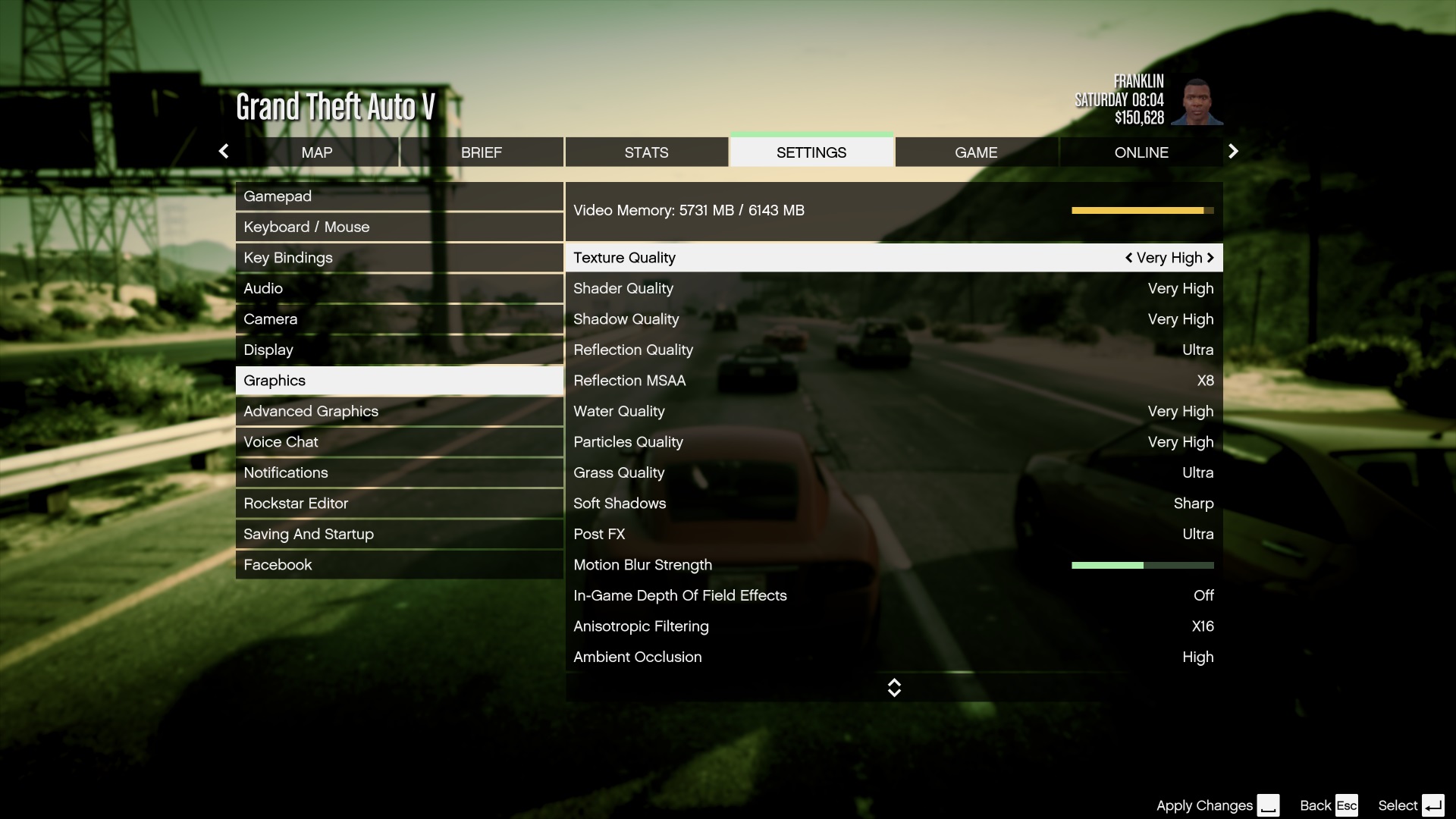
well the screenshots show 4026MB / 6143MB being used and i'm assuming that's from the demo which was running at 4K 60fps at Very High (everything maxed out).

I don't think that was everything maxed out because there was another screen where it showed 5.7GB being used.
 
When people say "maxed out", do they also mean pushing every slider option (Npc density, traffic, etc) to it's limit too?
Cause that'll probably tank your framerate pretty hard
, if you don't have the newest CPU's. Right? I hope people realize this.

These should probably be the first options to tone down if you've got an old CPU but fairly-new GPU.

Lazy devs confirmed
 
The max way is the best way.

At the least I'll max the population and vehicle sliders. Those are the most important.

Of course. But what kind of CPU could pull that off and not get crippled by that heavy load? (assuming it IS a heavy load....) hopefully my 2500K @ 4.4Ghz can handle the sliders on max. I think it's possible.
 
Top Bottom