2016+ Gaming Laptop Thread: Embracing Pascal's Wafer (Please Read OP)

So guys I have a MSI gaming laptop. I use it to surf the web mainly and sometimes play Lol on the go. Its a core i5 4200u with a GTX 840m 2GB. I got offered a Surface pro 3 core 13 model with the keyboard and other accessories for it.

I have a gaming PC (phenom II x4 965 BE, GTX 770) that I actually use for gaming. I used to have an ipad loved it but it went out on me a while back. I was just wondering if GAF thought that this was a good trade?

Edit: Also, can you use an SD card as like a 2nd harddrive?

(Yes I also posted this in the Surface Pro 3 thread as well).
 
So guys I have a MSI gaming laptop. I use it to surf the web mainly and sometimes play Lol on the go. Its a core i5 4200u with a GTX 840m 2GB. I got offered a Surface pro 3 core 13 model with the keyboard and other accessories for it.

I have a gaming PC (phenom II x4 965 BE, GTX 770) that I actually use for gaming. I used to have an ipad loved it but it went out on me a while back. I was just wondering if GAF thought that this was a good trade?

Edit: Also, can you use an SD card as like a 2nd harddrive?

(Yes I also posted this in the Surface Pro 3 thread as well).

Compare the GPU and CPU performance for both on Notebookcheck or similar site.
Surface 3 will be more portable, you get touch screen and battery life.
Yes, you can use micro sd card as a hard drive.
 
So I finally got this laptop http://www.amazon.com/dp/B00TZIK0F8/?tag=neogaf0e-20 except with an nvidia 860 8gb.

But I have question concerning the OS and was wondering if I could get some advice. The HDD is combined with the SSD, so when I turned it on there was no secondary drive like I suspected. The is a C partition with the OS and 888GB, then a D partition named "Lenovo" for 25GB. From what I can tell, the OS is not on the SSD, and I'm not sure how to go about getting it recognized. Should I do a fresh install somehow? I've also heard from a friend of mine that if I get it to install on the SSD, the computer might not recognize it properly on boot, which makes sense.
 
So I finally got this laptop http://www.amazon.com/dp/B00TZIK0F8/?tag=neogaf0e-20 except with an nvidia 860 8gb.

But I have question concerning the OS and was wondering if I could get some advice. The HDD is combined with the SSD, so when I turned it on there was no secondary drive like I suspected. The is a C partition with the OS and 888GB, then a D partition named "Lenovo" for 25GB. From what I can tell, the OS is not on the SSD, and I'm not sure how to go about getting it recognized. Should I do a fresh install somehow? I've also heard from a friend of mine that if I get it to install on the SSD, the computer might not recognize it properly on boot, which makes sense.

You have a SSHD, OS will see it as one physical drive. Most frequently used files are put on the SSD cache. The rest sits on regular HDD part of your drive.
 
These are the temperatures I got:

Clevo Co. W35_37ET ~ 66 degrees Celsius

CPU cores are about 66 degrees Celsius as well

ST750LX0 03-1AC154 ~ 36 degrees Celsius

It isn't recognizing the dedicated GPU? That's not good.

Try running GPU-Z to see if it can read the Nvidia card.

Have you used Nvidia's clean install option? If not, try that too.

I noticed there's also the NP8651-S, which seems to be similar, just with the 128 GB M.2 mSATA SSD, IC Diamond Thermal Compound, and Bigfoot Killer, while still being within my price range.
Is it worth getting that, or should I just stick with the NP8651?

Yeah the -S bundles a lot of nice additions at a discount. I just link the vanilla SKU for simplicity.
 
Where'd you see rumors of a 990M? What's the TDP going to be on that... any chance Alienware would put it in their 15"? Finally something that could truly drive 4K on a 15" laptop... MMMM....

Sorry I missed your post.

1. It was a Chinese expo leak, slides included.

2. I think it's bullshit, as not even a full desktop GTX 980 is 2x the speed of the 980M. We're talking Titan X territory. On a laptop TDP?

If it's true, Pascal must be beyond what even Nvidia thought they'd achieve.

I expect the 900M refresh to have as many or more a few more shaders unlocked as/than the GTX 970.
 
I can't wait to see Pascal with potential dx12 improvments.

Biggest thing is always going to be heat managment though.

I feel like we're so close to having 980m type cards in thin profile laptops.

I wonder if we will see any battery life improvements with Pascal?
 
Well even just assuming the (hypothetical) 970M successor is nearly 2x as fast at the same TDP, it'll already be way beyond the 980M.

That's just taking the die shrink and architecture change into account, because who knows exactly how much of a game changer the second gen HBM (High Bandwidth Memory) will be.

Could be looking at Titan X power in an MSI GS60 sized frame.

I don't know if they can improve battery life any more though. The GPUs already go into an ultra-low power state when not in use. But who knows.
 
While I'm still on the page, what is everyone's opinion on the best alternative to Hyper V? I only have 8.1 basic I guess, because it doesn't show up. I have some windows 95 games I still want to play, and the only way is to emulate win 9x
 
Aren't there programs to run those games in? There's also virtual box and VMware Player. Just not sure how great the hardware acceleration is and how the games run in he VMs.
 
I don't really need a gaming laptop, but this is the only laptop related OT, it seems. I need a reliable, quiet and decent laptop for about €1500. That's my max budget. Anything lower is a bonus, though.

My friend told me I should consider a Macbook Pro. And I am. The 13" Retina 2,7Ghz Macbook Pro is tempting. It costs €1600 though but my friend told me
I should just order it via the educational website. Apparently they don't check this. Not sure if I should do this, though.

A Macbook Pro is a lot of money for a laptop I will only use for daily activities (skype, telegram, internetz, perhaps some indies/flash games) and I've never had a 13" laptop. I've heard they are extremely reliable and fast though, which is important. Most of the laptops I've had in the past went to shit after about a year.
 
I think my laptop's graphics cards are gone all screwy. My display won't stop displaying flickering red and blue lines and I can't access the options for either my Intel or Nvidia card (I can only access the control panel for that one). And the Nvidia one refuses to update, just hanging there, green bar going left to right, doing nothing. What do I do?
 
I think my laptop's graphics cards are gone all screwy. My display won't stop displaying flickering red and blue lines and I can't access the options for either my Intel or Nvidia card (I can only access the control panel for that one). And the Nvidia one refuses to update, just hanging there, green bar going left to right, doing nothing. What do I do?

Have you attempted to clean and reinstall your graphic drivers? That may be a solution it if it's a software issue.
 
It isn't recognizing the dedicated GPU? That's not good.

Try running GPU-Z to see if it can read the Nvidia card.

Have you used Nvidia's clean install option? If not, try that too.


Yeah the -S bundles a lot of nice additions at a discount. I just link the vanilla SKU for simplicity.

Thank you! I downloaded it today. It did pick-up my gpu. Then I used HWMonitor and it was there again. No idea why or how that happened but the problem seems fixed (I hope, haven't tried a game yet).


Huh, tried running DarkSouls and framerate was still awful. Checked HWMonitor and lo and behold, the GPU is no longer appearing there but it is appearing in GPU-Z. What do you think is going on?
 
I don't really need a gaming laptop, but this is the only laptop related OT, it seems. I need a reliable, quiet and decent laptop for about €1500. That's my max budget. Anything lower is a bonus, though.

My friend told me I should consider a Macbook Pro. And I am. The 13" Retina 2,7Ghz Macbook Pro is tempting. It costs €1600 though but my friend told me
I should just order it via the educational website. Apparently they don't check this. Not sure if I should do this, though.

A Macbook Pro is a lot of money for a laptop I will only use for daily activities (skype, telegram, internetz, perhaps some indies/flash games) and I've never had a 13" laptop. I've heard they are extremely reliable and fast though, which is important. Most of the laptops I've had in the past went to shit after about a year.

It all comes down to whether you want the Mac OS. The Asus Zenbook is also a really high quality option.

Thank you! I downloaded it today. It did pick-up my gpu. Then I used HWMonitor and it was there again. No idea why or how that happened but the problem seems fixed (I hope, haven't tried a game yet).


Huh, tried running DarkSouls and framerate was still awful. Checked HWMonitor and lo and behold, the GPU is no longer appearing there but it is appearing in GPU-Z. What do you think is going on?

Did you try the clean install option?
 
Country: UK
Max Budget: ~£1000 (Price of Alienware 13)
Max size: 14.0"

My friend is looking for a 13-14" gaming laptop. She's currently considering the Alienware 13 (link above). But I'm wondering if there's anything better priced out there that would still offer good performance. As Alienware seems to be slightly more expensive based on the brand.

I've had a look around websites like Amazon, EBuyer, Scan etc. And the vast majority of gaming laptops all seem to be at least 15.6". From what I can see, the best option in the 13-14" range would probably be the Alienware?

Any help would be greatly appreciated. Sorry if I haven't provided enough info!
 
Country: UK
Max Budget: ~£1000 (Price of Alienware 13)
Max size: 14.0"

My friend is looking for a 13-14" gaming laptop. She's currently considering the Alienware 13 (link above). But I'm wondering if there's anything better priced out there that would still offer good performance. As Alienware seems to be slightly more expensive based on the brand.

I've had a look around websites like Amazon, EBuyer, Scan etc. And the vast majority of gaming laptops all seem to be at least 15.6". From what I can see, the best option in the 13-14" range would probably be the Alienware?

Any help would be greatly appreciated. Sorry if I haven't provided enough info!
Gigabyte p34w might be a good fit
 
Have you attempted to clean and reinstall your graphic drivers? That may be a solution it if it's a software issue.
I managed to update it to the latest drivers, but I'm still getting the problem. Also, there seems to be no problem when I output it to my television. What do you make of that?
 
Country: UK
Max Budget: ~£1000 (Price of Alienware 13)
Max size: 14.0"

My friend is looking for a 13-14" gaming laptop. She's currently considering the Alienware 13 (link above). But I'm wondering if there's anything better priced out there that would still offer good performance. As Alienware seems to be slightly more expensive based on the brand.

I've had a look around websites like Amazon, EBuyer, Scan etc. And the vast majority of gaming laptops all seem to be at least 15.6". From what I can see, the best option in the 13-14" range would probably be the Alienware?

Any help would be greatly appreciated. Sorry if I haven't provided enough info!


Gigabyte p34w might be a good fit

Yeah I'd go a little over budget for the Gigabyte. The jump in GPU power is immense.

I managed to update it to the latest drivers, but I'm still getting the problem. Also, there seems to be no problem when I output it to my television. What do you make of that?
You can game flawlessly, through HDMI/DVI/whatever? You've extensively tested that?

If true, the issue must be on the mobo, where the internal connection between display and GPU may be going faulty.
 
You can game flawlessly, through HDMI/DVI/whatever? You've extensively tested that?

If true, the issue must be on the mobo, where the internal connection between display and GPU may be going faulty.
I'll see if my laptop guy can get a look into it later in the next week.
 
Just wanted to chime in and say that, after a long time trying to figure out which gaming laptop to buy, I ended up with an Alienware 15 with a 980M, and I'm really happy with my choice.

Still, out of the box it isn't perfect. As many of you might know, the 180W PSU isn't sufficient and can cause throttling. It did for me. After talking to probably everyone over at Dell Norway, and trying to explain the issue, I finally got one of them to send me a 240W PSU. Turned out to be a lot harder than I thought, though. In US and Canada, you can just send Dell an e-mail, and they'll send it to you the next day. Not in Europe, though, and that's why it was such a hassle. Thankfully I got to talk to a relatively cool guy in the end, but if you're from Europe and are considering the AW15 with 980M, keep that in mind.

After receiving the new PSU and downgrading the BIOS, the AW is great. No throttling and it runs much cooler now - the absolute highest temp under load after playing some games was 78 degrees celcius. With the other PSU and BIOS, playing the same games, the highest temp was 89 degrees.

The screen is good as well. I have some minor backlight bleed on the bottom of the screen, but nothing serious at all. And I'm very picky when it comes to those kinds of things.

The build quality is great, the speakers are good, and it isn't that big. I was a bit worried it would be too big for my backpack, but it fits nicely.

If you're looking for a 15" gaming laptop, and are considering the AW15, I hope this can be of help.

And K.Jack, I'm not sure if you have any experience with this exact model, but in my opinion at least, you can safely recommend the AW15 to others on here.
 
Hey guys, new Nvidia driver out today, for the Heroes of the Storm release.

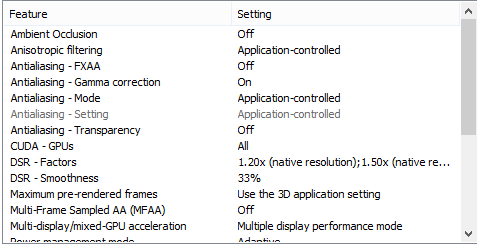
Good news is that Nvidia also snuck in DSR support for notebooks.

Just wanted to chime in and say that, after a long time trying to figure out which gaming laptop to buy, I ended up with an Alienware 15 with a 980M, and I'm really happy with my choice.

Still, out of the box it isn't perfect. As many of you might know, the 180W PSU isn't sufficient and can cause throttling. It did for me. After talking to probably everyone over at Dell Norway, and trying to explain the issue, I finally got one of them to send me a 240W PSU. Turned out to be a lot harder than I thought, though. In US and Canada, you can just send Dell an e-mail, and they'll send it to you the next day. Not in Europe, though, and that's why it was such a hassle. Thankfully I got to talk to a relatively cool guy in the end, but if you're from Europe and are considering the AW15 with 980M, keep that in mind.

After receiving the new PSU and downgrading the BIOS, the AW is great. No throttling and it runs much cooler now - the absolute highest temp under load after playing some games was 78 degrees celcius. With the other PSU and BIOS, playing the same games, the highest temp was 89 degrees.

The screen is good as well. I have some minor backlight bleed on the bottom of the screen, but nothing serious at all. And I'm very picky when it comes to those kinds of things.

The build quality is great, the speakers are good, and it isn't that big. I was a bit worried it would be too big for my backpack, but it fits nicely.

If you're looking for a 15" gaming laptop, and are considering the AW15, I hope this can be of help.

And K.Jack, I'm not sure if you have any experience with this exact model, but in my opinion, you can safely recommend the AW15 to others on here.

Thanks for the impressions, they'll help people out.

If budgets didn't exist, I'd be recommending nothing but AW15s and MSI GT72s. But alas...
 
:o

I will supersample my Valve games now :o

EDIT: I don't see it in the Nvidia Control Panel.

I have it in mine:

DSR.png~original


That sounds promising. Hope GT72 owners will be able to enable it or swap the panel for a compatible one.
Yep I'll be swapping in that 75Hz G-sync panel as soon as it's available. Can't wait!
 
http://www.microsoftstore.com/store/msusa/en_US/pdp/Dell-Alienware-17-ANW17-7493SLV-Signature-Edition-Gaming-Laptop/productID.313304000?tduid=13bed3e0bbae22dc5ad82f8ac9c4758b&tduid=dd575f1231c4f279aec1b2a16bd4aedc

Saw this over on Slick Deals. $200 sale with another $100 off using promo code PCGRAD15. Seems like a good specs/price ratio. The 8-cell battery in particular is pretty attractive, since most gaming laptops in this price range only come with 6-cell.

Could this laptop run Dolphin and PCSX2 at 1080/60? The 980M might be a beast, but those emulators are more CPU intensive than anything else. Would the i7-4710HQ be enough? Or should I go with a 970M/4720HQ combo?
 
http://www.microsoftstore.com/store/msusa/en_US/pdp/Dell-Alienware-17-ANW17-7493SLV-Signature-Edition-Gaming-Laptop/productID.313304000?tduid=13bed3e0bbae22dc5ad82f8ac9c4758b&tduid=dd575f1231c4f279aec1b2a16bd4aedc

Saw this over on Slick Deals. $200 sale with another $100 off using promo code PCGRAD15. Seems like a good specs/price ratio. The 8-cell battery in particular is pretty attractive, since most gaming laptops in this price range only come with 6-cell.

Could this laptop run Dolphin and PCSX2 at 1080/60? The 980M might be a beast, but those emulators are more CPU intensive than anything else. Would the i7-4710HQ be enough? Or should I go with a 970M/4720HQ combo?

Take the one with the 980M always.

That system will crush emulators.
 
Don't Alienware laptops have heating issues despite being so thick ?

I do like that they have that grafffics amplifier.

I mean the docking laptop with a 970m or 980m that you can dock into a 980 to for example is the dream.
 
What would be awesome, is if they'd run together in SLI.

I know nothing about heating issues.
 
I have it in mine:

DSR.png~original
No DSR for us Nvidia Optimus folk. It's up to Intel to add supersampling to their drivers, which probably isn't gonna happen.

I did try to disable the Intel graphics by mucking with my laptop's BIOS about a month ago, and didn't really accomplish anything other than nearly bricking the laptop by disabling the entire screen.
 
Yep I'll be swapping in that 75Hz G-sync panel as soon as it's available. Can't wait!

There are some reports that the panel which supports G-Sync is LP173WF4 SPF1, but that is exact IPS panel fitted to recent ASUS G751JY and MSI GT72 laptop.

Could this be true?
 
Country where it will be purchased. United States
Maximum budget. $1,200 (but prefer less)
Max size Not a significant factor
Planned usage Current gen games. Witcher 3, Fallout 4 etc.

I do not need the games to be played at "ultra" settings. I'm WILLING if needed to pay $1,200 but I would prefer to pay much less to play current gen at medium graphical levels. Any suggestions? I LOVED by Sager I bought a few years ago but it got damaged in a car wreck.
 
No DSR for us Nvidia Optimus folk. It's up to Intel to add supersampling to their drivers, which probably isn't gonna happen.

I did try to disable the Intel graphics by mucking with my laptop's BIOS about a month ago, and didn't really accomplish anything other than nearly bricking the laptop by disabling the entire screen.

I'm done with Optimus, and will never go back.

Hey guys. What's the best gaming laptop that I can get for about $850. Looking at the Lenovo y50 for now

The answer is.... the Y50.

There are some reports that the panel which supports G-Sync is LP173WF4 SPF1, but that is exact IPS panel fitted to recent ASUS G751JY and MSI GT72 laptop.

Could this be true?

That would be great.

I've recently heard that the leaked Asus driver actually overclocked the display to 75Hz, so it seems really plausible.

Hopefully all it takes is a BIOS update.

Country where it will be purchased. United States
Maximum budget. $1,200 (but prefer less)
Max size Not a significant factor
Planned usage Current gen games. Witcher 3, Fallout 4 etc.

I do not need the games to be played at "ultra" settings. I'm WILLING if needed to pay $1,200 but I would prefer to pay much less to play current gen at medium graphical levels. Any suggestions? I LOVED by Sager I bought a few years ago but it got damaged in a car wreck.

I'd try to stretch for one of these.
 
Country : USA
Maximum budget : $1500
Size : 15 or 17" that is light enough to carry it around
I'll have to use it for : Video editing (Adobe Premiere - I work as video editor), university work (major in graphics design so mostly Illustrator and Photoshop), occasional gaming (Heroes of the Storm and FFXIV Realm Reborn)

I've bought a Lenovo Y50 Touch last year and had a really bad experience with it, so I'm looking for a replacement. I don't really like the Clevo looks.

I'm thinking about getting an Asus ROG GL551 or an Alienware 15 (2015).
 
I need some help guys. I need gamign laptop that will last me years (my Lenovo y580 with a GTX 660M is awful) what are my options at a $1000 (i would prefer not to go that high) budget? Please and thank you.

Country : USA
Maximum budget : $1,000
Size : 15 or 17" that is light enough to carry it around
I'll have to use it for : Video editing and Heavy gaming.
 
Aorus announced an update to their x7 and x5 at Computex. Gsnyc monitors and updated intel chip.

https://www.youtube.com/watch?v=L1VeU4mXmvc

Nothing too crazy but you can replace a msata drive with a hardware encoder for streamers.

I like everything but the clickpad.

Country : USA
Maximum budget : $1500
Size : 15 or 17" that is light enough to carry it around
I'll have to use it for : Video editing (Adobe Premiere - I work as video editor), university work (major in graphics design so mostly Illustrator and Photoshop), occasional gaming (Heroes of the Storm and FFXIV Realm Reborn)

I've bought a Lenovo Y50 Touch last year and had a really bad experience with it, so I'm looking for a replacement. I don't really like the Clevo looks.

I'm thinking about getting an Asus ROG GL551 or an Alienware 15 (2015).

If you can get an AW15 with a 970M in that budget, I'd do so.

I need some help guys. I need gamign laptop that will last me years (my Lenovo y580 with a GTX 660M is awful) what are my options at a $1000 (i would prefer not to go that high) budget? Please and thank you.

Country : USA
Maximum budget : $1,000
Size : 15 or 17" that is light enough to carry it around
I'll have to use it for : Video editing and Heavy gaming.

For that budget the best machine in the $899 Y50 on Lenovo's site.

Messing with the settings of an unofficial BIOS is no joke.
On the bright side I'm upgrading to a Y50.
You bricked a laptop?


How is this rig?
Acer Nitro.

It's only 8GB, but has a 960 in it.

Pretty good.
 
I'm torn between these two. http://www.bhphotovideo.com/c/compa...r_Epic_Silver/BHitems/1083621-REG_1118896-REG

What are the advantages of the Alienware 17?

The Asus is said to have the worst speakers of any gaming laptop.

Yikes..$980 now.
Weird that it has no capacitive button for things like audio. That would be a strange change for me. What's the best way around that other than the obvious slider in the task tray?

I know of no laptops have have those buttons, anymore. I'm not sure what you can do about it.
 
Yikes..$980 now.
Weird that it has no capacitive button for things like audio. That would be a strange change for me. What's the best way around that other than the obvious slider in the task tray?

The 'FN' + up/down keys, though it require two hands.
 
Top Bottom