• Hey Guest. Check out your NeoGAF Wrapped 2025 results here!

It's the NAS (Network Attached Storage) Thread, yo.

Question for everyone that probably just falls under general advice: I currently have every picture, home video, and song I've ever had stored on one hard drive and I know that's just asking for the thing to fail. What's the best solution for backup here? I was toying with the idea of NAS so my wife and I could save and access everything from one location (she also has every picture she's ever taken stored on one laptop).

Is this an overly expensive idea? Is there a better option I'm just not thinking of?

NAS + offsite backup service like Crashplan or Backblaze
 
cloud backup service like crashplan, or a small NAS to keep a backup of your hard drive and wifes laptop. if the data is super valuable to you then even both so you have 3 copies spread across the cloud, the NAS and the original location.

NAS + offsite backup service like Crashplan or Backblaze

Killer, then this is absolutely going to be my Christmas present this year. Hopefully I can just get both sides of the family to chip in on one present, as I assume it's going to be expensive.

Is there a "crash course" post I should read that lists all the good options for a NAS? I've seen people mentioning "Synology", is that the way to go for ease of use?

I'll look into those websites you mentioned for backups.
 
Killer, then this is absolutely going to be my Christmas present this year. Hopefully I can just get both sides of the family to chip in on one present, as I assume it's going to be expensive.

Is there a "crash course" post I should read that lists all the good options for a NAS? I've seen people mentioning "Synology", is that the way to go for ease of use?

I'll look into those websites you mentioned for backups.

For pre-built the QNAP and Synology line up are hard to beat.
 
Anyone with FreeNAS experience able to maybe tell me if an idea I just had is viable?

I am sick of many of my consoles having external HDDs due to their internal storage capacities being awful.

I figure, hey. Maybe I can connect them to the NAS and set up a virtual volume that the particular console can access when it's powered on. I unfortunately imagine this would result in something like a 1:1 mapping of a USB port to a volume.

Does anyone know of any methods of virtualizing USB drives like this in FreeNAS?
 
The way a host accesses USB storage (as a full control block device) is fundamentally different from how it would access a network share. Proper computers can get around this by using iSCSI, which lets a single client have full control over the remote volume, but that's not something that's going to work on console via USB (or even Ethernet unless you hack it to run a customized OS that includes an iSCSI initiator).
 
Anyone have thoughts on if I should get two WD 4TB external drives for $99 each or one Seagate 8TB external drive for $199? They'd be exclusively used for storing Blu-ray rips and hooked up to my Synology. I recently had an external JBOD 4 drive enclosure die and the price to replace that for the enclosure alone is about $130 to $150 so it seems like if I was going to put that much out, I may as well get one of those solutions instead.
 
Question for everyone that probably just falls under general advice: I currently have every picture, home video, and song I've ever had stored on one hard drive and I know that's just asking for the thing to fail. What's the best solution for backup here? I was toying with the idea of NAS so my wife and I could save and access everything from one location (she also has every picture she's ever taken stored on one laptop).

Is this an overly expensive idea? Is there a better option I'm just not thinking of?

For the photos, the better option is Google Photos. Better in that it is free, you can access them anywhere (not just on your local network), and there are value-added features like the machine-learning-based search.

That is assuming you are not paranoid about Google holding your data. They also have a similar service that lets you store music for free.
 
For the photos, the better option is Google Photos. Better in that it is free, you can access them anywhere (not just on your local network), and there are value-added features like the machine-learning-based search.

That is assuming you are not paranoid about Google holding your data. They also have a similar service that lets you store music for free.

I wouldn't use Google Photos for archival photo storage at all.

You're limited by your google drive capacity for lossless uploads.
My RAW files are 25MB each. My 17GB would be gone in a flash.

If you want to have 'a copy' of them up there, great, but I can't imagine it replacing a NAS for anyone. Even iPhone uploads are going to get recompressed.
 
Holy hell there are 30 Synology models. Uhhh.....crap. I see people saying "5-bay" and "4-bay" Synology.....which one in particular are you dudes buying? I've spent an hour on this website trying to compare and contrast various models, but since I have 0 experience with NAS I have no idea how much RAM, or CPU I need (it looks like these are the determining factors of the models). I assume I need 4 Bays minimum (I'm shooting for an 8TB Raid 5, so 3x4TB drives), but that's about all I know.

As for what I plan on using the thing for (as I'm betting this will help with any sort of recommendation), it's only going to be a video, picture, and music storage machine that is accessed rather infrequently. I'm not trying to create a work server here!

EDIT: Now I'm debating how badly I even need a 4-bay and RAID 5. Realistically, my pitiful little home network probably only needs a RAID 1 config (2-bays) and I see this saves me money. Now I'm thinking that's the way to go. Ugh.
 
I noticed a few people in here have the Synology 415play.

I'm using it to stream 720p MKVs to my PS3 via DLNA. For some reason it always stops 1-2 minutes from the end. It seems like the DLNA communication is getting the timing wrong so it thinks it has reached the end of the file.

Has anyone else seen this and/or know a fix?
 
I wouldn't use Google Photos for archival photo storage at all.

You're limited by your google drive capacity for lossless uploads.
My RAW files are 25MB each. My 17GB would be gone in a flash.

If you want to have 'a copy' of them up there, great, but I can't imagine it replacing a NAS for anyone. Even iPhone uploads are going to get recompressed.

I thought Google allows up to like 12-15 MP photo for free without compressing?
 
Holy hell there are 30 Synology models. Uhhh.....crap. I see people saying "5-bay" and "4-bay" Synology.....which one in particular are you dudes buying? I've spent an hour on this website trying to compare and contrast various models, but since I have 0 experience with NAS I have no idea how much RAM, or CPU I need (it looks like these are the determining factors of the models). I assume I need 4 Bays minimum (I'm shooting for an 8TB Raid 5, so 3x4TB drives), but that's about all I know.

As for what I plan on using the thing for (as I'm betting this will help with any sort of recommendation), it's only going to be a video, picture, and music storage machine that is accessed rather infrequently. I'm not trying to create a work server here!

Then you would want the DS415+ (4 bays) or the DS1513+ (5 bays). the DS415+ is cheaper but you can't use the expansion units, if you wanted to add an additional 5 bay enclosure later on down the line.

The DS415+ ( I have this) is able to take 4x 4TB drives, includes 2x 1000GB ports (supports link aggregation as well).

DS415+ review - http://www.smallnetbuilder.com/nas/nas-reviews/32573-synology-ds415-diskstation-reviewed

DS1513+ review - http://www.smallnetbuilder.com/nas/nas-reviews/32157-synology-ds1813-diskstation-reviewed

As resourses needed, if you're just using it for storage then you're fine with most base models. If you plan on doing transcoding, I don't recommend doing it as none of these units will be able to keep up, they just arent made for 1080p transcoding / encoding. Get a cheap desktop (Windows or Linux) and run Plex on it for that.
 
Nope. All photos that are stored for free are recompressed. If you want the photos to be untouched, it'll count against your storage.

Ah, you're right. Did some digging and it looks like they did later correct their original statement from when it was first announced. They keep the same resolution up to 16 MP, but do still compress them (albeit in a way visually indistinguishable to the human eye, or so they claim).

So to the OP, yeah if you need the byte-for-byte untouched originals backed up, and don't want to pay for storage, don't use Google Photos for that purpose.
 
Holy hell there are 30 Synology models. Uhhh.....crap. I see people saying "5-bay" and "4-bay" Synology.....which one in particular are you dudes buying? I've spent an hour on this website trying to compare and contrast various models, but since I have 0 experience with NAS I have no idea how much RAM, or CPU I need (it looks like these are the determining factors of the models). I assume I need 4 Bays minimum (I'm shooting for an 8TB Raid 5, so 3x4TB drives), but that's about all I know.

As for what I plan on using the thing for (as I'm betting this will help with any sort of recommendation), it's only going to be a video, picture, and music storage machine that is accessed rather infrequently. I'm not trying to create a work server here!

EDIT: Now I'm debating how badly I even need a 4-bay and RAID 5. Realistically, my pitiful little home network probably only needs a RAID 1 config (2-bays) and I see this saves me money. Now I'm thinking that's the way to go. Ugh.

Here's something I learned early on about Synology. The model number has a lot of info in it. The first part of the number tells you the maximum number of drives it can take and the second number is the year it's released. I have a DS1813 which means it can take up to 18 drives and was released in 2013. The unit itself can only take 8 drives, but there are two expansion bays that hold 5 drives each which will take the other 10 drives if I expand. Not all of the Synology servers can take the expansion bay so this is how you know. If you look at a DS415, that means it can take 4 drives and was released this year.

So how do you decide? Well first off it depends on how important the data is to you. At a minimum you're going to have one drive for redundancy. So in a 4 drive enclosure, that's really only 3 drives of space. In a 2 drive enclosure, that's only one drive of space. In the event of a drive failure, you can only have one drive fail before you're vulnerable. I prefer to have two drive redundancy because it can take awhile between the time that the drive actually fails, you realize it has failed, getting a new drive, and then the extensive long process of it rebuilding the data on to the new drive. At any point in time if another drive fails. you'll have lost data. So that's why I prefer to have two drive redundancy since I'd have to have three drives fail before I'd lose data and I have the other drive as insurance while it's rebuilding. Granted, you should also back all of this to the cloud like Crashplan for offsite storage, but I still like the comfort of having two drives fail without losing data.

Don't worry about the CPU, or anything like that. Unless you're transcoding video on the fly or going to use it more as a server than storage, you're not going to really need the performance. Concentrate more on how many drives you think you'll need. Also, whatever you think is the right spot for the number of drives, increase it. You'll realize you wish you had more later on and it'll be harder to upgrade then. Pay up front and give yourself flexibility to grow in the future.

In my setup, even though I can max out at 18 drives, I'm right now only at 6 with two drives for redundancy, which means I'm really only at 4 drives of usable space. That gives me plenty of room to grow. I don't think you need 18 drives, but I'd certainly would go more than two, and I'd even say more than 4. I'd look to see if the DS1515 is affordable to you. That's a 5 bay unit, with the ability to expand with two expansion bays added to it. The 5 bay with two drive redundancy, will give you 3 drives of usable space. If you fill them all with 6TB drives, that's 18TB of space before you need to expand.

 
Thanks for all the help everyone, I've had a hell of a crash course today in all this

[awesomeadvice]

Thanks for writing all that up Mr. Chinn! You've given me a hell of a lot to think about. While the 1515 would be awesome for future expansion, it's definitely out of my price range (especially considering I'd still have to buy the HDs!).

I've felt like a dog chasing his tail for the last few hours, slowly convincing and dissuading myself from spending more money over and over, and I'm trying to figure out the right 4-bay solution (DS414j, DS415play, DS416, or the QNAP 431 or 451). Does anyone have any experience with the DS4XX series or the QNAPs and have a recommendation between them? At this point, if the DS414j can stream movies to our TV upstairs and allow me to remotely access / download stuff to my phone, I'm in. If I need to upgrade to the 415Play or 416 for better performance, I'm willing to spend the extra $100.

EDIT: oh God, and now that I've been reading the synology forums, people are suggesting to get an Intel processor in one of these things so it will be supported longer. That means looking at a 415+... Which is of course more expensive. Great.
 
So I have a question in regards to NAS vs media servers.

I'm looking at getting the Qnap TS-251+ and putting 8gb of ram in there so I can use it as a dedicated media server. Is this a good idea or should I just build a media server myself? I'm not going to be doing any transcoding, but I'll be using plex 24/7.
 
Thanks for all the help everyone, I've had a hell of a crash course today in all this


Thanks for writing all that up Mr. Chinn! You've given me a hell of a lot to think about. While the 1515 would be awesome for future expansion, it's definitely out of my price range (especially considering I'd still have to buy the HDs!).

I've felt like a dog chasing his tail for the last few hours, slowly convincing and dissuading myself from spending more money over and over, and I'm trying to figure out the right 4-bay solution (DS414j, DS415play, DS416, or the QNAP 431 or 451). Does anyone have any experience with the DS4XX series or the QNAPs and have a recommendation between them? At this point, if the DS414j can stream movies to our TV upstairs and allow me to remotely access / download stuff to my phone, I'm in. If I need to upgrade to the 415Play or 416 for better performance, I'm willing to spend the extra $100.

EDIT: oh God, and now that I've been reading the synology forums, people are suggesting to get an Intel processor in one of these things so it will be supported longer. That means looking at a 415+... Which is of course more expensive. Great.

QNAPs tend to have better processors

As for streaming with the Synology Play models, it should be understood this is ONLY when using the Synology video apps. The transcoding advertised is specifically designed and optimized for Synology, no other software running on the box can utilize it (this means Plex).
 
Im looking for a powerful nas for less than £250 that can handle 1080p video playback and
FLAC audio. PLEX would be nice too.

Appreciate any help GAF.
 
Im looking for a powerful nas for less than £250 that can handle 1080p video playback and
FLAC audio. PLEX would be nice too.

Appreciate any help GAF.

As long as you're doing direct play then you're ok. The issue with NAS comes when you need to transcode.

Is that price including storage or just bare metal?
 
As long as you're doing direct play then you're ok. The issue with NAS comes when you need to transcode.

Is that price including storage or just bare metal?

Just for the device itself. I have some drives.

Ill be streaming the music and video to my android phone, tablet, Roku, and smart TV
 
Just for the device itself. I have some drives.

Ill be streaming the music and video to my android phone, tablet, Roku, and smart TV

I can't imagine getting a power enough NAS for that low of a price. 1080p transcoding it going to require a NAS w/ a dedicated graphics processor (that Plex likely wouldn't be able to use anyway), or a desktop/laptop grade CPU.

edit: What tablet?
 
I can't imagine getting a power enough NAS for that low of a price. 1080p transcoding it going to require a NAS w/ a dedicated graphics processor (that Plex likely wouldn't be able to use anyway), or a desktop/laptop grade CPU.

edit: What tablet?

Asus Z300c (android)

I've been using plex on an oldish PC with a celeron g530, 4gb ram running windows 8. Its been fine for the most part. Hell, i'm using it away from the house right now.
 
Asus Z300c (android)

I've been using plex on an oldish PC with a celeron g530, 4gb ram running windows 8. Its been fine for the most part. Hell, i'm using it away from the house right now.

That Celeron is likely still more powerful than what you get in a pre-built box.

Why don't you just convert that old PC into a NAS?
 
Really have been trying to get into this game but I dont have the time to do a homebrew build, and I end up going down the hardware fetish rabbit hole whenever I peek over the fence.

Looking at getting a COTS diskless system from QNAP, Synology, or similar.

Aside from general storage(desktop pc will just have its ssd), I would like to make it my Plex Server and would like to have the capability to do 2x 1080p transcodes. Probably will also do some messing around with other capabilities but nothing serious enough to budget for.

This is sorta leaving me with considering the QNAP TVS-471-i3. Looks like its Passmark score is about 5k which gives some overhead according to Plex reccommendations of 2k per stream.

Another option is the ASUSTOR AS7004T, slightly better CPU but less memory(expandable). Feel like QNAP has a better reputation for robust software though.

Drive choice is currently the WD 4TB Red Pro WD4001FFSX, mostly for the extra warranty.

Not too sure about RAID configuration yet. I think My most important stuff is backed up on Blu-Ray or Online, everything else would just be a huge time sink to rebuild so I would feel comfortable with just 1 drive redundancy, so 12TB storage total.

Does this option seem reasonable given my use case?
 
Hi,

I am looking for a hard drive which we can store and access stuff through the network. I'm not sure if should be looking into a NAS. I was looking at something like this

or would I be better off getting a router and plugging a usb hard drive to it and using it as a network drive?

Thanks

Get a dual disk model from either synology or qnap, put the disks in raid 1. That way you won't be crying when one of the disks die on you.

This way you use one disk as backup, so you need to buy twice the drive space you need.. But it's worth it.
 
Get a dual disk model from either synology or qnap, put the disks in raid 1. That way you won't be crying when one of the disks die on you.

This way you use one disk as backup, so you need to buy twice the drive space you need.. But it's worth it.

Looking at the synology 215j and QNAP ts-231. Does it matter which one other than one being cheaper?
 
Hey guys, thinking of going the NAS route but I suppose in the short term I would save more from just connecting one of my external HDDs to the USB port on my router and create a hub from there.

Any reasons why I should not do this and just pay up front and go for the NAS route? Is there much better performance going the NAS route? I won't need the NAS to decode videos and files etc. but just as central storage for multiple computer to access anywhere in the home.

Thanks!
 
Hey guys, thinking of going the NAS route but I suppose in the short term I would save more from just connecting one of my external HDDs to the USB port on my router and create a hub from there.

Any reasons why I should not do this and just pay up front and go for the NAS route? Is there much better performance going the NAS route? I won't need the NAS to decode videos and files etc. but just as central storage for multiple computer to access anywhere in the home.

Thanks!

yes, because windows cannot create raid or spanning drives out of USB connected drives. Its not a big deal but in the future when you add more and try to create one storage space out of multiple drives you'll find you cant.
 
Hey guys, thinking of going the NAS route but I suppose in the short term I would save more from just connecting one of my external HDDs to the USB port on my router and create a hub from there.

Any reasons why I should not do this and just pay up front and go for the NAS route? Is there much better performance going the NAS route? I won't need the NAS to decode videos and files etc. but just as central storage for multiple computer to access anywhere in the home.

Thanks!

A lot of it depends on how fast the processor is on your router is. I have had some issues in the past with slow network speed with a hard drive connected to a router.

It also depends on what you are looking for in a NAS. Media streaming/transcoding or heavy and constant file transfers you probably need to look at a more beefed up NAS.

Good news is that the prices for an external HDD isn't much more than the HDD by itself. So if you want to try the external connected to your router go ahead. If it doesn't work out, go on youtube for instructions on how to yank out that HDD and you can use that in the NAS if you choose to get one.
 
A lot of it depends on how fast the processor is on your router is. I have had some issues in the past with slow network speed with a hard drive connected to a router.

It also depends on what you are looking for in a NAS. Media streaming/transcoding or heavy and constant file transfers you probably need to look at a more beefed up NAS.

Good news is that the prices for an external HDD isn't much more than the HDD by itself. So if you want to try the external connected to your router go ahead. If it doesn't work out, go on youtube for instructions on how to yank out that HDD and you can use that in the NAS if you choose to get one.

yes, because windows cannot create raid or spanning drives out of USB connected drives. Its not a big deal but in the future when you add more and try to create one storage space out of multiple drives you'll find you cant.

Thanks for the info. I'm tech savy so I buy all my drives as internals and case them out as necessary. Will a basic QNAP or Synology NAS cover me just for file transfers as a storage hub for multiple computers? I obviously want good sustained transfer speeds. No need for transcoding since I will consume it all on the PC anyway.
 
So I have been trying to think of how I could get rid of my htpc with Windows Media center for recording cable tv. If I get a qnap device and an hdhomerun tuner, could I use virtualization station to create a windows 7 PC, use it for recording cable, and then use plex or kodi for playing back recorded content? Can virtual environments always be kept running while using other functions of the qnap device? Does virtualization kill device performance?
 
So I have been trying to think of how I could get rid of my htpc with Windows Media center for recording cable tv. If I get a qnap device and an hdhomerun tuner, could I use virtualization station to create a windows 7 PC, use it for recording cable, and then use plex or kodi for playing back recorded content? Can virtual environments always be kept running while using other functions of the qnap device? Does virtualization kill device performance?
I believe you should be able to accomplish this just fine.

My main concern would be the Qnap device having the horsepower to run a Windows VM on top of its regular OS.

Drive performance should not be your limiting factor.
 
So I have been trying to think of how I could get rid of my htpc with Windows Media center for recording cable tv. If I get a qnap device and an hdhomerun tuner, could I use virtualization station to create a windows 7 PC, use it for recording cable, and then use plex or kodi for playing back recorded content? Can virtual environments always be kept running while using other functions of the qnap device? Does virtualization kill device performance?

You can do this, but my concern would be performance. The HDHomeRun requires dual-core CPU and 2GB of RAM.
 
Hey all-

I currently have an external HDD attached to my router (ASUS RT-N56U) as a quick way to share media throughout the house.

I'm running into an issue where it keeps unmounting itself - I'm not able to figure out if it's the router that's doing it or if the clients are unable to see it. My hunch is that it's just an issue with the router.

It's currently set up to stream media to my PC running Windows 10 and my FireTV, running Kodi, but at least once a day the FireTV is no longer able to see it. Likewise for the PC. Going through Windows and re-mapping it as a network drive works about 50% of the time - the other 50% of the time I have to fiddle with settings on the router itself.

Either way, it's a pretty big source of frustration for my family.

My proposed solution is to get a Raspberry or Banana Pi to serve as a dead simple, cheap NAS. Its only purpose would be to serve up music and videos across my home network.. not interested in any sort of RAID at the moment.

Do you guys see any issues with this? The primary thing consuming it would be the FireTV, only having my Windows machine transfer things to and from the external HDD.

I've found all sorts of guides of people doing something similar.. If this is a bad idea, what's the next cheapest solution?

*edit* Also, just out of curiosity is it possible that the issue is my HDD spinning down due to inactivity? If so, is there a way around that?
 
Hey all-

I currently have an external HDD attached to my router (ASUS RT-N56U) as a quick way to share media throughout the house.

I'm running into an issue where it keeps unmounting itself - I'm not able to figure out if it's the router that's doing it or if the clients are unable to see it. My hunch is that it's just an issue with the router.

It's currently set up to stream media to my PC running Windows 10 and my FireTV, running Kodi, but at least once a day the FireTV is no longer able to see it. Likewise for the PC. Going through Windows and re-mapping it as a network drive works about 50% of the time - the other 50% of the time I have to fiddle with settings on the router itself.

Either way, it's a pretty big source of frustration for my family.

My proposed solution is to get a Raspberry or Banana Pi to serve as a dead simple, cheap NAS. Its only purpose would be to serve up music and videos across my home network.. not interested in any sort of RAID at the moment.

Do you guys see any issues with this? The primary thing consuming it would be the FireTV, only having my Windows machine transfer things to and from the external HDD.

I've found all sorts of guides of people doing something similar.. If this is a bad idea, what's the next cheapest solution?

Could be the router, could be the HDD. You should run a test on the HDD. If it's not your HD and it checks out good, get a raspberry Pi and run it as a NAS server with the HDD attached to it. That would be the cheapest solution I think. Maybe also invest in a WD Red hard drive.
 
Could be the router, could be the HDD. You should run a test on the HDD. If it's not your HD and it checks out good, get a raspberry Pi and run it as a NAS server with the HDD attached to it. That would be the cheapest solution I think. Maybe also invest in a WD Red hard drive.

What sort of test would you recommend running?
 
My proposed solution is to get a Raspberry or Banana Pi to serve as a dead simple, cheap NAS. Its only purpose would be to serve up music and videos across my home network.. not interested in any sort of RAID at the moment.

Do you guys see any issues with this? The primary thing consuming it would be the FireTV, only having my Windows machine transfer things to and from the external HDD.

I've found all sorts of guides of people doing something similar.. If this is a bad idea, what's the next cheapest solution?

I've done that. It works but the throughput isn't super fast from the Pi 2. It shouldn't be an issue for streaming purposes.

Mounting external HDD to Pi will need separate power for the HDD. There're all kind of potential mounting issues that are all timing related. I found the easiest solution is just add a wait and mount command at the end of rc.local file.
 
I've done that. It works but the throughput isn't super fast from the Pi 2. It shouldn't be an issue for streaming purposes.

Mounting external HDD to Pi will need separate power for the HDD. There're all kind of potential mounting issues that are all timing related. I found the easiest solution is just add a wait and mount command at the end of rc.local file.

As far as I know my external requires power anyway. Don't think it can be powered by USB, so that shouldn't be an issue.

It seems like this is the way to go, then for the quickest and cheapest solution. My router works great for all other purposes, so not really interested in upgrading that.


Thanks! So these will just run diagnostics on it?
 
Guys I really need your help here with something is really driving me crazy.
I've got a DS212 with DSM 5.2-5644 Update 1 and this problem is clear (or anyway happens) only with big dimension files, like 25GBs. I move file with download station, via ftp, from a server. In the last period DW Station says the file transfer is completed but then if I check the relative folder in my PC I can see that it's not really like that and only a part of the file has been copied, like 16Gbs on 21.5 and it didn't even bother to transfer the other little txt files in the original folder.

WHY???

This obviously force me to lose a lot of time and keep on trying the transfer hoping that the next time it will be the right one. This doesn't look like happening with single 1 or 2 Gbs file (also not in folder).

I have enough space in both the drives, however I also tried to change the temp download folder from Disk 1 to Disk 2 but nothing changed. Honestly I've got some DSL problem in the last period (not totally stable, got a pair of disconnection per day) but I doubt this is linked to my problem: it should just go in "connection timeout" but now saying it's completed - when it's not.

Tried to check online for some solution or hint but didn't find anything, hope you can help me.
 
Nope. All photos that are stored for free are recompressed. If you want the photos to be untouched, it'll count against your storage.

The way I look at it, the free Google Photos copy is great for most viewing on screens and the app makes it easy to pull up on your phone without using storage. For printing or editing you'll obviously want the original files backed up somewhere.
 
The way I look at it, the free Google Photos copy is great for most viewing on screens and the app makes it easy to pull up on your phone without using storage. For printing or editing you'll obviously want the original files backed up somewhere.

I look at it as a worst case scenario situation. If somehow all my other methods of backing up the original fail or get destroyed, I still will at least have a copy in some form even if it's not the original. So far I still leave photos on my phone but I really should think about using the cloud to keep them accessible. I just hate the idea of time to download/access versus instantly already on the phone though. Combine that with actually removing the originals from my phone, it becomes annoying to me to not move forward on.
 
How bad are Seagate 4TB NAS drives? They can be had for $110 and for some reason everyone is out of stock of WD 4TB Red drives like they're being phased out for a newer revision.
 
How bad are Seagate 4TB NAS drives? They can be had for $110 and for some reason everyone is out of stock of WD 4TB Red drives like they're being phased out for a newer revision.

Either should be fine from what I've read, personally I prefer the reds due to some shitty experiences with seagate disks in the past. :p Aren't there 4tb reds on newegg and amazon?

I've recently begun putting together a FreeNAS box at home:

  • ASRock C2550D4I
  • 2x Crucial DDR3 PC12800/1600MHz ECC 2x8GB (CT2KIT102472BD160B)
  • 4x 2TB drives (wd green and 3 seagates. Planning on upgrading to 4TB reds or HGST soonish)
  • Some old ass psu that's not very effecient for this box.

Right now it's all sitting in a Fractal Design Define R4 case, but I'm planning on setting up a small rack. I went and got this from the post office the other day (sorry for shitty phone pic):
TgEdzTS.jpg

Right now it's just holding some vinyls and a boxed JAMMA PCB.

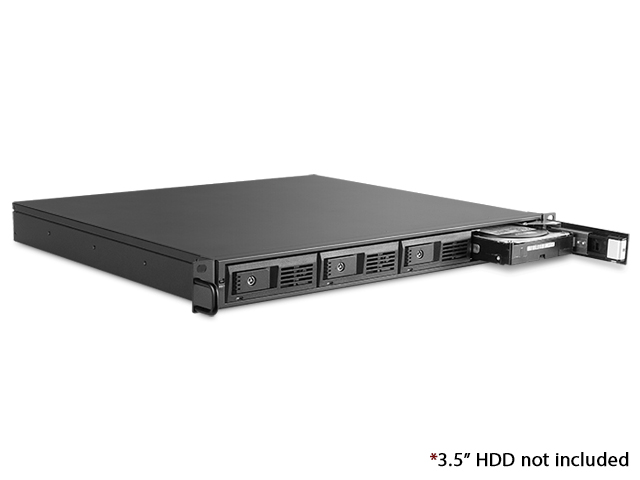
Next month I'll probably be getting a pretty sweet looking short depth 1u rack case which will hold my nas (M-140-ITX). For future expansion, just stack another rack case on top (M-140-JB for example, for the same look).
M-140-ITX_12.jpg


And then ofc a UPS asap, switch, shelf for the cable modem+router and backup drives and all taht, and then there will be some room over for a server or more to play around with.
 
Top Bottom