
• Hey Guest. Check out your NeoGAF Wrapped 2025 results here!

Watch Dogs 2 PC performance thread

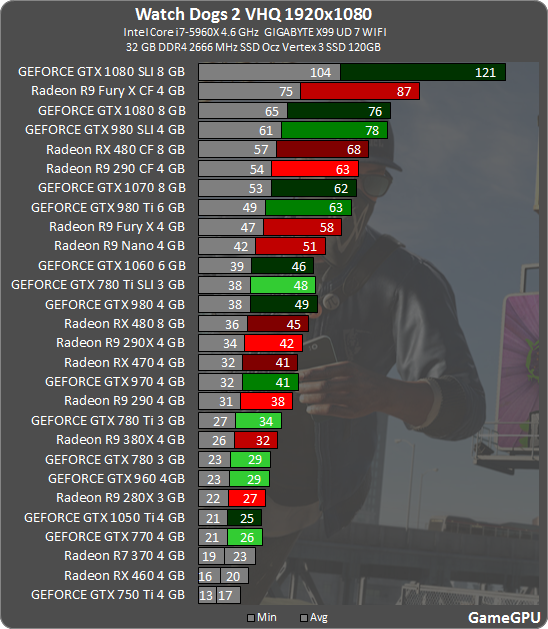
wd2_1920.png

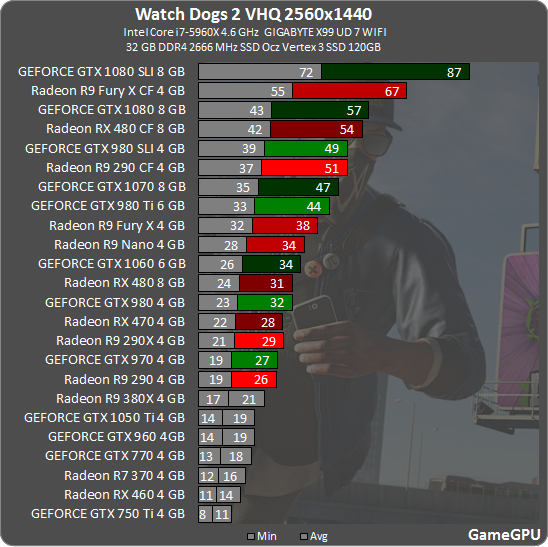
wd2_2560.png

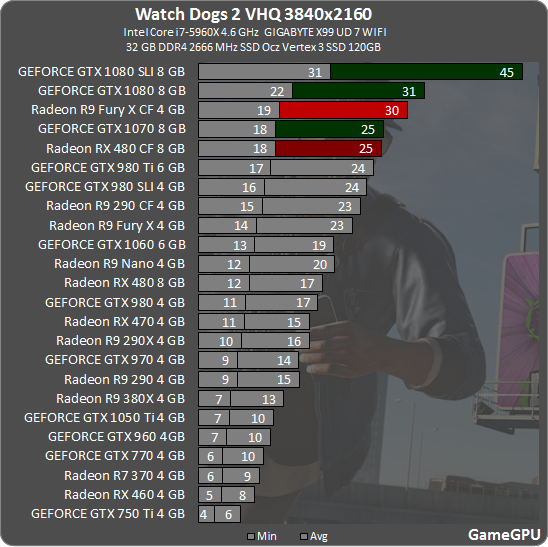
wd2_3840.png


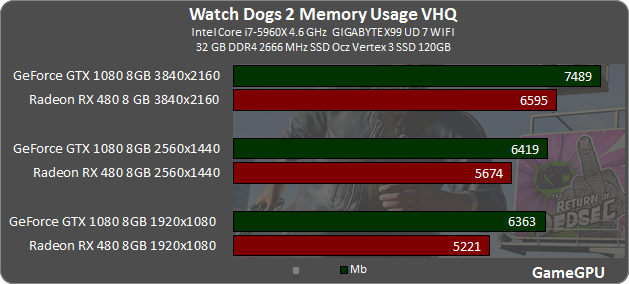
Using more than 6GB of VRAM @1080p:

wd2_vram.png


http://gamegpu.com/action-/-fps-/-tps/watch-dogs-2-test-gpu

This is quite odd. According to NVIDIA, a 1080 SLI only manages 27.5 FPS on average at 4K. Could Very High vs Ultra make all this difference?
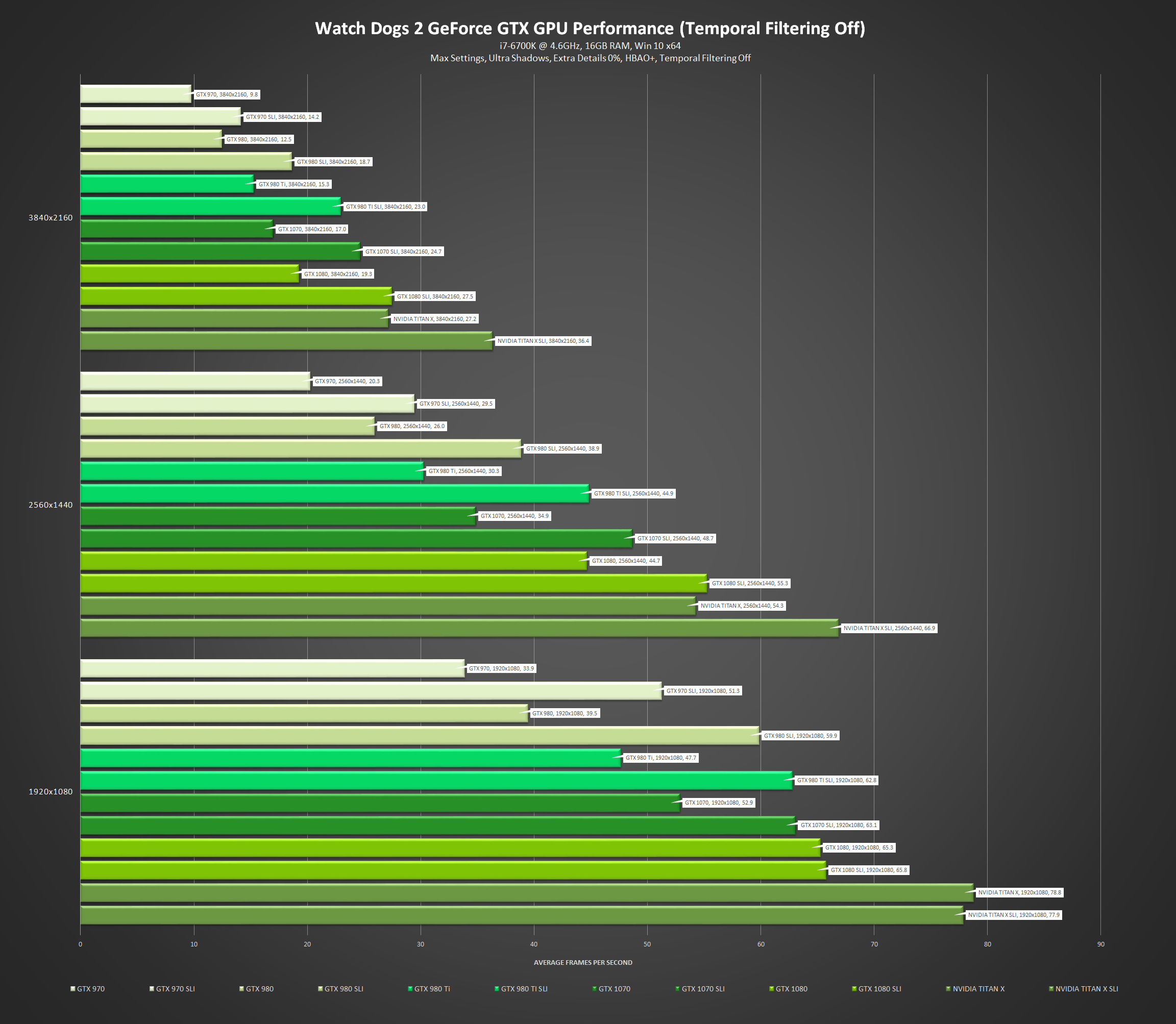
watch-dogs-2-nvidia-geforce-gtx-performance-temporal-filtering-off.png
 
I don't think this game is very VRAM dependent, because I'm using half of my 8GB and I'm still getting drops to 50 using certain settings.

Maybe I'm misunderstanding how these things work, though.
 
Question, does using the Temporal Filtering with a 1080p resolution makes the game too blurry?

Will I lose too much image quality by playing at the High Preset instead of Very High for example? I have a slightly overclocked GTX970 and would like to achieve a close to 60FPS @ 1080p if possible.
 
This is quite odd. According to NVIDIA, a 1080 SLI only manages 27.5 FPS on average at 4K. Could Very High vs Ultra make all this difference?

Seems right to me. There's no benchmark in this game, so the testers are just running about randomly.
Also gamegpu will tell you in their article what they did to test the game, including what "VHQ" actually means (Ultra preset in this case) and usually whereabouts in the game world they tested.
 
Question, does using the Temporal Filtering with a 1080p resolution makes the game too blurry?

Will I lose too much image quality by playing at the High Preset instead of Very High for example? I have a slightly overclocked GTX970 and would like to achieve a close to 60FPS @ 1080p if possible.

Temporal Filtering looks great on my setup with 1440p DSR. Using mostly Ultra + Very High settings. Note that I'm gaming on a 55" TV, so I sit a few meters away from the screen.
 
I don't think this game is very VRAM dependent, because I'm using half of my 8GB and I'm still getting drops to 50 using certain settings.

Maybe I'm misunderstanding how these things work, though.

If you were VRAM bound you would probably be getting stuttering.

If you haven't got it already, MSI Afterburner and Rivatuner will give you an overlay which will show you CPU and GPU usage.

Those drops to 50 could be GPU bound, or even CPU bound. Try and drop all your settings to a specific preset like High or something and see if you still get the drops, Extra Details can also make the game CPU bound so try and drop that as-well.
 
been playing for a bit now and i'm using the following settings. mostly feels solid at 60fps but there are some noticeable drops when driving.

Specs:

i7-6700K @ 4.5,
16GB DDR4 2666,
GTX 1070 8GB (~2035/4500 OC)
376.09 drivers on Windows 10 64-bit (1607)

At first i just used the High preset but turned some things up:

Window mode: Full-screen
Refresh rate: 60
Resolution: 1440p (Downsampling to 1080p)
Vsync: Normal
FOV: 86
Pixel Density: 1.0

Geometry: Very High
Extra Details: 0%
Terrain: Ultra
Vegetation: Ultra
Texture Resolution: High
Texture Filtering: Very high.
Shadows: Very High
Headlight Shadows: Your car
Water: High
Reflections: High
SSR: Ultra
San Francisco Fog: Off
DoF: On
Motion Blur: On
Bloom: On
AO: HBAO+
Temporal Filtering: On
Post process AA: FXAA

3061/8145 MB VRAM usage
 
Watch Dog 2: PC graphics performance benchmark review
We will test at Ultra Quality with HMSSAO and SMAA, we'll leave MSAA off for now as this mode is heavy on any GPU. For testing HMSSAO has been enabled as this option is available to both AMD and Nvidia graphics cards. We and you should leave temporal filtering disabled, as it is pretty bad (half the image quality).

checkerboarding on ps4pro cuts the horizontal res in half and samples alternate each frame. i dont think msaa is used? the ubi paper says their temporal filtering results in half the samples of native res which makes sense with msaa2x

What is "checkerboarding" in cutting horizontal rez in half? Was it confirmed to be working this way? I'm thinking that checkerboarding is exactly that - a checkerboard quad pattern alternating between frames. Would give a nice half 4K shading rate for Pro's 2x PS4 flops figure.
 
Try this (my 1070 settings):

1440p+1.2 pixel density

Geometry: V.High
Extra Detail: 0%
Terrain: Ultra
Vegetation: Ultra
Textures: Ultra
AF: Ultra
Shadows: V.High
Headlight: 2 cars
Water: High
Reflections: High
Screenspace Reflections: OFF
Fog: On (not encountered yet)
DoF: On
Motion Blur: On
Bloom: On
AO: HBAO+
AA: SMAA

You could even go a bit higher, I guess.

Yeah I'm averaging 50-60 FPS with your settings, the only change being I put Screenspace Reflections on Very High.

Specs:
i5-4590/GTX 1070/16GB RAM.
 
My 970 can't get a consistent 60fps with everything on low settings. Open world on low settings seems to float around 55fps, high settings is 45fps.
 
Geometry on Very High/Ultra and SSR really tanks the framerate on a 970. I'm sticking to the High setting for everything and it's not too bad, 60fps 90% of the time. Are people sure SMAA is even functioning as it should because I can't see a difference between it on and AA completely off?
 
Man, VRAM requirements in PC games are hiking more rapidly these days. 4GB is low end already ffs.

I was thinking about getting a 6GB 1060, and now it sounds like a very bad idea for investment.
 
Calling BS on that TechPowerUp benchmark.

I have a 1080 and you only get close to 60FPS inside. The openworld is closer to the mid-40s.
 
So. Used Origin to get the game. But its going through Uplay. When i try to play the game i get a message from Uplay saying this product can't be activated at this time.

Anyone having this same issue?
 
High resolution texture pack is worth it even at 1080p right?

(what with 4K being a new thing, I can imagine that being its own upgrade scale)
 
Man, VRAM requirements in PC games are hiking more rapidly these days. 4GB is low end already ffs.

I was thinking about getting a 6GB 1060, and now it sounds like a very bad idea for investment.

All GPUs are "a very bad idea for investment".

Do we know how to use afterburner with this yet?

Having only the fps count is killing me lol.

Is it just the overlay that doesn't work? If Afterburner itself (note, not rivatuner stats server) can monitor as usual, you can simply enable output to a text file and then graph the data in a spreadsheet to see what's what. It's not real-time of course, but depending on what you're trying to find out, it can still be very useful.
 
All GPUs are "a very bad idea for investment".

I mean, at least when 2GB cards are still hot they're still capable of doing their job for a few years.

4GB cards have just barely released like a couple or more years ago and it's already obselete. And it's even worse for 6GB cards.
 
So. Used Origin to get the game. But its going through Uplay. When i try to play the game i get a message from Uplay saying this product can't be activated at this time.

Anyone having this same issue?

When you launch through Origin you get the CD key that you input in Uplay. After that you can launch the game and Origin will clean up the install files, freeing up HDD space.

After that you should be able to just start the game through Uplay.
 
When you launch through Origin you get the CD key that you input in Uplay. After that you can launch the game and Origin will clean up the install files, freeing up HDD space.

After that you should be able to just start the game through Uplay.

Yep, the activation key is in Uplay, when i check the activation code it says its already been added to my game library. I verified the files, when i tried to run the game again it installed directx and then proceeded to let me know it can't verify my game right now like before.

This is getting annoying.
 
Posting performance impressions is all well and good, but being more specific about the settings you're using would make them all the more helpful. It's easy enough to infer that, say, "High settings" means the High preset, but in addition to your anti-aliasing configuration, any adjustments made to the predetermined settings ought to be mentioned (e.g. you've installed the texture pack and have texture quality set to Ultra), and this goes double for "max settings" as odds are that you're not actually running the game with everything pushed to the far right.
 
yeah i had extra details at 5% which caused frequent hitches, turned that off helped.


averaging around 40-50fps, which is fine for me with g-sync. Will play around some more later when I get home.

I really should get around to getting a 6700k, but shouldn't the next gen be coming soonish? hmmmm
 
On a 4790k @ 4.6ghz/ 16gb / R9 Nano @1050mhz.

1080p / 1.25 pixel density, Mix of very high / ultra with temporal filtering on I'm getting a mostly locked game at 50hz, even in dense foliage or heavy traffic it only goes to about 46fps, need to go through that Nvidia comparison guide to see what I can lower without detrimental effects to the IQ.

Checking the log for my nano it's holding its 1050mhz constantly not going over 76c and only using 3.1gb of vram.
 
yeah i had extra details at 5% which caused frequent hitches, turned that off helped.


averaging around 40-50fps, which is fine for me with g-sync. Will play around some more later when I get home.

I really should get around to getting a 6700k, but shouldn't the next gen be coming soonish? hmmmm
Yeah, Kabylake should hit retail in January.
 
1920x1080. GTX 970 (not overclocked), i5-4690 (not overclocked), 16gb RAM. on a HDD.

On the low preset (with no further configurations), I get 50-55fps in the open world.

On the high preset (also no extra configurations), I get 40-45fps in the open world.

Indoors on the intro mission seemed like a good 60fps on the high preset though.
 
I mean, at least when 2GB cards are still hot they're still capable of doing their job for a few years.

4GB cards have just barely released like a couple or more years ago and it's already obselete. And it's even worse for 6GB cards.

Firstly, this tech moves quickly and a couple of years is an age in GPU terms. You've been able to buy GPUs with 4GB since 2012 or so. Wanting some "standard" that means you don't have to spend money again is a hope beyond hope. Spend what you can afford and don't fucking worry about it. The second-hand GPU market is very healthy.

Secondly, 4GB GPUs (I guess you're talking about Maxwell 2 mainly) are far from obsolete. This is hyperbole. Over time, if you stick with the same hardware, you will have to turn down graphical features on new releases. This is progress.

Thirdly, you're looking at a benchmark that only shows average FPS for brand new game, set to maximum settings that has several cutting edge features, and then concluding that 4GB is over. The TechPowerUp tests were run with the high-resolution texture pack. A feature that is recommended for GPUs with 6GB or more. Maybe just settle for High textures if you're using a > 2 -year-old GPU. I know, it's the end of the world as we know it.

People's understanding of VRAM usage in game software is woefully basic. Well-coded software will use what memory is available. Available VRAM that's not used is serving no function at all, but it doesn't stop people freaking out when software uses all available video memory.

The amount of VRAM a game uses while running != minimum amount of VRAM that game requires to run properly.
 
I mean, at least when 2GB cards are still hot they're still capable of doing their job for a few years.

4GB cards have just barely released like a couple or more years ago and it's already obselete. And it's even worse for 6GB cards.

Obsolete? It's far from obsolete, 3GB and 4GB cards run games perfectly fine.

Just drop the texture quality setting if it requires more VRAM than your GPU has, you don't have to run the game with the max texture settings.

Complaints about VRAM requirements don't make any sense, PC Games are designed to be scalable so you can lower the texture quality settings or raise them depending on how much VRAM you have, do you want to have worse looking textures just so you can set them to max settings?

Firstly, this tech moves quickly and a couple of years is an age in GPU terms. You've been able to buy GPUs with 4GB since 2012 or so. Wanting some "standard" that means you don't have to spend money again is a hope beyond hope. Spend what you can afford and don't fucking worry about it. The second-hand GPU market is very healthy.

Secondly, 4GB GPUs (I guess you're talking about Maxwell 2 mainly) are far from obsolete. This is hyperbole. Over time, if you stick with the same hardware, you will have to turn down graphical features on new releases. This is progress.

Thirdly, you're looking at a benchmark that only shows average FPS for brand new game, set to maximum settings that has several cutting edge features, and then concluding that 4GB is over. The TechPowerUp tests were run with the high-resolution texture pack. A feature that is recommended for GPUs with 6GB or more. Maybe just settle for High textures if you're using a > 2 -year-old GPU. I know, it's the end of the world as we know it.

People's understanding of VRAM usage in game software is woefully basic. Well-coded software will use what memory is available. Available VRAM that's not used is serving no function at all, but it doesn't stop people freaking out when software uses all available video memory.

The amount of VRAM a game uses while running != minimum amount of VRAM that game requires to run properly.

Great post.
 
i7-5820K @ 3.3Ghz. Is this going to be a bottleneck or am I going to need to OC for this game?

My other specs are a 1080 and 16GB DDR4 @ 2133mhz

I'd be playing via steam link so just 60FPS is fine, I normally go for 100+ but it seems like that isn't happening on this game even at 1080p.
 
So is the consensus to use the temporal filtering? It maybe looks slightly more blurry to me but otherwise I don't see a big impact on IQ.

Im on a 1070 and 6600k and if i turn on temporal filtering with a 1.25 res scale at 1080p it performs well and looks probably better than just stock 1.0 res scale and no temporal filtering.

The benchmarks still worry me a bit and people here are reporting they get lower perf than what the benches say. Looks like getting 60fps at 1080p on a 1070 is difficult on ultra. I don't think the game looks good enough to warrant that performance. Has to be some more optimization to be had.
 
Calling BS on that TechPowerUp benchmark.

I have a 1080 and you only get close to 60FPS inside. The openworld is closer to the mid-40s.

Way to give literally no indication of what settings you're running at champ.

If you're running heavy non-PP AA, then maybe that's why.
 
16gb RAM, i5-4690k at standard clock

Hmm, the low settings should save quite a lot of GPU resources, it's quite strange that you're having trouble hitting 60 fps.
I suppose you could still be GPU bound though.

It would be good to get MSI Afterburner working in this game to see if you're CPU or GPU bound, do you know the speed of your ram?


Hmm that doesn't look like MSI Afterburner, maybe it's EVGA's overlay?

Edit: I'm totally wrong, that is MSI Afterburner. The style of the text threw me off.
 
But according to the benchmark above, the game uses more than 6gb of VRAM even at 1080p.

Some games can call for more VRAM if they see it available, but it's not necessarily improving performance if that is the case. 1060 6gb for 1080p 60fps is fine and will be fine for a few a years. Don't fret too muc about it.

If you want to go 1440p+ then yeah, 1060 is not the card to pick.
 
Way to give literally no indication of what settings you're running at champ.

If you're running heavy non-PP AA, then maybe that's why.

Clearly implying I was using exactly the same settings/resolution as TechPowerUP champ. Or maybe you could have viewed my post a a single page back where I did list my specs/settings. But who bothers to read anything but the first and last pages of a thread, right?

My guess is that their benchmark was the opening of the game only. Things drop considerably once you're in the open world.
 
Clearly implying I was using exactly the same settings/resolution as TechPowerUP champ. Or maybe you could have viewed my post a a single page back where I did list my specs/settings. But who bothers to read anything but the first and last pages of a thread, right?

My guess is that their benchmark was the opening of the game only. Things drop considerably once you're in the open world.

Considering many other benchmarks have stated a similar average of around 80 fps, I'll believe the benchmarks until I play it myself. ToD and weather could make a huge difference, especially with the SF Fog turned on.

EDIT: does default Ultra turn TXAA or MSAA on?
 
Top Bottom