
Thanks! Was leaning towards pc because of price as well.Like the vast majority of PC ports, it's the best way to play the game. Unless your PC isn't so great or you're keen on staying with your console friends list, PC's the way to go.
-
Hey Guest. Check out your NeoGAF Wrapped 2025 results here!
You are using an out of date browser. It may not display this or other websites correctly.
You should upgrade or use an alternative browser.
You should upgrade or use an alternative browser.
Watch Dogs 2 PC performance thread
- Thread starter JaseC
- Start date
Dreams-Visions
Member
What's this shit about draconian protection measures on the game?
https://www.techpowerup.com/228257/...monitors-systems-potentially-prevents-modding
Should I be concerned? Was planning to buy.
https://www.techpowerup.com/228257/...monitors-systems-potentially-prevents-modding
Should I be concerned? Was planning to buy.


Locuza
Member
PCGH did a CPU driver overhead test with two Radeons vs. one Geforce, well the results are quite shocking in this game:

http://www.pcgameshardware.de/Watch-Dogs-2-Spiel-55550/Specials/Test-Review-Benchmark-1214553/
Notice that the rendering resolution is basically at 180p (720p + pixel-densitiy at 0,25).
This is purely a CPU throughput test or how good the driver distributes work to the GPU.
Nvidia is getting 50% more performance out of the same processor as AMD.
http://www.pcgameshardware.de/Watch-Dogs-2-Spiel-55550/Specials/Test-Review-Benchmark-1214553/
Notice that the rendering resolution is basically at 180p (720p + pixel-densitiy at 0,25).
This is purely a CPU throughput test or how good the driver distributes work to the GPU.
Nvidia is getting 50% more performance out of the same processor as AMD.
SPECS:
OS: Windows 10 64-bit (Anniversary Update)
Nvidia Driver: 376.09
Display: Acer Predator XB271HU
Motherboard: ASRock Z87 Extreme4
Power Supply: EVGA SuperNOVA 750W G2
CPU: i7-4770k @4.2GHz (HT Enabled)
Heatsink: Hyper 212 Evo w/2x Noctua NF-F12 Fans
GPU: GIGABYTE GTX 980 Ti G1 Gaming 6GB
RAM: 16GB G.SKILL Sniper DDR3 @1866MHz
SSD (OS): 256GB Samsung 850 Pro
HDD (Games): 5TB Western Digital Black 7200 RPM/128MB Cache
SETTINGS:
Running with G-Sync on my 5TB drive. High speed traversal is virtually free of any hitching, stutter, or pauses, thankfully; that's big. Any shadow setting higher than Ultra is a no-no, and SSR is really demanding (12-15 fps hit for me) with little visual payoff in most instances; SSR on cars looks speckled and adds extra shader aliasing on top of an already very aliased game. It's a small tragedy that they didn't add TAA, heck, they already have a sharpening filter available, and I can't imagine it would have been difficult to include. At the very least, they could have included the Temporal SMAA featured in the first game. TXAA is appreciated, but not at all viable.
My current settings are getting me in the 50-60 average range, with pretty decent IQ:
I really hope they consider adding a post-process TAA solution, and that they fix Afterburner support. Otherwise, not bad.
OS: Windows 10 64-bit (Anniversary Update)
Nvidia Driver: 376.09
Display: Acer Predator XB271HU
Motherboard: ASRock Z87 Extreme4
Power Supply: EVGA SuperNOVA 750W G2
CPU: i7-4770k @4.2GHz (HT Enabled)
Heatsink: Hyper 212 Evo w/2x Noctua NF-F12 Fans
GPU: GIGABYTE GTX 980 Ti G1 Gaming 6GB
RAM: 16GB G.SKILL Sniper DDR3 @1866MHz
SSD (OS): 256GB Samsung 850 Pro
HDD (Games): 5TB Western Digital Black 7200 RPM/128MB Cache
SETTINGS:
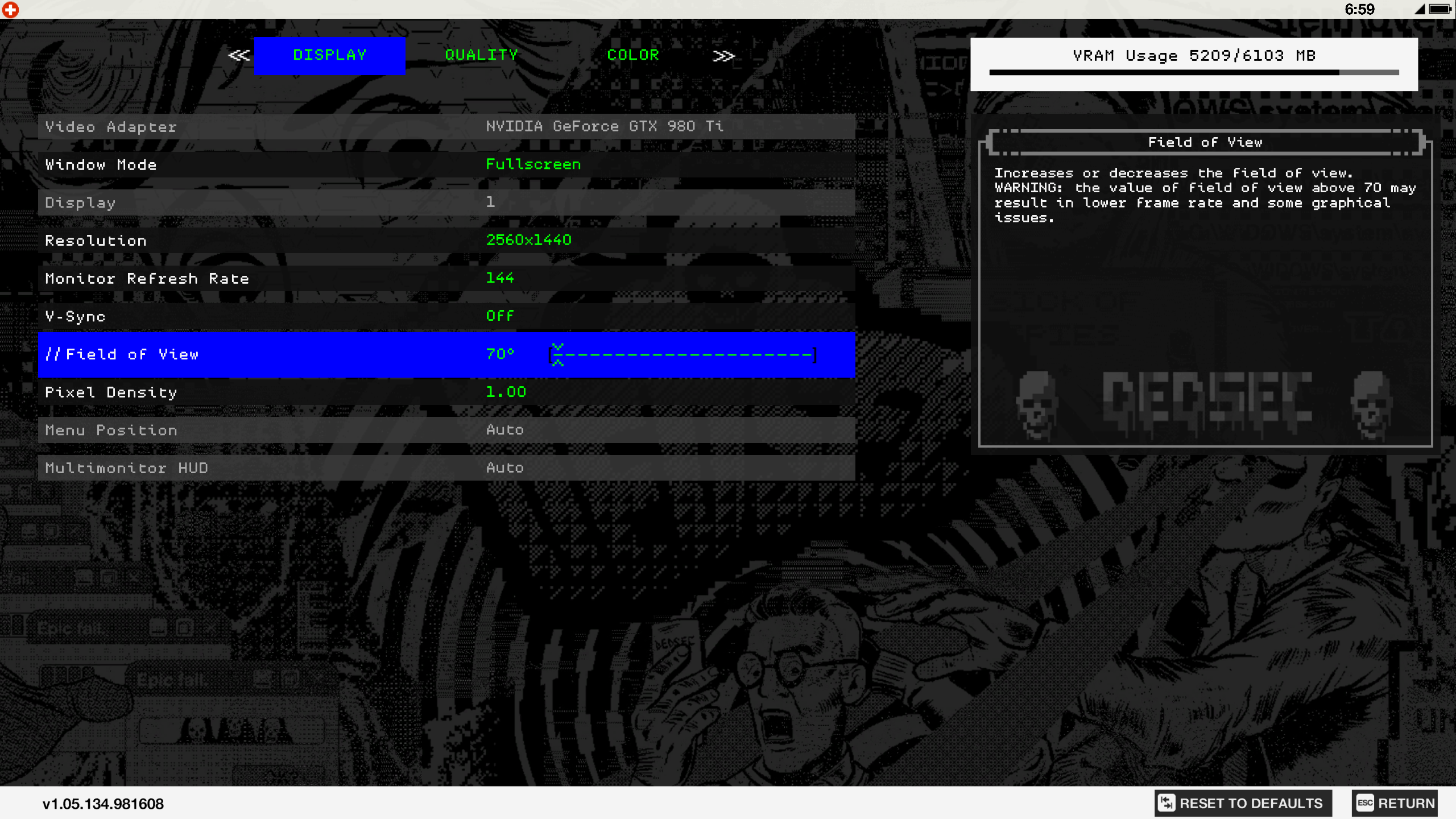
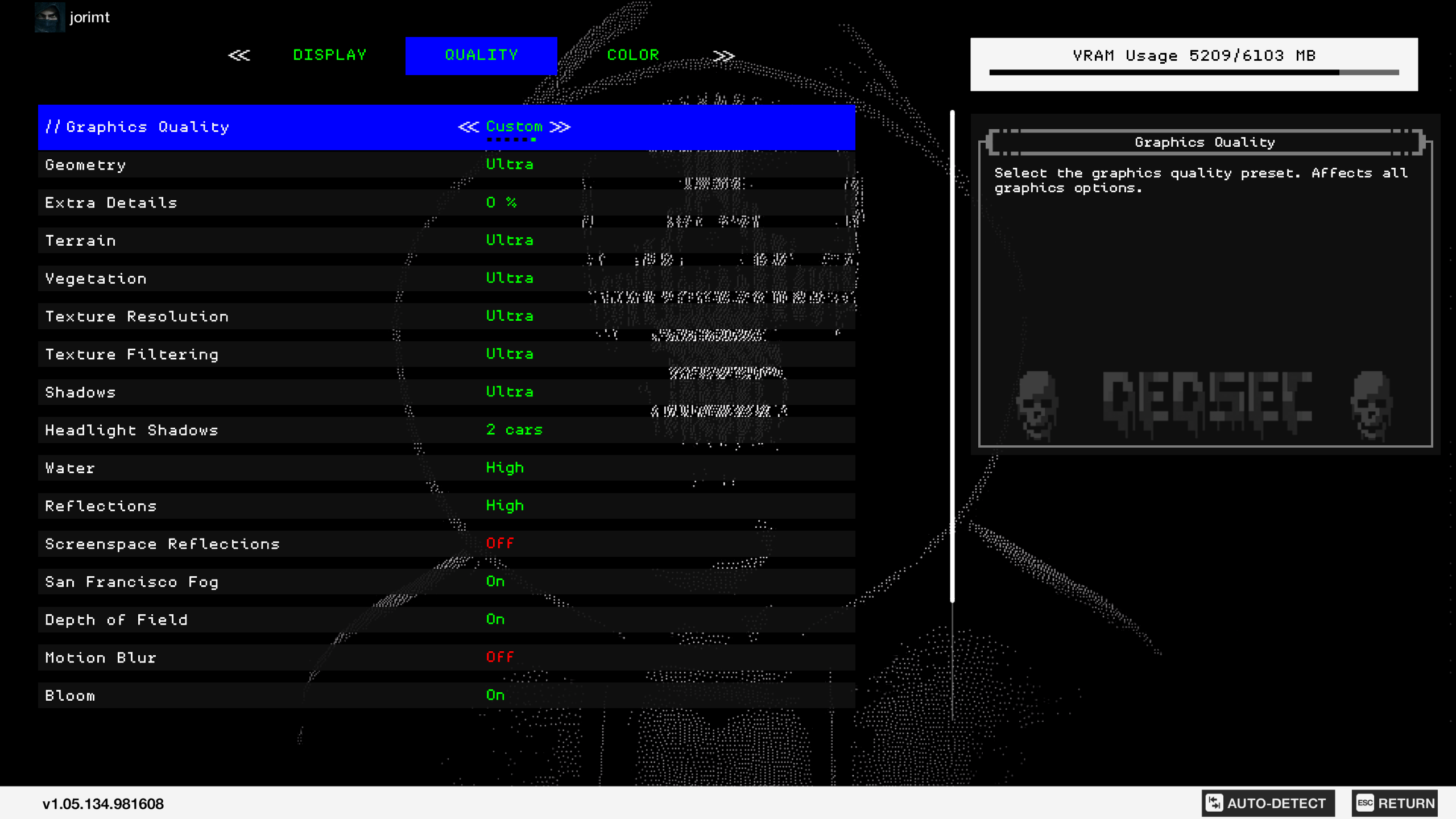
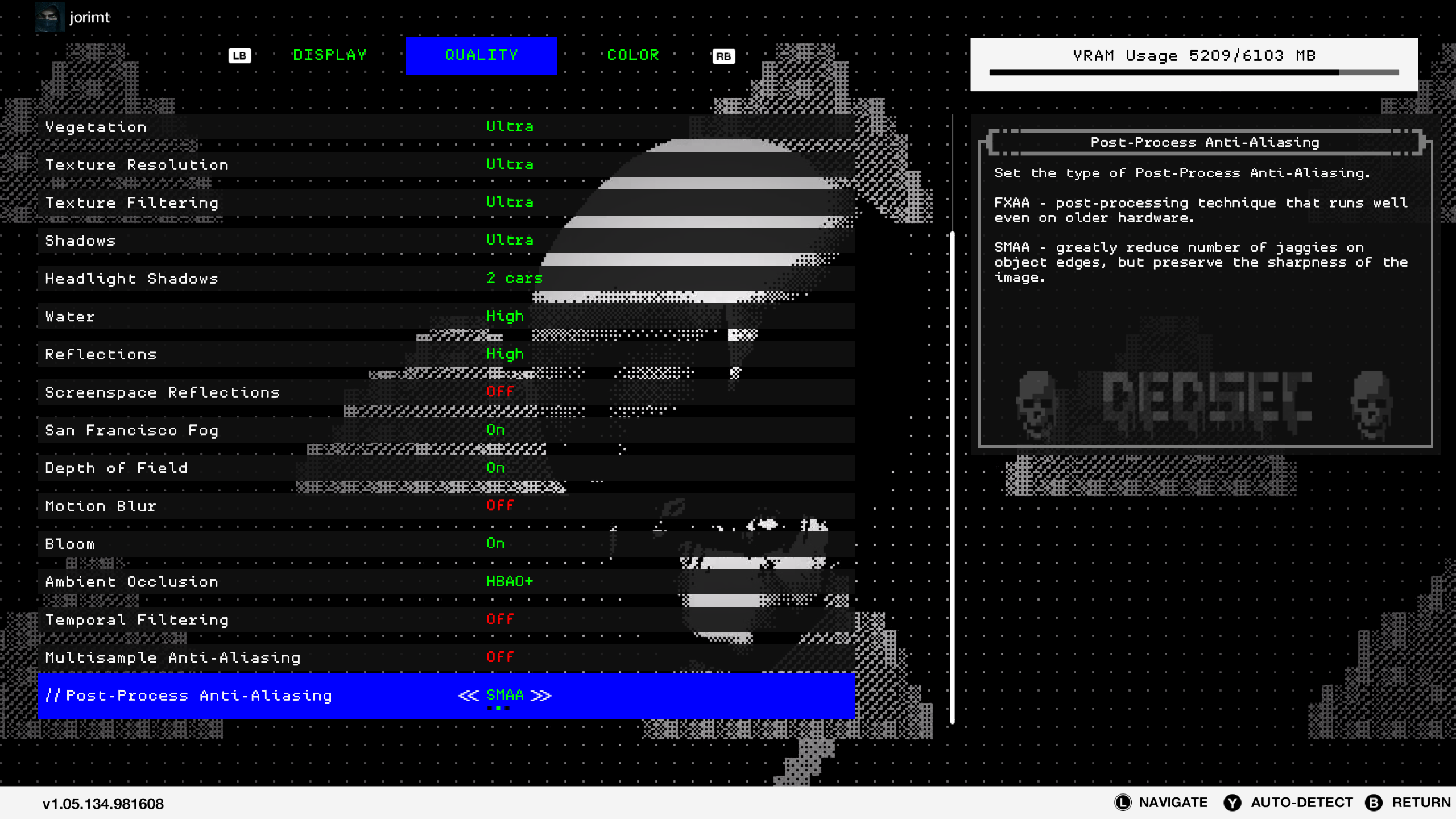
Running with G-Sync on my 5TB drive. High speed traversal is virtually free of any hitching, stutter, or pauses, thankfully; that's big. Any shadow setting higher than Ultra is a no-no, and SSR is really demanding (12-15 fps hit for me) with little visual payoff in most instances; SSR on cars looks speckled and adds extra shader aliasing on top of an already very aliased game. It's a small tragedy that they didn't add TAA, heck, they already have a sharpening filter available, and I can't imagine it would have been difficult to include. At the very least, they could have included the Temporal SMAA featured in the first game. TXAA is appreciated, but not at all viable.
My current settings are getting me in the 50-60 average range, with pretty decent IQ:
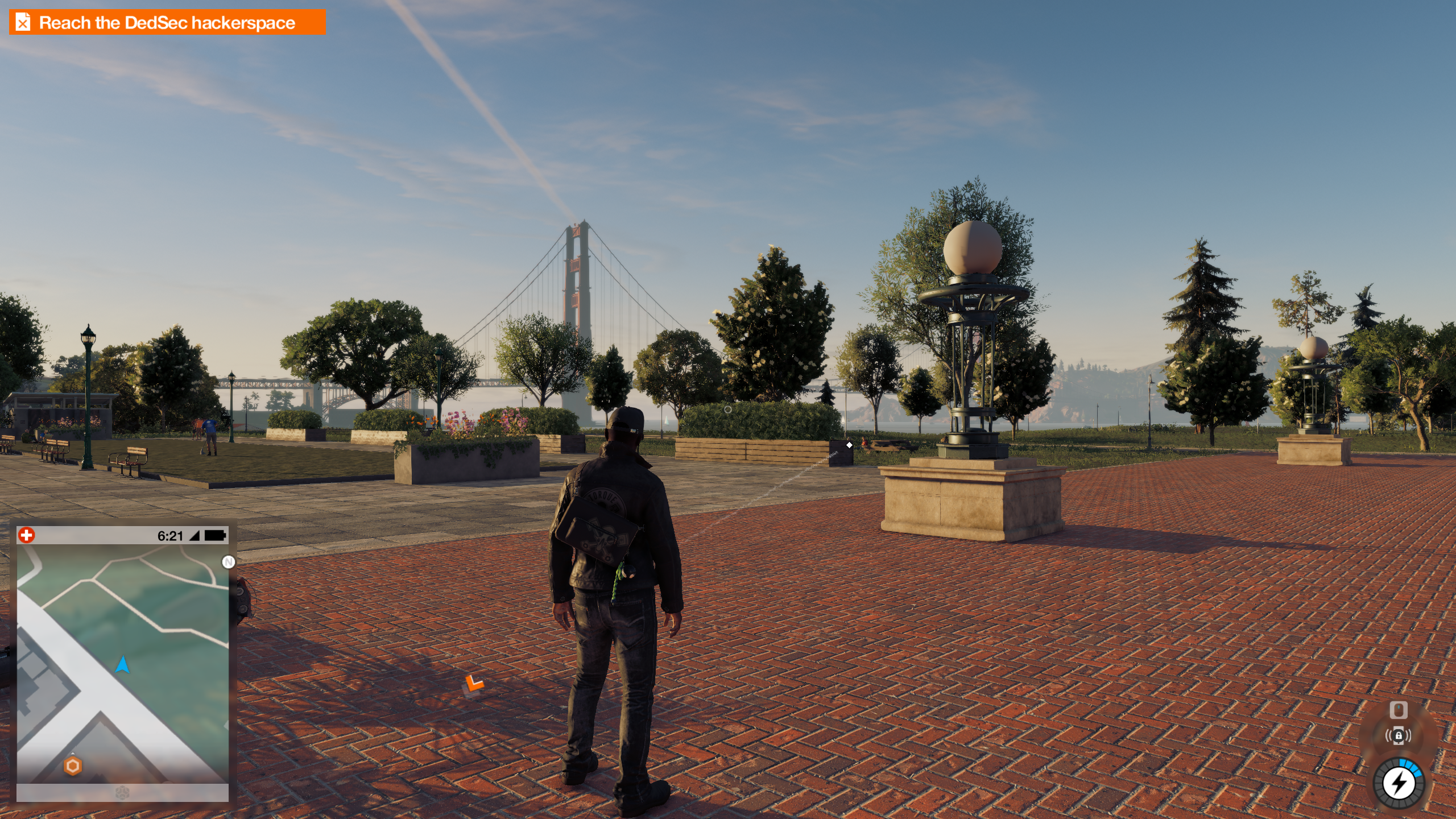
I really hope they consider adding a post-process TAA solution, and that they fix Afterburner support. Otherwise, not bad.
Maintenance
Member
What's this shit about draconian protection measures on the game?
https://www.techpowerup.com/228257/...monitors-systems-potentially-prevents-modding
Should I be concerned? Was planning to buy.
The fuck is this, they managed to find something worse than Denuvo.
Nyteshade517
Member
SPECS:
OS: Windows 10 64-bit (Anniversary Update)
Nvidia Driver: 376.09
Display: Acer Predator XB271HU
Motherboard: ASRock Z87 Extreme4
Power Supply: EVGA SuperNOVA 750W G2
CPU: i7-4770k @4.2GHz (HT Enabled)
Heatsink: Hyper 212 Evo w/2x Noctua NF-F12 Fans
GPU: GIGABYTE GTX 980 Ti G1 Gaming 6GB
RAM: 16GB G.SKILL Sniper DDR3 @1866MHz
SSD (OS): 256GB Samsung 850 Pro
HDD (Games): 5TB Western Digital Black 7200 RPM/128MB Cache
SETTINGS:
Running with G-Sync on my 5TB drive. High speed traversal is virtually free of any hitching, stutter, or pauses, thankfully; that's big. Any shadow setting higher than Ultra is a no-no, and SSR is really demanding (12-15 fps hit for me) with little visual payoff in most instances; SSR on cars looks speckled and adds extra shader aliasing on top of an already very aliased game. It's a small tragedy that they didn't add TAA, heck, they already have a sharpening filter available, and I can't imagine it would have been difficult to include. At the very least, they could have included the Temporal SMAA featured in the first game. TXAA is appreciated, but not at all viable.
My current settings are getting me in the 50-60 average range, with pretty decent IQ:
I really hope they consider adding a post-process TAA solution, and that they fix Afterburner support. Otherwise, not bad.
Afterburner/RTSS works...you just have to use RTSS 6.3.0 (or earlier I think)
the anti-cheat program that WD2 uses is what's causing more current versions of RTSS to not idsplay correctly
Having a hard time keeping it at 60 on Ultra on my GTX 1080 in 1080p.... Sigh
Also, in Uplay I can see that the Highres Texture pack is installed (I did download it) but when I check in the "Premium Content" menu it shows as "Not Installed"? I have the textures set to Ultra in the settings which I assume is how you use the pack?
Also was the Zodia Killer missions not included with the NVIDIA Promo Codes? I mean... Technically it was a pre-order...
Also, in Uplay I can see that the Highres Texture pack is installed (I did download it) but when I check in the "Premium Content" menu it shows as "Not Installed"? I have the textures set to Ultra in the settings which I assume is how you use the pack?
Also was the Zodia Killer missions not included with the NVIDIA Promo Codes? I mean... Technically it was a pre-order...
ussjtrunks
Member
What settings are you using for that + what does it run like in 1080p?Yes. I am getting near 60 with a 980FTW at 1440p
I had to quit the game temporarily due to a bug that made it impossible to talk to a character in dedsec HQ (Horatio) to progress the story. After eating, checking gaf and preparing myself to attack the game again, I am faced with this:
WTF Ubisoft? I thought we were over this shit after the AC2 always online debacle.
To clarify, my game was bought for the full, ridiculous and expensive EU price directly from Steam.
did you get this fixed? i just did the download, install from origin on to uplay. uplay instlaled all files and i still get this message. wtf??
Anyone?
Nyteshade517
Member
Having a hard time keeping it at 60 on Ultra on my GTX 1080 in 1080p.... Sigh
Also, in Uplay I can see that the Highres Texture pack is installed (I did download it) but when I check in the "Premium Content" menu it shows as "Not Installed"? I have the textures set to Ultra in the settings which I assume is how you use the pack?
Also was the Zodia Killer missions not included with the NVIDIA Promo Codes? I mean... Technically it was a pre-order...
if you see Ultra for Texture Resolution then it's installed (otherwise the highest you'd see there is High and Ultra wouldn't be listed at all)
as far as the Zodiac Killer mission not being included that's pretty common...majority of the time those promo codes don't include pre-order items as far as Ubisoft games go
PHOENIXZERO
Member
PCGH did a CPU driver overhead test with two Radeons vs. one Geforce, well the results are quite shocking in this game:
Notice that the rendering resolution is basically at 180p (720p + pixel-densitiy at 0,25).
This is purely a CPU throughput test or how good the driver distributes work to the GPU.
Nvidia is getting 50% more performance out of the same processor as AMD.
Yeah, I think it's pretty well known that AMD's drivers are garbage in DX11 and for this reason why there's such a big boost in performance in DX12 and Vulkan for AMD.
What's this shit about draconian protection measures on the game?
https://www.techpowerup.com/228257/...monitors-systems-potentially-prevents-modding
Should I be concerned? Was planning to buy.
EAC seems like total garbage from all the problems it can cause as I've seen while looking up on it. Anti-cheat measures for online of great and all but this, not so much.
EDIT: Gah! I didn't get the chance to play since this morning, I wanted to tweak my settings to see if I could hit a more stable 60+ FPS but now I'm too damn tired.
Afterburner/RTSS works...you just have to use RTSS 6.3.0 (or earlier I think)
the anti-cheat program that WD2 uses is what's causing more current versions of RTSS to not idsplay correctly
Aware, I just don't feel like downgrading for one game if I don't have to. I may though.
I just read through the NVIDIA Performance guide and it's really well made but then again I feel like every single settings is always "just a couple of frames" lol
Heaviest hitters so far are "Shadows," Screenspace Reflections," and "Multisample Anti-Aliasing." Not counting "Temporal Filtering," every other setting doesn't seem to affect much.
Hazardous Metal
Member
So after running into some issues with not having my Twitch Hoodie pack, I uninstalled and when I reinstalled I get this error when trying to launch the game:
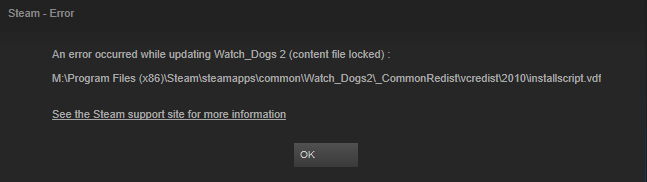
I've uninstalled and reinstalled again and I'm still getting that error. Any thoughts as to what is causing this? Currently waiting in queue for Ubisoft support chat but there's 100 people ahead of me... RIP.
I've uninstalled and reinstalled again and I'm still getting that error. Any thoughts as to what is causing this? Currently waiting in queue for Ubisoft support chat but there's 100 people ahead of me... RIP.
Lockjaw333
Member
i5 6600k @ 4.2 ghz
GTX 1070 SC
16 gb RAM
SSD
After lots of tweaking, I've settled on 1080p at 1.0 pixel density with default ultra settings except AO is on HBAO+. I do get some drops below 60 in the city, but its doable. Game runs mostly locked 60fps.
The aliasing with SMAA is pretty crappy though. I can clean it up if I turn on Temporal Filtering and up the pixel density to 1.20, but then I actually do notice an overall softer looking image. Particularly in motion, IQ just looks overall softer and textures look less crisp. I prefer to try to tweak with TF off.
Would really love a TAA option. Its in almost every big game lately.
GTX 1070 SC
16 gb RAM
SSD
After lots of tweaking, I've settled on 1080p at 1.0 pixel density with default ultra settings except AO is on HBAO+. I do get some drops below 60 in the city, but its doable. Game runs mostly locked 60fps.
The aliasing with SMAA is pretty crappy though. I can clean it up if I turn on Temporal Filtering and up the pixel density to 1.20, but then I actually do notice an overall softer looking image. Particularly in motion, IQ just looks overall softer and textures look less crisp. I prefer to try to tweak with TF off.
Would really love a TAA option. Its in almost every big game lately.
zombipuppy
Member
This game is now locking up my Windows Explorer after exiting... I can't open any new folders, thumbnails won't load in already open folders, task manager will not come up..
Something is seriously messed up with this title. I've never had a game force me to reboot my PC to make it behave again.
Something is seriously messed up with this title. I've never had a game force me to reboot my PC to make it behave again.
Would really love a TAA option. Its in almost every big game lately.
You and me both; seriously missed opportunity. Even the last game had an adequate Temporal SMAA.
I'm guessing they didn't include it because they didn't want the less informed to enabled it and Temporal Filtering at the same time (they clash), but come on...
icecold1983
Member
You and me both; seriously missed opportunity. Even the last game had an adequate Temporal SMAA.
I'm guessing they didn't include it because they didn't want the less informed to enabled it and Temporal Filtering at the same time (they clash), but come on...
Doubt thats the reason. Its crap on ps4bone as well. The pro version seems to compare favorably to any non-txaa settings tho

Peterthumpa
Member
Doubt thats the reason. Its crap on ps4bone as well. The pro version seems to compare favorably to any non-txaa settings tho
The reason is probably Nvidia's TXAA.
Just noticed this has Tobii Eye tracker support. Neat. I got one cheap and have been messing around with it in other games, but ones I've already fully learned so it's not always an ideal adjustment period. Having it for near the start and think I'll probably get more use out of it than normal (plus it really fits the themes here).
Most Ubisoft games support it. Ubi gets into some weird stuff that they don't always get credit for.
Most Ubisoft games support it. Ubi gets into some weird stuff that they don't always get credit for.
The reason is probably Nvidia's TXAA.
Unlikely. Rainbow Six Siege had temporal filtering, TXAA, and TAA. Nvidia did an official guide, and even recommended TAA over the other AA methods for performance reasons.
So while there might be a reason for its absence in WD2, it's probably a stupid one.
Slackbladder
Member
Had this problem when the game crashed. Felt it was a driver error but not sure. Had to reboot. When closing the game it's fine though.This game is now locking up my Windows Explorer after exiting... I can't open any new folders, thumbnails won't load in already open folders, task manager will not come up..
Something is seriously messed up with this title. I've never had a game force me to reboot my PC to make it behave again.
I think I have a good grip on the PQ and IQ. At 4k but 76 pixel depth (or whatever it's called) mainly because the contrast and colour remains just right. If I go to 1440p the picture get washed out for some reason. Must have something to do with the native resolution of my TV.
Anyway everything at Ultra except with Temporal Aliasing (MSAA X2) ans SMAA. Uncertain of frame rate but generally 60fps most of the time. If there are a lot of cars and smoke etc frame rate drops. Maybe a few frames drop when driving at high speed. Hard to tell. Will probably set my refresh to 50hz for 50fps and boost Pixel Density. May drop shadows to Very High too as they still look pretty good. Jaggies are hard to get rid of but overall it looks pretty good. PC -
4790k@4.4ghz
1080 (mild overclock sub 10%)
16GB 2133DDR3
SSD
LelouchZero
Member
Yeah, so with the latest Nvidia drivers I wasn't losing 12 FPS on my GTX 1080, I was losing 20+. And that's dropping me down from 60 to 40. That's a 50% performance cost for a barely noticeable feature. That's insane.
I highly, HIGHLY recommend everyone who's playing at 1440p or above to just forgo it completely and use ultra on most other things instead.
Haven't tried using temporal filtering. Didn't notice any changes - should it just be improving performance at a super minor hit to the visuals?
Basically yeah, give it a try and see if you like the image quality and the performance.
What's this shit about draconian protection measures on the game?
https://www.techpowerup.com/228257/...monitors-systems-potentially-prevents-modding
Should I be concerned? Was planning to buy.
It sounds awful, I read about this a few hours ago and was almost totally put off from getting the game but then I heard that the screenshot stuff is only for CSGO Tournaments or something like that.
Restrictions of modding is quite unfortunate for a game that has a single-player portion but at-least they're trying to combat cheating, cheating is what nearly killed The Division on PC so I'm glad to see that Ubisoft have at-least tried to implement a better anti-cheat.
I do wonder why they didn't use something like BattlEye though, it's used in Rainbow Six Siege and it works really well.
Privacy information can be found here: https://www.easyanticheat.net/privacy/
Throughout history several anti–cheat solutions have gained a reputation of being invasive to the end–user privacy, and have thereby given the entire sector a bad name. We see countering cheating as a fight based on merit and coding excellence, not one of witch hunts and assumptions. We guarantee you that we do not get involved with screenshots, keylogging, or scanning your hard disk. We are not interested in anything that is personal to you as an individual.
Only when licensed in the context of competitive Counter–Strike tournaments, we do offer the possibility for uploading in–game screenshots to the organiser's servers. Note that those screenshots will never touch our servers. In order to participate in such tournaments you need to agree with the organiser's EULA, EasyAntiCheat is not responsible for the data in any way. In these cases, the EULA is fundamentally different from the one typically used by EasyAntiCheat's integrated games. Screenshot functionality is not included nor available for any game other than Counter–Strike.
I've done some light browsing through this thread but help would be nice. With these specs, can I expect to maintain 60 fps @ 1080p with everything basically maxed?
i7‑6700K (not overclocked, yet)
16GB DDR4 2666,
GTX 980 Ti
Thanks in advanced!
Probably not maxed, no. Stay away from MSAA, anything above Ultra shadows, and lower or disable Screenspace Reflections. If you want a big bump in performance, enable Temporal Filtering, but be warned that image quality degrades slightly; it reconstructs from a lower res.

jchung55
Member
What settings are you using for that + what does it run like in 1080p?
Also wondering this. I have the same card and I'm having trouble keeping it at 60 on medium to high settings.
mercenar1e
Member
feels so good driving up in the rural areas. getting like 70fps while i get like 40-50 in the cities lol
total opposite for me at 1440P ultra. im getting 35-47 in the city and 25-31 in the rural areas.. its the same exact performance at 4K.

GavinUK86
Member
does anyone else have a stutter whenever they live the camera no matter what the fps is?
do you mean use the camera?
i get an annoying stutter when i turn off detective vision. it drops about 10 frames but then goes back to 60.
yeah sorry i meant just moving the camera. my gsync has stopped workingdo you mean use the camera?
i get an annoying stutter when i turn off detective vision. it drops about 10 frames but then goes back to 60.
flipswitch
Member
feels so good driving up in the rural areas. getting like 70fps while i get like 40-50 in the cities lol
It's funny because you start off in the rural area and I was getting 60fps, so I was thinking this ain't too bad despite using SMAA which still showed aliasing
Then I made my way towards the city and the framerate fluctuations began even before I made it there. It was too much for me.
An 980ti should be able to run it at 60fps using temporal filtering and SMAA, with several presets on high/very high at 1080p. That's when I got my refund.
This game is now locking up my Windows Explorer after exiting... I can't open any new folders, thumbnails won't load in already open folders, task manager will not come up..
Something is seriously messed up with this title. I've never had a game force me to reboot my PC to make it behave again.
I had that twice yesterday too
Yeah this is how it looks for me too. Atrocious.
Edit: Fixed it!!
It was due to having MFAA forced in Nvidia driver settings.
After a quick test before heading to work, you seem to be correct sir. I thank you for your help. I had MFAA on globally. This would be the first game that hasnt played nice with that option be it implemented or not.
Weird. ¯_(ツ
 _/¯
_/¯
d00d3n
Member
did you get this fixed? i just did the download, install from origin on to uplay. uplay instlaled all files and i still get this message. wtf??
Anyone?
It worked after a reboot. I don't know if we have same same issue, though, because the game installed fine and worked several times before I had those issues.
So after running into some issues with not having my Twitch Hoodie pack, I uninstalled and when I reinstalled I get this error when trying to launch the game:
I've uninstalled and reinstalled again and I'm still getting that error. Any thoughts as to what is causing this? Currently waiting in queue for Ubisoft support chat but there's 100 people ahead of me... RIP.
The solution to this seems to vary. Have a read through this thread and try anything that somebody said did the trick.
It worked after a reboot. I don't know if we have same same issue, though, because the game installed fine and worked several times before I had those issues.
After waiting like 2 hrs for customer support, im about to talk to a rep from Ubi. I have a feeling they won't be able to fix the issue haha.
There is a thread on their forum btw. http://forums.ubi.com/showthread.php/1526308-Unable-to-start-the-game/page2
Seems i am not alone on this one. When i looked for the error a place said that it was because the game had not unlocked in my region. hmm...
Sad Affleck
Member
Is there a site or youtube channel that benchmarks games on medium settings? 60 fps is way more important for me than ultra settings?
icecold1983
Member
This game is suppose to be well optimised ? Lol
Im not sure where all the gpu cycles are going
Probably powering the DedSec operation trying to shut down Vivendi :^)Im not sure where all the gpu cycles are going
DudeRandom84 has some side by side video comparisons of PC and Pro btw. Most apparent thing to jump out with YT compression is shadows, they look pretty crappy on Pro and "jump" quite irritatingly to adjust to ToD/lightning.
https://m.youtube.com/watch?v=sO1fMsgjeh4
icecold1983
Member
Probably powering the DedSec operation trying to shut down Vivendi :^)
Oh snap!
SilentRage47
Member
Temporal Filtering is actually pretty good in this game, great performance for a little less IQ. It was way worse in R6 for example.
Alright, had a good few hours of tweaking and playing last night, here's some notes and thoughts:
6700k @ 4.6
GTX1080 2050/5300 / WD2 GameReady drivers
16 gigs DDR4/2666
SSD
Win10
1440p gsynced
Overall port is good. If you have the rig the handle it, I'd go as far as saying it's very good. The following settings got me around 70-90fps 90% of the time, with lows around 60. Everything unmentioned at max with high resolution textures installed:
-Shadows ultra
-Motion blur off
-DOF off
-Temporal filtering enabled
-SMAA
-HBAO+
-Headlights 2 cars
-Extra details at 0%
Observations:
-This game is MURDER on your CPU. It is the very first game that consistently pushes this CPU at or close to 100% load
-Extra details setting is rarely mentioned in this thread and I think a lot of people might have this above 0% without realizing how much that increases CPU load. If you are having huge performance dips in in city/crowded areas or can see that your CPU is capped out during poor performance, check that you have this at 0%
-Shadows above Ultra are super expensive, as one would expect. In some scenarios not so bad, but in others dropping to Ultra shadows can almost double the FPS.
-For an open world game, the asset streaming is mind blowingly good. Almost zero stutters and relatively little pop-in even on 0% extra details. Really impressive on this front.
-Temporal filtering is basically a must at 1440p unless you're running a SLI rig. It DOES show. There's more aliasing and the picture just isn't as clean as one would like. But given the difference in performance at 1440p, it's really not even a choice for an "fps first" guy like me.
-Mouse code is excellent. Feels like raw input, and feels like control latency has been prioritized in development. Even when the fps goes lower (I tested around without TF etc) the input still feels lag free and snappy. First class job here as well.
-Given the necessity of TF, better AA options would be welcome. Even at 1440p + SMAA the game is very jaggy compared to any recent title I remember playing. I'm not going to pretend like I have enough knowledge to tell what they should and could have implemented, but as far as the graphical presentation goes, aliasing is the biggest problem the game has.
Game seems like a good amount of fun, too. Overall, after the clusterfuck that my recent game purchases have been performance wise (Dishonored 2, new Deus Ex, Infinite Warfare, all displaying some sort of annoying stutter), I'm very happy with how WD2 is. It's taxing on the system for sure, and some midrange rig owners might have much less to celebrate about than I do, but from my POV this is good stuff.
6700k @ 4.6
GTX1080 2050/5300 / WD2 GameReady drivers
16 gigs DDR4/2666
SSD
Win10
1440p gsynced
Overall port is good. If you have the rig the handle it, I'd go as far as saying it's very good. The following settings got me around 70-90fps 90% of the time, with lows around 60. Everything unmentioned at max with high resolution textures installed:
-Shadows ultra
-Motion blur off
-DOF off
-Temporal filtering enabled
-SMAA
-HBAO+
-Headlights 2 cars
-Extra details at 0%
Observations:
-This game is MURDER on your CPU. It is the very first game that consistently pushes this CPU at or close to 100% load
-Extra details setting is rarely mentioned in this thread and I think a lot of people might have this above 0% without realizing how much that increases CPU load. If you are having huge performance dips in in city/crowded areas or can see that your CPU is capped out during poor performance, check that you have this at 0%
-Shadows above Ultra are super expensive, as one would expect. In some scenarios not so bad, but in others dropping to Ultra shadows can almost double the FPS.
-For an open world game, the asset streaming is mind blowingly good. Almost zero stutters and relatively little pop-in even on 0% extra details. Really impressive on this front.
-Temporal filtering is basically a must at 1440p unless you're running a SLI rig. It DOES show. There's more aliasing and the picture just isn't as clean as one would like. But given the difference in performance at 1440p, it's really not even a choice for an "fps first" guy like me.
-Mouse code is excellent. Feels like raw input, and feels like control latency has been prioritized in development. Even when the fps goes lower (I tested around without TF etc) the input still feels lag free and snappy. First class job here as well.
-Given the necessity of TF, better AA options would be welcome. Even at 1440p + SMAA the game is very jaggy compared to any recent title I remember playing. I'm not going to pretend like I have enough knowledge to tell what they should and could have implemented, but as far as the graphical presentation goes, aliasing is the biggest problem the game has.
Game seems like a good amount of fun, too. Overall, after the clusterfuck that my recent game purchases have been performance wise (Dishonored 2, new Deus Ex, Infinite Warfare, all displaying some sort of annoying stutter), I'm very happy with how WD2 is. It's taxing on the system for sure, and some midrange rig owners might have much less to celebrate about than I do, but from my POV this is good stuff.

sertopico
Member
I have a problem with this game, anytime I quit the CPU remains almost at full load, that means of course that I cannot use Windows anymore and I am forced to reset (!) the whole PC. Anybody with a similar issue and maybe a solution?
This game is now locking up my Windows Explorer after exiting... I can't open any new folders, thumbnails won't load in already open folders, task manager will not come up..
Something is seriously messed up with this title. I've never had a game force me to reboot my PC to make it behave again.
I have exactly the same problem, could it be related to this invasive anti cheat system? It doesn't happen all the time, that's the only correction i have to do to my previous post. I can hear my CPU fan spinning like crazy, as if I were running some stress test like Prime.

ISee
Member
Temporal Filtering is actually pretty good in this game, great performance for a little less IQ. It was way worse in R6 for example.
It's definitely not as bad as some in here make it out to be. Especially if you give it a boost with extra pixel density.
But I really wonder why temporal has to be used in the first place. Granted the LOD seems to be good, especially on trees, also the lighting and view distance. But the game apparently runs at native 1080p on PS4 (according to DF) and I wonder what's going on with the PC port.
I don't know what settings ps4 is using and of course it's just running at 30fps. But the ps4 gpu is also a very, very low end one. Especially compared to modern gpus.
I can make the game look good with my 1070 at 1440p(temporal)/60 (+1.15 pixel boost) with a mix of ultra and high settings, so I'm quiet satisfied. WD2 seems to be one of the most demanding games so far on PC, but rightfully so?
I really wish somebody would make a good article/video about the pc version.
icecold1983
Member
It's definitely not as bad as some in here make it out to be. Especially if you give it a boost with extra pixel density.
But I really wonder why temporal has to be used in the first place. Granted the LOD seems to be good, especially on trees, also the lighting and view distance. But the game apparently runs at native 1080p on PS4 (according to DF) and I wonder what's going on with the PC port.
I don't know what settings ps4 is using and of course it's just running at 30fps. But the ps4 gpu is also a very, very low end one. Especially compared to modern gpus.
I can make the game look good with my 1070 at 1440p(temporal)/60 (+1.15 pixel boost) with a mix of ultra and high settings, so I'm quiet satisfied. WD2 seems to be one of the most demanding games so far on PC, but rightfully so?
I really wish somebody would make a good article/video about the pc version.
highly unlikely temporal filtering isnt being used to hit that 1080p on ps4