PS4 Update 4.5 is coming tomorrow, details inside

https://blog.eu.playstation.com/201...t-tomorrow-heres-everything-you-need-to-know/

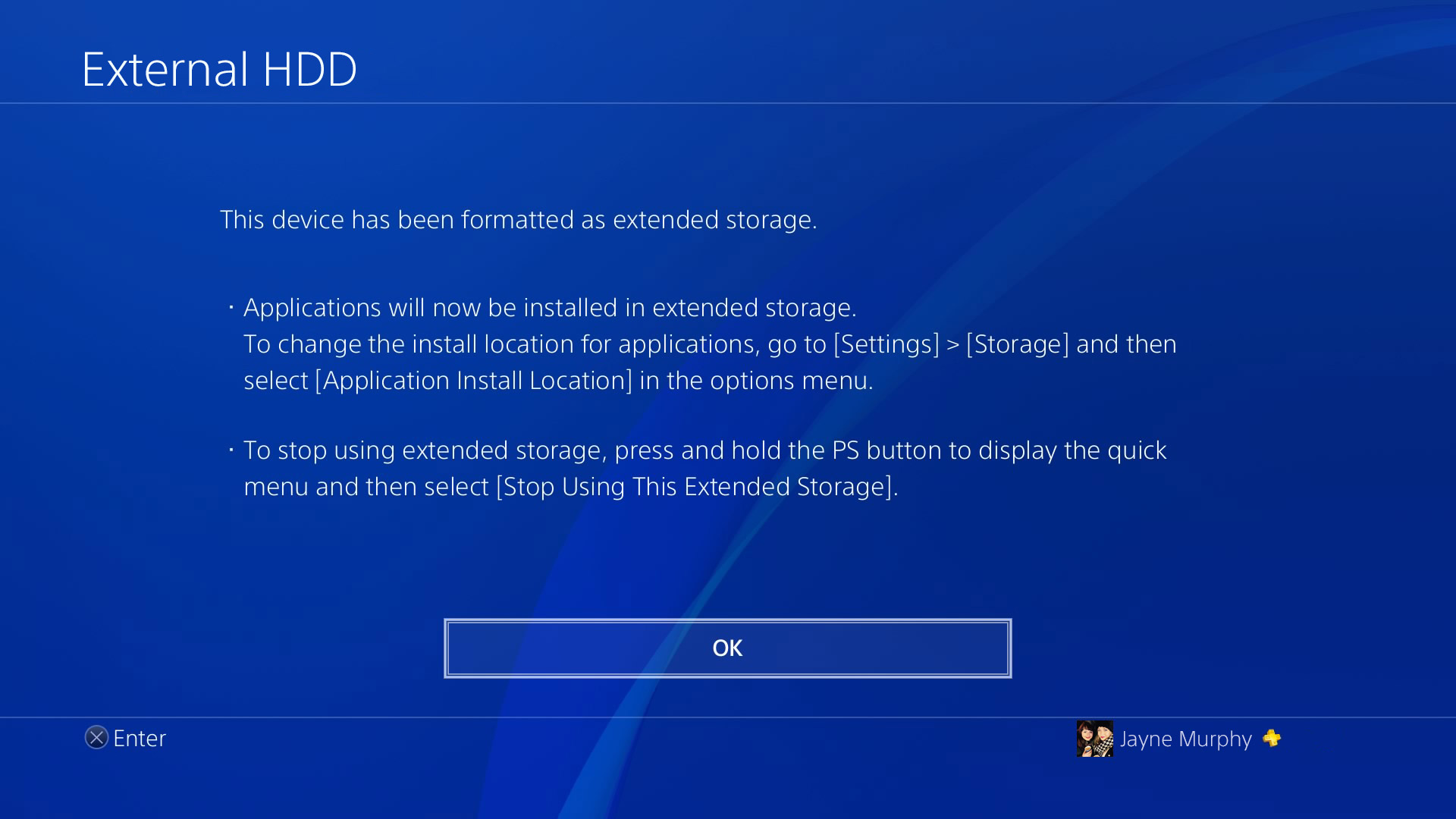
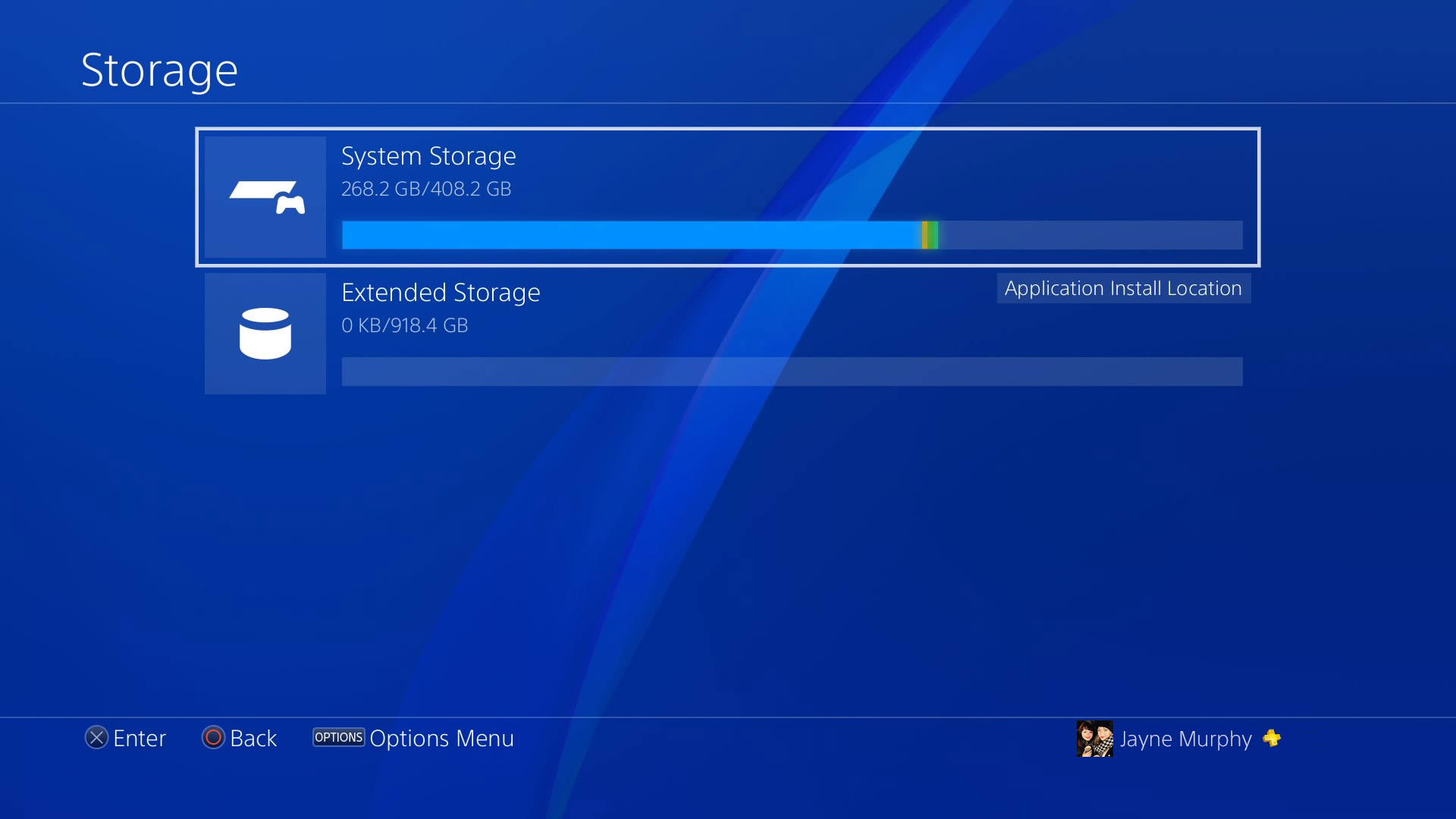
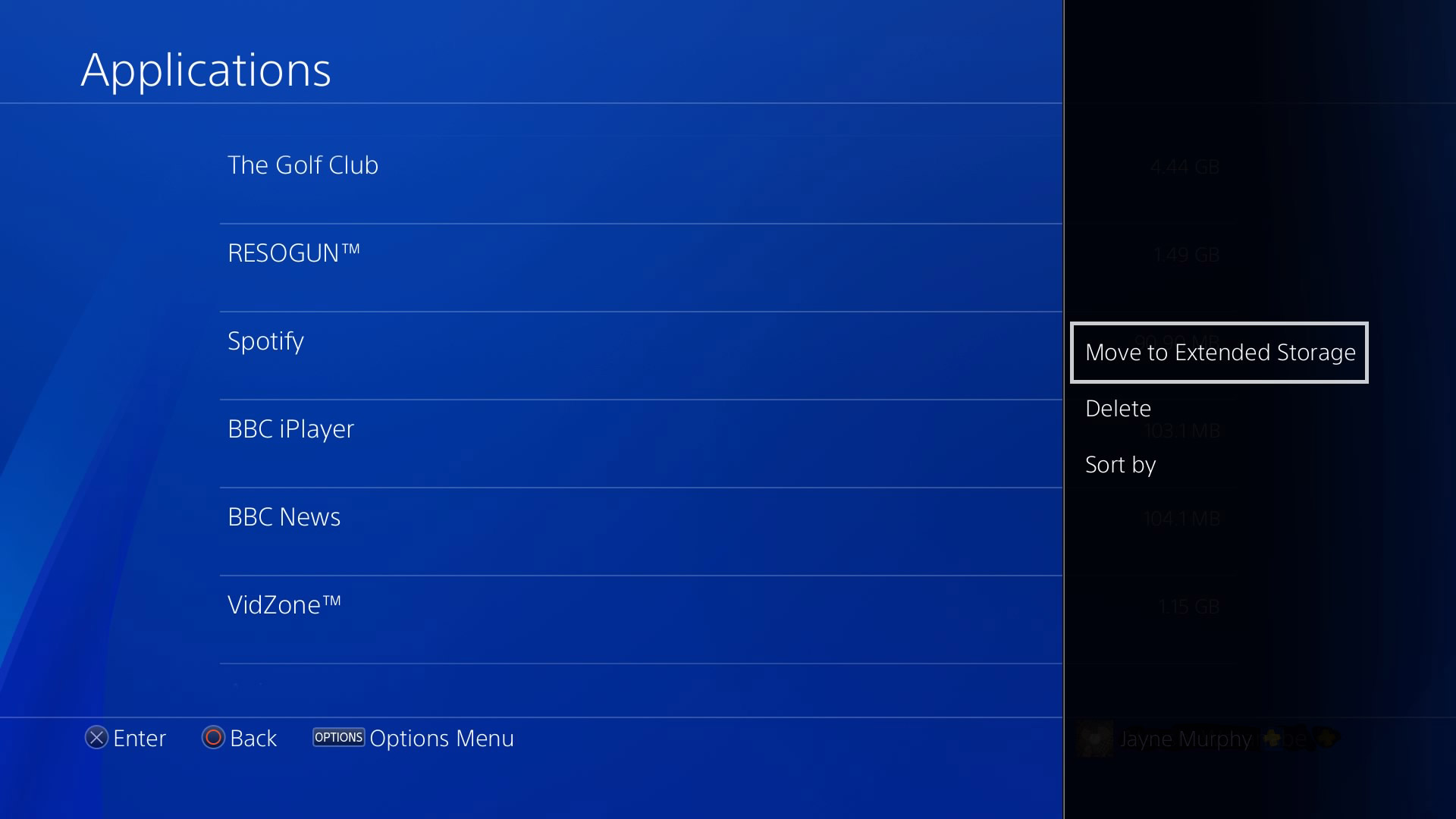
- External HDD
32506968693_42c3b532e1_o.jpg

- PS VR Improvements

If you're playing a game in PS VR, and you return to PS4's home screen, you may notice that the resolution looks lower than normal on the TV ‘Social Screen'. Following this update, you'll find that the resolution of the system screen displayed on your TV is significantly better when you're out of VR mode.

Also, the resolution of Cinematic Mode on PS VR will improve – if your PS VR screen size is set to Small or Medium, the framerate of content viewed in Cinematic Mode goes up from 90Hz to 120Hz with this update.

PS VR will now support Blu-ray 3D* discs. You will have the ability to watch them in stereoscopic 3D via your headset.

- Voice chat for Remote Play

We're adding voice chat when using Remote Play on Windows PC, Mac or an Xperia device. If you've got a gaming session planned with your friends, but you're away from your system, this update makes it seem like you're right at home. You can switch your mic on and off via the microphone icon on the Tool Bar of the Remote Play app.

- Off-console availability

We have a variety of off-console apps and features that make communication with other gamers easier, like the PlayStation App and PS Messages. We're adding an icon, shaped like a smartphone, which indicates a player is logged into PSN but away from their console

- Custom wallpaper & profile colour

Ready for a much more personal PS4 home screen? Head to Settings, then select Theme. From here, choose ‘Custom' and select any screenshot and set it as your new PS4 home screen wallpaper.

- Activity feed privacy

In addition, you can now change the privacy settings for individual posts. You can alter who sees your Activities via the same-named tab in the Sharing Your Experience section of Settings, while you can decide the level of privacy for videos, screenshots, broadcasts, PS Store and PS Music when you go to upload them. But worry not, you can also alter who gets to see that content after the post has been shared.

- Save Data Shortcut
Hover over a game title icon and press the Options button. You'll be given the choice to ‘Upload/Download Saved Data' from the the PS4's home screen that let you upload the saved data on your PS4 to PS Plus online storage and download the saved data from PS Plus online storage to your PS4 with ease.

- GIF support

Get the GIF love in 4.50, as you can now share GIFs from SHAREfactory to your Activity Feeds

And probably the most interesting feature:

- Boost mode (applicable to PlayStation 4 Pro only)

PS4 Pro gets a new feature in this update called Boost Mode. This feature has been designed to provide better performance for legacy titles that have not been patched to take advantage of the PS4 Pro's faster CPU and its faster and double-sized GPU. This can provide a noticeable frame rate boost to some games with variable frame rates, and can provide frame rate stability for games that are programmed to run at 30 Hz or 60 Hz.

Depending on the game, the increased CPU speed may also result in shorter load times. Keep in mind that Boost Mode is not guaranteed to work with all titles. Turning the setting off will allow the game to be played in a mode that replicates the standard PS4.

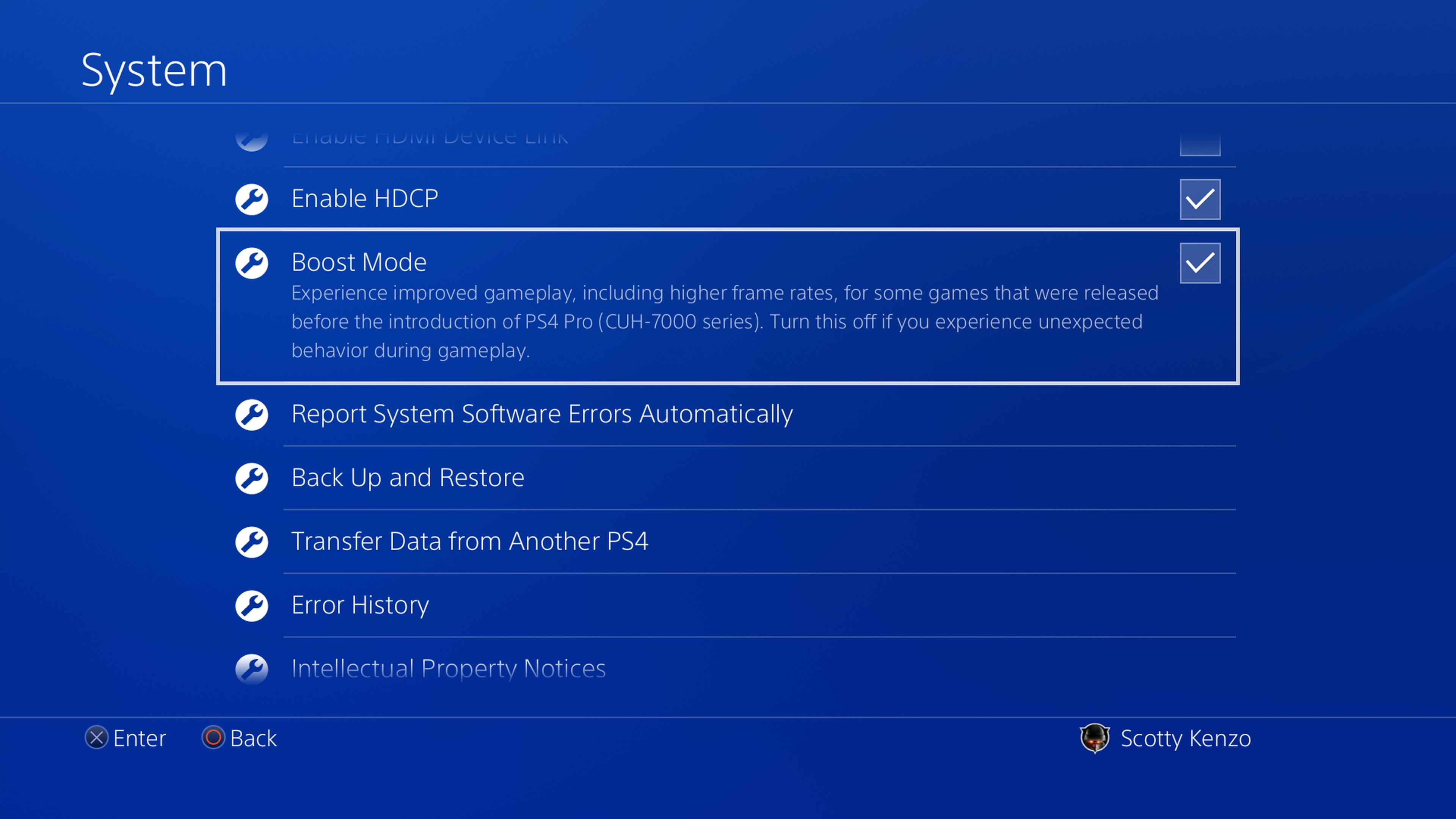
You can turn on the Boost Mode from the PS4's Settings menu. Go to ‘Settings', then ‘System', then scroll down to ‘Boost Mode' and tick the box to turn Boost Mode on.
 
http://blog.us.playstation.com/2017/03/08/ps4-system-software-update-4-50-out-tomorrow/

Improved 2D Images on PS VR
If you're playing a game in PS VR and you return to the PS4 home screen, you may notice that the resolution looks lower than normal on the TV Social Screen. Following this update, you'll find that the resolution of the system screen displayed on your TV is significantly better when you're out of VR mode.

Voice Chat for Remote Play
We're adding voice chat when using Remote Play on Windows PC, Mac or an Xperia device. This is especially useful if you've got a gaming session planned with your friends, but you're away from your system. You can switch your mic on and off via the microphone icon on the Tool Bar of the Remote Play app.

Off Console Availability
We have a variety of off-console apps and features that make communication with other gamers easier, like the PlayStation App and PS Messages. We're adding an icon, shaped like a smartphone, which indicates a player is logged into PSN but away from their system.

Boost Mode (for PlayStation 4 Pro only)
PS4 Pro gets a new feature in this update called Boost Mode. This feature has been designed to provide better performance for select legacy titles that have not been patched to take advantage of the PS4 Pro's faster CPU and its faster and double-sized GPU.

PS Messages and Communities app Updates
We're also updating the PS Messages (Android/iOS) and PS Communities (Android/iOS) apps tomorrow with a few handy features.
 
Good to see Boost Mode is mentioned as the other thread at one point stated it was missing:

PS4 Pro gets a new feature in this update called Boost Mode. This feature has been designed to provide better performance for legacy titles that have not been patched to take advantage of the PS4 Pro’s faster CPU and its faster and double-sized GPU. This can provide a noticeable frame rate boost to some games with variable frame rates, and can provide frame rate stability for games that are programmed to run at 30 Hz or 60 Hz.

Depending on the game, the increased CPU speed may also result in shorter load times. Keep in mind that Boost Mode is not guaranteed to work with all titles. Turning the setting off will allow the game to be played in a mode that replicates the standard PS4.

You can turn on the Boost Mode from the PS4’s Settings menu. Go to ‘Settings’, then ‘System’, then scroll down to ‘Boost Mode’ and tick the box to turn Boost Mode on.
 
Dumb question but do I need to consider anything when picking an external hdd?

USB 3.0 is the only requirement, afaik.
 
Nice.

I could really do with more USB slots (thanks PSVR). Does anyone have a usb hub connected to their PS4, and if so which ones are recommended?

... oh and at long last we have custom wallpapers.

OfYGY.gif
 
The external storage update is the big one, IMO. That has been a long time coming! Time to pick up a cheap USB 3.0 hard drive.
 
External storage still needs a bit of work. Games started to install reaaaally slow on the regular PS4 HDD when I used it the last time, and it seems that some people are experiencing disconnecting and always on HDDs (on rest mode).

Still, thanks to Sony for hearing players. This is quite a big update.

And don't get me started on Beast mode. The Witcher 3 is at Nintendo first party level of flawlesness now.
 
What about 3D Blu-Ray in PSVR?

- PS VR Improvements

If you’re playing a game in PS VR, and you return to PS4’s home screen, you may notice that the resolution looks lower than normal on the TV ‘Social Screen’. Following this update, you’ll find that the resolution of the system screen displayed on your TV is significantly better when you’re out of VR mode.

Also, the resolution of Cinematic Mode on PS VR will improve – if your PS VR screen size is set to Small or Medium, the framerate of content viewed in Cinematic Mode goes up from 90Hz to 120Hz with this update.

PS VR will now support Blu-ray 3D* discs. You will have the ability to watch them in stereoscopic 3D via your headset.
 
External storage still needs a bit of work. Games started to install reaaaally slow on the regular PS4 when I used it the last time, and it seems that some people are experiencing disconnecting and always on HDDs (on rest mode).

Still, thanks to Sony for hearing players. This is quite a big update.

And don't get me started on Beast mode. The Witcher 3 is at Nintendo first party level of flawlesness now.

You are on beta 4.5. Maybe it's better on the full release.
 
External storage still needs a bit of work. Games started to install reaaaally slow on the regular PS4 when I used it the last time, and it seems that some people are experiencing disconnecting and always on HDDs (on rest mode).

Still, thanks to Sony for hearing players. This is quite a big update.

And don't get me started on Beast mode. The Witcher 3 is at Nintendo first party level of flawlesness now.

Um...
 
- PS VR Improvements

If you’re playing a game in PS VR, and you return to PS4’s home screen, you may notice that the resolution looks lower than normal on the TV ‘Social Screen’. Following this update, you’ll find that the resolution of the system screen displayed on your TV is significantly better when you’re out of VR mode.

Also, the resolution of Cinematic Mode on PS VR will improve – if your PS VR screen size is set to Small or Medium, the framerate of content viewed in Cinematic Mode goes up from 90Hz to 120Hz with this update.

PS VR will now support Blu-ray 3D* discs. You will have the ability to watch them in stereoscopic 3D via your headset.

Missed it. Thanks.
 
All I really want now is the option to permanently save messages offline. It's quite irritating to have old messages randomly disappear.

I find that old messages are especially good for checking why I've added certain people to my friends list when I might not play with them that often.
 
Still waiting for that PSN name change option

I love anytime we get a major feature that has been long requested by the user base, there is always someone to chime in that they want something else. Like we are never satisfied.

That being said, I wish they would add a way to remove things from our download list.....
 
I don't know if it's impressive or frightening that I have had to "clean out the fridge" on a 1TB PS4. So many games!

Definitely can put my 4TB to good use. Thank you, Sony.
 
Top Bottom