• Hey Guest. Check out your NeoGAF Wrapped 2025 results here!

Samsung Galaxy S8 · S8+ |OT| - Available April 21, 2017

Where do you input this code?
On the dialer itself. After you input the last character it will automatically display the Color Balance screen. Click on the number 3 and it should automatically change. Combine it with some fiddling on the Screen Mode options and you should see a noticeable difference on the screen temperature and display.
 
May be because I'm on Verizon, but I just get the number can't be dialed message. Fortunately I don't have the red tint issue but I was just curious to see what it would do.
Yeah for some reason it isn't working on the Verizon variant. But for those who want to try and fix the display colors a bit go to Settings > Display > Screen Mode > Color Balance and move the red slider all the way to the left, the green around the middle and the blue all the way to the right and the white balance on the screen should be better. Maybe it will help with the pink hue around the edges.
 
May be because I'm on Verizon, but I just get the number can't be dialed message. Fortunately I don't have the red tint issue but I was just curious to see what it would do.

Verizon locks out all the sub screens that you can access via the dialer codes (they have done this on all android phones for as long as I can remember). It fucking sucks when you are trying to test out a device to make sure everything is working fine.
 
Yeah for some reason it isn't working on the Verizon variant. But for those who want to try and fix the display colors a bit go to Settings > Display > Screen Mode > Color Balance and move the red slider all the way to the left, the green around the middle and the blue all the way to the right and the white balance on the screen should be better. Maybe it will help with the pink hue around the edges.

I knew verizon would have their filthy mitts on this phone somewhere. Lol
 
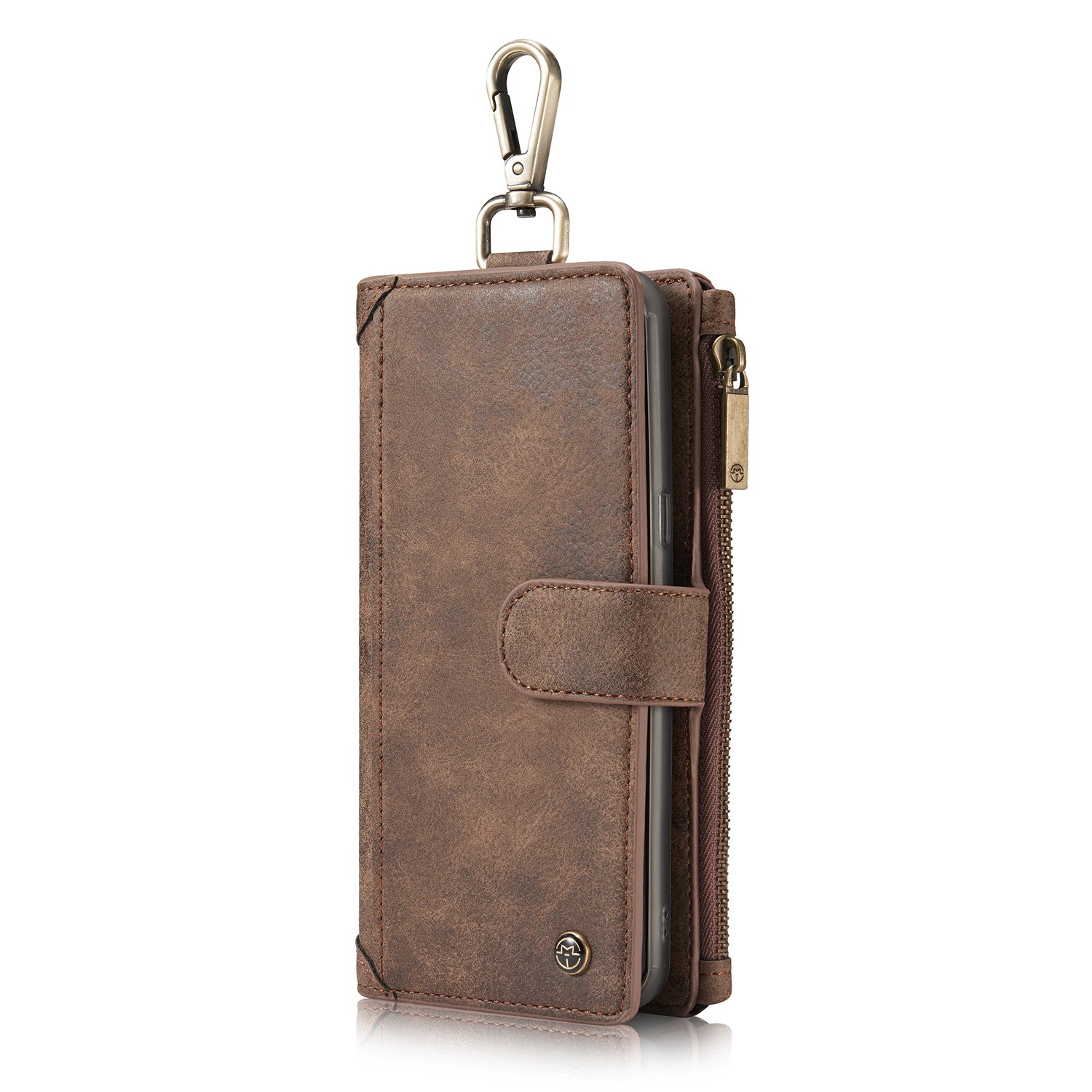
71SBbLNJnzL._SL1500_.jpg
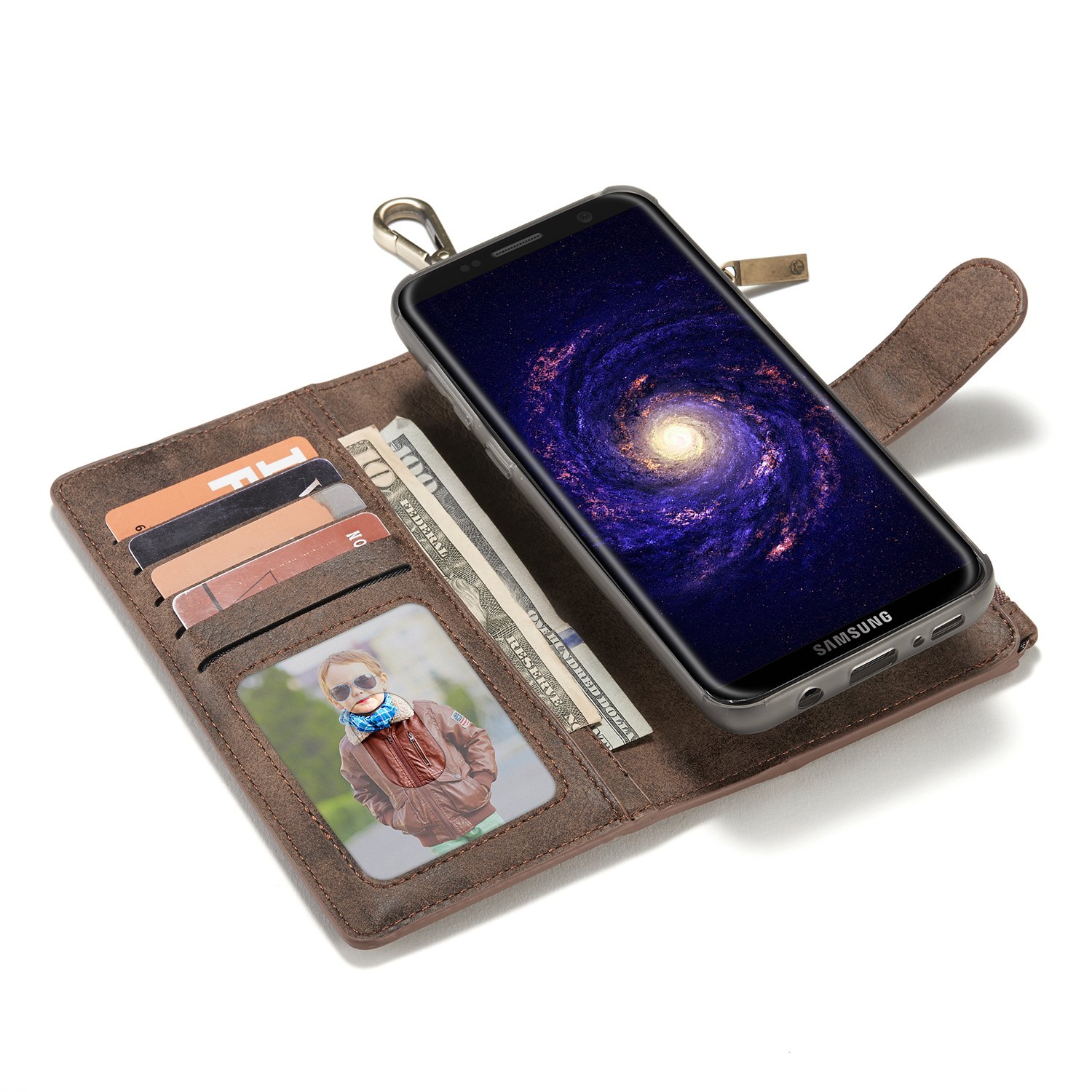
81ijg1dIazL._SL1500_.jpg
https://www.amazon.com/gp/product/B06Y2ZGNLX/?tag=neogaf0e-20

Thinking about going with this case. Does anyone have any pros and cons for this sort of case? I've usually stuck with Otterbox cases, but this one is quite sexy. Would my phone still be extremely vulnerable in this type of case?
 
So, I got the Samsung Type Cover this afternoon...
I absolutely love it.

Two minor problems
1) It's not waterproof. So that messes up that feature of the phone. I'll just have to remember to take it off if it's going to be in the water / near water.
2) It's difficult to press the Predictive Text options at the bottom of the screen. I wish they had buttons on the keyboard to select them or something.

Other than those things though... Yeah, it makes the screen smaller (same size as it would be with a keyboard up - but all the time, even if the keyboard isn't up), but the fact that it automatically adjusts the screen is fabulous (so nothing's hidden under the keyboard or anything).

But, yeah - I love it! :)
 
https://www.amazon.com/gp/product/B06Y2ZGNLX/?tag=neogaf0e-20

Thinking about going with this case. Does anyone have any pros and cons for this sort of case? I've usually stuck with Otterbox cases, but this one is quite sexy. Would my phone still be extremely vulnerable in this type of case?

I use the S-Folio case, and used a folio case with the Lumia 1520.

Pros:
-easier to grip
-stand
-protects screen

Cons:
-makes the fingerprint sensor even harder to use
-Phone doesn't lie flat when the front cover of the folio is folded back
-flap takes a while to get used to

Usually the protection on cases are due to the soft bumpers that reduce the momentum of the impact. But folio cases usually have a hard plastic cover to put the phone on.

But, one folio case protected my Lumia 1520, with only a very slightly dented corner to show https://www.amazon.com/gp/product/B00ICM1VI8/?tag=neogaf0e-20

Leather is better for falls than plastic.

how do I turn on the alarm 'sound' when I have the phone audio on vibrate?

I've never encountered a phone that does this lol.

what do you mean? I set mine to vibrate but the alarm rings at 5:30am.

My problem is that it rings at FULL volume instead of the minimum I have it set to.
 
What's the best way to transfer all my contacts from years on an iPhone to the S8?
 
https://www.amazon.com/gp/product/B06Y2ZGNLX/?tag=neogaf0e-20

Thinking about going with this case. Does anyone have any pros and cons for this sort of case? I've usually stuck with Otterbox cases, but this one is quite sexy. Would my phone still be extremely vulnerable in this type of case?

I had the Samsung wallet case with my s6 and I was surprised to see à lot more scratches on the screen. A lot of dust and particules are trapped between the covered and the screen and that increases the level of scratching you usually see.
 
1) Are you more or less likely to lose your phone than your wallet?

2) Would keeping your cards and ID with your phone make you less likely to lose it?

3) Stop losing $750 pieces of electronics.

1) Which one do you take more out of your pockets to put it somewhere else?

2) If you took the wallet out of your pocket the same amount of times you do your phone to put it somewhere else, you would lose it too

3) 10/10 for shit reason
 
What's the best way to transfer all my contacts from years on an iPhone to the S8?

Sync your contacts on your iPhone to your Google account. Then sign into the S8 with the same account. I switch between my iPhone and Android every other month and this is the most seamless way to have the contacts stay synced.
 
What's the best way to transfer all my contacts from years on an iPhone to the S8?

As nm3th said, I used Google. I exported them all as a single vCard file though and imported that into the (old) Google contacts web app - the new one specifically directed me back to the old site torun the import.
 
As nm3th said, I used Google. I exported them all as a single vCard file though and imported that into the (old) Google contacts web app - the new one specifically directed me back to the old site torun the import.

It's actually easier then that now. On the iPhone, go to Settings>Mail, Contacts, Calenders> Add account. Enter your Gmail credentials and enable Contacts sync.
 
Man, trying to get this free Gear VR has been a bigger pain than I was expecting. Just got an email saying my claim was denied and I purchased the device outside of the eligibility period. I've had the phone preordered since the 31st, so I'm wondering why it was denied. When I try to go on the website to enter for the promotion, now it's telling me my IMEI and WiFi mac address aren't eligible.
 
Man, trying to get this free Gear VR has been a bigger pain than I was expecting. Just got an email saying my claim was denied and I purchased the device outside of the eligibility period. I've had the phone preordered since the 31st, so I'm wondering why it was denied. When I try to go on the website to enter for the promotion, now it's telling me my IMEI and WiFi mac address aren't eligible.
Yeah I had those errors too. I had to do it through the Shop Samsung app. Only way it'd work.
 
1) Which one do you take more out of your pockets to put it somewhere else?

2) If you took the wallet out of your pocket the same amount of times you do your phone to put it somewhere else, you would lose it too

3) 10/10 for shit reason

Well, I guess that all I can say is that I've never lost my phone.
Or my wallet.
Or my cards, keys, etc.
Or anything I carry on my person.
 
Man, trying to get this free Gear VR has been a bigger pain than I was expecting. Just got an email saying my claim was denied and I purchased the device outside of the eligibility period. I've had the phone preordered since the 31st, so I'm wondering why it was denied. When I try to go on the website to enter for the promotion, now it's telling me my IMEI and WiFi mac address aren't eligible.

The girl at the Sprint store ordered mine but I don't know if it truly went through?

 
Hello ,

We couldn't approve your registration because:
The receipt you uploaded does not contain any retailer information.

uh, i took a screen cap of my best buy order page.

Anyone here order from best buy online have success redeeming the promotion? What did you do?


edit: trying the physical receipt they gave me when i got the box.
 
It's actually easier then that now. On the iPhone, go to Settings>Mail, Contacts, Calenders> Add account. Enter your Gmail credentials and enable Contacts sync.

Cool :-)

I wish I'd known that two days ago! Not that the vCard thing was tricky but glad hey'be made it even easier.
 
Pro: Keeping your phone, cards, and ID all together in the same place so you don't lose them.

Who the heck "loses" their phone?

People do it all the time. Not me, I treat it as a wallet or key. When I'm on vacation I'll keep taking my keys with me until a couple of days later that I don't need them.
 
how do I turn on the alarm 'sound' when I have the phone audio on vibrate?

I've never encountered a phone that does this lol.

download "audio manager" from the play store .. thats what i use. give 6 separate aspects to change independently, and profile support is also a winner. one of the first things i download on any phone
 
is there a way to unlock my phone the fingerprint only? on my 6p i would put my finger on the sensor and it would take me to the home screen. with this phone i put my finger on the sensor and nothing happens?
 
Pocket Casts bar none. It's the general GAF consensus whenever asked too

Pocket casts is the one I used on Android and iOS. Works pretty damn well. But it does cost money.

Thanks for replies. I was looking at Pocket Casts but I will get it.

is there a way to unlock my phone the fingerprint only? on my 6p i would put my finger on the sensor and it would take me to the home screen. with this phone i put my finger on the sensor and nothing happens?

I only use the fingerprint and iris scan. I wonder if it's some kind of security mechanism requiring two or more unlock methods at a time.
 
how do I turn on the alarm 'sound' when I have the phone audio on vibrate?

I've never encountered a phone that does this lol.

There's an option somewhere in the settings that allows alarms to play at volume, even when the phone is on silent or vibrate.

is there a way to unlock my phone the fingerprint only? on my 6p i would put my finger on the sensor and it would take me to the home screen. with this phone i put my finger on the sensor and nothing happens?

I'm using the fingerprint scanner to unlock my phone. When the phone is locked I just pick it up and place my finger there and it unlocks and takes me to the home screen. Make sure you don't have something else activated instead.
 
Saw the Otterbox Defender for $38 and bought it. Damn.

Now I have the Otterbox, the S-Folio and the Keyboard Cover.
 
I applied to the VR set on thursday. Samsung sent the confirmation for the that yesterday morning, with a link to buy the $99 package. I did that today.
Hmm. So it's the first 50K they confirm and not the first 50K that are actually purchase. So there's a chance that they don't even sell 50K bundles, odd.
 
Jesus... please tell me I'm just an idiot and BestBuy isn't more fucking horrible than I thought.

Just bought an S8 at full cost since they kept fucking up the contract version. Just got home, and turned on the device. It's asking for a password. I haven't set ANYTHING up - especially not a password.

Seems someone else already used this phone... but it had all the plastic and stuff still on it, so I'm hopeful I'm just dumb.
 
Top Bottom