

SolidQ
Member
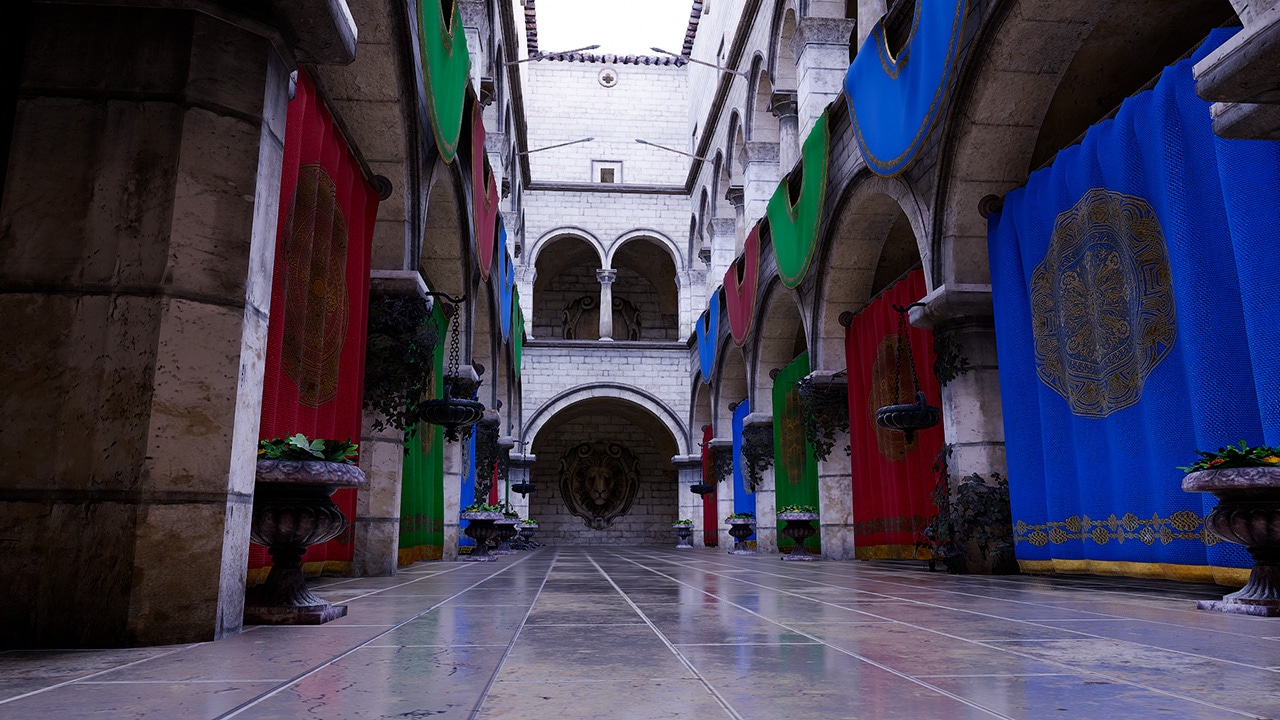
Introducing AMD GI-1.2 with multibounce indirect real-time rendering - AMD GPUOpen
AMD GI-1.2, our real-time Global Illumination solution, is available now as part of the AMD Capsaicin Framework v1.3.


Price to performance in that situation favors the 9070 ever so slightly, but it's close. Go for the 9070 XT if you can afford it, can never go wrong with more performance if it's that close.Guys hypothetical question. (because I'm regionalizing for the prices in my reality) question
9070 for 399
Vs
9070 XT for 469
Which one would you buy?

thanksPrice to performance in that situation favors the 9070 ever so slightly, but it's close. Go for the 9070 XT if you can afford it, can never go wrong with more performance if it's that close.


Both are fine. Just check couple of videos about their noise to temp ratio. Oh and xt all the waythanks
now the brand.
Sapphire (pulse) or XFX (swift)?
Both are really good.thanks
now the brand.
Sapphire (pulse) or XFX (swift)?
Both are really good.
Look at the comparison here. But the cards are very, very similar.

XT version. Easily!Guys hypothetical question. (because I'm regionalizing for the prices in my reality)
9070 for 399
Vs
9070 XT for 469
Which one would you buy?
I've got the Sapphire Pulse XT version.thanks
now the brand.
Sapphire (pulse) or XFX (swift)?

Sapphire Pure 9070XT is apparently pretty good, from what I've read it has pretty good chip binning at that too.It looks like the XFX has only one HDMI port (i really would like 2), but the Sapphire isn't available anymore at my retailer.
I'll wait until tomorrow to decide but thanks anyway.
I'm using LACT though on Linux side, tried CoreCtrl but it can't find any sensors other than GPU so I can't fully utilise it, and LACT is more intuitive for me anyways.So I remembered to start corectrl finally. With 200mzh undercolck and -120 undervolt, I'm playing the game at like 115-120w average. Lol. Right now im afk looking at a big rocky area with no enemies and its hanging at 95w.
edit: oh, crash. lol. Backing it off to -100.
I'm using LACT though on Linux side, tried CoreCtrl but it can't find any sensors other than GPU so I can't fully utilise it, and LACT is more intuitive for me anyways.
It would be awesome if CoreCtrl used something like PawnIO drivers on Linux side since FanControl + PawnIO on Windows can sense all of my fans, CPU, PWM Hub, GPU.
What specific model of 9070XT do you have? I can't go lower than -50 on my Gigabyte Gaming OC.
I just started experimenting with power limit on Linux.It's an asrock steel legend. When I reloaded the scene with the crash, I realized there is some particle effect being used in the cutscene that is causing the power usage to go nuts. 300w+. This card is overkill so I'm power-saving for now. I had that power limited before but seems I forgot to bring it down when I fiddled the setting last. I'll get big undervolts with the clocks and power trimmed down.
 Crayon
TimeSplitters Rewind
A greatest hits collection developed by the community for the classic TimeSplitters trilogywww.timesplittersrewind.com
My power limit experimenting started with this, it doesn't play nice with FPS cap on Linux at all, stutters like crazy, uncapped runs smooth but my TDP went up like crazy so I thought what if I power limit it and leave FPS uncapped and it worked, lmao.
Mangohud/ Goverlay too.How do you cap your frames? I do it through goverlay, but I'm not sure what method that is actually invoking, these days.

Space Marine 2 should have FSR4. I remember having it when I had the 9070XT and it is still on the list if games that support it.Haha so I got mine early in the year and have hardly played anything on it. Indiana Jones was my demo-purchase. So now I started space marine 2, known to be a bit heavy. I saw that on PS5 it could get a little rough. Well this card is sleepwalking through it.
If I adjust settings to what I can actually see from 7 feet away, that puts this game at a 4k upscale with the TAA set to quality. 60fps. I occasionally will catch some small element on screen with artifacts, but it's fleeting. I basically can't see it. So now the card runs about 75% and 150w playing the game. And that was without an undervolt. (forgot to turn it on).
Too bad no fsr4. I bet using the same methodology, I could play on performance mode. I'd basically have a ps6 lol. I could use optiscaler, but there's no point going through the trouble because the card is crushing the game as it is.
CachyOS install is still treating me right. Haven't had to put in much effort. Works great with the card and it's nice knowing I have the newest updates for it.
Yeah, it should.Space Marine 2 should have FSR4. I remember having it when I had the 9070XT and it is still on the list if games that support it.
Crayon
if you're using ProtonGE or ProtonEM put
Space Marine 2 should have FSR4. I remember having it when I had the 9070XT and it is still on the list if games that support it.
Yeah, it should.
PROTON_FSR4_UPGRADE=1
In launch options in Steam properties of game.
You don't have to use OptiScaler, it should work in CachyOS.
I sometimes use OptiScaler and force 1.0 resolution to use FSR4 Native AA though.

Thanks for reply. Some people seem to be experiencing issues like crashes and freezes, while gaming or watching youtube. I didn't have many problems back in the rx580 era, but my older amd (ati) experiences were always full of these kinds of issues. Are problems like this common?Pros: (in my region at least) it's priced closer to the 5070 than the 5070ti while trading blows on performance with the 5070ti. Better Raster performance.
Cons: DLSS, multi frame generation and RT performance basically. FSR 4 still has a lower IQ and a much slower (official) Implementation than DLSS,
The 9070xt performance on RT is closer to Nvidia last gen than this one (although the situation is improving),
You can't create RTX remixes with it (plus you can't use framegen on it like the Nvidia)
AMD OpenGl performance was always lacking.
AMD can pull a series 6xxx driver support/Redstone moment down the road.
5070ti is way ahead on productivity tasks.
You can consider the same for cons for 9070 non XT, plus its priced above the 5070 (but you get those 4gb of RAM, so you get a immense longevity plus over the 5070) and IMHO the 9070 is priced dangerously close to the XT to justify it.
I'm using a 780m iGPU and experience occasional crashes combining Youtube playback and gaming. It's rare where it normally works, but blows up enough to be annoying. Even when a full restart or shutdown doesn't fix it. I have to manually disable and reenable the GPU in device manager to fix it. The biggest issues I had with NVIDIA in the latest few years was for a few months I needed to disable hardware acceleration in Firefox as it was causing crashes.Thanks for reply. Some people seem to be experiencing issues like crashes and freezes, while gaming or watching youtube. I didn't have many problems back in the rx580 era, but my older amd (ati) experiences were always full of these kinds of issues. Are problems like this common?
Can someone share all the cons of this card and the non-xt version? I remember there were some issues related to DX9. Does Optiscaler work in every game? It doesn't look very practical. Fsr vs dlss differences? As far as I know, its ray tracing performance is also a bit behind the 5070ti. How are amd's drivers? Do bugs occur very often?
Grabbed my RX 9070XT at launch.Thanks for reply. Some people seem to be experiencing issues like crashes and freezes, while gaming or watching youtube. I didn't have many problems back in the rx580 era, but my older amd (ati) experiences were always full of these kinds of issues. Are problems like this common?
Oh those COD crashes... Now I remember, I had a lot of them when I was using rx580. They are still a thing huh.Then occasional Call of Duty crashes.
Then Call of duty DirectX errors. But that's mostly COD thing.

The draw is that the 5070 Ti is only 6% faster for 25% more money. Ray tracing I think it's around 17% faster. If your budget is $600 and under, then basically there's 5070 12GB or 9070/9070 XT 16GB, and 12GB is risky for 1440p+ players.Can someone share all the cons of this card and the non-xt version? I remember there were some issues related to DX9. Does Optiscaler work in every game? It doesn't look very practical. Fsr vs dlss differences? As far as I know, its ray tracing performance is also a bit behind the 5070ti. How are amd's drivers? Do bugs occur very often?

Guys hypothetical question. (because I'm regionalizing for the prices in my reality)
9070 for 399
Vs
9070 XT for 469
Which one would you buy?
Were a thing. Not a blip in 3 months I think.Oh those COD crashes... Now I remember, I had a lot of them when I was using rx580. They are still a thing huh.

FSR4 at performance or higher is fantastic in 4k.This fsr4 looks pretty damn good! Can't compare to dlss because I don't trust YouTube images and zooms. Pretty fuckin good on its own, though. It's not even the same thing as 3.1. I know it's literally not the same thing, I mean the result isn't even close. 7' from a 55inch tv, 4k via performance mode looks great. Ultra performance was quite a step down in quality, though.
From my own experience, and based on comparisons from a few reliable youtubers, FSR4 is in between DLSS CNN and Transformer in quality. Which kind of makes sense since it's a hybrid CNN and Transformer model from what I've read.This fsr4 looks pretty damn good! Can't compare to dlss because I don't trust YouTube images and zooms. Pretty fuckin good on its own, though. It's not even the same thing as 3.1. I know it's literally not the same thing, I mean the result isn't even close. 7' from a 55inch tv, 4k via performance mode looks great. Ultra performance was quite a step down in quality, though.
From my own experience, and based on comparisons from a few reliable youtubers, FSR4 is in between DLSS CNN and Transformer in quality. Which kind of makes sense since it's a hybrid CNN and Transformer model from what I've read.
I usually play 1440p(FSR4 'Performance'). It looks great and I'd rather have the frames any day. In Cyberpunk benchmark 1440p/Native "no upscaling" with Ultra+RT(Ultra) I got 55fps. With FSR4 'Performance' at the same settings it was 106fps while having way less shimmering than Native.
Cyberpunk has native FSR4, and DLSS CNN or Transformer options in the settings. It also has built-in frame gen, but for some reason I like AFMF with Quality settings.Using optiscaler to get the fsr4 on there?
Cyberpunk has native FSR4, and DLSS CNN or Transformer options in the settings. It also has built-in frame gen, but for some reason I like AFMF with Quality settings.
I play on a 1440p/165Hz monitor, and if I was chasing visuals I'd play 1440p(FSR4 'Perf'), Ultra Settings, Path Tracing, AFMF 'Quality' or built-in FSR3.1 FG. In the heavy corpo plaza area speeding on a superbike I drop to around ~110fps, otherwise it's ~120fps all the time and it looks great. Personally, I'm ok with regular RT at 'Ultra' settings. That way it's smooth asf.No shit!!! Last I checked it didn't have it but that was a long time ago. I'm going to try that out. I love the game and I wanted to go all the way through it again for the phantom liberty. I was waiting for two things. First, I want to wait long enough so that I forget most of the game lol. And I wanted to wait till I had a serious hardware upgrade over the PS5 that I played on.
I play on a 1440p/165Hz monitor, and if I was chasing visuals I'd play 1440p(FSR4 'Perf'), Ultra Settings, Path Tracing, AFMF 'Quality' or built-in FSR3.1 FG. In the heavy corpo plaza area speeding on a superbike I drop to around ~110fps, otherwise it's ~120fps all the time and it looks great. Personally, I'm ok with regular RT at 'Ultra' settings. That way it's smooth asf.
CDPR really redeemed themselves with this game. It's easily one of the best games out there with cutting edge tech, and they have it optimized for Deck, Switch 2, PC, etc..
I play on a 1440p/165Hz monitor, and if I was chasing visuals I'd play 1440p(FSR4 'Perf'), Ultra Settings, Path Tracing, AFMF 'Quality' or built-in FSR3.1 FG. In the heavy corpo plaza area speeding on a superbike I drop to around ~110fps, otherwise it's ~120fps all the time and it looks great. Personally, I'm ok with regular RT at 'Ultra' settings. That way it's smooth asf.
CDPR really redeemed themselves with this game. It's easily one of the best games out there with cutting edge tech, and they have it optimized for Deck, Switch 2, PC, etc..


 wccftech.com
The mod can be downloaded from the following link: https://github.com/optiscaler/OptiScaler. Navigate to Releases from the right-hand side and grab the latest version. Make sure not to download the source code but the actual Optiscaler.7z package itself.

Can you press f8 (keep tapping until you see a menu pop up) after a reset and choose to start windows instead of start advanced recovery?Guys help out here.
What I did
DDU the GTX 1060 driver in safe mode (entered safe mode via boot config)
Installed the new PSU
Installed the new 9070xt
Turned it on.
Video signal ok
And I'm stuck into the dreaded Recovery mode looping with a message of "not possible to connect to network"
Can you press f8 (keep tapping until you see a menu pop up) after a reset and choose to start windows instead of start advanced recovery?
Jesus...yeah that is a mess.I don't think so (I still go to recovery when mashing F8). I've already tried safe mode and it still gets me to recovery
One thing that I noted was in bios. I believe was booting with legacy/CSM mode on the old GPU. Now it's stuck on uefi, and I can't change it. (Grey selection)
The Mobo is. A b660m Mag bazooka DDR4
edit. Shit I think I found it. Rdna4 only works in UEFI! As soon as i installed the 9070xt it switch my bios to UEFI.
I have to switch to uefi before installing the new GPU. Here we go switching everything back, switching to uefi on windows then installing the GPU again...
edit 2. found a way to switch back to csm, install adrenaline. When i try to convert to UEFI,
My pc already shows in gpt partition but i can boot in uefi mode, which is necessary for resizable bar.
What a clusterfuck
I would put old gpu back, copy all the important data, passwords, or better switch to Bitwarden and synchronise all between mobile and Windows, it also synchronise all my passwords on Linux.I don't think so (I still go to recovery when mashing F8). I've already tried safe mode and it still gets me to recovery
One thing that I noted was in bios. I believe was booting with legacy/CSM mode on the old GPU. Now it's stuck on uefi, and I can't change it. (Grey selection)
The Mobo is. A b660m Mag bazooka DDR4
edit. Shit I think I found it. Rdna4 only works in UEFI! As soon as i installed the 9070xt it switch my bios to UEFI.
I have to switch to uefi before installing the new GPU. Here we go switching everything back, switching to uefi on windows then installing the GPU again...
edit 2. found a way to switch back to csm, install adrenaline. When i try to convert to UEFI,
My pc already shows in gpt partition but i can boot in uefi mode, which is necessary for resizable bar.
What a clusterfuck
