• Hey Guest. Check out your NeoGAF Wrapped 2025 results here!

NVIDIA DLSS 4.5 to feature 2nd Gen Transformer model and Dynamic 6x Frame Generation

This is kind of a shit show at the moment. Setting Nvidia App to latest version as a "set it and forget it" setting no longer seems viable.

Think I'm going to stick with Preset K (DLSS 4) for now, as I either run Quality or DLAA. L and M (DLSS 4.5) are Ultra Performance and Performance settings.

For anyone wondering what each preset does:

- Preset F (intended for Ultra Perf/DLAA modes): Will be deprecated in the next SDK cycle and should
not be used.
- Preset G (Unused): Do not use – reverts to default behavior
- Preset H (reserved): Do not use – reverts to default behavior
- Preset I (reserved): Do not use – reverts to default behavior
- Preset J: Similar to preset K. Preset J might exhibit slightly less ghosting at the cost of extra flickering.
Preset K is generally recommended over preset J
- Preset K: Default preset for DLAA/Balanced/Quality modes. Less expensive performance wise
compared to Preset L.
- Preset L: Default preset for UltraPerformance mode. Delivers a sharper, more stable image with less
ghosting than Preset J, K but are more expensive performance wise. Preset L is peak performant on
RTX 40 series GPUs and above.
- Preset M: Default preset for Performance mode. Delivers similar image quality improvements as
Preset L but closer in speed to Presets J, K. Preset M is peak performant on RTX 40 series GPUs and
above.
 
Not sure if was posted but some nice info on Dynamic MFG.

Our next question was to understand how the 240 FPS mode picked the default target FPS, whether it did so by looking at the supported display modes reported by the monitor to Windows, or if it's always default to 240 FPS even when connected to a display with lower refresh rates, such as 144 Hz or 60 Hz. NVIDIA says that since DLSS Overrides are a user-initiated feature, the user has full control. You first have to select "Dynamic" in the Frame Generation Mode section of DLSS Override, and in the Target FPS dropdown, you are presented with two choices. The "Max refresh rate" option sets the target FPS to the maximum refresh rate supported by the monitor, while the "Custom" option lets you manually specify a target FPS value.

This is a really great feature tbh for 50 series tho Im sure a lot of gaf members are anti fake frames, but this can easily keep my target framerate consistent without much of a noticeable downgrade. I doubt I'll ever need 4x-6x, but 2x-3x is fine and I wont have to keep switching between them.
 
Not sure if was posted but some nice info on Dynamic MFG.


This is a really great feature tbh for 50 series tho Im sure a lot of gaf members are anti fake frames, but this can easily keep my target framerate consistent without much of a noticeable downgrade. I doubt I'll ever need 4x-6x, but 2x-3x is fine and I wont have to keep switching between them.

Yup, I want to upgrade my monitor for >240Hz this year because of this tech. Right now at 120Hz my monitor makes MFG pretty useless.
 
Not sure if was posted but some nice info on Dynamic MFG.


This is a really great feature tbh for 50 series tho Im sure a lot of gaf members are anti fake frames, but this can easily keep my target framerate consistent without much of a noticeable downgrade. I doubt I'll ever need 4x-6x, but 2x-3x is fine and I wont have to keep switching between them.
DLSS 4.5 was kind of a bummer for us 1440p users, but im kinda excited for this one tho. I saw some videos about the new mfg and it looks like its a big improvement. 6x barely had any artifacts around HUD elements so hopefully 3x and 4x will be much better. Using dynamic mfg on my 240hz monitor should be a good time
 
Tested in Cyberpunk at max settings (PT) at 1440p with RR turned off in perf mode, huge IQ boost. Looks almost like native res to my eyes in motion, if you have Ray Reconstruction turned on, it replaces Super Resolution & any override you have with it's own presets. RR didn't get a 2nd gen update yet so preset E is the latest RR preset which is first gen based.
 
Nah, I'm sticking to 4. 4.5 I & M both are too oversharpened, its disgusting. I've gotten used to 4 preset J.

If they can get rid of the sharpening then I'm in.
 
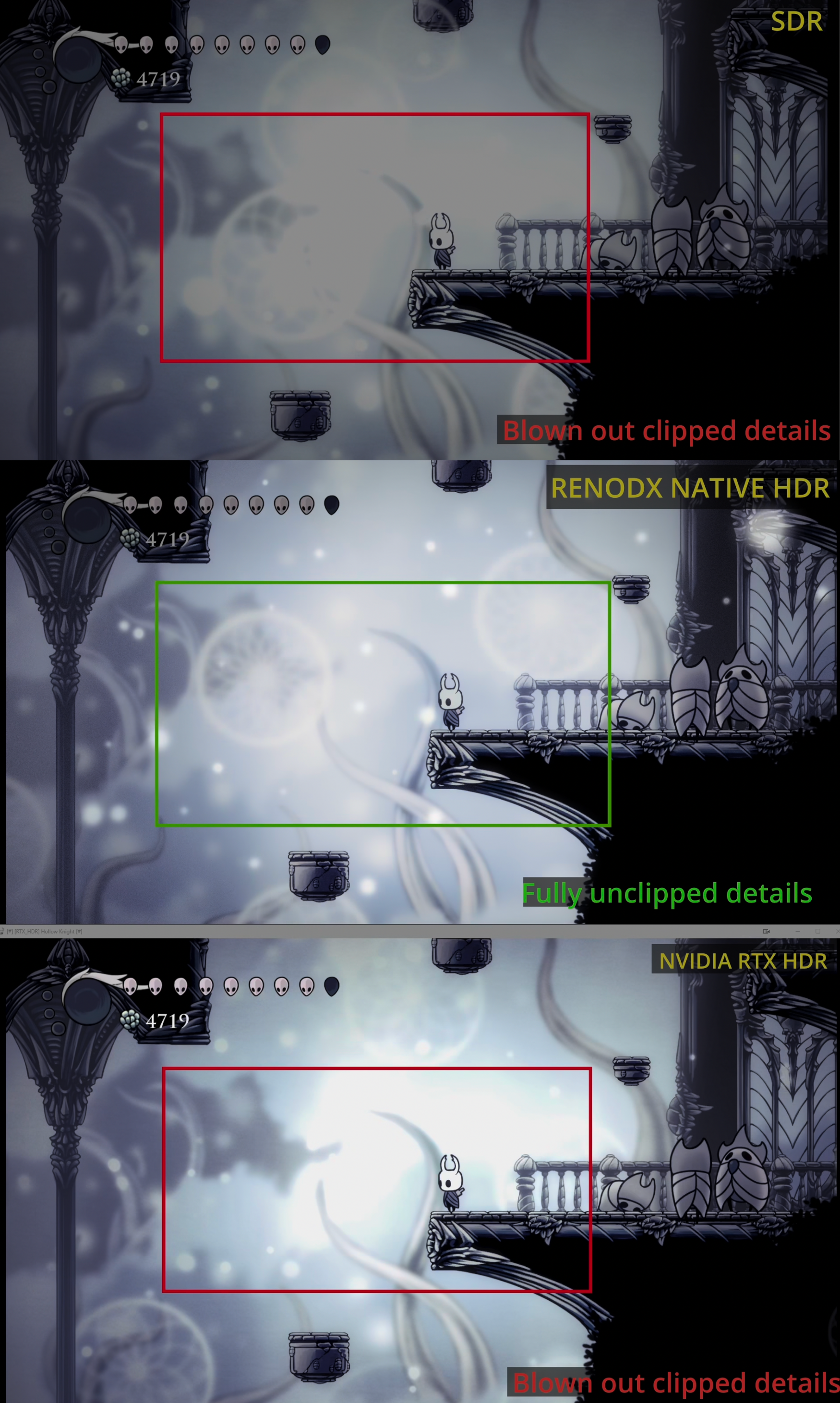
I mean, not even talking about the technical details, RTX HDR just fails far too often for me to consider it usable. It dramatically overbrightens UI elements in pretty much every instance. And while it expands the nit output of specular highlights, it doesn't actually retain any highlight detail the way real HDR does. It just makes it brighter/makes it pop more.

This is a good example of how RTX HDR just blows out highlights whereas a proper HDR implementation from RenoDX actually preserves highlight detail:

Nj1rYaoHtZ4LVQ8y.png

I don't see how this is RTX HDR's fault when the SDR source is already blown out to begin with. RTX will only attempt to add an HDR effect to the source that it's fed. Obviously RenoDX is better due to how it intercepts the whole rendering pipeline to deliver true HDR, but that mod only supports a tiny fraction of games. Compared to dogshit like Windows Auto HDR, RTX HDR is pretty damn good at what it does (and works on video sources to boot).
 
When MSAA or tessellation launched, the developers didn't come back a year later to say 'hey, here's MSAA 2.0 - it looks better but your old GPU now runs 20% slower'. Most importantly, MSAA, anisotropic filtering and such weren't secretive AI black box things. DLSS, on the other hand, isn't something so open. It gets updated with no clear indication of whether the IQ improvements are caused by the same thing that affects the performance negatively. Let's assume for a brief moment that they're lying to us, putting both 'good' and 'bad' in those updates deliberately - wouldn't it be a planned obsolescence? I hope I'm wrong, I really hope I'm indeed just a clown wearing a tinfoil hat, but there's a possibility that soon we'll all be on a treadmill where 'better DLSS quality' is just code for 'give them carrot, but don't forget to slap them with a stick'.
"To the best of our knowledge, Nvidia's 8800 GTX was the first GPU to support 8x MSAA and looking at an example from back in the day - The Elder Scrolls: Oblivion - it lost around 35 percent of its performance running with 8x MSAA. That's significantly but nowhere near the same as our RTX 3070 Crysis 3 example, which lost 90 percent of its throughput"

Like 8x MSAA back in the day, users are not forced to use the latest DLSS models. And even if they use the wrong model out of ignorance, they can still simply lower the DLSS preset to get the performance back, with similar or better image quality.
 
As someone else already mentioned, RTX HDR is for simulating HDR in games that don't support it natively. For example, Metaphor: ReFantazio, Black Myth: Wukong, Clair Obscur: Expedition 33 look much better using RTX HDR over the original SDR image. It's much better than Windows 11 built-in AutoHDR since it actually uses the correct gamma curve. Of course, the introduction of tools like RenoDX allow for a much more accurate attempt of what an official native HDR implementation would achieve, but it does require for some manual tweaking or game-specific profiles to be made available whereas RTX HDR is a fully automatic process. So, I tend to use RTX HDR as a stop-gap solution until something better comes along with RenoDX. However, I wouldn't choose either over native HDR support if the game ships with it.

The windows HDR calibration tool is just for configuring HDR to match your display specs (peak brightness - maxCLL, black levels - minCLL, etc.).


One problem that is especially annoying is some games shipping with black-level raise in their HDR implementation ex: Cyberpunk 2077 and Hogwarts Legacy. Meaning they don't allow the HDR to achieve true blacks which is especially noticeable on an OLED since the pixels should be completely turned off. For these, I would first resort to finding a ReShade profile to address this, but if the problem isn't easily resolved that I might resort to using "simulated HDR" over native HDR. This underappreciated (and frankly, entertaining) channel offers some insight how you can use ReShade to fix "broken" HDR implementations:

This YouTuber, Ariel, can't understand that artists (developers, or filmmakers) use color grading to enhance mood, by leveraging color psychology. Color grading in sci-fi genre uses palettes of cold blues, greens, and grays to create a futuristic mood. These palettes contrast with warm tones to evoke nostalgia or humanity. Sometimes, neon colors are used to create a cyberpunk aesthetic. What this youtuber Ariel want's to do is to make every game look as close to realife as possible according to his own taste.

HDR works very well in Cyberpunk on my OLED TV without any reshade tweaks. This game has true blacks, very bright highlights, and a wide color gamut. Personally, I like the color grading in this game as it is and don't want to make it more realistic.
 
Last edited:
anyone got the nvidia app 11.0.6 beta working? Mine just just show spinnign circle for a few second and says there is a problem launching the APP.
[h3][/h3]
 
I don't see how this is RTX HDR's fault when the SDR source is already blown out to begin with. RTX will only attempt to add an HDR effect to the source that it's fed. Obviously RenoDX is better due to how it intercepts the whole rendering pipeline to deliver true HDR, but that mod only supports a tiny fraction of games. Compared to dogshit like Windows Auto HDR, RTX HDR is pretty damn good at what it does (and works on video sources to boot).

I don't care where the fault lies lol, how weird. I care about the end result, which is blown out highlights and eye searing GUIs because the underlying tech is unable to accurately convert SDR into a real HDR image.

If you like it, great! Keep using it. It's nothing personal.

I swear there's a defense force for literally everything nowadays.
 
Last edited:
if you have Ray Reconstruction turned on, it replaces Super Resolution & any override you have with it's own presets.

Yep, after a lot of headaches trying to figure out why the hell I couldn't apply the M preset, I found out RR was interfering.

For now, I'm going to skip DLSS 4.5. RR is essential if you're playing with path tracing enabled, which is my case in Cyberpunk. Maybe on the 13th, when Nvidia releases official DLSS 4.5 support through a new driver, they'll also release a new version of RR that works alongside DLSS 4.5? I really hope so.
 
I don't care where the fault lies lol, how weird. I care about the end result, which is blown out highlights and eye searing GUIs because the underlying tech is unable to accurately convert SDR into a real HDR image.

If you like it, great! Keep using it. It's nothing personal.

I swear there's a defense force for literally everything nowadays.

I'm explaining to you that it's not blowing out anything in your example because the SDR source it's using is already clipped (as your screenshots even caption). The RTX HDR image is brighter, yes, but there isn't any additional loss of detail compared to SDR - in the area you highlighted it's a mass of white even in SDR, so there wasn't any detail there to begin with. How else is the technology meant to interpret that? If we feed RTX HDR shit then we can't be surprised when we get shit out the other end.

And I don't see how that explanation constitutes a defence force or making it personal. You're living up to your tag.
 
Last edited:
Why the fuck would anyone use fake hdr when even the games that actually support hdr usually do a shit job with it on pc?? (Like literally there is a famous yt channel that only does hdr settings for games and 9 times out of 10 hdr suck balls)

I can't even imagine how bad fake hdr is in term of accuracy...

I think it's wonderful, and it's one of the reasons I prefer Nvidia GPUs. RTX HDR transforms games that don't support HDR, especially older ones. On the LG OLED C4, it's become an indispensable feature.
 
I don't care where the fault lies lol, how weird. I care about the end result, which is blown out highlights and eye searing GUIs because the underlying tech is unable to accurately convert SDR into a real HDR image.

If you like it, great! Keep using it. It's nothing personal.

I swear there's a defense force for literally everything nowadays.
I think a lot of people still think HDR is all about how bright the image can get. They probably use their TV or monitor's vivid preset too.

RTX/Auto HDR should only ever be used as a very last resort if there isn't native HDR or a Renodx mod available. Personally though, I'd rather just use SDR than fake HDR.
 
Last edited:
This YouTuber, Ariel, can't understand that artists (developers, or filmmakers) use color grading to enhance mood, by leveraging color psychology. Color grading in sci-fi genre uses palettes of cold blues, greens, and grays to create a futuristic mood. These palettes contrast with warm tones to evoke nostalgia or humanity. Sometimes, neon colors are used to create a cyberpunk aesthetic. What this youtuber Ariel want's to do is to make every game look as close to realife as possible according to his own taste.

HDR works very well in Cyberpunk on my OLED TV without any reshade tweaks. This game has true blacks, very bright highlights, and a wide color gamut. Personally, I like the color grading in this game as it is and don't want to make it more realistic.
Black-level raise was fixed on Cyberpunk? I haven't played since Phantom Liberty launched, but I remember it still being an issue even then. I agree with what you're saying about artist intent; was mostly using the video as an example of how you can fix "broken" implementations with some ReShade tweaks.
 
anyone got the nvidia app 11.0.6 beta working? Mine just just show spinnign circle for a few second and says there is a problem launching the APP.
[h3][/h3]
11.0.5.420 (non beta) here, and all games where I have "use latest" on super resolution, they get Preset M. Didn't need to update mu Client App to use beta branch.
 
I'm explaining to you that it's not blowing out anything in your example because the SDR source it's using is already clipped (as your screenshots even caption). The RTX HDR image is brighter, yes, but there isn't any additional loss of detail compared to SDR - in the area you highlighted it's a mass of white even in SDR, so there wasn't any detail there to begin with. How else is the technology meant to interpret that? If we feed RTX HDR shit then we can't be surprised when we get shit out the other end.

That's my whole point though. RTX HDR will make specular highlights brighter, but it won't actually reveal any additional detail the way a true HDR image should vs SDR.

RTX HDR is just SDR with brighter highlights.
 
11.0.5.420 (non beta) here, and all games where I have "use latest" on super resolution, they get Preset M. Didn't need to update mu Client App to use beta branch.
I got it to work now, but preset M doesn't show up for me on 11.0.5.420, have to opt in for beta.
 
I think a lot of people still think HDR is all about how bright the image can get. They probably use their TV or monitor's vivid preset too.

RTX/Auto HDR should only ever be used as a very last resort if there isn't native HDR or a Renodx mod available. Personally though, I'd rather just use SDR than fake HDR.

Yeah I mean to each their own but I agree with you. I greatly prefer SDR over Auto HDR or RTX HDR.
 
I got it to work now, but preset M doesn't show up for me on 11.0.5.420, have to opt in for beta.
Preset L or M do not show up in the non beta so you can "pick between them" but choosing "latest" makes it use Preset M when you're in a game, even on 11.0.5.420 (or at least it do for me)
 
Tested in Cyberpunk at max settings (PT) at 1440p with RR turned off in perf mode, huge IQ boost. Looks almost like native res to my eyes in motion, if you have Ray Reconstruction turned on, it replaces Super Resolution & any override you have with it's own presets. RR didn't get a 2nd gen update yet so preset E is the latest RR preset which is first gen based.
I noticed this as well. That's why the game switched to the D preset even when I forced the M preset.

However, the latest 310.5 DLL files still improve the image quality significantly on my PC, even when DLSS overlay the D preset is used. With RR turned on, the image looks slightly softer with standard DLSS Q. However, with an 88% resolution scale, sharpness looks superb at 1440p, and the framerate with Ultra RT is still very good (65-75 fps without FG and 120 fps with FG).
 
Last edited:
Yeah I mean to each their own but I agree with you. I greatly prefer SDR over Auto HDR or RTX HDR.
In some games, such as MGS3 Delta, I found that RTX HDR looked better. However, most of the time, it's the other way around on my OLED monitor and SDR looks better to me, especially at 400 nits, or even peak 1000 (some people might even mistake that for real HDR, that's how good SDR looks on my monitor). RTX HDR creates stronger contrast in games than SDR, but certain scenes can sometimes look just fake. Also, brighter colors appear washed out compared to SDR.
 
Last edited:
It's an actual fucking scam:

Step 1: initial DLSS Buzzword 4.0 release. Hidden truth: it's botched deliberately, with some IQ downsides baked in.
Step 2: sell hardware that supports the initial release well.
Step 3: announce an 'improved' Buzzword 4.5 version of it. "It's for the better": the performance is 1% to 5% worse, but the customers won't mind this because IQ is 'improved', wink-wink.
Step 4: introduce new hardware that supports DLSS Buzzword 5.0: the performance is 5% to 10% worse compared to 4.5, but holy shit the pixels now dance or something, it's +9999% image quality!
Step 5: collect huge margins because the PC gamer Stans and Joes won't even look at RTX Basic_Crap anymore, since that 10% drop makes it inconvenient, and oh boy do they have a solution for this little problem: RTX Super_Duper.

Tommy Chong Weed GIF by Paramount Movies
 
Black-level raise was fixed on Cyberpunk? I haven't played since Phantom Liberty launched, but I remember it still being an issue even then. I agree with what you're saying about artist intent; was mostly using the video as an example of how you can fix "broken" implementations with some ReShade tweaks.

Yeah, raised black level was never fixed - it's atrocious on OLED. Reno mod looks amazing in CP.
 
Black-level raise was fixed on Cyberpunk? I haven't played since Phantom Liberty launched, but I remember it still being an issue even then. I agree with what you're saying about artist intent; was mostly using the video as an example of how you can fix "broken" implementations with some ReShade tweaks.
CDPR will not "fix" their artistic intention. Cyberpunk has intentional black floor raise in many areas (in both SDR and HDR, it's not HDR fault as this youtuber Ariel thinks). However, blacks aren't raised everywhere. If you decrease the black floor globally with simple Reshade tweaks, you'll have good blacks in some locations (those with lifted blacks / shadows) and crushed blacks in other places where blacks were at the correct level before. Only Reshade mods that modify the in-game shaders and tone mapper for each location can avoid crushed blacks in all locations.

Cronos had lifted black levels to an extreme degree (even compared to Cyberpunk), so I had an LCD-like image (gray blacks) in this game on my OLED. One modder addressed that issue, but he explained that it wasn't as simple as using basic Reshade tweaks. He had to modify the in-game shaders and adjust how the game's tone mapper behaves in different situations. As a result, Cronos with the black floor mod now has perfect blacks and fully visible shadow details. I don't know if there are similar mods for Cyberpunk because I liked the color grading in this game and never looked for ways to adjust it. On my OLED, the blacks in this game are lifted just a little bit in the nightclubs, but not to the point to annoy me (unlike Cronos) and I can see that color grading serves it's purpose there. For example, the Pyramid Nightclub in the DLC is so dimly lit that if CDPR wanted realistic color grading, I would probably need a flashlight to see anything there, especially with PT enabled. However, thanks to color grading this game use, I can navigate this nightclub without a flashlight because shadow details are clearly visible. I might look for a black level fix for this game just to see what the nightclub location looks like with inky blacks. However, I expect it will break the gameplay in this location.
 
Last edited:
The fact that Ray Reconstruction forces 4.5 override "off" is a deal breaker right now, for the heavy path tracing games that use RR like CP2077, Indiana Jones and Half-Life 2 RTX. RR is really a must have for those games at that level of ray tracing. Really looking forward to them bringing RR in line with 4.5.

The Nvidia overlay will show SR OVR "Inactive" when trying to override 4.5 SR on a game currently using RR, and will then show "Preset M" after you toggle off RR. That is at least a nice way to sanity check what is actually going on and why.
 
Last edited:
The reason why HDR sucks for many PC gamers is because y'all using monitors not TVs.
Nah, i've been using tv as monitor since forever.

Most games just have inaccurate hdr to begin with because devs are lazy or don't give 2 fucks about it, it is like audio design, very few devs actually care about precise sound design, most games have busted audio design.

People make tests to check this stuff, it is something you can check with the correct equipmemt, it's not just tale from ass.

You can try to play with the settings to adjust something but if the hdr is inaccurate, it's like putting lipstick on a pig if you ask me.
 
Last edited:
The reason why HDR sucks for many PC gamers is because y'all using monitors not TVs.
It might actually work on WOLEDs because these TVs have crushed blacks due to white subpixel. LG was forced to hide the noise by crushing near-black details and crushed near-black details can work as an advantage in a game with lifted blacks.

Some WOLED TVs offer options to adjust raised blacks with simple settings tweaks.

 
Last edited:
Man, DLSS 4.5 Quality @ 4K is just stupidly good looking. Looks significantly better than DLAA 4.0 did and is way more performant.


Quick shot of Ratchet & Clank:

5TME4RqokCReyxbn.png
 
Last edited:
In some games, such as MGS3 Delta, I found that RTX HDR looked better. However, most of the time, it's the other way around on my OLED monitor and SDR looks better to me, especially at 400 nits, or even peak 1000 (some people might even mistake that for real HDR). RTX HDR creates stronger contrast in games than SDR, but certain scenes can sometimes look just fake. Also, brighter colors appear washed out compared to SDR.

Yeah, I don't blame anyone for using RTX HDR if they like it. It definitely makes the image pop more vs SDR. But I just don't like it because it's too gaudy/artificial for my tastes.


Also, MGS Delta has RenoDX support and the HDR looks magnificent with that method.
 
Yeah, I don't blame anyone for using RTX HDR if they like it. It definitely makes the image pop more vs SDR. But I just don't like it because it's too gaudy/artificial for my tastes.


Also, MGS Delta has RenoDX support and the HDR looks magnificent with that method.
Is this renoDX for this game a free mod or locked behind a paywall?

HDR implementation in MGS3 Delta wasn't very good. I had dim image and washed-out blacks. RTX HDR looked much better, but it was costly. I think I lost 10 fps, if not more.
 
Last edited:
Is this renoDX for this game a free mod or locked behind a paywall?

HDR implementation in MGS3 Delta wasn't very good. I had dim image and washed-out blacks. RTX HDR looked much better, but it was costly. I think I lost 10 fps, if not more.

Reno is fucking great, I used it in E33, C2077 and SHf and it fixes all the issues (E33 don't have HDR at all).
 
Last edited:
Yeah, I don't blame anyone for using RTX HDR if they like it. It definitely makes the image pop more vs SDR. But I just don't like it because it's too gaudy/artificial for my tastes.


Also, MGS Delta has RenoDX support and the HDR looks magnificent with that method.

Ultimately, what matters is having an image you like, regardless of its accuracy.
 
Man, DLSS 4.5 Quality @ 4K is just stupidly good looking. Looks significantly better than DLAA 4.0 did and is way more performant.


Quick shot of Ratchet & Clank:

5TME4RqokCReyxbn.png
I played though the game with a GTX1080 and an i5 15600k. Not as purdy looking, but it was actually pretty enjoyable at 60fps. With the exception of Torren IV, the planet with the giant robot where frames dropped a lot in places. Like Returnal it's a showcase title for the Dualsense.
I should do the new game plus on my 5080/9800x3D.

F6F5E6E6B3C72569E99EAFD8FDF129F263325BA7
 
I played though the game with a GTX1080 and an i5 15600k. Not as purdy looking, but it was actually pretty enjoyable at 60fps. With the exception of Torren IV, the planet with the giant robot where frames dropped a lot in places. Like Returnal it's a showcase title for the Dualsense.
I should do the new game plus on my 5080/9800x3D.

F6F5E6E6B3C72569E99EAFD8FDF129F263325BA7
I also played Rift Apart on my old GTX 1080 and ancient i7 3770K, and I couldn't believe how well a PS5 game could run on that PC. I had 50-60 fps at 1440p with FSR Quality and high settings. On VRR monitor that was perfectly playable to me.
 
There's no direct download link for the MGSDelta preset. They just sent me to Discord. If I register a Discord account, there will be download link there?

Instead of the Discord link, click where it says "Snapshot". And then once you have the file, just follow the installation steps on the top of the page.
 
What about Balanced and Performance? Are they as good as Quality on 4.0?
I honestly can't answer that with 100% certainty, but when 4.0 was released, there were reports saying that performance mode was just as good as last gens quality mode. I'm not sure if it will translate to 4.5, but I have seen some videos and screenshot comparisons that seem to point to the new version of performance / ultra performance being as good, if not better, picture wise, but costing a bit more performance / frames.

Hopefully come release on the 13th (I think) the driver will be polished and the results will be more obvious.
 
The reason why HDR sucks for many PC gamers is because y'all using monitors not TVs.
It looks amazing on even my cheap 200 dollar 1440 24 inch monitor at least on Marvel Rivals and FFVII Rebirth. Tested with both HDR on and off and HDR made them look a lot better, both games on max settings.
 
Last edited:


I think this is the best dlss 4.5 comparison . It's showing what really mattered . Watch at 4k .

That's pretty cool cause the other video I saw yesterday was having 4.5 showing more flickering compared to 4.0 but this one you showed is the other way around.

I hope these things would be great on 1440p too with a 5070ti.
 
nVidia:

"Were sorry our pivot to AI is costing you arm and a leg but here is DLSS 4.5 to make up for it!"
"Now go fuck yourself"
 
Top Bottom