Downsampling for AMD cards is now possible

Wow, I didn't know I posted in this thread. Pretty ironic since I ended up using this tool as GTA4 doesn't allow any sort of external AA beside morphological.

For those who are still having troubles, this is exactly what I did to get it to work. I have the cheapest 1080p acer monitor you can buy.

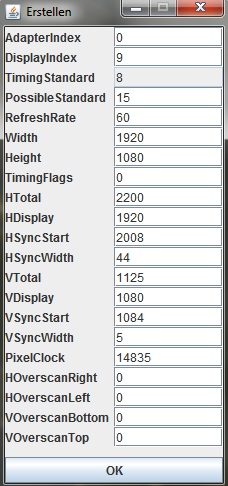
Run the jar, and click Erstellen. You will see some cmd prompts flash and you should get another window that is populated with numbers to pop up.

Change the width and height to 2560 and 1440 if you have 1080p, otherwise use 2600x1600 if you are 16:10.

Click ok, and you should hear the windows 'new device' sound.

Make sure GPU scaling is off in catalyst.
Make sure you have 'hide modes' deselected in your monitors properties (If this setting is incorrect, you will still see the resolutions, it just will not change to them correctly.)

Don't change your desktop resolution.

Change your in-game resolution to the new higher resolution.
 
The hell... I formatted my PC now for some reason I can't get all the resolutions to show up on the Windows menu. I installed the same .inf file as before and nothing -.-
 
Have you uncheked that "show all resolution" thingy?

Yes ofc. I even tried manually editing the original inf file for my monitor and no dice. Really weird.


Ok, I used an inf for some Samsung monitor and now it works. I just hope it doesn't cause problems later on.


Can't understand why the same file that worked before doesn't work now.
 
What do you mean by display index?

The number you have to type in so I can set the resolution for my other monitor. It only makes the resolutions available for my primary monitor.
Or maybe it's adapter index?

res14oxhj.jpg
 
The number you have to type in so I can set the resolution for my other monitor. It only makes the resolutions available for my primary monitor.
Or maybe it's adapter index?

http://www.abload.de/img/res14oxhj.jpg

Have you tried Guru's FAQ:

FAQ

I can't get the AMDDownsamplingGui utility to run.
You need 'Java'. Download it from here: http://java.com/en/

I can't get my display to work with anything higher than 2560x1440 or 2560x1600.
For most display devices this may not be possible. A list containing display devices that can go higher with confirmed maximum resolutions can be found at the top of this page. (Thanks to WhiteLighting for spotting these.)

I can not change the tick box 'hide modes that this monitor can not display' as it is greyed out in advanced display properties.
You can try one of the custom monitor inf files posted in the guide. This has worked for most. (Thanks to teleguy for spotting these.)

After changing the display resolution for my HDMI display most colours are darker or otherwise not correct.
The display may have switched to RGB limited when using a custom resolution. Changing to 'non standard' in the HDMI options should make the display run at full RGB. (Thanks to Derko1 for pointing this out.)

For some reason this is only allowing me to add the new resolution to the right monitor, not my middle (primary) one. Any ideas?
Apply it for each monitor by making the one you are using the primary and disabling the second; then apply the new settings from the single enabled display. This is what I had to do to get it to wok for my HDTV while my LCD was connected. There might be another way to do this by altering the display Index number at the top of the utility, I did not however try this.

Does the downsampling still work if I choose the custom resolution in windows and in-game?
It should work fine whether you use the custom resolution from windows and games or only in games. I would recommend just using it in games as the much higher resolution will probably make it difficult to navigate the desktop.

Will using this utility result in increased cpu usage for heavily cpu bound games like Skyrim?
Actually, running at a higher 'display' resolution should have very little effect on cpu usage or, more likely, reduce it slightly. Display resolution is not directly linked to CPU usage. Instead, a higher or lower display resolution increases or reduces GPU usage, respectively. All other things being equal, a higher GPU load means less data required from the CPU and therefore lower CPU usage.

In the specific case of Skyrim, the shadows, A.I, water and other physics are CPU based so the CPU is indeed quite important, however running the game at a higher resolution will not change the number of calculations for any of these as the CPU based (internal) shadow resolution does not change, neither will the water/physics calculations increase with resolution. What will change is that the GPU will be busier rendering everything at a higher resolution and therefore will refer to the CPU for data less often.

How much performance will I lose when using downsampling?
This will depend entirely on the game in question. In most cases the performance impact will be proportional to the increase in resolution or total number of pixels, however graphics card memory may also need to be considered. Overall this method should provide image quality comparable to full screen antialiasing but with far less compatibility issues and in many cases higher performance. The downside is that in some cases game menus may become harder to read, fortunately many games (for e.g. Arma 2) allow you to increase the size of the UI and in some it auto-adjusts (for e.g. Need for Speed: The Run).

If not, I suppose you could try entering 1 or 2, since it detects the primary as 0. But try it in the Adapter Index instead of the Display Index.

edit:
Thinking about it, and looking at Windows Settings, Adapter is the Videocard so I guess the one you should be changing is Display... I would try between 0 and 9 (or maybe 10) since from what I'm reading 10 is the maximum Windows 7 support. If you have more then the GPU vendor's driver should handle it, in this case AMD's Catalyst.
 
Glad this was bumped, I have a minor issue. I can downsample from 2560x1440 to 1080p fine, it just doesn't work in many games. But I get major issues when I try 2880x1620 - all the games show 1/4 of the screen and sometimes I just get a black screen. I've only edited the two fields shown in the instructions - do I have to edit other stuff for higher resolutions?
 
Alright, due to the "hide resolutions" option being greyed out I had to resort to using a custom inf to try and get the fix working. Only problem is, I have no idea where the file is supposed to go. Anyone have any ideas where I'm supposed to drop this thing?
 
Just took way longer than expected to get this working for Dishonored (had to install custom monitor drivers, etc). Couldn't really find any specifics about AA with this game for ATI cards, so I game this a shot and it's undoubtedly the best option (for NVIDIA cards, there's some debating what looks best and has the best performance hit).

Makes the Steam overlay look awfully silly, too. Gotta say, sort of a poor show that it took this much work (a German-only .jar, eh?) to get functioning when SGSSAA looks so good on NVIDIA with no extra trouble needing. But whatever, it blows the default options out of the water especially when considering performance. Ultimately worth it (right click->open in new tab for full size):
 
If you can afford the performance hit, you can force SSAA through your drivers. It's super easy with UE3 games. I prefer using RadeonPro, as CCC is still a piece of shit.
 
If you can afford the performance hit, you can force SSAA through your drivers. It's super easy with UE3 games. I prefer using RadeonPro, as CCC is still a piece of shit.
I'm able to use 2xSSAA and downsampling from 2560x1440 and still get around 60fps in UE3 games.
 
I'm able to use 2xSSAA and downsampling from 2560x1440 and still get around 60fps in UE3 games.
What do you have? That's amazing.

2xSSAA from CCC works fine but doesn't look nearly as good as downsampling. I can't get a solid 60fps at that downsampled res, sadly, but it's totally playable and looks amazing.
 
What do you have? That's amazing.

2xSSAA from CCC works fine but doesn't look nearly as good as downsampling. I can't get a solid 60fps at that downsampled res, sadly, but it's totally playable and looks amazing.
Two 5850s. More of a sign of how long this console gen is than anything. This shot had a framerate of 51.4 (I cropped out the framerate counter and resized it to 1080p):

http://www.abload.de/img/chivalrymedievalwarfanka8q.jpg

Original shot:

http://www.abload.de/img/chivalrymedievalfull1zypj7.jpg
 
I'm pretty certain I know the answer is a resounding "no," but there's no compatible 16:9 resolution between 1080p and 1440p, right?
 
Sure there is - there's just no standard between the two. You can practically use any resolution with the 16:9-ratio. Fore example, 1936x1089, 1952x1098 and so on.
...why didn't it occur to me to just divide according to that ratio? Thank you.

Has anyone had any experience with these non-standard resolutions? I'm trying to take a little less of a performance hit than I do at 1440p but still bludgeon the in-game AA to death.
 
When I click on the link to download AMDdownsamplingGUI, it says the file has been removed, anywhere else I can download this?
 
This could actually be very useful for me for capturing 1080p video. My "monitor" is my HD TV and therefore I can't have a higher resolution normally, and it's a PITA to try and capture 1080p in fullscreen. Thanks for this.
 
When i try to run skyrim at 1440p it says failed to initialize renderer. :/

Bumping an oldie, but did you resolve this? Is that the only game you've tried at 1440p, because it might be your monitor can't support the extended resolution bump at certain timings. I'm using it successfully in BF3 and FC3 now, but haven't tried Skyrim.
 
Bumping an oldie, but did you resolve this? Is that the only game you've tried at 1440p, because it might be your monitor can't support the extended resolution bump at certain timings. I'm using it successfully in BF3 and FC3 now, but haven't tried Skyrim.

No games work. When i try to change the in game res to anything custom above 1080p, It fails to render after several seconds of black screen and flickering, before reverting back to 1080p.

Not really fussed though. Downsampling doesn't have any significant effect from 1440p IMO, and I don't have the grunt to downsample from something like 2160p while retaining at least 40fps (Crossfire HD 7850 @ 1GHZ).

Edit: Might be my monitor, it's 4 years old
 
Anyone can help?

When I select the 2560x1440 resolution and click ok on the AMD Downsampling GUI, I get this error:

ERROR: ADL_Display_ModeTimingOverride_Set() failed!

Running on 1080p
 
Anyone can help?

When I select the 2560x1440 resolution and click ok on the AMD Downsampling GUI, I get this error:

ERROR: ADL_Display_ModeTimingOverride_Set() failed!

Running on 1080p
Until the downsampling app is updated... ditch 13.1/13.2b until further notice :(
 
Yeah it's a shame. My current set resolutions work, but you can't add any new ones :/
and I like 13 drivers, the new game settings are finally where they need to be.
 
It's inspired me to go the hack on the driver inf files though, so I'm now about to install 12.8 for my 5xxx series but with (hopefully) some 7xxx features available, if not visible in CCC. Also disabled ULPS from the get go :D
 
Maybe you should change the thread title for the time being to avoid confusion ? Something like this "Downsampling for AMD cards is now possible (but not on Catalyst 13)"
 
Ah, gotcha. I wouldn't hold my breath on anything official, as even the "official" nVidia solution isn't an actively supported process, it's just something their internal guys release as an unsupported tool for the public. You'd be better off keeping an eye on this thread at Guru3D for when the dude who released the original app updates it for the latest driver revision.
 
Ah, gotcha. I wouldn't hold my breath on anything official, as even the "official" nVidia solution isn't an actively supported process, it's just something their internal guys release as an unsupported tool for the public. You'd be better off keeping an eye on this thread at Guru3D for when the dude who released the original app updates it for the latest driver revision.

Thanks for posting this and sorry for the old news back there, I was distracted with work!

I'll keep an eye on it because I wanted to give it a try with some of my most played games who also happen to look like shit (wow, tf2, D3, soon Path of Exile) and bump their resolutions as much as my 7950 can.
 
Seems to work now but I am getting a display sync error and the resolition looks very crummy, I guess the timings are off. No idea how to adjust that ;)
 
for me it doesn't work either...nothing happens at reboot...:/

I have an hdtv samsung from 2007 and with old method (before 13.1 driver) i can get 2560x1440 with my 5850 without any problem...Damn amd! :(
 
Top Bottom