• Hey Guest. Check out your NeoGAF Wrapped 2025 results here!

Android Hardware Thread - 2009 Edition

Status
Not open for further replies.
http://www.droiddog.com/android-blog/2009/10/moment-specs-and-video/

  • 800 MHz Samsung S3C6410 CPU
  • 3.2 inch AMOLED display (320 x 480 pixels) 16M colors
  • 512 MB ROM / 256 MB RAM
  • Dimensions: 4.6 x 2.34 x 0.63 inches; weight 5.67 oz.
  • 2 GB microSD card included / expandable up to 32 GB
  • Standard Lithium (LiIon) battery 1440 mAh (up to 5.5 hours continuous talk time)
  • QWERTY keyboard that slides out horizontally
  • 3.2 megapixel camera with flash and camcorder with auto-focus
  • WiFi 802.11 b/g, Bluetooth, GPS
  • Accelerometer and proximity sensor
  • Outlook e-mail with Microsoft Direct Push Technology and HTML support; E-mail (EAS), POP, IMAP
  • Easily view Word, Excel, PowerPoint on the go to maximize productivity
  • Ships with Android 1.5, Android 1.6 coming in 2010 and must be side-loaded (not OTA)

Disappointing storage. I had thought that after starting with the Galaxy, at least 8 GB would be the standard for Samsung's Android phones... Though I am glad to see AMOLED on all of these.

To sum up: Great keyboard, great AMOLED screen, good battery, absolutely fantastic CPU, but disappointing storage, lower-end camera, and it's kinda thick looking. I'd say this is probably the best (Android) phone on Sprint, just because of the CPU and keyboard, (and AMOLED helps.)
 
Andrex said:
http://www.droiddog.com/android-blog/2009/10/moment-specs-and-video/

  • 800 MHz Samsung S3C6410 CPU
  • 3.2 inch AMOLED display (320 x 480 pixels) 16M colors
  • 512 MB ROM / 256 MB RAM
  • Dimensions: 4.6 x 2.34 x 0.63 inches; weight 5.67 oz.
  • 2 GB microSD card included / expandable up to 32 GB
  • Standard Lithium (LiIon) battery 1440 mAh (up to 5.5 hours continuous talk time)
  • QWERTY keyboard that slides out horizontally
  • 3.2 megapixel camera with flash and camcorder with auto-focus
  • WiFi 802.11 b/g, Bluetooth, GPS
  • Accelerometer and proximity sensor
  • Outlook e-mail with Microsoft Direct Push Technology and HTML support; E-mail (EAS), POP, IMAP
  • Easily view Word, Excel, PowerPoint on the go to maximize productivity
  • Ships with Android 1.5, Android 1.6 coming in 2010 and must be side-loaded (not OTA)

Disappointing storage. I had thought that after starting with the Galaxy, at least 8 GB would be the standard for Samsung's Android phones... Though I am glad to see AMOLED on all of these.

To sum up: Great keyboard, great AMOLED screen, good battery, absolutely fantastic CPU, but disappointing storage, lower-end camera, and it's kinda thick looking. I'd say this is probably the best (Android) phone on Sprint, just because of the CPU and keyboard, (and AMOLED helps.)
I believe it will come with a 16 GB MicroSD...
 
Matt said:
I believe it will come with a 16 GB MicroSD...
Andrex said:
  • 2 GB microSD card included / expandable up to 32 GB

And it doesn't matter how big the card is, without root you can't run apps off it.

I dream of the day when 1-2GB 3D Android games hit the scenes, but I dread it because 90% of the handsets out there right now wouldn't even be able to download them. In reality, if Google wanted apps to stay on the internal memory, the G1 should have had 1 GB minimum to set the standard.
 
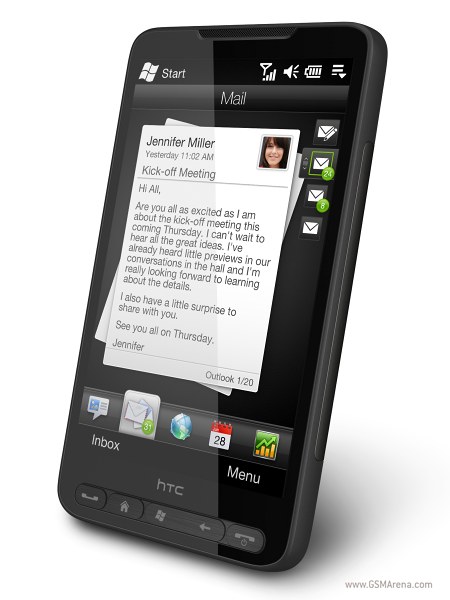
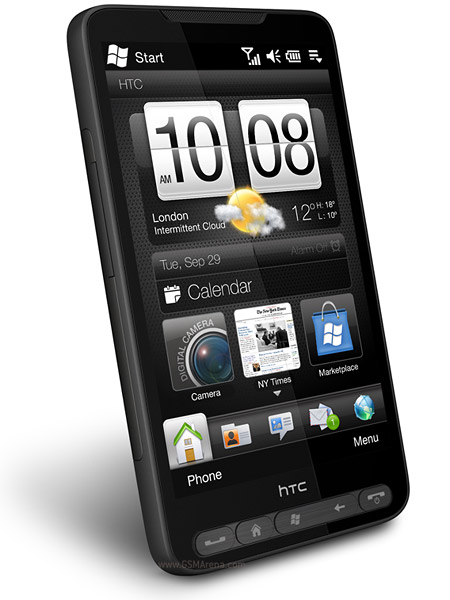
Please HTC. Can we have an Android version of this:-

2G Network GSM 850 / 900 / 1800 / 1900
3G Network HSDPA 900 / 2100
Announced 2009, October
Status Coming soon. Exp. release 2009, November
Size Dimensions 120.5 x 67 x 11 mm
Weight 157 g
Display Type TFT capacitive touchscreen, 65K colors
Size 480 x 800 pixels, 4.3 inches
- Sense UI
- Multi-touch input method
- Accelerometer sensor for auto-rotate
- Proximity sensor for auto turn-off
- Ambient light sensor
- Pick-to-mute a call
Sound Alert types Vibration; Downloadable polyphonic, MP3, WAV, WMA ringtones
Speakerphone Yes
- 3.5 mm audio jack
Memory Phonebook Practically unlimited entries and fields, Photocall
Call records Practically unlimited
Internal 448 MB RAM, 512 MB ROM
Card slot microSD (TransFlash)
Data GPRS Class 12 (4+1/3+2/2+3/1+4 slots), 32 - 48 kbps
HSCSD Yes
EDGE Class 12
3G HSDPA, 7.2 Mbps; HSUPA, 2 Mbps
WLAN Wi-Fi 802.11 b/g, Wi-Fi router
Bluetooth Yes, v2.1 with A2DP
Infrared port No
USB Yes, miniUSB
Camera Primary 5 MP, 2592 x 1944 pixels, autofocus, LED flash
Features Geo-tagging
Video Yes
Secondary No
Features OS Microsoft Windows Mobile 6.5 Professional
CPU Qualcomm Snapdragon QSD2850 1 GHz processor
Messaging SMS (threaded view), MMS, Email, Instant Messaging
Browser WAP 2.0/xHTML, HTML
Radio Stereo FM radio with RDS
Games Yes
Colors Black
GPS Yes, with A-GPS support; NaviPanel
Java Yes, MIDP 2.0
- Digital compass
- MP3/WAV/WMA/eAAC+ player
- AVI(DiVX/XviD)/MP4/WMV/H.264/H.263 player
- Facebook and Twitter integration
- YouTube client
- Pocket Office (Word, Excel, PowerPoint, OneNote, PDF viewer)
- HTC Peep, HTC Footprints
- Voice memo
- T9
Battery Standard battery, Li-Ion 1230 mAh
Stand-by Up to 490 h (2G) / Up to 390 h (3G)
Talk time Up to 6 h 20 min (2G) / Up to 5 h 40 min (3G)
Music play Up to 12 h

gsmarena_002.jpg


htc-hd2.jpg
 
Raydeen said:
Please HTC. Can we have an Android version of this:-

2G Network GSM 850 / 900 / 1800 / 1900
3G Network HSDPA 900 / 2100
Announced 2009, October
Status Coming soon. Exp. release 2009, November
Size Dimensions 120.5 x 67 x 11 mm
Weight 157 g
Display Type TFT capacitive touchscreen, 65K colors
Size 480 x 800 pixels, 4.3 inches
- Sense UI
- Multi-touch input method
- Accelerometer sensor for auto-rotate
- Proximity sensor for auto turn-off
- Ambient light sensor
- Pick-to-mute a call
Sound Alert types Vibration; Downloadable polyphonic, MP3, WAV, WMA ringtones
Speakerphone Yes
- 3.5 mm audio jack
Memory Phonebook Practically unlimited entries and fields, Photocall
Call records Practically unlimited
Internal 448 MB RAM, 512 MB ROM
Card slot microSD (TransFlash)
Data GPRS Class 12 (4+1/3+2/2+3/1+4 slots), 32 - 48 kbps
HSCSD Yes
EDGE Class 12
3G HSDPA, 7.2 Mbps; HSUPA, 2 Mbps
WLAN Wi-Fi 802.11 b/g, Wi-Fi router
Bluetooth Yes, v2.1 with A2DP
Infrared port No
USB Yes, miniUSB
Camera Primary 5 MP, 2592 x 1944 pixels, autofocus, LED flash
Features Geo-tagging
Video Yes
Secondary No
Features OS Microsoft Windows Mobile 6.5 Professional
CPU Qualcomm Snapdragon QSD2850 1 GHz processor
Messaging SMS (threaded view), MMS, Email, Instant Messaging
Browser WAP 2.0/xHTML, HTML
Radio Stereo FM radio with RDS
Games Yes
Colors Black
GPS Yes, with A-GPS support; NaviPanel
Java Yes, MIDP 2.0
- Digital compass
- MP3/WAV/WMA/eAAC+ player
- AVI(DiVX/XviD)/MP4/WMV/H.264/H.263 player
- Facebook and Twitter integration
- YouTube client
- Pocket Office (Word, Excel, PowerPoint, OneNote, PDF viewer)
- HTC Peep, HTC Footprints
- Voice memo
- T9
Battery Standard battery, Li-Ion 1230 mAh
Stand-by Up to 490 h (2G) / Up to 390 h (3G)
Talk time Up to 6 h 20 min (2G) / Up to 5 h 40 min (3G)
Music play Up to 12 h

gsmarena_002.jpg


htc-hd2.jpg

go back a page, dude

edit: http://www.engadget.com/2009/10/05/htc-dragon-android-device-surfaces-in-firmware-build-could-pack/
 
wayward archer said:
You're in luck the HTC Dragon is supposedly the exact same specs and design only with Android instead of WinMo 6.5.

What network (in the USA) is rumored to be getting this Jesus Phone?
 
SimleuqiR said:
What network (in the USA) is rumored to be getting this Jesus Phone?

Nobody knows yet. The Winmo 6.5 version (HD2) came out earlier this week on t-mobile in britain. The US isn't getting it until early 2010.
 
wayward archer said:
You're in luck the HTC Dragon is supposedly the exact same specs and design only with Android instead of WinMo 6.5.

If you go back to the original source of the Dragon info it only says that it will have an 800x480 resolution, not about the screen size, processor, etc. even though every site seemed to pick up the 'fact' that it will have a 1 GHz processor somehow.
 
Andrex said:
http://www.droiddog.com/android-blog/2009/10/moment-specs-and-video/

  • 800 MHz Samsung S3C6410 CPU
  • 3.2 inch AMOLED display (320 x 480 pixels) 16M colors
  • 512 MB ROM / 256 MB RAM
  • Dimensions: 4.6 x 2.34 x 0.63 inches; weight 5.67 oz.
  • 2 GB microSD card included / expandable up to 32 GB
  • Standard Lithium (LiIon) battery 1440 mAh (up to 5.5 hours continuous talk time)
  • QWERTY keyboard that slides out horizontally
  • 3.2 megapixel camera with flash and camcorder with auto-focus
  • WiFi 802.11 b/g, Bluetooth, GPS
  • Accelerometer and proximity sensor
  • Outlook e-mail with Microsoft Direct Push Technology and HTML support; E-mail (EAS), POP, IMAP
  • Easily view Word, Excel, PowerPoint on the go to maximize productivity
  • Ships with Android 1.5, Android 1.6 coming in 2010 and must be side-loaded (not OTA)

Disappointing storage. I had thought that after starting with the Galaxy, at least 8 GB would be the standard for Samsung's Android phones... Though I am glad to see AMOLED on all of these.

To sum up: Great keyboard, great AMOLED screen, good battery, absolutely fantastic CPU, but disappointing storage, lower-end camera, and it's kinda thick looking. I'd say this is probably the best (Android) phone on Sprint, just because of the CPU and keyboard, (and AMOLED helps.)

Andrew you seem to be the most "in the know" and I don't really keep on on Android news, just drop in this threat here and there and see what Engadget happens to cover. Can you answer a few questions? Now that Android is finally on Sprint I'm really considering it, the AMOLED screen makes up for the .3 screen loss. So does how Samsung made the required buttons into touch buttons and placed them well, something that's annoyed me about the Hero (both versions but especially Sprint's), G1 and Magic.

1. Officially, you can only save apps onto the phone's built in storage still? Do you still need to root the device to save apps to the card, and how many apps do you think 512 can handle?

2. How do you sync music to Android? I've never heard of a desktop client and I don't understand how it would know the difference between a playlist and album with drag and drop. Is there a way to sync?

3. When you access your music from a card, is it pretty seamless? On my Instinct it had to scan and then build the music library which could take a minute...every single time I opened it.

Thanks. I've entertained the thought of Android for a while but now that it's on Sprint and I've watched some more videos of the Moment I think I'm ready. I miss the Everything Plus plan, and while the iPhone is a wonderful device I think I'm ready for something more sophisticated, with Android's widgets and notification pane for example.
 
jonnybryce said:
1. Officially, you can only save apps onto the phone's built in storage still? Do you still need to root the device to save apps to the card, and how many apps do you think 512 can handle?

2. How do you sync music to Android? I've never heard of a desktop client and I don't understand how it would know the difference between a playlist and album with drag and drop. Is there a way to sync?

3. When you access your music from a card, is it pretty seamless? On my Instinct it had to scan and then build the music library which could take a minute...every single time I opened it.
1. Lots. I've heard reports of people having 50+ apps installed, and still having ~150MB of free storage. I have around 20 installed on my Magic and still have 232/288MB free.
2. On your sdcard, you can make a "music" directory and place the music you want in there. Alternatively, you can mount your phone in Windows Media Player and sync it there too using it's built in sync function. The Sync app that you can get on support sites is meant for syncing with Windows Mail/Contacts, which is kinda redundant given the Google cloud hosting.
3. I've had no major issues with lag or anything using either the native app of the HTC sense music app. There's no initial load or scanning required.

Hope that answers all your questions.
 
jonnybryce said:
Andrew you seem to be the most "in the know" and I don't really keep on on Android news, just drop in this threat here and there and see what Engadget happens to cover.

Thanks. :) I don't know how in the know I can be compared to people who are actually using the phones, I just post a lot. :P I'll try to be some help.

jonnybryce said:
1. Officially, you can only save apps onto the phone's built in storage still? Do you still need to root the device to save apps to the card, and how many apps do you think 512 can handle?

Yeah, you can still only run applications from the interior storage in any of the official ROMs, that is stock Android, Sense, Blur, etc.

Relatively to what's on the Market now and other Android phones coming out, 512 MB is plenty and I wouldn't worry too much about it. Maybe in a year things will be different, but it's impossible to know.

jonnybryce said:
2. How do you sync music to Android? I've never heard of a desktop client and I don't understand how it would know the difference between a playlist and album with drag and drop. Is there a way to sync?

You can drag and drop to the SD card, or you can drag and drop through a USB cable if you go into the settings and "mount" the phone.

Alternatively, you can mount and use doubleTwist, which syncs music, pictures, and videos to almost every device under the sun. It also recently got song buying via Amazon MP3.

jonnybryce said:
3. When you access your music from a card, is it pretty seamless? On my Instinct it had to scan and then build the music library which could take a minute...every single time I opened it.

I think Skittleguy already covered this more than I can.

jonnybryce said:
Thanks. I've entertained the thought of Android for a while but now that it's on Sprint and I've watched some more videos of the Moment I think I'm ready. I miss the Everything Plus plan, and while the iPhone is a wonderful device I think I'm ready for something more sophisticated, with Android's widgets and notification pane for example.

Indeed, some people calling the iPhone more polished hands-down in every aspect have not played with Android for very long. Plus, it's getting better all the time.

I would love to hear your thoughts on the Moment as I'm now considering it too. Though like my other phone aspirations, it'll probably fall through no matter my decision. :lol
 
Yay, got the Hero for Sprint yesterday. I am very pleased so far. The size is great and it feels solid. It's much more customizable than my Pre was (obviously), the screen is brilliant and so far I have experienced a very snappy interface. Lag switching between the "desktops" is non-existent, opening programs is quick and even quicker if they have been previously opened. I downloaded the TasKiller app but I really haven't noticed any lag from having a lot of programs open, maybe it's more for battery life.

Overall I am very happy with my switch from the Pre to the Hero.

edit: One thing I really do miss is the Push Gmail (IMAP IDLE) that the Pre supported, it was awesome. It seems weird that Google's own mobile OS doesn't support it.
 
Husker86 said:
Yay, got the Hero for Sprint yesterday. I am very pleased so far. The size is great and it feels solid. It's much more customizable than my Pre was (obviously), the screen is brilliant and so far I have experienced a very snappy interface. Lag switching between the "desktops" is non-existent, opening programs is quick and even quicker if they have been previously opened. I downloaded the TasKiller app but I really haven't noticed any lag from having a lot of programs open, maybe it's more for battery life.

Overall I am very happy with my switch from the Pre to the Hero.

edit: One thing I really do miss is the Push Gmail (IMAP IDLE) that the Pre supported, it was awesome. It seems weird that Google's own mobile OS doesn't support it.

I am thinking about buying this phone outright. I just sold my old tv for 200 dollars but the phone cost 479 without a contract. I have the other 279. Making the decision in the next few minutes. I really hate my touch pro.

Fuck it ima buy this thing today. 479. Its worth it to get rid of this touch pro.
 
MThanded said:
I am thinking about buying this phone outright. I just sold my old tv for 200 dollars but the phone cost 479 without a contract. I have the other 279. Making the decision in the next few minutes. I really hate my touch pro.

Fuck it ima buy this thing today. 479. Its worth it to get rid of this touch pro.

I bought it outright ($472 BB employee price, 7 dollar savings wooo); you can get some money from the Touch Pro. I eBay'd my Pre/Touchstone for about $330 total so it wasn't too much extra for the Hero.

I had the Touch Pro for a while, I think you'll be very happy with the switch.

edit: Might have to go to Best Buy to buy with the early access Reward Zone deal since the phone doesn't officially release until tomorrow so I'm not sure if Sprint stores will be selling it. Just have them price match Sprint's retail price.
 
Husker86 said:
I bought it outright ($472 BB employee price, 7 dollar savings wooo); you can get some money from the Touch Pro. I eBay'd my Pre/Touchstone for about $330 total so it wasn't too much extra for the Hero.

I had the Touch Pro for a while, I think you'll be very happy with the switch.

edit: Might have to go to Best Buy to buy with the early access Reward Zone deal since the phone doesn't officially release until tomorrow so I'm not sure if Sprint stores will be selling it. Just have them price match Sprint's retail price.
sprint store in pittsburgh is selling it.
 
Husker86 said:
I bought it outright ($472 BB employee price, 7 dollar savings wooo); you can get some money from the Touch Pro. I eBay'd my Pre/Touchstone for about $330 total so it wasn't too much extra for the Hero.

I had the Touch Pro for a while, I think you'll be very happy with the switch.

edit: Might have to go to Best Buy to buy with the early access Reward Zone deal since the phone doesn't officially release until tomorrow so I'm not sure if Sprint stores will be selling it. Just have them price match Sprint's retail price.
does it come with a holster?
 
Canada-GAF, you may be pleased to know that the GSM (ie. non-Sprint) version of the Hero is coming to Telus next month to coincide with the HSPA launch.

Now I'm seriously considering buying it and going month-to-month until Wind comes online... though they're 1700 AWS :(
 
Thanks skittleguy and andrex for the information. So I'm definitely switching! The plan is to go on the Everything Plus 500 plan ($59) and get the Moment, but if for some reason I don't like it (I like stock Android UI, my main concern is the slider mechanism, I don't want it to feel cheap, loose, give when I swipe the way it slides, I want it to feel solid) then the Hero will win by default even though I'm not in love with it as much as I am with the Moment. So I'll be ordering the moment online I assume Nov 1 when it's available on the Everything Plus website and will be all set that week!

I really like my iPhone but it's not all it's cracked up to be. I really like Android, the way you can multitask, the way messages show in the notification pan, the way it's more open. I've been waiting for it to go to Sprint and get hardware I like, and that has happened. The one thing I don't like is that everyone makes Android phones so once you buy one, you never know if a cooler one is going to leak or be announced a month or two later, but that's just something you have to deal with or else you'll be waiting forever as I have been doing. Plus I don't mind paying full price if something killer comes along to Sprint.

Husker86 said:
Yay, got the Hero for Sprint yesterday. I am very pleased so far. The size is great and it feels solid. It's much more customizable than my Pre was (obviously), the screen is brilliant and so far I have experienced a very snappy interface. Lag switching between the "desktops" is non-existent, opening programs is quick and even quicker if they have been previously opened. I downloaded the TasKiller app but I really haven't noticed any lag from having a lot of programs open, maybe it's more for battery life.

Overall I am very happy with my switch from the Pre to the Hero.

edit: One thing I really do miss is the Push Gmail (IMAP IDLE) that the Pre supported, it was awesome. It seems weird that Google's own mobile OS doesn't support it.

How is flash in the browser? Good? Is it too slow/spotty working? Do you personally find it easy to type?
 
Husker86 said:
Nope, it comes with nothing but a pre-installed 2GB microSD card (and the standard books/charger).
Shit. I need something to protect the screen. I am sort of anal about that :-/
 
SRG01 said:
Canada-GAF, you may be pleased to know that the GSM (ie. non-Sprint) version of the Hero is coming to Telus next month to coincide with the HSPA launch.

Now I'm seriously considering buying it and going month-to-month until Wind comes online... though they're 1700 AWS :(

O SNAP!

When does Wind go online? Will they have an Android phone?
 
zedge said:
O SNAP!

When does Wind go online? Will they have an Android phone?

Speculation is that they will have a lineup similar to T-Mo down in the states. They'll probably carry the good AWS phones, such as the Android Samsung Galaxy (I think?).

edit: Wind will most likely go online in around 30 or so days, launching in TO and Calgary.

NinjaFridge said:
EngadgetMobile have their review of the Pulse up. Seems to be pretty good.

http://www.engadgetmobile.com/2009/10/09/t-mobile-pulse-review

I was thinking of getting this phone, but this will clearly not launch in Canada anytime soon.
 
I cannot make my mind up. I really hate my touch pro and i need a new smartphone. I decided to have a coin decide for me. It told me to buy... I over-think my purchases
 
SRG01 said:
Speculation is that they will have a lineup similar to T-Mo down in the states. They'll probably carry the good AWS phones, such as the Android Samsung Galaxy (I think?).

edit: Wind will most likely go online in around 30 or so days, launching in TO and Calgary.


I was thinking of getting this phone, but this will clearly not launch in Canada anytime soon.
Oh nice, not too far apart then. Exciting times.
 
only thing that the hero does not have is an actual keyboard. hopefully i wont miss it to much. I am an indecisive bastard. Can someone make the decision for me?
 
So I just discovered Songbird + Foldersync for syncing music to Android. I love Songbird, never used it before but it brought all my music and playlists from iTunes over and has a nice Windows Aero skin. I'm digging it and can't wait to try it out.

MThanded said:
only thing that the hero does not have is an actual keyboard. hopefully i wont miss it to much. I am an indecisive bastard. Can someone make the decision for me?

Why not the Moment then? IMO Htc Sense is over rated, stock Android has widgets and if that's not good enough there are new home screens like ahome and freshface in the marketplace. Sure, there's more to Sense than a nicer homescreen but you're not missing much if you want a keyboard.
 
jonnybryce said:
How is flash in the browser? Good? Is it too slow/spotty working? Do you personally find it easy to type?

Flash is noticeably laggy, but it works. I haven't tried it on very many websites.

Typing isn't as easy as it is on the iPhone (given the slimmer screen) but it has fantastic error correction so I have no problem, of course I haven't really adjusted to it yet so I imagine it will only get better.
 
MThanded said:
only thing that the hero does not have is an actual keyboard. hopefully i wont miss it to much. I am an indecisive bastard. Can someone make the decision for me?

Honestly I thought I would miss the physical keyboard too, but my opinion changed after using the HTC Magic in-store. For some reason, I could type better on it than on the iPhone...

Sense UI actually has a lot of improvements over stock Android, particularly the messaging system. Phonedog actually had a pretty good review of the HTC Hero/Sense UI when it first came out.

edit: BTW, Samsung's Android phones should have an implementation of TouchWiz, so take that as you may.
 
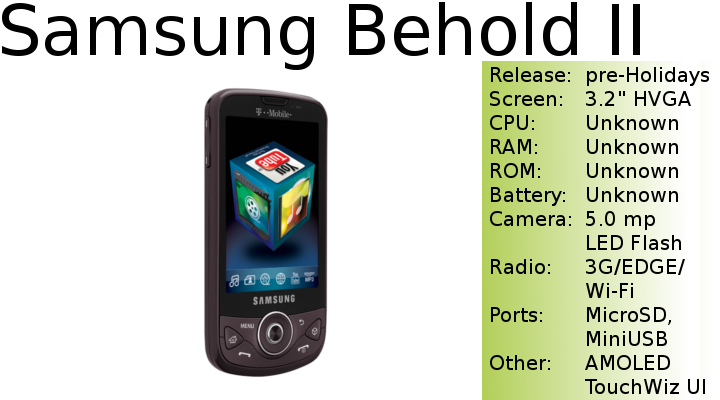
The Moment doesn't have TouchWiz but the Behold 2 should.

Husker86 said:
Flash is noticeably laggy, but it works. I haven't tried it on very many websites.

Typing isn't as easy as it is on the iPhone (given the slimmer screen) but it has fantastic error correction so I have no problem, of course I haven't really adjusted to it yet so I imagine it will only get better.

That's cool. Can you let me know if you experience slowdown like some reviews claim, that multitasking makes it take a hit. Some say it does, some say it doesn't.
 
I didn't think I would become a hard keyboard "fanboy" and that I'd love soft keyboards, but... I don't. Even though it's a much crappier device I liked typing on an EnV Touch much more than an iPod Touch, though I only used each for about half an hour.
 
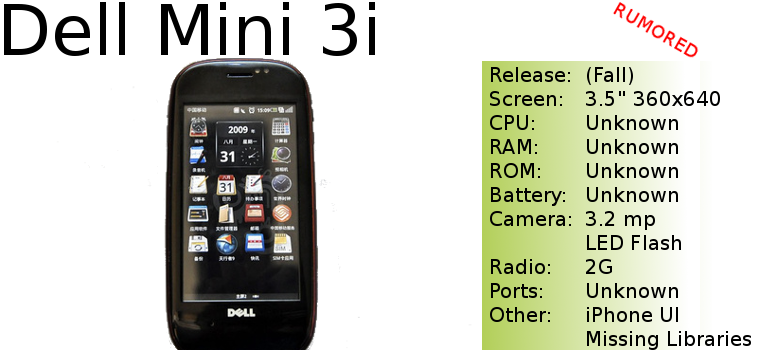
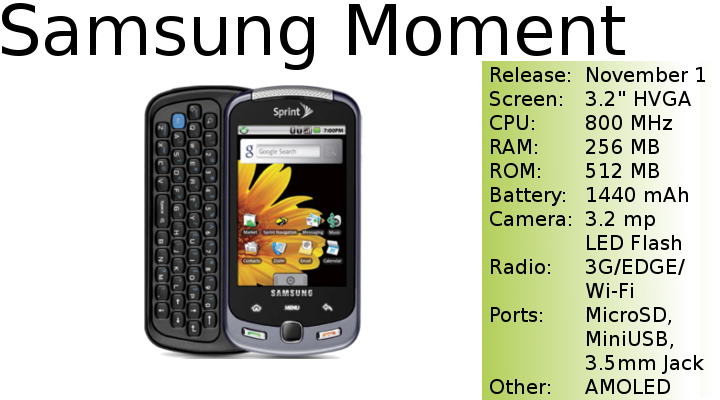
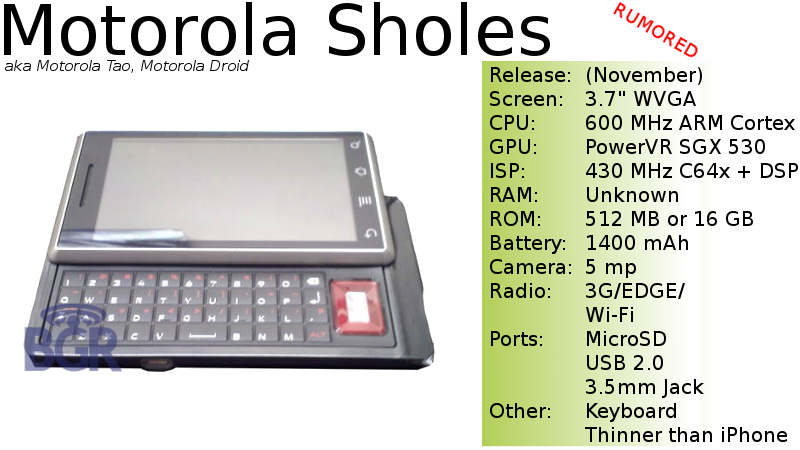
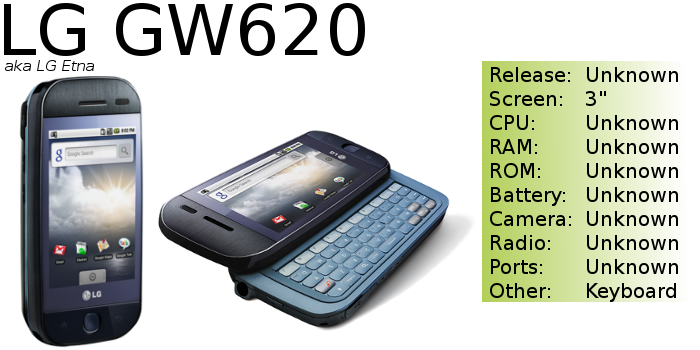
It is my pleasure to introduce the following handsets into the OP:

AHT-BeholdII01.png


AHT-DellMini3i01.png


AHT-Moment01.png

(I know the shadow's messed up, sorry.)

AHT-MotoSholes01.png


AHT-Etna01.png


I still need to add the Acer A1 and Archos 5 Internet Tablets, but those don't have carriers so I didn't feel too pressured about them.

Some news on other countries: I will try to add the UK and Canada soon, but other than those two I have no plans for other nations, it's very hard to keep track of. Even so I think you'll know you're carriers lineup and the OP will help you choose the best hardware if you need to compare.
 
someone with a sprint hero i need help. Just got the phone. Somehow they let me get the full discounted price even thought i got a touch pro less than a year ago :lol :lol . Anywayz, I am confused about email on this thing. I set it up to sync gmail in the setting but the htc app must not read the sync setting. Is that true? do i have to manually set up gmail in the htc mail app and uncheck sync gmail in the main phone settings?
 
MThanded said:
someone with a sprint hero i need help. Just got the phone. Somehow they let me get the full discounted price even thought i got a touch pro less than a year ago :lol :lol . Anywayz, I am confused about email on this thing. I set it up to sync gmail in the setting but the htc app must not read the sync setting. Is that true? do i have to manually set up gmail in the htc mail app and uncheck sync gmail in the main phone settings?
What's the problem? Are you just trying to get your email working or do you want the gmail contacts/calendar to get subversive over to?

I just set up my gmail in the mail app then I think I had to go to the data synchronization menu under settings and check gmail to get the contacts and calendar over.
 
Husker86 said:
What's the problem? Are you just trying to get your email working or do you want the gmail contacts/calendar to get subversive over to?

I just set up my gmail in the mail app then I think I had to go to the data synchronization menu under settings and check gmail to get the contacts and calendar over.
turning on gmail synchronization in the main phone settings does not interact with the htc settings. So is that checkbox useless?
 
Let me clarify. I assumed that clicking gmail synchronization in the main phone sync setting would do something so that i could see my messages in the htc mail app. It will notify me that i have a new message but account does not show up in the htc mail app.

The messages must be going somewhere if the phone is notifying me. Not sure where though.
 
MThanded said:
turning on gmail synchronization in the main phone settings does not interact with the htc settings. So is that checkbox useless?

Hmm, by HTC settings do you mean the HTC Sync app? If so I believe that is just for PC USB syncing but maybe I'm misunderstanding. Is anything not working right for you, are you just trying to clear something up? The checkboxes may be redundant.

And by the way, even though it doesn't mention anything about push it seems my Gmail is getting pushed to my phone, I'm getting emails very quickly after they're sent. I don't know if you noticed, MThanded, but do you see in your notification bar that emails come as "conversations" first, that is, the @ symbol appears when I get a new email, but it's not necessarily in the "email" app...it's hard to explain. Either way, mail comes fast and that's all I care about!

Oh, one more thing. When you go to 'Settings' 'About Phone' then 'Status' it says EVDO Rev.0 which confuses me as everything I've read about this phone says it's Rev.A. Speed tests are as fast as my Pre so it's no big deal but that just confused me.
 
Raydeen said:
Please HTC. Can we have an Android version of this:-

2G Network GSM 850 / 900 / 1800 / 1900
3G Network HSDPA 900 / 2100
Announced 2009, October
Status Coming soon. Exp. release 2009, November
Size Dimensions 120.5 x 67 x 11 mm
Weight 157 g
Display Type TFT capacitive touchscreen, 65K colors
Size 480 x 800 pixels, 4.3 inches
- Sense UI
- Multi-touch input method
- Accelerometer sensor for auto-rotate
- Proximity sensor for auto turn-off
- Ambient light sensor
- Pick-to-mute a call
Sound Alert types Vibration; Downloadable polyphonic, MP3, WAV, WMA ringtones
Speakerphone Yes
- 3.5 mm audio jack
Memory Phonebook Practically unlimited entries and fields, Photocall
Call records Practically unlimited
Internal 448 MB RAM, 512 MB ROM
Card slot microSD (TransFlash)
Data GPRS Class 12 (4+1/3+2/2+3/1+4 slots), 32 - 48 kbps
HSCSD Yes
EDGE Class 12
3G HSDPA, 7.2 Mbps; HSUPA, 2 Mbps
WLAN Wi-Fi 802.11 b/g, Wi-Fi router
Bluetooth Yes, v2.1 with A2DP
Infrared port No
USB Yes, miniUSB
Camera Primary 5 MP, 2592 x 1944 pixels, autofocus, LED flash
Features Geo-tagging
Video Yes
Secondary No
Features OS Microsoft Windows Mobile 6.5 Professional
CPU Qualcomm Snapdragon QSD2850 1 GHz processor
Messaging SMS (threaded view), MMS, Email, Instant Messaging
Browser WAP 2.0/xHTML, HTML
Radio Stereo FM radio with RDS
Games Yes
Colors Black
GPS Yes, with A-GPS support; NaviPanel
Java Yes, MIDP 2.0
- Digital compass
- MP3/WAV/WMA/eAAC+ player
- AVI(DiVX/XviD)/MP4/WMV/H.264/H.263 player
- Facebook and Twitter integration
- YouTube client
- Pocket Office (Word, Excel, PowerPoint, OneNote, PDF viewer)
- HTC Peep, HTC Footprints
- Voice memo
- T9
Battery Standard battery, Li-Ion 1230 mAh
Stand-by Up to 490 h (2G) / Up to 390 h (3G)
Talk time Up to 6 h 20 min (2G) / Up to 5 h 40 min (3G)
Music play Up to 12 h

http://pic.gsmarena.com/vv/reviewsimg/htc-hd2/gal/ofic/gsmarena_002.jpg[img]

[img]http://img.gsmarena.com/vv/pics/htc/htc-hd2.jpg[img][/QUOTE]

We just got this in at my job. Fucking awesome, awesome phone WinMobile or no.
 
Husker86 said:
Hmm, by HTC settings do you mean the HTC Sync app? If so I believe that is just for PC USB syncing but maybe I'm misunderstanding. Is anything not working right for you, are you just trying to clear something up? The checkboxes may be redundant.

And by the way, even though it doesn't mention anything about push it seems my Gmail is getting pushed to my phone, I'm getting emails very quickly after they're sent. I don't know if you noticed, MThanded, but do you see in your notification bar that emails come as "conversations" first, that is, the @ symbol appears when I get a new email, but it's not necessarily in the "email" app...it's hard to explain. Either way, mail comes fast and that's all I care about!

Oh, one more thing. When you go to 'Settings' 'About Phone' then 'Status' it says EVDO Rev.0 which confuses me as everything I've read about this phone says it's Rev.A. Speed tests are as fast as my Pre so it's no big deal but that just confused me.
did u just set it up as standard imap? i am suprised the mail app does not just allow you to enter your google account and not make you set up everything manually also yeah something is not working for me.

1. you know how menu on the main screen-> settings->data synchronization
2. in this menu it says mail,calendar,contacts
3. If you check mail the mail does not seem to get synced anywhere

I thought that going through this menu would sync your mail. Seems like you must set it up manually in the mail app.
 
Oh yeah, I just set it up as an IMAP account. Though after I picked IMAP I just entered my gmail username and password and it took everything from there, didn't have to enter in any server info or anything like that. Once you get your mail setup in the mail app check those boxes in the data synchronization menu and it will pull all the info (contacts calendars) from your gmail account.
 
MThanded said:
did u just set it up as standard imap? i am suprised the mail app does not just allow you to enter your google account and not make you set up everything manually also yeah something is not working for me.

1. you know how menu on the main screen-> settings->data synchronization
2. in this menu it says mail,calendar,contacts
3. If you check mail the mail does not seem to get synced anywhere

I thought that going through this menu would sync your mail. Seems like you must set it up manually in the mail app.
You try opening the Gmail app? It should have the mail for the Google account you synced with your phone.

The HTC Mail (or Work Email app) uses Exchange or IMAP settings that you define in the app. I like the Gmail app as it has push notification :3

Edit: In reading the questions above, setting up an IMAP/POP3 mail account in the HTC app will integrate it with the People app. Using the synchronization setting will set it up with the Gmail app. If you wanted to use Gmail with the HTC app to get it integrated with your People app, set up the account and deselect synchronization in the settings menu.
 
Skittleguy said:
You try opening the Gmail app? It should have the mail for the Google account you synced with your phone.

The HTC Mail (or Work Email app) uses Exchange or IMAP settings that you define in the app. I like the Gmail app as it has push notification :3

Edit: In reading the questions above, setting up an IMAP/POP3 mail account in the HTC app will integrate it with the People app. Using the synchronization setting will set it up with the Gmail app. If you wanted to use Gmail with the HTC app to get it integrated with your People app, set up the account and deselect synchronization in the settings menu.
Thanks yeah i understand now. Guess i should have them both sync in the same app to make it easier and less confusing lol.

If you use the htc app i dont think you get the notifications in the top slide down area. Maybe you do.

Moral of the story is dont put gmail in both apps because you will probably be syncing twice as much lol.
 
MThanded said:
Thanks yeah i understand now. Guess i should have them both sync in the same app to make it easier and less confusing lol.

If you use the htc app i dont think you get the notifications in the top slide down area. Maybe you do.

Moral of the story is dont put gmail in both apps because you will probably be syncing twice as much lol.
Pretty much. You'll get notifications either way. I prefer the Gmail app since it pushes mail to your device, meaning you don't have to set a sync interval, whereas the HTC one requires it.
 
Heres the main problem for me with using the gmail app. I use a school email and a gmail email. The gmail app wont let you reply as an alias will it? like online i can send as other email addresses but the app doesnt seem to pick that info up. Id rather not reply using my gmail to all of my reply messages.

Skittleguy said:
Pretty much. You'll get notifications either way. I prefer the Gmail app since it pushes mail to your device, meaning you don't have to set a sync interval, whereas the HTC one requires it.
You can just set the gmail one up using the microsoft exchange settings rather than the gmail settings. That will push mail too.
 
MThanded said:
Heres the main problem for me with using the gmail app. I use a school email and a gmail email. The gmail app wont let you reply as an alias will it? like online i can send as other email addresses but the app doesnt seem to pick that info up. Id rather not reply using my gmail to all of my reply messages.
Unfortunately no, which is why there's the HTC app :D
 
phone is amazing. touch pro-> htc hero is like a ford pinto -> Ferrari. vroom vroom :D

Also, i can test this out all the way up to the samsung moment release date to see if i need a keyboard. 30 day test period ftw. From the looks of it the moment seems very dull.This is some sleek shit right here lol
 
I'm going to play with a Hero in store asap. I think I'll order it and give it a chance and use the return period if I find it too slow or hate it. I've been watching some videos and it's grown on me. I still think it's a little ugly but maybe I'll like it in person.
 
Status
Not open for further replies.
Top Bottom